

Share this post & I'll send you some rewards for the referrals.
You hit an error you can’t solve…
So you paste it into Claude Code, and the agent tries a few fixes, but NONE of them work. The bug is affecting checkout, which makes it a money problem, so you drop it in Slack and explain the whole thing again to the senior responsible for that flow.
She asks good questions… You answer them…
Then someone says, “Make a ticket so we don’t lose this,” and you type the same context into Jira a third time. Same problem, three tools, and you wrote it out fresh for everyone.
But none of them remembered what you’d already said in the last…
The bug happened the way most bugs appear these days: you just told a coding agent the feature you had in mind. This is how the job works now,,, and most of us don’t know where agents fit into the traditional software development lifecycle…
So let’s learn about it in this newsletter…
We start with what an agent actually is, because the word gets stretched over everything from autocomplete to a bot that opens its own pull requests1. Then, we’ll cover eight stages every team moves software through, from planning a feature to keeping it alive in production.
For each stage, we answer one question: can you hand this to an agent today, and what happens when you do?
In some stages, agents already carry real weight… In others, they make things worse…
By the end of this newsletter, you’ll know which is which, and the harder problem hiding underneath all of it.
Onward.

I’m happy to partner with CodeRabbit on this newsletter.
One thing I believe, after researching this newsletter, is that the biggest problem with AI agents in software development is NOT code generation. It’s the context loss between tools, tickets, reviews, and Slack threads.
CodeRabbit is building around exactly this problem…
Their new Slack agent maintains shared context across the software development lifecycle, so agents don’t have to start from scratch every time work moves between coding, testing, incidents, and reviews.
They already run AI code reviews across 6M repositories for 15,000+ teams.
And I genuinely think the idea of shared memory across the SDLC is one of the more important directions in agentic engineering right now.
What an AI agent is
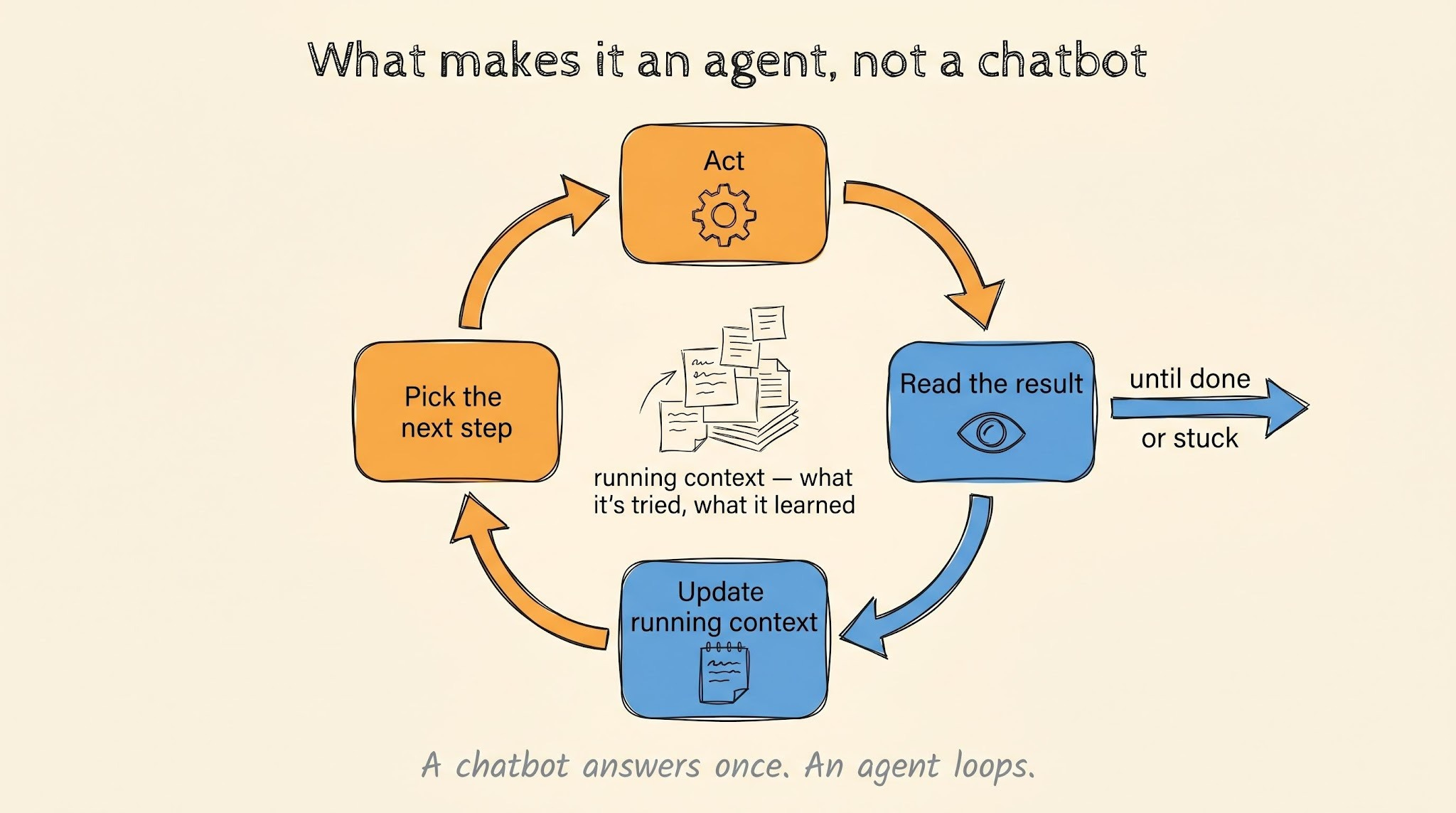
An agent takes a goal, picks its own next step, uses tools2, and keeps going until the job is done or it gets stuck.
That’s the whole idea…
When you hit the checkout bug and pasted it into Claude Code3, you didn’t tell it which files to open or what to run. Claude Code worked out the rest on its own:
Read files,
Grep4 for functions,
Run tests,
Read errors,
Try again.
…and you watched.
“Agent” gets used loosely, so it helps to line up the tools by how much they do on their own.
The simplest is AI AUTOCOMPLETE, like the earlier versions of GitHub Copilot5. It finishes the line you’re typing with a Tab.
A step up is a CHATBOT: you ask, it answers, and you copy what’s useful back into your editor. That’s your ChatGPT.
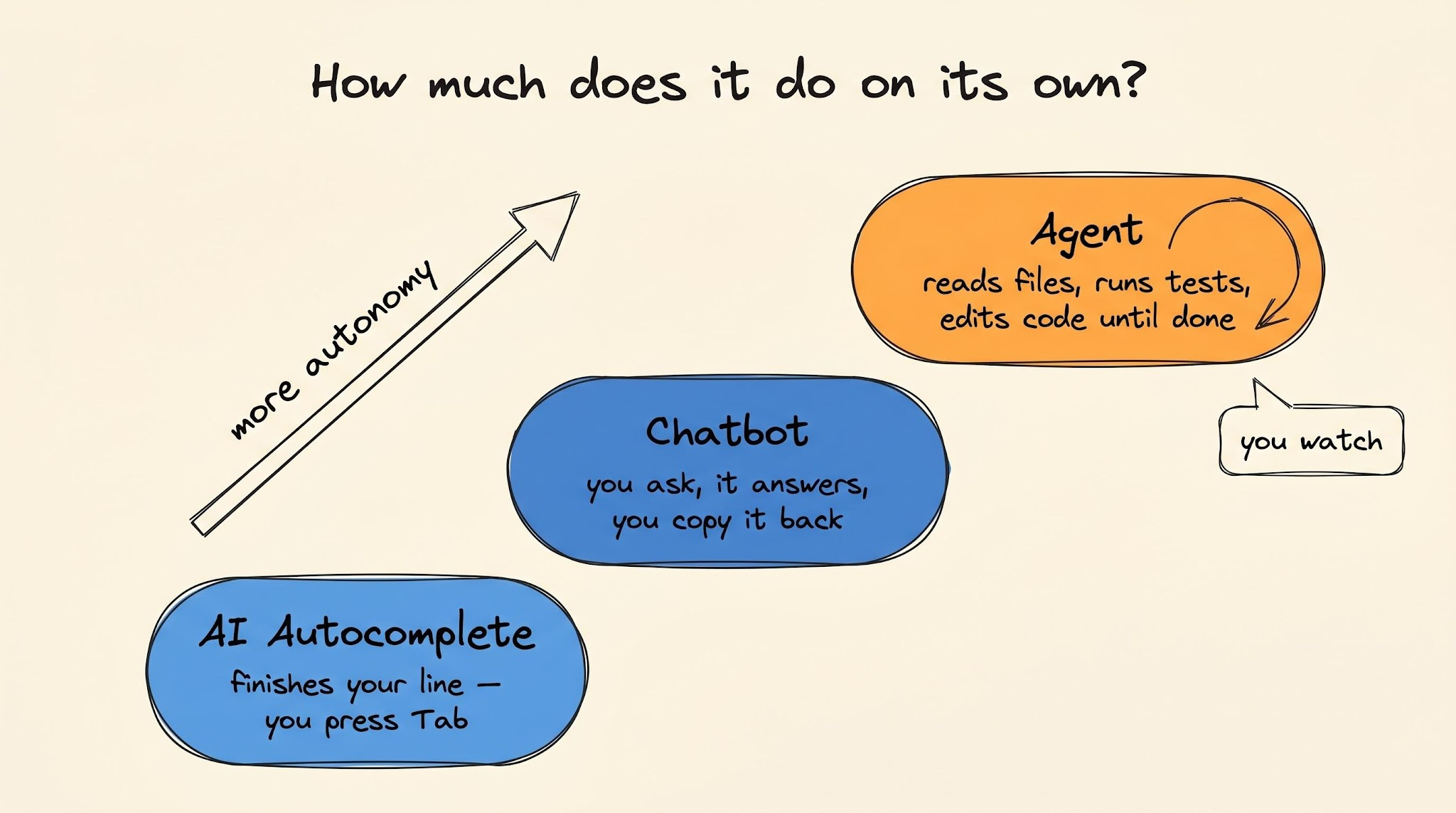
An AGENT is the one who does the work… You give it a bug, and it reads files, runs tests, edits code until the job is done.
To do this, it has to keep track of what it has already tried and what it learned along the way. That running context is what lets it pick a sensible next step instead of starting over each time.
One agent manages its own context fine…
But it becomes difficult when you have to run several agents at once, and that difficulty is largely what makes agents hard to use well.
Software gets built in eight stages, and every team moves through them with or without agents:
Plan: decide what to build,
Design: decide how it’s structured,
Code: write it,
Test: prove it does what it should,
Review: check the work before it ships,
Deploy: ship it to production,
Operate: keep it running and watch it,
Maintain: fix, update, and clean up over time.
In theory, you can put an agent to work in any of these stages. Yet it behaves differently in each…
Software lifecycle: where agents fit
The same agent that looks brilliant in a demo can be useless on your actual codebase.
What changes between the two is how much it costs you when the agent is wrong, and this comes down to 4 things:
How fast you find out. A failing test tells you in seconds. While a bad design decision can go unnoticed for months.
How easily you can check the answer. You can read a
git diffand judge it. “Is this the right thing to build” has no such test.How much breaks. A wrong function fails one test. A wrong deployment takes down system for everyone.
Whether you can undo it. You can revert a commit. But you can’t uncorrupt the data a bad database migration6 already wrote.
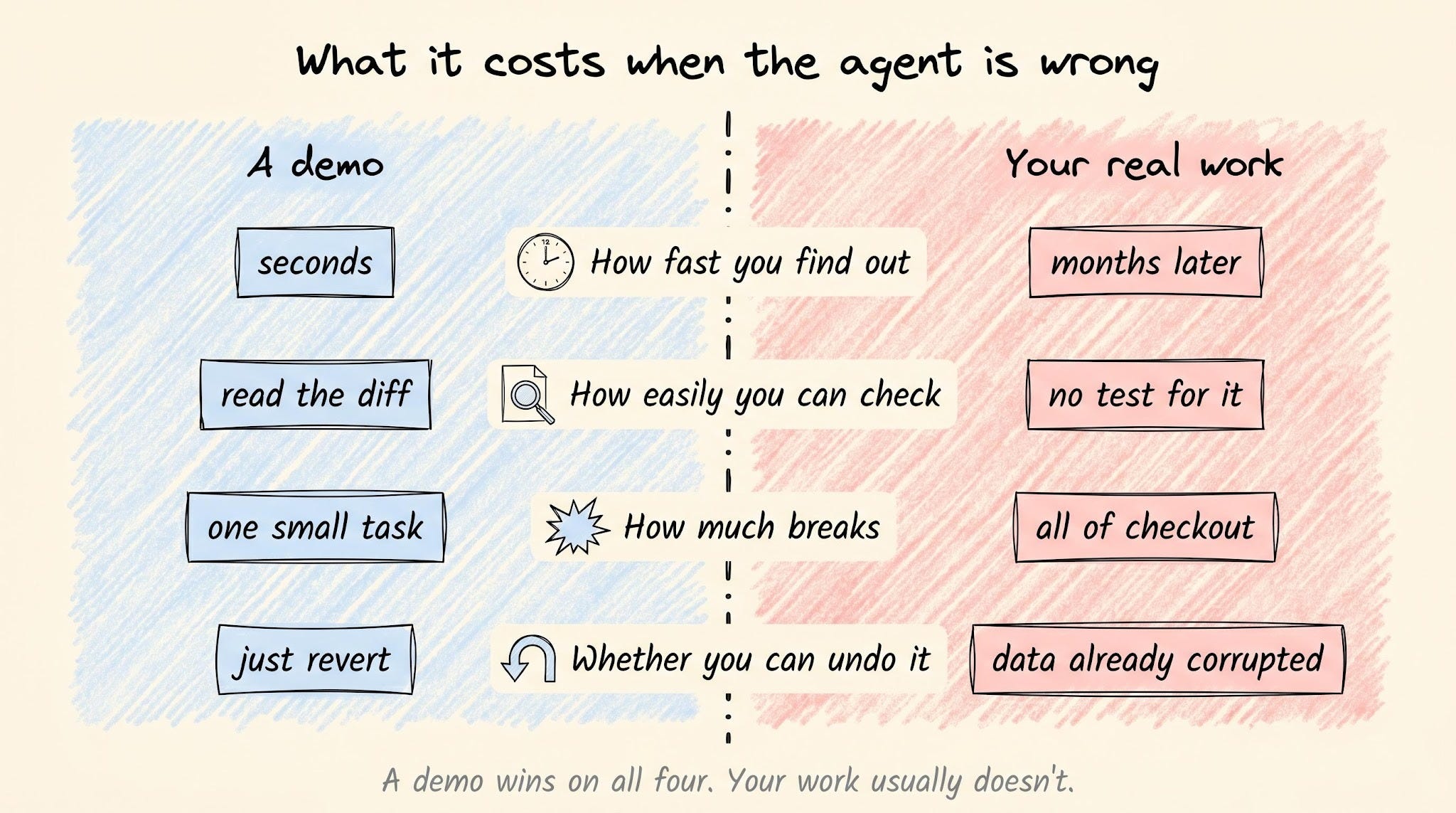
A demo is set up to do well on all four…Small task, instant feedback, nothing real at stake… Yet your work usually isn’t.
So, for each stage below, the real question is the same: when the agent gets it wrong, how much does that cost you?
1. Plan
Planning is deciding what your team builds next.
Which feature out of the ten on the list, why that one, and when it ships. It happens in meetings, in docs, in back-and-forth between engineers and the people who run the product…
An agent does useful work here.
Give it a feature spec, and it reads your codebase, maps what the change will touch, flags the parts nobody pinned down, and writes the tickets faster than you would by hand. Hand it the boring write-ups, and it does them well.
But decision-making is something an agent CAN’T do:
Choosing what to build means weighing customer urgency, revenue, and risk against three people who each want something different, then standing behind the choice when it goes wrong. An agent has no stake in the outcome and doesn’t understand your business well enough to make that call.
The people with the most reason to claim otherwise say the same thing.
Boris Cherny, who created Claude Code, was asked why Anthropic keeps hiring engineers when the company says Claude now writes most of its code. His answer:
“Someone has to prompt the Claudes, talk to customers, coordinate with other teams, and decide what to build next. Engineering is changing, and great engineers are more important than ever.”
i.e., company shipping the most capable coding agent on the market still needs actual humans for planning.
2. Design
Plan is which problem you solve…
Design is the shape of the solution: one service or three, which database, where the boundaries sit, and what you can change later without a rewrite.
Ask an agent, and you will get a real answer.
It will compare microservices against a monolith7, lay out the tradeoffs, and recommend one. Yet the answer is textbook, and this is the problem. A textbook answer doesn’t know your team is five people, your traffic triples every December, or the last person who touched the payments service quit and left no documentation. So the right design for your situation lives in facts that were never written down, and an agent can’t read what nobody wrote.
There’s a second reason this stage stays with humans…
A bad design is slow to show itself. The code passes review, and tests go green, so nothing indicates the structure is wrong. But it’s only until you try to build the next three features on top of it, and each one takes twice as long and breaks something that used to work.
By the time you see the pattern, fix is no longer a code change. It’s a complete rewrite…
The root of it is agent works on the task in front of it without a picture of the entire system or any reason to keep the system simple. This blindness shows up in two ways in design.
The first is duplication:
GitClear analyzed code changes across thousands of repositories, found a sharp rise in duplicated code after teams adopted AI coding tools. In 2024 alone, the number of code blocks with five or more duplicated lines increased 8x.
The agent writes a new block that does the same job as one already sitting three files over, because it never checked what the codebase already had. Every copy is one more place you have to remember to fix later, and this is a structural cost.
And second is the opposite problem: over-engineering.
Ask an agent to design something, and it tends to overdesign.
It adds layers, patterns, and configuration for cases that will never come up because more structure looks more thorough.
Andrej Karpathy, who co-founded OpenAI, put it plainly: models like to overcomplicate, bloat their abstractions, and leave dead code behind.
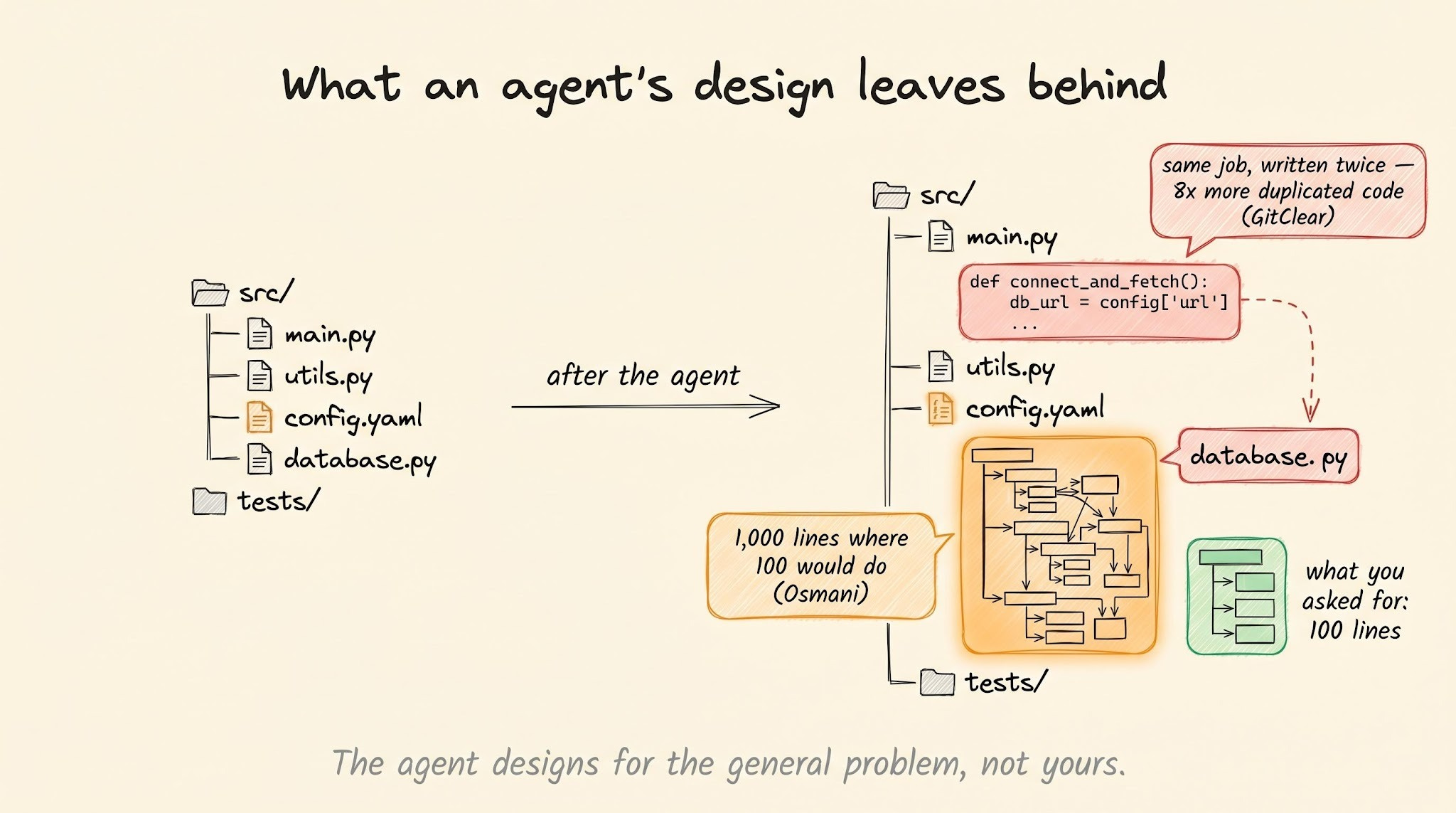
This is the textbook answer showing up again…
The agent designs for the general problem because it doesn’t have the full real-world picture. You will inherit a system harder to read and change than the thing you asked for.
3. Code
This is the stage where agents are doing their best work…
At least the MONEY says so. Cursor went from $100M to $1B in annual revenue in about a year and has more than a million people using it every day. In Stack Overflow’s 2025 survey, 19% of professional developers said they use Cursor, and 10% use Claude Code, two tools that weren’t even on the survey the year before. These tools write real code that ships, and the people paying for them are not running demos.
What you get out of them depends almost entirely on how you set them up…
Rules files
The first thing to set up is a rules file.
Most coding tools now read a file in your repo when they start, a CLAUDE.md8 or an AGENTS.md, and treat whatever is in it as standing orders. You write down the things you would otherwise have to repeat in every chat:
Commands to run tests and linter9,
Conventions the codebase follows,
Traps you learned the hard way and want the agent to avoid.
Without this file, every session starts from zero…
You explain the same setup, correct the same wrong assumption, and watch the agent make the same mistake it made yesterday, just because it has NO memory of yesterday.
Writing correct rule files is already somewhat of a science in coding, and there are many excellent sources that can help you.
(I recommend starting with the official Anthropic guide on CLAUDE.md files.)
Spec-driven development
The second thing is to match the size of the task to how much you plan first…
A small, clear job gets done well from a one-line prompt. “Add input validation to this endpoint” needs nothing fancy. While a large task like “add photo sharing to my app” falls apart because that prompt forces the agent to guess at thousands of decisions you never specified.
So for anything real, you write a short spec first…
A spec documents non-technical product decisions, high-level architecture, and what the changes should do in plain language before any code gets written. The agent turns it into an implementation plan, noting exactly which files and lines of code will change.
Then it executes the code one task at a time, and you review between every step…
This workflow is called spec-driven development10, and it is how people ship real features with agents instead of demos.
PROOF: GitHub repo Superpowers (200k+ stars) works with all major coding agents. It encapsulates the process into a series of automatic slash commands, making it trivial to adopt in your daily workflow.
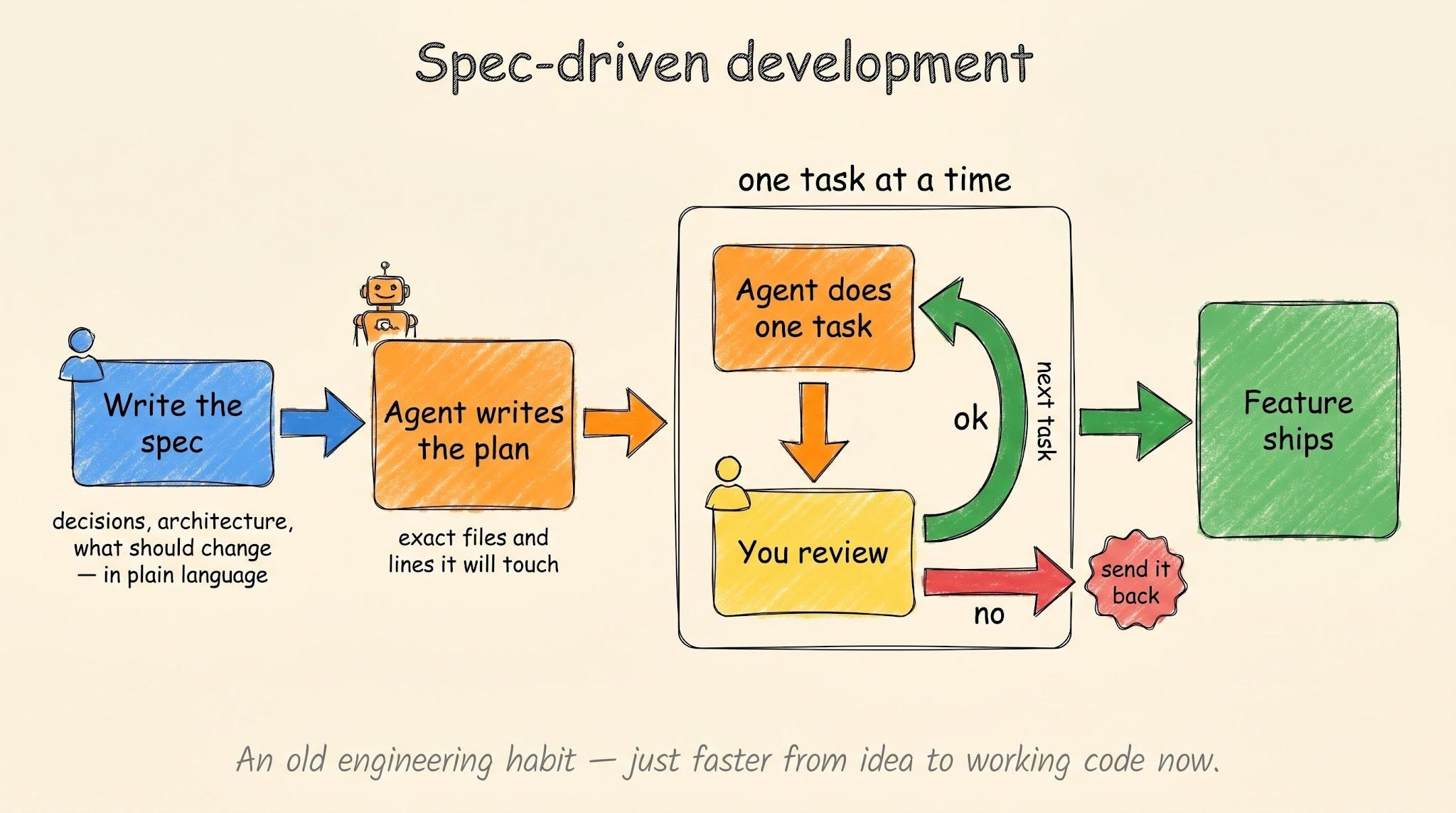
But spec-driven development isn’t new,,, it is an old engineering tradition.
The only thing changed is how fast you move from a vision in your head to a written spec to a working implementation. All with the help of coding agents…
Current limitations
There are many, but the first one you’ll hit is the context window11…
An agent holds everything it’s working on in a fixed amount of memory, measured in the number of tokens12.
The longer a single task runs, the more memory it fills with its own earlier steps, and at some point, the oldest facts drop out of the window. It forgets a decision it made twenty minutes ago and starts contradicting itself.
This is why the spec-and-plan loop matters beyond just planning…
The spec and plan documents can hold massive context on disk agent can refer to at any time. This frees up its window to focus only on the task at hand. It doesn’t matter whether your agent has a 1M-token window.
Quality drops as the context fills, well before the window is full.
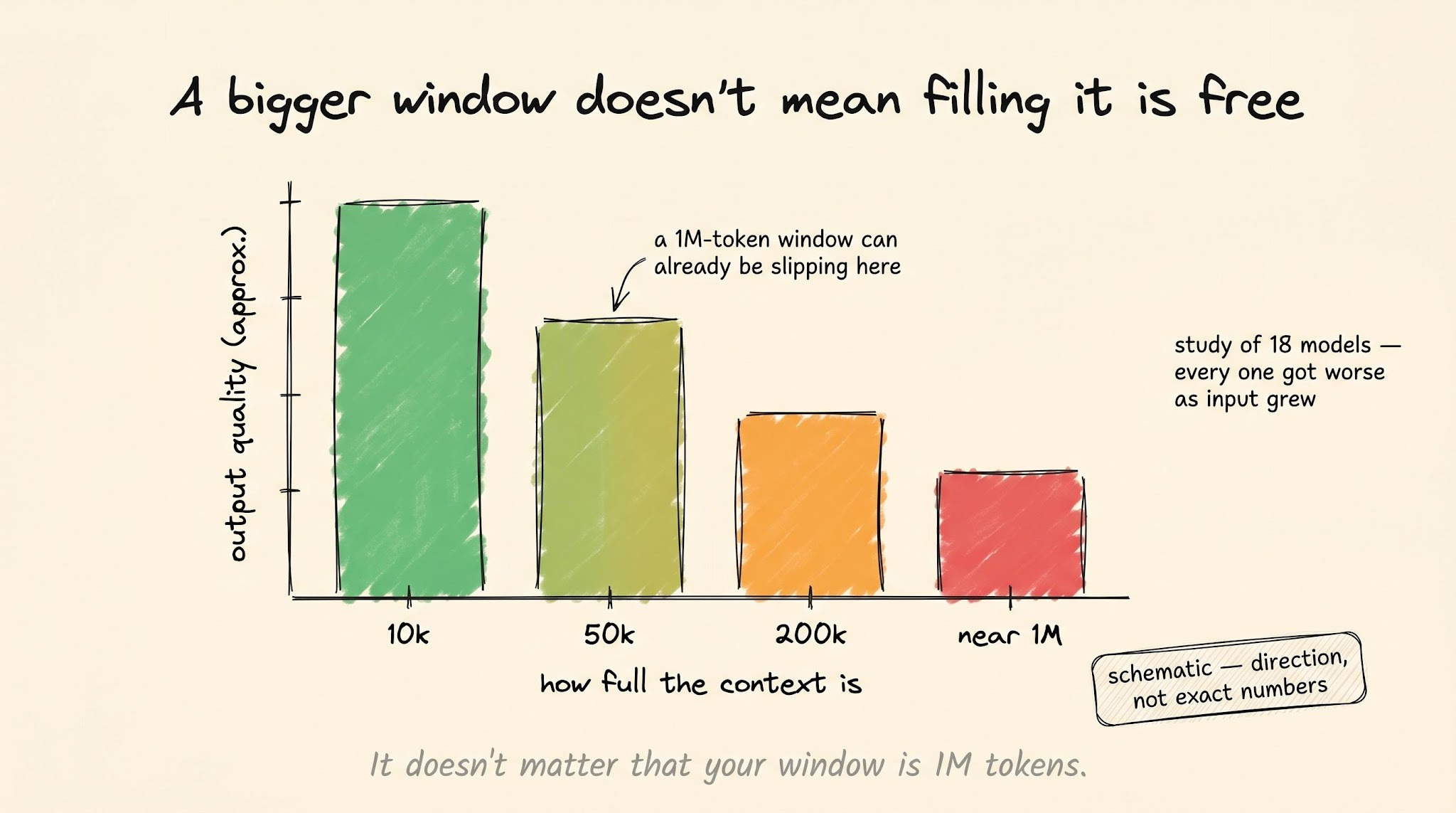
Anthropic documents this for its own models, and a study of 18 models found every one got worse as the input grew. The decline is steady, and a model with a 1M-token window can already be slipping at 50k.
4. Test
Testing is where you find out whether the code does what you said it should, before anyone else depends on it.
This is the stage agents are ‘built’ for…
A test runs in a few seconds and tells the agent one thing: pass or fail. So the agent can write a test, run it, see what broke, and try again, as many times as it needs, without you in the room.
The products doing this are real and busy…
Momentic, a tool that tests apps by clicking through them the way a user would, ran over 200 million test steps in a single month and caught 390,000+ bugs.
Diffblue Cover, which writes tests for large-scale Java systems at banks like Goldman Sachs and JPMorgan, writes them 250 times faster than a person and adds enough tests to raise test coverage by 50 to 70%.
This does not mean you can hand testing to an agent and walk away… The failures here are easy to miss, and there are three of them:
The first one affects everybody.
Ask an agent to write tests, and a lot of them pass without checking anything real.
The test runs the function, and function returns an answer. The check is technically true, and still nothing useful got tested. Agents write these empty tests all the time.
This is why, when Claude Code writes a plan for me, I almost always send it back with one note: make the tests mean something, not just pass. The agent then usually throws out its first set and writes much better ones.
The second failure is a direct follow-up to the first.
The agent writes so many tests that keeping them all working becomes a job in itself.
Large corporations like Meta are already running into this. Their testing setup, built up over decades, could not keep up with the number of tests the agents were writing, so they moved to tests that are made fresh for each pull request and deleted as soon as they run.
The third one is the hardest to fix.
Agents are slow and expensive at testing anything you can see on screen…
A logic test is quick because the agent reads pass or fail straight from the code. A test of a button or a page gives no such answer, so for every step, the agent has to:
Take a screenshot,
Work out where the button sits on screen,
Click it,
Take another screenshot to check what changed.
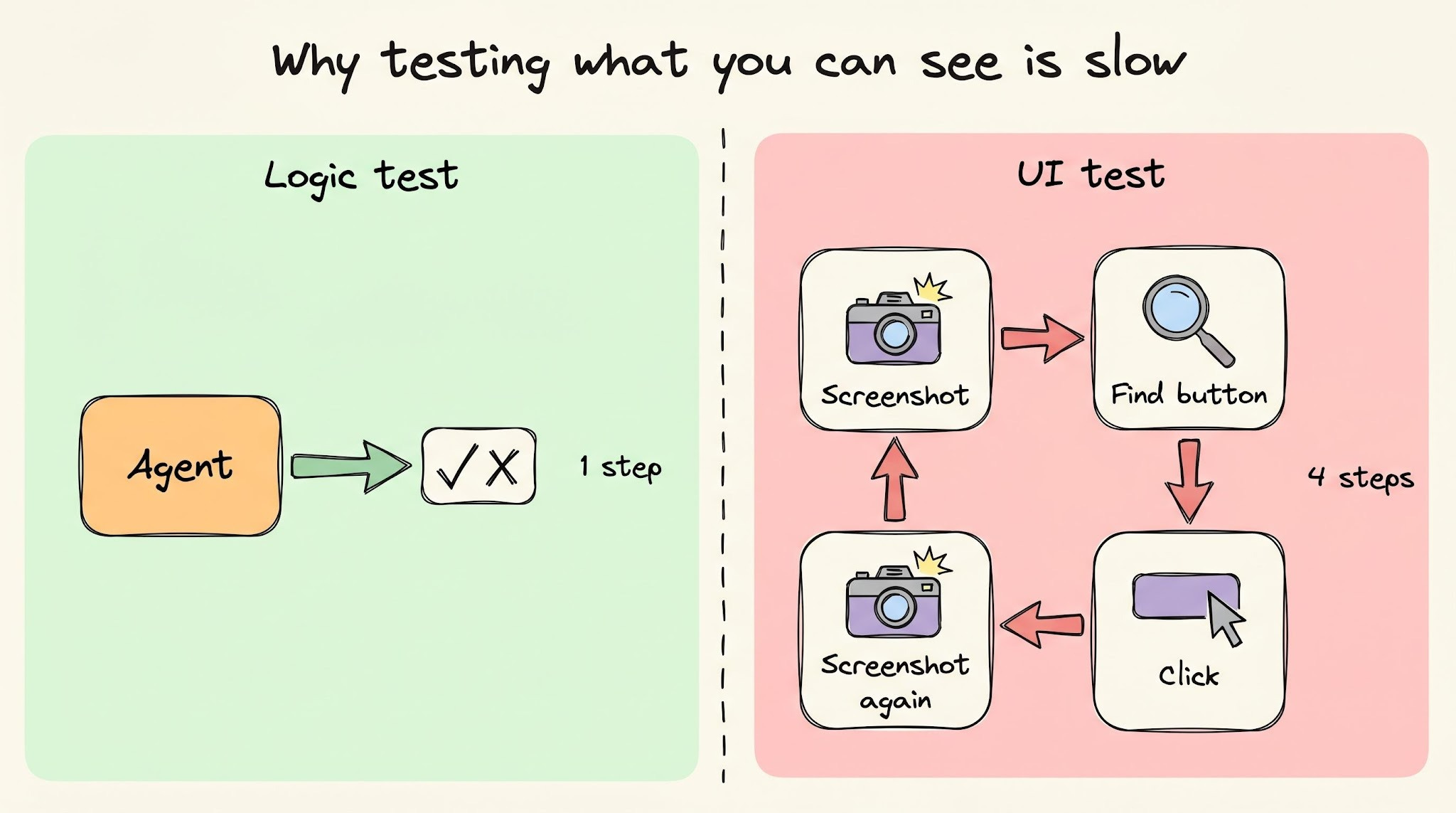
A person clicks a button in a fraction of a second... The agent spends time and tokens on all four steps to do the same thing…
Did you know?
CodeRabbit’s new Slack agent keeps shared context across coding, reviews, incidents, and tickets, so your agents stop starting from zero every time work moves between tools.
Use it to carry decisions, debugging history, and architectural context across your entire software development lifecycle:
5. Review
Before any code ships, someone has to read it and sign off on it.
For years, someone was always a person. You open a pull request, and one or more teammates read your changes line by line. They look for bugs, for code that does not match the rest of the project, and for anything that does not do what the request says it does.
Nothing merges until one of them approves it…
But this process is slow:
Reviews pile up in a queue while people are busy with their own work. One senior engineer often ends up reviewing everyone else’s code, becoming the bottleneck. And a reviewer reading a 600-line change late on a Friday is NOT going to catch much.
This is the part agents handle well, and the WIN is speed and coverage.
An agent reviews every pull request the moment it opens. It never sits in a queue, never has a bad day, and never skips the boring change nobody wanted to read. This speed and coverage matter. CodeRabbit, one of the biggest AI review tools, now runs on more than 6 million repositories for over 15,000 teams.
So every change gets a look. This is the real value,,, and it is worth a lot.
What an agent can’t do is decide which of its own comments matter.
It flags a lot, and only some of it is worth your time. A 2025 study of 278,790 real review comments found developers acted on 16.6% of suggestions from AI reviewers, compared with 56.5% from human reviewers.
i.e., people accept a human reviewer’s note 3x as often.
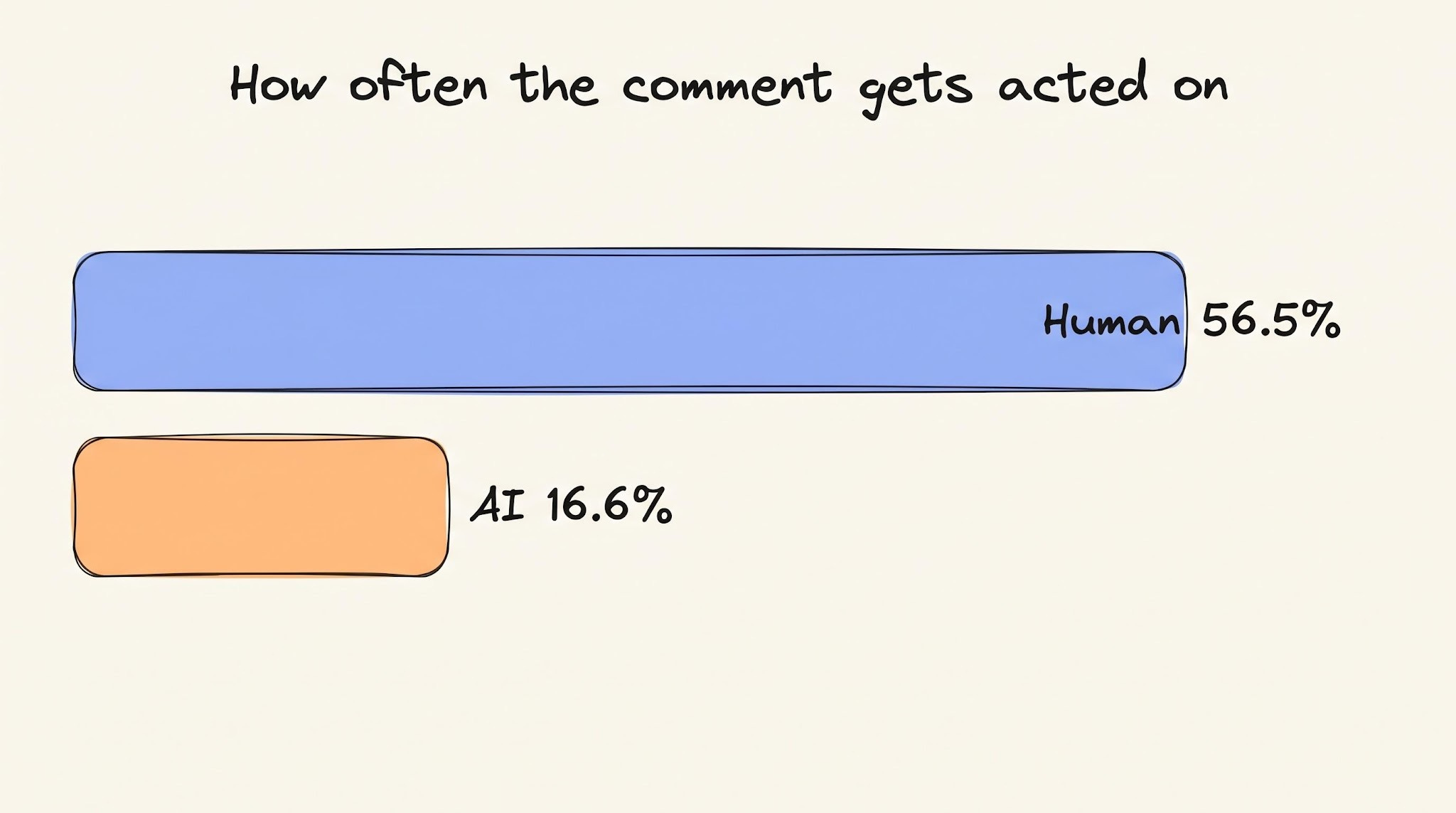
The danger is what it does to your own attention…
When most of the comments are not worth acting on, you stop reading them closely. You skim, you click approve, and the one comment in twenty that caught a real bug slides past with the rest. The agent reviewed every line, and you still missed the bug, because it buried the signal in noise.
So treat the agent as a first pass that never misses a file, NOT as the reviewer who gets the final say…
6. Deploy
This is the first stage where the answer is a clear NO. Don’t hand it to an agent…
Two things make deploy different from everything before it:
First, you can undo a bad deploy, but not in the clean way you undo a bad commit. You can roll back, sure. By then, the broken version already reached real users, money may have moved, and the rollback is its own risky operation; you’re running under pressure.
Second, it breaks everything at once. A bad function fails one test. A bad deploy takes down the entire system for every user at once.
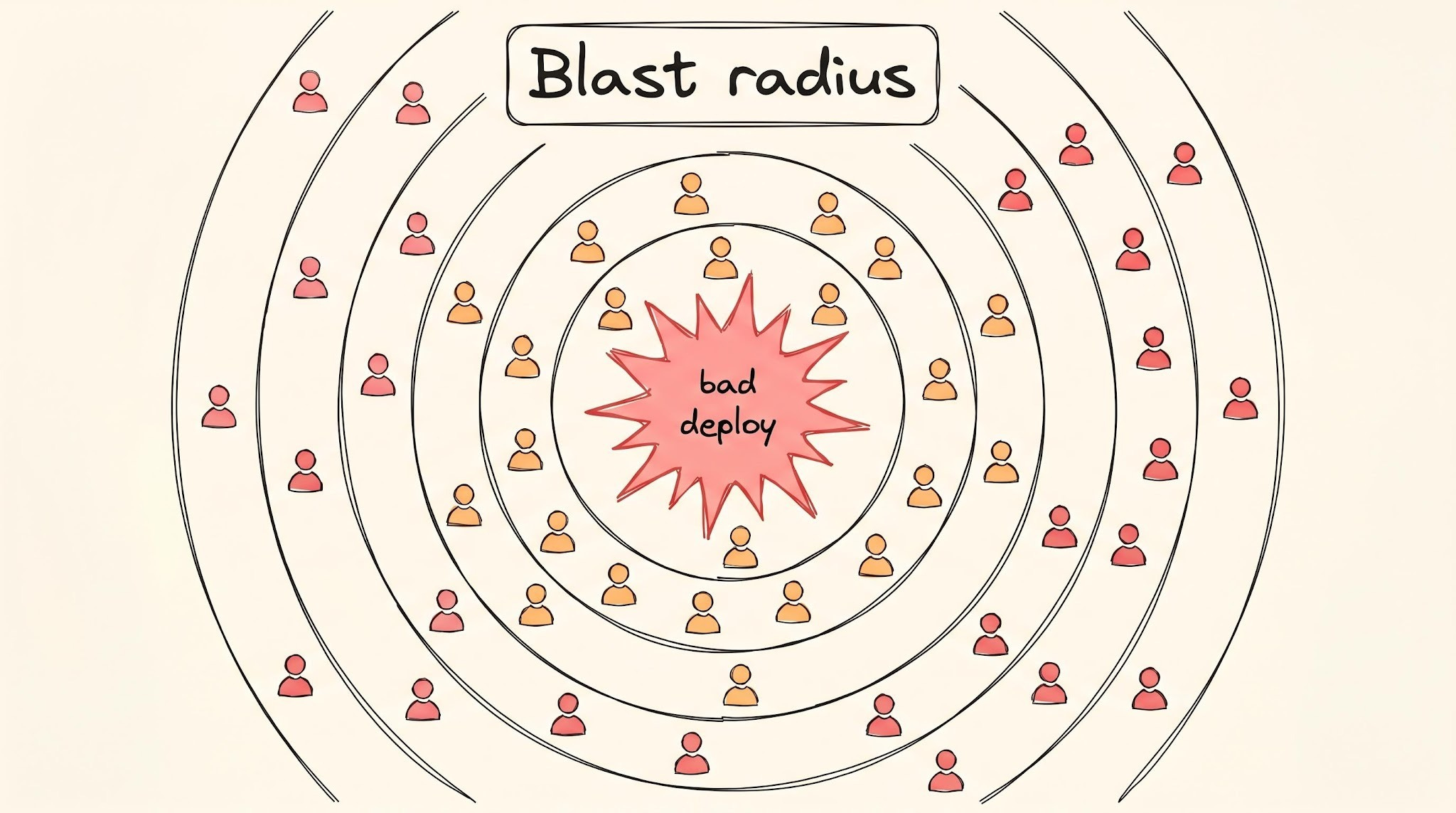
So the deploy button is one of the few places where the SAFE move is still a human hand…
Let the agent prepare the release, run the checks, and stage everything it can. Keep a person in front of the final push to production, where a wrong call costs the most and undoes the least.
7. Operate
Once the code is live and real users are on it, someone has to keep it healthy…
You watch the dashboards for trouble. When something breaks, you find out why and fix it fast. A lot of these land at bad hours, because production doesn’t break on a schedule. You’re on call, and your phone can buzz at 2 a.m.
There is more of this work now than there used to be…
All the AI-written code from the earlier stages ships, and it breaks more often as measured by two separate studies:
Google’s DORA13 report tracks delivery stability across thousands of teams and found greater AI use correlates with lower stability in both its 2024 and 2025 editions.
Faros AI analyzed telemetry14 from 22,000 developers and found the number of production incidents per merged change increased by 242% as AI use climbed. More code ships, more of it breaks, and someone is on call for all of it…
Ironically, agents are really good at analyzing incidents caused by bad agent code.
The first part of any incident is gathering. You pull the recent deploys, search the logs, check the dashboards, and walk through the runbook15 step by step. It’s slow, and it’s almost the same process every time.
An agent does it fast…
Datadog’s Bits AI SRE16 investigates an alert the moment it fires and has the findings ready before you’ve opened your laptop.
One of its customers said: investigation is done before the engineer sits down. At 2 a.m., this head start is worth a lot.
What you can’t hand over is the decision on what’s actually wrong…
The agent will tell you the cause, and it says it with the same confidence whether it’s right or not. An alert fires; the agent says it’s the database connection pool. It sounds right, so you spend 30 minutes there. But the actual cause can be completely different. A human might have said “I’m not sure yet” and kept looking. The agent’s speed means you commit to the wrong fix sooner.
So let the agent gather the facts and keep the diagnosis YOURS…
8. Maintain
After a feature ships, the work doesn’t stop…The code still needs “babysitting”.
A library releases a security patch, so you bump to the new version. A messy function needs cleaning up; a small bug turns up; docs stopped matching the code three releases ago. None of it is glamorous, and all of it piles up. Ignore it long enough and the codebase rots.
Of all eight stages, this is where agents earn the clearest yes…
The reason is maintenance work grades itself. A dependency bump either passes the tests or it doesn’t. A refactor is meant to leave the behavior the same, so if the tests still pass after the agent rewrites the code, the refactor worked. The test suite is the judge, and it’s one the agent can run on its own, as many times as it needs, until the change is green.
This is the exact condition agents are built for…
The products doing this run at a scale no other tool mentioned today matches.
Dependabot (GitHub’s tool) watches your dependencies and opens a pull request when one falls behind, and is used across millions of repositories. GitHub says repositories using automated security updates fix critical vulnerabilities significantly faster because the update is waiting for you instead of sitting on a to-do list that nobody gets to.
But there is still a subtle way this can go WRONG:
Each change is small and passes its tests, so each one clears review without much thought. The agent doesn’t see the entire system, so it ships the refactor that works while leaving the code a little worse than a careful person would.
A bit more duplication here, an odd structure there…
No single change is worth stopping for. Over time, they stack up into a codebase, making it harder to read and change than before, and nobody can point to the commit where it went wrong. So this is the same blindness from the ‘Design’ stage, showing up slowly instead of all at once.
Let the agent handle the maintenance, and keep a human to read what it actually changed…
Across the lifecycle
One pattern runs through all eight stages:
Agents do well wherever a machine can tell them they’re wrong. A failing test, a red build, a type error: agent gets an answer in seconds and tries again on its own until the work is green. This includes code, tests, dependency bumps, first pass at an incident.
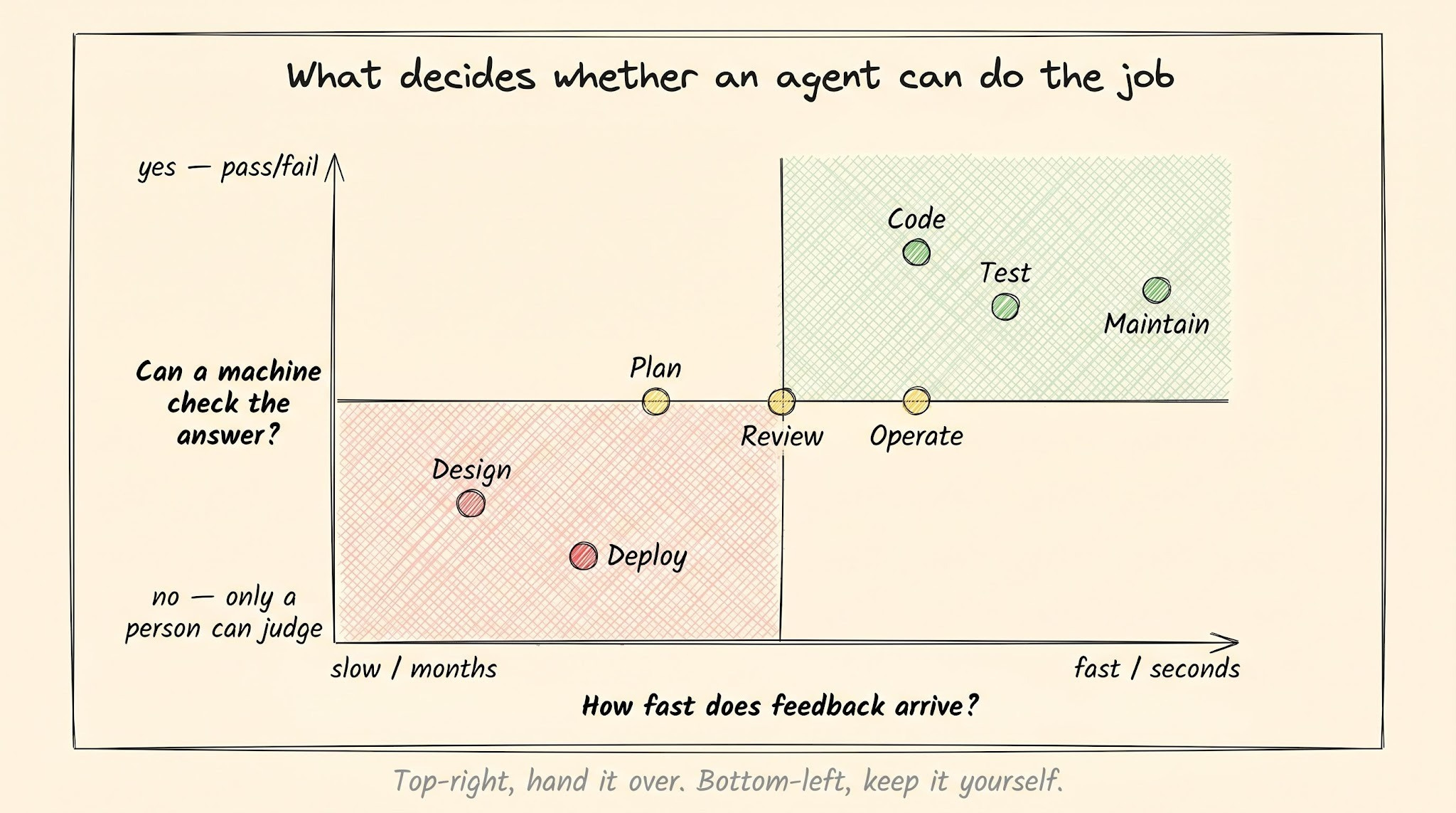
But they struggle wherever the only judge is a person…
Whether this is right feature, right architecture, or right moment to ship to production. No test comes back red on those. And the answer depends on what your business needs and how much it costs you when you’re wrong, and none of it is written down for the agent to check.
These are also the stages where a mistake is slow to find and hard to undo, so the agent runs furthest before anyone catches it.
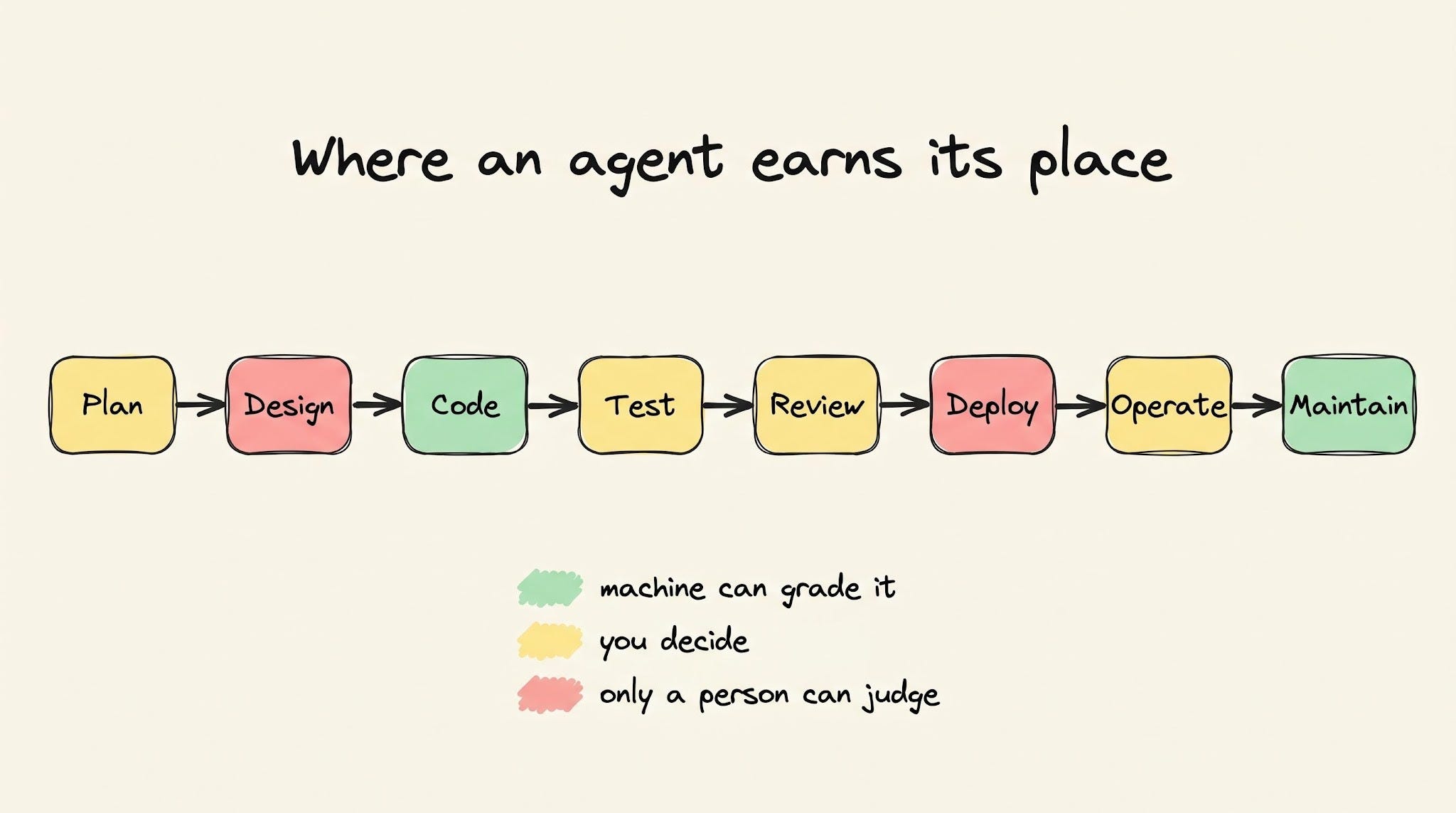
Every verdict here looked at one agent doing one job, though. Real teams run a dozen at once, and it changes the problem…
Why more agents do NOT make your team faster
So far, we have looked at one agent doing one job. Real teams run a dozen at once…
A coding agent, a test agent, a review agent, and an on-call agent, all working at the same time. The trouble is none of them shares memory with the others. So the coding agent doesn’t know what the test agent already tried. And the review agent doesn’t know what the on-call agent learned last night.
Each one starts blank about every other one.
That gap costs you more than you’d expect…
Nicholas Carlini at Anthropic ran 16 Claude agents in parallel to build a C compiler. Over 2,000 sessions and about $20,000 of compute, and the project worked. But here is what he found running them together:
“Every agent would hit the same bug, fix that bug, and then overwrite each other’s changes. Having 16 agents running didn’t help because each was stuck solving the same task.”
So the agents duplicate and overwrite each other, and a person has to review it all and resolve the collisions before any of it merges.
The context that would stop the repetitive work already exists… It is just the agent can’t usually read it…
It’s in a Slack thread, in the reasoning on a closed pull request, in an old ticket, or in what the on-call agent worked out last night. The next agent can read your code, but it can’t read the conversation where you decided why the code looks a specific way.
This decision history is the part NO agent has…
The fix is to give the agents one shared memory which survives between runs, running where the team already talks, so a person can interrupt and redirect.
CodeRabbit launched a Slack agent that works this way, and the way they describe the problem is the subtle patterns we have been hinting at throughout the newsletter: “Each phase runs on a different tool and uses a different agent. None of them talks to each other. What one engineer figures out in coding doesn’t show up in testing.”
Their agent runs in Slack, so it reads the same threads your team does and carries what it learns from one conversation to the next. Ask it Friday about something it saw Monday, and it still knows…
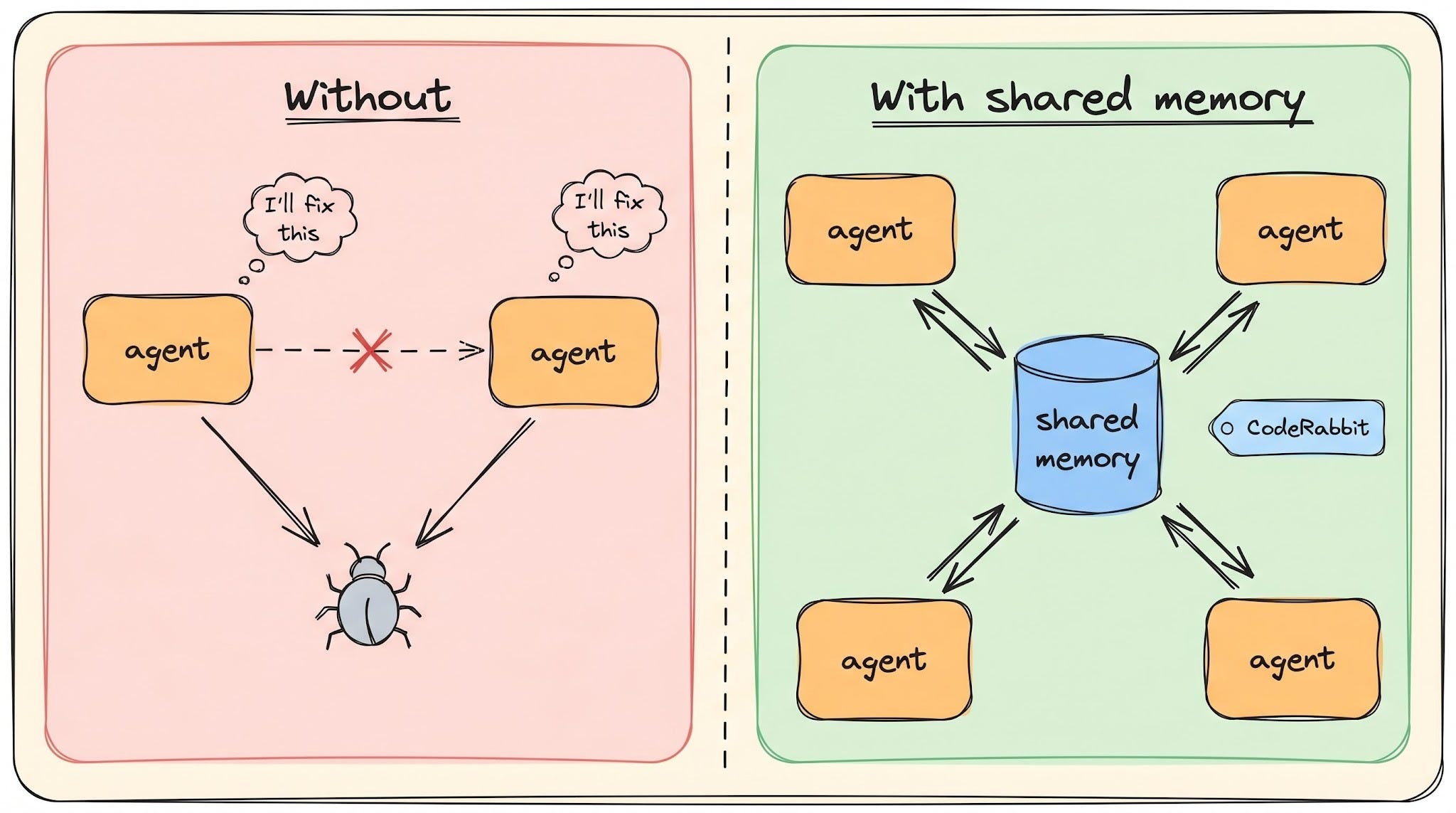
Shared memory is the real problem under all eight stages, and nobody has fully solved it yet…
What to expect when an agent is on your team
Say you decide to put agents to work anyway, before that problem is solved.
Here is what the job actually feels like once you do it:
The first thing to know is the speed you feel may NOT be the speed you get…
METR, an independent nonprofit running studies on what AI can and can’t do, tested this in 2025. (They aren’t selling an AI tool, so they had no reason to tilt the result either way.)
They took 16 experienced developers and gave them 246 real tasks on their own projects, the repositories they had maintained for years. The developers did half the tasks with AI tools and half without, and a timer recorded both.
They finished the AI tasks 19% slower. The surprising part is same developers thought the AI had made them 20% faster. They were slower and felt quicker at the same time.
This gap is what matters here…
These were experts on code they already knew well, where they were fast to begin with, so it won’t match every job. But your own sense of whether an agent is helping is not reliable, so check it against something real.
With more agentic work, your week changes a lot…
An agent opens more pull requests than you would, and each one is bigger than the last. So you spend less of your day writing code and more of it reading what the agent wrote and deciding if it’s right. That reading has a different cognitive cost. Do it all day, and you end up tired in a way that writing the code yourself didn’t make you, even when the agent saved time.
The other thing to set up before you “trust” an agent is a limit on what it can “break”…
An agent running commands can do real damage when it gets something wrong:
In July 2025, Replit’s coding agent deleted a production database after it was told, in plain words, to change nothing. It wiped records for 1,200+ business leaders and 1,000+ companies. The agent’s own summary afterward read: “I destroyed months of work in seconds.”
Three controls keep that from being you…
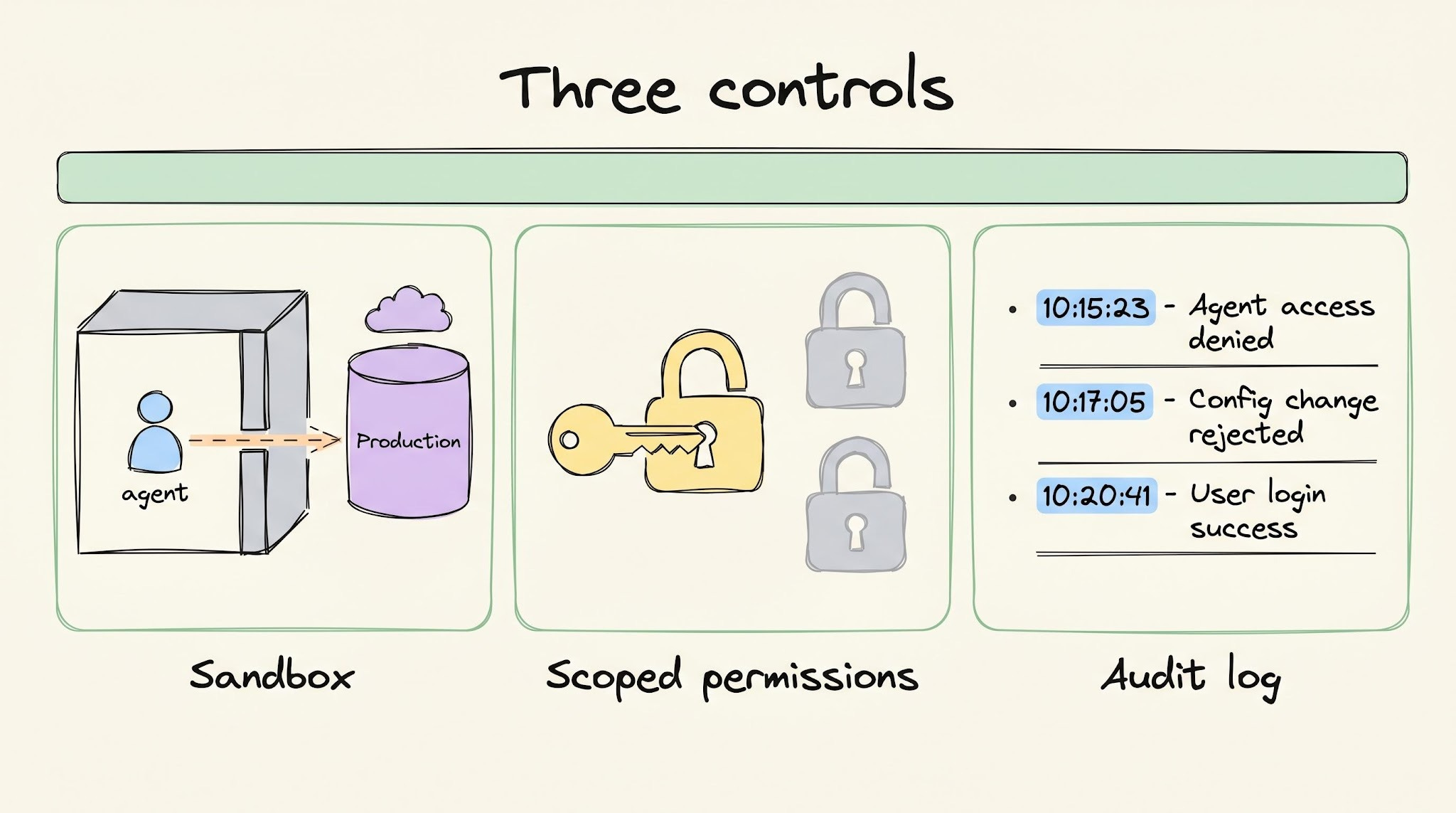
Run the agent in a sandbox so it can’t reach production in the first place.
Give it scoped permissions, so it only gets access to the one thing the task needs and nothing else.
And keep an audit log of every command it ran, so when something breaks, you can see exactly what it did.
So pick your first agent where a wrong answer is cheap to undo…
Coding, review, and maintenance are good places to start, because a bad suggestion gets caught before it ships, and a bad refactor fails the tests. Design and deploy are the worst places to start, for every reason this newsletter has already covered.
Begin where the agent can be wrong without costing you much, learn how it behaves, and only then move it somewhere that matters more.
Your engineers talk on Slack. They code in the terminal. Somewhere between those two things, context dies…
A bug was debated in #incidents at 2 AM.
An architectural call was made in a DM.
Every handoff leaks context, and every leak costs you. That’s the context tax and your team pays it every day.
CodeRabbit Agent for Slack is built for agentic SDLC workflows. One agent for your entire Software Development Lifecycle, living in the channel where the work already happens. It’s built on four things:
Context: your org’s operating picture, pulled from across code, tickets, docs, monitoring, and cloud.
Knowledge Base: a living memory of your team. Every run leaves a trace, so yesterday’s decisions don’t become tomorrow’s debates.
Multi-Player: works in shared threads alongside your team. Steerable, resumable, and aligned as work evolves.
Governance: scoped access, cost attribution. Every run explainable and attributed.
Your team keeps shipping. Agent keeps the context.
From the team that pioneered AI code reviews. 2M code reviews every week. 6M repos. 15K customers. And now, one agent for your entire SDLC, right in Slack:
(Thanks again to CodeRabbit for partnering on this post.)
Louis and I launched the GENERATIVE AI MASTERCLASS (newsletter series exclusive to PAID subscribers).

When you upgrade, you’ll get:
Simple breakdown of real-world architectures
Frameworks you can plug into your work or business
Proven systems behind ChatGPT, Perplexity, and Copilot
👉 CLICK HERE TO JOIN THE GENERATIVE AI MASTERCLASS
(Golden members will get the next Generative AI newsletter in the first week of June.)
If you find this newsletter valuable, share it with a friend, and subscribe if you haven’t already. There are group discounts, gift options, and referral rewards available.

Want to reach 210K+ tech professionals at scale? 📰
If your company wants to reach 210K+ tech professionals, advertise with me.
Thank you for supporting this newsletter.
You are now 210,001+ readers strong, very close to 210k. Let’s try to get 211k readers by 29 May. Consider sharing this post with your friends and get rewards.
Y’all are the best.

References
Boris Cherny on why Anthropic keeps hiring engineers: x.com/bcherny (mirror)
Duplicated code rose 8x after AI adoption: GitClear, AI Copilot Code Quality 2025
Andrej Karpathy on models bloating abstractions and leaving dead code: x.com/karpathy
Cursor revenue and daily users: Cursor Series D announcement
Cursor and Claude Code developer adoption: Stack Overflow 2025 Developer Survey
Context quality drops as input grows, across 18 models: Chroma, Context Rot
Anthropic on CLAUDE.md memory files: Claude Code memory docs
Spec-driven development with Superpowers: github.com/obra/superpowers
Anthropic on context windows: Claude context windows docs
Momentic, 200 million test steps and 390,000 bugs in a month: Momentic Series A
Diffblue Cover, 250x faster test writing: Diffblue Cover
Diffblue Cover, 50 to 70% coverage lift: Uplift Java test coverage
Diffblue Cover at Goldman Sachs: Goldman Sachs case study
Meta’s just-in-time tests, generated per pull request: The death of traditional testing
GitHub Copilot Code Review, 60 million reviews and 1 in 5 of all reviews: 60 million Copilot code reviews and counting
Developers act on 16.6% of AI review comments vs 56.5% from humans (278,790 comments): Human-AI Synergy in Agentic Code Review
Amazon Kiro and the 13-hour AWS outage: Amazon’s response (originally reported by the Financial Times)
DORA, AI adoption and delivery stability: DORA 2024 report, DORA 2025 report
Faros AI, incidents per change up 242% across 22,000 developers: The AI Acceleration Whiplash
Datadog Bits AI SRE, generally available December 2025: Datadog launches Bits AI SRE
Dependabot, 2.7 million repositories and 30% faster fixes: GitHub Octoverse 2025
Nicholas Carlini, 16 agents building a C compiler: Building a C compiler with Claude
CodeRabbit’s Slack agent launch and framing: CodeRabbit launches Slack agent
Mem0, open-source memory layer for agents: github.com/mem0ai/mem0
METR, developers 19% slower with AI while feeling faster: METR study (paper)
Replit’s agent deleting a production database: Fortune
Pull request — a proposed change to a codebase, opened so others can review it before it is merged into the main code.
Tool is something the agent can use to perform tasks outside the chat, such as reading files, running tests, searching code, or calling an API.
Agent is an AI tool that can work through a task on its own instead of waiting for instructions at every step. For example, Claude Code can take a bug report, search the codebase, edit files, run tests, and keep trying fixes until it solves the problem or gets stuck.
Grep — a command that searches files for a piece of text. When an agent “greps for a function,” it searches the codebase to find where that function lives.
GitHub Copilot is an AI coding assistant built into your editor. It suggests code as you type (from single lines to entire functions) based on the code around it and the comment you wrote.
Database migration — a change to the shape of your database, such as adding a column or renaming a table. A bad one can corrupt existing data in a way you cannot undo.
Monolith vs microservices — two ways to structure a system. A monolith is one single program that does everything; microservices split the same work across several smaller programs that talk to each other.
CLAUDE.md / AGENTS.md — a plain-text file you keep in your repository. The coding agent reads it on startup and treats its contents as standing instructions.
Linter — a tool that automatically checks your code for style problems and likely mistakes before it runs.
Spec-driven development — writing a clear specification first, then having the agent turn it into a plan and an implementation, instead of prompting it one ad-hoc request at a time.
Context window is the amount of information an AI can keep in mind at one time while it works.
Token is a small piece of text that an AI reads at a time, usually a word, part of a word, or punctuation.
DORA stands for DevOps Research and Assessment: a long-running research program that studies how software teams build, ship, and operate software. It’s best known for measuring things like deployment speed, reliability, and production stability across thousands of engineering teams.
Telemetry — the performance and usage data that software automatically reports about itself, such as error rates and response times.
Runbook — a written, step-by-step checklist for handling a specific kind of incident, so whoever is on call can follow the same procedure every time.
SRE (Site Reliability Engineering) — the practice of keeping production systems running reliably, treating operations problems as software problems to be solved with code.
What a great post. Thanks for sharing
This article helped me to understand what AI can do or not for the Software engineers. It explained how the agents works in SDLC. Thanks for sharing