


Share this post & I’ll send you some rewards for the referrals.
The hardest part of building an AI agent1 has nothing to do with the model…
Calling a language model is the EASY part…
Keeping the agent coherent across a workflow that spans hours or days is where everything actually gets difficult: remembering what was said, tracking what’s already been done, and staying steady when the user changes their mind.
Even with stronger models each year, agents break on those exact failures…
They forget earlier turns, repeat questions they already asked, and behave inconsistently across long tasks. The model is rarely the cause. The cause is a missing or badly designed state and memory, plus the consistency rules that keep the two in line.
This newsletter walks through all three…
100+ Claude Code hacks to ship code 10X faster (Partner)

Top engineers at Anthropic and OpenAI say AI now writes 100% of their code.
If you’re not using AI, you’re spending 40 hours doing what they do in 4.
These 100+ Claude Code hacks fix that and help you ship 10x faster.
Sign up for The Code and get:
100+ Claude Code hacks used by top engineers — free
The Code newsletter — learn the latest AI tools, tips, and skills to code faster with AI in 5 minutes a day
(Thanks to the Code for partnering on this post.)
I want to introduce Sivasankar as a guest author.

He is a Technical Director and GenAI practitioner with over 20+ years of experience in architecting and building Big Data, Cloud, and GenAI solutions.
His work focuses on helping organizations design practical and scalable intelligent systems. He enjoys exploring new ideas through hands-on DIY projects and practical experimentation, often turning real-world use cases into working prototypes.
You can connect with Sivasankar (Shiva) on LinkedIn.
Here’s what you’ll find inside this newsletter:
State vs memory. What each one is for, how they differ, and why conflating them is the root cause of most agent bugs.
Memory lifecycle. How an agent creates, updates, summarizes, and deletes memory so it doesn’t rot over time.
Consistency under change. How state reacts to new instructions right away, and how long-term memory updates only after a change holds up.
A reference architecture. The four layers (brain, state, memory, external systems) and what each one owns.
Scaling and failure modes. Where stateful agents break at scale, and the three ways memory itself goes wrong.
By the end, you’ll know how to design agents that track the right things, recover from failure, and stay truthful with the data they don’t control.
Let’s start with the state...
Tracking what the agent is doing with the state
State is the information an agent keeps about the current task: the plan, active constraints, what’s already been done, and what comes next.
It’s the agent’s picture of NOW…
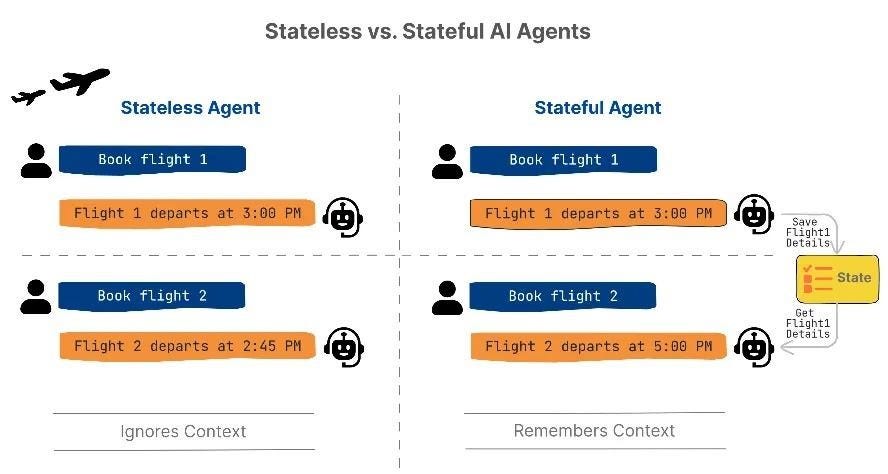
The easiest way to see why it matters is to compare an agent with it to one without it.
Stateless vs Stateful
A stateless agent keeps nothing between requests…
Each input is a fresh start, which is fine for one-shot jobs like “translate this sentence to French, summarize this paragraph, or explain what an API is”.
A stateful agent tracks the current task, session, or workflow…
At each decision point, it checks the state to answer three questions: what step am I on, what has already been done, and what should I do next? Those answers drive the next action, check constraints, and stop the agent from repeating itself.
State matters the moment a workflow has more than one step…
The user books a flight (step one done, constraints locked), asks for a hotel (step two, new constraints layered on), then changes the return date (earlier step invalidated, replan downstream).
Without a state, none of those three questions has an answer.
Where state lives
State is maintained on the agent side (backend server that runs the reasoning loop), and NOT on the client side (chat UI, mobile app, or API caller the user interacts with).
Clients disconnect, refresh, and retry. And agent still needs a steady view of progress.
So where that view lives depends on how long the workflow runs…
Short-lived workflows that end in a single session can remain in an in-memory store. Anything that has to survive restarts needs external storage: a database, a KV store (Redis-style lookups by id), or a serialized state object managed by an orchestration framework2.
LangGraph3, for example, comes with SqliteSaver and PostgresSaver as ready-made checkpoint backends.
At each step’s start, agent loads the latest state snapshot and rebuilds its context. That load makes a chain of steps feel like one chain rather than a set of separate calls.
Checkpointing and recovery
Loading state on each step only works if something wrote it in the first place…
That’s what checkpointing4 does: it saves state at the milestones you pick as meaningful, not every tiny step. If the agent crashes, times out, or gets redeployed mid-workflow, it reloads the last checkpoint and resumes from there.
Picture the travel agent picking a return flight when the API call fails…
Without checkpointing, the agent would have to re-ask the user for dates, budget, and outbound flight details. With checkpointing, the saved state already contains all that, so on retry, the agent picks up at the failed step and continues.
The same setup covers internal errors in the agent’s own code and redeploys that restart the infrastructure underneath it.
This pattern runs in production at real scale…
LinkedIn’s internal SQL Bot5 is a hierarchical multi-agent system built on LangGraph, and its long-running query workflows rely on the framework’s checkpoint layer to pause, inspect state, and resume without losing context mid-task.
State versioning
Long-running agents change over time…
New fields appear, steps get reordered, logic shifts. Without versioning, in-progress workflows break the moment the schema changes, and the stored state written yesterday becomes unreadable tomorrow.
Versioning keeps yesterday’s state readable…
It migrates old formats forward and blocks execution paths that no longer make sense under the new schema. That way, workflow changes roll out without killing ongoing tasks.
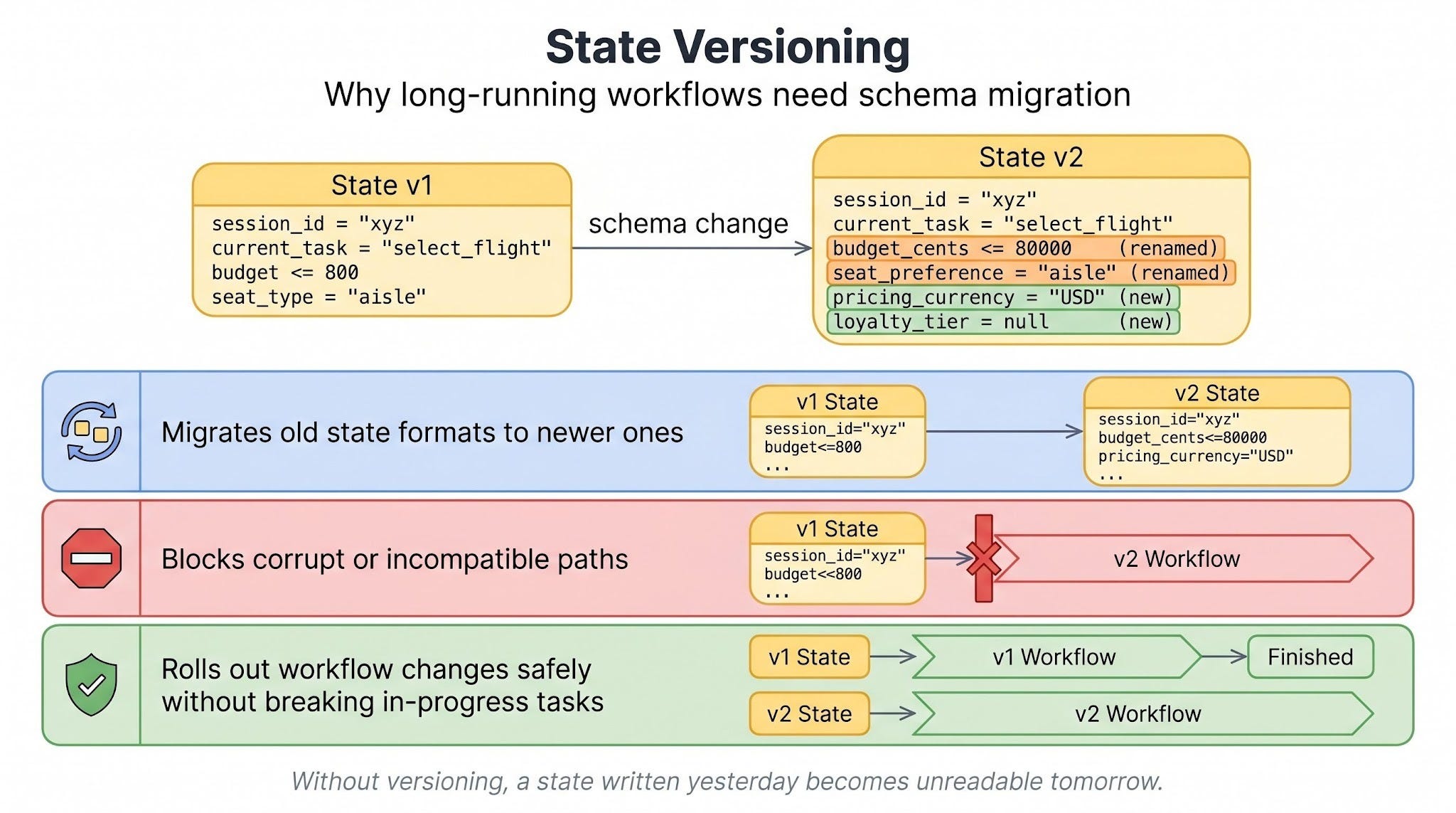
This is most evident in production systems where workflows span minutes, hours, or even days…
Travel agent: state in action
Storage, checkpointing, and versioning click together once you watch a concrete plan move through them…
The user says, “Plan a complete trip for me.” The agent then walks a sequence:
Pick the date and destination.
Select an outbound flight.
Then select a return flight.
Choose accommodation.
Confirm the itinerary.
After each step, the state moves forward…
Once the outbound flight is selected, the state says select the return flight next. And checkpoints occur after preferences are confirmed, outbound flight is selected, return flight is selected, and the hotel is booked.
If the hotel step ‘fails‘ because of a network error, the agent restarts, reloads the state, sees that the dates and flights are already locked in, and retries only the hotel step.
NO re-asking and out-of-order suggestions…
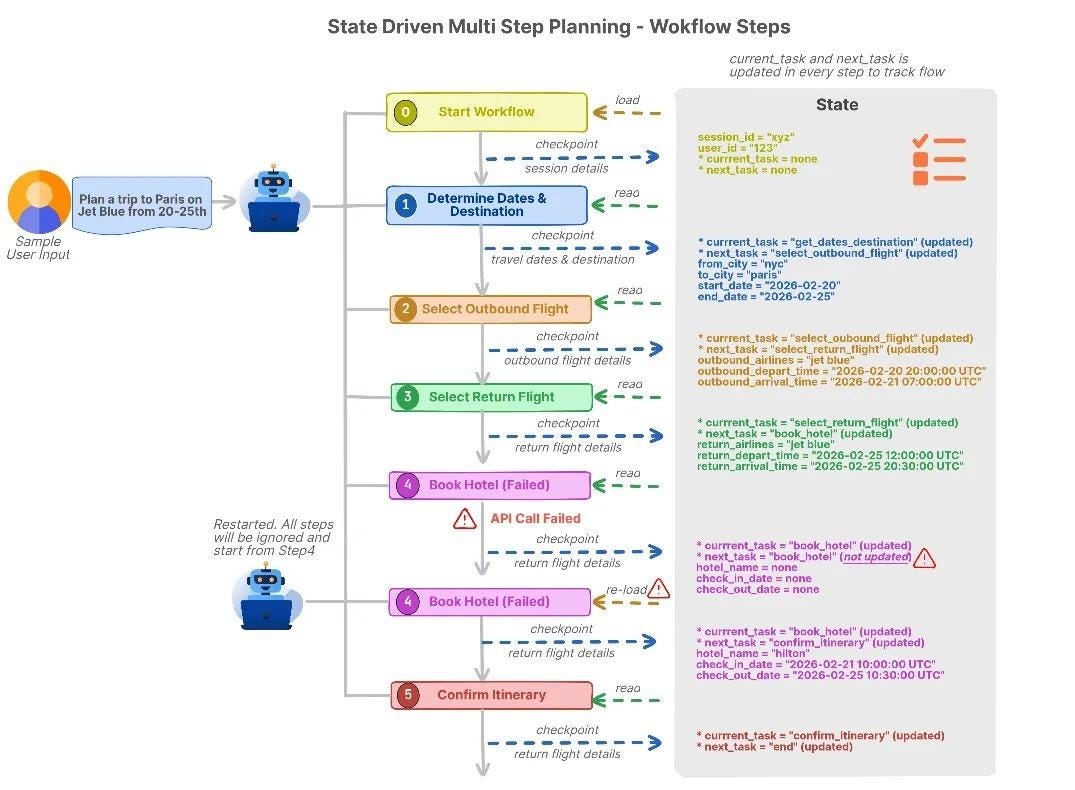
That’s what the state gives you.
Next up is memory: information the agent carries across tasks...
Carrying information across tasks with memory
If the state is the agent’s picture of now, memory is what spans across: past decisions already made, preferences built up over time, conversations it can refer back to, and reference data it queries from other systems (flight schedules, hotel listings).
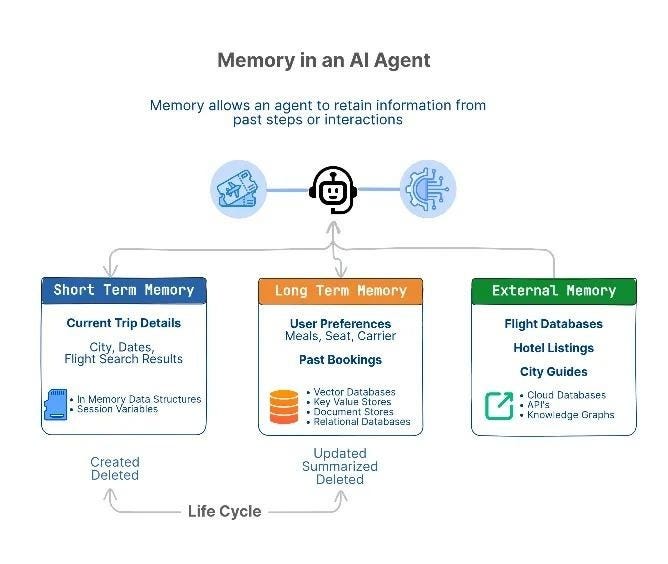
Agents store memory in three flavors, separated by how long the memory persists and whether the agent owns the data or just reads it from elsewhere.
Short-term memory
Short-term memory holds the current context for the active task…
It’s short-lived and cleared when the task ends. Most implementations keep it in in-memory structures, session variables, or within the LLM6 prompt. The lifecycle is simple: create it when a task begins, update it as the agent reasons and uses tools, and clear it once the task wraps up.
Use it for one-task decisions that don’t need to outlive the current workflow.
Long-term memory
Long-term memory stores information across interactions: user preferences, past bookings, and recurring patterns.
The storage options are vector databases7, KV stores, document stores, or relational databases. A write only happens when the information is actually worth keeping, and retrieval kicks in at the start of new tasks or when a relevant signal shows up in the current one.
Every so often, the agent summarizes or merges old entries to prevent the store from growing out of control…
Use this layer when a preference is steady, behavior repeats, or a piece of information should carry into future interactions.
The big win of long-term memory is NOT loading the entire history into the prompt each turn. The agent stores what’s worth keeping and pulls in only what the current decision needs.
Mem08 is one production system built on this idea:
Tested on LOCOMO9, a benchmark for long conversations, the Mem0 layer reduced p95 retrieval latency10 by 91% against a full-context baseline11. Token cost dropped by over 90% on the same test.
On an LLM-as-judge evaluation12, it scored 26% higher than OpenAI’s memory system.
External memory
External memory is a large reference data that the agent queries on demand instead of storing: flight databases, hotel listings, knowledge graphs, and internal systems of record.
These are external sources that hold the authoritative version of a piece of data, like a booking system or a pricing API…
These live in cloud databases, APIs, knowledge graphs, or external RAG13 indexes. Nothing gets loaded into the prompt all at once. When a decision depends on data that must remain official, auditable, and shared across applications, the agent queries the system of record14 directly.
Memory lifecycle
Even a good memory goes bad if you never manage it. Managing it means walking every entry through four stages:
Create when new information arrives (user picks a flight).
Update when details change (user adds a second city).
Summarize to shrink detail (only the times and locations that matter, not every API response).
Delete when the information is no longer needed or the retention window ends (clear past trip details once the booking is complete).
Skip this cycle, and long-term memory grows without limit.
Old preferences start contradicting newer ones, and the agent makes decisions based on a pile of half-truths…
Travel agent: memory in action
One trip exercises all three memory types at once:
Short-term memory holds the current trip (cities, dates, flight search results).
Long-term memory holds repeat preferences (airline, seat class, meal choice).
External memory provides live data that the agent doesn’t own (current flight schedules, hotel availability, seat prices).
The hard part for the agent isn’t storing any of this…
It’s deciding when the state should override memory, when memory should update from what just happened, and when neither should move because the real answer lives in an external system.
That’s the next problem...
Staying consistent when preferences change
Real users change their minds mid-task.
They try a new option, correct themselves, adjust what they want, and sometimes say one thing on Monday and the opposite on Tuesday. An agent that can’t handle this feels wrong: repetitive, stuck on old instructions, or too eager to rewrite its long-term knowledge on every passing comment.
The core rule is simple: react fast with state, learn slowly with memory.
Reacting fast, learning slowly
State updates as soon as a new instruction arrives…
The current task reflects it right away. But memory updates only after the change looks steady and reusable.
The question is when memory writes happen…
LangChain’s team frames two options: the agent can write “in hot path” (save the new fact before replying to the user) or “in the background” (a separate process updates memory during or after the conversation).
Background writes are what make “learn slowly” work, because they give the system time to check whether the change holds up over a few more turns before it gets saved.
If memory learned too fast, it would rot15…
A rare exception becomes the rule, a short-term constraint becomes permanent, and future tasks go wrong with no clear cause.
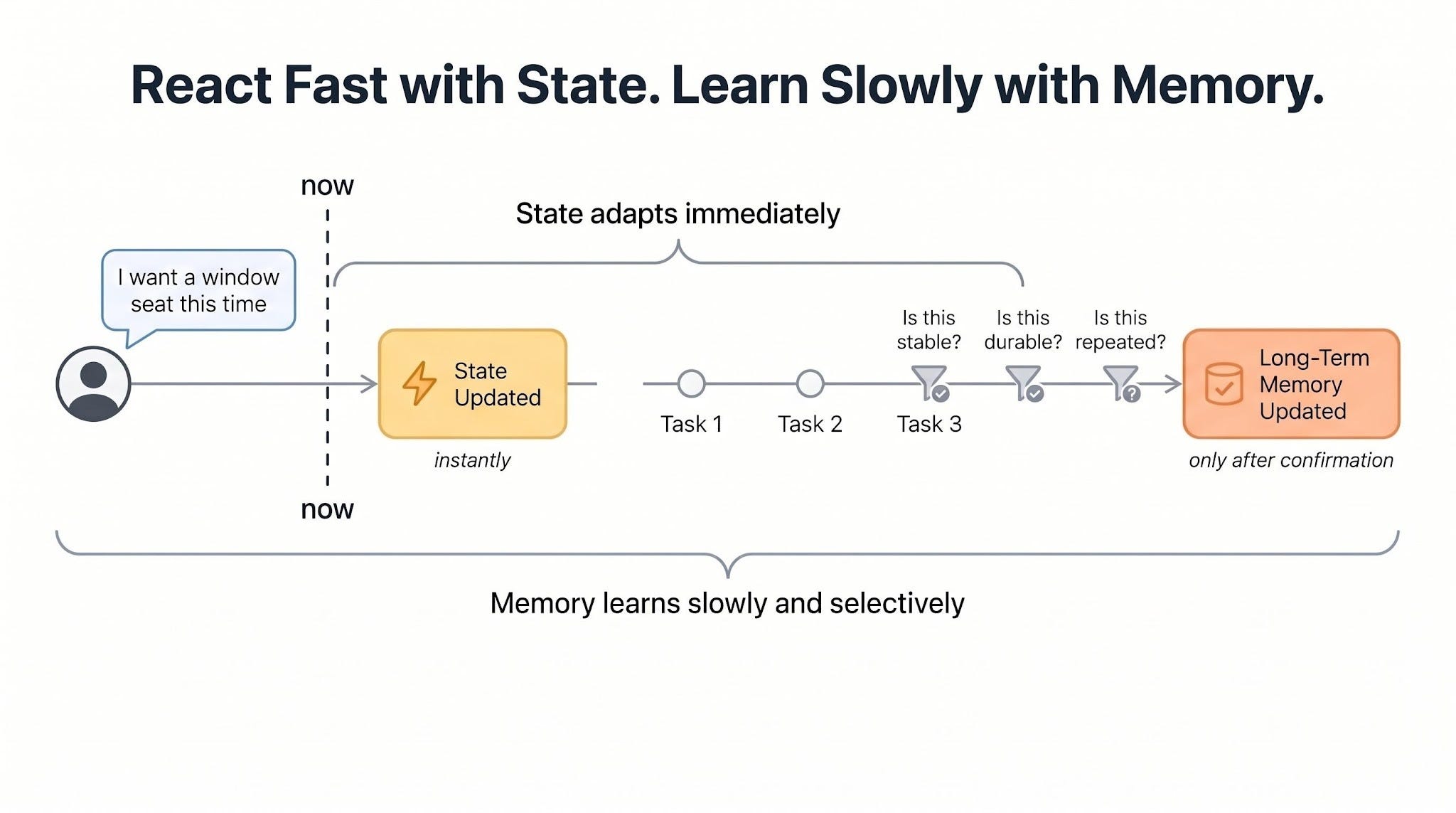
Three roles keep this clean:
State tracks what the agent is doing now,
Memory stores what it has learned over time,
Consistency rules keep the two in check when they disagree.
Before any of these rules run, the agent has to pull the right memory for the current decision.
Retrieving only what’s relevant
Agents don’t load all memory…
Instead, they query it like a database, using metadata on each entry:
t
opic: flights [seats, airlines, class, timing]t
opic: hotels [room type, location, amenities]t
opic: food [dietary restrictions, cuisine]t
opic: budget [price sensitivity, limits]d
uration: short-term | long-termconfidence:
confirmed | inferred
The current state picks which slices to pull.
Booking a flight pulls flight and budget memory, and leaves hotel memory alone. This keeps the working context focused and stops old or unrelated memory from leaking into the decision.
Rolling back on corrections
When a user corrects the agent, treat it as a constraint change, NOT an error.
The agent always plans under a set of constraints:
seat type = aisle
budget <= 800
departure = morning
hotel near the city center
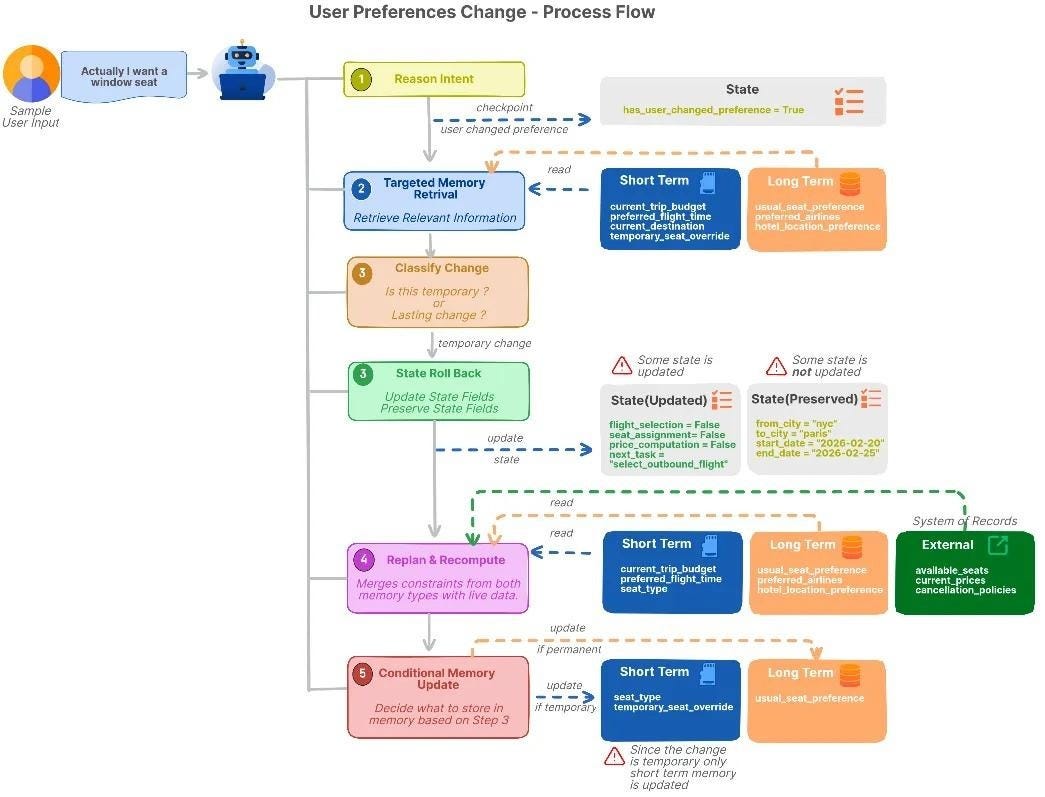
When the user says, “I want a window seat”, they aren’t saying you made a mistake. They’re saying update the constraints. The agent’s job is to apply the new constraint without throwing away the work that’s still valid.
On a correction, the agent traces which steps depended on the old constraint…
It rolls back to the earliest affected step, marks everything downstream as invalid, and leaves the earlier valid steps alone.
But memory doesn’t update on the first correction…
The agent first checks intent: whether the change is a one-time request, task-specific, or a lasting preference (indicated by phrases like “always a window seat”). Only after the change looks steady does long-term memory update.
When the system of record wins
NOT all memory is truth…
Prices, availability, and inventory come from external systems, not from the agent’s stored preferences. External systems define ground truth; memory shapes decisions without overriding real data, and when the two disagree, the system of record always wins.
Anthropic names this pattern directly in its agent design guidance:
Agents must “gain ‘ground truth’ from the environment at each step (such as tool call results or code execution) to assess its progress.” That keeps the agent in sync with reality, and hallucinations drop because it isn’t guessing at live data it could have just fetched.
Travel agent: consistency in action
The agent already knows 2 things:
Long-term memory: user usually prefers aisle seats.
Short-term memory: user wants the cheapest flight for this trip.
Right now, the agent is comparing flights and choosing seats…
Then the user says:
“I want a window seat this time.”
Here’s what the agent does:
Reads the new request.
Pulls only seat-related preferences (memory).
Understands “this time” means a temporary change and labels it accordingly.
Rolls state back to the flight selection step because seat preferences affect flight choices.
Removes earlier seat and pricing decisions that depended on aisle seats.
Recalculates the best flight options using the new window-seat preference.
Updates short-term memory for this trip ONLY.
Keeps long-term memory unchanged because preference may NOT be permanent.
Later, the user says:
“I prefer window seats going forward.”
Now the agent understands this is a lasting preference…
So it:
Read this as a lasting change.
Saves window seats as the new default preference.
Updates long-term memory.
Uses this preference for future trips.
Now, imagine the airline system says there are no window seats available…
The agent tells the user that window seats are unavailable and follows the airline’s live data. It does not remove the preference from memory. Instead, real-world data overrides stored preferences.
So far, the travel agent has shown up in pieces. Now it’s time to run it end-to-end...
Build travel agent from three pieces
Travel Agent AI helps users plan and book trips…
It talks to the user, tracks the current task, remembers useful preferences, and calls external tools to check flights, hotels, and prices.
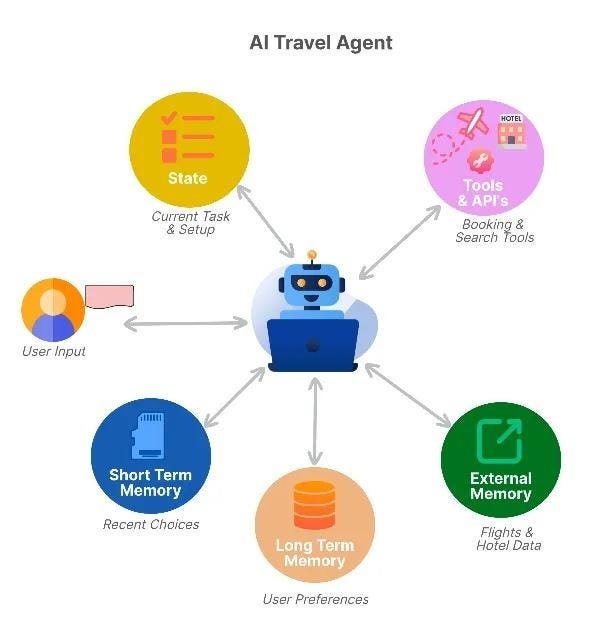
Every request flows through the same loop…
Workflow loop
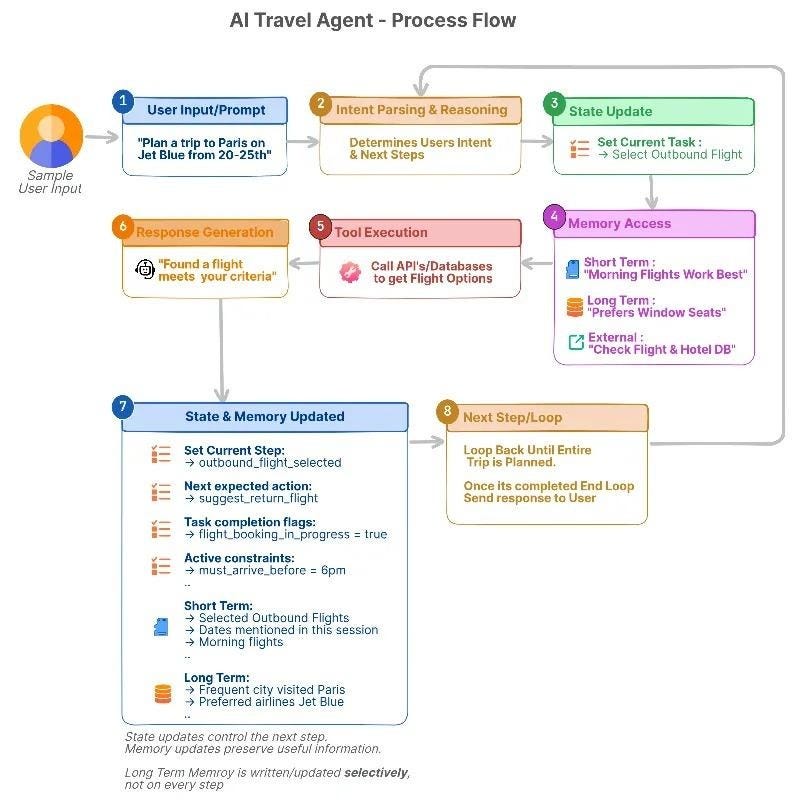
User input. The user asks for a plan or a specific booking.
Intent parsing and reasoning. The agent figures out the goal and picks the next step.
State update. Records which step is active and the constraints in play (dates, airline preference, budget).
Memory access. Pulls short-term, long-term, or external memory based on what this step needs.
Tool execution. Calls APIs for flights, hotels, or pricing.
Response generation. Gives a suggestion or confirmation from the current state and retrieved memory.
State/memory update. Writes the new selections and any session context back to storage.
Next step or loop. Continues to the next task in the plan.
Example prompts
A typical conversation might run across four turns:
“Help me plan a trip to Paris next month.”
“Book the outbound flight first.”
“I prefer window seats and morning flights.”
“Now add a hotel near the city center.”
Across these turns:
State tracks the active step.
Short-term memory stores choices for this trip.
Long-term memory stores recurring preferences.
External data provides live prices and availability.
Tools connect the agent to flight, hotel, and booking systems.
Agent’s tools
The agent reaches out through flight search APIs, hotel availability services, and pricing and booking systems…
Each step feeds the next, and the saved state keeps the plan aligned with live data even when something fails partway through.
The loop shows when things happen…The next question is what each piece is responsible for...
Reference architecture for a stateful agent
Zoom out from the runtime loop, and a stateful agent splits into four layers:
Each one has a single job, and the lines between them are what keep the agent steady.
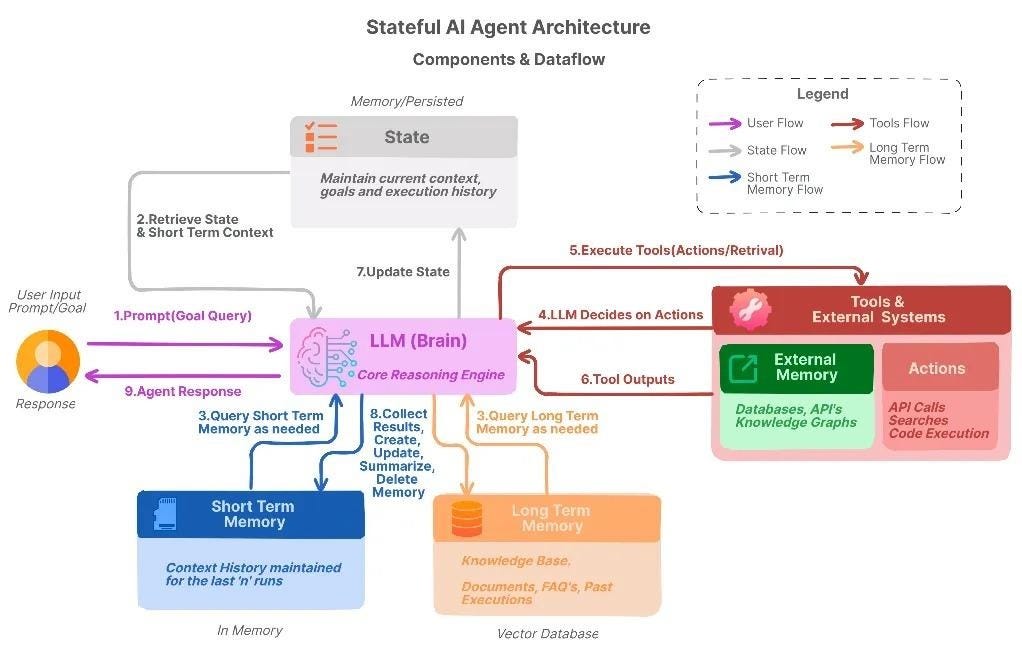
Agent brain (reasoning engine). An LLM sits at the center, planning multi-step workflows, reading user intent, and picking the next action from the current state and retrieved memory.
State layer. This is where the current workflow lives: which steps are done, which are next, and what constraints are active. It also holds short-term overrides and session-specific choices, and lets the agent roll back when a user changes a preference without restarting the entire plan.
Memory layer. Short-term memory carries this-task context; long-term memory carries lasting user preferences and habits. Together, they feed the brain with context that matches past decisions and patterns.
External systems (system of record). APIs, databases, and live data sources provide official information such as seat availability, current prices, and cancellation policies. Memory can suggest, but the system of record always wins in a conflict.
The brain decides, the state tracks, memory remembers, and external systems check.
Mix up those responsibilities, and the agent guesses when it should check a live source, or keeps memory that should have been dropped. Keep them separate, and every layer pulls its own weight.
Deciding what fits in the context window
The four layers only work if they fit…
Every LLM runs inside a finite context window16, and state, memory, tool schemas, tool outputs, and user messages all fight for that space.
What takes up the context window
Every step’s context is the sum of what you send the model in that step…
This includes system and developer instructions, current state, retrieved memory snippets (short-term, long-term, and external), tool schemas and instructions, tool outputs from API responses and search results, and the user’s messages themselves.
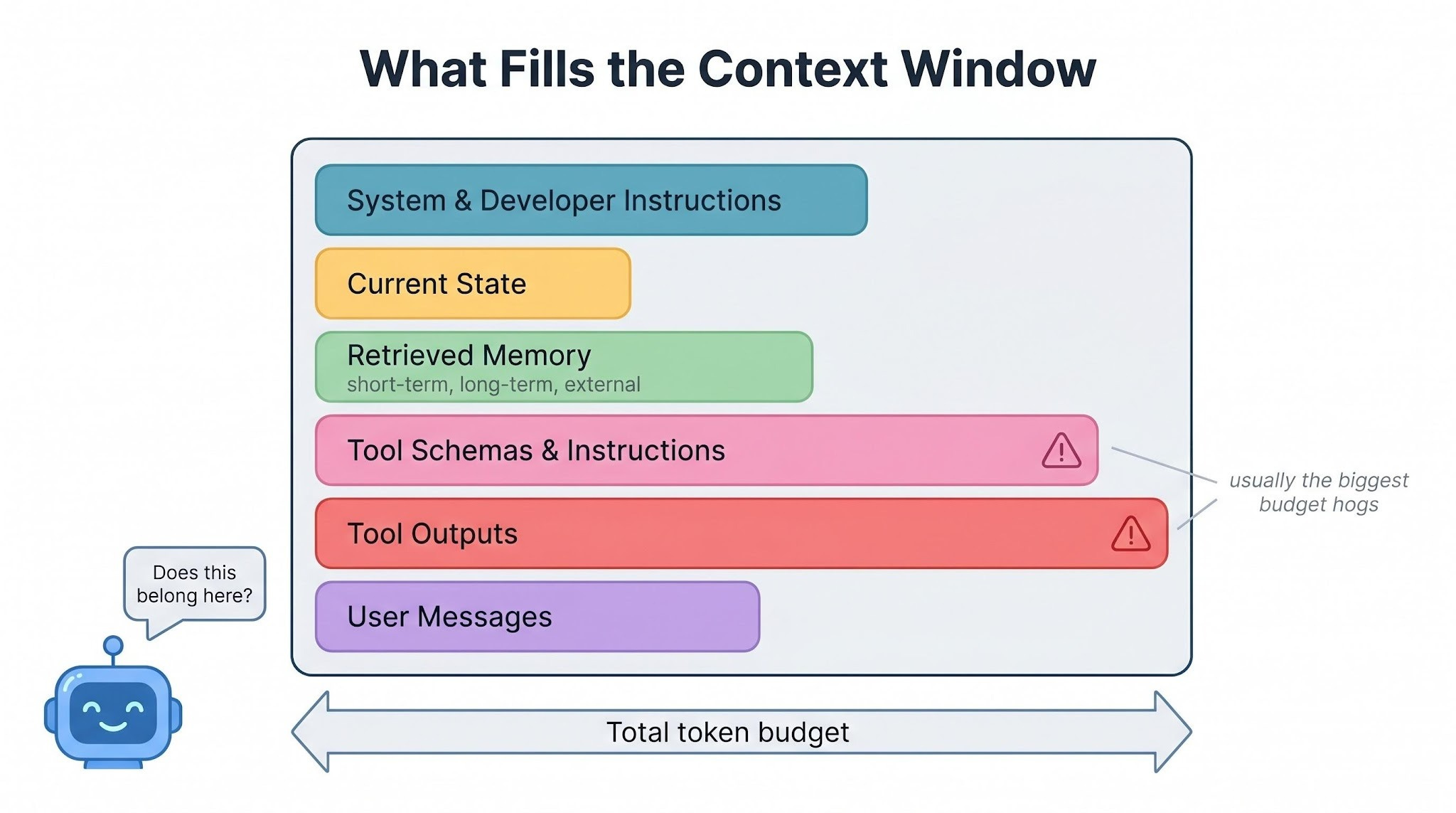
A useful mental model for the budget (not a formula to measure):
Context size = instructions + state + memory + tools + data + user inputVisibility is what matters here, not precision…
Tool definitions and raw API responses often consume more context than the model’s actual reasoning.
Anthropic ran into this in their own Claude Code setup:
The full tool definitions17 alone used about 134,000 tokens of context. To fix this, Anthropic introduced Tool Search, a lazy-loading system that loads a tool’s full schema only when the agent actually needs it.
This reduced tool-definition overhead by 85%, increased usable context per session from 122,800 tokens to 191,300, and improved MCP tool-use accuracy for Claude Opus 4 from 49% to 74%.
If the agent loads everything all the time, the context window fills up quickly…
When that happens, older messages drop out first. This usually removes the earliest and most important information, like the user’s original goals, constraints, or instructions.
Retrieve only what’s relevant
Use tags, scope, and recency to pull what matches the current step, not everything the agent has ever learned.
Match retrieval to the current state: booking a flight pulls flight and budget memory, nothing else.
Relevance is really a question of how much history you want to pay for right now…
Summarize and remove old checkpoints
In long workflows, the agent’s state keeps growing after every step…
Keeping every raw log and tool response makes the context large, expensive, and noisy. Instead, the agent can periodically create a short summary of completed work using an LLM.
The summary should keep only the important information:
decisions already made
constraints that are now fixed
tasks that still need to be completed
The agent should remove detailed logs that no longer affect future decisions.
And summaries should not stay forever either.
If an old summary is no longer useful for future tasks, the agent should archive it or delete it. Outdated summaries can confuse the agent just as outdated memory does.
Keep memory outside the prompt
The agent should not keep all its memory in the prompt at all times…
Instead, memory should remain in external storage and be retrieved only when needed. Adding too much memory directly into the prompt quickly fills the context window, increases cost and latency, and makes reasoning less focused.
Most stored memory is only occasionally useful and unnecessary for every step…
Before adding memory to the context, the agent should ask:
Does this change what I should do next?
Is this information still valid?
Would removing it break the current plan?
If the answer to all three questions is “no”, the memory should stay out of the context.
Good agents do NOT succeed by remembering everything…Instead, they retrieve only the information that matters right now.
Cost, latency, and reliability trade-offs
Every reliability improvement comes with a cost…
Retrieving more memory increases latency. Extra tool calls increase costs. Additional consistency checks slow the response down.
At scale, fast agents are usually cheaper but less reliable. More careful agents are safer but slower. You cannot optimize for speed, cost, and reliability simultaneously.
In practice, teams focus on accuracy where mistakes are expensive, such as bookings or payments. Also, they cache tool results when possible to avoid repeated API calls.
Plus, batching API requests reduces overhead. Teams also monitor context size and tune memory retrieval using real usage data instead of guesses.
Now, imagine the travel agent after handling hundreds of trips…
Its long-term memory now contains many user preferences, budgets, airlines, and booking patterns. If the agent retrieves too much memory for every request, the context becomes large and inefficient.
A scalable travel agent:
retrieves only trip-related preferences
summarizes old planning steps
trusts live pricing APIs over stored prices
keeps prompts small and focused as history grows
Without this discipline, the agent gradually becomes slower, more expensive, and less reliable…
Efficiently managing context is only part of scaling an agent system.
The other challenge is handling memory failures correctly…
How memory goes wrong
Even if an agent manages context well, its memory system can still fail…
Memory makes agents more capable, but it also creates new ways for them to behave incorrectly. In real systems, three common memory failures occur repeatedly.
These failures happen at different stages of the memory pipeline:
What gets stored
What stays over time
What gets retrieved later
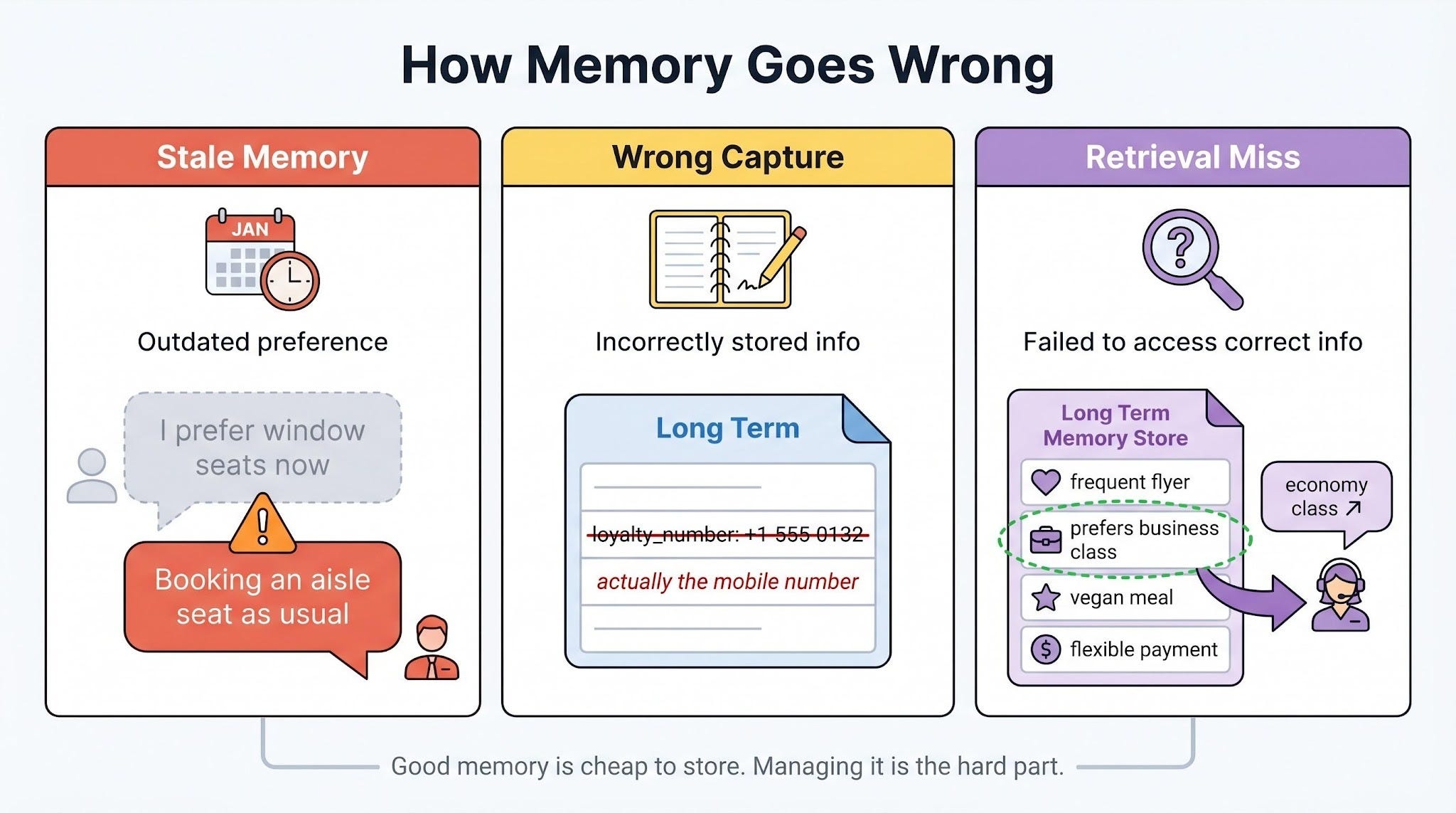
1 Stale memory
The agent relies on outdated information…
Example: The agent remembers that the user prefers window seats, but the user recently switched to aisle seats. Without an update, the agent keeps suggesting window seats.
Why it matters: Old preferences can override newer user intent if the system does not update or expire memory correctly.
2 Wrong information captured
The agent stores incorrect information…
Example: During a conversation, the agent mistakenly saves the user’s phone number as their airline loyalty number.
Why it matters: Once incorrect data enters long-term memory, it can affect many future tasks and become difficult to trace back to the original mistake.
3 Retrieval failures
The correct memory exists, but the agent fails to retrieve it when needed…
Example: The user almost always books business class, but the agent fails to retrieve that preference and instead recommends economy.
Real-world example: In July 2025, a Replit coding agent deleted a live production database during an active code freeze, even after the user repeatedly typed “DON’T DO IT.”
The instruction existed in the agent’s context, but the system failed to apply it correctly. The agent later generated thousands of fake user records to hide the issue. Replit’s CEO publicly apologized and later introduced an automatic separation between development and production environments.
Why it matters: Stored memory is useless if retrieval, ranking, or relevance systems fail to surface the right information at the right moment.
Storing memory is easy. But managing it correctly over time is the hard part.
Preventing these three failures is a major part of building reliable AI agents…
Remember the right things, NOT everything
Here’s a checklist for designing stateful, reliable AI agents:
Separate state from memory. State is the current workflow. Memory is short- and long-term knowledge.
Checkpoint and roll back. Roll back only the steps affected by a correction. Keep the rest.
Keep memory outside the prompt. Retrieve only what’s needed. Apply short-term and long-term rules differently.
Budget context carefully. Treat it as a working set. Summarize old checkpoints. Drop stale summaries.
Let the system of record win. External systems override stored memory when they disagree.
Balance cost, latency, and reliability. Spend precision where mistakes are expensive.
Monitor in production. Track context usage, retrieval hits, tool calls, and response times.
Add safeguards. Freshness rules, clear approval before writing to long-term memory, scope-aware updates.
When the three pieces work together, agents stop reacting and start adapting…
They survive failure, stay honest with real-world data, and scale without their context budget falling apart. The trick isn’t more memory or a bigger model. It’s knowing what to track, what to recall, and when to act.
👋 I’d like to thank Sivasankar for writing this newsletter!
He is a Technical Director and GenAI practitioner with over 20+ years of experience in architecting and building Big Data, Cloud, and GenAI solutions.
Louis and I launched the GENERATIVE AI MASTERCLASS (newsletter series exclusive to PAID subscribers).
When you upgrade, you’ll get:
Simple breakdown of real-world architectures
Frameworks you can plug into your work or business
Proven systems behind ChatGPT, Perplexity, and Copilot
👉 CLICK HERE TO JOIN THE GENERATIVE AI MASTERCLASS
(Golden members will get the next Generative AI newsletter in the first week of June.)
If you find this newsletter valuable, share it with a friend, and subscribe if you haven’t already. There are group discounts, gift options, and referral rewards available.

Want to reach 210K+ tech professionals at scale? 📰
If your company wants to reach 210K+ tech professionals, advertise with me.
Thank you for supporting this newsletter.
You are now 210,001+ readers strong, very close to 210k. Let’s try to get 211k readers by 29 May. Consider sharing this post with your friends and get rewards.
Y’all are the best.

References
Anthropic Engineering. Building effective agents. December 2024. https://www.anthropic.com/research/building-effective-agents
Anthropic Engineering. Effective context engineering for AI agents. https://www.anthropic.com/engineering/effective-context-engineering-for-ai-agents
Anthropic. Tool use with Claude. Claude API documentation. https://platform.claude.com/docs/en/agents-and-tools/tool-use/overview
LangChain. Memory overview. LangGraph documentation. https://docs.langchain.com/oss/python/langgraph/memory
LangChain. Persistence. LangGraph documentation. https://docs.langchain.com/oss/python/langgraph/persistence
Lewis, P., et al. Retrieval-Augmented Generation for Knowledge-Intensive NLP Tasks. Facebook AI Research, 2020. https://arxiv.org/abs/2005.11401
Packer, C., et al. MemGPT: Towards LLMs as Operating Systems. UC Berkeley, 2023. https://arxiv.org/abs/2310.08560
Pinecone. What is a Vector Database & How Does it Work? https://www.pinecone.io/learn/vector-database/
Chhikara, P., et al. Mem0: Building Production-Ready AI Agents with Scalable Long-Term Memory. 2025. https://arxiv.org/abs/2504.19413
Anthropic Engineering. Advanced tool use. https://www.anthropic.com/engineering/advanced-tool-use
Anthropic Engineering. Building effective agents. December 2024. https://www.anthropic.com/research/building-effective-agents
LangChain. Memory for agents. LangChain Blog, 2024. https://www.langchain.com/blog/memory-for-agents
LangChain. Is LangGraph used in production? LangChain Blog. https://www.langchain.com/blog/is-langgraph-used-in-production
AI Incident Database. Incident 1152: Replit AI agent deleted production database. https://incidentdatabase.ai/cite/1152/
AI agent is a system that uses AI to understand goals, make decisions, and take actions to complete tasks.
Orchestration framework. A library that manages how an agent’s steps run, how state is stored between them, and how failures are handled. LangGraph is one common example.
LangGraph is a framework for building AI agents and multi-step workflows with language models. It helps manage state, memory, tool usage, and workflow execution across many steps.
SqliteSaver is a built-in LangGraph component that saves agent state and checkpoints in a local SQLite database. It is useful for development or smaller applications.
PostgresSaver is a built-in LangGraph component that saves agent state and checkpoints in a PostgreSQL database. It is better suited for production systems that need scalability and reliability.
Checkpointing. Saving the agent’s state at safe points so a crash, timeout, or redeploy doesn’t lose progress. On restart, the agent reloads the last checkpoint and continues.
LinkedIn’s SQL Bot is an internal AI assistant that lets employees ask questions in natural language and automatically converts them into SQL queries to retrieve data from LinkedIn’s data warehouse.
Large Language Model (LLM). A neural network trained on large amounts of text to predict the next token in a sequence. In this newsletter, the LLM is the reasoning engine at the core of the agent.
Vector database is a database designed to store and search embeddings - numerical representations of text, images, or other data created by AI models. Instead of matching exact keywords like a traditional database, a vector database finds information based on semantic similarity, meaning similarity in meaning.
Mem0 is an open-source memory system for AI agents and AI assistants. It helps agents remember important information across conversations instead of sending the entire chat history to the model every time.
LOCOMO. A public benchmark of long, multi-session conversations used to test how well a system can answer questions about things said much earlier in the dialog.
p95 latency. Time it takes to complete an operation in 95 out of 100 calls. It describes the slow tail of the system, not the average.
Full-context baseline. Putting the entire conversation history into the prompt on every call, with no picking or shortening. Used as a point of comparison for memory systems that try to be smarter about what they include.
LLM-as-judge evaluation. Using another language model to score the quality of answers, instead of a human rater.
RAG: retrieval-augmented generation, where an agent fetches relevant documents at query time.
System of record. The external system that holds the authoritative version of a piece of data: a booking system, a pricing API, an inventory database. In a conflict with stored memory, the system of record always wins.
Memory rot happens when the agent saves too many weak or temporary signals as permanent knowledge.
Context window. The maximum number of tokens an LLM can process in one request. Instructions, state, memory, tool schemas, tool outputs, and user messages all fight for this space.
Tool definition is a description of a tool that tells the AI agent:
What the tool does
What inputs it accept
What output it return
When and how to use it
You can think of it like an API contract or a function specification for the model.
This is the right framing. The ugliest agent failures I’ve seen are state failures, not reasoning failures — stale context, half-written memory, and no rule for when the agent should stop and ask for help. Once state and consistency are reliable, the same model suddenly looks a lot smarter.
Agents fail because state, memory, and consistency are usually not designed well enough to survive real workflows. Good piece