


Share this post & I'll send you some rewards for the referrals.
If you ask questions about your company’s policies, a contract you have open in another tab, or anything outside training data, an AI personal chat assistant will either say “I don’t know” or invent something that sounds right.
The most direct fix is to include the relevant documents in the prompt.
But this only works if the documents fit within the context window, and most real knowledge bases do not. Company policies, contracts, and internal wikis are lengthy, and loading them in full for every query can be impractical because of latency, cost, and context window limitations.
Retrieval-Augmented Generation (RAG) is a more practical approach.
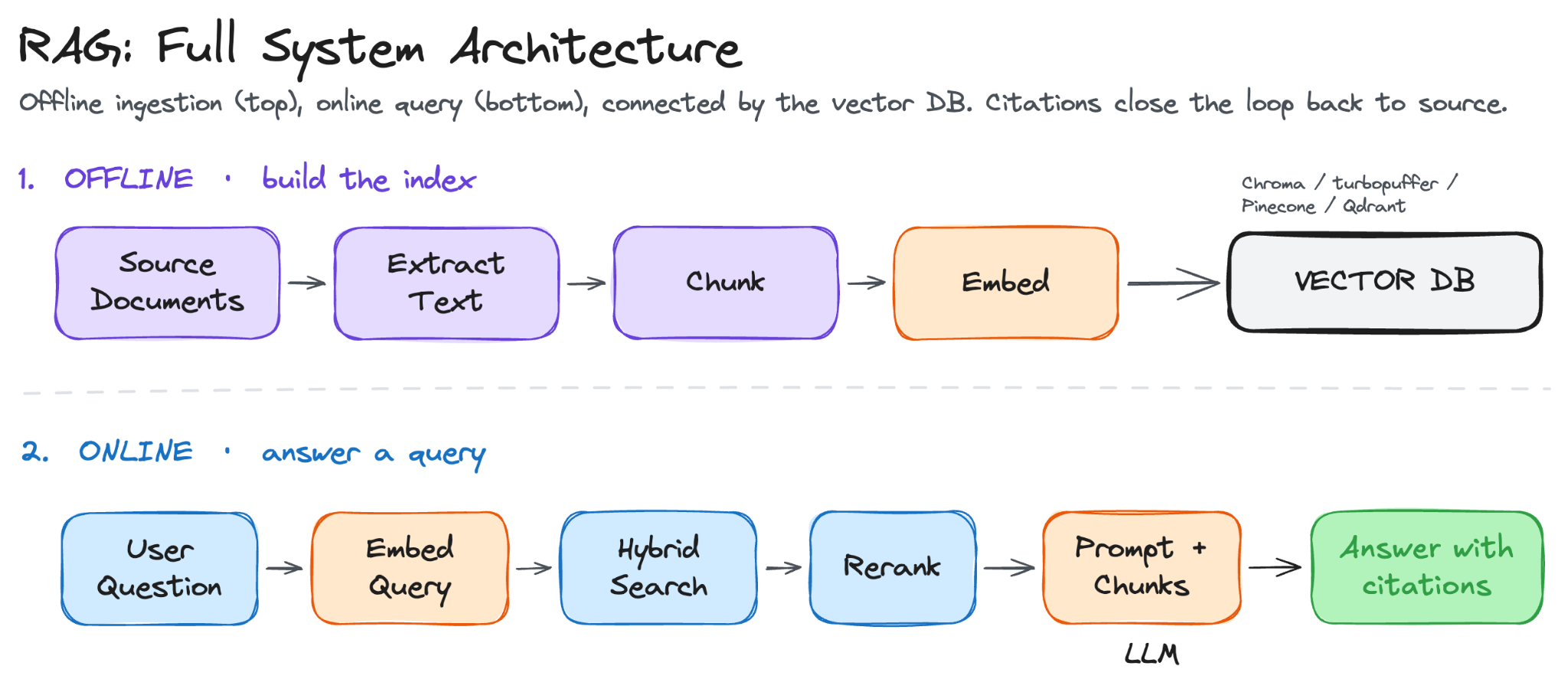
Instead of loading the entire knowledge base into every prompt, the system retrieves only the most relevant passages at query time, includes them alongside the question, and the model generates a cited answer from that material.
It is the architecture behind Perplexity, ChatGPT with Search, GitHub Copilot’s codebase search, and most internal AI tools inside large companies.
Onward.
Code review for AI-native engineering teams — at 1M+ LOC (Partner)

Pull request review was built for human authors.
AI-written code fails differently, and most reviewer tools never caught up.
AgentField just open-sourced a multi-agent code reviewer built for AI-native teams:
Runs on open or closed models — Kimi, DeepSeek, Claude — so it scales to whatever a team can afford.
Drops into GitHub Actions in minutes.
Built to make deep code review economically viable at scale.
The architecture rationale — the four jobs of code review, and which three became load-bearing once AI took the first — is in AgentField’s latest post.
I want to reintroduce Louis-François Bouchard as the author of this newsletter.

He’s a best-selling author (Building LLMs for Production), the co-founder of Towards AI, and the creator of the YouTube Channel, What’s AI, where he helps people understand AI and learn how to apply it in the real world.
Through his development work with clients and his content, teaching, and AI training programs on the Towards AI Academy, Louis focuses on making AI practical for builders, engineers, and curious learners alike.
At Towards AI, he and his team train AI engineers through courses built for every stage, from beginner to advanced. That educational mission and the real-world experience building for his clients are exactly why I wanted him in this newsletter series.
Here’s what’s inside this newsletter:
The full RAG architecture. How a question becomes an embedding, how the system finds the right chunks across a large knowledge base, and how the model generates an answer grounded in retrieved sources.
Document ingestion and chunking. What makes a chunk useful, three strategies for splitting documents, and the metadata that makes citations possible.
Retrieval and generation in production. Hybrid search, reranking, query transformation, system prompts, citation strategies, and how to make the system decline questions it cannot answer rather than guess.
Failure modes and evaluation. The three ways RAG breaks in practice, the four RAGAS metrics that surface them, and how to build a test set that catches regressions.
Production concerns. Caching, access control, monitoring, and cost at scale.
A practical eight-step build. A folder of PDFs turned into a working Q&A system with hybrid retrieval, reranking, structured citations, and a quality scorecard.
Why Build Your Own Knowledge Q&A System?
Perplexity, ChatGPT with browsing, and Gemini with Search already answer questions with cited sources.
They are capable and improving fast.
But the limitation is that they are built for public knowledge. The moment your questions involve internal documents, regulated data, or a knowledge base within your infrastructure, off-the-shelf tools hit hard constraints.
Here is where they fall short:
Off-the-shelf tools cannot access regulated data. You can upload personal files into a ChatGPT project and get useful answers. You cannot do that with customer records, contracts, medical files, or anything covered by HIPAA, GDPR, or SOC 2. That data has to stay inside your own perimeter, behind your own access controls, with your own audit trail.
Your knowledge is not in a folder you can drag and drop. It lives in Confluence, in a Drive folder with thousands of contracts, in a support tool, or in an internal wiki. Off-the-shelf assistants can connect to some of these, but the data flows out of your infrastructure and into theirs, and is processed under their privacy policy. A system built on your infrastructure reads directly from those sources, using your auth, and ensures data never leaves your perimeter.
Retrieval happens at query time, so answers stay current. A model’s training data has a cutoff, but your documents keep changing. Because RAG retrieves at query time, a document updated after the model was trained is still used to answer the next question, with no retraining required.
You control what the system knows. When a document is added to the knowledge base, the system uses it for the next query. When it is removed, it is no longer used. When it is updated, the next answer reflects the new version. This control is what lets you curate, version, and audit the knowledge base, and it is what regulated industries require.
Focused retrieval is more accurate and cheaper. A model answering a question from five selected passages is working with a much smaller, more relevant input than one drawing on its full training data. More relevant context produces more accurate answers, and shorter prompts cost less per call.
These five constraints all point to the same architecture.
The rest of this newsletter builds on it…
Part 1: Turning Documents into Searchable Knowledge
A RAG system has two stages:
First runs once, or whenever new documents are added: it processes your documents, converts them into vector representations, and stores them in a database that can be searched by meaning.
Second runs on every user query. This part focuses on the first: ingestion, chunking, embedding, and storage.
Document Ingestion and Preprocessing
Before anything can be retrieved, your documents need to be readable by the system.
That sounds straightforward, but documents come in many formats: PDFs, HTML pages, Word files, Markdown exports from Notion, Confluence pages, and scanned forms. Each format stores text differently and needs its own parser.
A poor extraction at this stage degrades everything downstream, so it is worth getting right.
There are five things to handle during ingestion:
Text extraction. As text is extracted, the structural information alongside it is preserved: headings, page numbers, and table boundaries. This is what allows the system to later cite not just a document, but the specific section and page a passage came from.
Tables, code, and images. These elements break when treated as regular text. A table flattened into a paragraph loses its row-column relationships. Code blocks lose meaning when indentation and line breaks are stripped. Images contain no text at all unless a caption is present or OCR is run on them. Each is typically handled through a separate extraction path.
Scanned PDFs. A digital PDF stores text as text. A scanned PDF stores it as an image, which a regular parser cannot read. Optical Character Recognition (OCR) is used for converting scanned documents into readable text. But OCR takes several seconds per page, which adds time to the ingestion stage. Tesseract is the standard library for clean scans. Vision-language models work better on low-quality images and complex layouts.
Duplicates. When the same document exists in multiple folders, it can be indexed multiple times, which causes retrieval to return identical chunks. A common approach is to hash each document’s content and skip any document whose hash has already been indexed. For near-duplicates such as different versions of the same contract, fuzzy text matching is used instead.
Boilerplate. Headers, footers, navigation menus, and copyright notices add noise without adding information. These are typically identified by how frequently they repeat across pages and stripped before the text is passed downstream.
Clean text is necessary but not sufficient.
Before it can be embedded and searched, it has to be cut into pieces small enough for the embedding model to represent accurately.
Chunking
A long document cannot be embedded as a single vector.
An embedding that represents 50 pages of mixed content does not align well with a specific question. Instead, each document is split into smaller pieces called chunks, and each chunk is embedded individually.
Different chunk sizes have different tradeoffs…
Larger chunks carry more context but produce less specific embeddings. Smaller chunks produce more specific embeddings but may lack the surrounding context needed to fully answer a question. A well-formed chunk is self-contained, covers a single topic, and includes its section heading and document title.
Here are three common strategies for splitting documents into chunks:
Fixed-size chunking splits the text into chunks of N tokens, with a fixed overlap, usually 50 to 100 tokens. The overlap ensures that a sentence cut at a chunk boundary still appears in full in one of the two adjacent chunks. It is the simplest approach and works well on uniform text such as articles and documentation.
Recursive chunking splits on paragraph boundaries first, then sentences, then words, going to a finer level only when a chunk is still too large. It follows the structure already present in the document rather than imposing an arbitrary boundary. Most popular RAG libraries, including LangChain and LlamaIndex, use this as their default.
Semantic chunking splits a document into sentences, then forms small groups of consecutive sentences and creates an embedding for each group. The embedding of each group is compared with that of the previous group, and a chunk boundary is placed where the difference between the two embeddings is large. The assumption is that a large change in the embedding indicates a change in topic. Semantic chunking performs better than the other methods when topics shift within paragraphs rather than across them, but it requires an embedding call for each sentence group at ingestion time, making it the most expensive of the three.
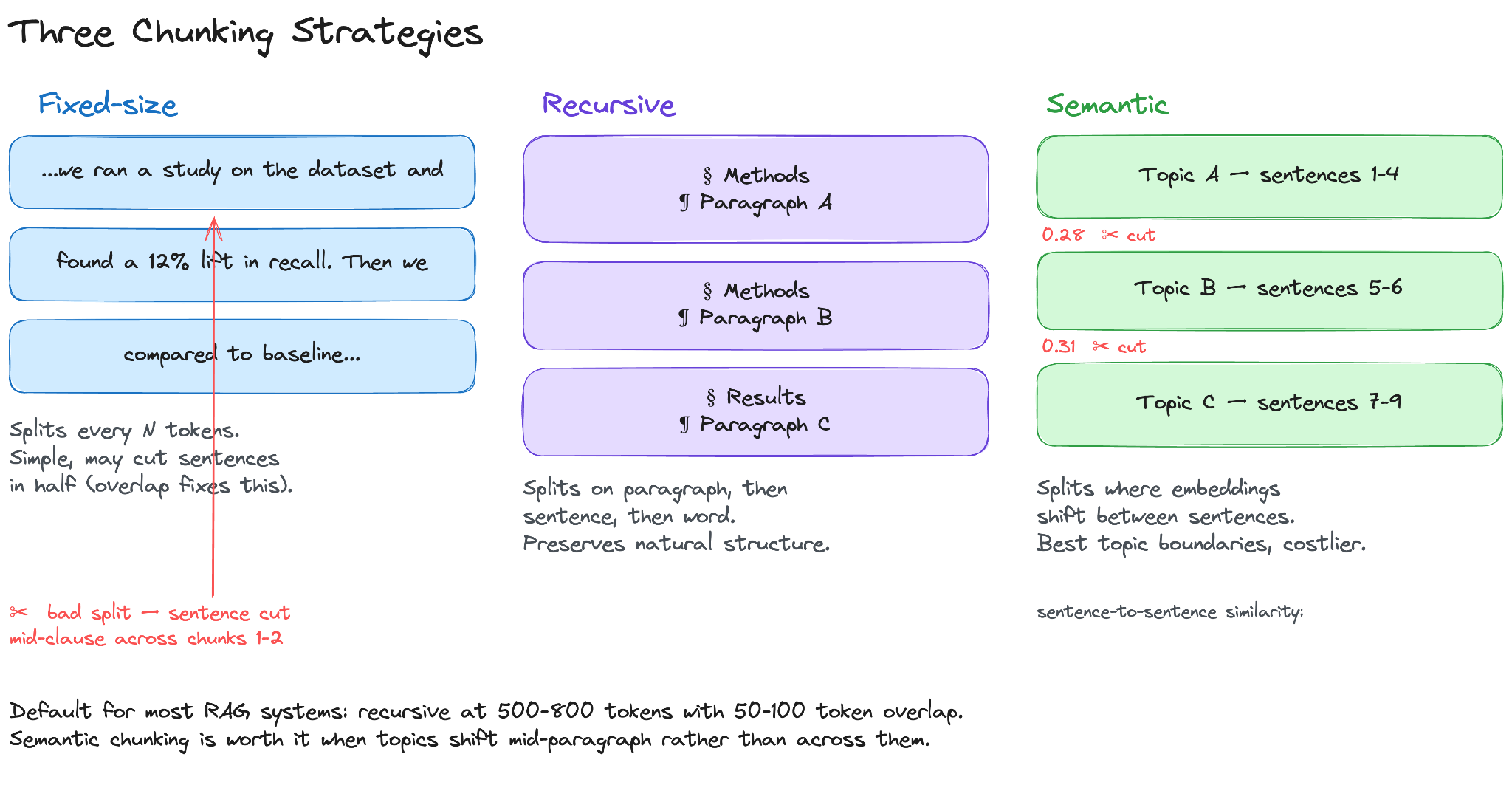
A common starting point is recursive chunking at 500 to 800 tokens with a 50- to 100-token overlap.
Each chunk is tagged with metadata: source document, page number, section heading, and last-modified date. This metadata is what the system uses to produce citations later.
The chunks are now ready to be searched. Searching by exact word match would miss most relevant results, since users rarely use the same words that documents do.
Each chunk is therefore converted into a numeric vector that captures its meaning…
Embeddings
These vectors are called embeddings: fixed-length vectors of numbers that represent the meaning of a piece of text.
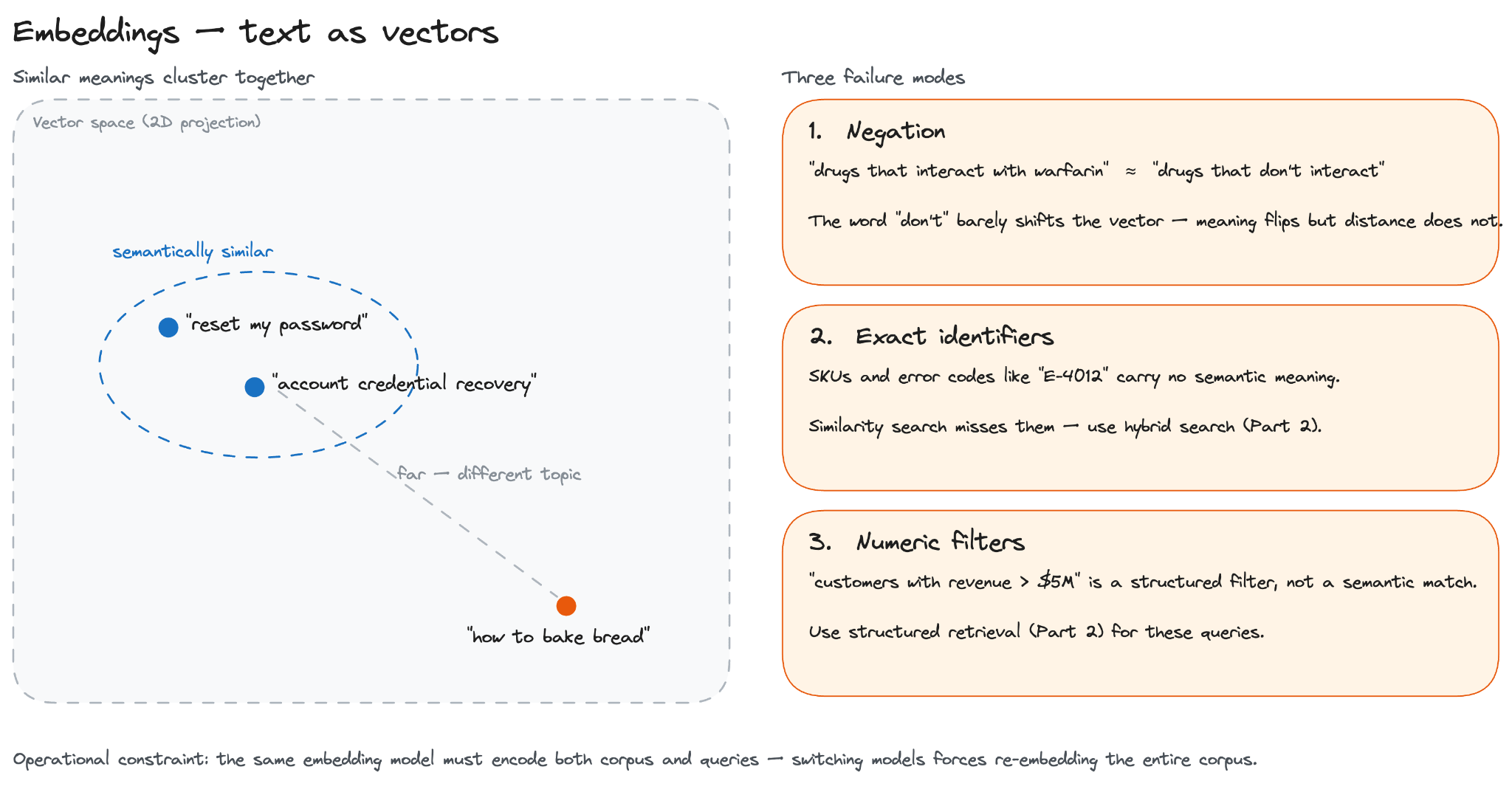
Two chunks with similar meaning produce vectors that are close to each other; two chunks on different topics produce vectors that are far apart.
This is what allows a query like “reset my password” to retrieve a document titled “account credential recovery,” even though the two share no words in common.
Some commonly used embedding models in 2026 include OpenAI’s text-embedding-3-large, Cohere’s embed-v4, and open-source options such as bge-large and e5-mistral.
The typical starting point is an API model, with a move to self-hosted open-source if data residency, privacy, or cost becomes a constraint. For specialized domains such as legal, biomedical, or financial text, a domain-specific model generally outperforms a general-purpose one.
The MTEB benchmark is a useful reference for comparing models.
Embeddings have three limitations worth understanding before choosing a retrieval strategy:
Negation. “Drugs that don’t interact with warfarin” and “drugs that interact with warfarin” produce nearly identical embeddings. The word “don’t” has very little effect on the resulting vector, even though it inverts the meaning.
Exact identifiers. Order numbers, error codes, and SKUs such as E-4012 carry no semantic meaning, so similarity searches cannot reliably match them. Hybrid search (covered in Part 2) is used in these cases.
Numeric filters. A query like “customers with revenue above $5M” is a structured filter, not a similarity match. Structured retrieval (covered in Part 2) is used for these queries.
Another operational constraint is that the model used to embed the chunks must also be used to embed queries during retrieval.
The two share a single vector space, and switching models means re-embedding the entire corpus.
The choice of embedding model is effectively a long-term commitment…
Vector Databases
Once the chunks are embedded, they need to be stored in a system that supports fast similarity search.
A vector database stores each chunk’s embedding alongside its metadata and returns the closest matches to a query vector. The metadata, source document, page number, section heading, and last-modified date are returned with each result, so the system can point the user back to the source.
The basic operation is similarity search: given a query vector, return the K vectors in the database that are closest to it.
Closeness is usually measured using cosine similarity, which compares two vectors based on the angle between them.
A direct implementation of this compares the query vector against every vector in the database. This works for small databases of a few thousand vectors, but the cost grows linearly with the database size and becomes impractical at scales of millions of vectors.
Production systems use approximate nearest neighbor (ANN) search, a family of algorithms that returns close-to-exact results at a fraction of the cost. ANN trades a small amount of recall for a large reduction in latency, often by orders of magnitude, with the exact tradeoff depending on the dataset, the index, and the recall target.
Hierarchical Navigable Small World (HNSW) and Inverted File (IVF) are two of the most commonly used ANN index types. Some managed vector databases abstract this choice entirely, while others let you pick the index and tune its parameters.
Here are three deployment options, each suited to different constraints:
Managed services such as Pinecone, Turbopuffer, and Weaviate Cloud. The service runs the infrastructure and exposes an API. This is appropriate when the team does not want to operate the database directly.
Self-hosted open-source options such as Weaviate, Qdrant, and Milvus. These run on your own infrastructure and offer full control over configuration, scaling, and metadata filtering.
Database extensions such as pgvector for Postgres. These add vector search to an existing relational database. A practical option when the stack already runs Postgres, and the corpus stays under approximately one million chunks.
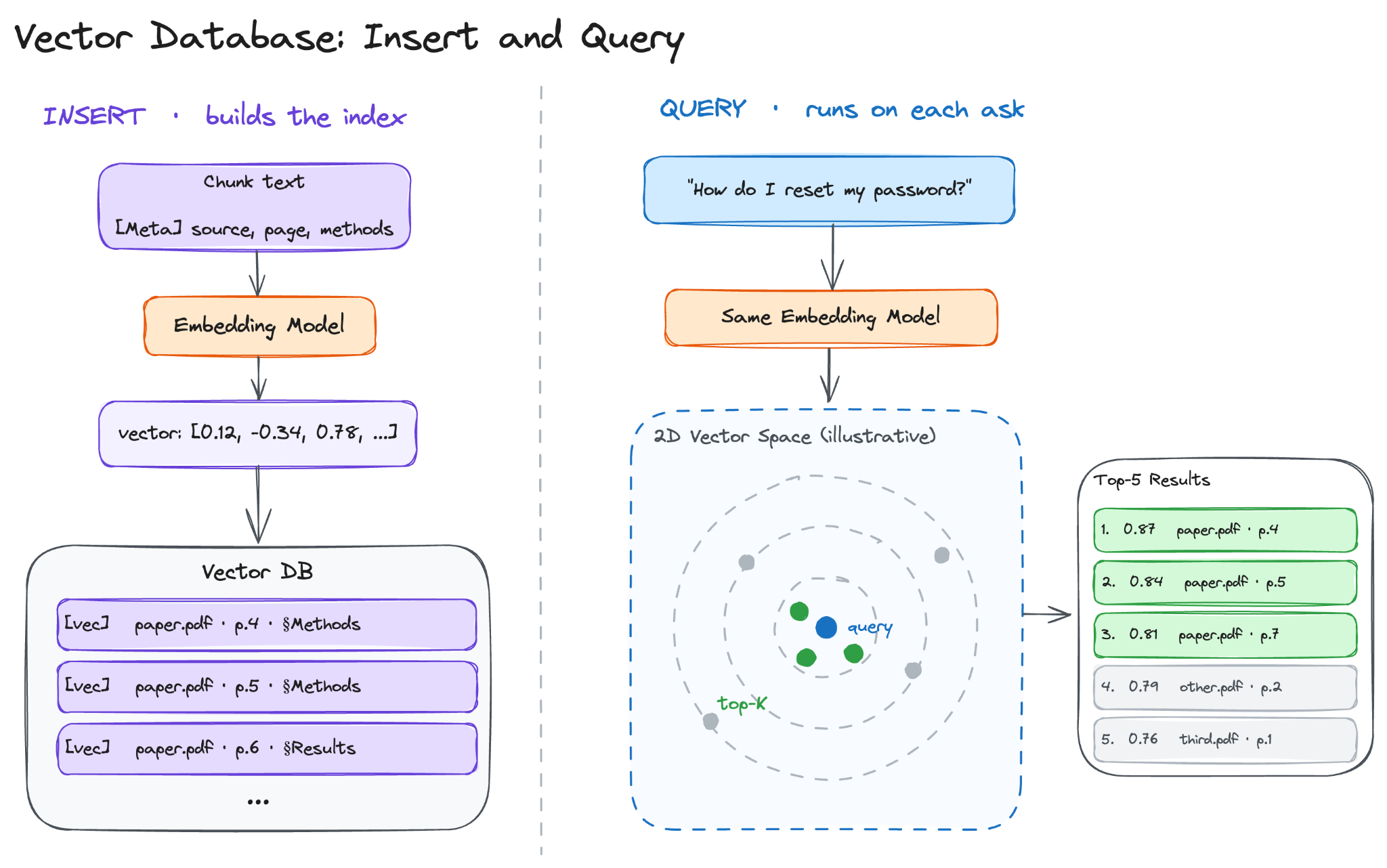
With the index built and the chunks stored, the offline pipeline is complete. The next question is how the system uses it when a user actually asks a question.
Reminder: this is a teaser of the subscriber-only newsletter series, exclusive to my golden members.

When you upgrade, you’ll get:
Simple breakdown of real-world architectures
Frameworks you can plug into your work or business
Proven systems behind ChatGPT, Perplexity, and Copilot
Part 2: Finding the Right Information
This part covers how the system returns the chunks that contain the answer…
Basic Retrieval
The default retrieval approach has three steps: embed the question using the same model used to embed the chunks, run a similarity search against the vector database, and return the top K results.
K is a tradeoff parameter.
Too small, and the system misses chunks that contain the answer. Too large, and the prompt fills with irrelevant material, which reduces answer quality and increases cost. A reasonable starting value is between 5 and 10.
The right value for your system is determined over time by testing on real queries. It depends on the expected answer length and how much room the LLM’s context window leaves for the retrieved chunks.
Basic retrieval works well on direct questions over a uniform corpus, but it has three common failure modes:
Vocabulary gap. User uses one word, and the document uses another. For example, the user types “downtime” and the document uses “service interruption.” Acronyms, internal jargon, and exact identifiers often fall outside the scope of what a general-purpose embedding model has been trained on.
Multi-hop questions. Answer is spread across many documents that are not semantically similar. For example, the question “what did the CFO say about the product launch?” requires information from both an earnings transcript and a product roadmap. The two documents do not embed near each other in vector space, so similarity search alone is unlikely to retrieve both.
Ambiguous queries. Query has more than one valid interpretation. For example, “tell me about Apple” could refer to the fruit or the company. Without disambiguation, similarity search returns results for one interpretation without indicating that another was possible.
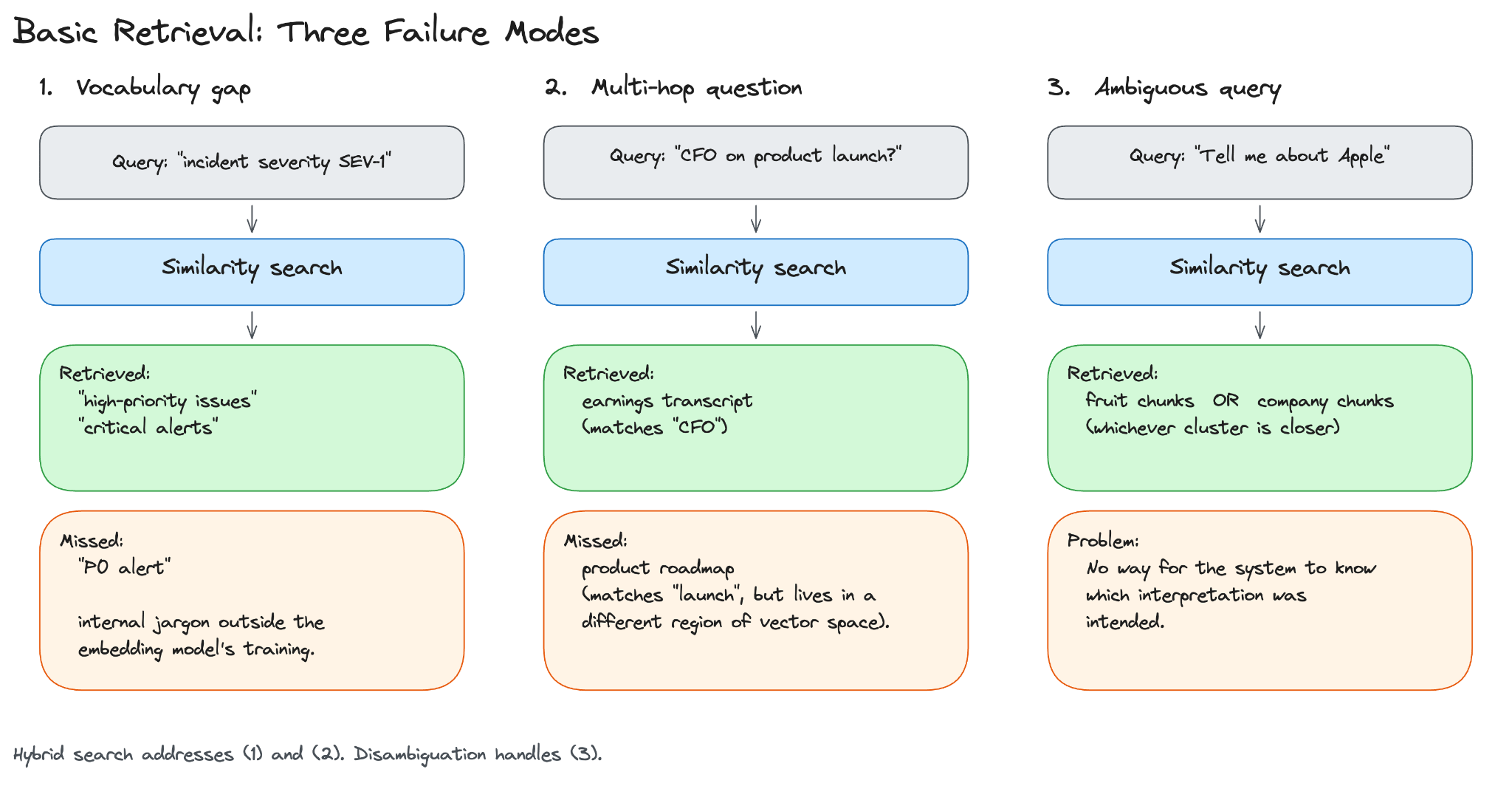
The vocabulary gap and the exact-identifier problem both come from the same source: similarity search alone cannot match words it does not understand semantically. Hybrid search adds a second retrieval path that can.
The third failure mode, ambiguous queries, is handled by a different technique covered later in this newsletter…
Let’s keep going!