
Design a personal AI chat assistant
#144: Part 2 - Generative AI Masterclass


Share this post & I'll send you some rewards for the referrals.
ChatGPT, Claude, and Gemini handle general-purpose tasks and one-off conversations well…
The moment your assistant is customer-facing, the requirements change:
Your users need an assistant that knows your product, your policies, and their history with you. That knowledge lives in your systems, NOT in a model’s training data. You could try to inject it at runtime, but proprietary data comes with real constraints: it is often too large to fit in a context window, too sensitive to send to a third-party API, and too dynamic to stay current in a static prompt.
Beyond data, you cannot fully configure its behavior; you cannot integrate it past a browser tab, and costs scale with every conversation…
Here is what changes when you build your own:
Privacy and data control. When you build your own assistant, conversations stay on your infrastructure. You decide what gets logged, how long it gets stored, and when it gets deleted. For healthcare, legal, finance, and enterprise use cases, this is a compliance requirement, not a nice-to-have.
Full control over behavior. You own the system prompt, persona, and the guardrails. You can enforce a specific tone, restrict responses to your product domain, swap the underlying model, or A/B test different configurations. With an off-the-shelf product, you get what they ship.
Cost at scale. You can implement prompt caching, model routing (a cheap model for simple questions, an expensive one for hard ones), and context management strategies that dramatically cut costs. With thousands of conversations per day, the savings are significant.
Product integration. Your assistant lives inside your product, not in a separate tab. It shares your auth system, your UI, and your user context. That level of integration is not possible when you are wrapping someone else’s chat interface.
Security. You control the full request path: what goes into the model, what comes out, and what filters run in between. You implement your own prompt injection defenses, output guardrails, and content policies.
Off-the-shelf tools are great for personal use and internal prototyping. Building your own is for when the assistant is the product or a core feature.
Enterprise auth from day one. No upgrade required. 🚀 (Partner)

Enterprise auth is intimidating without a doubt - SSO, SCIM, etc.
You may feel these features are next year’s problem because the price jump to unlock basic SAML or OIDC connections is just too brutal for an early-stage roadmap.
With Auth0, ship your first Enterprise Connection and SCIM setup for $0 on their free tier. If you’re scaling AI Agents, security stack is built for production:
Token Vault: Securely connect 3rd-party tokens (Slack, GitHub) to stop hard-coding API keys.
FGA for RAG: Ensure LLMs respect fine-grained permissions to prevent data leaks and also control access to specific AI tools/models.
Async Authorization: Use backchannel authentication for human-in-the-loop approvals on critical agent actions.
User Authentication: Securely identify users to unlock chat history, order tracking, and personalized settings within your AI agents.
And stop worrying about DIY-ing auth.
(Thanks to Auth0 for partnering on this post.)
I want to reintroduce Louis-François Bouchard as the author of this newsletter.

He’s a best-selling author (Building LLMs for Production), the co-founder of Towards AI, and the creator of the YouTube Channel, What’s AI, where he helps people understand AI and learn how to apply it in the real world. Through his development work with clients and his content, teaching, and AI training programs on the Towards AI Academy, Louis focuses on making AI practical for builders, engineers, and curious learners alike.
At Towards AI, he and his team train AI engineers through courses built for every stage, from beginner to advanced. That educational mission and the real-world experience building for his clients are exactly why I wanted him in this newsletter series.
Inside this newsletter, you’ll get:
What happens when you send a message. Tokenization, prefill, and decode phases, KV-cache, and why longer conversations get slower and more expensive.
How the model got here. Pretraining, post-training (SFT and RLHF), and scaling laws, and what each one means for the assistant you are building.
Output controls. Temperature, top-p, top-k, why hallucination happens, and which settings to use for which task.
Context engineering. System prompts, few-shot, chain-of-thought, structured outputs, context window management, and persistent memory across sessions.
Cost and how to know it works. Worked token math across model tiers, prompt caching, model routing, golden test sets, and LLM-as-Judge evaluation.
A practical eight-step build. From a single API call to a production-minded assistant with streaming, system prompts, JSON output, multi-turn compaction, prompt injection defense, and persistent memory.
What We Are Building
We’re building a ChatGPT-style conversational assistant that you fully control: your own system prompt, your own personality, your own rules.
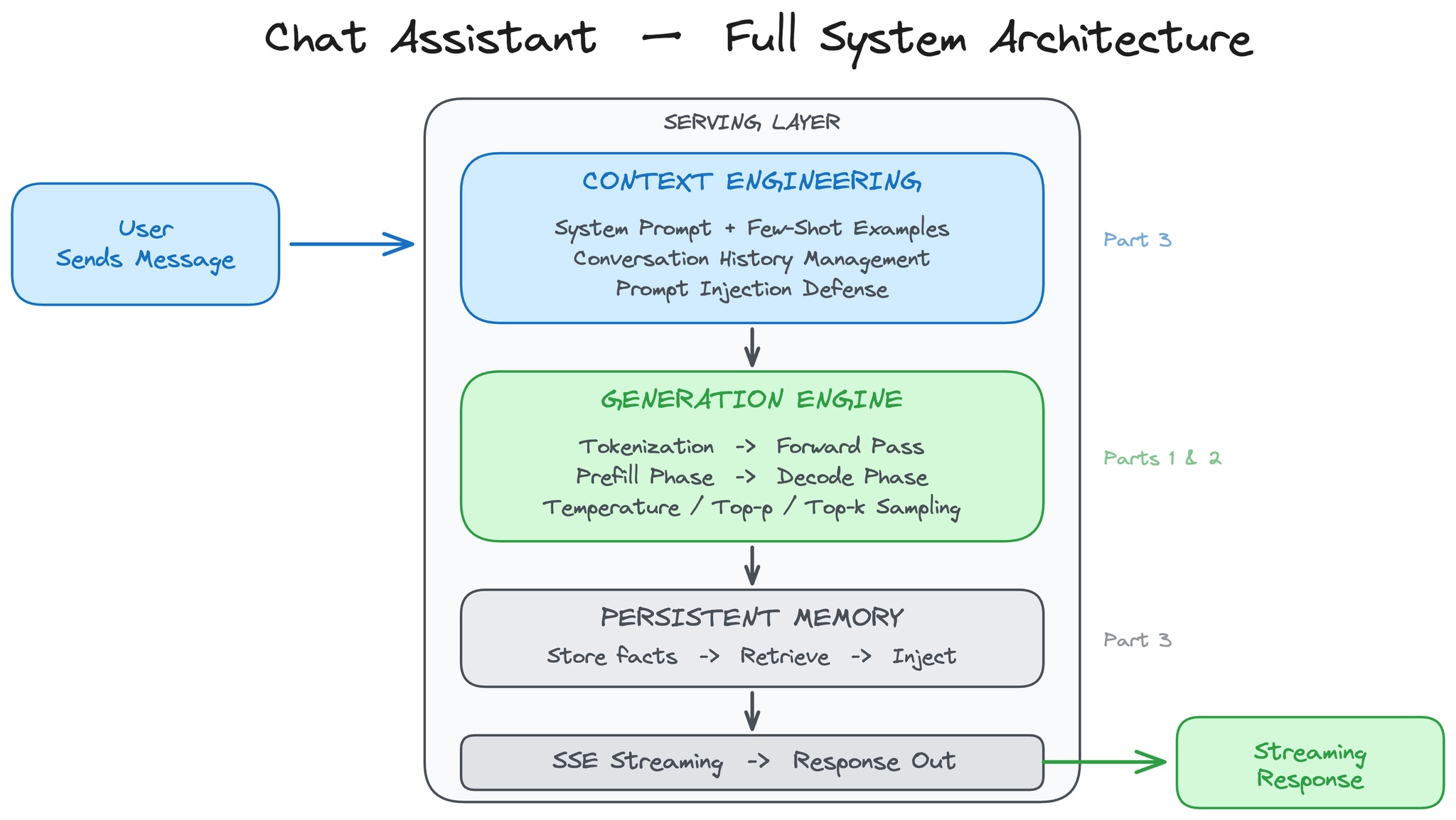
Here are the requirements:
Multi-turn conversation with context preserved across turns.
Streaming responses, where words appear as they’re generated.
Configurable behavior, creative for brainstorming, precise for data extraction.
Resistant to prompt injection attacks.
Cost-effective at scale, with thousands of conversations per day.
One extra feature covered later: persistent memory across sessions, so the assistant remembers user preferences between conversations.
What this system does not do: it does NOT retrieve external documents, it does NOT have domain expertise beyond its training data, and it does NOT take actions or call tools. It’s purely conversational.
We use a model API (OpenAI, Anthropic, or similar) for this build.
The provider handles GPUs, scaling, and inference optimization, the right starting point for most teams. When you outgrow APIs, you move to self-hosted open-source models served with vLLM, llama.cpp, or SGLang.
This newsletter is organized around 4 core design decisions:
What happens when you send a message?
How do you control what the model says?
How do you engineer the context for every request?
What does it cost, and how do you know it works?
(Then we build the whole thing from scratch in Part 5.)
Let’s start with what happens under the hood when you send a message…
Part 1: What Happens When You Send a Message
When you call a model API, a lot happens between your request and the first token appearing on screen.
Even if you never need to use a GPU, this helps you understand the latency, cost, and trade-offs…
From Text to Tokens
Before the model can process your message, it needs to convert it from text into numbers.
Models do not read words. They work with tokens, small chunks of text mapped to numerical IDs. A token might be a whole word (“the”), part of a word (“un”, “believ”, “able”), or a single character.
The process of splitting text into tokens is called tokenization.
As we covered in Part 1, there are different ways to split text into tokens:
You could split by individual characters, but then the model has to process very long sequences just to read a short sentence. You could split by whole words, but then the vocabulary becomes enormous, and the model cannot handle any word it has not seen before.
Subword tokenization is the sweet spot, and virtually all modern models use it.
The most common algorithm is Byte Pair Encoding (BPE). BPE starts with individual characters and iteratively merges the most frequent pairs into a single token. Common words like “the” or “and” become single tokens. Rare or long words get split into meaningful pieces. The word “unbelievable” might be broken into three tokens: “un” + “believ” + “able.” This keeps the vocabulary manageable, typically 30,000 to 100,000 tokens. And if the model encounters a word it has never seen before, it can still process it by breaking it into known subword pieces.
This is why language models struggle with certain tasks that seem trivial to humans…
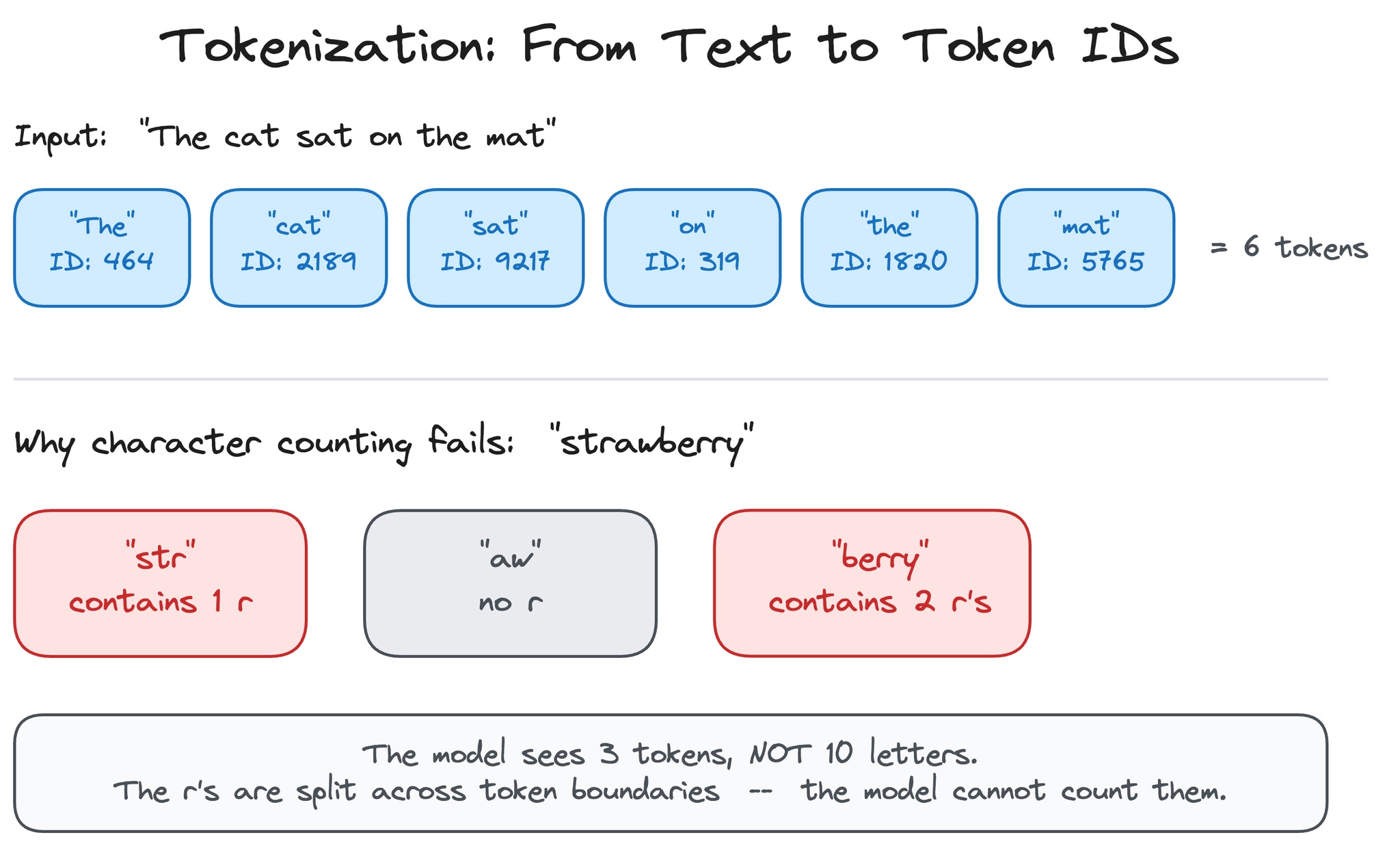
Ask “How many r’s are in strawberry?” and the model might get it wrong because it never sees the individual letters. The word “strawberry” might be tokenized as “str” + “aw” + “berry,” so the model literally cannot count the r’s because they are split across token boundaries. Reversing a word, counting specific characters, and other character-level operations are all hard for the same reason: the model operates on tokens, not letters.
Tokenization has direct practical consequences for building a chat assistant.
Token count does not equal word count: a typical English sentence of 10 words might be 13 to 15 tokens. Code is usually more token-dense than prose. Non-English languages often require more tokens per word because BPE vocabularies are built primarily from English text. Since API pricing, context window limits, and latency all scale with token count, understanding this conversion is essential for cost estimation and context management, both of which we cover later in this newsletter.
Reminder: this is a teaser of the subscriber-only newsletter series, exclusive to my golden members.

When you upgrade, you’ll get:
Simple breakdown of real-world architectures
Frameworks you can plug into your work or business
Proven systems behind ChatGPT, Perplexity, and Copilot
How the Model Got Here: From Pretraining to Chat
Before we look at what happens on each request, it helps to understand what happened before you ever sent a message…
The model you are calling went through a multi-stage pipeline to become a chat assistant, and each stage has direct consequences for the product you are building.
Pretraining is where the model learns language.
As covered in Part 1, the model is trained on a massive corpus, books, websites, code, research papers, and learns to predict the next token given all the tokens before it. This is self-supervised: no one labels the data. The model just reads trillions of tokens and learns patterns. Pretraining is what gives the model its general knowledge, its grammar, its ability to write code, and its tendency to produce plausible-sounding text, whether or not it is true.
When your chat assistant confidently states a wrong fact, that behavior traces back to pretraining: the model learned to produce likely continuations, not verified truths.
Post-training is what turns a text predictor into a chat assistant.
The pretrained model is good at completing text, but it does not know how to follow instructions, hold a conversation, or refuse harmful requests. Post-training fixes this in stages.
First, supervised fine-tuning (SFT) trains the model on curated examples of good conversations: a user asks a question, and a human-written response shows what the ideal answer looks like. This teaches the model the format and style of a helpful assistant.
Then, reinforcement learning from human feedback (RLHF) refines the model further. Human raters compare pairs of model responses and pick the better one. The model learns from those preferences, becoming more helpful, more accurate, and less likely to produce harmful or unhelpful output.
This is why the same base model can feel completely different depending on how it was post-trained. It is also why system prompts work: the model was specifically trained to follow developer-level instructions during post-training.
Scaling laws govern the relationship between model size, training data, and performance.
Research (notably Kaplan et al. at OpenAI and the Chinchilla paper from DeepMind) showed model performance improves predictably as you increase the number of parameters and training tokens, following power-law curves.
This is why the industry keeps building bigger models: doubling model size produces measurable, predictable gains in capability. For you as a builder, scaling laws explain the cost-capability tradeoff you face.
A frontier model (hundreds of billions of parameters) costs more per token but handles harder tasks. A lightweight model (fewer parameters, less training) is cheaper and faster but less capable. The tiered pricing you see from API providers, frontier versus mini versus nano, maps directly to where each model sits on the scaling curve.
Understanding this helps you make the model routing decisions we discuss later: use the big model when you need its capabilities, and the small model when you do not.
Let’s keep going!
Keep reading with a 7-day free trial
Subscribe to The System Design Newsletter to keep reading this post and get 7 days of free access to the full post archives.
 | A guest post by
|