


Share this post & I’ll send you some rewards for the referrals.
I’ve been using Claude Code for more than half a year now…daily, for actual work.
For most of the time, I ignored a hidden folder that controlled everything Claude did.
Every session, I copied the same instructions: setup, preferences, and what to avoid1. And Claude kept asking permission for things I’d already approved. So when I opened a new project, it knew nothing.
None of it was necessary…
Claude Code2 is Anthropic’s AI in your terminal.
It reads code, writes files, and runs commands. When you install it, a hidden folder appears: .claude. This folder controls everything: Claude’s instructions, permissions, reusable commands, and session memory3. Configure it right, and Claude walks into every project already knowing the rules.
With the launch of Cowork4, there’s another folder on your machine doing similar work. Same idea, but a different surface. Claude keeps your routines, outputs, and memory5 outside your conversations.
This newsletter gives you a complete map: what’s inside both systems, what each file does, and how it all fits together…
Onward.
Review the actual change, not the file list (Partner)

CodeRabbit Review reorganizes any pull request from a flat file list into a structured, layer-by-layer walkthrough - the logical reading order of the change, not the order your platform happens to sort it. Every range gets its own plain-language summary, with sequence diagrams, state machines, and ERDs generated inline wherever a visual earns its place.
Cohorts group related files, and chunks so you review one idea at a time. Layers order them so foundational changes - data shapes, contracts - come before the code that depends on them. Code Peek lets you click any variable, function, class, or type to see its definition and usages without leaving the tab, while Semantic Diff view cuts past formatting noise to show what actually changed.
Open it straight from the Review Change Stack button in the PR Walkthrough. Navigate cohorts and layers from the keyboard, comment against exact line ranges, and submit native reviews, comments, and approvals post back to GitHub or GitLab right where your team expects them.
In the early access, available for free to everyone.
From the team that pioneered AI code reviews. 2M reviews every week. 6M repos. 15K customers. The review interface built for the way modern PRs are actually written.
>>> Review your next PR with CodeRabbit Review Today
(Thanks to CodeRabbit for partnering on this post.)
I want to introduce Ilia Karelin as the guest author.

He comes from a data background, data science, analytics, and BI, and brings that analytical mindset to Prosper In AI, his newsletter, where he constantly experiments with AI tools and workflows to help professionals adopt AI in ways that actually improve their work and lives.
Follow him on LinkedIn as well.
Here’s what you’ll find inside this newsletter:
The hidden operating system behind Claude Code. What every file in
.claude/actually does, whyCLAUDE.mdis only one piece of the puzzle, and how Claude decides what to load before you type a word.Configuration layer nobody explains. Instructions, permissions, commands, hooks, memory, and MCP servers--what each one controls and where they fit in the stack.
How Claude really works under the hood. The startup sequence, memory system, permission checks, tool pipeline, and why understanding this flow makes debugging dramatically easier.
Claude Code vs Claude Desktop vs Cowork. Where configuration lives, what carries across sessions, what stays local, and why the same workflow behaves differently on each platform.
The mistakes that quietly break Claude. Bloated
CLAUDE.mdfiles, stale memory, overpowered permissions, weak commands, broken hooks, and the patterns that make Claude ignore your rules.
What lives inside
Every file inside the folder falls into one of three categories: instructions, permissions, or reusable commands.
Open a Claude Code session, and this folder is what it reads first. Only then does it act…
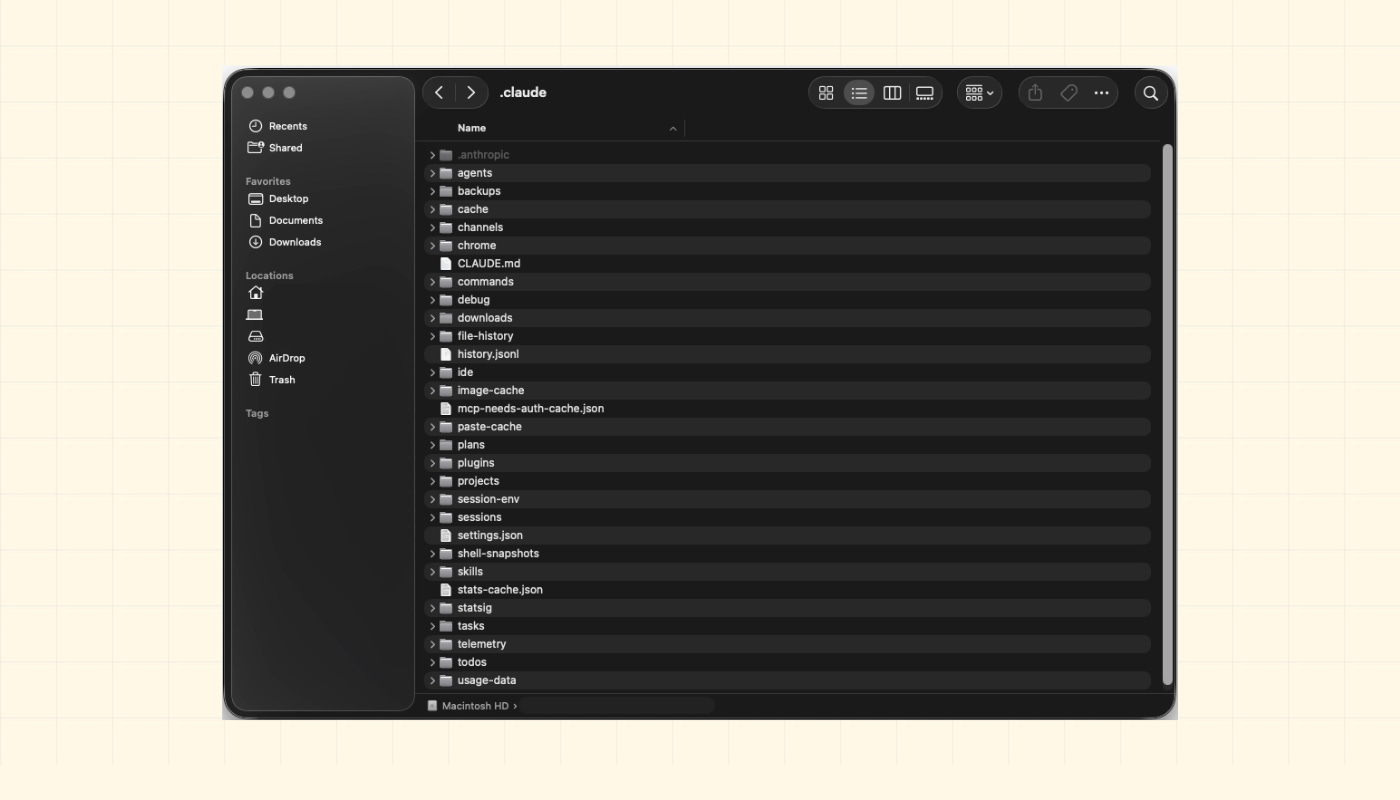
.claude folder in your home directory — (/Users/yourname/.claude)💡 Quick note for context:
Claude Desktop is the native app: conversational, no file access.
Cowork6 is the visual workspace: live artifacts, local folders, and autonomous runs.
Yet neither uses the .claude/ folder the way Claude Code does.
They follow the same philosophy: persistent context, reusable actions, and behavior controls. But files live in different places and are managed differently.
(I’ll cover this later.)
Now we know what’s inside, let’s look at exactly where everything lives…
The folder map: what lives where
Here’s the first thing that trips people up…there are two .claude folders:
~/.claude/ lives in your home directory (
/Users/yourname/.claude). This is your “global” Claude configuration. It applies to every Claude Code session you run, across all projects..claude/ lives at the root of a specific repository or working directory (inside a project). Everything here applies only when you’re working inside the project.
Think of these 2 folders as layers…
Claude loads the global config first, then the project config on top of it. i.e., project settings “override” global ones where they conflict.
Here’s what’s in the global folder:
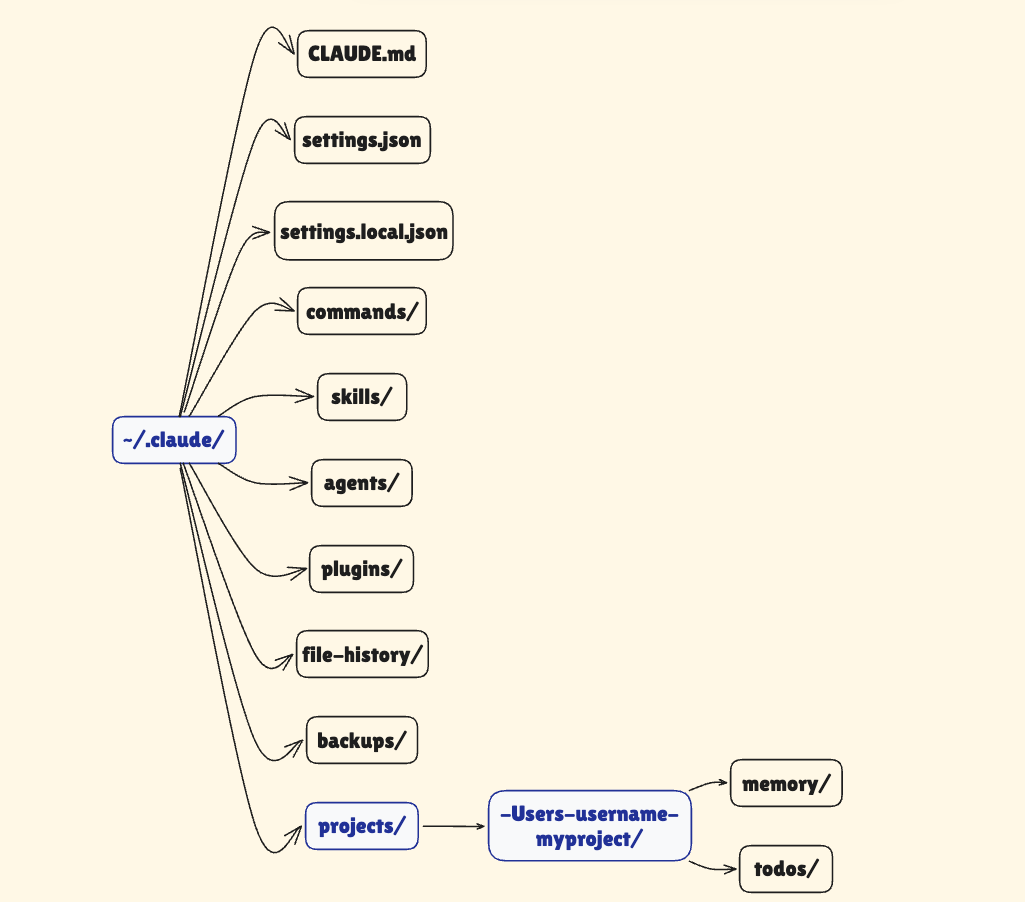
And here’s what you’ll find inside the project folder:
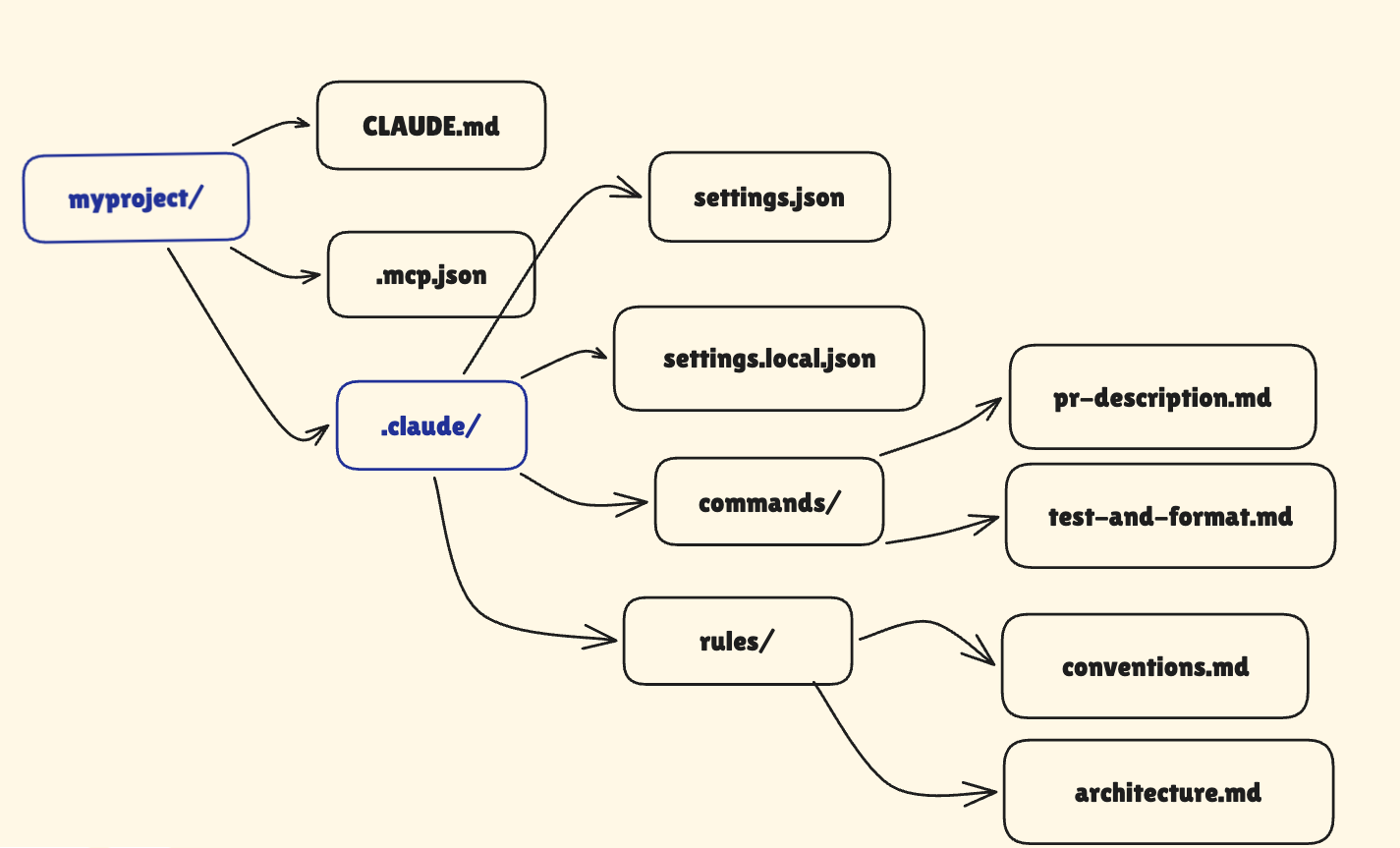
NOTE: CLAUDE.md does NOT live inside .claude/ folder. Instead, it sits at the root of your project.
Think of it this way:
.claude/stores Claude’s settings and behavior rules7CLAUDE.mdstores instructions and project context
They work together, but they are separate files…
Plus, .mcp.json lives at the project root.
Model context protocol (MCP)8 servers allow Claude to connect to external tools such as databases, APIs, and services.
If you want MCP tools available everywhere, configure them globally in
~/.claude/settings.json.But if you want MCP tools for just one project, use
.mcp.jsoninside the project instead.
This matters because different MCP setups can make Claude behave differently across projects.
You can commit the project .claude/ folder to git. i.e., everyone on your team gets the same Claude setup when they clone your repository.
You should commit files like:
settings.jsoncommands/
But do NOT commit settings.local.json. It stores machine-specific paths and personal settings that usually break on other machines.
Claude used to support CLAUDE.local.md for personal instruction overrides… But it’s now deprecated. Today, the recommended approach is to use @ imports inside your main CLAUDE.md.
Also, rules/ helps you split a large CLAUDE.md into smaller files by topic.
For example:
architecture.mdmistakes.mdconventions.md
Claude automatically reads every .md file inside rules/ when a session starts. No imports or extra setup needed. You just add the file, and Claude uses it.
You can also make rules apply only to certain folders.
For example, rules/api-conventions.md can load only when Claude works inside src/api/.
This helps when different parts of the project follow different rules…
TAKEAWAY
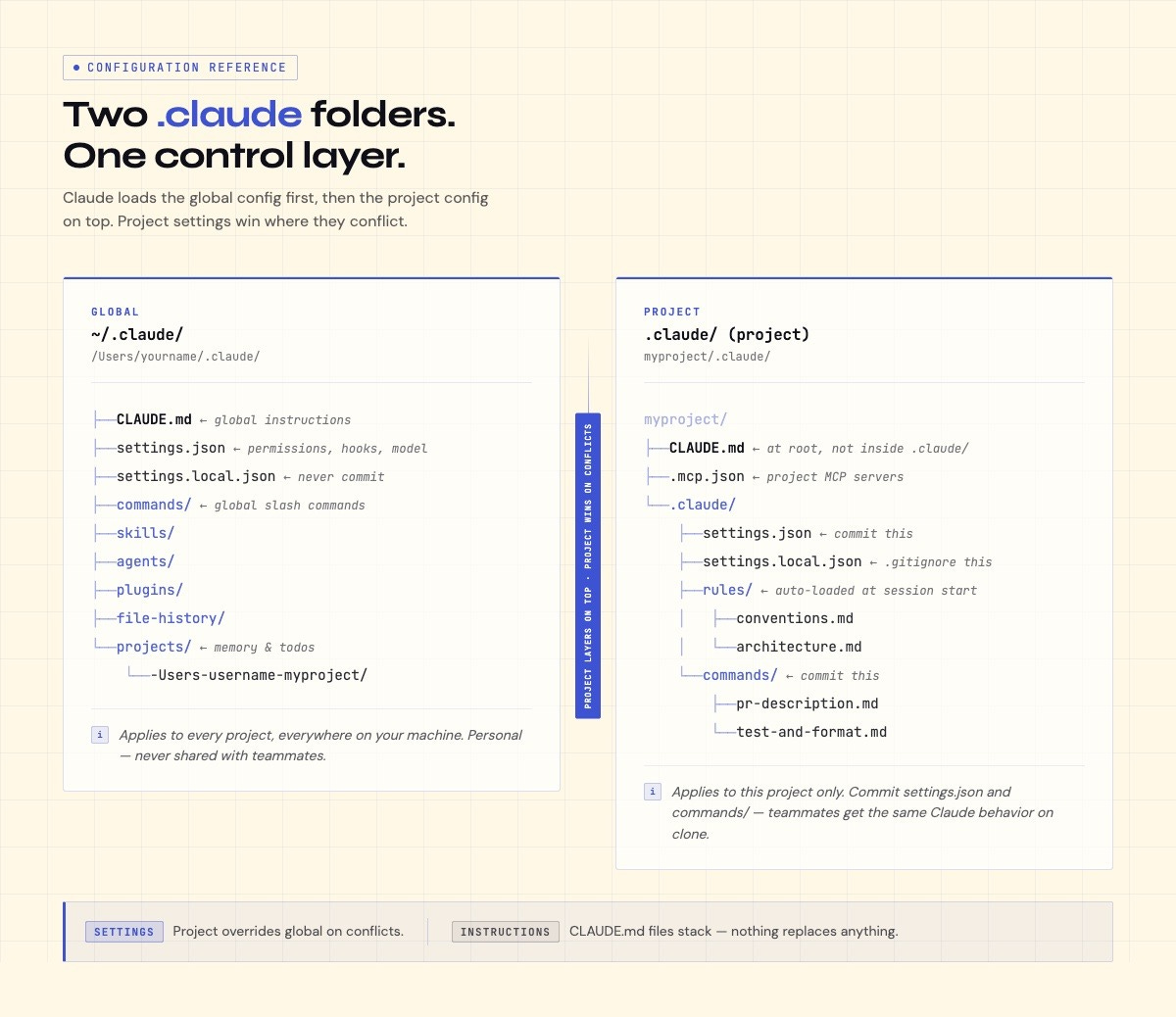
Commit these files:
CLAUDE.md.claude/settings.json.claude/commands/.claude/rules/
So when a new engineer clones the repo, Claude already knows the project rules, restricted files, and available commands.
But do NOT commit .claude/settings.local.json. Instead, add it to .gitignore because it stores personal settings. It works only on one machine.
With the folder structure mapped out, let’s dig into the most important file: CLAUDE.md.
CLAUDE.md: instructions layer
CLAUDE.md is not documentation for humans, but instructions for Claude.
Regular docs explain the project to developers: what the app does, how to install it, and how the API works. While CLAUDE.md tells Claude how to behave on a project: what rules to follow, what conventions matter, and what files to avoid.
When you start a session, Claude loads every CLAUDE.md file it can see, in this exact same order:
~/.claude/CLAUDE.md- your global instructions./CLAUDE.md- instructions for the current projectAny
CLAUDE.mdfiles inside subfolders you are working in
They stack together. i.e., each file adds more instructions without replacing the earlier ones.
You can also split large instructions into separate files using @ imports. For example, @docs/architecture.md. Claude will automatically load the file at the start of the session.
This keeps your main CLAUDE.md short while still giving Claude access to deeper project details.
IMPORTANT: imported files still count toward Claude’s context limit. Splitting files improves organization, but it does not reduce the amount of context Claude carries into the session.
Here’s what belongs in CLAUDE.md:
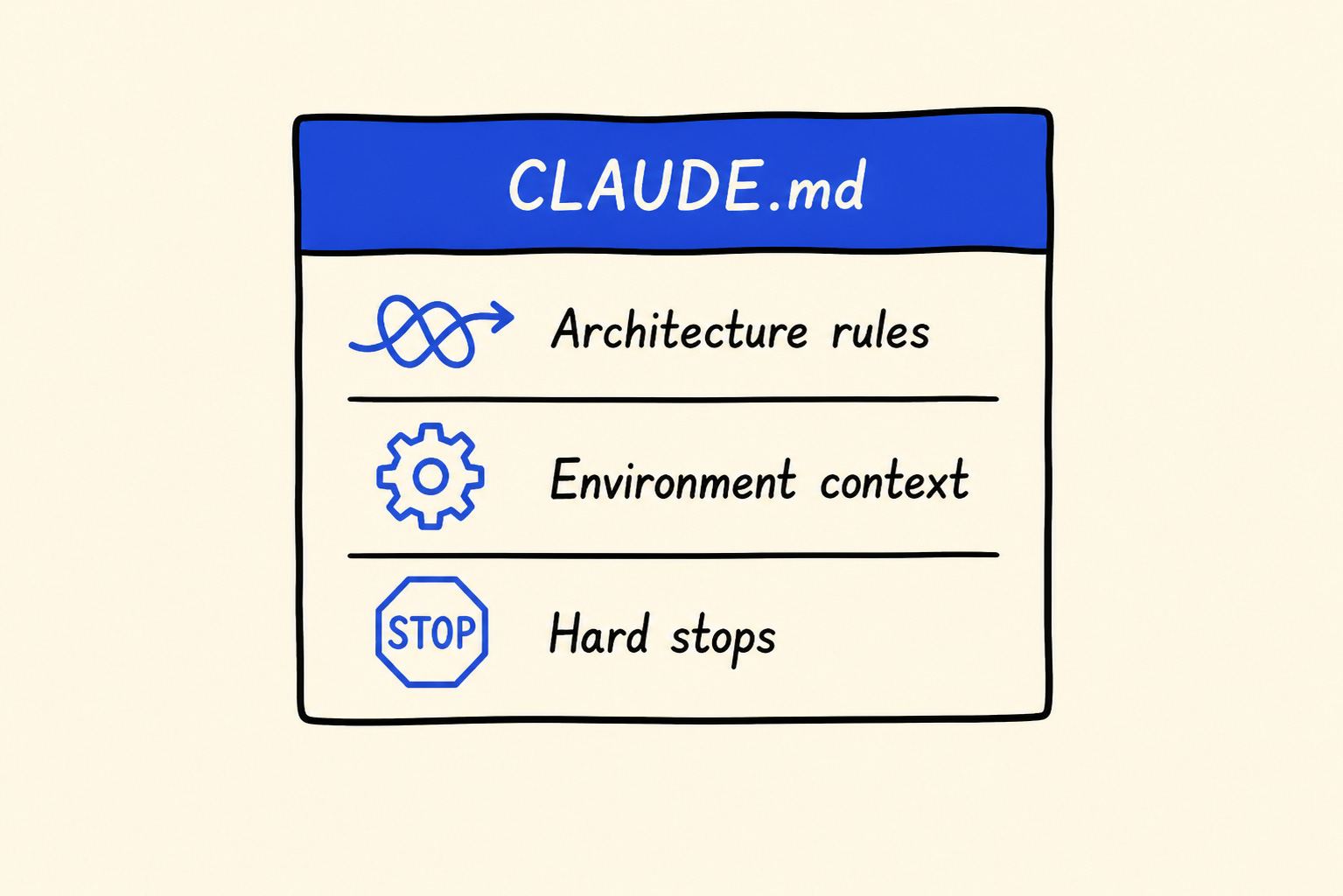
1. Architecture rules Claude cannot infer
Some rules are invisible in the code itself.
For example:
“Never import directly from
utils.ts.”“Always use the shared API client.”
“Do not edit generated files.”
Claude will NOT reliably discover these patterns on its own... So write them down.
2. Environment and workflow context
Include the information a new engineer would spend days piecing together:
which test runner you use
how deployments work
where database configs live
what setup steps usually fail
which scripts matter
3. Hard boundaries
Tell Claude what it should never touch without permission.
Use strong markers like:
IMPORTANTYOU MUST
Anthropic has confirmed emphasis markers improve adherence to instructions.
What does not belong
Do not fill CLAUDE.md with:
long essays
duplicated documentation
theory
things already obvious from the code
Here’s a simple rule:
If removing a line would not change Claude’s behavior, delete it.
CLAUDE.md has no hard length limit. Yet longer files weaken instruction reliability. As the file grows, instructions compete for attention9. And rules near the bottom become easier to ignore than rules near the top…
A 200-line CLAUDE.md is usually not thorough and noisy.
Here’s a tiny but effective CLAUDE.md:
# Project Context

This is a personal finance tracker.
Users log expenses; the app categorizes them.
Run locally with: `npm start`. Tests: `npm test`.

## Rules

- IMPORTANT: never store real financial data in test files
- All database queries go in /db - not scattered across other files
- Don’t touch the /legacy folder - it’s kept for reference only

## Common tasks

- Adding a new feature: check /docs/architecture.md first
- Running into a bug: look in /logs before changing any code
Claude already knows what the project does, what files to avoid, and where to look before changing anything.
Here’s the fastest way to start: run /init inside a Claude Code session. Claude scans your project, detects things like the build system and test framework, then generates a starter CLAUDE.md for you.
That is usually much better than starting from a blank file.

One distinction matters here: prompts and configuration are not the same thing.
Use prompts for one-time requests:
“Explain this simply.”
“Summarize this as bullet points.”
You can use CLAUDE.md for rules that should apply every session:
coding conventions
hard boundaries
project context
workflow rules
Here’s a simple test to help you: If you repeat an instruction in every new session, then put it in CLAUDE.md.
Instructions are only half the picture. Now let’s look at the skills and commands that make Claude reusable…
Reminder: this is a teaser of the subscriber-only newsletter, exclusive to my golden members.
When you upgrade, you’ll get:
High-level architecture of real-world systems.
Deep dive into how popular real-world systems work.
How real-world systems handle scale, reliability, and performance.
And much more!
Ready for the best part?