



Share this post & I’ll send you some rewards for the referrals.
You’ve spent three days crafting the perfect prompt.
You’ve added role-playing instructions, sprinkled in a few-shot1 examples, and even included that magic phrase everyone swears by, “Let’s think step by step”.
Your AI travel assistant is ready for production.
Then your first real user types: “Book me a hotel in Paris for the DevOps conference.”
Your agent cheerfully books the Best Western in Paris, Kentucky.
This isn’t a prompting failure. It’s an architecture failure. And if you’ve been building AI agents in production, you’ve probably hit this wall where no amount of clever phrasing can make up for missing information.
The solution isn’t to write better prompts. It’s engineering a better context!
Onward.
Unblocked: The context layer your AI tools are missing (Partner)

Give your agents the understanding they need to generate reliable code, reviews, and answers. Unblocked builds context from your team’s code, PR history, conversations, documentation, planning tools, and runtime signals. It surfaces the insights that matter so AI outputs reflect how your system actually works.
(Thanks, Unblocked, for partnering on this post.)
I want to introduce Priyanka Vergadia (“Cloud Girl”) as the guest author.

She is a cloud and AI expert who has worked at two of the hyperscalers: Google and Microsoft. Check out her newsletter and social media:
It’ll help you quickly master cloud and AI.

This newsletter will walk you through the shift from Prompt Engineering (optimizing what you write) to Context Engineering (architecting what the model receives).
By the end, you’ll understand why this distinction matters and how to implement it in your own systems. But first, let’s make sure we’re speaking the same language…
Key Concepts: A Quick Primer
Whether you’re just getting started with AI development or looking for a refresher, here are the foundational terms we’ll use throughout this post:
LLM (Large Language Model)
Think of this as the “brain” of your AI application.
Models like GPT-4, Claude, or Llama2 are trained on massive amounts of text to understand and generate human-like language. They don’t “know” things the way you do—they “predict” what text should come next based on patterns they’ve learned.
Prompt
The instructions or text you send to an LLM.
If the LLM is an actor, the prompt is the script you hand them. A prompt might be as simple as “Summarize this email” or as complex as a multi-paragraph system message with examples and constraints.
Context
All the information the LLM has access to when generating a response.
This includes your prompt, as well as any additional data you provide: conversation history, retrieved documents, user profiles, tool outputs, and more. Context is everything in the model’s “working memory” at the moment of inference.
Context Window
The maximum amount of text (measured in “tokens”—roughly 3/4 of a word) that an LLM can process at once.
Think of it as the model’s short-term memory capacity. GPT-4 Turbo has a 128K token window; Claude 3 offers up to 200K. Anything beyond this limit simply won’t be seen by the model.
Inference
The moment when the model actually generates a response.
Everything you send—prompts, context, conversation history—gets processed at inference time. It’s the “go” moment.
RAG (Retrieval-Augmented Generation)
A technique where you fetch relevant documents or data from an external source (like a database or search engine) and inject them into the context before inference. This gives the LLM access to information it wasn’t trained on—like your company’s travel policy or today’s flight prices.
Agent
An AI system that can take actions, not just generate text.
Agents typically operate in loops: they reason about a task, call tools3 (such as APIs or databases), observe the results, and iterate until the task is complete. Your travel booking assistant is an agent.
Hallucination
When an LLM confidently generates information that isn’t true.
Without proper context, models fill in gaps with plausible-sounding but incorrect details—like assuming “Paris” means Kentucky when the user clearly meant France.
With these concepts in hand, let’s explore why traditional prompt engineering often falls short—and what to do instead.
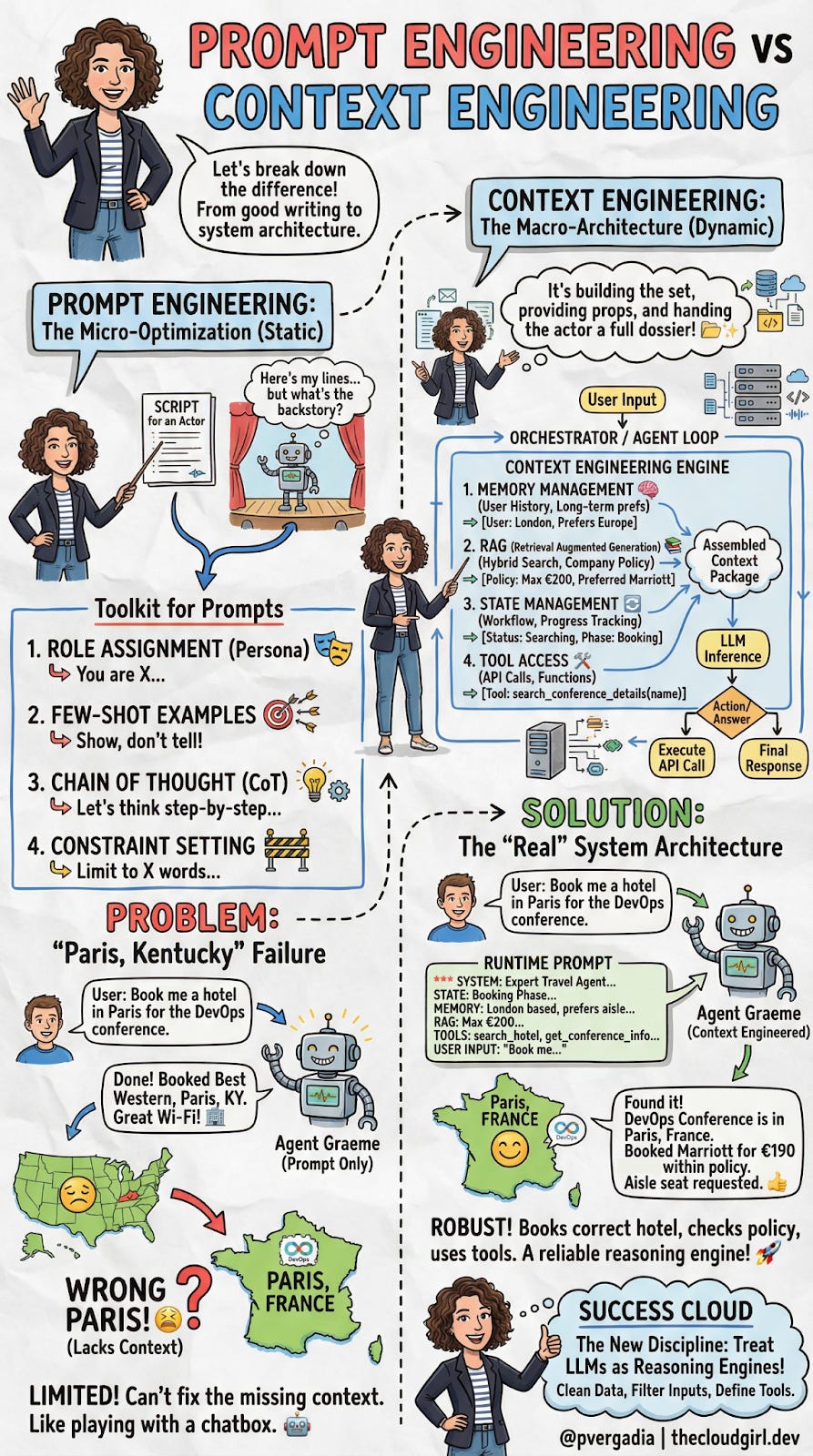
1. The Micro-Optimization: Prompt Engineering
The “Static Script”.
If you’ve been working with LLMs, you already know Prompt Engineering. It’s the craft of writing effective instructions for a model, and for the past two years, it’s been the primary way developers have tried to improve AI output.
Think of an LLM as a talented improv actor:
Prompt Engineering is the script you hand them before the curtain rises. It defines their character, the scene's tone, and the rules of engagement. A good script can make a significant difference in performance.
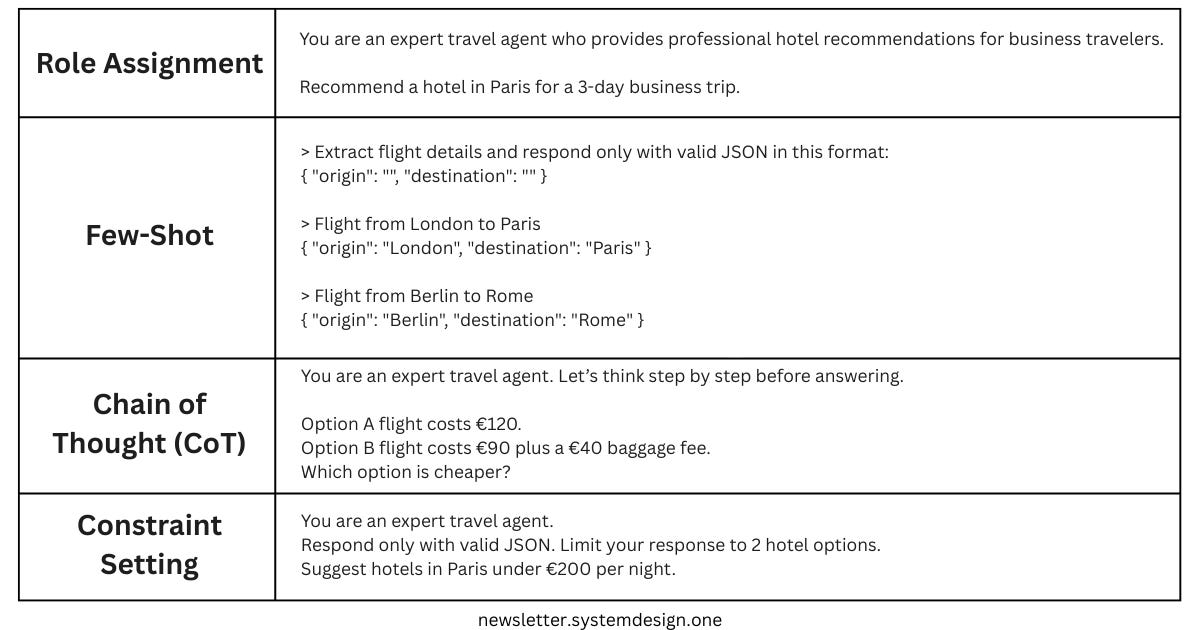
The standard developer toolkit for prompt engineering includes:
Role Assignment – Setting the persona with instructions like “You are an expert travel agent.” This primes the model to use vocabulary and behaviors associated with that role.
Few-Shot Examples – Providing input/output pairs demonstrating the exact format you want. For example, showing the model three examples of properly formatted JSON responses before asking it to generate one.
Chain of Thought (CoT) – Instructions like “Let’s think step by step” that encourage the model to show its reasoning. This dramatically reduces errors in logic and math problems by forcing the model to “work through” the problem rather than jumping to an answer.
Constraint Setting – Hard limits on output, like “Limit your response to 50 words,” or “Respond only with valid JSON.”
These techniques are valuable and worth mastering.
But they share a fundamental limitation that becomes apparent when you move from demos to production.
The “Paris, Kentucky” Failure
The limitation of Prompt Engineering is that it is static.
Let’s return to our travel agent. The user says: “Book me a hotel in Paris for the DevOps conference.”
An agent relying only on prompt engineering sees the words “Paris” and “DevOps.” It has no access to external data, so it does what LLMs do when they lack information: it makes a probabilistic guess. There’s a Paris in France, sure, but there’s also a Paris in Kentucky, Texas, Tennessee, and several other states. Without additional context, the model has no way of knowing which one you mean.
The result?
Your user gets booked into the Best Western in Paris, Kentucky.
No amount of clever prompt phrasing can fix this. You could write “Always book hotels in major international cities”—but what about the user who actually wants Paris, Texas? The problem isn’t the prompt. The problem is that the model lacks three critical pieces of information:
User lives in London (suggesting international travel is more likely)
DevOps conference this year is actually in Paris, France
The user’s company policy requires booking Marriott properties under €200/night
This is where the paradigm shifts.
We need to move from optimizing static scripts to dynamically assembling the right information at runtime. We need Context Engineering.
2. The Macro-Architecture: Context Engineering
The “Dynamic Set Design”.
If Prompt Engineering is handing a script to your improv actor, Context Engineering is building the entire stage, providing the props, dressing the set, and handing them a dossier about their scene partners—all before they speak a single line.
Context Engineering is the programmatic assembly of the “Context Package”—the exact bundle of tokens sent to the LLM at inference4 time. It’s not about writing a better sentence; it’s about building an Orchestrator Loop that fetches the right information from multiple sources before the model ever generates a response.
This is a systems engineering challenge, involving data pipelines5, vector databases6, state machines, and API integrations.
The traditional flow looks like this:
User Input → LLMThe context-engineered flow looks like this:
User Input → [Memory + RAG + State + Tools] → Assembled Context → LLMLet’s break down each component of this architecture.
The Four Pillars of Context Engineering
1. Memory Management (The Brain)
Here’s a naive approach that doesn’t scale: dump the entire conversation history into the context window every time.
With a 128K token context window and $10/million tokens, this gets expensive fast—and it significantly slows response time (a metric called Time to First Token, or TTFT).
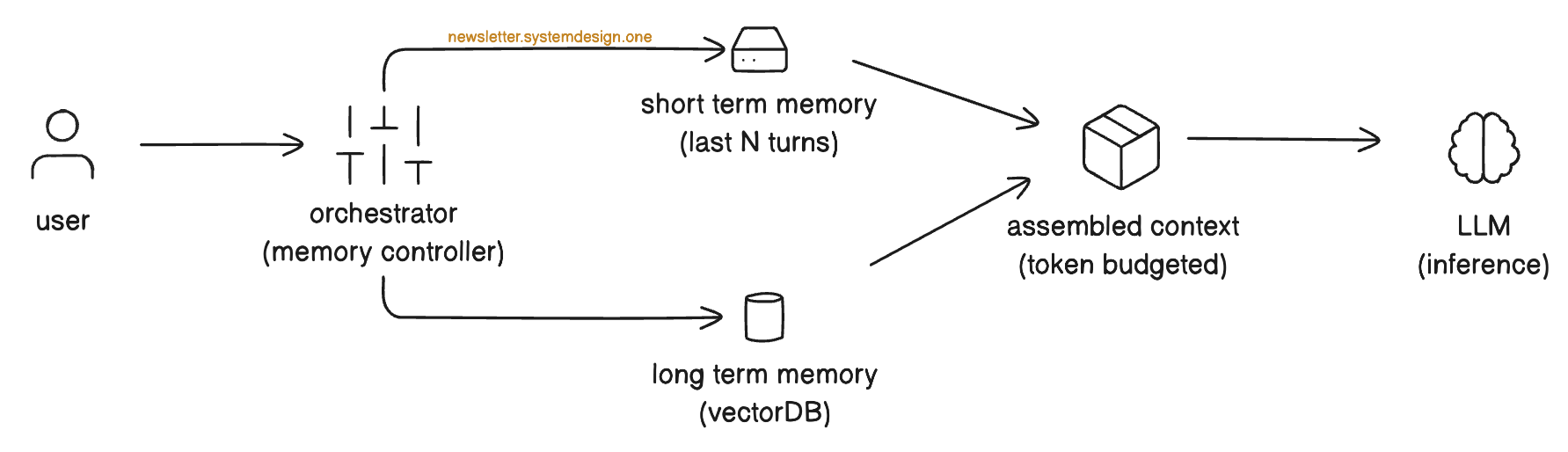
Smart memory management means being strategic about what you include:
Short-term memory
A rolling window of the last N conversations is used to maintain immediate context. The user said, “Actually, make it a window seat”. The model needs to remember they were just discussing flight preferences.
Long-term memory
Persistent facts about the user, retrieved semantically. Instead of storing every conversation verbatim, you extract and index key facts: “User location: London”, “Seating preference: Aisle.” At inference time, you query this memory store to retrieve only what’s relevant to the current task.
Travel Agent Example:
When the user asks about booking a hotel, the system retrieves “User: London-based” and “Preference: Aisle seat” from long-term memory, while keeping the last 3 conversation turns in short-term memory.
2. RAG (Retrieval Augmented Generation)
RAG is your connection to “ground truth”—information that exists outside the model’s training data. This might be company policies, product documentation, real-time pricing, or any other external data source.

A robust RAG implementation typically combines:
Hybrid Search
Combining traditional keyword search (BM25)7 with semantic vector search8. Keyword search catches exact matches (“policy ID 998”); semantic search catches conceptual matches (“rules about hotel spending”).
Smart Filtering
You don’t want to retrieve the entire company handbook—that would blow your token budget. The context engine must extract only the relevant chunks, ranked by relevance to the current query.
Travel Agent Example:
When the user mentions booking a hotel, the retrieval system queries the corporate travel policy database and pulls the specific snippet: “Max Hotel Spend: €200/night, Approved Chains: Marriott, Hilton.” This grounds the agent’s booking decisions in the company's actual rules.
3. State Management (The Workflow)
Unlike simple chatbots, agents are stateful—they operate within multi-step workflows where sequence matters.
You can’t book a hotel before you’ve searched for options. You can’t confirm a reservation until the user approves the price.
The LLM needs to know where it is in this business process. State management includes:
Workflow Tracking
What phase are we in? Discovery, Search, Selection, Booking, Confirmation?
Progress Indicators
What constraints have already been satisfied? What’s still needed?
Travel Agent Example:
The system injects a state object like:
{
  "Phase": "Booking",
  "Status": "Searching",
  "Constraints_Met": ["dates", "location"],
  "Constraints_Pending": ["user_approval", "payment"]
}
This prevents the agent from accidentally jumping ahead to book before search results are reviewed.
4. Tool Access (The Hands)
The LLM is a reasoning engine, not a database.
It can’t check flight prices, look up conference locations, or execute bookings on its own. We must give it “hands”—well-defined interfaces (APIs) it can call.

Tool integration involves:
Function Schemas
JSON definitions of available tools.
For example:
search_conference_details(name: string),
search_hotels(location: string, check_in: date, max_price: number),
execute_booking(hotel_id: string)
The model learns what tools exist and what parameters they accept.
Orchestrator Execution
When the model decides to call a tool, it outputs a structured request.
The Orchestrator intercepts this request, executes the actual code, and returns the result to the context for the next inference step.
Handling Failures
Tools don’t always work perfectly. A robust context engine must handle failure scenarios gracefully:
Timeouts:
If a tool call takes too long (e.g., an API doesn’t respond), the system might retry with exponential backoff, try an alternative tool, or inform the user of the delay.
Errors:
If a tool returns an error (e.g., “No hotels found matching criteria”), the agent should recognize this and either adjust parameters or ask the user for clarification.
Ambiguous Results:
If a tool returns unclear or partial data, the agent might call additional tools to verify, request human confirmation, or explicitly note the uncertainty to the user before proceeding.
Travel Agent Example:
The agent calls:
search_conference_details(”DevOps Conference”)…and receives:
{ “Location”: “Paris, France”, “Dates”: “Oct 12-15” }Now it knows exactly which Paris the user means. If this API times out, the system retries twice, then asks the user: “I’m having trouble looking up the conference details. Can you confirm the location?”
When Context Exceeds Capacity: Prioritization
Even with large context windows, you’ll often have more relevant information than you can fit. When the assembled context exceeds your token budget, the system must prioritize.
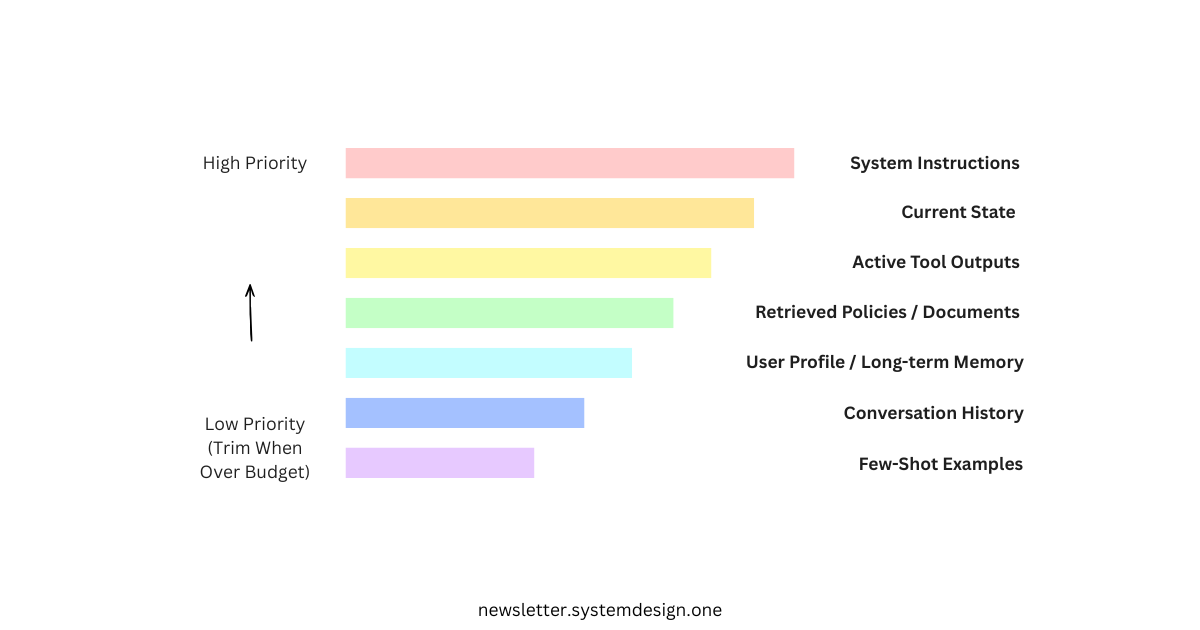
Here’s a typical priority hierarchy:
1. System Instructions (always included) – The core behavioral rules and role definition never get cut.
2. Current State (highest priority) – Where are we in the workflow? This prevents the agent from taking nonsensical actions.
3. Active Tool Outputs (high priority) – Results from the most recent tool calls are essential for the current reasoning step.
4. Retrieved Policies/Documents (high priority) – Compliance rules and ground truth data that constrain valid actions.
5. User Profile/Long-term Memory (medium priority) – Persistent facts about the user that improve personalization.
6. Conversation History (lower priority) – Earlier turns can be summarized or dropped when space is tight. Keep the most recent turns intact.
7. Few-shot Examples (lowest priority) – These can often be reduced or removed once the model is performing well on the task.
Think of it this way: if your agent forgets a few-shot example, the output format might drift slightly. If it forgets a compliance policy, it might book an unauthorized hotel. If it forgets its current state, it might try to book a hotel that doesn’t exist.
Prioritize accordingly.
3. The Solution: “Runtime Prompt”
When you move from Prompt Engineering to Context Engineering, the actual text sent to the model (Runtime Prompt) is dynamically generated.
Here is what the “Real” System Architecture sends to the LLM for Travel AI Agent Example:
*** SYSTEM INSTRUCTIONS ***

You are an Expert Travel Agent.
Review the memory, policy, and state below before answering.


*** STATE ***

Phase: Booking
Status: Searching


*** MEMORY & USER PROFILE ***

- User Location: London, UK
- Preference: Aisle seats
- History: Prefers Europe for conferences


*** RAG / RETRIEVED POLICY ***

- Corporate Policy ID: 998
- Max Hotel Spend: €200
- Approved Chains: Marriott, Hilton


*** TOOL OUTPUTS ***

> search_conference_details(”DevOps Conference”)
  Result: “Location: Paris, France. Dates: Oct 12-15”


*** USER INPUT ***

“Book me a hotel in Paris for the DevOps conference.”
The Result

Because the context was engineered before inference, the model now has everything it needs to make a correct decision:
Disambiguation: The tool output explicitly clarifies “Paris, France.” No ambiguity remains.
Compliance: The RAG retrieval enforces the €200/night limit and approved hotel chains. The agent won’t even consider the €400/night boutique hotel.
Reasoning: With all constraints visible, the LLM selects the Paris Marriott Champs-Élysées (€190/night) instead of making a blind guess.
This is the power of Context Engineering: transforming the LLM from a probabilistic text generator into a reliable reasoning engine constrained by real-world data.
Understanding the Tradeoffs
More context isn’t free. As you implement these systems, be mindful of the costs:
Token Costs: Each additional token you send to the model costs money. At $10 per million input tokens, a 10K token context package processed 100,000 times costs $10,000. The prioritization hierarchy discussed earlier becomes essential at scale.
Latency: Larger context windows increase Time to First Token (TTFT). Users waiting 3+ seconds for a response may disengage. You’ll need to balance comprehensiveness with responsiveness.
System Complexity: Memory stores, RAG pipelines, state machines, and tool integrations all require maintenance, monitoring, and debugging. Every component is a potential point of failure.
Retrieval Quality: Bad retrieval is worse than no retrieval. If your RAG system surfaces irrelevant documents, you’re paying token costs to confuse the model. Invest in retrieval quality metrics and continuous improvement.
The right approach is iterative: start with the minimum viable context, measure what’s missing when failures occur, and expand strategically.
Closing Thoughts
Context Engineering represents a fundamental shift in how we build AI applications.
It moves us from treating LLMs as chatbots that need cleverer instructions to treating them as reasoning engines that need better inputs.
The investment is real, but the payoff is production-grade reliability that prompt tweaking alone can never achieve.
👋 I’d like to thank Priyanka for writing this newsletter!
Also subscribe to her newsletter, Cloud Girl Bytes, and follow her on LinkedIn, Twitter, YouTube, or the social network of your choice. It’ll help you quickly master cloud and AI.
I launched Design, Build, Scale (newsletter series exclusive to PAID subscribers).

When you upgrade, you’ll get:
High-level architecture of real-world systems.
Deep dive into how popular real-world systems actually work.
How real-world systems handle scale, reliability, and performance.
10x the results you currently get with 1/10th of your time, energy, and effort.
👉 CLICK HERE TO ACCESS DESIGN, BUILD, SCALE!
If you find this newsletter valuable, share it with a friend, and subscribe if you haven’t already. There are group discounts, gift options, and referral rewards available.

Thank you for supporting this newsletter.
You are now 210,001+ readers strong, very close to 210k. Let’s try to get 211k readers by 7 March. Consider sharing this post with your friends and get rewards.
Y’all are the best.

Block diagrams created using Eraser.
Few-shot prompting is a technique where a model is given a small number of input-output examples within the prompt to guide its responses.
Llama is used for more control, customization, or data privacy compared to closed API-only models
A tool is an external function or API that an AI model can call to retrieve real-world data or perform actions beyond generating text.
Inference time is the moment when the model receives your prompt and generates a response.
Data pipelines are automated workflows that ingest, transform, and route data from source systems to destinations for storage or analysis.
Vector databases are specialized storage systems designed to index and query high-dimensional embeddings for fast similarity search.
BM25 (best matching) is a ranking function used by search engines to estimate the relevance of documents to a search query.
Semantic vector search is a method of finding information by comparing the meanings of text using numerical embeddings (vectors) rather than matching exact keywords.
This distinction is the most important thing you can explain to someone building with AI right now. Prompt engineering is a question. Context engineering is an environment. I built my AI chief of staff named Kioni entirely on context engineering principles: a terms of reference document, a voice stack with three registers, an escalation ladder, a rules document. She does not get better prompts. She gets better context. The results are not comparable.
Thank you both! This is one of the cleanest breakdown of the prompt vs context distinction I've seen. The Paris, Kentucky example is perfect. It shows exactly where prompt engineering hits the wall, you just can't phrase your way around missing information.
I ran into this building my own MCP servers. It worked after I give Claude access to my actual subscriber data and article history so it could see patterns I couldn't.
The runtime prompt diagram at the end should be required reading for anyone building agentic systems.