

Get my system design playbook for FREE on newsletter signup:
This post outlines the important deployment patterns. You will find references at the bottom of this page if you want to go deeper.
Share this post & I'll send you some rewards for the referrals.
Note: This post is based on my research and may differ from real-world implementation.
Once upon a time, there was a tiny startup.
They offered live-streaming services.
Yet they had only a few customers.
So they deployed code overnight with a scheduled downtime.
Deployment means releasing new code to users.

But one day, a celebrity joined their platform for a livestream.
Because of this, their platform became popular among users around the world.
Although explosive growth is a good problem to have, deploying new code without downtime became difficult.
Also they were on a tight budget.
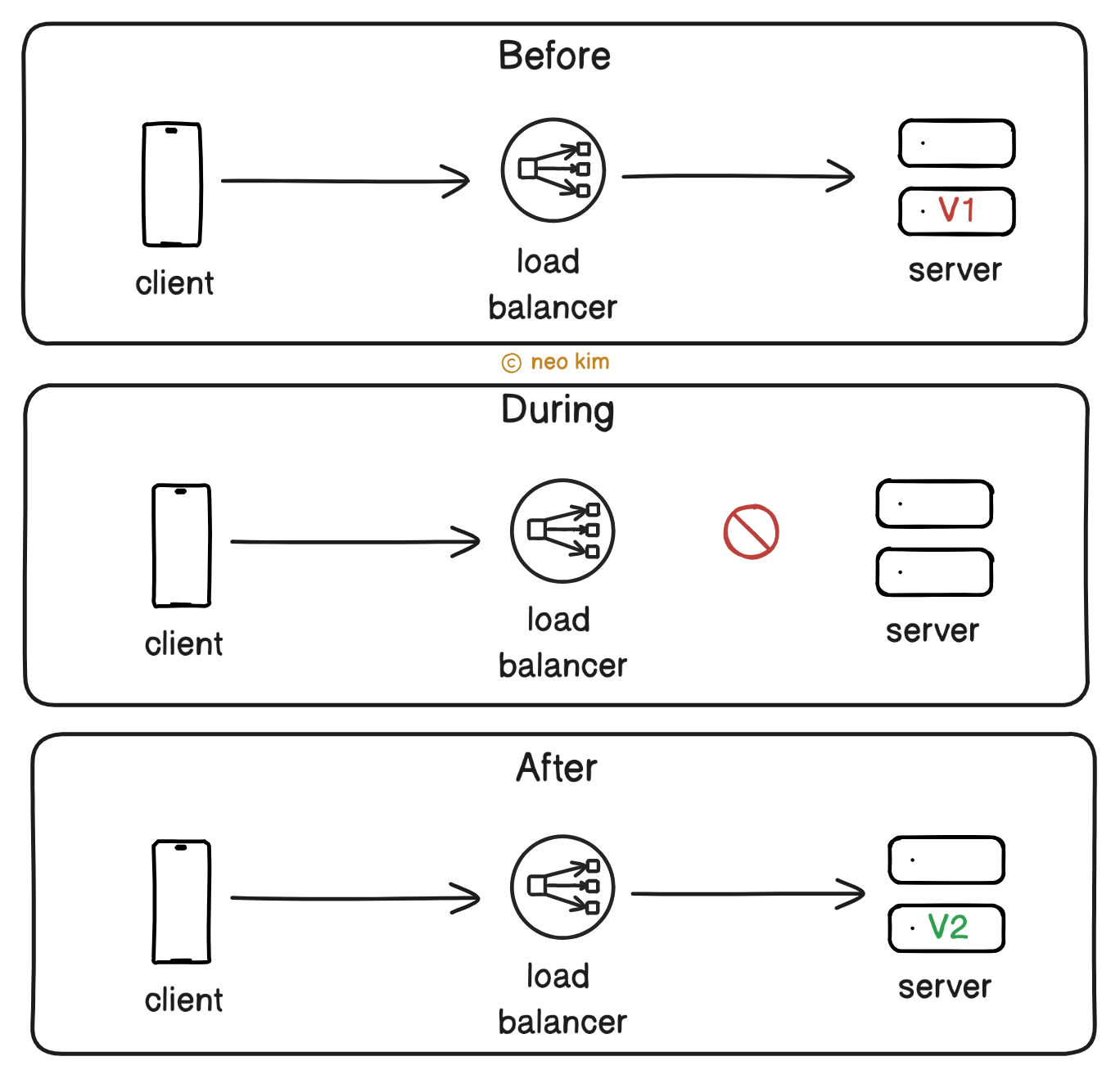
They used the Big Bang deployment pattern to keep things simple.
Put another way, they take the system offline for a short period. And replace the old version with the newer version on each server.
So the service remains unavailable during deployment. Besides any failure with the new version affected all users at once.
Until one day, when their lead engineer decided to evaluate different deployment patterns to solve this problem.
Onward.
Become an AI Generalist that makes $100K (in 16 hours) - Sponsor
One of the biggest IT giants, TCS, laid off 12,000 people this week. And this is just the beginning of the bloodbath.
In the coming days, you’ll see not thousands, but millions more layoffs & displacement of jobs. So what should you do right now to avoid getting affected?
Invest your time in learning about AI: the tools, the use cases, the workflows–as much as you can.
Join the world’s first 16-hour LIVE AI upskilling sprint for professionals, founders, consultants & business owners like you. Register Now (Only 500 free seats left).
Date: 9 August (Saturday) and 10 August (Sunday), 10 AM - 7 PM, EST time zone.

Rated 4.9/5 by global learners–this will truly make you an AI Generalist that can build, solve & work on anything with AI.
In just 16 hours & 5 sessions, you will:
✅ Learn how AI really works by learning 10+ AI tools, LLM models, and their practical use cases.
✅ Learn to build and ship products faster, in days instead of months
✅ Build AI Agents that handle your repetitive work and free up 20+ hours weekly
✅ Create professional images and videos for your business, social media, and marketing campaigns.
✅ Turn these AI skills into $10k income by consulting or starting your own AI services business.
All by global experts from companies like Amazon, Microsoft, SamurAI, and more. And it’s all for free. 🤯 🚀
$5100+ worth of AI tools across 2 days — Day 1: 3000+ Prompt Bible, Day 2: Roadmap to make $10K/month with AI, additional bonus: Your Personal AI Toolkit Builder.
Deployment Patterns
Here’s what they found:
1. Rolling
The rolling release offers zero-downtime deployment.
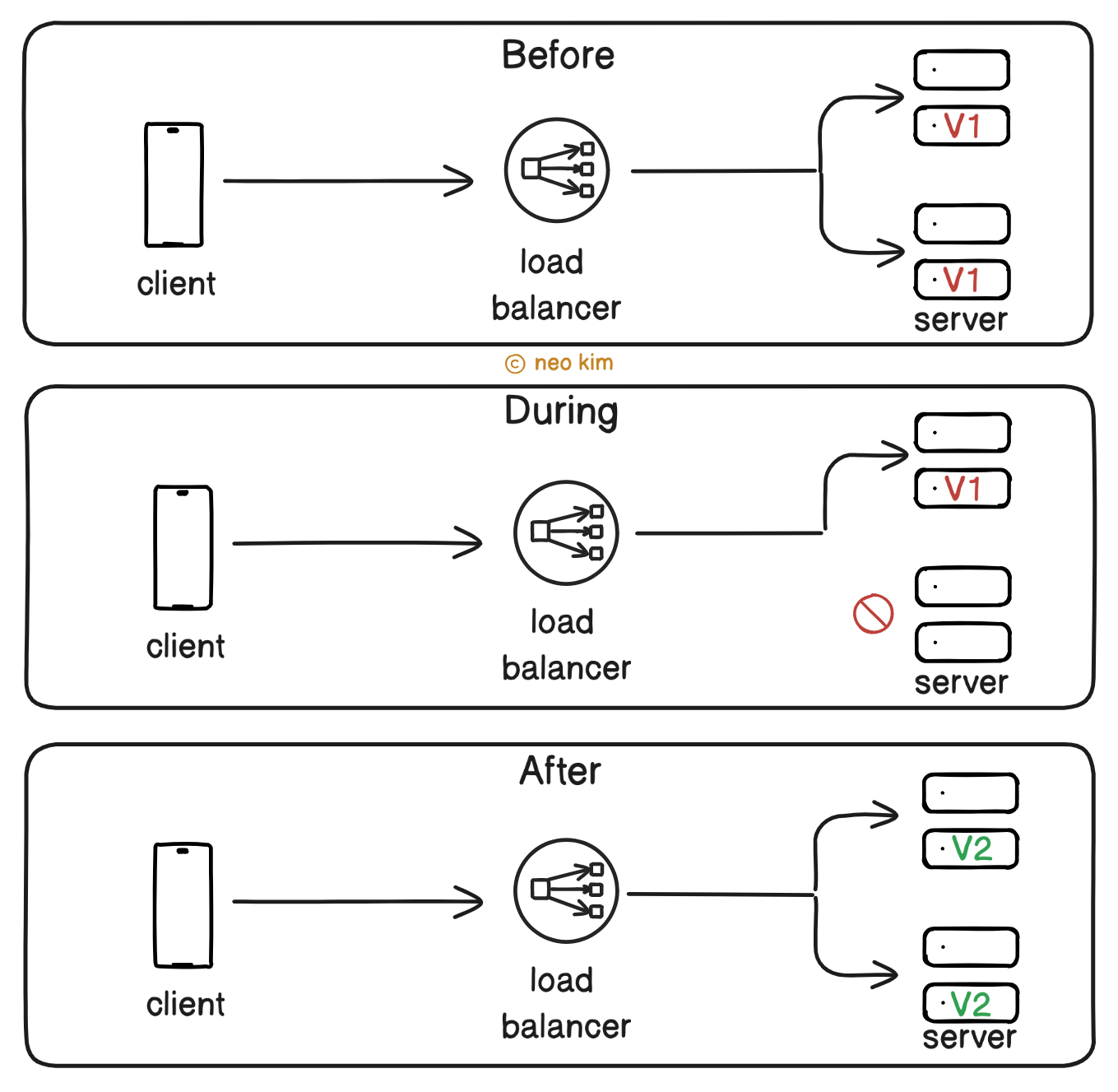
Here’s how it works:
Some servers get taken offline and updated
Those updated servers then go online
This process repeats until all servers get the new version
Put simply, a new version is rolled out server by server until it’s fully deployed.
While the system remains available because the remaining servers handle requests during deployment.
For example, Twitter and Etsy use this pattern for routine feature deployment with minimal user impact.
Only a subset of servers runs the code initially. Because of that, the failure impact is low during deployment. Yet it’s infrastructure-driven and doesn’t focus on specific user segments. Also the rollout is relatively slow as updating each server takes time.
So use this pattern only if you need zero downtime and to avoid extra infrastructure costs.
Ready for the next technique?
2. Blue Green
The blue-green pattern offers zero-downtime deployment and instant rollback.
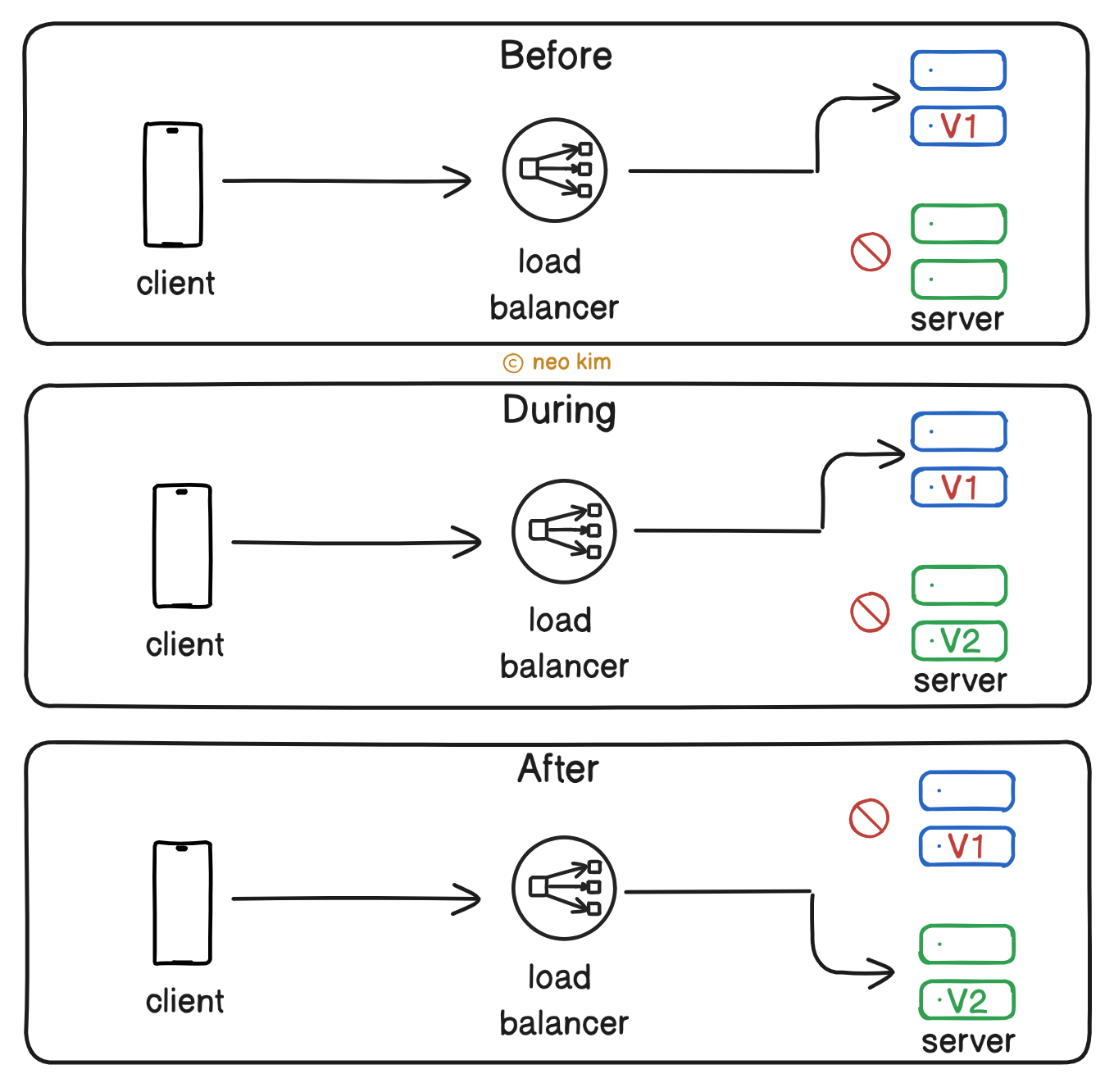
Here’s how it works:
Set up 2 identical environments called Blue & Green
The new version gets tested on Green
While Blue runs the old version and handles requests to avoid downtime
The entire traffic then gets routed to Green using a load balancer or DNS
Also Blue acts as a fallback until the new version on Green becomes stable. Because of that, an instant rollback is possible. Besides testing the new version in a production-like environment (Green) increases release confidence.
For example, Netflix uses this pattern for critical services to avoid service interruption.
Yet running 2 environments in parallel increases infrastructure costs and complexity. Also there’s an extra operational overhead.
So use this pattern only for critical services and high-risk deployments.
3. Canary
The name comes from the use of the canary bird in coal mines to detect toxic gases quickly.
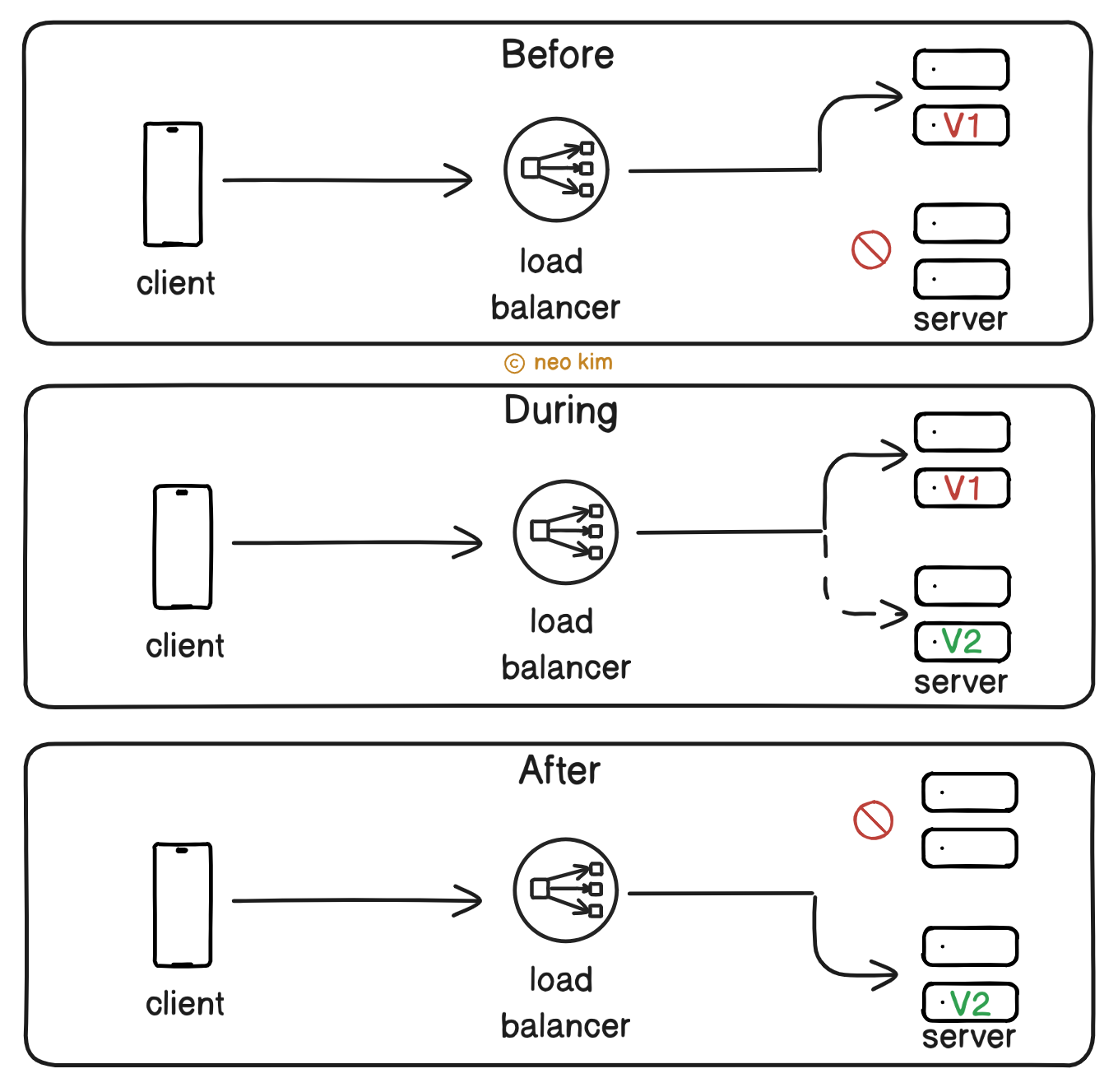
Here’s how it works:
A tiny percentage of users get the new version
While the remaining traffic goes to the old version
The traffic to the new version then gets slowly increased (10% → 50% → 100%)
Put another way, real-world users validate the new version before rolling it out entirely. Thus increasing the release confidence.
Also a failure in the new version affects only some users, and a quick rollback is possible.
For example, Amazon uses this pattern to fix problems before a global rollout.
Yet it increases the complexity with advanced monitoring and automated rollout control. Besides setting up routing rules needs extra effort.
So use this pattern for large-scale services and high-risk deployments. Or when a beta launch to a subset of users is necessary.
Let’s keep going!
4. Feature Toggle
This pattern allows for code deployment without directly releasing it to users.
A feature toggle means conditional logic in the code.
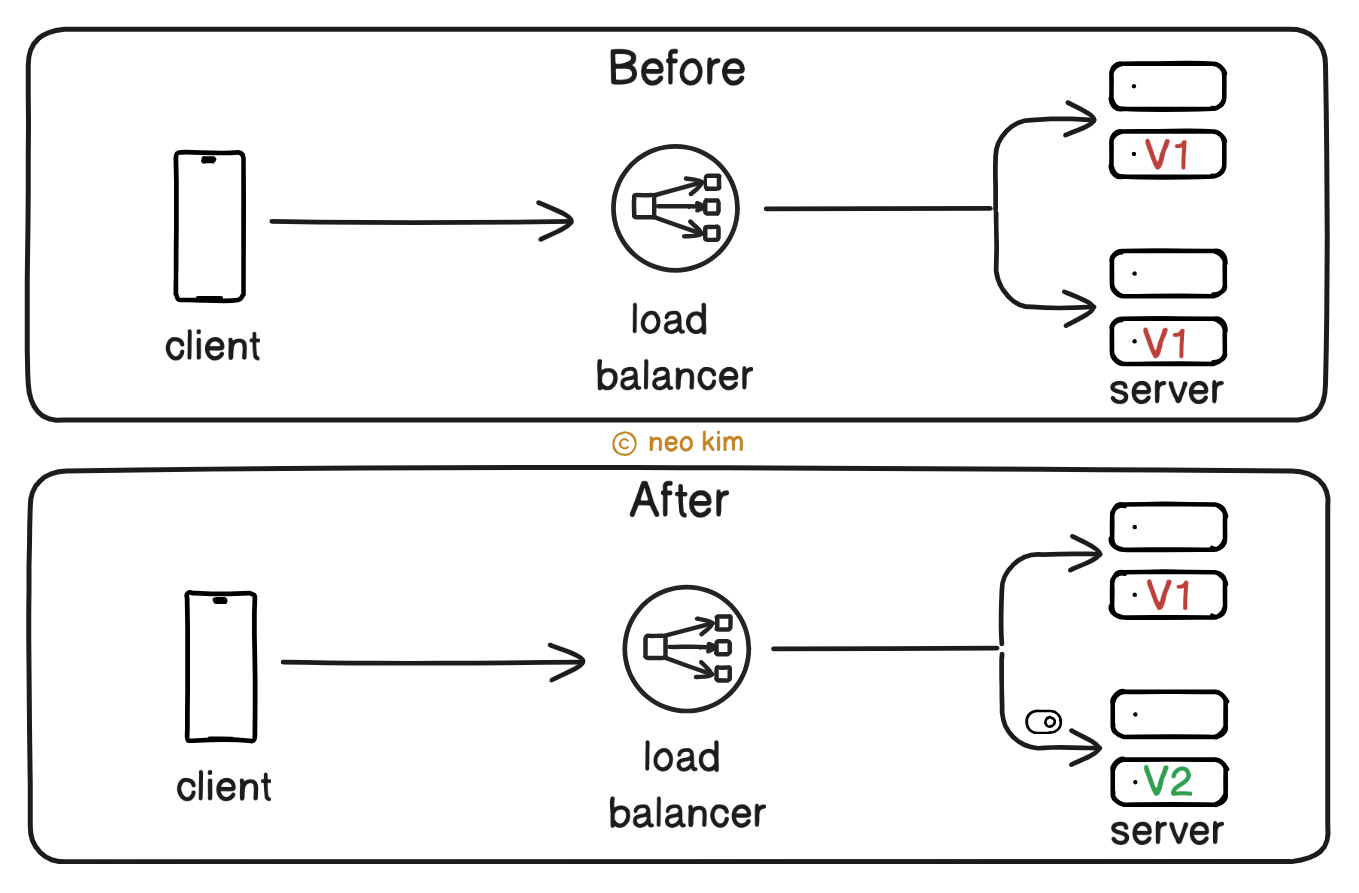
Here’s how it works:
The developer puts the new feature behind a feature toggle
And the feature remains hidden until someone turns on the toggle
One can turn a feature toggle on or off for specific users via a configuration dashboard
Thus separating code deployment from feature release.
For example, Google and Facebook use feature toggles for A/B testing and safe releases.
This pattern makes it easy to enable or disable features for a specific set of users. Also it enables continuous integration by deploying code safely behind feature toggles.
Yet the code complexity increases because of conditional paths. Also testing becomes hard because one should test both on and off states. Besides feature toggles can become a technical debt if unremoved on time.
So use this pattern when you need frequent deployments without affecting users. Or when you need to do an A/B test or a beta launch.
Each deployment pattern solves a specific problem.
But there’s no silver bullet.
So choose the right pattern based on your needs: safety, speed, and cost.
While most companies use different deployment patterns within the same project. For example, a payment service might use blue-green for zero downtime. While frontend UI might use canary or feature flags for safe releases.
Ever since that day, our tiny startup installed a combination of deployment patterns and lived happily ever after.
Subscribe to get simplified case studies delivered straight to your inbox:

Neo’s recommendation 🚀
Everything you need to know to land your next Data Science job. Get expert tips straight to your inbox at Ask Data Dawn.
Want to advertise in this newsletter? 📰
If your company wants to reach a 165K+ tech audience, advertise with me.
Thank you for supporting this newsletter. Consider sharing this post with your friends and get rewards. Y’all are the best.

TL;DR 🕰️
You can find a summary of this article here. Consider a repost if you find it helpful.


Really liked this breakdown.
I think deployment isn’t just about pushing code, it’s about managing risk at scale.
That's a good combination there; canary for frontend and blue-green for payments.
The patterns are clear, but rollback stops at the database. Code rolls back, but a schema change doesn't. The same applies to model deployments. Expand-contract migrations matter more than the release pattern.