


Share this post & I'll send you some rewards for the referrals.
I have a big big announcement for those of you who want to become good at AI engineering.
INTRODUCING: GENERATIVE AI MASTERCLASS
This is a monthly newsletter series that’ll teach you Generative AI system design.
By the end of this newsletter series, you’ll walk away with:
Simple breakdown of real-world architectures
Frameworks you can plug into your work or business
Proven systems behind ChatGPT, Perplexity, and Copilot
And here’s the best part:
You’ll go from knowing how to “use AI” to understanding how to design, build, and ship AI.
No AI/ML background needed. Each newsletter explains concepts in plain English, with visuals and real product examples.
If you want the maximum AI career leverage, join below:
New Open Source: Build and Scale Agents and Harnesses Like APIs (Partner)

One.harness() call and orchestrate hundreds of Claude Code, Codex, and Gemini instances into a coordinated team. They discover each other at runtime, split work, cross-reference results, and converge autonomously. Go deeper on harness engineering → blog.
No DAGs. No glue code. Agents work like APIs, Python, TypeScript & Go.
We built production systems you can clone and run today:
→ Autonomous Engineering Team: 175 agents ship code end-to-end
→ Deep Security Auditor: 250 agents scan every CVE
→ Adversarial Code Reviewer: 50+ agents debate your PRs
Each runs on any model. Apache 2.0.
We’ve all used ChatGPT.
From our user perspective, it looks simple: type a question, get a response. But there’s a lot more behind it than a large language model (LLM) with a chat interface.
Building a product like ChatGPT means choosing the right model from a growing landscape of options, preparing the data that trains it, running a multi-stage training pipeline, evaluating whether the outputs are actually good, adding safety controls to prevent harm, and wrapping it all in serving infrastructure that can handle millions of requests. The same is true for Perplexity, GitHub Copilot, and Midjourney.
The model is one piece of a much larger system.
Understanding these components is what separates someone who can use GenAI from someone who can design and build it. That’s what this newsletter series is for.
This first newsletter covers the foundation.
We walk through the model landscape, the data layer, the training pipeline, evaluation, safety, and the engineering that turns a model into a product.
Let’s start with a glossary of key terms that come up throughout this newsletter and the rest of the series. If you’re already comfortable with terms like tokens, embeddings, and context windows, skip ahead to Part 1: The AI Model Landscape.
I want to introduce Louis-François Bouchard as the author of this newsletter.

He’s a best-selling author (Building LLMs for Production), the co-founder of Towards AI, and the creator of the YouTube Channel, What’s AI, where he helps people understand AI and learn how to apply it in the real world. Through his development works with clients and his content, teaching, and AI training programs on the Towards AI Academy, Louis focuses on making AI practical for builders, engineers, and curious learners alike.
At Towards AI, he and his team train AI engineers through courses built for every stage, from beginner to advanced. That educational mission and the real-world experience building for his clients are exactly why I wanted him in this newsletter series.
Key Terms
You don’t need to learn these upfront.
Skim to get familiar, then refer back whenever you hit an unfamiliar term:
Token: LLMs work with numbers, not words. Before processing any text, the model breaks it into small chunks, called tokens. A token can be a whole word (“the”), part of a word (“un”, “believ”, “able”), or punctuation. One token is roughly ≈ 4 English characters, though this varies by language and model. API pricing, context limits, and cost are all measured in tokens.
Embedding: A token ID alone (like 1023 for “What”) tells the model nothing about meaning. An embedding replaces that ID with a list of numbers (a vector) that captures what the word means and how it relates to other words. These vectors are what the model actually works with internally, processing and transforming them at every step to build up an understanding of the full input. Words with similar meaning end up with similar vectors: “king” and “queen” are close together, “king” and “banana” are far apart. This same property also powers search in GenAI products: when a user asks “How do I reset my password?”, the system can find documents on password resets, account recovery, and login issues, even if those documents never use that exact phrase.
Parameter: These are internal variables inside a model, billions of them. At the start of training, they’re random. Each time the model makes an incorrect prediction, settings are nudged slightly. After trillions of such adjustments, they encode language patterns. GPT-3 had 175B parameters. Llama 4 comes in Scout (17B active) and Maverick (17B active). More parameters mean more capability, but also more memory: a large model can need 140GB or more just to load.
Context Window: The maximum amount of text (in tokens) a model can see in one request. GPT-5 supports up to 400K tokens (272K input). Claude and Gemini support up to 1M tokens. Everything the model needs, system instructions, conversation history, retrieved documents, and the user’s question must fit within this window. Deciding what goes in and what gets cut is called context engineering.
Inference: Every time someone sends a message to ChatGPT, the model runs to produce a response. That’s one inference call. At scale, this can mean millions of calls per day, and the cost adds up. Two key metrics define inference performance: Time to First Token (TTFT), the time the user waits before the first word appears, and Tokens per Second (TPS), the rate at which the rest of the response streams in after that.
LLM (Large Language Model): A neural network (a program that learns patterns from data) trained on one objective: to predict the next token. GPT, Claude, Llama, and Gemini are all LLMs. The objective is simple, but at a massive scale (trillions of tokens of training data), it produces the ability to follow instructions, write code, reason through problems, and hold conversations.
Foundation Model: A large, general-purpose model trained on massive data that serves as the starting point for products. Both LLMs (GPT-5, Claude) and diffusion models (Stable Diffusion, Midjourney) are foundation models. These aren’t built from scratch for each product. You take one and adapt it through prompting, fine-tuning, or both.
RAG (Retrieval-Augmented Generation): A design approach where the system retrieves relevant documents at query time and includes them in the prompt, so the answer is grounded in real sources rather than what the model memorized during training. Products like Perplexity use this approach: search the web, feed the results to the model, and generate an answer with citations. It’s widely used in products that need up-to-date or domain-specific knowledge.
Fine-tuning: Taking a foundation model and training it further on a smaller, task-specific dataset to specialize its behavior. For example, a model fine-tuned on customer support conversations learns the right tone, format, and escalation patterns for that domain. Fine-tuning changes how the model responds (style, format, tone), not what it knows. If the model needs to answer questions using knowledge not in its training data, retrieval-augmented generation (RAG) is the standard approach.
Prompt: The full text input sent to a model for each request is a prompt. It typically includes a system prompt (developer-defined instructions that define the model’s role), the conversation history (previous messages), and the user message (the current question). In RAG systems, retrieved documents are also included. Prompt engineering is the practice of refining how this input is structured to get better results.
Hallucination: When a model generates confident but factually wrong output, like citing a paper that doesn’t exist or inventing a URL. This isn’t a bug. These models are optimized to produce text that sounds plausible rather than factually correct, so hallucinations are a built-in trade-off, not a malfunction. The main ways to reduce hallucinations are RAG (retrieving real sources to ground the answer) and evaluation (testing the model’s outputs for accuracy).
Transformer: The neural network architecture behind nearly all modern foundation models, introduced in 2017 (“Attention Is All You Need”). Its key innovation is the attention mechanism: instead of processing tokens sequentially, the model considers all tokens simultaneously and learns which are relevant to one another. In “The cat sat on the mat because it was tired,” attention connects “it” back to “cat” rather than “mat.” Some models extend this architecture with a Mixture of Experts (MoE), where only a subset of the model’s parameters is used for each input rather than all of them, making the model faster and cheaper to run while maintaining high overall capability.
GPU/TPU: The specialized hardware on which GenAI runs. GPUs (NVIDIA H100, A100, B200) handle the massive number of calculations required by models. A request that takes milliseconds on a GPU could take orders of magnitude longer on a regular CPU. Training a large model needs thousands of GPUs running for months. TPUs are Google’s custom chips for ML, used primarily within Google Cloud.
Latency: How long the user waits for a response. Different products have different targets depending on what the user is doing. Autocomplete has to keep up with typing, so it typically needs a response in under 300ms. Chat users expect a short pause before the reply starts streaming. Image and video generation is much slower; users wait 10 to 60 seconds. These targets influence which model to use, whether to add caching, and how much the system can do before it starts to feel slow.
The first decision in designing any GenAI system is choosing the right model…
That starts with understanding what kinds of models exist and what each one is good at.
Part 1: The AI Model Landscape
Not all generative models work the same way.
They differ in how they generate output, what kinds of output they produce, and how they’re built. This section breaks down the two core architectures, types of outputs they support, the internal structure of models, and how to choose between them.
Two Families of Generative Models
All generative AI models are built on one of two architectures:
1 Autoregressive models generate text one token at a time.
Given the input “The capital of France is”, the model predicts the most likely next token: “Paris” in this case. It appends “Paris” to the sequence, and now uses “The capital of France is Paris” to predict the next token, i.e., “.” Then it uses the full sequence to predict the token, and so on. Each output feeds back as input. This is how GPT, Claude, Gemini, and Llama models work.
When you see a chatbot “typing” its response word by word, that’s not a UI animation; the model is actually producing tokens one after another.
Because generation is sequential, latency scales with output length: a 500-token response takes roughly 500 generation steps. Cost scales, too: a 1,000-token response costs roughly 10x as much as a 100-token response.

Autoregressive generation: each token is produced one at a time, left to right.
2 Diffusion models work completely differently.
Instead of producing one piece at a time, they start with pure random noise and gradually remove it over many steps until a coherent image (or video) emerges.
During training, the model sees millions of images with noise added at various levels and learns to predict what the clean version looks like. At generation time, it reverses the process step by step, typically 20 to 50 steps, removing a little noise each time until a clear image forms.
This is how Midjourney, Stable Diffusion, DALL-E, and Sora work.
The serving model is very different from text: image generation can take roughly 10 to 60 seconds, and video can take minutes, so products typically run generation as batch jobs with a queue rather than streaming.
A single image generation also costs roughly 10-100x as much compute as a typical ChatGPT response.

Models Outputs
These two architectures cover a range of output types:
1 Text generation (autoregressive): chat responses, code, summaries, translations, structured data extraction. This powers ChatGPT, Claude, GitHub Copilot, Perplexity.
2 Text-to-image (diffusion): generate images from text prompts. Midjourney, DALL-E 3, Stable Diffusion.
3 Text-to-video (diffusion): generate video clips from text or image prompts. Sora, Runway Gen-3, Kling.
4 Text-to-audio (autoregressive + diffusion): generate speech, music, and sound effects. ElevenLabs, Suno, Bark.
5 Vision-language models (autoregressive) process images alongside text. Upload a photo and ask the model to describe it, extract data from a receipt, or analyze a chart. GPT-5, Claude, and Gemini all support this.
Multimodality
Each of the output types above used to require its own dedicated model.
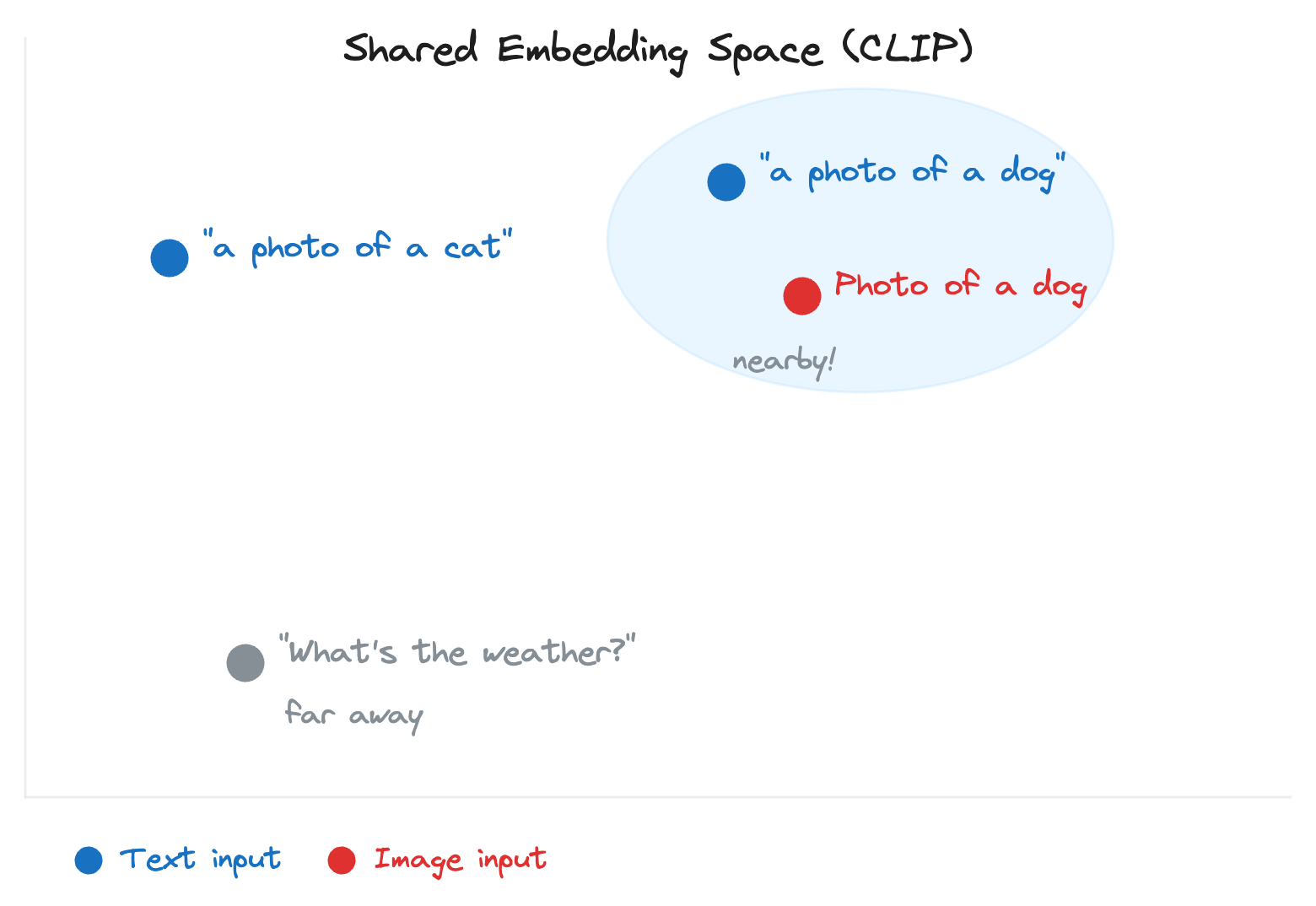
That’s changing; models like GPT-5 and Gemini now handle text, images, audio, and video within a single architecture. The question is how. How does a text prompt like “a photo of a cat” actually guide an image model to generate the right image?
Through cross-modal embeddings.
An embedding converts content into a list of numbers that captures its meaning. Cross-modal embeddings do this across different content types, text and images, placing them on the same map.
CLIP, developed by OpenAI, is the most well-known example. It places both “a photo of a cat” (text) and an actual cat photo (image) side by side on this shared map. That shared representation enables a text description to guide image generation.
Model Architecture Variants
Not all foundation models are built the same way…
Most are based on the Transformer (covered in the glossary above), but they use it differently. The two main jobs of a language model are understanding input and generating output.
Different architectures handle these jobs in different ways:
1 Decoder-only models focus entirely on generation: they take an input and produce text left-to-right, one token at a time. GPT, Claude, Llama, and Gemini are all decoder-only. This is the dominant architecture for text generation today.
2 Encoder-only models (like BERT, an early Transformer‑based language model) focus entirely on understanding: they read input and produce a numerical representation of its meaning, but don’t generate new text. Used for classification, sentiment analysis, and search ranking. For example, when a support system reads “I’m furious about my broken order” and classifies it as “negative sentiment, high urgency”, that’s an encoder-only model at work. In GenAI products, they play supporting roles, such as classifying user intent or detecting toxicity.
3 Encoder-decoder models (like Google’s T5 and Meta’s BART) do both: one part reads and understands the input, the other generates the output. Suited for translation, summarization, and rewriting.
4 Mixture of Experts (MoE) is a different kind of optimization.
Instead of a single large model where every parameter is used for every input, MoE splits the model into multiple specialized groups, called “experts.” For each input, a router determines which experts are relevant and activates only those. A question about Python code might activate code-specialized experts, while a question about French history might activate different experts. Models like Mistral’s Mixtral 8x7B use this approach, with 46.7 billion total parameters but only around 12.9 billion active per token. You get more capability per unit of compute, but you need more GPU memory to store all the experts.

The Model Landscape: Proprietary, Open-Weight, and Open-Source
When choosing a model, there are three categories with different trade-offs:
1 Proprietary models (GPT, Claude, Gemini) are accessed via API. They offer the highest capability and are the easiest to start with, but give users the least control. You can’t see the model’s internal parameters, modify its architecture, or run it on your own servers.
2 Open-weight models (Llama, Mistral, Gemma) release their trained parameters publicly. You can download them, run them on your own GPUs, and fine-tune them. Training data and methods are typically not shared. This gives you full control over the model, but it also means you have to manage the infrastructure yourself.
3 Open-source models go further by sharing not just weights but training code, data, and the full methodology behind how the model was built.
The gap between proprietary and open-source is narrowing…
By early 2025, models like Llama 4 Maverick and DeepSeek-V3 were competitive with proprietary models on many tasks. Most production systems use a mix: a proprietary model for complex tasks and an open-weight model for high-volume, simple ones.
Model Selection
Each model family offers a range of sizes (e.g., GPT-5 vs. GPT-5 mini, Claude Opus vs. Haiku, Llama 4 Maverick vs Scout).
Smaller models are faster and cheaper, but less capable. Beyond size, some models offer specialized variants. OpenAI’s GPT-5, for example, includes configurable reasoning effort, and Claude offers an extended thinking mode. These reasoning capabilities require more compute during inference to work through problems step by step, breaking complex questions into smaller parts before answering. This improves accuracy on tasks such as math, logic, and multi-step analysis, but it costs more per request and takes longer to respond.
This trade-off is another reason model routing matters: route simple questions to a faster model, and complex reasoning tasks to a model with these capabilities.
Public benchmarks help narrow down which specific model is best suited to a task. MMLU tests general knowledge across 57 subjects; HumanEval and MBPP focus on code generation; Chatbot Arena by LMSYS aggregates human preference scores from real conversations; and benchmarks like GPQA and ARC-AGI evaluate reasoning and problem-solving abilities.
But benchmarks have a well-known problem: contamination.
Models can be trained on benchmark test data, inflating scores. It’s like a student who memorized the answers to last year’s exam; they score high, but can’t solve newer problems. A model that tops MMLU may underperform on a specific task. Benchmarks are useful for narrowing the field, but final selection requires evaluating on your own data.
That covers the model landscape, what models exist, how they differ, and how to pick between them. All of these models, though, start with random parameters. What turns them into something useful is data.
Reminder: this is a teaser of the subscriber-only newsletter series, exclusive to my golden members.

When you upgrade, you’ll get:
Simple breakdown of real-world architectures
Frameworks you can plug into your work or business
Proven systems behind ChatGPT, Perplexity, and Copilot
Part 2: The Data Layer
A model’s capability comes entirely from the data it was trained on.
The quality of that data, how it’s collected, cleaned, and organized directly determines how well the model performs.
Training Data
Foundation models learn from massive datasets: trillions of tokens scraped from books, websites, code repositories, scientific papers, and forum posts. For diffusion models, training data consists of millions of images, each paired with a text description of its contents.
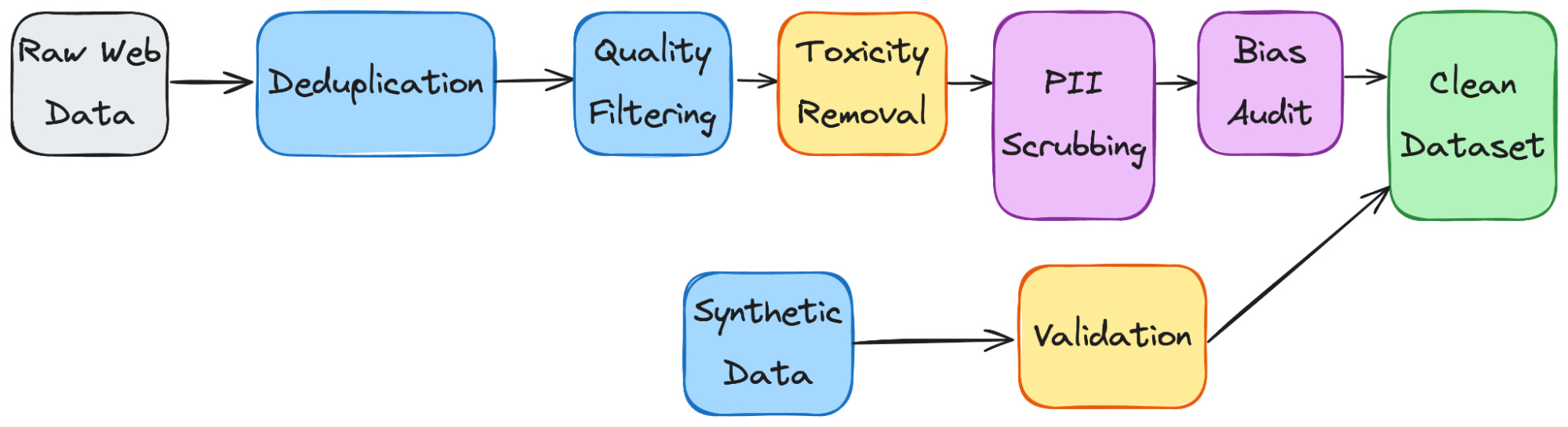
Raw data is never used directly.
It passes through a data pipeline that cleans, filters, deduplicates, and transforms the data before training begins. For example, the same news article might appear on hundreds of websites. Without deduplication, the model sees the same phrases hundreds of times and overlearns them.
The pipeline handles problems like near-duplicate web pages that inflate certain patterns, toxic or biased content the model would absorb, personally identifiable information (PII) that shouldn’t be memorized, and low-quality text that adds noise without a useful signal.
The quality of this pipeline directly determines the model's quality.
Synthetic data generation is increasingly used to fill data gaps. An existing model generates additional training examples for areas where real data is scarce, such as specialized medical terminology, underrepresented languages, or edge-case code patterns. The quality of synthetic data depends on the model that generates it and how it’s validated.
Bias detection starts here. If the training data overrepresents certain perspectives, demographics, or viewpoints, the model will reflect those imbalances. Data teams audit for representation gaps and offensive content before training begins, but detection is imperfect. Some biases only surface after the model is trained and tested.
NSFW and harmful content requires explicit handling during this stage. Some pipelines filter it entirely. Others retain it in a controlled form so the model can later learn to recognize and refuse it. The approach depends on the product’s intended use.
Data Storage and Retrieval
Training and inference have very different data needs.
During training, the dataset can be terabytes or more in size, containing text, images, and code. Teams typically store this in distributed file systems like HDFS (Hadoop Distributed File System), which splits large files across a cluster of machines so they can be read in parallel, or cloud object storage like S3 (Amazon’s Simple Storage Service), which stores files as objects in the cloud and is widely used because it’s cheap, scales without limits, and requires no infrastructure to manage. Training pipelines stream data from these systems to GPU clusters in batches, feeding the model continuously throughout training.
At inference time, the training data is no longer needed.
What matters is the model itself. The model’s parameters need to be loaded into GPU memory before it can serve any requests, and for large models, that means hundreds of gigabytes. Once loaded, the model takes in a prompt and generates tokens one at a time, streaming them back to the user.
The challenge is keeping sufficient GPU capacity available to handle many users simultaneously without long wait times.
Some GenAI systems also retrieve data at runtime, pulling in documents, search results, or database records when a user asks a question. This is how products like Perplexity stay current beyond the model’s training data.
In Part 6, we cover how this retrieval works, embeddings, vector databases, and structured data handling when we design the full product architecture.
But having clean, well-organized data is only the starting point.
The next question is what happens to that data, and how a pile of text becomes a model that can actually follow instructions…
Let’s keep going!