

Share this post & I’ll send you some rewards for the referrals.
You have more than one AI agent working on the same project:
A few coding agents in your terminal, a chatbot in your browser, an agent deployed on AWS.
Each keeps its “own” memory.
i.e., your terminal agent doesn’t know what you told the browser chatbot 10 minutes ago. And the browser chatbot doesn’t know what’s happening in your editor.
And you copy decisions between chats and carry context1 by hand…
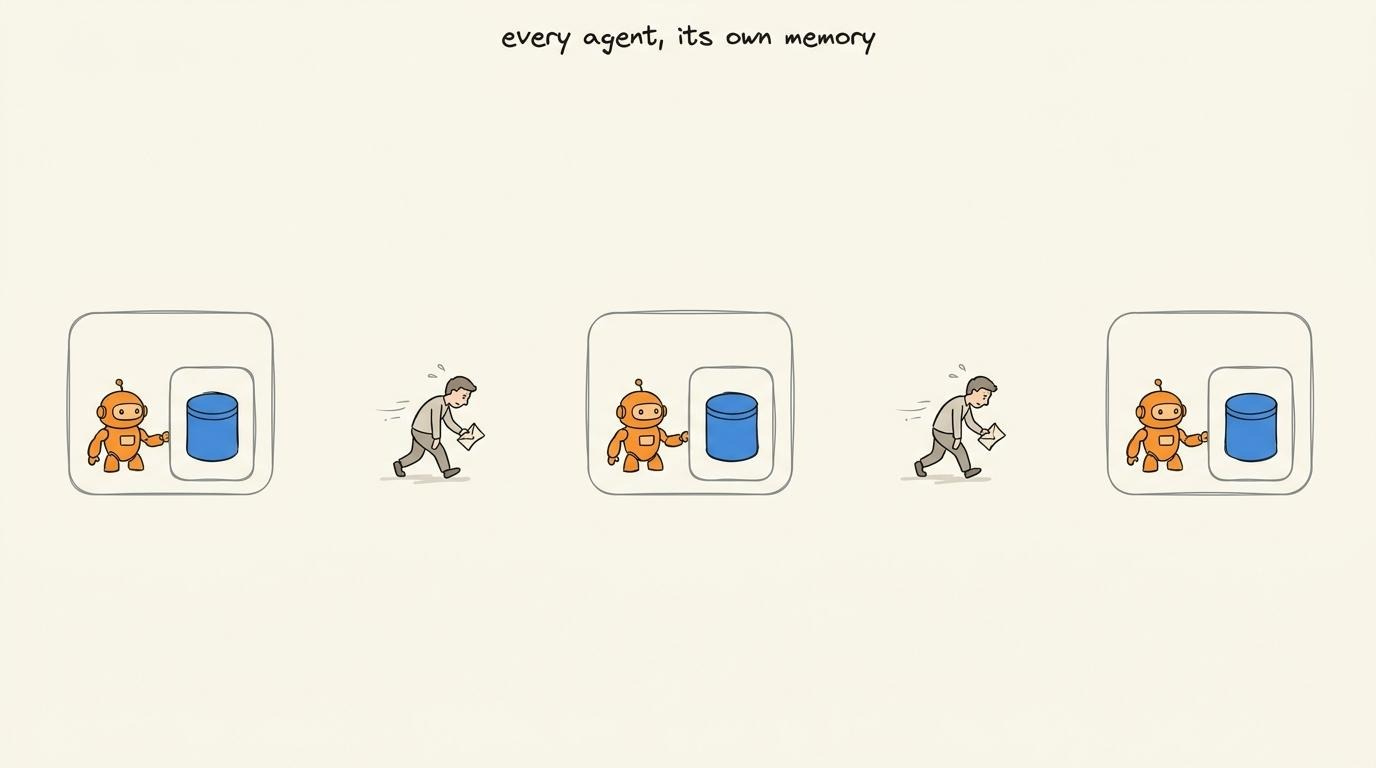
So a single “shared memory” every agent can read from & write to is missing…
I’ll use Omnigraph as the case study for this newsletter.
(It’s an open-source graph engine built for solving this exact same problem.)
Here’s what’s inside this newsletter:
Why shared folders and vector databases fail. The hidden problem that appears the moment many AI agents write to the same memory.
Why graph-shaped memory wins. How nodes, edges, and schemas let agents build knowledge instead of disconnected text.
Object storage without database transactions. How Omnigraph achieves atomic writes on Amazon S3.
Git for AI memory. Why branches, commits, merges, and policy checks stop agents from overwriting each other or turning mistakes into shared truth.
One query, three retrieval methods. How graph traversal, keyword search, and semantic search combine to assemble better context for every AI agent.
When graph memory is the wrong tool. The workloads where a traditional database, a graph database, or a vector database is still the better choice.
Onward.
Why traditional memory breaks
One “shared” memory every AI agent can read from and write to sounds simple.
Yet the obvious ways to build it don’t work well…
Let’s start with two simple approaches:
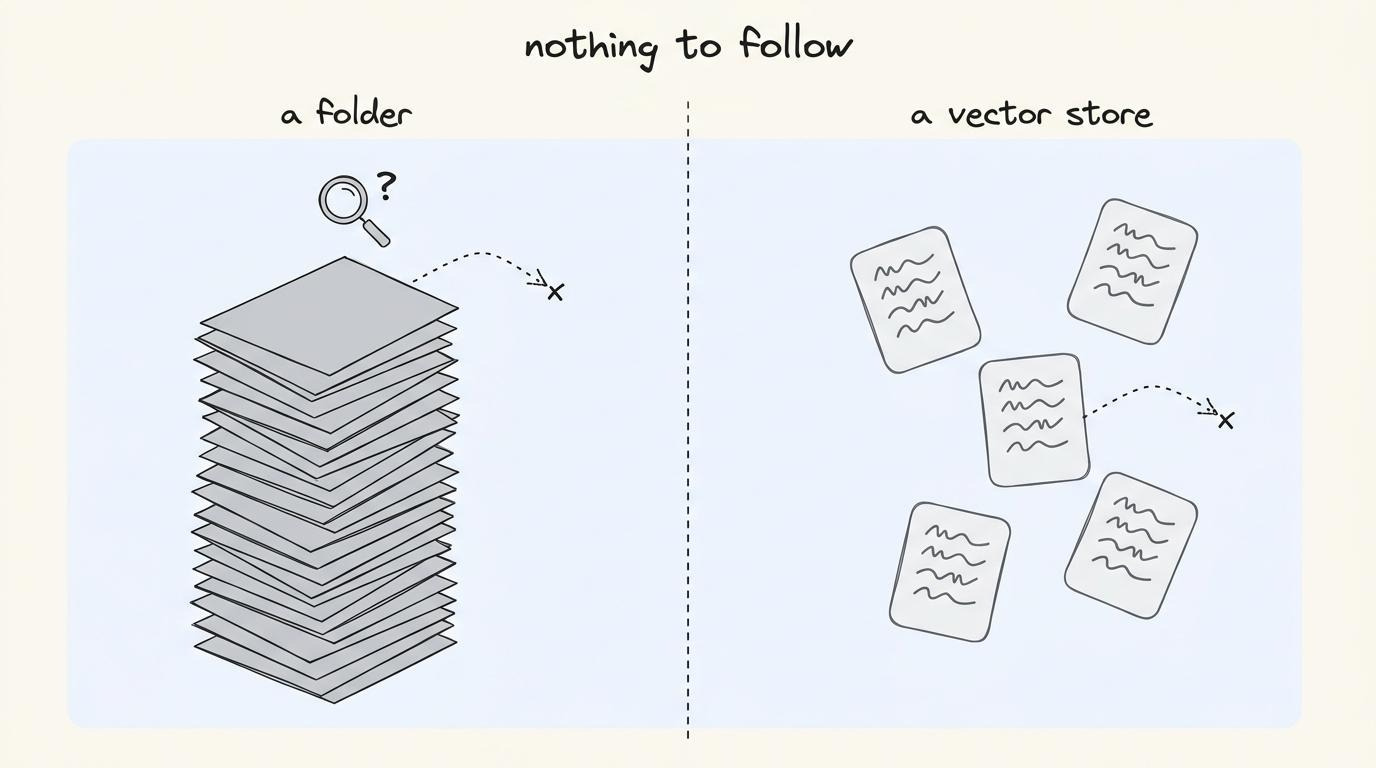
1. Shared document folder
Every agent stores text in notion, google drive, confluence, or a wiki.
Yet the folder has NO structure an agent can reason over…it’s just a pile of text.
If you ask, “Which deploy touched this service, or who shipped it?”, the agent can answer it off a single file just fine. But it becomes extremely difficult when the answer is spread across 200+ files…
Then agent doesn’t know deploy, service, and person are different concepts. Plus, it has to read everything to be sure it didn’t miss the one file that mattered... or fall back to the classic habit of hallucination2.
A folder stores text,,, NOT knowledge.
2. Vector database
Ask the vector database3 a question using retrieval-augmented generation4 (RAG).
It returns the chunks of text that most closely match your question…This is useful for “find me the passage about X.”
But a vector database holds NO relationships or types.
It can’t start at the customer; find their open tickets, connect them to the engineer on call, and then to the commit that probably caused it. Instead, you get only a bag of similar-sounding snippets, and you need to connect the dots yourself.
So neither one allows an agent to start with one fact and follow it to another related fact…
Even if you ignore these issues, everything falls apart the moment a second agent writes to the same place…
A shared folder has no way to coordinate concurrent writes. If two agents save the same document, the last write wins and the other disappears.
A vector database does NOT distinguish between a proposed change and an accepted one. Once an agent writes new information, every other agent can retrieve it immediately.
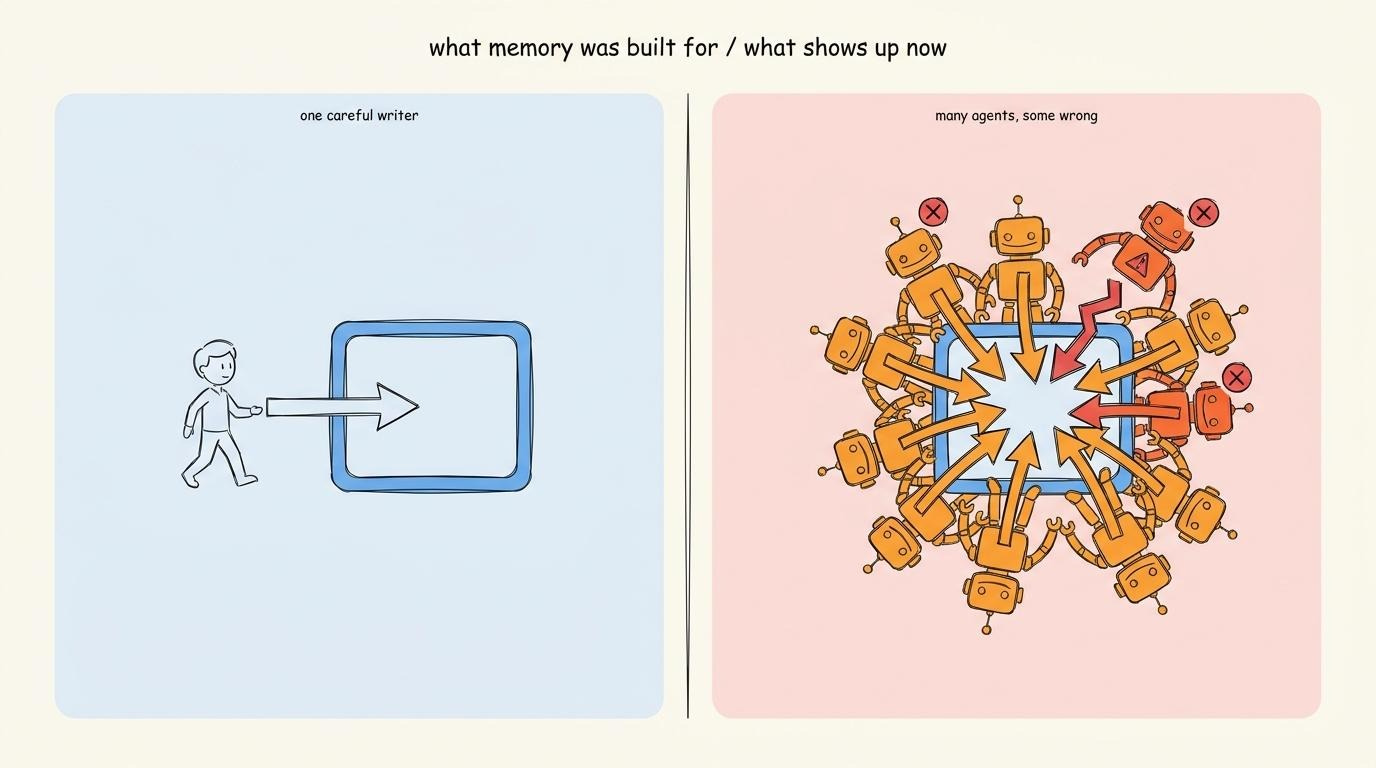
i.e., one agent’s mistake becomes every agent’s input (shared context). And agents often get things wrong, so letting one write straight to the shared memory is extremely dangerous.
A “shared” memory for AI agents must do three jobs:
Read: Assemble context across connected facts. Start from one fact, follow its relationships, and build the context an agent needs.
Write: Persist new knowledge so it survives after the task ends.
Coordinate: Allow many agents to read & write simultaneously without overwriting each other or exposing incomplete changes.
Reads and writes aren’t new…but coordination is…
Traditional memory systems assume a few deterministic writers making short, careful, and predictable updates.
But AI agents behave differently:
They reason for minutes, revise earlier conclusions, make ‘mistakes’, and run alongside many other agents touching the same knowledge.
Shared folders & vector databases are NOT designed for this type of workload…
Omnigraph’s core idea is simple:
AI agents don’t need a better folder or a vector database. Instead, a memory system designed for the way they read, write, and coordinate.
I’m happy to partner with Omnigraph on this newsletter.
When dozens of agents share one graph, things get chaotic fast: updates collide, bad writes land immediately, and context drifts.
Omnigraph gives every agent an isolated branch of the same typed graph, so agents can enrich data in parallel while humans deliberately review, approve, and merge changes. Built on Lance, Arrow, DataFusion.
Graph state stored in object storage. MIT.

Graph based memory
So what should this memory look like?
Imagine facts as dots and relationships as lines connecting them.
A customer is a dot.
Each of their tickets is a dot.
Lines connect the customer to each ticket.
The engineer who owns a ticket is a dot with a line to it.
The commit that probably caused the bug is another dot, with a line to the ticket it broke.
This is a graph: dots are nodes & lines are edges.
To answer a question, the system doesn’t search thousands of documents for clues. Instead, it follows the existing edges:
Customer → Ticket → Engineer → Commit i.e., four direct hops through connected data.
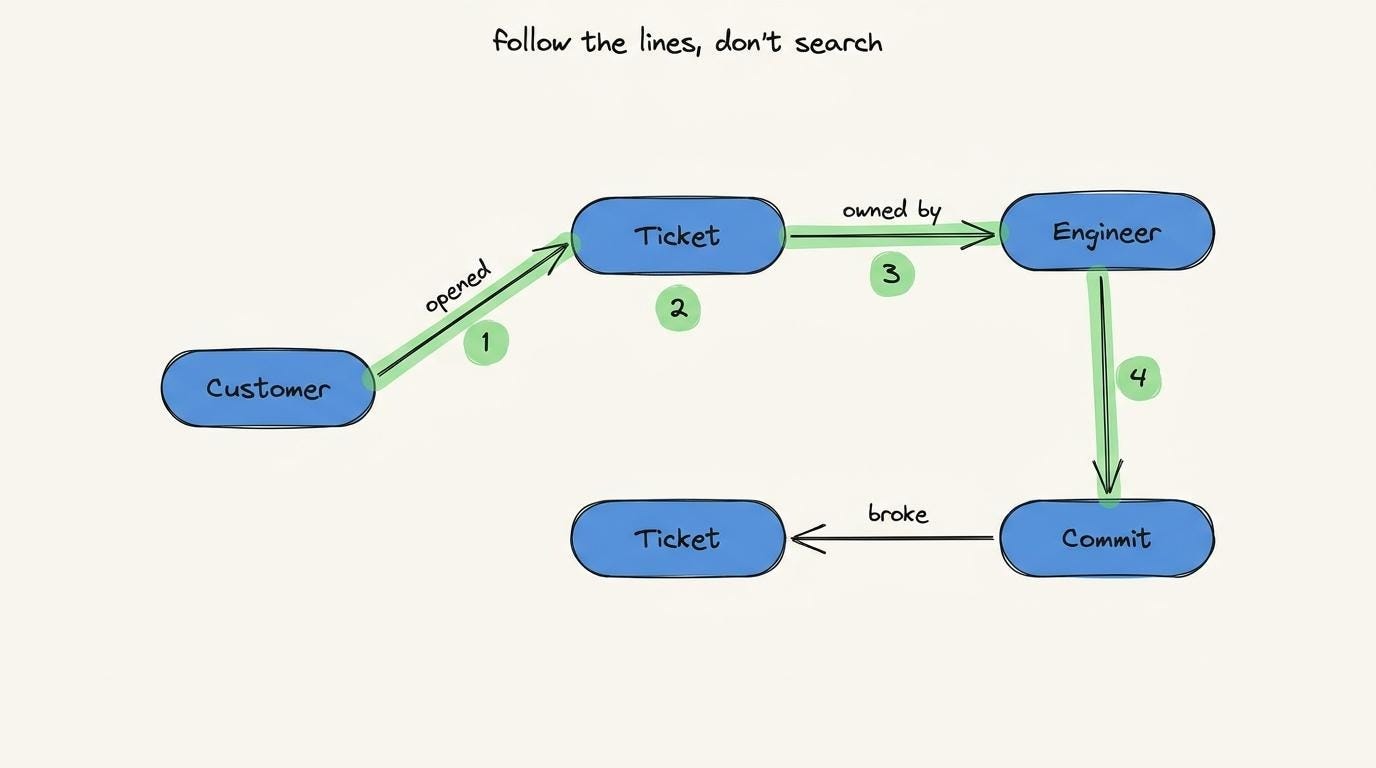
The graph stores relationships alongside the facts themselves.
This is exactly what shared agent memory has been missing…
Graph schema
A graph alone is NOT enough.
Once many AI agents start writing to the same graph, a new problem appears…
Imagine three agents recording the same production event:
One writes
“deploy”,Another writes
“deployment”,And the third writes
“release”.
To you, those are different words with the same meaning…but to the graph, they’re three different nodes.
(Nothing tells the graph they represent the same concept…)
Now when an agent asks, “Show me every deploy this week and who shipped it.”
It follows the deploy nodes and returns only part of the answer. Every deployment and release sits elsewhere on the graph, so the query “silently” never reaches them.
The result looks complete… but it’s WRONG!
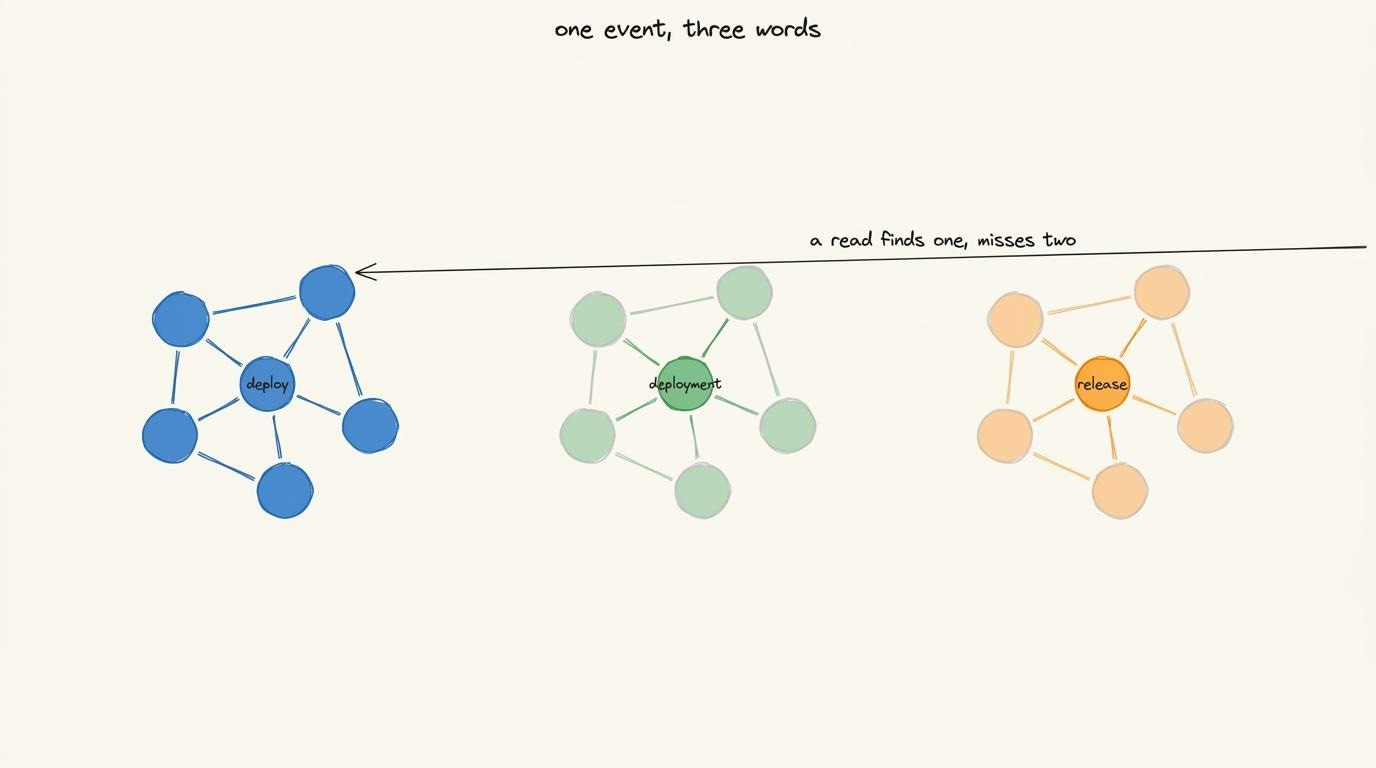
The graph didn’t fail,,, but the schema did.
Without a “shared” schema, each agent creates its own vocabulary. The graph stores exactly what each agent writes, even when different terms describe the same concept.
The solution is to define the graph before anyone writes to it.
A schema specifies:
Which node types are allowed to exist,
Which relationships connect them,
How each node is identified.
Every agent writes against the same schema, so they all describe the world in the same way.
So the graph stays consistent, even when hundreds of agents write to it.
Omnigraph schema
In Omnigraph, a schema is a plain text file:
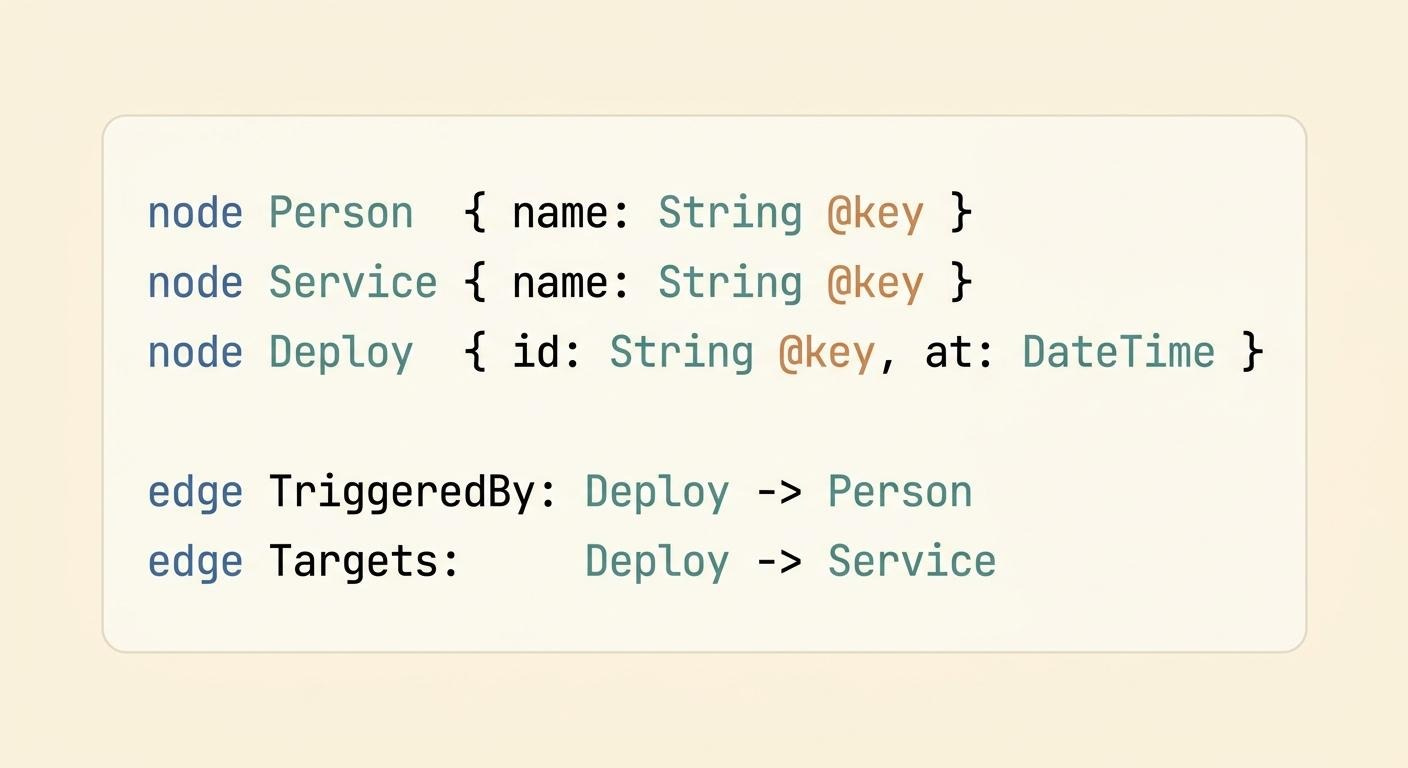
You do NOT write it from scratch.
Instead, the agent generates it from your graph and updates it as your knowledge evolves. And the file describes the graph itself.
Each node defines a type of entity, such as Person, Service, or Deploy. The @key specifies how each node is uniquely identified; for example, a person’s name, a deploy ID, and so on.
Each edge defines a relationship between two node types and the direction an agent can traverse it.
Deploy -> Service literally means “from the deploy to the service it touched.”
Every agent reads the same schema before it writes. This keeps the graph consistent even when many agents update it simultaneously.
So the memory isn’t just a graph…it’s a “typed” graph with a shared schema.
The next question is where this graph lives…
Where memory lives
The graph lives in object storage.
Think of it as a data bucket in the cloud. Some popular examples are Amazon S35, Google Cloud Storage (GCS), and Cloudflare R2.
Modern web apps use object storage for backups, logs, images, videos, and data lakes.
Why Omnigraph chose S3
Omnigraph uses AWS S3 for storage.
Here’s why:
1. Low cost
Amazon S3 storage costs only a few cents per gigabyte each month.
AI agents accumulate knowledge over time. And object storage lets memory grow without the cost of running a large database cluster.
2. High durability
Once data is stored, Amazon S3 replicates it across many availability zones (AZ) within a region to provide very high durability.
This is crucial because the graph becomes your agents’ shared memory and system of record.
3. Shared access
An object storage bucket is NOT tied to one machine.
Every agent with the right credentials can read from and write back to the same bucket. Your coding agent, browser chatbot, and background agents all share “one” memory instead of maintaining separate copies.
i.e., there’s no need to copy state between separate agent data stores.
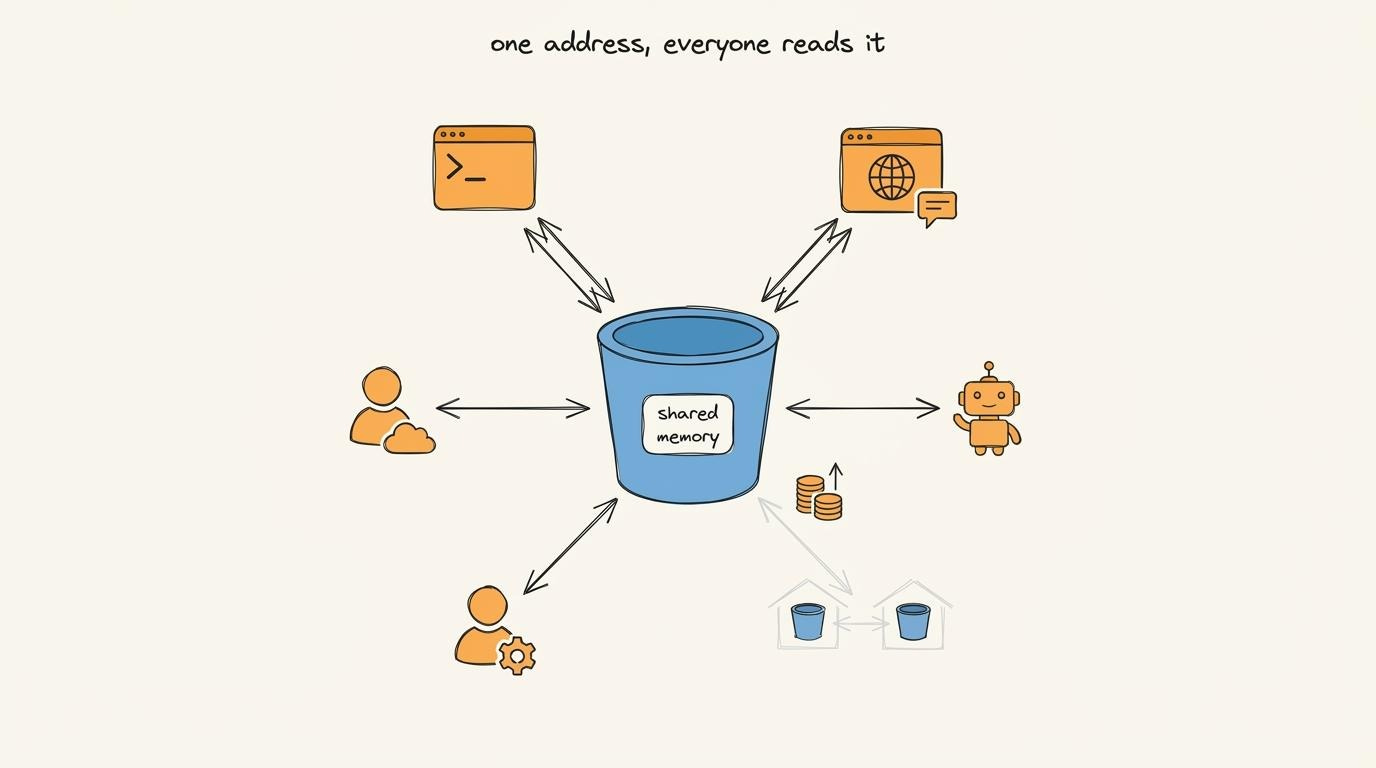
Yet an object storage has one key limitation:
It stores one object safely at a time, but it can’t commit several objects as a single all-or-nothing operation. A database calls this an atomic write.
Write object A, then B, then C, and the bucket treats them as three independent writes. There’s NO built-in way to say, “Commit all three or none.”
And a graph update almost always touches “many” objects…
So how do you get atomic writes from storage that doesn’t support them?
How atomic writes work
To understand this, you first need to see how Omnigraph stores the graph in the S3 bucket…
How Omnigraph stores the graph
The graph is NOT stored as a single file.
Instead, Omnigraph splits it into many separate stores. This design is what makes atomic writes (all-or-nothing writes) possible.
Take the schema from before:
Each node type & edge type has its own store.
And each store contains every record of that type in versioned files. Under the hood, Omnigraph uses an open columnar file format6 called Lance, yet you never interact with it directly.
So schema above becomes five stores, plus a smaller store called the manifest.
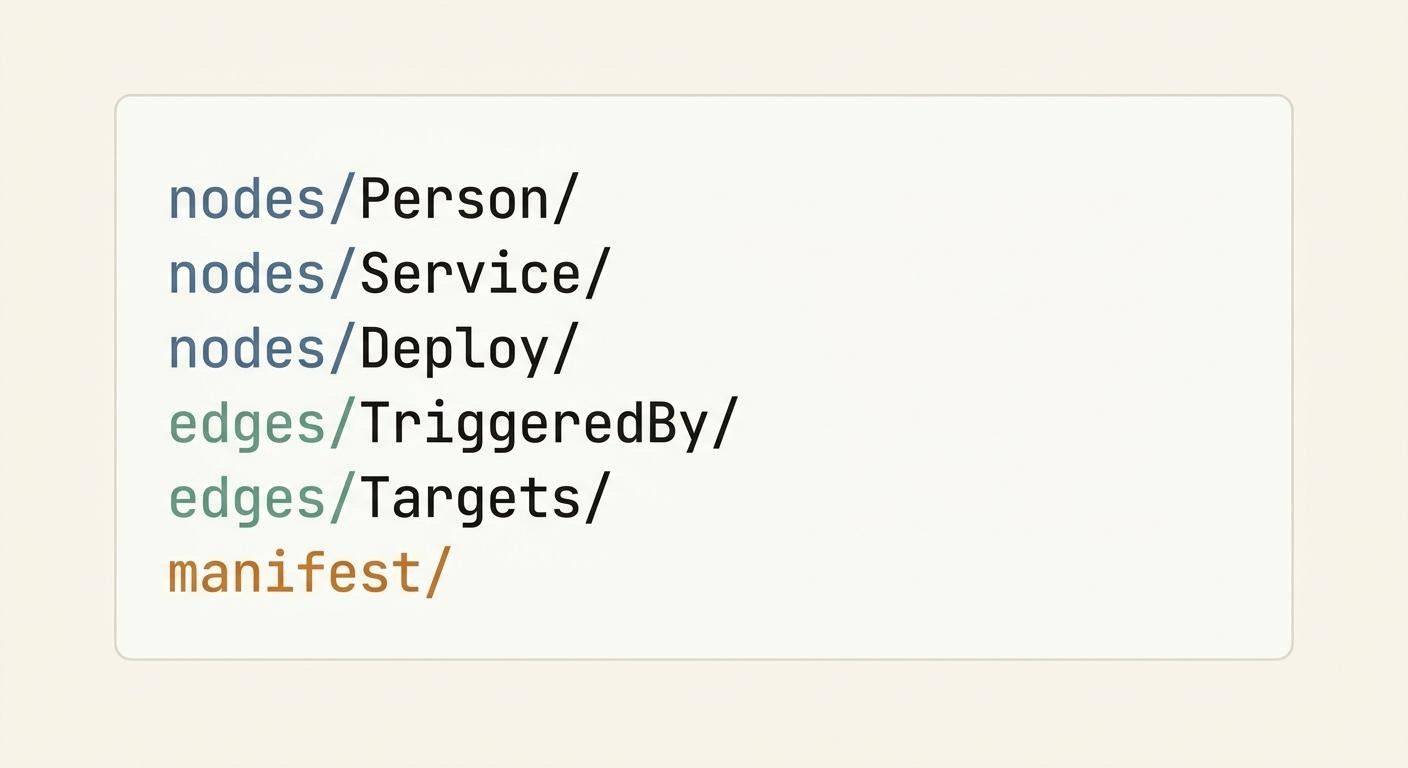
Also, a store is NOT a single file.
Think of nodes/Deploy/ as a folder that keeps growing as new deploys arrive…
(This detail becomes important in a second…)
One update touches many stores
An update to a graph almost always writes to several stores.
This is where object storage turns into a limitation…
Record a single deploy: Alice pushes deploy d-913 to the checkout service.
Omnigraph has to write:
a new row in
nodes/Deploy/for deployd-913a new row in
nodes/Person/for Alice, if she doesn’t already exista new row in
edges/TriggeredBy/linkingd-913to Alice
i.e., write to three separate stores for one logical update.
And to the bucket, those are just three independent writes…
If the process crashes after writing the Deploy and Person stores but before writing the TriggeredBy edge, the graph becomes inconsistent. Then deploy exists, but nothing says who triggered it…
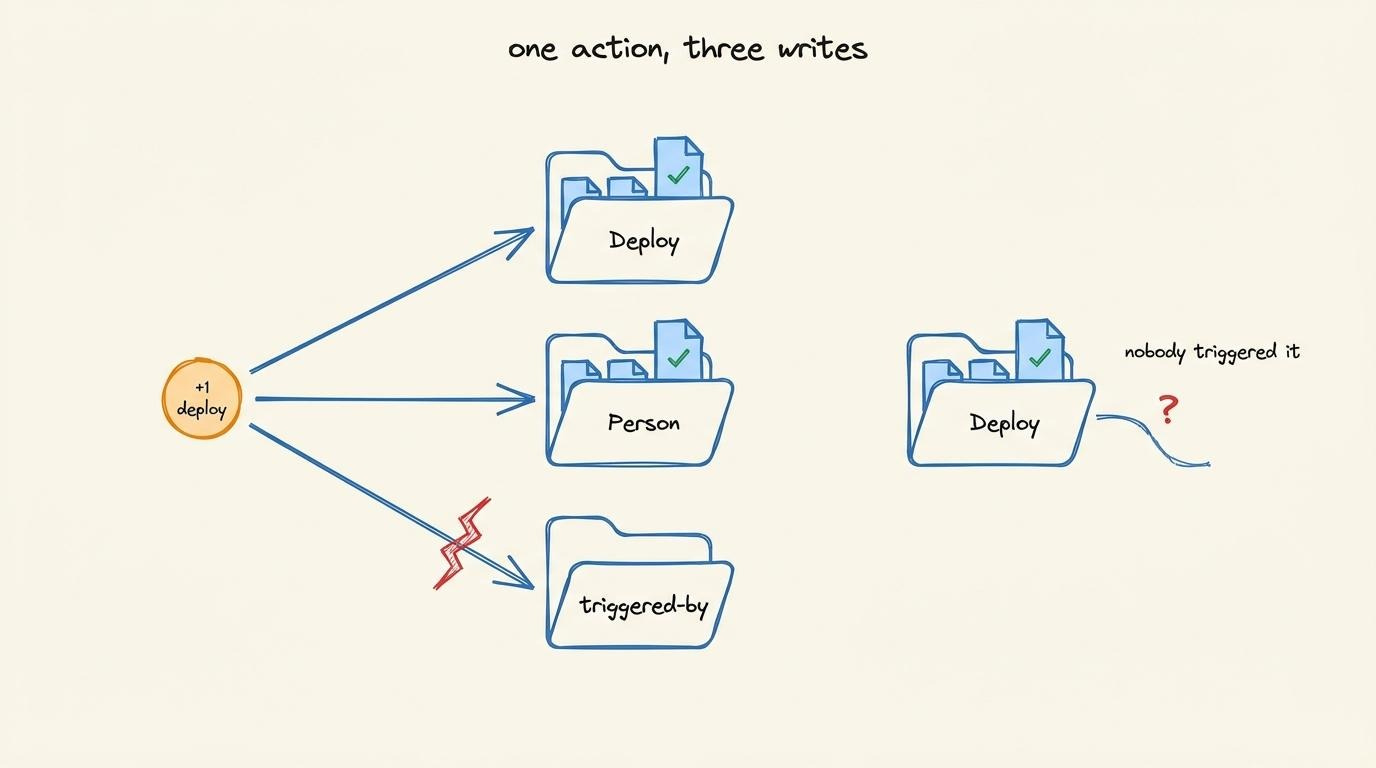
Besides, object storage can’t roll those writes back because it never knew they belonged to the same logical update.
Manifest tracks live versions
The manifest is the smaller store…It does NOT contain graph data.
Instead, it’s a small table whose only job is to record, for every other store, which version of it is live right now.
It follows these two simple rules:
Rule #1 Stores are immutable
A write “never” modifies a store in place.
A write to nodes/Deploy/ creates a new version alongside the old one. Both versions exist in object storage simultaneously. And the old version remains live (agents keep seeing it) until the manifest says otherwise.
Rule #2 Every store has exactly one live version
The manifest stores a pointer to the current version of each store.
It looks like this:
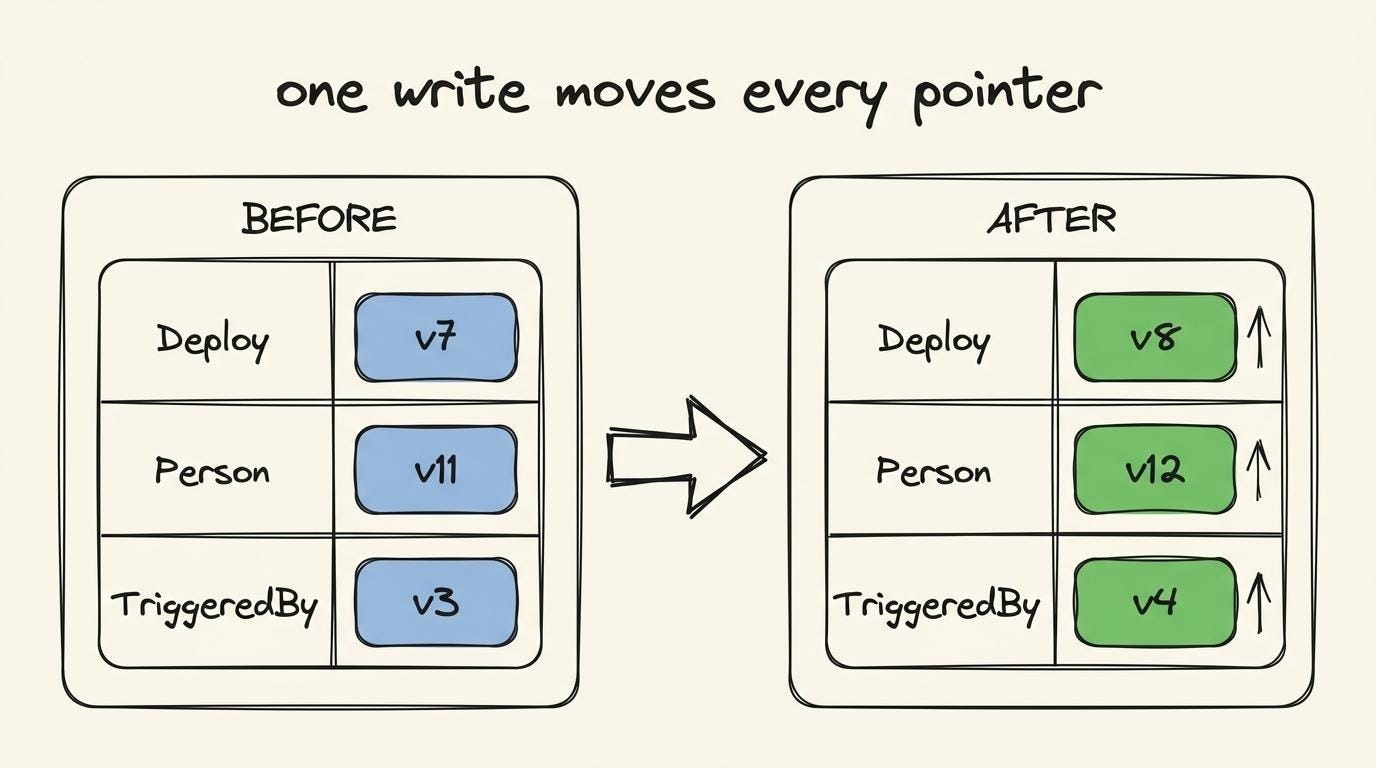
Now check the deploy from earlier…
The update touches three stores,,, so the manifest has to move three pointers to their new versions.
Publishing a graph update
Here’s the complete (all-or-nothing) write sequence:
Omnigraph writes the new store versions without touching the manifest.
It creates
Deploy v8,Person v12, andTriggeredBy v4in the bucket.Those versions already exist in object storage, but they’re invisible to agents. Every agent still reads
Deploy v7,Person v11, andTriggeredBy v3because the manifest hasn’t been updated.The final step is to update the “manifest” file.
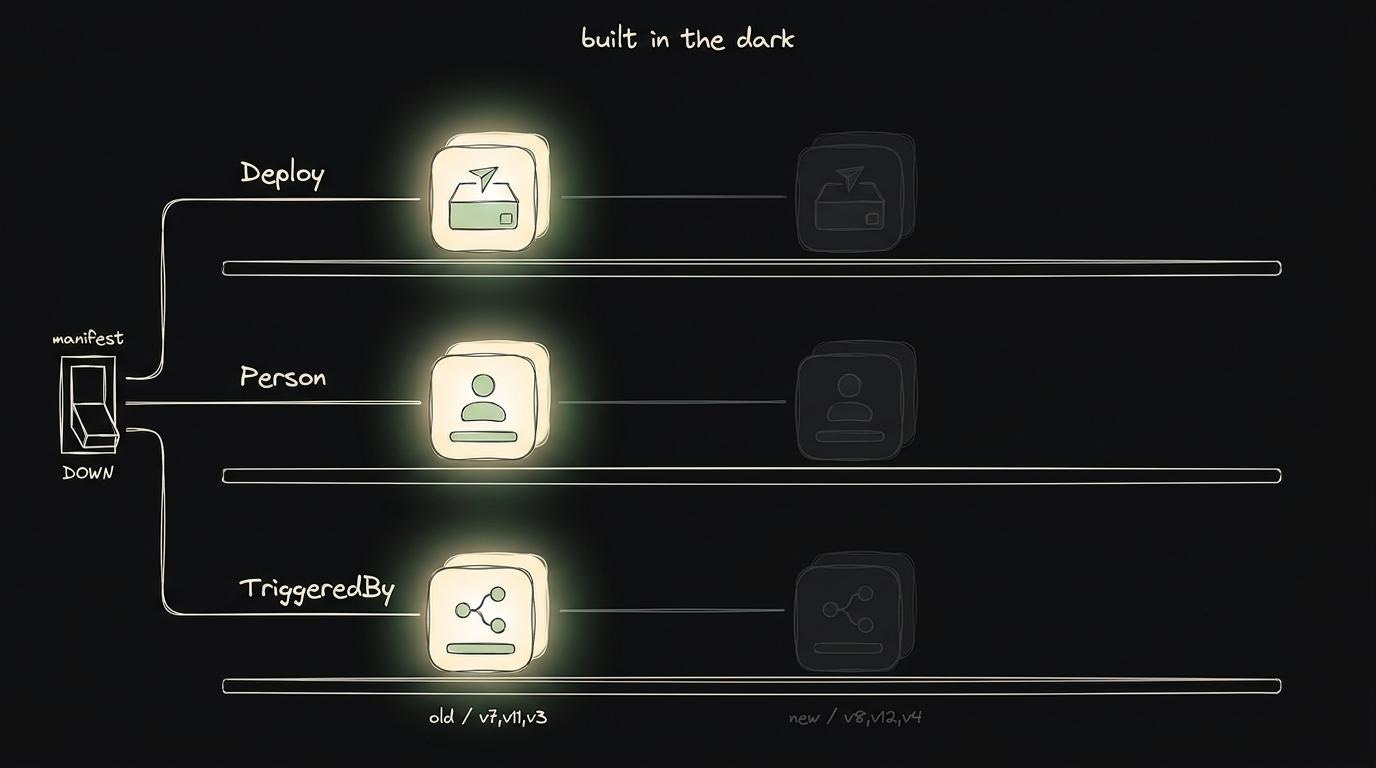
A single manifest write moves all three pointers at once:
Deploy → v8Person → v12TriggeredBy → v4
Thus from an agent’s perspective:
Before commit: entire old graph is visible (consistent)
After commit: entire new graph is visible (consistent)
During commit: there is no partial state (consistent)
The only atomic operation is the update to the manifest file.
If the process crashes before the manifest changes,,, nothing becomes visible. The new store versions remain orphaned files in object storage, while every agent continues reading the previous graph version.
Preventing conflicting updates
What happens if another agent updates the graph before your commit becomes visible?
Omnigraph solves this problem using compare-and-swap7 (CAS).
Before updating the manifest, it checks whether every store is still on the version the writer originally read.
Suppose a writer starts from Deploy v7 and creates Deploy v8.
Before publishing the update, Omnigraph asks one question:
Is Deploy still on version v7?
Yes. Nothing changed, so the manifest update succeeds.
No. Another writer already published a newer version. The commit then gets rejected, nothing becomes visible, and the writer retries from the latest state.
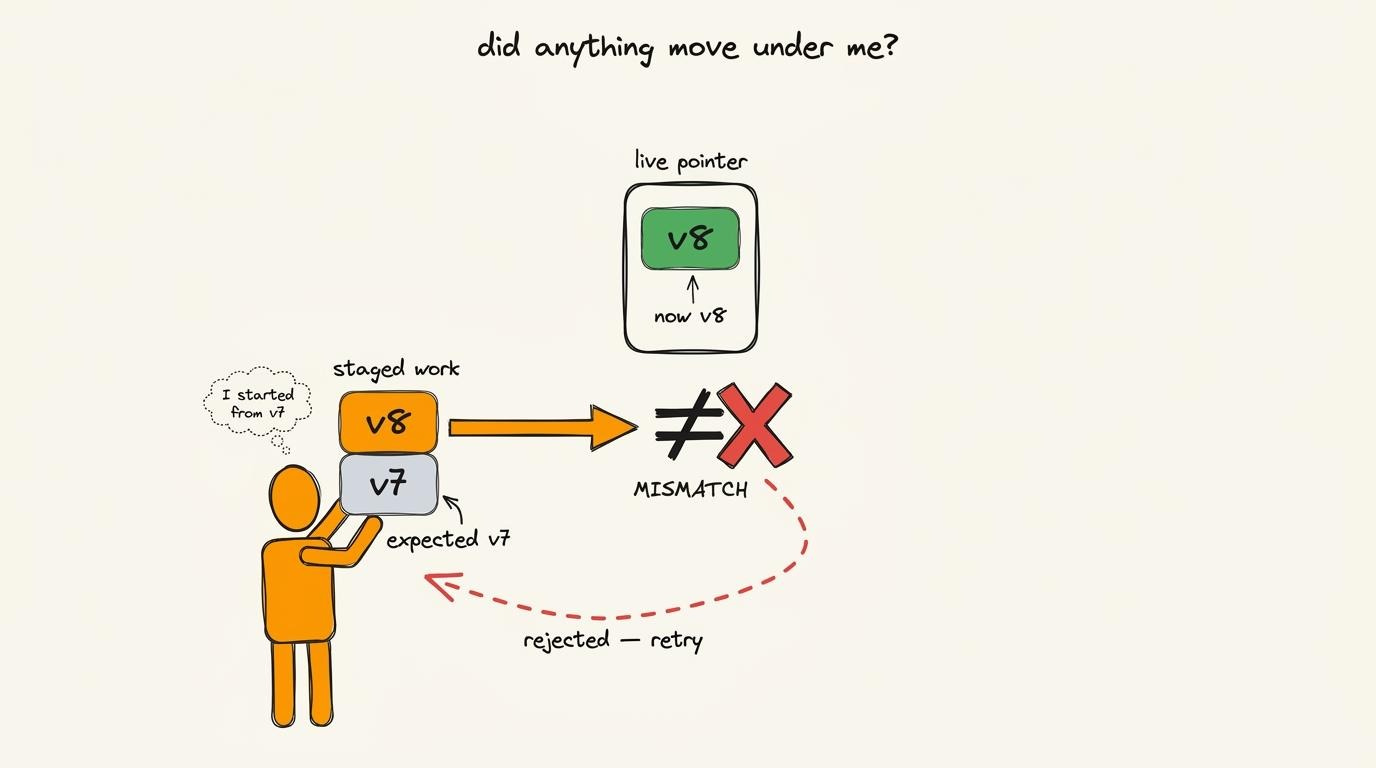
Compare-and-Swap simply compares the expected version with the current version before swapping the manifest pointer.
The manifest file is append-only.
i.e., it never modifies older entries. Instead, each successful commit simply adds a new set of live pointers.
CAS prevents one writer from accidentally overwriting changes it never saw.
Proven approach
Omnigraph isn’t the first system to solve this problem…
Apache Iceberg and Delta Lake8 (open table formats) use the same pattern to achieve atomic commits on object storage.
They write new data files first, keep them invisible, then publish them with a single metadata update. It’s a proven design to power production data platforms.
Atomic commits solve one problem:
They guarantee every graph update is complete or NOT visible at all.
But another challenge remains…
What happens when many AI agents want to change the graph at the same time? And how do you stop one bad write from becoming shared memory?
How agents write safely
Compare-and-Swap (CAS) prevents “conflicting” writes:
If two AI agents update the same store at once, one commit succeeds, and the other retries. So the graph remains consistent.
But CAS doesn’t decide whether the write is correct…
AI agents can hallucinate, misread context, or make wrong inferences. If a bad write wins the CAS check, it immediately becomes part of the shared graph.
And then every other agent reads it as fact.
Omnigraph solves this problem using a workflow similar to the Git version control system:
You don’t edit the shared repository. Instead, you create a branch, make your changes, review those, and then merge them. (Omnigraph applies the same idea to graph memory.)
i.e., AI agents don’t write directly to the shared graph, but to branches first.
Let’s dive in!
Every agent gets its own branch
Agents “never” write directly9 to main branch (shared truth).
Instead, each agent creates its own branch from the latest graph and writes there. This branch is private. And the agent can add, modify, or delete data without affecting anyone else’s view. So main branch remains unchanged.
Imagine two agents working on the same graph; each creates their own branch:
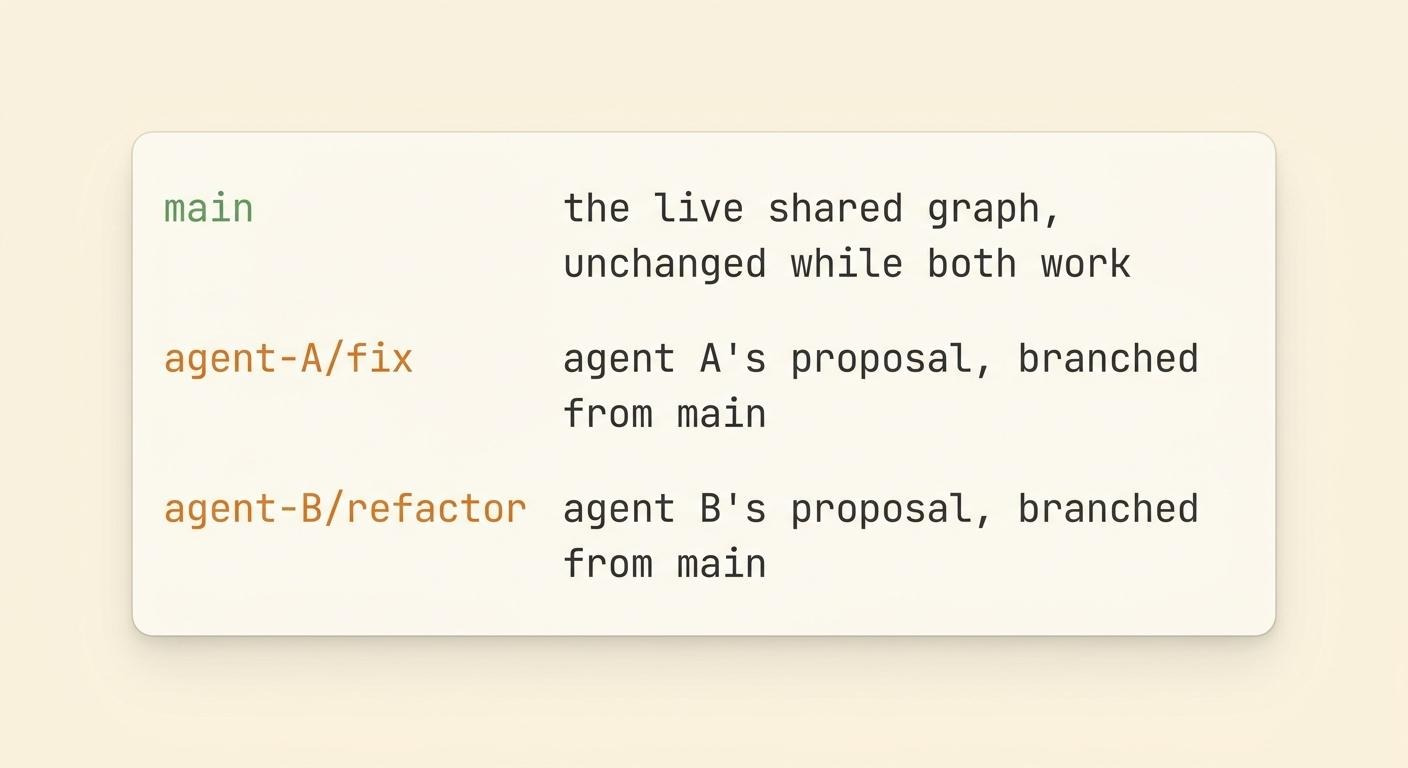
They work in PARALLEL without blocking each other, while the main branch remains unchanged…
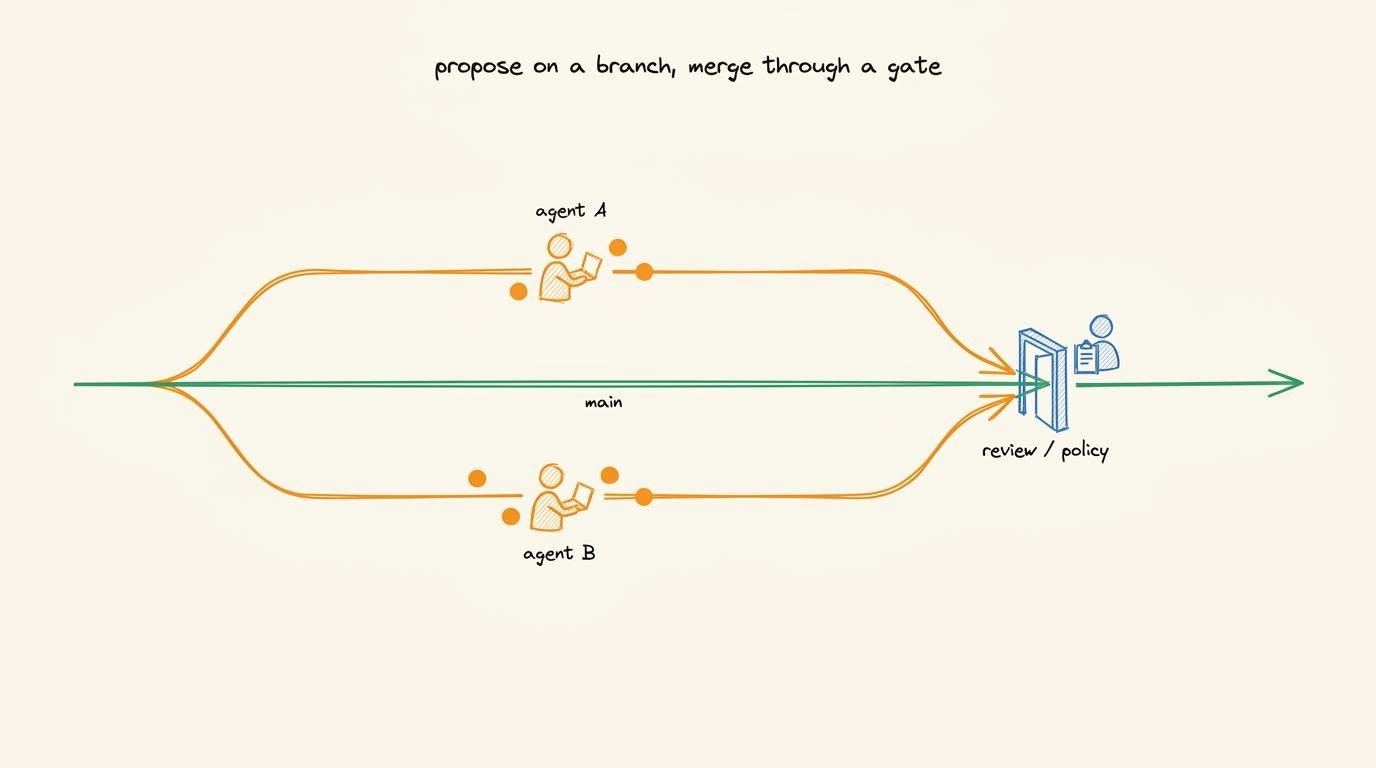
Branching does NOT copy the entire graph:
A store gets copied only when an agent writes to it for the first time. Until then, the branch shares the same underlying storage as main branch.
Branching is therefore “inexpensive”.
Every merge needs approval
A branch is ONLY a proposal.
It doesn’t become part of main until it’s merged10.
But every merge must be “approved”. You can approve it yourself, or define policy rules that automatically approve routine, low-risk changes from a trusted AI agent (into a scratch branch). Yet larger/riskier changes go through human review.
The key idea is simple:
An AI agent never approves its own changes.
(Let’s return to policy rules later.)
Now, let’s understand what occurs on merge conflicts…
Merge conflicts
Most branches merge automatically.
If two agents change “different” parts of the graph, Omnigraph keeps both changes.
Imagine Agent A updates one deploy, while Agent B adds a new person. Those changes don’t overlap, so the merge succeeds…
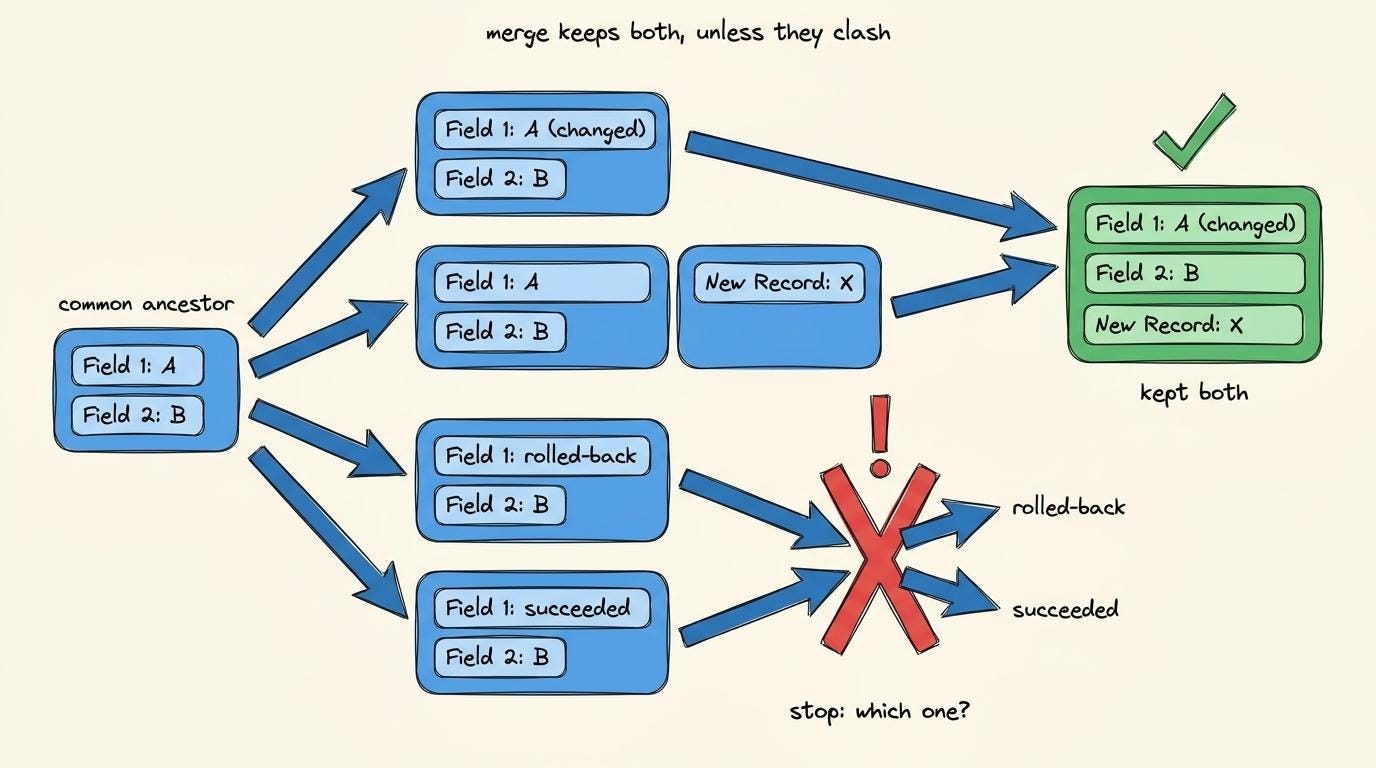
Conflicts occur only when two branches modify the “same” field differently:
Suppose Agent A changes deploy d-913 to rolled-back, while Agent B changes the same field to succeeded.
Omnigraph won’t guess which value is correct11. Instead, it reports the exact conflict: node, field, and both competing values. Then a human or a policy rule decides which one wins.
Also graphs introduce another kind of conflict:
One branch can delete a node while another adds an edge pointing to it. And merging both would leave a dangling edge.
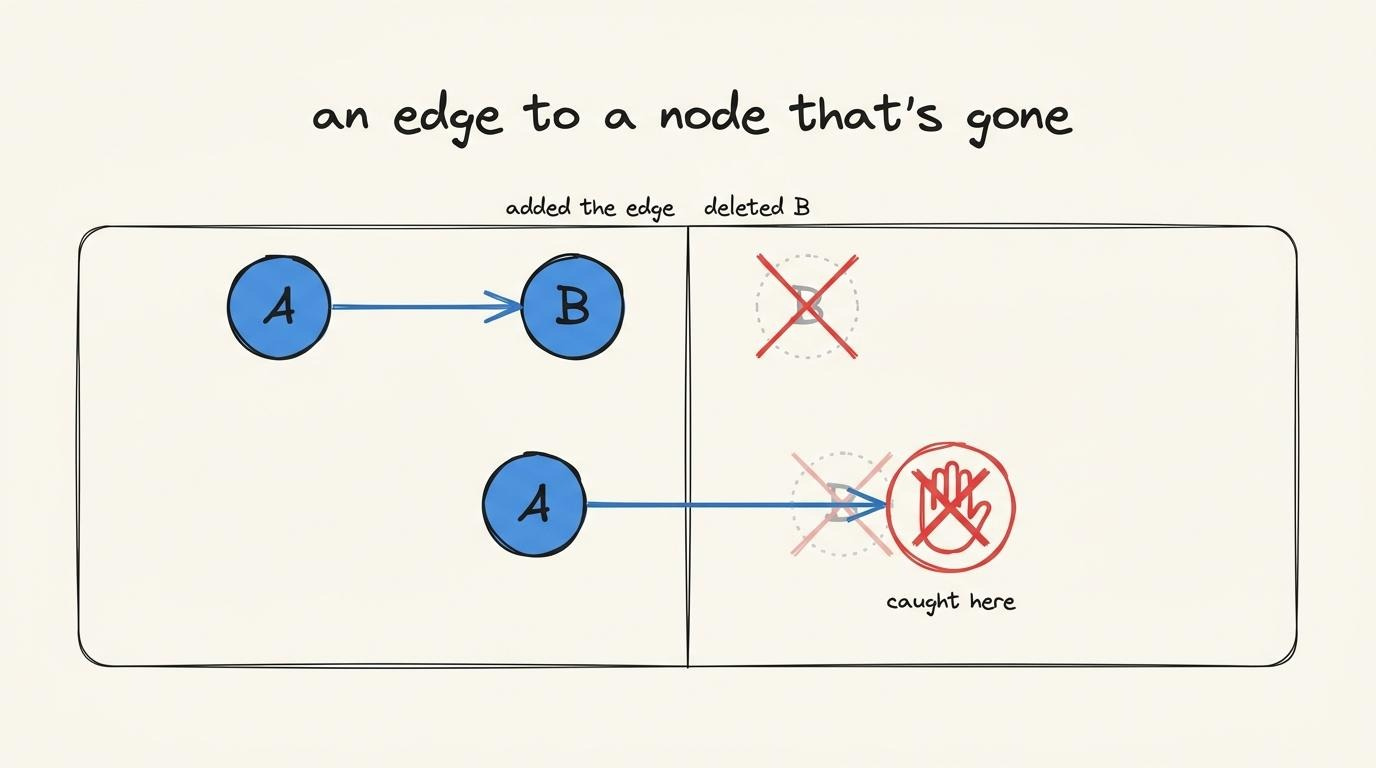
Omnigraph detects this conflict before the merge completes, preventing the graph from becoming inconsistent.
i.e., every disagreement becomes an explicit conflict and NOT a silent overwrite of data.
Proven pattern
Omnigraph is NOT the first system to use branches & merges for data.
Dolt brings Git-style branching and merging to SQL databases. lakeFS applies the same idea to data lakes.
Omnigraph extends this pattern to typed graphs, giving AI agents a safe way to propose, review, and merge changes into shared memory.
When many AI agents share the same graph, updates can conflict, incorrect writes can spread instantly, and shared context can drift over time.
Omnigraph gives each agent an isolated branch of a typed graph, allowing agents to work in parallel while humans review, approve, and merge changes before they become shared truth.
Built on Apache Arrow, Lance, and DataFusion. Stores graph state in object storage. Open source under the MIT License.
Managing graph updates
A safe write still leaves three questions open:
Who is allowed to make this change?
Who actually made the change?
How do you undo the change later?
Omnigraph answers all three with one object: commit.
Every accepted change becomes a commit on main. This commit records who made the change, governs how it entered the graph, and preserves the history to reverse it later if needed.
Authorization layer
Omnigraph itself is the engine—the core that stores the graph, merges branches, executes queries, and manages commits.
You can reach it in three ways:
over
HTTPthrough the server,through
omnigraphcommand-line tool,through an SDK embedded in your own app.
AI agents usually connect through a Model Context Protocol12 (MCP) server, which talks to the HTTP server.
It might seem natural to enforce permissions at the HTTP layer. But it protects only one entry point. Plus, the command-line tool and SDK bypass the HTTP server completely.
So Omnigraph enforces permissions inside the engine.
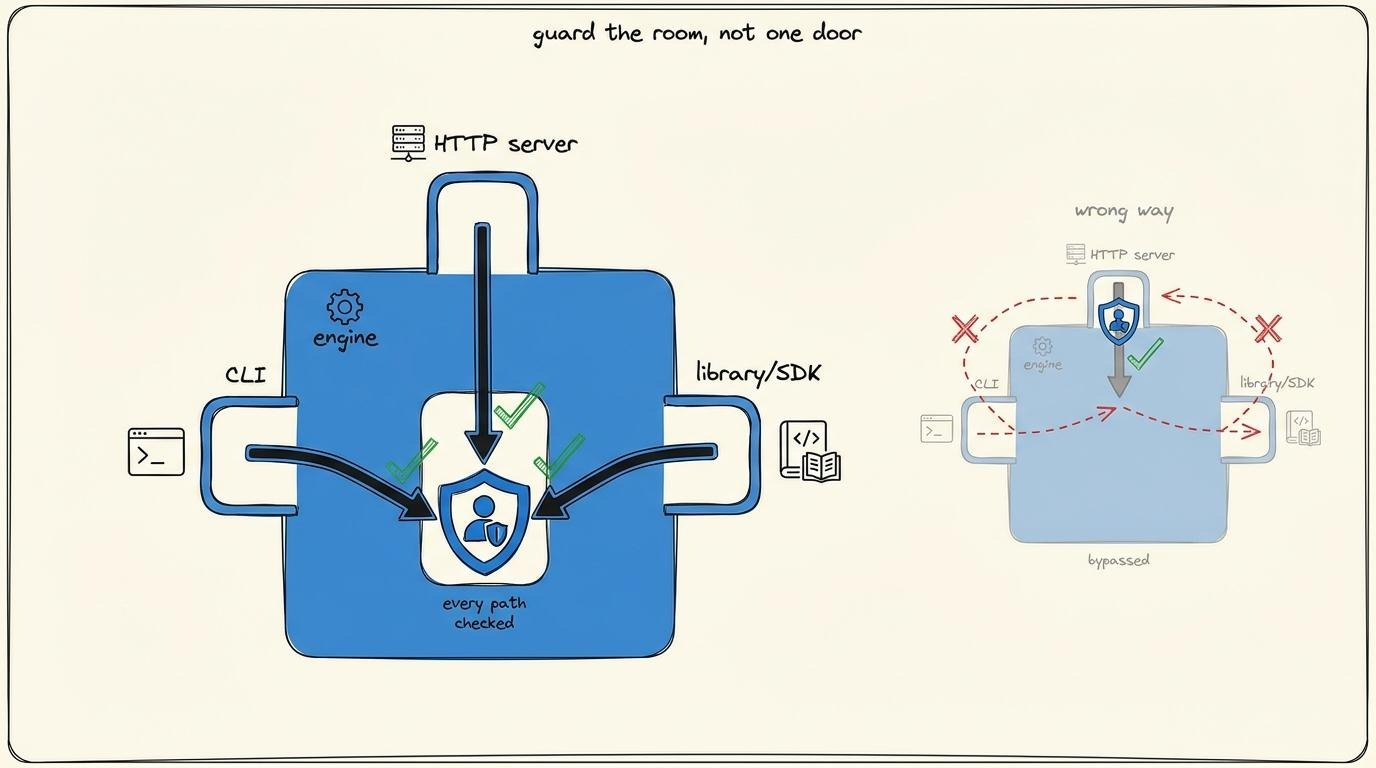
Every write passes through the same authorization check, regardless of whether it came from HTTP, the command line, or an SDK.
There’s NO path to the graph that bypasses the permission system.
What the policy controls
Every authorization check runs against a policy…
Imagine policy as a set of rules that defines who can perform which actions. These are the same policy rules that decide whether a branch can be merged.
The actions are specific:
read the graph,
make a change,
create a branch,
modify a branch,
merge into
main,change the schema.
A policy could allow one actor to merge into main while allowing another to read the graph but never modify it.
Omnigraph writes these rules in Cedar, an open policy language from AWS.
How Omnigraph verifies identity
Every policy rule applies to an actor.
So the first step is identifying who the actor really is. Each actor receives a token when it’s created (similar to a service API key). And every request from the actor includes that token.
The engine then identifies the actor from the token, NOT from information in the request itself.
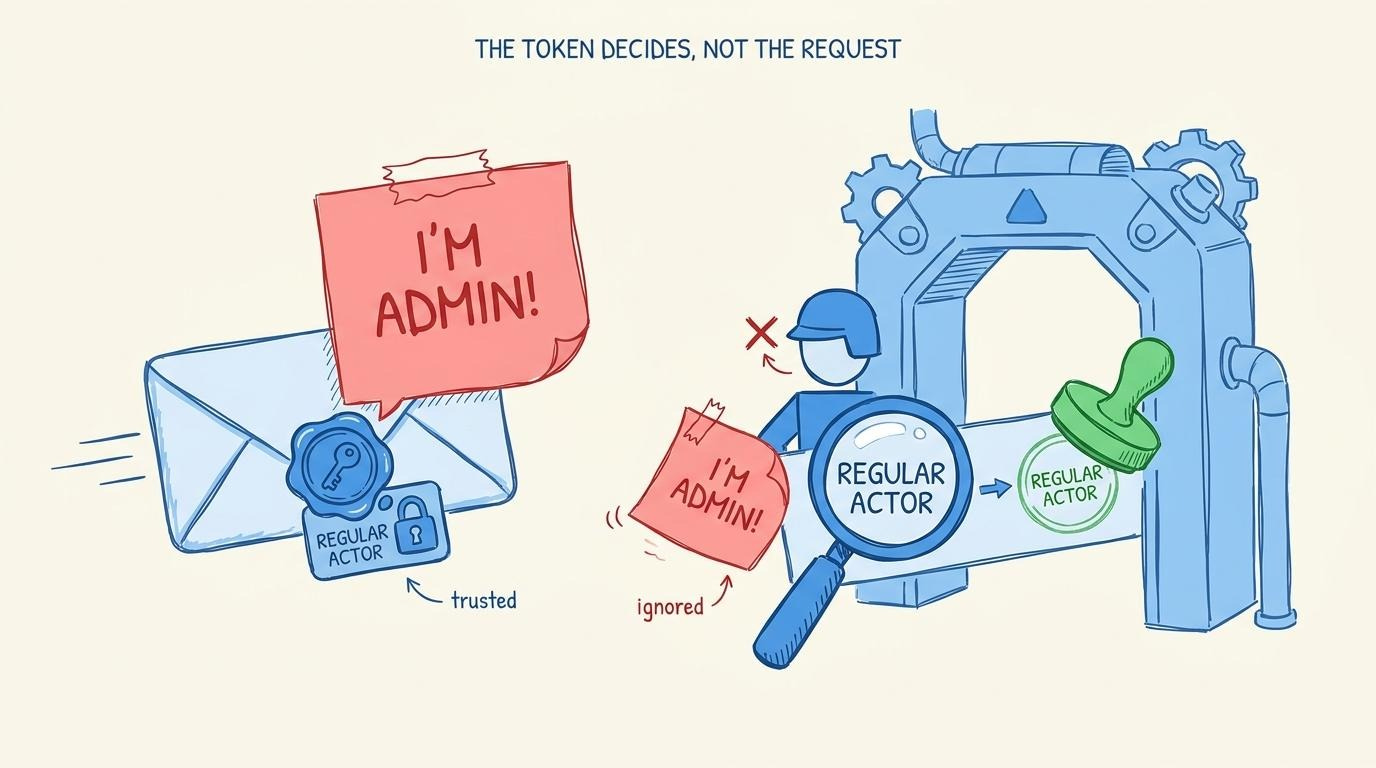
A request can claim, “I’m an admin.” Yet the token decides whether that’s true…
If the token belongs to a regular actor, the request gets treated as a regular actor every time. Trusting the request rather than the token would allow anyone to claim any identity.
What permissions can control
Omnigraph enforces permissions at the branch level…
A policy can answer questions such as:
Can this actor13 create a branch?
Can this actor write to this branch?
Can this actor merge into
main?
Yet it can’t answer more granular questions, such as whether an actor can update one field of a node while leaving every other field untouched. For example, “can this actor edit a deploy’s status without touching its owner?”
(Field-level permissions are on Omnigraph’s roadmap…)
So today the permission system controls access to branches, NOT individual fields.
Commit history
Authorization answers one question:
“Who is allowed to make a change?”
So the next logical question is:
“Who actually made it?”14
Every accepted change becomes a commit on main.
The good news is that commit records:
who (actor15) made the change,
when it was committed,
its parent commit.
Chain those commits together, and you get the history of the entire graph…
Every change has an author, a timestamp, and a place in the commit history.
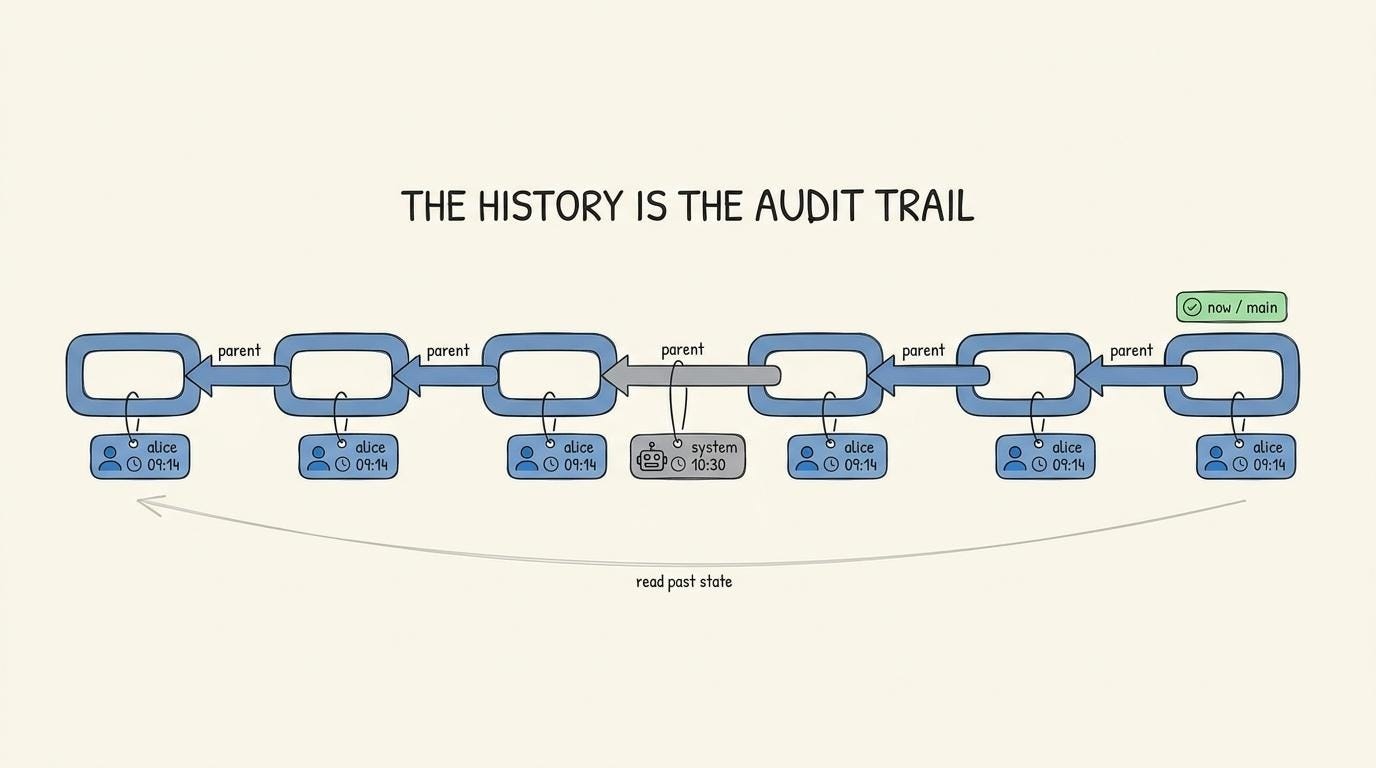
This chain is the “audit” trail.
Omnigraph does NOT need a separate audit log because the commit history already records every accepted change in order.
Reverting graph updates
Omnigraph never updates data in place.
Every change creates a new version alongside the old one. The manifest simply points to the new version, while the old version remains in object storage.
This is what makes every change REVERSIBLE…
Every historical version of the graph still exists.
You can read the graph exactly as it looked before the merge, inspect what the system knew at that point in time, or compare it with the current state.
Nothing needs to be “reconstructed” because nothing got overwritten…
Rolling back works the same way.
A branch can be discarded, and a merged change can be reverted by creating a new commit that restores an earlier state. The previous versions are still there, ready to be read.
Crash recovery
A write can FAIL halfway through…
New store versions could already exist, while the manifest still points to the previous graph.
The next time Omnigraph opens the graph for writing, it automatically recovers the interrupted operation. It either completes the pending commit or rolls it back.
This recovery gets recorded as its own commit… Yet this commit uses a reserved system identity instead of a human or AI agent, making automatic recovery easy to distinguish in the commit history.
You can immediately tell whether a change came from a human, an AI agent, or the system itself from the audit trail.
How one query searches structure, keyword, and meaning
Every write in Omnigraph gets saved atomically, gets checked before it is shared, and gets protected against crashes & conflicting updates…
Yet an AI agent is only as good as the context it receives.
And the context almost “never” comes from a single lookup:
To answer a question, an agent usually has to assemble related information. Some of it comes from relationships, some from exact keywords, and some from semantic meaning.
The engine has to search all three…
1. Relationships
Start at the LoginService node and follow its edges. Which services depend on it? Which incident involved it? Who owns it?
That’s graph traversal…The engine walks relationships which already exist.
2. Exact keywords
Sometimes you know exactly what you’re looking for:
the error string
ERR_AUTH_443,a service name,
a ticket ID.
That’s full-text search,,, similar to searching a log file with grep.
A graph traversal can’t answer those queries efficiently.
3. Semantic meaning
The agent searches for “can’t log in,” but the relevant incident is titled “authentication failure.”
The words are different… but the meaning is the same…
And that’s what vector search is designed for.
A straightforward solution is to build three separate systems:
Graph database for relationships,
Search index for keywords,
And a vector database for semantic search.
But this approach creates a synchronization problem.
Each system keeps its own copy of the data…
If one index falls behind, they stop agreeing. The graph knows about a node that hasn’t been indexed yet, or the vector database still returns an outdated version of it. Your application now has to query all three systems and combine the results itself.
So Omnigraph takes a different approach…
It stores ONE copy of the graph in object storage and builds three indexes on top of it:
graph relationships,
full-text index,
vector index.
Every index gets built from the same underlying data, so they stay in sync.
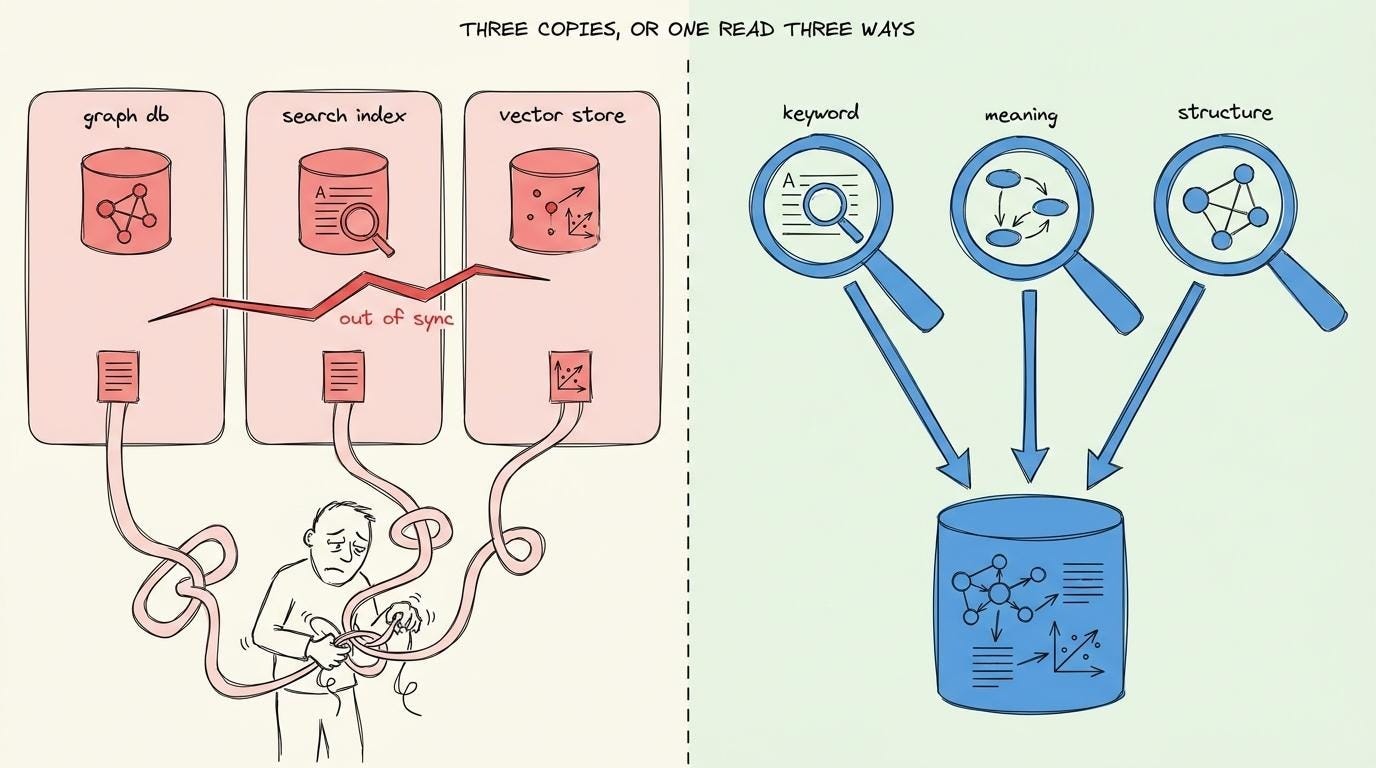
Here’s what happens when an AI agent sends a query:
Omnigraph searches graph, full-text index, and vector index.
Each search returns its own ranked list of results.
The engine then combines those lists into one final ranking.
It doesn’t average the scores because each search method uses a different scoring system.
Instead, Omnigraph ranks the results from each search independently, then merges those rankings using Reciprocal Rank Fusion (RRF).
i.e., results that appear near top across many searches rise to the top of final list.
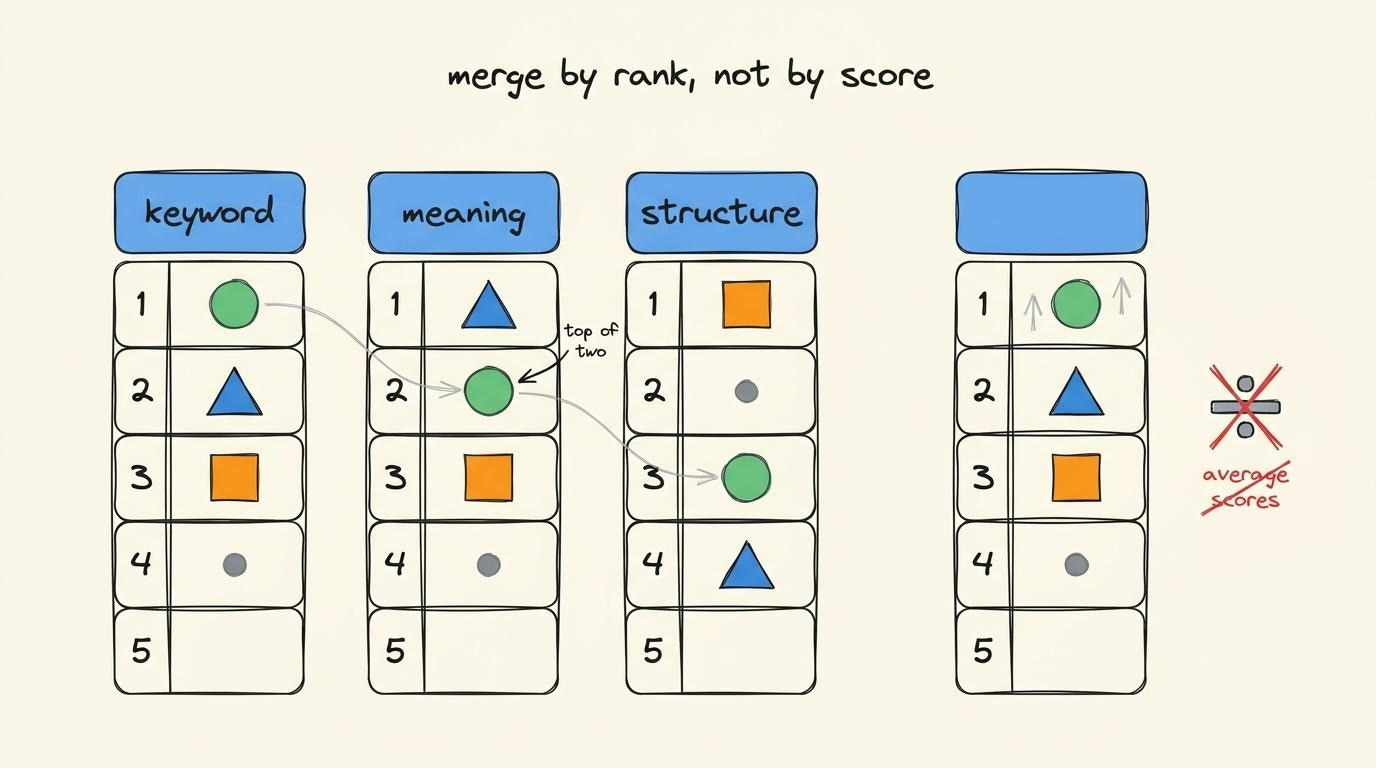
Under the hood, Omnigraph combines several retrieval techniques:
BM2516 for keyword search,
Vector k-nearest neighbors17 (k-NN) with cosine similarity for semantic search,
Fuzzy matching for approximate matches,
Reciprocal Rank Fusion18 (RRF) for combining results.
You don’t have to know any of these techniques yourself or how to even use them, because the agent using Omnigraph is going to handle it for you…
When to use graph memory
Graph memory solves a specific problem.
Multiple AI agents need to read shared context, write new knowledge, and coordinate those changes without corrupting the shared graph.
Here are some use cases:
Company knowledge graph where agents read and update decisions, ownership, and relationships.
Long-term agent memory that survives after each task ends.
Codebase graph that coding agents continuously read and update.
Personal knowledge graph managed by one or more AI agents.
The common pattern isn’t the domain…
But multiple agents working on the same knowledge over time.
When NOT to use graph memory
Graph memory is NOT the right tool for every workload…
The biggest limitation is “write” latency.
Omnigraph stores data in object storage. Small writes typically take tens to hundreds of milliseconds, while an in-memory database can respond in well under a millisecond.
It’s a fair tradeoff for AI agents that already spend seconds reasoning…
But it’s NOT a good fit for workloads that require thousands of low-latency writes per second, such as payment processing, click counters, or real-time session state.
Those belong in a transactional database…
You also don’t need graph memory if you only need one retrieval method…
Need semantic search? Use a vector database to keep it simple.
Need graph traversal for a single application with one writer? A traditional graph database such as Neo4j is a better fit.
Need high-throughput transactions? Use a transactional database.
Final thoughts
AI agents turned out to be a new kind of memory user.
They need a memory system built for how they actually read, write & coordinate.
Omnigraph is a typed graph on shared object storage, where every change is proposed, reviewed, and merged before it reaches shared memory.
The agents are already here…And the memory is finally catching up.
Thanks to Omnigraph for partnering on this newsletter.
When dozens of agents share one graph, things get chaotic fast: updates collide, bad writes land immediately, and context drifts.
Omnigraph gives every agent an isolated branch of the same typed graph, so agents can enrich data in parallel while humans deliberately review, approve, and merge changes. Built on Lance, Arrow, DataFusion.
Graph state stored in object storage. MIT.
Louis & I launched the GENERATIVE AI MASTERCLASS (newsletter series exclusive to PAID subscribers).

When you upgrade, you’ll get:
Simple breakdown of real-world architectures
Frameworks you can plug into your work or business
Proven systems behind ChatGPT, Perplexity, and Copilot
👉 CLICK HERE TO JOIN THE GENERATIVE AI MASTERCLASS
If you find this newsletter valuable, share it with a friend and subscribe if you haven’t already. There are group discounts, gift options, and referral rewards available.

Want to reach 210K+ tech professionals at scale? 📰
If your company wants to reach 210K+ tech professionals, advertise with me.
Thank you for supporting this newsletter.
You are now 210,001+ readers strong, very close to 210k. Let’s try to get 211k readers by 10 July. Consider sharing this post with your friends and get rewards.
Y’all are the best.

References
ModernRelay, Omnigraph
ModernRelay, Omnigraph Cookbooks
Apache Iceberg, Table Spec
Delta Lake, Protocol
DoltHub, Dolt: Git for Data
Cedar, Cedar Policy Language
Lance, Columnar Data Format
Context is all the information an AI uses to answer a request or make a decision.
Hallucination: When an AI generates information that sounds correct but is false or unsupported by the available data.
Vector database: A database that stores data as mathematical vectors so AI can find information by meaning, not just exact keywords.
RAG (Retrieval-Augmented Generation). A method where an agent searches a store of text for passages that match a question, then feeds those passages to the model as context before it answers. The store is usually a vector database that matches by meaning rather than by exact words.
Amazon Simple Storage Service (Amazon S3): AWS object storage service for storing and retrieving files and other unstructured data at virtually any scale.
Columnar file format: A file format that stores data by columns instead of rows, making analytics and scans over large datasets much faster.
Compare-and-Swap (CAS): A concurrency control technique that updates data only if it hasn’t changed since it was last read, preventing conflicting writes from overwriting each other.
Open table formats that adds transactions, versioning, and schema evolution to data stored in object storage.
NOTE: Agents can write to main. You can configure it so that no agent writes directly to main.
NOTE: An agent can write to the main and merge branches; it depends on the policy.
NOTE: Merge is three-way at the record level, not the field level.
MCP (Model Context Protocol). An open standard that lets an agent connect to outside tools and data sources through a common interface, so the same agent can reach many systems without custom code for each one.
Actor: An authenticated identity that performs actions on the graph.
An actor can be:
AI agent
human user
application
service
automated job or background process
Each actor authenticates with a bearer token. Omnigraph identifies the actor from that token and evaluates authorization policies for that identity before allowing the requested action.
You need this answer before you can undo anything: to revert a bad change, you first have to know which change was bad and who made it.
Resolved from that same trusted token.
BM25 (Best Matching 25): A keyword search algorithm that ranks documents by how well their words match a search query, while considering word frequency and document length.
Vector k-nearest neighbors (k-NN): A search algorithm that finds the stored vectors closest to a query vector, returning results with the most similar meaning.
Reciprocal Rank Fusion (RRF): A ranking algorithm that combines results from multiple search methods, giving higher priority to items that rank highly across several search results.
Great article as always Neo. A feedback - as much as I liked the reasoning and technology details it could have been better with a solid use case which was lacking to give that real world context on when this could be used in a real project. Hope you can incorporate use cases in these to give more clarity to the technical ideas 💡 Thanks!
This is a great survey of the space, but I'll admit some of these multi-graph architectures feel like overkill for a solo builder. My Hermes + Obsidian setup gets like 80% of the benefit just from backlinks and a decent retrieval prompt. Curious at what scale people actually need the full graph split instead of just a well-organized vault.