



Share this post & I'll send you some rewards for the referrals.
Everyone is talking about AI agents, but only very few people are actually building them.
Plugging a chatbot into your website is just a UI update. The biggest opportunity is in agentic AI, and most people are missing it…
Onward.
The best way to build any app (Partner)

The real tax on vibe builders right now isn’t effort, it’s cost.
Every tool wants you to pay for its model usage and hosting forever. Orchids.app lets you bring your own and use tools/SDKs that already exist elsewhere.
Plug in your ChatGPT, Claude Code, Gemini, Copilot, GLM, or any API key you already pay for.
You keep control of the bill. And the best part is: you don’t get price locked because you shipped with Orchids. Deploy your code straight to Vercel with one click.
(Use this discount code to get a onetime 15% off during checkout: MARCH15)
I want to introduce Fran Soto as a guest author.

Fran is a software engineer at Amazon. He’s responsible for most of the “Add to Cart” and other buttons you see in the search results of the Amazon marketplace, and now works at Ring.
Fran helps software engineers grow their careers. He teaches them productivity and the AI automation skills they need to grow to the next level.
To celebrate this collaboration, Fran is giving away his premium System Design Template completely free to all new subscribers. This template is the perfect tool to structure your architectural decisions before you write any code. You can practice filling it with the case studies and deep dives from this newsletter!
For the next few days, you can also claim a 25% discount on the StrategizeYourCareer annual subscription from the links in this newsletter. Whether you grab the annual discount or just want the free template, join today to become a productive engineer.
Check out his newsletter: StrategizeYourCareer.
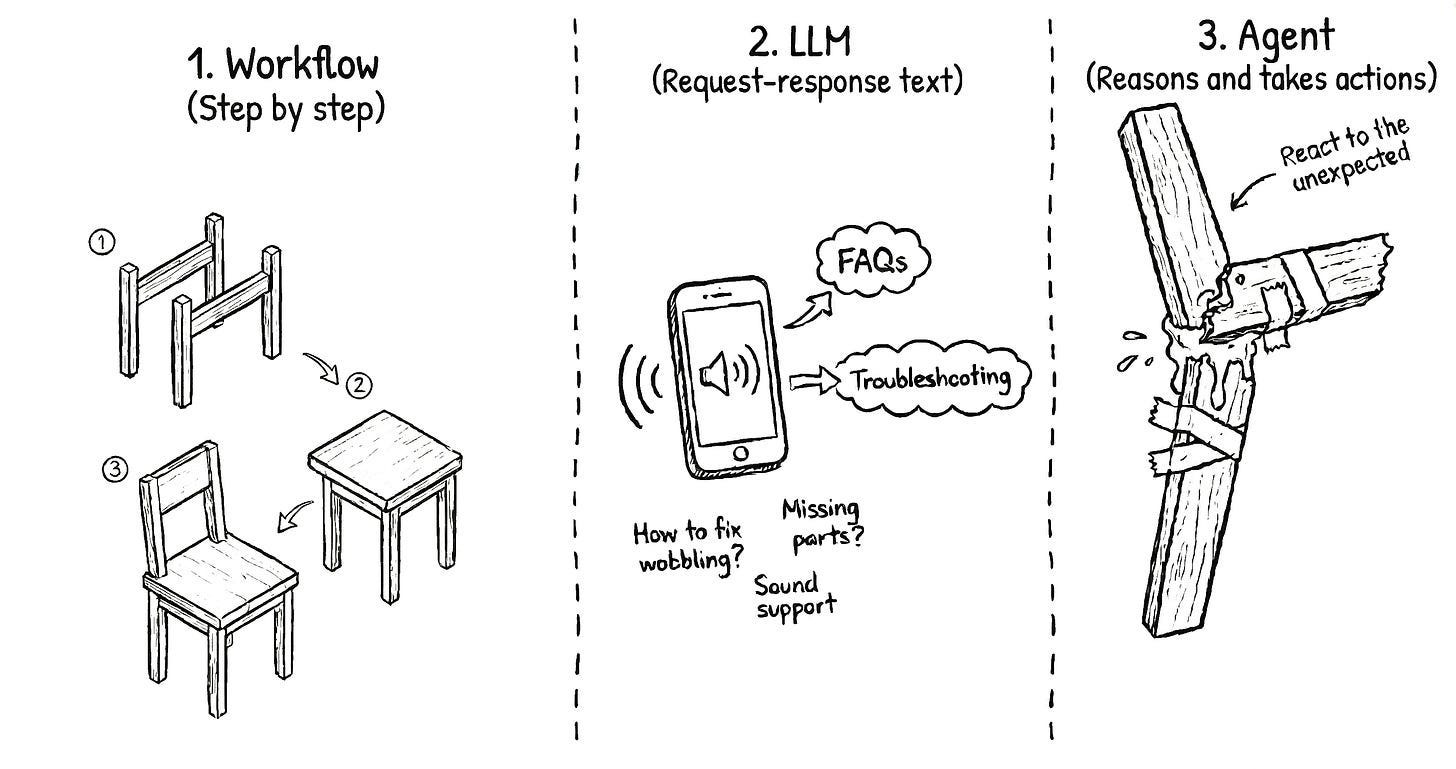
Imagine you have just bought some furniture and now you have to assemble it…
The fixed set of instructions that comes in the box is a workflow. It is a linear path that works perfectly as long as everything goes right. It’s the equivalent of scripts and programming languages. But if you make a mistake and break a wooden part, the instructions cannot help you.
There is no recovery from that.
An LLM would be like having a customer support line available for you to call.
You can describe the broken piece, and they will give you a brilliant, empathetic answer. They might even explain why the wood snapped. But at the end of the call, you are still sitting on the floor with a broken piece. No matter how nice the other person is, they don’t have hands to help you with your broken piece.
You are the agent in this scenario.
You are the one with the tools, like a hammer, nails, glue, and a drill. You are the one with the brain to make decisions on how to best use those tools and how to recover from errors that were never in the initial instructions.
In this newsletter, I want to show you how to build AI agents, providing the tools and knowledge they need to do work on your behalf.
I will use an incident response agent as an example, but the principles of giving an AI both a brain and a set of hands apply to almost any process.
In this newsletter, you’ll learn:
The differences between LLMs, workflows, and agents.
Why the non-deterministic nature of AI is a good feature.
A 10-step framework to evolve from manual work to autonomous agents.
How and when to keep the human in the loop.
Let’s get started:
Why the lack of determinism in AI is good for reliability and self-healing
I see a lot of skepticism about AI because it is NOT as reliable as traditional code.
We are used to code that does exactly the same thing every time. However, I believe this lack of determinism is actually a good thing for certain tasks.
Humans are not as reliable as a machine, yet we are the ones who fix machines when they break. We prefer humans using machines because it brings the best of both worlds. Machines give us the speed and precision of determinism, while humans make things not go as expected.
An agent mimics this human ability to adapt to new situations. When a system fails in a way you did not anticipate, an agent can review the logs and adjust its approach.
It’s self-healing.
However, to get the most out of agents, instead of using the out-of-the-box generic tool, you need to create your own agents tailored to your use case.
How to build your first AI agent
AI companies provide us with generic agents that have planning capabilities and built-in tools. While these are useful, I do not think we want a generic assistant for specialized tasks.
They also offer integration points to our own memories and tools.
This is where the opportunity is. The same way a company would hire a software engineer rather than a “generic human”, we want that same level of expertise in our agents.
Building an agent is not a one-step process where you just flip a switch and everything works perfectly. It is an iterative process in which you gradually offload parts of your cognitive load to the machine while keeping a close eye on its performance.
I’ve followed this 10-step framework that starts with pure manual work and ends with a fleet of autonomous agents working together…
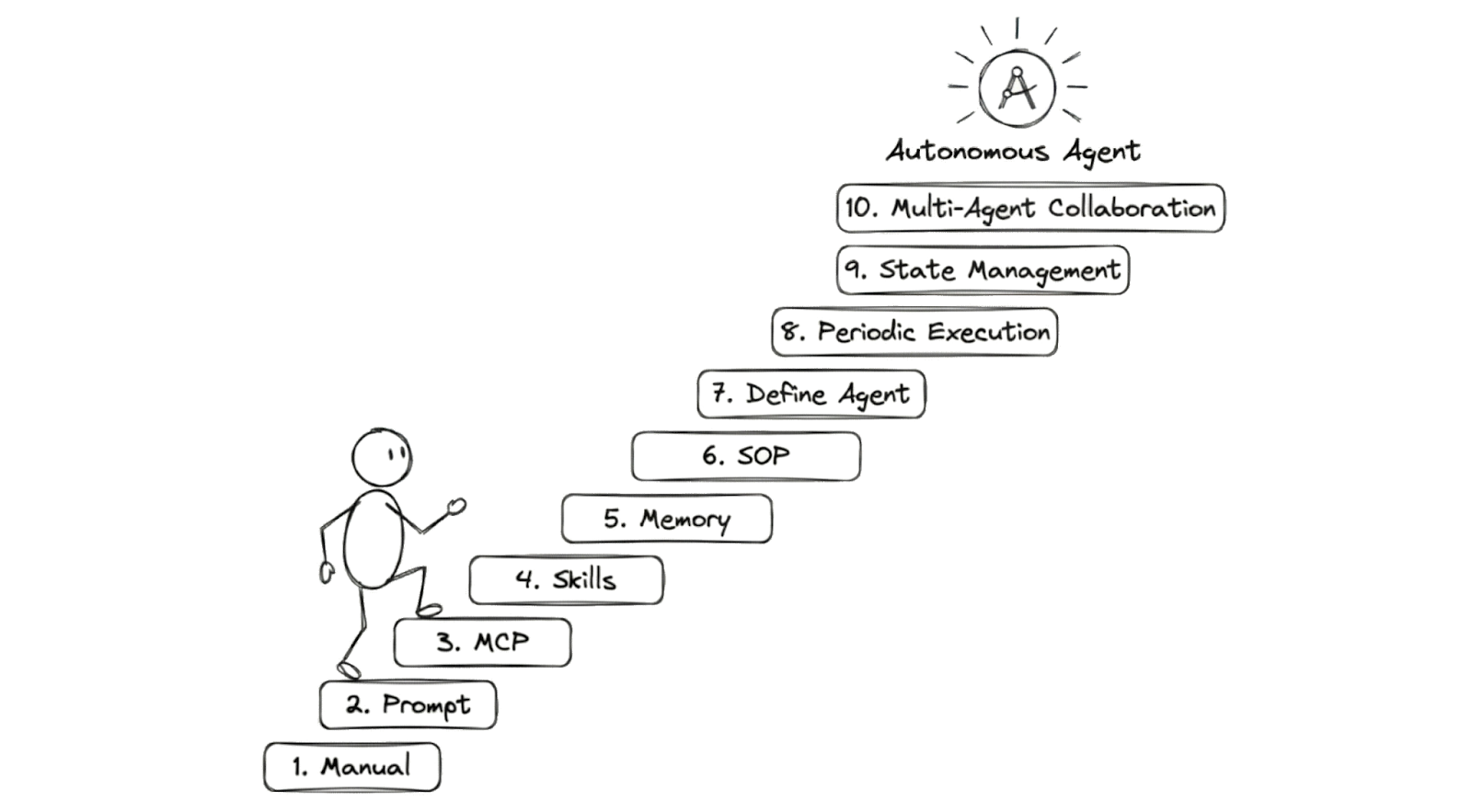
(This process starts with the way we have always worked: Solving it manually.)
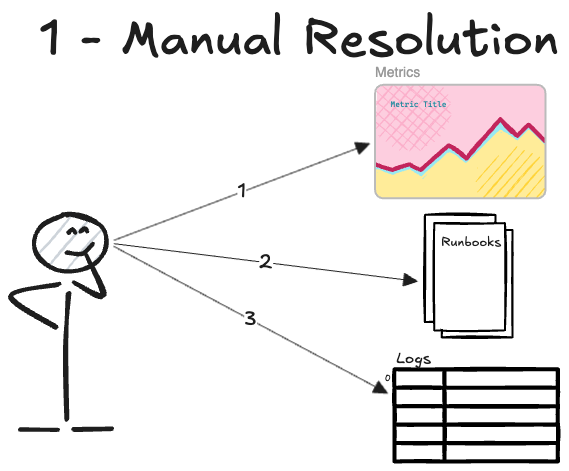
Step 1. Do the work manually
The first step is always to do the work yourself…
I recommend outlining the steps as if you were documenting the runbook for someone else to follow:
You open the monitoring dashboard and check any metric outside the usual pattern.
You check the runbooks for troubleshooting info for that specific metric.
You query the error logs for the last 15 minutes, looking for requests that resulted in an HTTP 500 error.
Current state: At this stage, you are the bottleneck in the entire process. Every step requires your manual intervention and your attention. This is the baseline that we want to improve.
Step 2. Start using an LLM
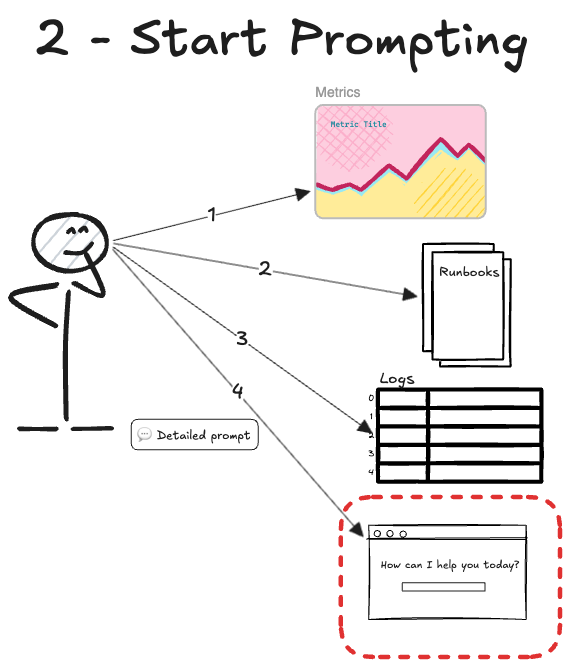
Now that you have a solid manual process, you can use it as a guide for an LLM.
This moves us from manual labor to having an assistant who can analyze the data for you. You can prompt the AI by copy-pasting the logs from your terminal or the metrics from your dashboard.
I suggest paying close attention to the prompts you usually use.
“Review these logs to find what error is happening: <copy-paste of logs>”
At this point, it’s important to notice the areas where the AI does not do what you want, and how you steer it back to the right path when it goes off track.
Current state: The AI can start analyzing patterns, but you still have to orchestrate everything and move data around manually.
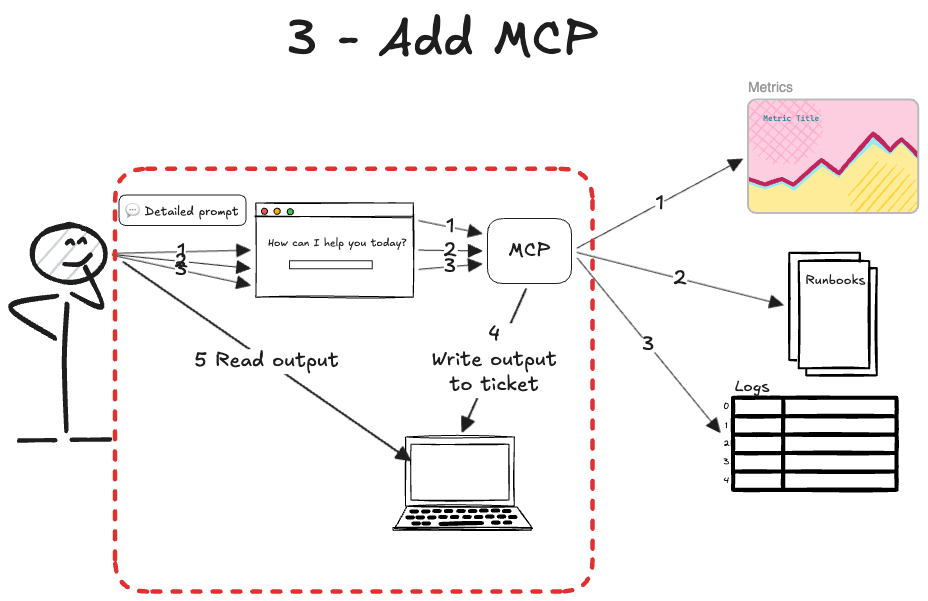
Step 3. Add MCP Tools
At this stage, you have an AI partner helping with the analysis, but you are still stuck in the middle, acting as a bridge.
The next step is to stop copy-pasting data. You can use the Model Context Protocol (MCP1) to allow the AI to take actions for you. MCP is like HTTP for AI agents. It’s an API that enables the model to execute operations in other systems.
Once you connect to the right MCP servers and enable the MCP tools, your prompts will look like this:
“Obtain the alarms that fired in the last 15 minutes. You must give me only the alarm name.”
“Check the logs for requests ending with an HTTP 500 error. You must give me the message of the log, the error message, and the stack trace...”
The AI can get the incident details on its own!
Current state: The human can drive the entire process through the AI interface without switching between tabs and tools.
Step 4. Add Agent Skills
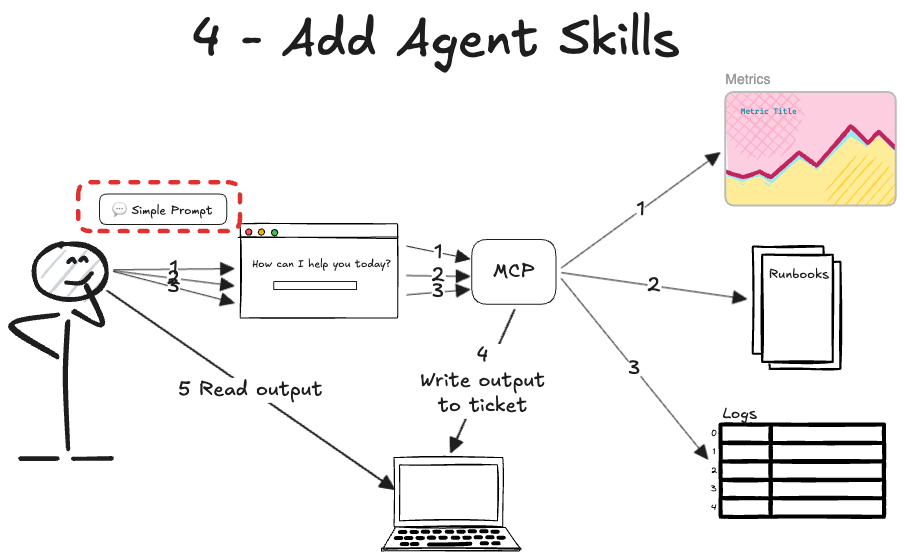
Up to this point, you still have to be an expert in incident response…
AI is useful for doing everything from one place. Now we’ll start looking at the notes we have been taking on how to improve the process and where AI usually goes wrong.
We have to onboard the AI to incident response the same way we’d onboard a junior engineer recently hired:
Teach exactly how to use each tool.
Teach how you want the work done.
We can combine guides and Standard Operating Procedures.
These provide step-by-step instructions for routine tasks. We’d write them in human language, using small scripts, to address a problem with determinism.
For example, if the MCP tools require a query as input, we can create the Skill of building a query. We’ll combine a markdown guide containing the fields from the logs with a few scripts to build queries from a template. This is much better than having the AI write complex queries every time. Plus, it reduces the hallucinations of fields that don’t exist in your logs.
We call these reusable pieces of logic Agent Skills.
Agent Skills are great because they’re loaded into the model ONLY when needed. The agent may have skills for metrics and logs. If we only ask about fired alarms, the agent ignores the log data. It just doesn’t need it.
This saves memory.
With agent skills, our interaction would be like this (Slash is the syntax used in IDEs like Cursor2 to force the agent to load a particular skill):
/Metrics-and-alarm-management Find the alarms fired
<LLM response with metrics information>
/My-service-logs-management Find the logs with errors in these endpoints
<LLM response with the logs information>
/Code-expert Where in code is this log emitted?
<LLM response with the code information>
Current state: We have now taught AI how we want certain tasks done, such as metrics and log information. The human is orchestrating the process to do things in order.
Step 5. Add memory
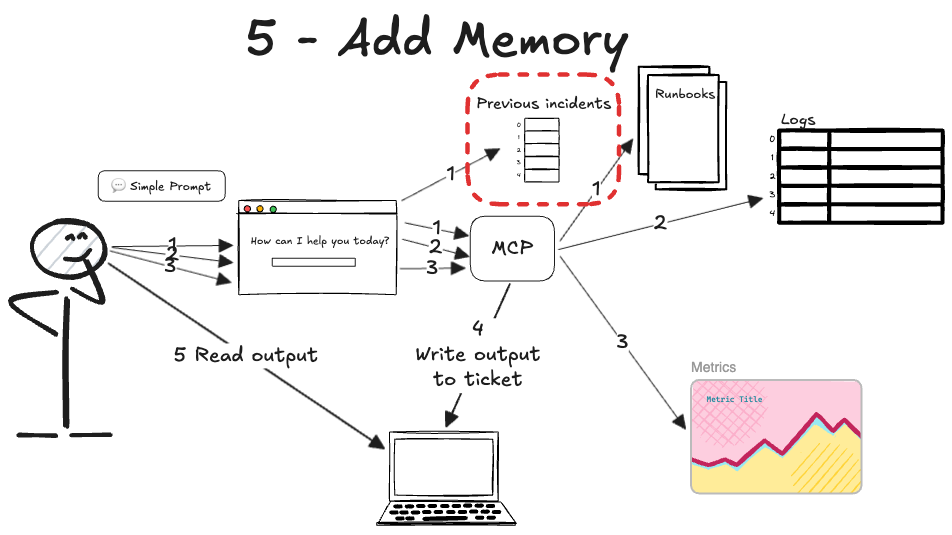
We have given our agent tools and domain expertise, but every time you start a new chat, it’s like the agent has amnesia. It knows how to solve an incident, but it doesn’t remember the one you fixed yesterday.
An agent needs context to be effective…
You can add simple short-term memory and long-term memory files to your system.
The short-term memory is built by design into the agent. This is essentially the AI’s ability to remember the previous messages in your current conversation. It helps it stay on track without you having to repeat yourself. When making an API call to get the model’s response, it sends the previous messages along with the new ones.
For an incident response agent, we also want some long-term memory.
We have added some memory thanks to the skills, but we can add more context by creating files that the AI can access.
Some time ago, each company had its own format, but now they have agreed on a standard called Agents.md3. This means the information inside Agents.md file will be read by the AI regardless of which AI it is.
Also, each implementation allows you to point to which folders/files to use for the agent’s context.
Current state: We still prompt AI the same way. It uses data from skills and logs. It also reads files to understand the system it is debugging. This helps the AI find past errors and the solutions that worked.
Step 6. Orchestrate with Agent SOPs
Up to this point, we have given our agent a brain, a set of hands through MCP tools, and a memory.
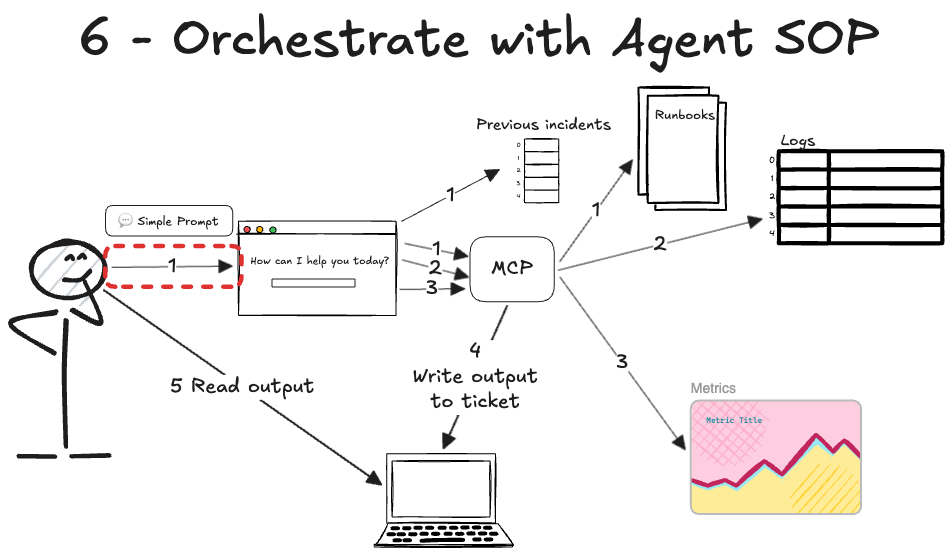
But you are still the one directing every move. While the agent is now more capable, it still requires you to decide manually what to use and when. This is the bottleneck that we solve with Agent SOPs.
Instead of prompting the AI to use a series of skills one by one, you can create a step-by-step process for the AI to follow. This is what’s called a Standard Operating Procedure (SOP) for your agent.
An Agent SOP is a file written in accordance with RFC 21194. This RFC defines key capitalized words (MUST, SHOULD, MAY, etc.) to specify requirement levels. Besides, it contains the steps in order.
I learned about this concept at work, as Amazon uses it in its Kiro5 and Strands6 agents. However, I’m also using Agent SOPs with Cursor and Claude Code7 easily. You just have to write the markdown file as an Agent Skill.
Now, instead of prompting step by step, we just execute our agent with that SOP. For example, if we wrap our SOP in a skill:
/Incident-response-agent-sop Investigate the incident reported at JIRA-1234
Current state: This makes the agent much more autonomous. The human just invokes the right SOP, and the agent handles the rest. It’s like a high-level manager finding the right engineer to loop into a call.
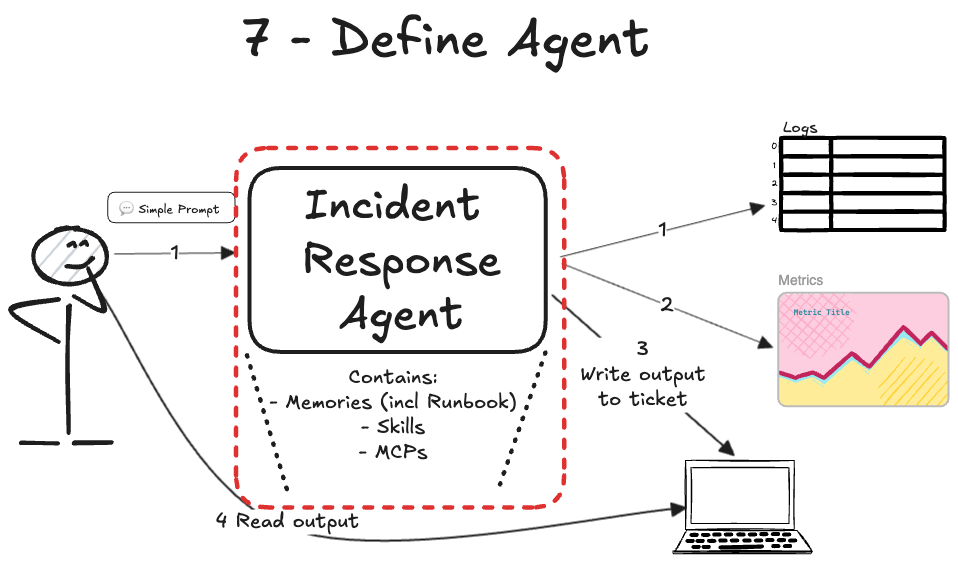
Step 7. Define an agent
At this point, we have many MCP tools, skills agent SOPs that need to be configured and made available for our agent to work.
This is easy if this is your first agent, but when you have dozens of them, each using their own set of artifacts, things get hard…
We solved this problem in traditional software with dependencies. We declare which packages our software depends on, so it can run in different environments.
Now it’s time to declare those dependencies with a new artifact called an agent. This way, we’d have our incident response agent, and we can define other agents for other purposes.
This guarantees the AI has all the tools it needs, so you do not need to provide them manually. Currently, there isn’t a proper package manager to install all of these, but it’s just a matter of time…
Current state: We now have our agent, and we can delegate the entire incident response investigation to it. We just invoke it and wait for the results.
Step 8. Execute your agent periodically
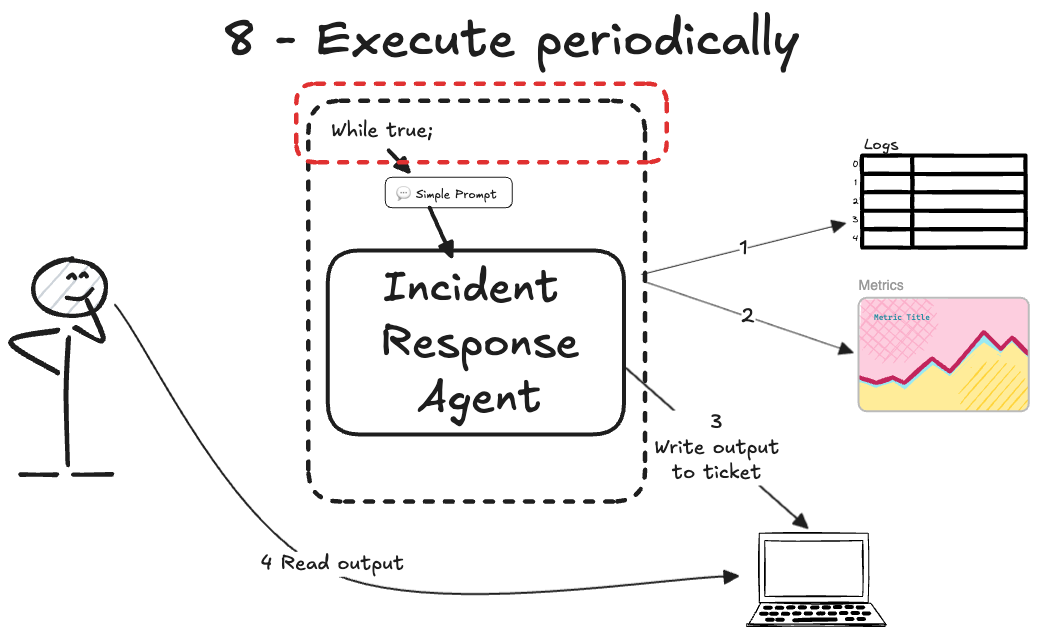
Up to this point, we have a fully defined agent that knows exactly what to do, but it only moves when you tell it to.
You have built a great tool, but you are still the one holding the power button…
Now that we can delegate most work to AI, you may ask: Why am I still getting paged at 3 am just to invoke the agent and wait?
It’s time to set the AI agent to run autonomously…
I recommend using CLI tools to run your AI agent independently. We can start with a simple script that checks for work and runs the AI agent when found; otherwise, sleep for N minutes.
Current state: Now the human isn’t involved in triggering the agent, but it will find the alarm and the agent’s output together.
Step 9. Improve state management
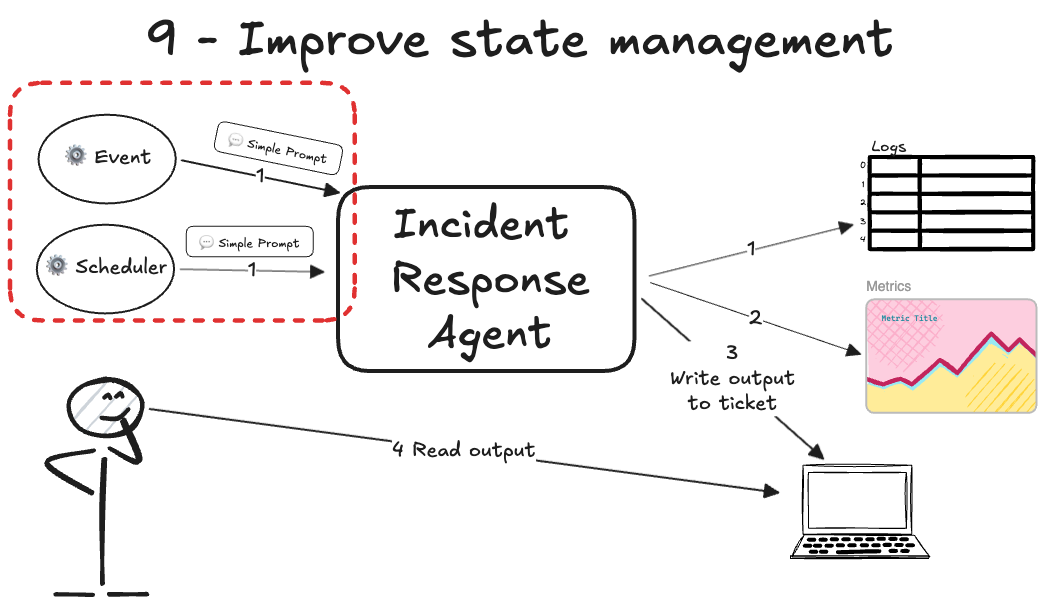
The agent is now running on its own, but it’s still isolated on your local machine using basic loops. To make it a true part of your team, it needs to be integrated into your production environment…
The goal is to define an end-to-end workflow that triggers AI agents at the right time without human involvement. For example, a webhook from PagerDuty could automatically trigger the AI agent in Lambda.
For periodic reports, you may want to set up a cron8 job that triggers the AI agent at regular intervals.
The AI agent performs the investigation and then posts a summary of the root cause or a periodic report to a Slack channel. This means your agent is working while you sleep, even if it only does one specific thing well.
Current state: Now our agent is like a real engineer involved when an incident happens, or an engineer who has scheduled work in their calendar.
Step 10. Scale to multiple agents
At this stage, you have a specialized agent working 24/7.
But as your system grows, one agent can become overloaded with too many responsibilities. Just as you wouldn’t ask one engineer to handle every single microservice, we shouldn’t ask one agent to do it all.
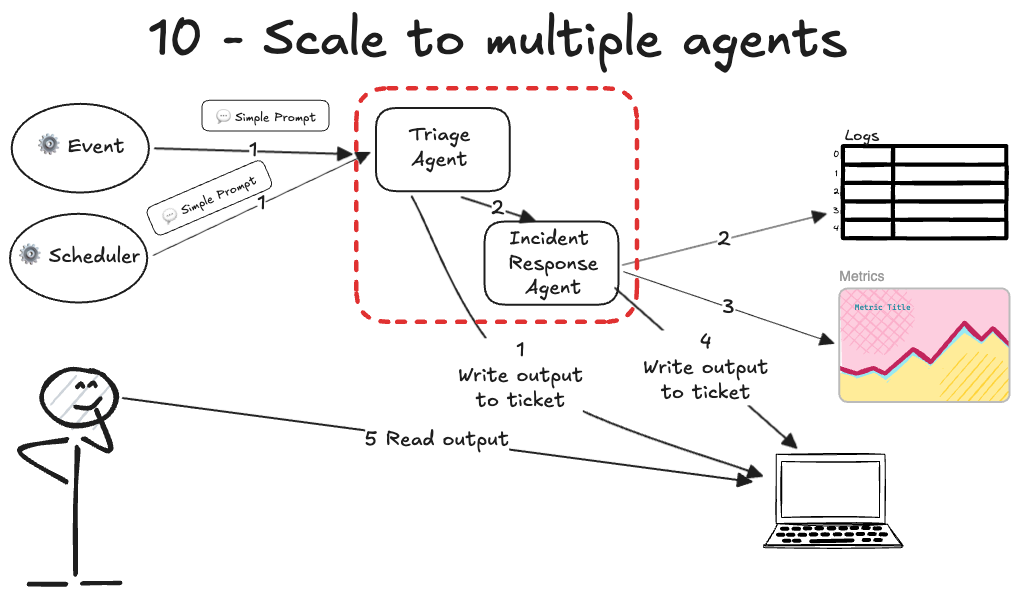
The final step is to have multiple agents collaborating on the same incident. Each agent can have a different function based on its expertise:
One agent gathers the raw logs while another checks for known infrastructure issues.
Another agent could review the recent code deployments for errors.
There are different orchestration paradigms you can use, like sequential, routing, or swarms.
Even for the same function, there’s no limit to how much you specialize. If an incident response agent has too many details, you can create agents to check different parts of the system.
You need a bit of abstraction to manage your AI workforce, just as a manager coordinates a team of specialists. You just do the same: multiple specialist agents, and a manager that invokes each subagent.
You can use different triggers, such as schedules or events, to make agents collaborate via the file system. No need to start with complex agent-communication protocols; instead:
Start with an orchestrator agent triggered by events, schedule, or polling.
The orchestrator invokes other subagents that you have also defined. Most AI companies already implement subagents.
All agents write to the filesystem, so they see each other’s work.
I suggest running agents on your own computer and letting them work together by sharing files.
Current state: At this point, the AI performs complex work with multiple steps without your involvement. Humans are no longer the bottleneck.
We did it!
Now we have our autonomous AI agent for incident response.
I know it looks easier in diagrams than in practice, and the AI doesn’t work as expected. Let me also share some lessons from building AI agents.
Lessons from the trenches
I’ve spent a lot of time building these agents, and I want to share some practical advice that will save you hours of frustration:
Make sure you have enough examples to build a robust agent. You wouldn’t want to automate a task that isn't frequent, so you're likely to have multiple instances to iterate on. I asked my team to handle all intakes of a service for a month. I’m sure your manager will be happy you're taking on more work.
Iterate multiple times per step. Don’t move to the next step of the automation until you have solved several tickets or tasks to find the real patterns and failure modes.
Don’t switch tabs while AI works. Watch the agent work live to catch its mistakes instead of letting it run in the background.
Use tmux9 for persistent loops. Run your agents from your computer in a tmux session so they keep working even if you lose your terminal connection.
Log everything for observability. Pipe all the agent’s output into a dedicated log file to give you the same level of visibility when you move to executing it 24/7.
Refine prompts based on observations. Even after you consider the 10 steps done, new edge cases will arise. Make AI keep learning, either by updating it yourself or by letting the AI update its memory files between iterations.
Defining the role of the human in the loop
I want to be clear that this is not about all-human or all-AI systems…
I’ve focused the incident response agent examples on read-only tasks, such as checking alarms, metrics, and logs.
Each of us has to define where and when to involve humans for the highest leverage. You can have the agent triage the incident and suggest a fix, then wait for your approval and execution.
Maybe someone else wants to plug the AI into the codebase to create a PR with the fix and wait for a human to approve it and deploy the hotfix.
I still think we don’t want AI making changes in production without human oversight. I have read postmortems where AI ran unauthorized production operations in an AWS account without any human review.
If we think about the incident response process and a code change, there are many steps before we change something in the system…
My current stance on agents is to push the human to the right as much as possible. This is all about making the human do less work, but still overseeing. This is important because no one will ask the AI for ownership or accountability.
They’ll ask the humans for it!

TLDR: The Building Blocks of AI Agents
Brain (LLM): The Large Language Model processes information, makes decisions, and determines which steps to take.
Hands (Tools & MCP): They are the interfaces that allow the AI to interact with the real world. Using the MCP, an agent can execute code, query databases, or fetch logs instead of just “talking” back to you.
Skills (Agent Skills & SOPs): They teach the model how to perform tasks. This is like a junior engineer following a runbook. It reduces errors and hallucinations.
Memory (Context & Agents.md): This allows the agent to remember past actions. Short-term memory handles the current conversation. Long-term memory provides historical context through shared files. This prevents the agent from repeating mistakes.
Manager (Orchestrator): Use an orchestrator to manage multiple specialized agents as you scale. One agent might find the error, while another suggests a fix, all working together toward a final result.
Alarm clock (Cron job): It lets the agent run on a schedule without you having to manually start it.
Workspace (Local filesystem): A common area where agents read and write. This allows them to collaborate on complex problems.
Closing Thoughts: The future of agentic work
It is often said that AI will not take your job, but someone using AI will.
I truly believe this.
But “using AI” does not just mean installing a new extension in your IDE. I have seen many people get frustrated when the AI does not do exactly what they want on the first try, thinking the AI is just dumb.
The people who succeed are the ones who build an army of AI agents to do the heavy lifting for them. All those AI companies are giving us default tools, but we are the ones who must adapt them to our specific needs.
I hope this guide was helpful and that you start building your own agents today.
👋 I’d like to thank Fran for writing this newsletter!
Also subscribe to his newsletter, StrategizeYourCareer.
It will help you master productivity and the AI automation skills needed to thrive in your career, just like we learned in this post.
Remember to claim your free System Design Template by signing up today at StrategizeYourCareer. You can also take advantage of his special discount before it expires!
If you find this newsletter valuable, share it with a friend, and subscribe if you haven’t already. There are group discounts, gift options, and referral rewards available.

Thank you for supporting this newsletter.
You are now 210,001+ readers strong, very close to 210k. Let’s try to get 211k readers by 21 March. Consider sharing this post with your friends and get rewards.
Y’all are the best.

An open standard that enables AI models to interact with local and remote data and tools. https://modelcontextprotocol.io/docs/getting-started/intro
An AI-powered code editor designed for pair programming and agentic workflows. It also has a CLI available. https://cursor.com/
A standard format for providing context and instructions to AI agents within a repository. https://agents.md/
A document defining requirement levels like “MUST” and “SHOULD” used in engineering documentation. https://datatracker.ietf.org/doc/html/rfc2119
An AI agent framework designed to automate engineering tasks and workflows. It has an IDE and CLI as products https://kiro.dev/
An open-source framework for building and orchestrating autonomous AI agents. https://strandsagents.com/latest/
Anthropic's agentic CLI tool that can reason about and edit your codebase directly. https://claude.com/product/claude-code
A tool to execute commands on a schedule https://en.wikipedia.org/wiki/Cron
A terminal multiplexer that allows you to keep terminal sessions running in the background. https://github.com/tmux/tmux/wiki
The gap between "talking about agents" and actually building them is massive right now.
Most people stop at the chatbot wrapper stage and call it an agent. Building something that actually responds to real incidents with real consequences is a completely different problem.
Curious how you handle the trust layer. When the agent recommends an action during an incident, what's the human override flow look like?
Framing incident response as the entry point for agents nails the architectural transition: deterministic runbooks make ideal state-machine guardrails. The real hurdle at scale isn't tool routing or prompt engineering, but building robust eval loops to safely bound autonomous triage actions in production.