



Share this post & I'll send you some rewards for the referrals.
You’ve heard it before: “It works on my machine.”
The app is under development. Tests pass, dependencies install, and everything looks ready to ship. But the moment it reaches production, something breaks. The server might use a different Python version, or a library may exist locally but not in the deployment environment. Sometimes the operating system itself causes the issue.
The problem was never just the application…it was the environment around it.
For a long time, virtual machines were the best solution engineers had.
Instead of deploying only the application, teams started packaging an entire operating system along with it. This approach fixed a big part of the consistency problem. The environment behaved the same no matter where the workload ran. But the tradeoff was hard to ignore.
Each virtual machine included its own kernel1, services, and system overhead to run a single application. They consumed a large amount of memory, took time to boot, and became too difficult to manage as the infrastructure grew.
What the industry needed was a way to isolate applications without paying the cost of a full operating system every time.
The interesting part is GNU/Linux already had most of the building blocks required to make this possible:
Namespaces could isolate processes from each other. cgroups could control how much CPU and memory a process was allowed to consume. The primitives2 already existed, but they were hard to use directly and too complex for most developers to manage on their own.
Docker changed this by turning those low-level kernel features into a developer-friendly workflow.
Engineers no longer had to configure isolation primitives manually. They got a simple CLI, portable images, reproducible environments, and a runtime for running containers at scale.
This shift fundamentally changed modern infrastructure.
Today, containers sit underneath almost everything in modern infrastructure. From CI/CD pipelines to Kubernetes clusters, they power it all. But despite how common they are, most engineers interact only with the surface layer. They know the commands. They know how to build images and start containers. What they rarely see is the runtime stack operating underneath those commands.
This newsletter is about the lower layer.
Onward.
Building across platforms shouldn’t mean rewriting the same logic 3 times (Partner)

A validation rule in your backend, Android app and iOS should behave the same.
But with different codebases, logic diverges and mobile apps might behave differently than your backend.
Kotlin Multiplatform (KMP), developed by JetBrains, is designed to solve this at the architecture level.
With KMP, you define a shared domain layer and reuse it across platforms instead of duplicating business logic.
It’s built around:
Consistency: same app behaviour runs across Android, iOS, desktop, web and server.
UI sharing flexibility: keep your native UIs or extend KMP with Compose Multiplatform to share user interfaces as well.
Low-risk: integrates into existing ecosystems safely, preserves native performance and hiring flexibility – continue recruiting Android and iOS engineers instead of searching for niche cross-platform specialists.
Proven maturity: KMP is trusted in production by global enterprises like Bolt and Duolingo for serious, long-lived applications.
Whether teams choose to share their UI or keep it native, KMP keeps the business logic perfectly aligned.
Explore how teams are using Kotlin Multiplatform in production:
(Thanks to JetBrains for partnering on this post.)
I want to introduce Ayaan as a guest author.

He’s a self-taught DevOps engineer focused on Kubernetes & cloud infrastructure. He builds in public and writes about cloud-native systems, sharing daily technical tips and projects.
Check out his work and socials:
Here’s what you’ll find inside this newsletter:
The full Docker runtime stack, from the CLI down to the Linux kernel.
Linux primitives behind containers: namespaces for isolation and cgroups for resource control.
How container images, layers, and OverlayFS actually work.
The complete path from
Docker runto a running process, step by step.How container networking and storage work under the hood.
What Docker gets right, where it struggles, and where containers start to break down.
Docker Architecture
Docker is NOT one program.
It is a stack of cooperating components where every layer has a specific responsibility and passes work to the next.
Most engineers interact with the CLI and assume Docker handles everything behind the scenes. But when you execute docker run, the command travels through an entire runtime chain before a process ever starts.
Understanding this chain makes the rest of Docker's internals easier to follow…
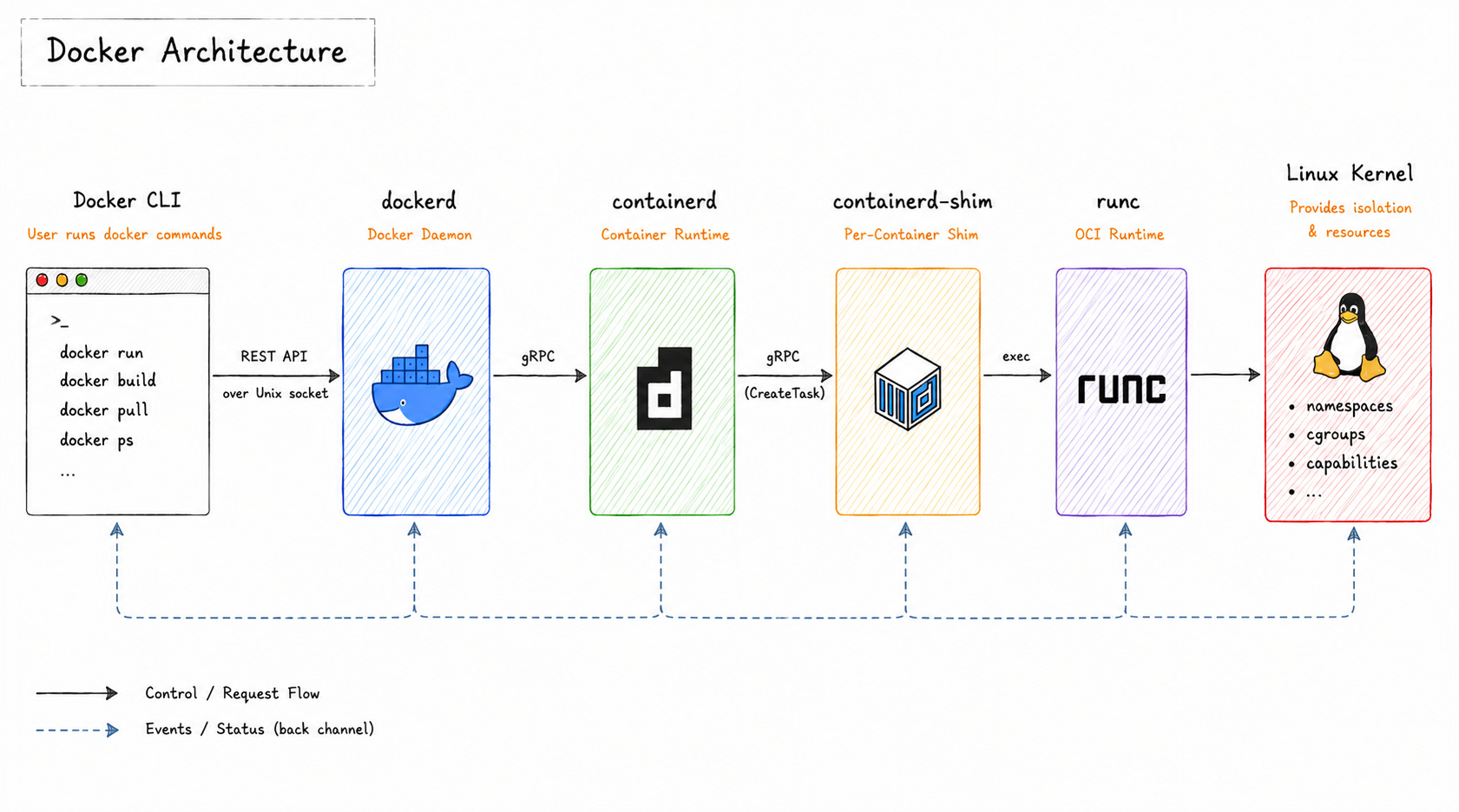
Every layer has a specific responsibility.
Some components manage APIs. Some manage container lifecycle operations. Others interact directly with the Linux kernel. That separation keeps the runtime modular and easier to maintain.
Let’s see how the chain works:
Docker CLI
The Docker CLI3 is a thin client.
When you type docker run or docker build, it converts your command into an API request and sends it over /var/run/docker.sock4 to the Docker daemon.
The CLI itself does not build images, pull layers, or start containers. It only forwards requests.
The real work happens behind it.
This separation matters because the CLI and daemon do not even need to run on the same machine. Docker can expose its API remotely, so external tools and automation systems can communicate with the daemon directly.
dockerd
dockerd is the Docker daemon.
It receives requests from the CLI and manages images, networks, volumes5, and the overall Docker API surface. But dockerd does NOT run containers directly. Instead, it hands container lifecycle management to containerd.
This separation keeps containers running even if the Docker daemon restarts.
So the runtime layer lives independently from the higher-level Docker API layer.
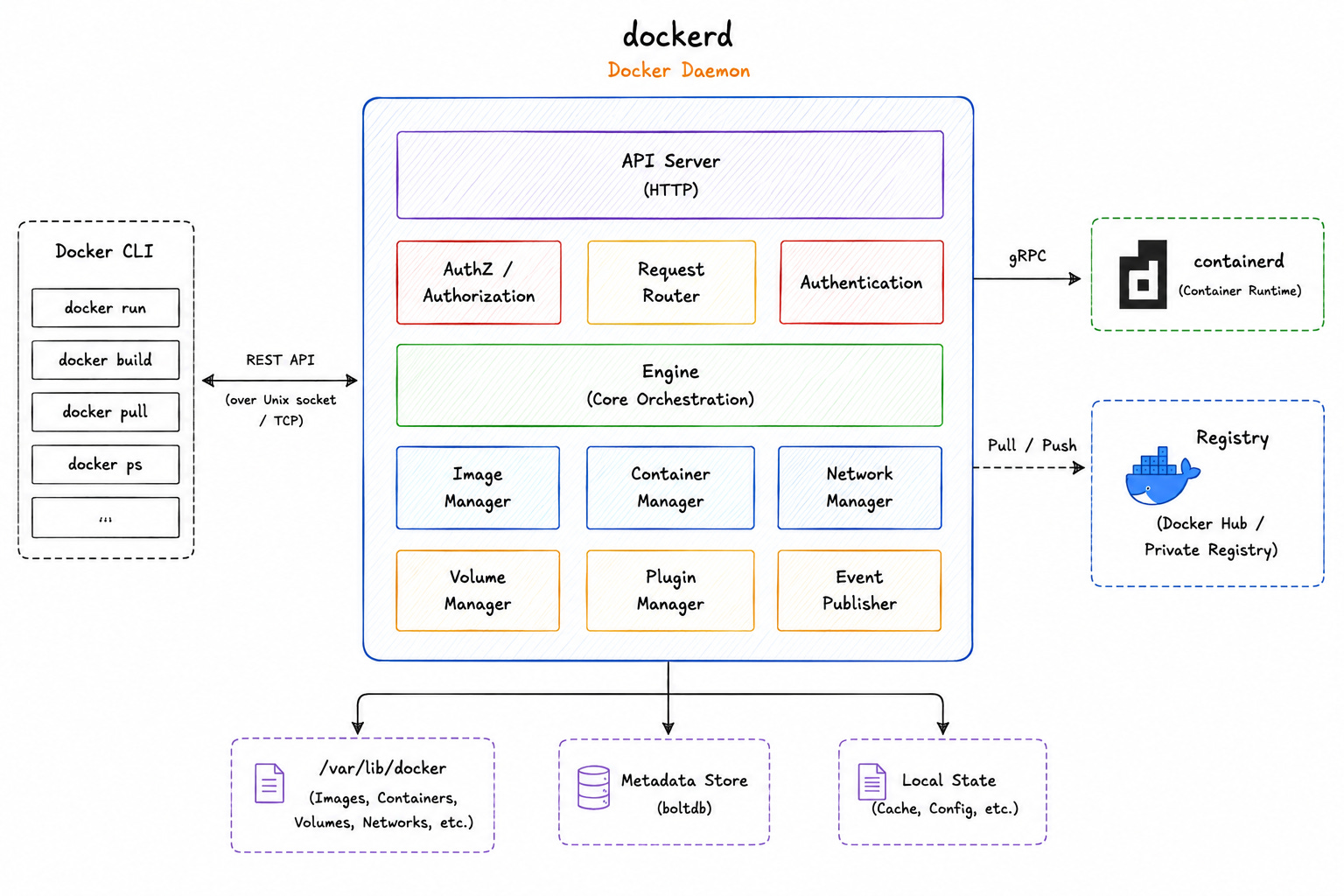
The daemon also acts as the orchestration layer for local Docker operations.
When you pull an image, create a network, or attach a volume, the request first goes through dockerd. Then it reaches the lower runtime components.
containerd
containerd is the core container runtime responsible for managing container lifecycles.
It manages image pulling, snapshots, image unpacking, and runtime operations6 through a gRPC7 API.
When dockerd needs to start a container, it delegates that work to containerd. From that point onward, the Docker daemon mostly steps out of the execution path.
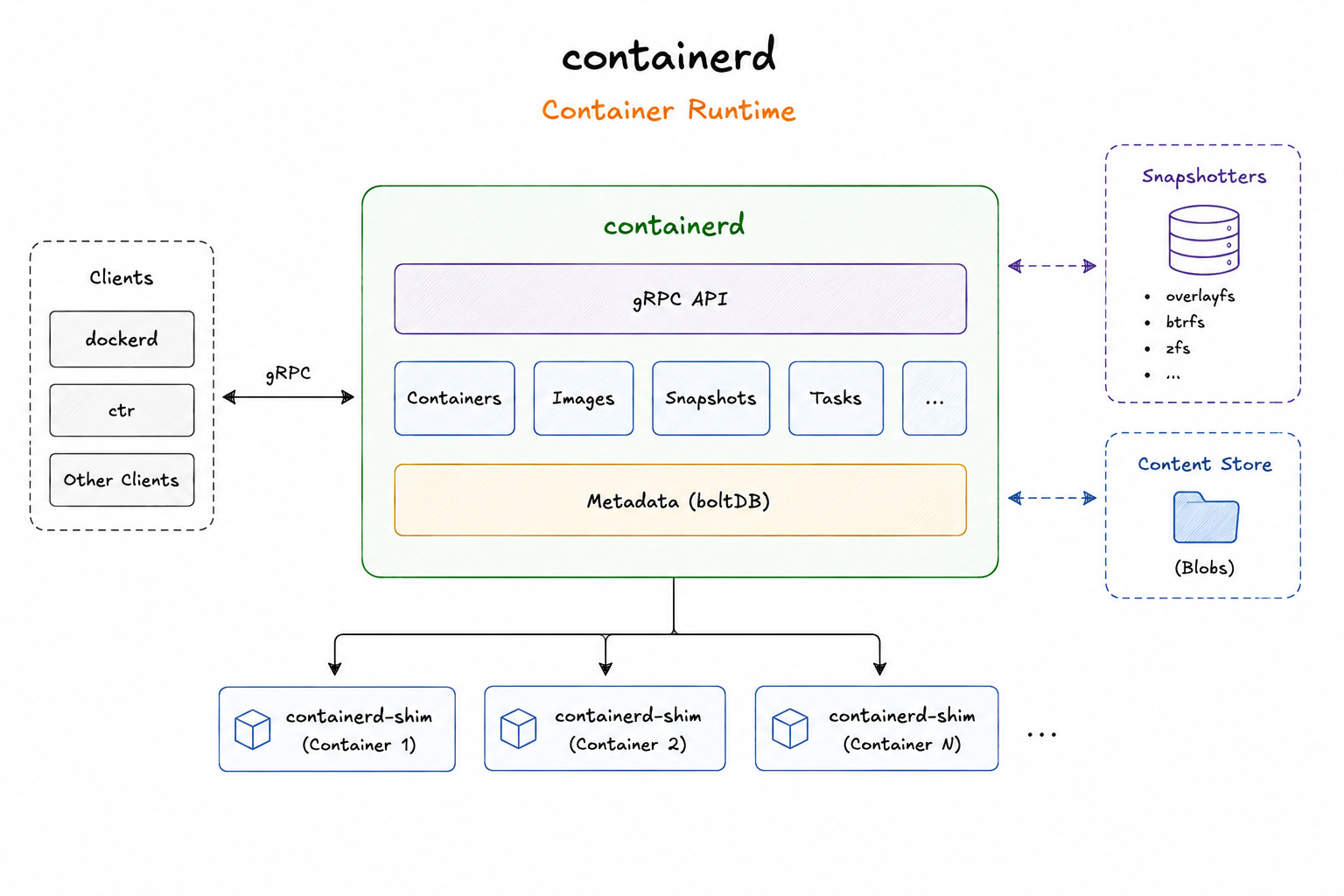
containerd originally started as part of Docker itself.
In 2017, Docker donated it to the Cloud Native Computing Foundation (CNCF) as an independent project. Today, Kubernetes communicates with containerd and other CRI-compatible runtimes instead of Docker.
This shift significantly changed the container ecosystem.
Docker remained the developer platform, while containerd became the runtime underneath orchestration systems. Even then, containerd does not directly create containers. It passes that responsibility further down the stack.
containerd-shim
The containerd-shim is a lightweight process between containerd and the running container.
Before a container starts, containerd launches a shim process first. The shim becomes the parent of the container process and keeps the container alive even if containerd crashes or restarts.
Each container gets its own shim. That process isolates the running container from the runtime layer and keeps the connection alive.
The shim also manages container input/output streams and exit status reporting. Without it, containerd would need to stay directly attached to every running container process.
Once the shim is ready, it calls the component that actually creates the container.
runc
runc is the Open Container Initiative (OCI) runtime that directly interacts with the Linux kernel to create the container.
It reads the container configuration and creates namespaces and cgroups. Then it configures the filesystem and starts the container process.
This is the layer where containers stop behaving like Docker objects and become ordinary Linux processes. The kernel enforces its isolation boundaries.
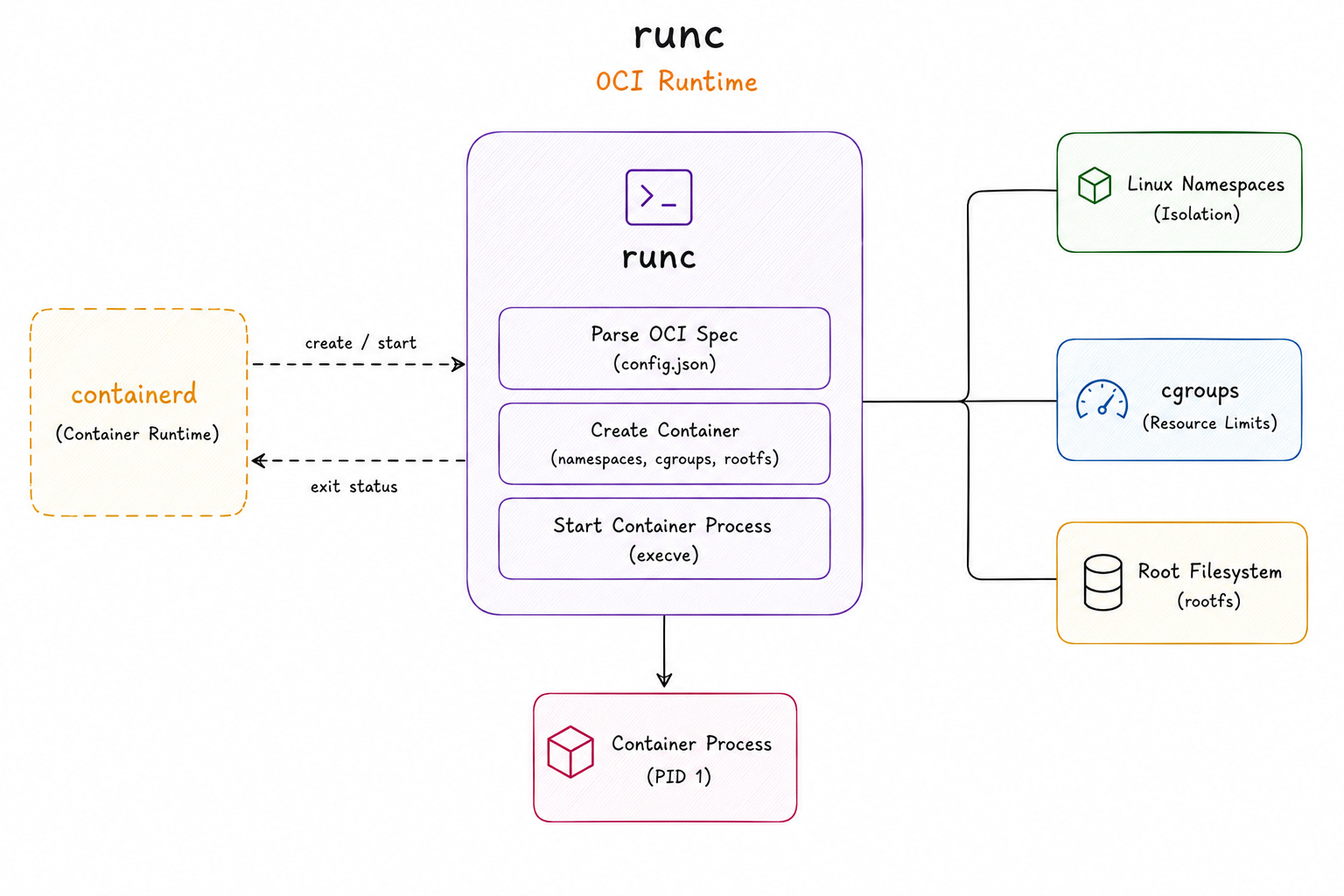
After the process starts, runc exits…
Its job is complete. The shim continues supervising the container and reports its status back to containerd.
OCI Standards
Every component in this stack works together because they follow the same OCI standards.
The Open Container Initiative (OCI) defines open standards for container images and runtimes. This standardization allows different tools to interoperate cleanly across the container ecosystem.
Docker-built images run unchanged on containerd, CRI-O, and Podman8. Kubernetes can swap one OCI runtime for another without changing the rest of the stack.
Before OCI standardization, container tooling was far more tightly coupled. Docker helped popularize containers, but OCI allowed different container tools to work together.
OCI standards made container runtimes modular rather than tied to a single vendor or toolchain.
Now the runtime stack is clear, let’s look at the Linux primitives that actually make containers possible…
Linux Primitives: Namespaces
Containers are not a feature of Docker… They are a feature of the Linux kernel.
Docker provides the tooling, CLI, image format, and workflow. But the isolation that makes containers actually work comes from the kernel itself. And at the center of that isolation is a single primitive: namespaces.
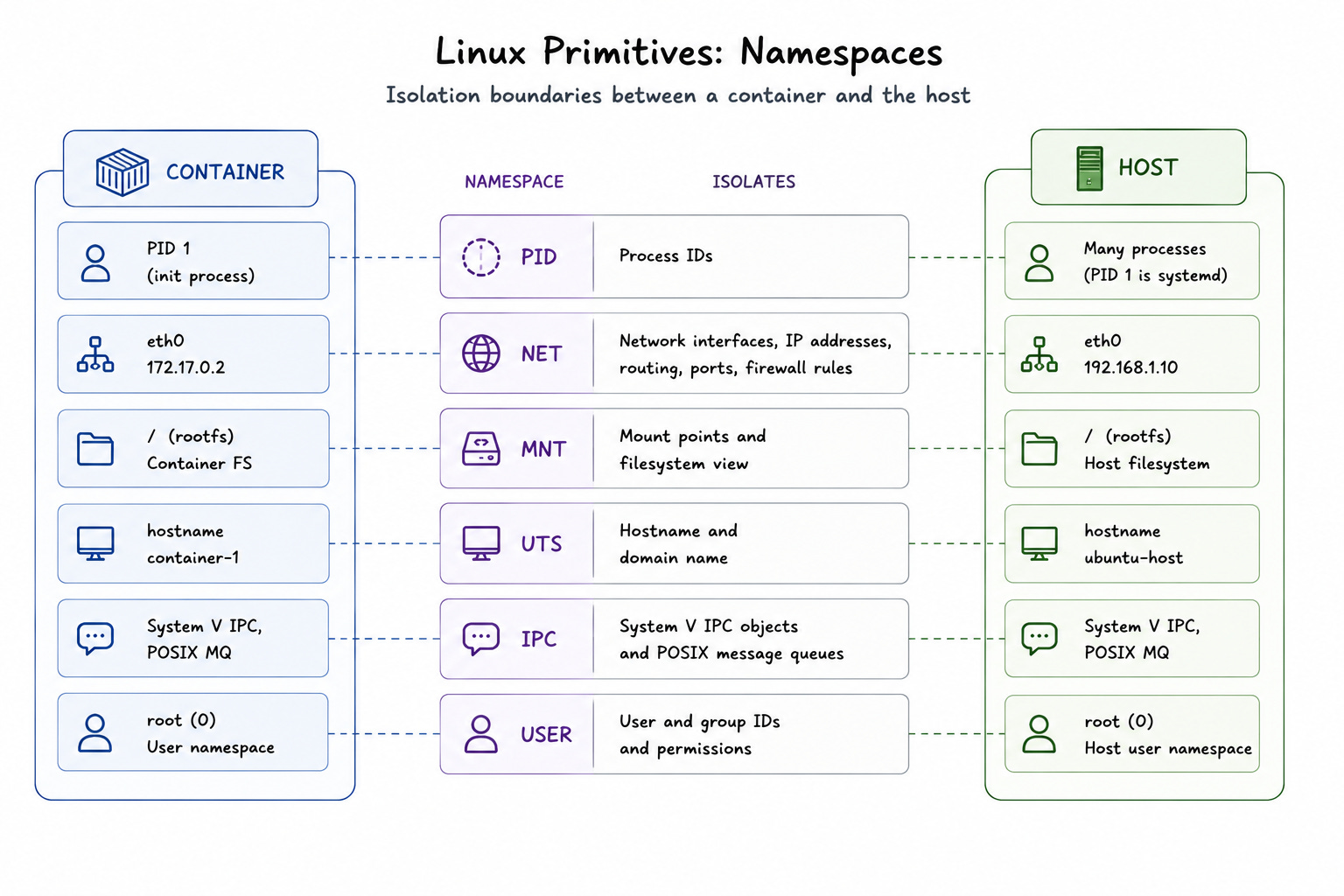
A namespace wraps a global system resource and makes it appear private to a specific process.
The process inside the namespace believes it has its own isolated version of that resource. Host and every other process on the machine still see the original global resource.
Linux has six namespaces that containers rely on. Each one isolates a different part of the system. Together, they create the illusion that a container is running on its own machine.
Let’s go through each one:
1. PID Namespace
Every process on a Linux system has a process ID (PID).
On the host, these IDs are global. All the running processes share the same numbering space.
The PID namespace changes this.
When a container starts inside its own PID namespace, the first process it runs gets assigned PID 19. From inside the container, that process looks like the root of the entire system. It can see its own child processes, but it cannot see anything running on the host or in other containers.
While the host sees the container process with its real PID in the global namespace. The container has NO idea.
It matters because PID 1 carries special responsibilities in Linux. It’s expected to handle signals and reap orphaned child processes. Containers that do not handle this correctly end up with zombie processes. That is why what runs as PID 1 inside a container is an important design decision.
2. Network Namespace
By default, every process on a Linux machine shares the same network stack.
They see same interfaces, same routing tables, and same ports.
The network namespace gives a container its own isolated network stack. Each container gets its own virtual network interface, IP address, routing table, and set of ports10. A process inside the container can bind to port 80 without conflicting with anything else on the host.
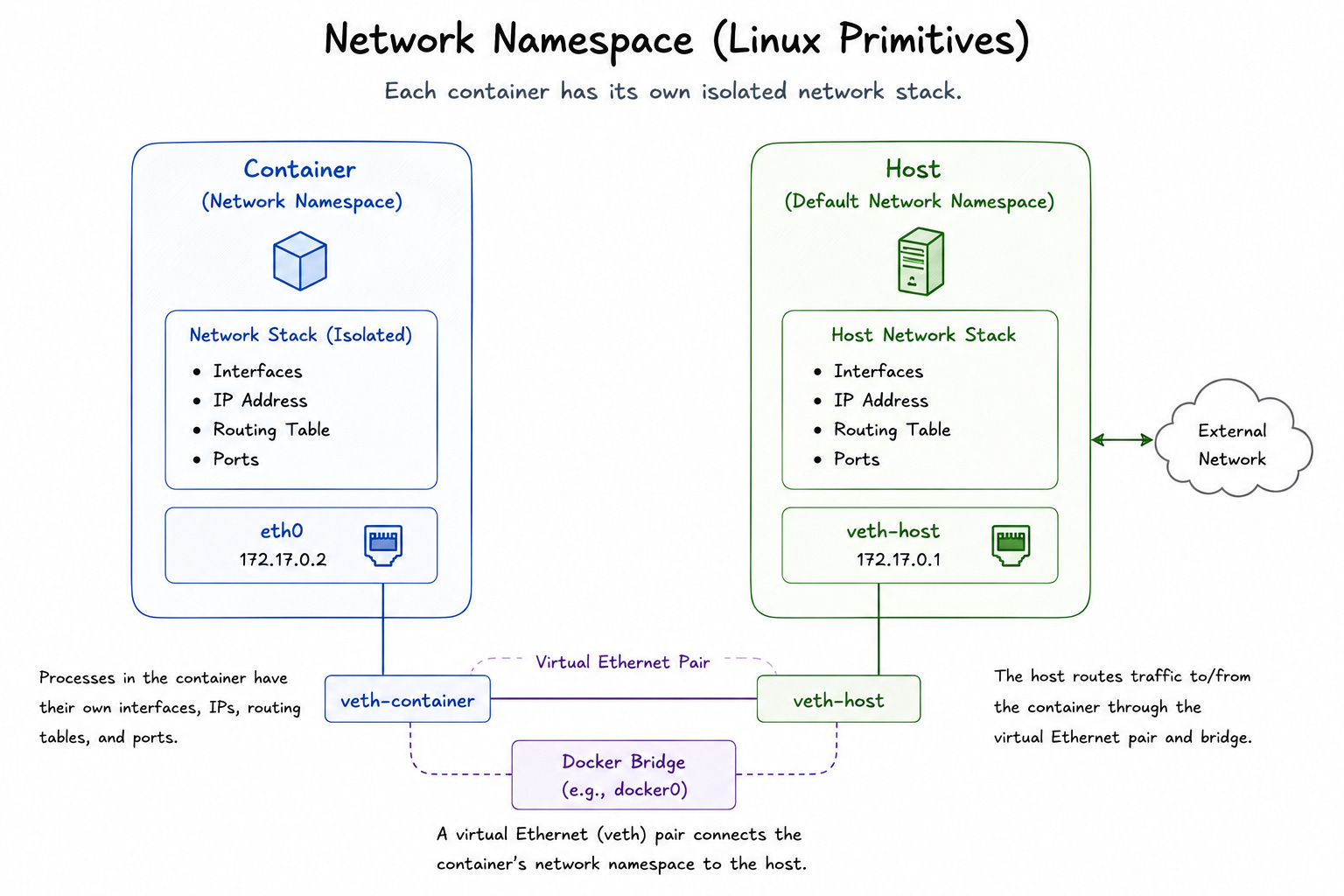
This is how different containers can each listen on port 80 simultaneously on the same machine. They are not actually sharing the same port. Instead, each has its own private network namespace.
Docker creates a virtual Ethernet pair to connect each container’s network namespace to the host. Traffic flows through that pair, and the host routes it appropriately.
This bridge makes container networking possible, but the namespace is what makes the isolation real.
3. Mount Namespace
The mount namespace controls what a process can see when it looks at the filesystem.
Without it, every process on the system shares the same view of the filesystem. Any process could see every mounted disk, every directory, and every file on the machine.
With a mount namespace, each container gets its own filesystem view. When Docker starts a container, it sets up a layered filesystem using OverlayFS11 and mounts it inside a new mount namespace. The container sees only that filesystem. It cannot browse the host’s directories or access files outside its own root.
This gives each container its own isolated root filesystem.
It includes its own operating system files, libraries, and application code without touching the host.
4. UTS Namespace
The Unix Time-Sharing (UTS) namespace12 controls hostname and domain name of a process.
This one is simpler than the others, but it matters for how containers identify themselves on a network. Without it, every container would share hostname of the host machine. Without it, logs, monitoring systems, and service discovery tools would struggle to distinguish containers from the host.
The UTS namespace lets each container have its own hostname.
When a container runs hostname, it sees the name Docker assigned to it, NOT the name of the underlying host. That small detail keeps container identities clean and predictable.
5. IPC Namespace
Linux lets processes communicate directly through mechanisms like shared memory segments and message queues.
The Inter-Process Communication (IPC) namespace isolates these mechanisms13. Processes inside a container can only communicate with other processes in the same IPC namespace. They cannot access another container or the host via shared memory.
Without this isolation, a process in one container could potentially interfere with or read data from shared memory segments belonging to another container on the same host. The IPC namespace closes this gap.
6. User Namespace
The user namespace is the most powerful of the six, and also the most nuanced.
It maps user IDs and group IDs inside the container to different IDs on the host. A process can appear to run as root inside the container while actually mapping to an unprivileged user ID on the host.
This distinction is critical for security.
Many containers run their processes as root by default. Without user namespaces, the process is root on the host too. A container escape14 would give an attacker full root access to the machine.
With user namespaces enabled, root inside the container is just a regular unprivileged user on the host. The blast radius of a container escape shrinks significantly.
User namespaces are what make rootless containers15 possible.
Docker, Podman, and other container runtimes use them to let engineers run containers without needing root privileges on the host at all.
How Namespaces Work Together
No single namespace makes a container.
It is the combination of all six working together that creates the isolation engineers rely on:
The PID namespace hides host processes.
Network namespace provides private networking.
Mount namespace gives each container its own filesystem.
UTS namespace sets a clean identity.
IPC namespace prevents cross-container memory interference.
User namespace limits the damage if something goes wrong.
But namespaces only control what a container can see.
They say nothing about what it can consume. That is where the second Linux primitive is used…
Reminder: this is a teaser of the subscriber-only newsletter, exclusive to my golden members.
When you upgrade, you’ll get:
Architecture breakdown of core DevOps systems.
Deep dives into Docker, Kubernetes, Terraform, and so on.
Practical insights into how real-world systems achieve scalability, automation, and reliability.
Let’s keep going!