


Share this letter & I’ll send you some rewards for the referrals.
Engineers still joke about not deploying on Fridays for a reason.
For a long time, deployments were one of the riskiest parts of software delivery. They were mostly manual. Engineers logged into production servers, made the required changes & restarted services.
A tiny mistake could easily cause problems.
If a deployment failed, finding the cause meant retracing every step by hand. There was hardly an audit trail, a rollback plan, or even a clear record of what had changed.
For tiny teams, this was usually enough…
Deployments were infrequent, infrastructure was relatively simple, and a single engineer often understood the entire process from start to finish.
But as software teams grew, release cycles got shorter, and deployment frequency increased. What used to happen once a month started happening weekly, then daily, and eventually many times a day. The more often teams released software, the more opportunities for human error emerged.
Tiny mistakes could bring production down:
A missed command, a forgotten environment variable, or a deployment differing slightly from the previous one was often enough.
Teams reduced this risk through runbooks, deployment checklists, and planned release windows. Those practices helped. Yet they did not solve the underlying problem. The process was still manual, and manual processes become harder to manage as systems and teams grow.
CI/CD emerged as a response to these challenges & became a fundamental part of modern software delivery.
Instead of relying on engineers to repeat the same sequence of steps, CI/CD turns those steps into an automated pipeline. Every change follows the same path. Code gets built, tested, packaged & deployed the same way every time. This reduces the risk of deployment errors and makes releases more predictable.
The goal is simple:
Move changes from a developer’s machine to production quickly and safely.
But CI/CD is not a single tool/single process…It’s a collection of systems working together:
Source control systems trigger pipelines.
Build stages create deployable artifacts1.
Deployment stages promote those artifacts across environments.
And safe deployments depend on more than automation.
They also require security checks, approval gates, rollback2 mechanisms, and monitoring.
Most engineers interact with CI/CD every day. They push code, wait for checks to pass, and watch deployments complete. What they rarely see is everything happening underneath…
Onward.
§
[Webinar] How to stop babysitting your agents (Partner)

Agents can generate code. Getting it right for your system, team conventions, and past decisions is the hard part. You end up wasting time and tokens in correction loops.
More MCPs give agents access to information, but not understanding. The teams pulling ahead use a context layer to give agents exactly what they need.
Join live on Sep 2 (FREE) to see:
Where teams get stuck on the AI maturity curve
How a context layer solves for quality, efficiency, and cost
Live demo: the same coding task with and without a context layer
(Thanks to Unblocked for partnering on this newsletter.)
§
I want to introduce Ayaan as a guest author.

He’s a Certified Kubernetes Administrator (CKA) who writes about Kubernetes, cloud infrastructure, and cloud-native systems. He builds in public and shares practical tips, projects, and lessons learned along the way.
Check out his work & socials:
§
Here’s what you’ll find inside this newsletter:
What actually happens after you push code. The full path from a Git commit to the build, test, release, and deployment stages that eventually put your application in front of real users.
Why the same release can survive staging and still break production. How artifacts, environment parity, deployment strategies, and rollback decisions determine whether a release is repeatable or becomes an incident.
The machinery underneath every pipeline run. What runners, triggers, registries, approval gates, Pipeline as Code, secrets, and software supply-chain controls are doing while you wait for that green checkmark.
A successful deployment can still be a failed release. Health checks, smoke tests, latency and error signals, business metrics, and SLOs that reveal what happened after real traffic reached the new version.
Why mature CI/CD pipelines eventually lead to GitOps. Where traditional pipelines stop, how production drift appears after deployment, and the architectural problem GitOps is designed to solve next.
§
What CI/CD Actually Means
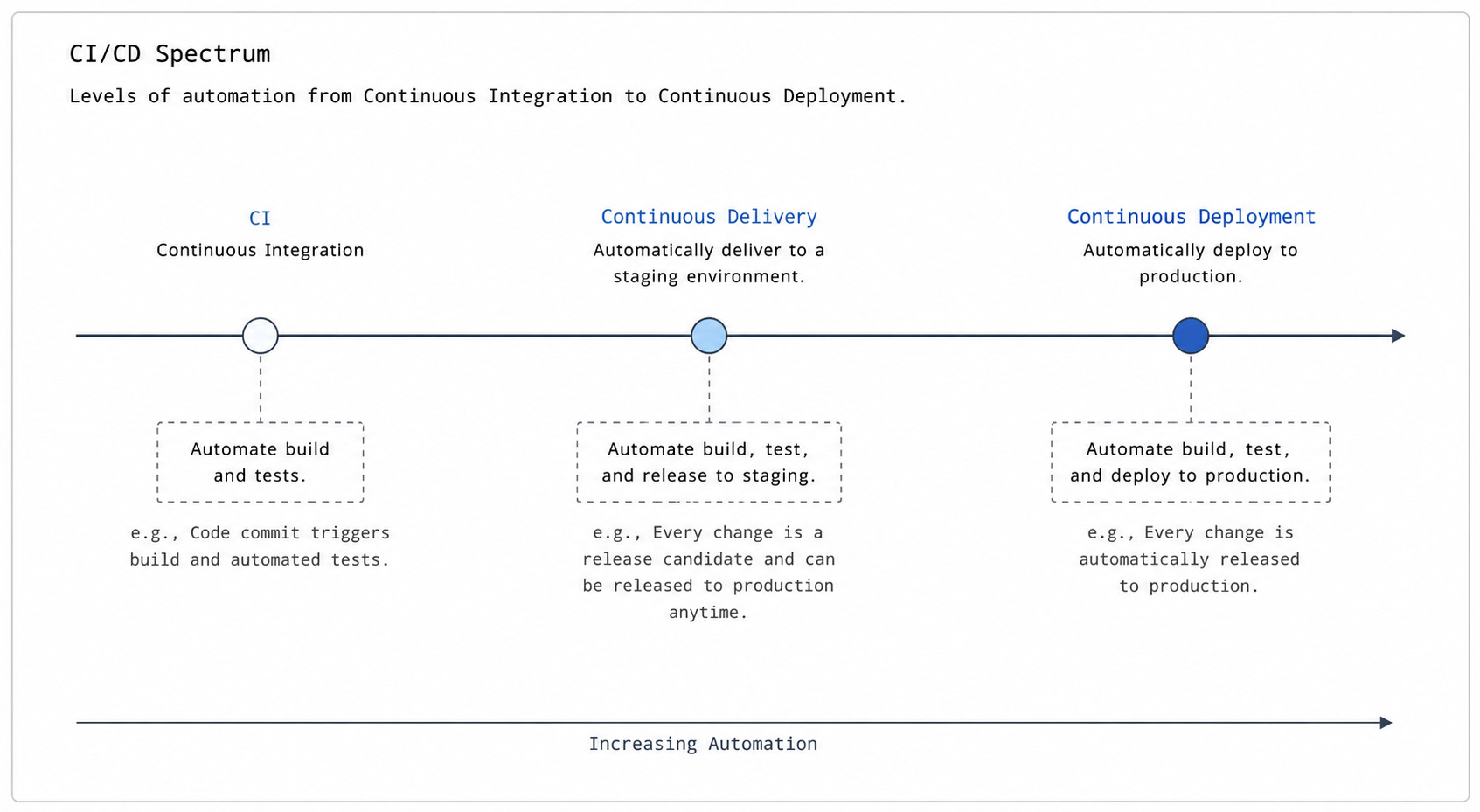
CI/CD is often used as a single term, but it refers to three distinct practices…
Each one solves a “different” problem…Treating them as one concept makes it harder to understand why pipelines are designed the way they are.
Continuous Integration
Continuous Integration (CI) is the practice of frequently merging code changes into a shared branch, often many times a day.
Each merge triggers an automated build & a test suite. If the build breaks/tests fail, the team knows immediately.
Before CI, developers often worked on separate branches for days/weeks before merging. When they finally did, the differences had grown large enough to cause serious conflict. Integration became its own painful phase at the end of development.
This is called merge hell.
CI eliminates this phase by keeping integration “continuous”.
Small, frequent merges mean smaller conflicts. Automated checks catch broken code before it reaches anyone else. The branch stays stable, and the team can always see what is actually working.
Continuous Delivery
Continuous Delivery (CD) extends CI one step further:
It ensures every change passing through the pipeline is in a releasable state. Not eventually releasable but releasable right now.
A passing test suite alone is NOT enough. The code must be built into a deployable artifact. It must also be tested in a production-like environment and pass quality and security checks. Every stage gates the next one. A failure at any point stops the change from moving forward.
The keyword here is delivery, not deployment.
The pipeline brings the change to the production door, but a human still decides when to open it. This final approval step is intentional. Some teams need it for compliance, change management, and/or business coordination.
Continuous Deployment
Continuous Deployment removes the final manual step from the process.
Every change passing through the pipeline goes to production automatically. No human approval is required!
This is the furthest point on the spectrum, and not every team reaches it/needs to. It requires a high degree of confidence in the pipeline itself.
Tests must be comprehensive.
Rollback mechanisms must be fast & reliable.
Monitoring must catch regressions3 quickly after release.
Most organizations operate somewhere between Delivery & Deployment rather than at either extreme.
Teams operating at this level often deploy dozens/hundreds of times a day. The pipeline becomes the gating mechanism entirely.
The distinction between Delivery and Deployment comes down to this final approval step. Delivery keeps a human in the loop before production. Deployment automates the decision entirely. Both approaches are valid.
Now we understand the terminology, let’s look at the anatomy of the pipeline itself…
§
Anatomy of a Pipeline
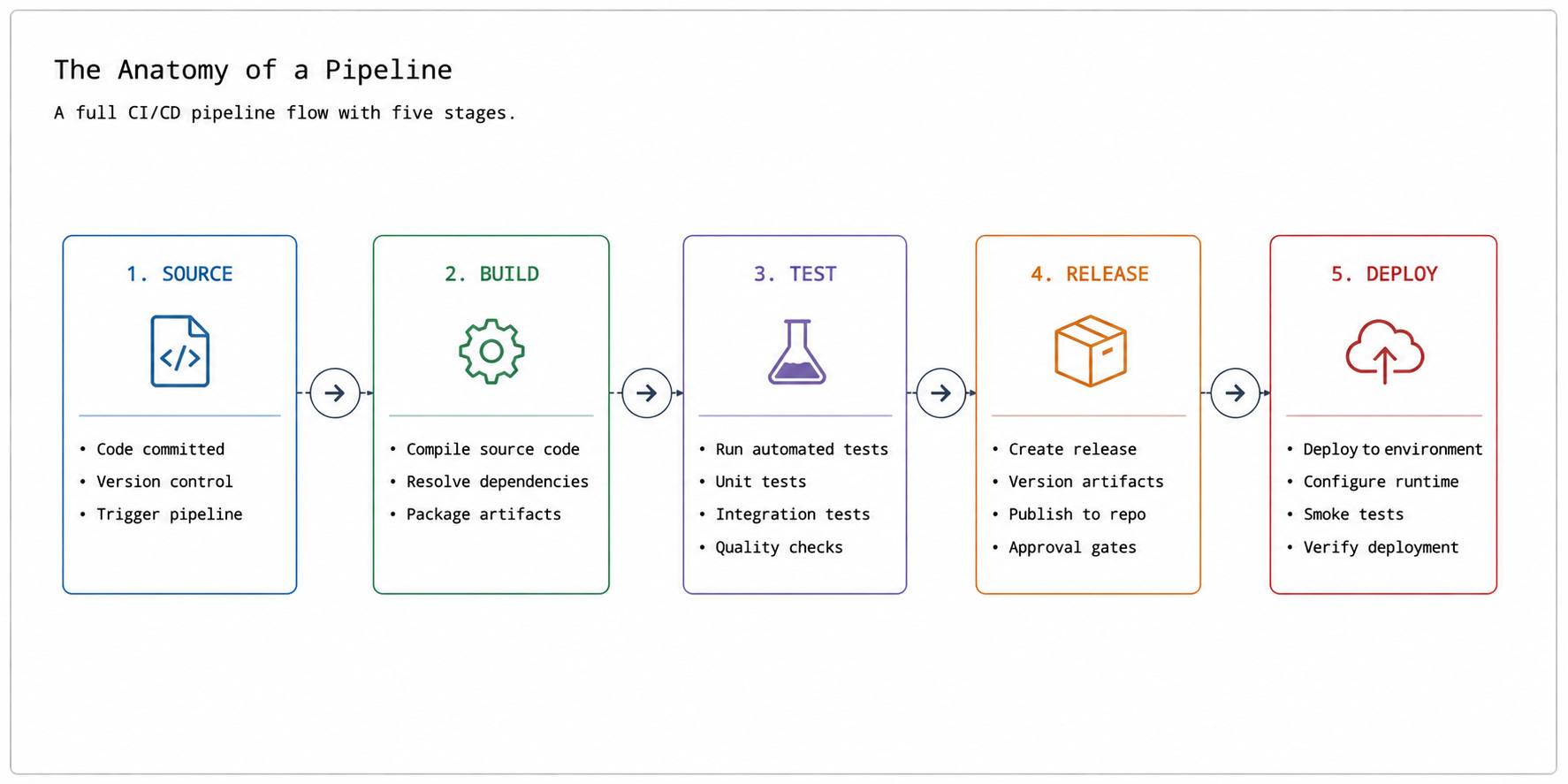
A pipeline is a series of automated stages that a code change must pass through before it reaches production.
Each stage is a gate. Fail one, and the change stops there. Pass all of them, and you'll have a verified, deployable artifact ready for users.
Most pipelines follow the same fundamental sequence regardless of the tool. The stages have different names across GitHub Actions, GitLab CI, and Jenkins, but the underlying structure is always the same…
Let’s walk through each stage:
1. Source Stage
Everything starts with a commit.
When you push code to a branch, a webhook4 fires and the pipeline starts automatically. No manual trigger needed. This push signals that something has changed & needs to be validated.
Git is the universal standard here.
But the branch strategy your team uses shapes how the pipeline behaves:
Trunk-based development: Everyone commits directly to a single main branch, often many times a day. Pipelines run on every push. Problems surface fast, but this approach requires strong test coverage and feature flags5 to hide incomplete work.
Feature branches: Developers work in isolation and merge when ready. The pipeline runs on the branch first, then again after the merge. Safer, but long-lived branches delay integration.
GitFlow: Long-lived branches for features, releases, and hotfixes. Each type triggers different pipeline behavior. Strong structure, but slower path to production.
2. Build Stage
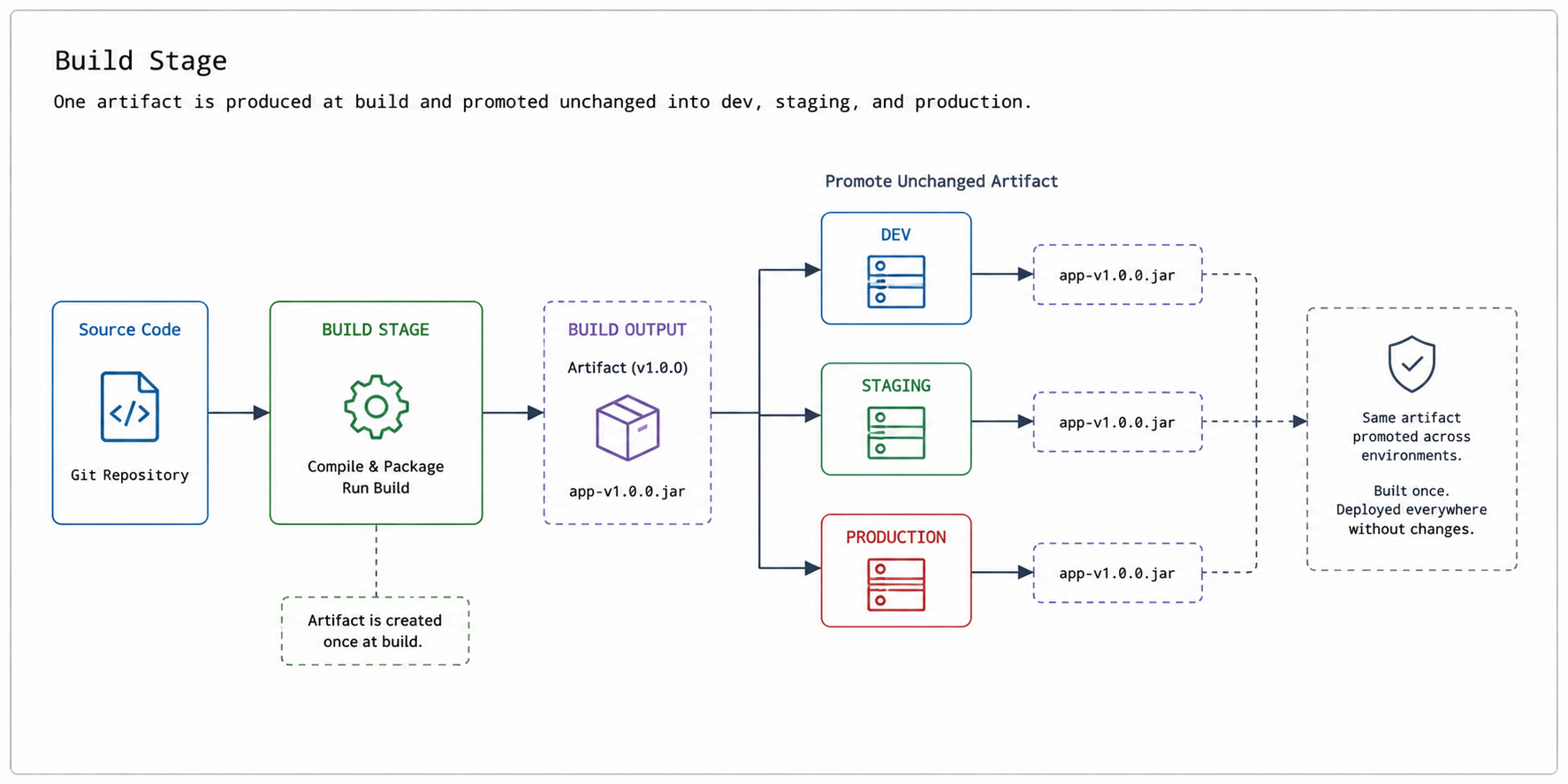
The build stage turns source code into something deployable.
Dependencies are resolved, code is compiled, and an artifact is produced. This artifact is the immutable output of the build. It could be a Docker image, a JAR file, or a compiled binary. The exact form depends on the stack, but the principle never changes.
Build once, deploy everywhere…
The artifact produced here moves through every environment unchanged. Nothing gets rebuilt for staging, and nothing gets rebuilt for production. Rebuilding introduces drift, and drift means what you tested is no longer what you shipped. The same artifact passing the tests in CI must be the exact artifact running in production.
Build speed matters too…A slow build is one that developers start routing around.
Here are two ways to keep it fast:
Dependency caching: Stores resolved packages between runs. Dependencies change far less often than source code, so caching them cuts significant time off every build.
Docker layer caching: Reuses unchanged image layers. If the base image and dependency steps haven’t changed, the build skips straight to copying the new source. The key is to order your Dockerfile from least to most frequently changed.
The build stage ends when a versioned, immutable artifact exists and is ready to be tested…
3. Test Stage
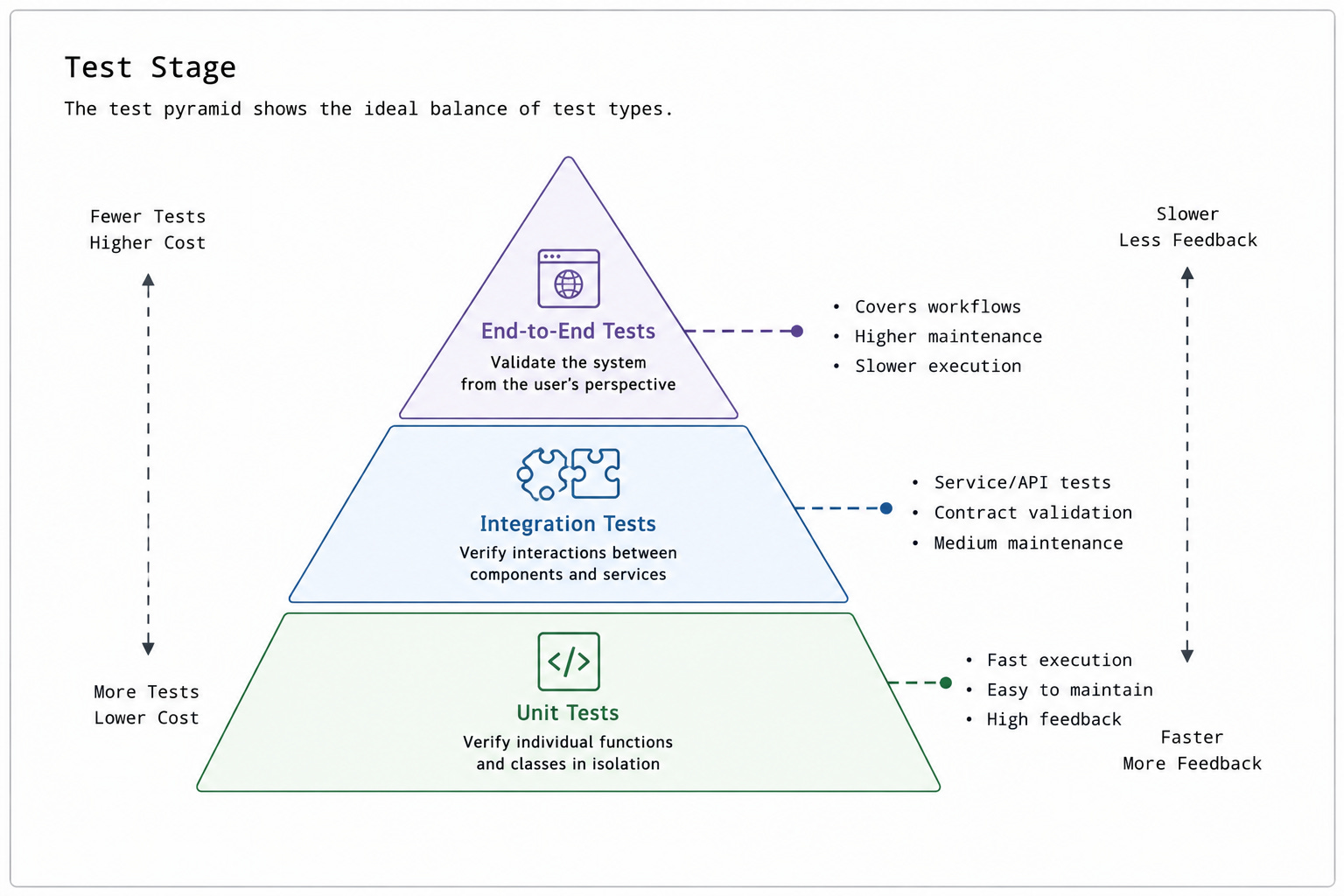
The test stage validates whether the artifact actually works.
Automated tests run against it to catch problems before they reach users. The goal is not to run every possible test. But to run the right tests in the right order so obvious problems fail fast, and expensive checks come later.
The test pyramid describes how to think about this:
Unit tests sit at the base. They are fast, isolated, and numerous. A suite of a thousand unit tests can be completed in a minute or less. They catch logic errors at the function level and should make up the majority of your test coverage.
Integration tests sit in the middle. They test how components interact with each other, with services, and with databases. Slower and more expensive to maintain, but they catch problems undetected by unit tests.
End-to-end tests sit at the top. They simulate real user behavior through the full system. Use them sparingly, focused only on the most critical paths.
Fast feedback is not optional…
A pipeline taking 45 minutes to report a failure is the one developers stop trusting. They push & move on. By the time it reports back, they have lost the context to fix it. Most teams target a feedback window of 10 minutes or less for the core suite.
Here are two techniques to keep test time manageable as the codebase grows:
Parallel jobs: Splits the suite across different runners executing at the same time. Instead of 500 tests running sequentially on one machine, 100 tests run on five machines simultaneously.
Test sharding: Partitions the suite so each runner covers a different subset. Combined with parallel runners, this scales well even for large codebases.
Test failures are intentional gates.
They exist to stop bad changes. A pipeline not failing doesn’t mean it’s a healthy pipeline. It just means it is not catching anything…
4. Release Stage
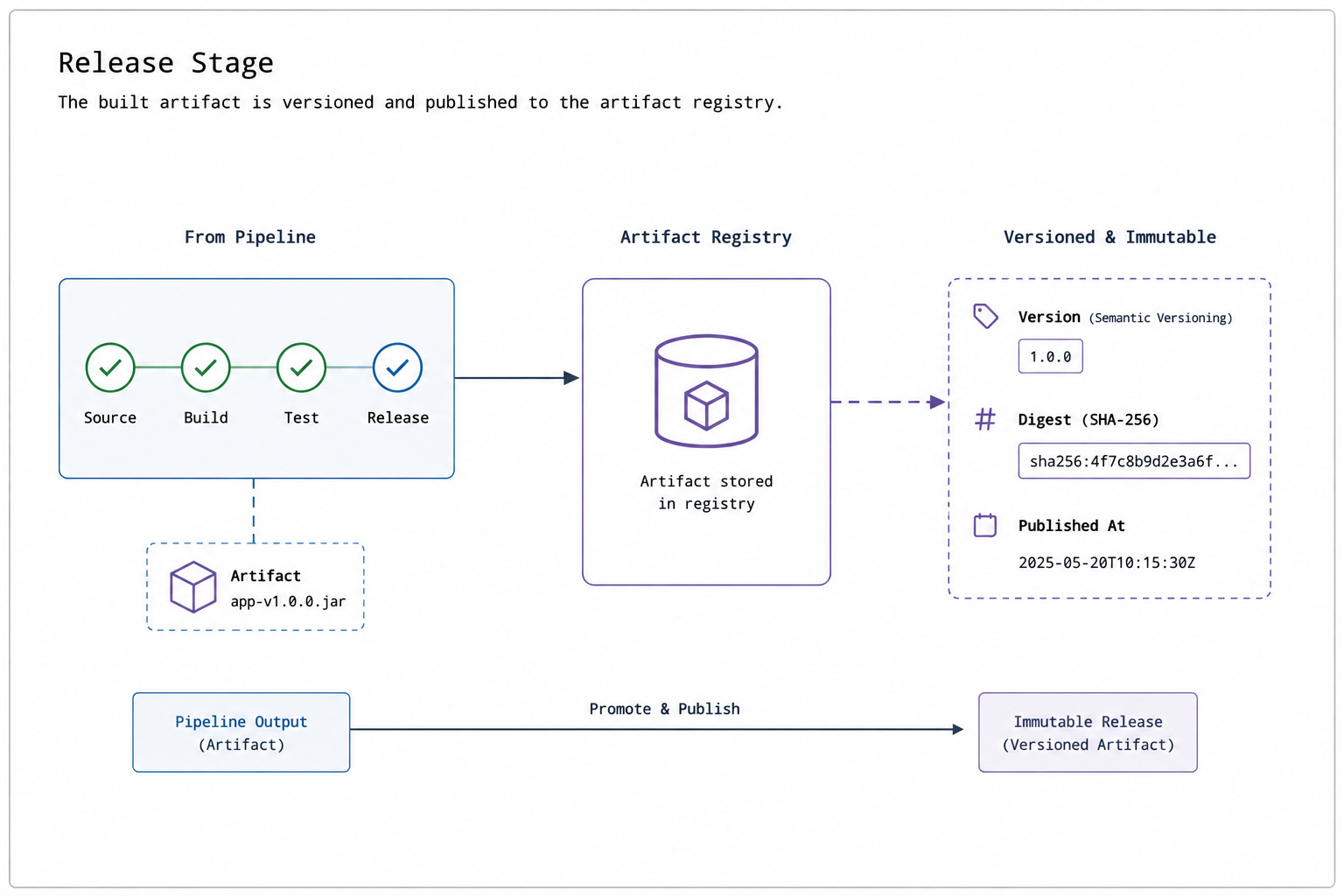
Once the artifact is tested, it needs to be stored and versioned before it can be deployed anywhere… The artifact is pushed to a registry.
Here are some popular registries:
Docker Hub
Amazon Elastic Container Registry (ECR)
Google Artifact Registry
JFrog Artifactory
The registry is the central store from which every environment pulls.
Without it, there is no consistent source of truth for what gets deployed…
Here are two versioning practices that matter here:
Semantic versioning6. Major, minor, and patch numbers give each artifact a meaningful identifier. Teams can see at a glance what kind of change they are deploying.
Immutable tags. A given tag should always point to the same artifact. Never use the latest in production pipelines. latest is a mutable pointer. It moves every time you push. A deployment pinned to latest six months ago would pull a completely different image today. Pin to a specific version tag, or a content digest7.
At the end of this stage, the artifact is deployment-ready… versioned, stored, verified.
But it has not reached any environment yet…
5. Deploy Stage
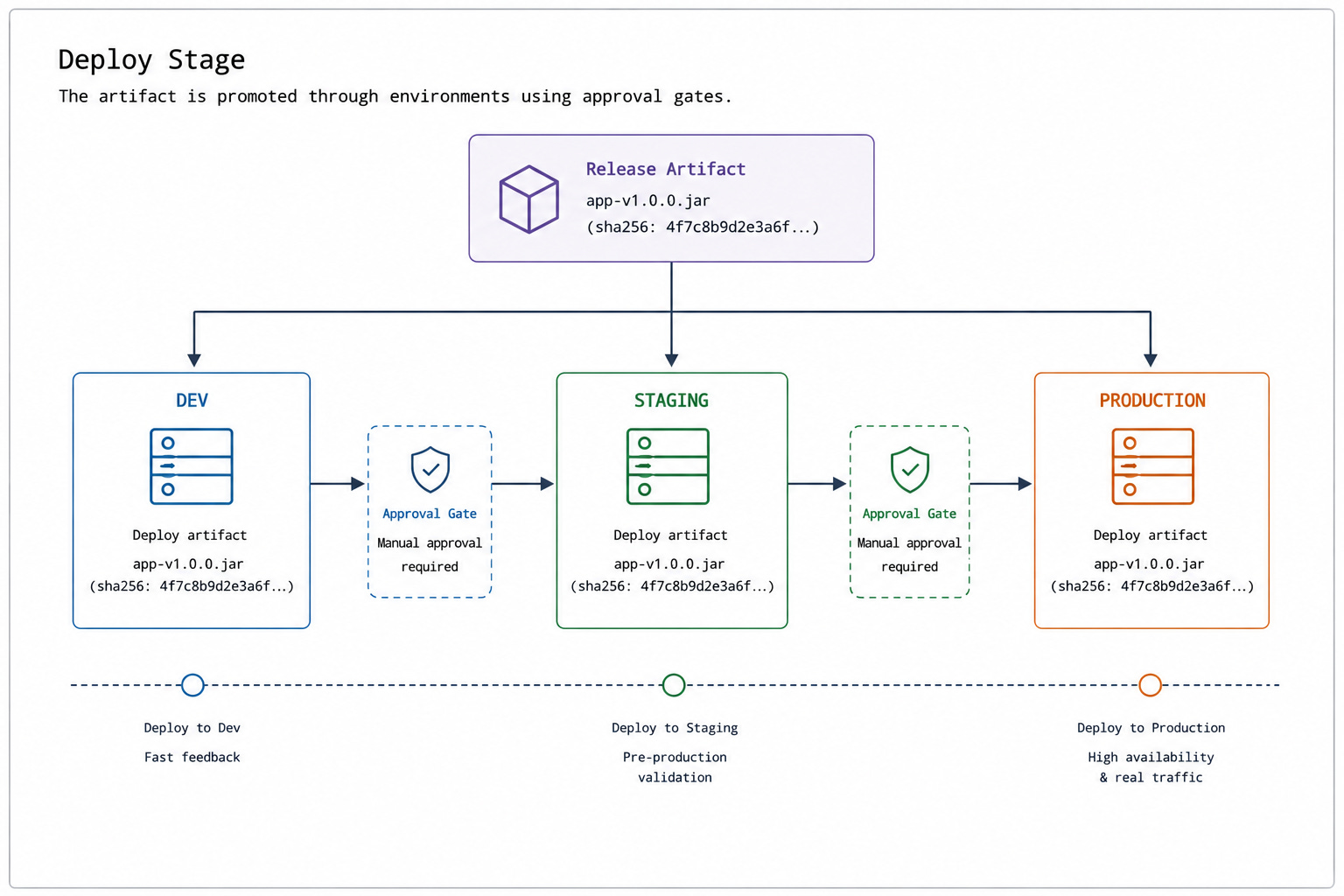
The deploy stage takes the verified artifact & makes it available to users.
By this point, the artifact has already been built, tested & stored in a registry. The deploy stage takes that artifact and releases it into a target environment.
This stage often includes approval gates, deployment policies, and infrastructure-specific tasks. Some teams deploy automatically…others require manual approval before production changes can proceed.
Deployments can also involve additional work beyond simply starting a new application version:
Database migrations8 would need to run first.
Configuration changes would need to be applied.
Infrastructure resources would need to be updated.
The deploy stage is where the pipeline stops validating the artifact & starts delivering it.
Pipeline Runners
The pipeline defines the work, and runners execute it.
A runner is the compute environment where pipeline jobs run. GitHub Actions runners, GitLab runners, and Jenkins agents all serve this role. When a stage is triggered, the platform schedules its jobs onto available runners. Each job runs in an isolated environment, completes its steps, and reports the result back.
Runners come in two forms:
Platform-managed runners: These get provisioned by the CI/CD provider. You define the job, and the platform handles the infrastructure. Less control over the environment, but no infrastructure to maintain.
Self-hosted runners: They run on your own machines. Teams use them when they need specific hardware, internal network access, and/or more control over the build environment. The tradeoff is you have to own the maintenance & scaling.
Every build, every test run, and every deployment runs on a runner somewhere.
Slow/overloaded runners are a common cause of slow pipelines, even when the rest of the system works as expected.
Each stage serves a purpose. Together, they turn a code change into a tested, versioned, and deployable release.
But a pipeline is more than a collection of stages. Teams also need a reliable way to define how those stages work & evolve over time…
§
Reminder: this is a teaser of the subscriber-only newsletter, exclusive to my golden members.
When you upgrade, you’ll get:
High-level architecture of real-world systems.
Deep dive into how popular real-world systems work.
How real-world systems handle scale, reliability, and performance.
(If this newsletter has helped you become a better software engineer, consider subscribing to support my work.)