


A code assistant looks like one product:
You type & it completes your line.
You ask a question & it answers from your codebase.
You describe a change & it edits the files.
Copilot, Cursor, Windsurf, Claude Code, and OpenAI Codex all present these as a single experience.
Yet under the surface, they’re 3 separate systems with almost nothing in common.
Autocomplete has 300 milliseconds to return a suggestion before the developer types past it. It runs a small, fast model on a narrow window of local context, and speed matters most.
Chat has seconds, not milliseconds, but it has to find and read the right files in a codebase it has never seen.
Agent mode has minutes, but it writes code, runs it, and must recover when tests fail.
Each mode uses a different model, context strategy & evaluation.
The constraint on autocomplete is latency… While the constraint for chat is knowledge… And for agent, the constraint is trust.
This newsletter designs all three modes, then builds the local core from scratch.
Let’s dive in!
§
Has AI-Generated Code Finally Become a Security Liability?
Please--whatever you do--don’t assume your AI-generated code is secure because it works and passes tests. Everything is not OK.

If you believe what the experts say, mark my words-the only thing the rise of AI coding agents is going to do is split engineering teams into two separate and yet highly unequal groups:
The haves and the have-nots… those who adapt their security practices, actively hunt for exploitable vulnerabilities, and fix weaknesses before attackers exploit them...and those who fail to recognize the growing security risks, complacently shipping AI-generated code.
So which side will you end up on?
CodeRabbit Secure helps you find, verify, and fix security vulnerabilities:
Security Agent: Reviews every pull request for security vulnerabilities before code gets merged.
Deep Scan: Uses AI-powered security analysis to hunt for potentially exploitable vulnerabilities across your codebase.
Attack Surface Map: Maps entry points, trust boundaries, and security-sensitive operations to show what got verified and what needs attention.
Vulnerability Verification: Checks findings for reachability, existing safeguards, and exploitation conditions to filter unsupported findings.
Fix with AI: Drafts fixes as pull requests for developers to review, test, and approve.
Blast Radius Analysis: Evaluates how code changes affect downstream services and security boundaries.
Continuous Monitoring: Tracks security findings as code changes, showing what got verified and what still needs attention.
Multi-Repo Analysis: Traces potential security risks across linked repositories and services.
When you start your 14-day free trial, you will get access to CodeRabbit Secure. It’ll help you find, verify, and fix security vulnerabilities before attackers exploit them.
No credit card required.
P.S. Get one FREE Deep Scan when you try CodeRabbit Secure. Use it to uncover potential security vulnerabilities hiding in your codebase.
(Thanks to CodeRabbit for partnering on this newsletter.)
§
The full design covers repo exploration, multi-model routing, tool use, source code privacy, and optional RAG over code, with autocomplete held to a few hundred milliseconds budget.
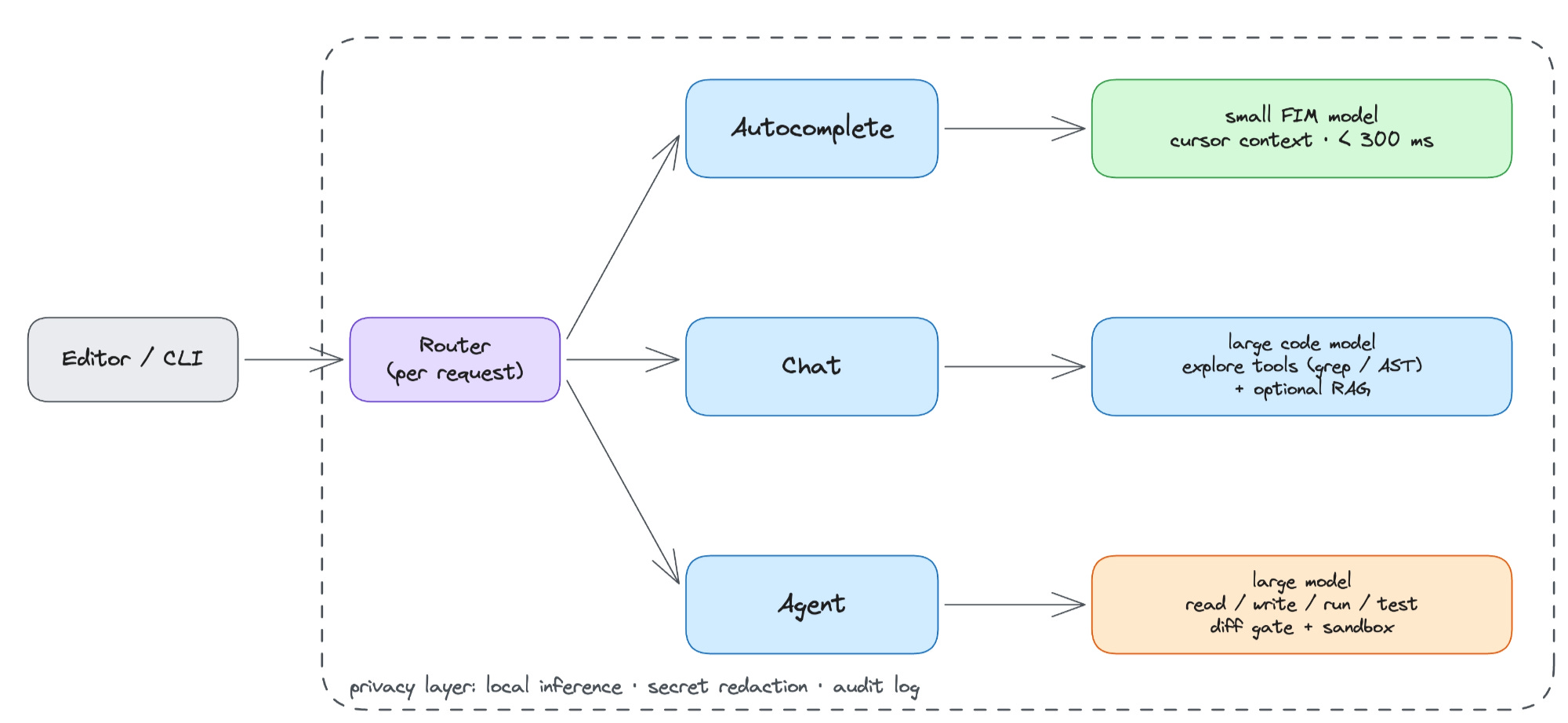
The companion build implements the working core of that design: repository chat and exploration, approval-gated file edits, read-only commands, model routing, a callable FIM completion path, and optional semantic RAG.
Many of these terms might be new if you have not worked on code tooling before, but don’t worry, each one is explained where it first appears…
§

I want to introduce Louis-François Bouchard as a guest author.
He’s a best-selling author (Building LLMs for Production), the co-founder of Towards AI, and the creator of the YouTube channel What’s AI, where he helps people understand AI and learn how to apply it in the real world. Through his development work with clients, content, teaching, AI training programs, and the new Mentorship program at Towards AI Academy, Louis focuses on making AI practical for builders, engineers, and curious learners alike.
At Towards AI, he and his team train AI engineers through courses and mentorship built for every stage, from beginner to advanced. That educational mission, plus the real-world experience of building for his clients, is exactly why I wanted him in this newsletter series.
§
Here’s what’s inside this newsletter:
Your AI coding assistant could know your entire codebase and still give the wrong answer. The hidden limitations of code search, and why finding the right function becomes harder as your repository grows.
Your fastest AI model could make your coding assistant painfully slow. Autocomplete has a strict latency target, while chat and agent tasks need different capabilities. The surprising trade-offs behind choosing the right models.
Your AI agent could fix one bug and create three more. Giving an AI permission to read files, execute commands, and modify code introduces risks that a working prototype might never reveal.
A 7B coding model passed 3 out of 5 edit tasks. A 32B model passed 3 out of 3. The small benchmark that raises a bigger question about model size, tool reliability, and when paying for a stronger model makes sense.
Your AI coding assistant could pass every demo and still fail in production. The gaps between a laptop prototype and a production system, and what changes when many developers start trusting AI agents with their code.
Share this letter & I’ll send you some rewards for the referrals.
§
Why Build Your Own Code Assistant?
GitHub Copilot, Cursor, Windsurf & Claude Code already work well for most developers.
For individual use, choosing an existing tool makes more sense.
Yet there are two good reasons to build your own:
1. Learning
Building each mode yourself helps you understand how AI code assistants work.
You learn why autocomplete feels instant, how much context and how many tool calls an assistant needs to understand your codebase, and why agents sometimes make incorrect/unnecessarily broad changes.
2. Production Ownership
Building your own assistant makes sense when existing tools cannot meet your engineering requirements.
Here are five reasons:
Your codebase has unique context. Public models have never seen your internal frameworks, naming conventions, or service boundaries. An assistant that understands your
PaymentGatewaywrapper and error-handling patterns provides more relevant help than one that only knows generic Python.Your source code must stay within your infrastructure. Many hosted assistants offer enterprise data controls and zero-retention options. Yet strict security requirements in regulated industries, defense, or environments with sensitive intellectual property sometimes prohibit code from leaving your infrastructure. Local or self-hosted inference addresses this requirement.
You need control over latency. Autocomplete must respond almost instantly. A local model avoids network round trips, while a self-hosted model keeps requests within your network. Provider-side caching reduces processing time, but network latency remains. Owning the endpoint gives you more control over response times.
General models struggle with domain-specific languages (DSLs). Proprietary scripting languages, SQL dialects, infrastructure-as-code files, and internal APIs receive limited coverage in public training data. Fine-tuning or prompting a model with relevant examples could improve performance, provided you have suitable training data and evaluations.
High request volume increases costs. Autocomplete runs whenever developers pause while typing. Across an engineering team, these requests add up quickly. A small, inexpensive model handles autocomplete, while a larger model handles complex chat and agent tasks. This approach helps control inference costs.
For individual developers, an existing assistant is usually the practical choice.
Building one yourself is valuable when you want to understand how its different modes work. For engineering teams, building a custom assistant makes sense when specific requirements justify owning the infrastructure.
§
Target System Design
The AI code assistant has three modes: autocomplete, chat, and agent.
They appear as one product to the developer, but each serves a different purpose and has unique technical requirements.
The practical build implements a simplified local version.
I’ll explain where the full production design includes additional features.
Three Modes, Three Requirements
Autocomplete: Returns code suggestions within 300 milliseconds for at least half of requests (p50). The p95 latency measures the time within which 95% of requests finish.
Chat: Answers questions about files, functions, symbols, and repository structure, with references to relevant file paths and line numbers.
Agent: Reads and edits files, executes approved commands, and, in the full design, runs tests to detect errors and improve its changes.
The practical build supports file exploration, read-only commands, and edits that require approval. It does not execute tests.
Shared Architecture
All three modes use common code exploration tools:
Code exploration:
grep,read_file,find_fileslocate relevant files and code.Abstract Syntax Tree (AST) lookup: Finds functions and classes by examining the structure of the code.
Retrieval-Augmented Generation (RAG): Adds embedding-based code search when repositories become too large for basic exploration.
A model router sends complex chat and agent requests to a larger model and simpler requests to a smaller model.
Autocomplete uses its dedicated Fill-in-the-Middle (FIM) model1 directly to minimize latency.
Security and Code Review
In the full design, agents execute commands inside isolated containers and request approval for sensitive actions.
The practical build runs locally on Ollama. It restricts commands through an allowlist, blocks access to sensitive files and paths outside the workspace, and requires approval before writing changes. A self-hosted deployment is also an option for engineering teams.
Agent mode2 proposes code changes as diffs, letting developers review modifications before applying them.
The practical build lets you accept/reject changes in the terminal.
The full design adds an editor interface where you can review and modify proposed changes. It also separates the frontend, AI models, exploration tools, and sandboxed workspace.
Why Autocomplete Is Different
Autocomplete has the strictest latency requirements.
Chat and agent requests have seconds or minutes to complete. Autocomplete targets roughly 300 milliseconds before the developer resumes typing.
This tight deadline determines which model to use, how much context to collect, and which processing steps to skip.
§
§
Part 1: Autocomplete and 300ms Budget
Autocomplete is the feature developers use most and notice least.
It fires on every pause in typing, suggests the rest of a line or block, and the developer either accepts/types past it. GitHub describes code completion as its most widely used Copilot feature. Everything about how it is built follows from one fact: a suggestion that arrives late is never shown, and a suggestion that is never shown has an acceptance rate of zero regardless of quality.
A fast, decent suggestion beats a slow, smart one every time.
Latency Budget
In practice, “feels instant” means well under a second.
The best systems aim for a few hundred milliseconds. Typing rhythm sets the target: suggestions must appear during the pause before the developer resumes, and the acceptance rate drops as latency increases.
The numbers are public:
The engineering team behind Cody, Sourcegraph’s AI coding assistant, drove single-line completion from a 75th-percentile latency of 1.8 seconds to under 900 milliseconds, treating anything past a second as too slow.
This newsletter sets a stricter working target of roughly 300ms for the median request.
Treat it as an illustrative design target, not an industry standard. This is plausible with a small local model & fast serving, with no network round trip to pay for, but whether a given 1 to 3B model reaches it on specific hardware is a question only measurement answers.
Where the 300ms Goes
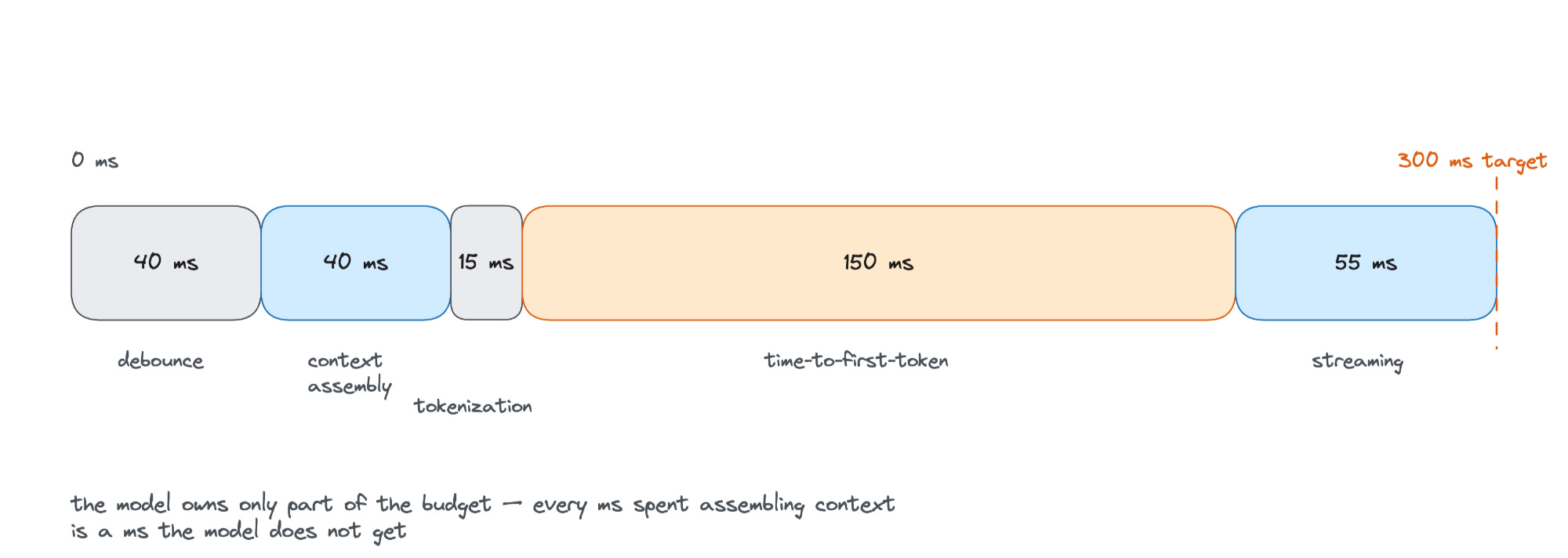
The 300 milliseconds are not spent in one place.
Instead, they’re split across five stages, each competing for the same window:
Debounce is the wait after the last keystroke before firing a request, typically a few tens of milliseconds, so the system does not fire on every character.
Context assembly gathers the code around the cursor & nearby signals.
Tokenization converts that context into tokens.
Time-to-first-token is the model’s prefill latency & is usually the dominant cost.
Streaming delivers the suggestion token by token.
The model owns only part of the budget.
If debounce & context assembly take 80ms, the model has roughly 220ms left to produce a usable suggestion. Context assembly competes directly with inference for the remaining time, which means the editor has to be deliberate about how much context it gathers.
What the Editor Sends
The editor sends a small amount of relevant code (instead of the entire repository) to the AI model.
This context includes:
Code around the cursor: The lines immediately before & after where you’re typing.
Open tabs: Other files you’re currently working with.
Recent edits: Code you’ve recently modified.
Imports: Related modules and dependencies.
The editor selects the most relevant snippets because larger prompts require more processing time, thus increasing time-to-first-token (TTFT).
Sourcegraph’s Cody ranks recently viewed files and open tabs by their similarity to the code around the cursor. GitHub Copilot also uses the current file and related workspace files to build context.
Both approaches prioritize relevance and recency to keep autocomplete fast.
Chat mode faces a larger context-selection problem because it searches across the repository. (We’ll explore this in Part 2.)
For autocomplete, the next step is to generate code that fits the cursor’s position.
Fill-in-the-Middle
Traditional chat models generate text by predicting what comes next.
Yet code autocomplete has a different requirement: the generated code must fit between existing lines.
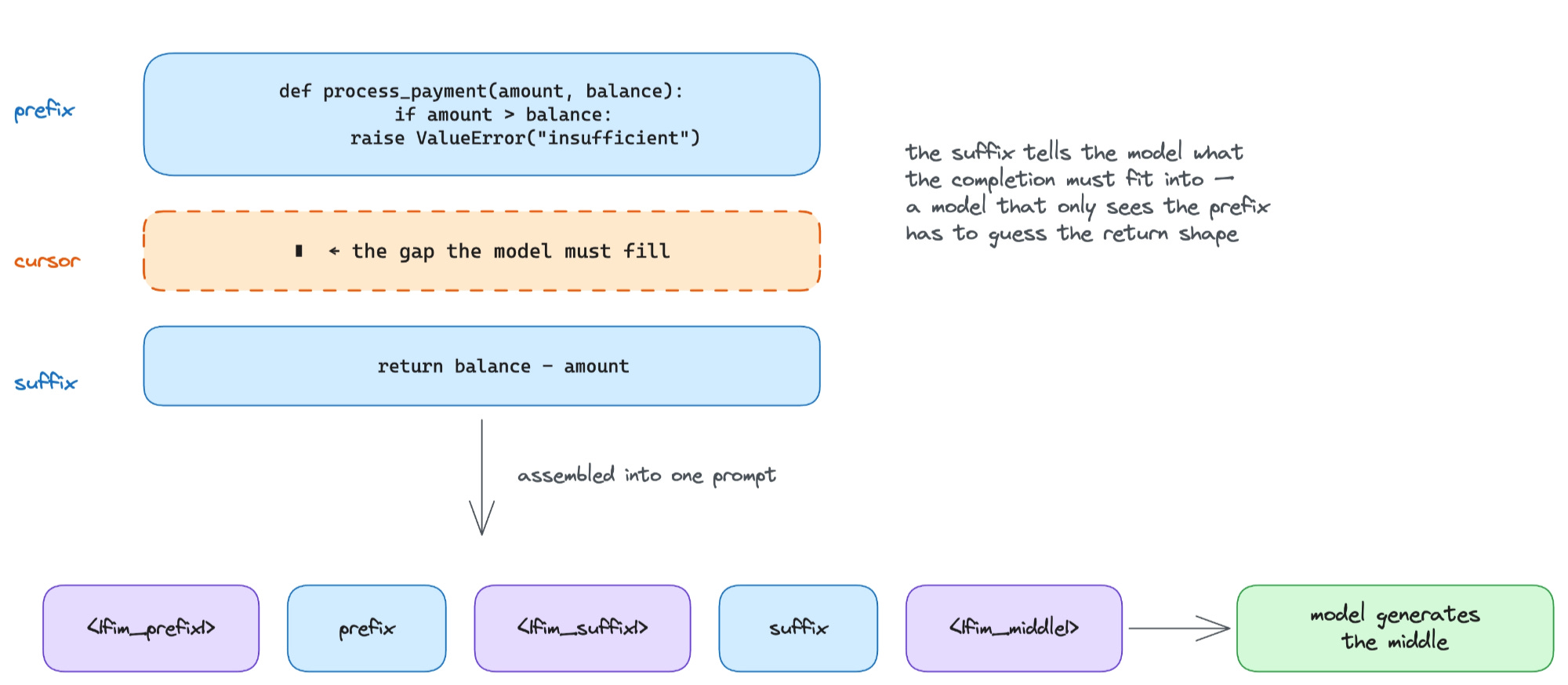
Fill-in-the-Middle (FIM) solves this by dividing the code into three parts:
Prefix: Existing code before the cursor.
Suffix: Existing code after the cursor.
Middle: New code the model generates between them.
Imagine the function below the cursor returns a Response object.
A model that reads only the prefix must guess what comes next. An FIM model also reads the suffix, thus generating code consistent with the function’s return type.
GitHub encountered problems when using ordinary chat models for code completion. Suggestions sometimes appeared in the wrong location, repeated existing code, or overwrote subsequent lines.
Although prompting a chat model with the suffix approximates this behavior, FIM-trained models are better suited to reliable inline completion.
Models such as Qwen2.5-Coder and FIM-capable variants of Code Llama and DeepSeek Coder use special tokens to identify the three parts.
The general prompt structure looks like this:
<PRE>{prefix}<SUF>{suffix}<MID>
Each model family uses its own token format.
For example, Qwen uses:
<|fim_prefix|>for the prefix.<|fim_suffix|>for the suffix.<|fim_middle|>to begin generation.
(The practical build in Part 6 uses Qwen’s FIM format.)
Model variants differ in their FIM support, so selecting a compatible model matters.
The next challenge is producing it fast enough for autocomplete…
Speculative Decoding and Prefix Caching
Here are 2 techniques to reduce autocomplete latency without changing the model’s output quality.
1. Speculative Decoding
A small draft model predicts several tokens ahead. A larger target model then verifies them in a single forward pass.
When the predictions are correct, the system accepts multiple tokens at once instead of generating them one by one.
This speeds up generation while preserving the target model’s output distribution.
2. Prefix Caching
The code above the cursor usually changes very little between keystrokes.
Prefix caching reuses the Key-Value (KV) cache from earlier requests instead of processing the same context again.
This reduces repeated computation, especially when the prompt contains thousands of tokens.
Yet there’s a limitation: FIM places the suffix after the prefix in the token sequence. So reusing the suffix’s cache requires additional support from the inference server.
Both techniques help reduce latency. Prefix caching reduces prompt processing time, while speculative decoding accelerates token generation.
But faster inference raises another question: how large should the autocomplete model be?
Model-Size Trade-off
A small, fast model is better for autocomplete than a larger, slower one.
Consider two models:
1–3 billion parameters: Produces simple completions quickly & consistently.
7 billion parameters: Handles harder completions more accurately but could exceed the latency budget.
If the larger model misses the response deadline on a third of requests, its additional accuracy becomes less useful.
Plus, the hardware matters. A 7B model would respond fast enough on a server GPU, while a smaller model is more practical on a laptop.
Autocomplete typically handles short, predictable tasks:
Finish the line of code.
Close the bracket.
Complete a function argument.
A small FIM model handles these common cases without the overhead of a larger model.
Speculative decoding and prefix caching could make larger models practical in some deployments. Yet the default autocomplete path favors a small, dedicated model, as we’ll discuss in Part 4.
Sourcegraph reported lower latency and higher suggestion acceptance after moving Cody’s fast path to a smaller, code-specific model.
But acceptance alone does not tell you whether the suggestions are useful.
Acceptance-Rate Problem
The best autocomplete model produces suggestions developers actually keep.
Here are two metrics to measure this:
Acceptance rate: The percentage of suggestions developers accept.
Retention: How much of an accepted suggestion remains in the code after subsequent edits.
But acceptance rate alone can be misleading.
For example, a model that frequently suggests short, obvious completions could achieve a high acceptance rate without providing much value.
GitHub encountered this problem and introduced accepted and retained characters, which measure how much suggested code survives over time.
Sourcegraph’s Cody uses edit distance to track a similar signal.
Consider a suggestion that a developer accepts but immediately rewrites. The acceptance rate counts it as successful, even though it provided limited value.
Retention helps reveal these cases.
The metrics you optimize influence which model you deploy. (Part 5 covers the evaluation scorecard across autocomplete, chat, and agent modes.)
Autocomplete operates under a strict 300-millisecond latency target. Every design choice must account for this constraint.
Chat mode has a different challenge. When you ask a question about your codebase, the assistant needs enough repository context to provide an accurate answer.
§
Reminder: this is a teaser of the subscriber-only newsletter series, exclusive to my golden members.
When you upgrade, you’ll get:
Simple breakdown of real-world architectures
Frameworks you can plug into your work or business
Proven systems behind ChatGPT, Perplexity, and Copilot
(If this newsletter has helped you become a better software engineer, consider subscribing to support my work.)