


Share this letter & I’ll send you some rewards for the referrals.
Every task used to start the same way for me, and you know this feeling:
You sit down to ship something small, and before you write a line, you ask, “Where is this documented?”
The context I needed was never in one place…
So I would dig through scattered READMEs, a stale runbook, an ADR1, and a lost Slack thread, then ask a team member. And when none of it worked, just guess.
None of it was the work itself, and over time, I realized it came down to three problems stacked on top of each other:
First, the time. I burned hours hunting through docs and GitHub pages before I even started, just trying to find where this structure was explained.
Then comes trust. So let’s say my AI agent finds something. How do I trust it when AI can hallucinate2?
And the last one is the scariest: the knowledge never written down anywhere, the kind that lives in one senior engineer’s head and leaves the day they do.
These are real problems, and they cost real time and trust on every team.
The good news is you can solve all three with a single tool called NotebookLM.
So let me show you what it actually is…
[Webinar] 8 levels of context maturity in AI-native engineering (Partner)

AI is in your engineering workflow. While the token spend shows it, the throughput doesn’t. The human is very much still in the loop, and that’s a context problem.
Join live July 23 (FREE) to learn:
The 8 levels of context maturity: where most teams are stuck and what the ceiling looks like at each stage
Why more MCPs, rules, and skills provide agents access but not understanding
How leading engineering teams are using a context engine to make the most of their agents
(Thanks, Unblocked, for partnering on this newsletter.)
I want to introduce Gencay as the guest author.

He has been building with AI since ChatGPT first shipped in 2022.
For years, he built for clients on Upwork: 7,300+ hours of it.
Now he builds in the open and shares every piece of it on LearnAIWithMe, every Monday, Wednesday, and Friday.
Not just theory for its own sake. One real build at a time, from idea to running system.
Here’s what’s inside this newsletter:
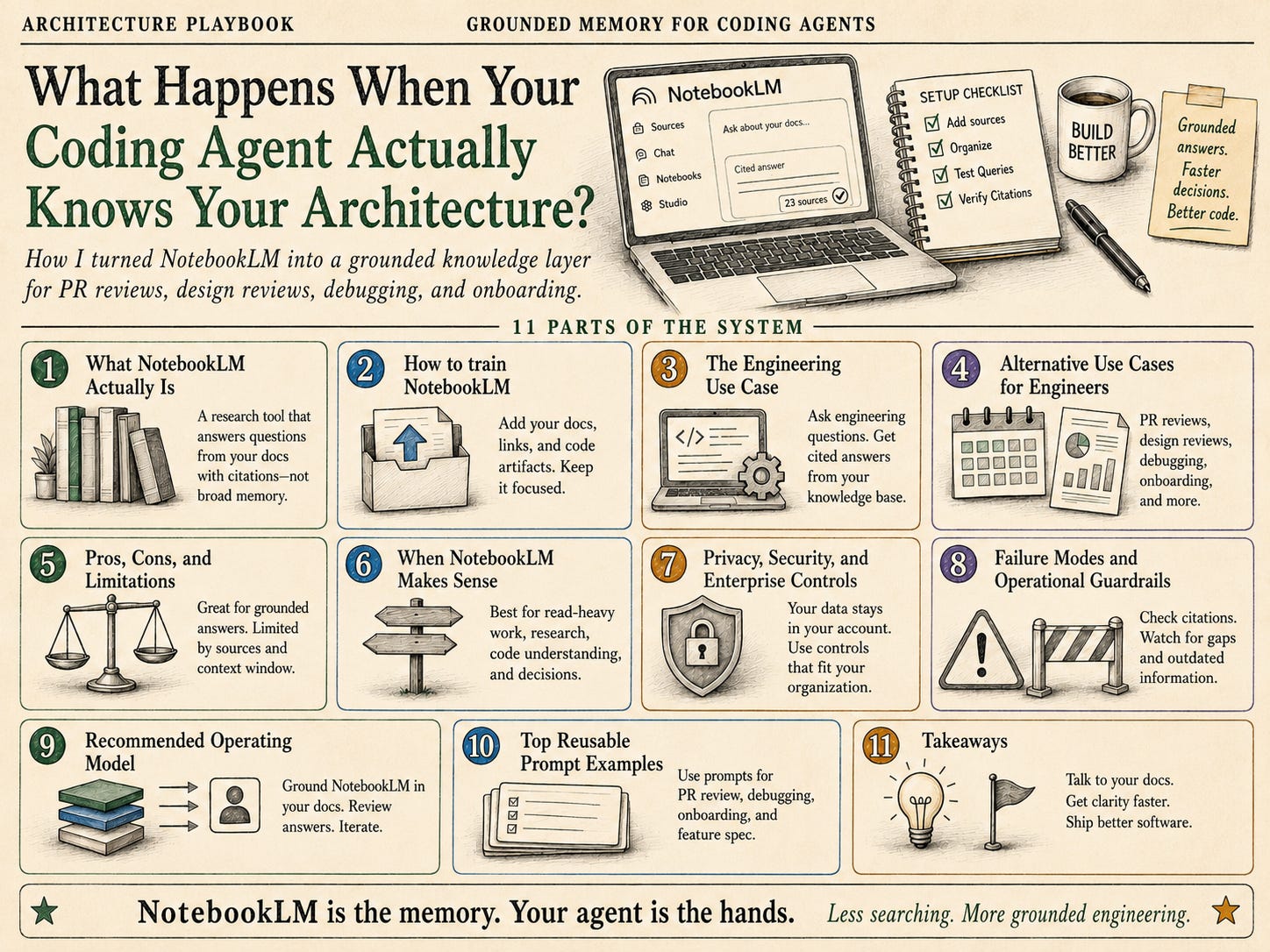
What NotebookLM Actually Is
NotebookLM is a research tool from Google that answers your questions using a set of documents you provide.
The set you give it is called a notebook, just a workspace where you collect the files you want to read, like a folder you can ask questions to.
Picture a sharp new hire on their first day:
They are smart, and they want to help, but they do not know your system yet, so you hand them a stack of your real docs and tell them to work from those. This single constraint is the whole point.
They will not wing it from general knowledge, and when they tell you something, they can point to the page they got it from.
NotebookLM works differently from general chat models like ChatGPT/Claude. Those usually come from broad model knowledge.
Now you might ask, why not just bolt a RAG pipeline3 onto ChatGPT or Claude and be done with it?
Yes, you can, and sometimes it is the right call. But NotebookLM gives you grounding and citations out of the box with nothing to build or maintain.
(I’ll cover the real numbers on this later.)
Under the hood, the core mechanism behind NotebookLM is retrieval and grounding rather than open-ended model memory.
Here’s the workflow:
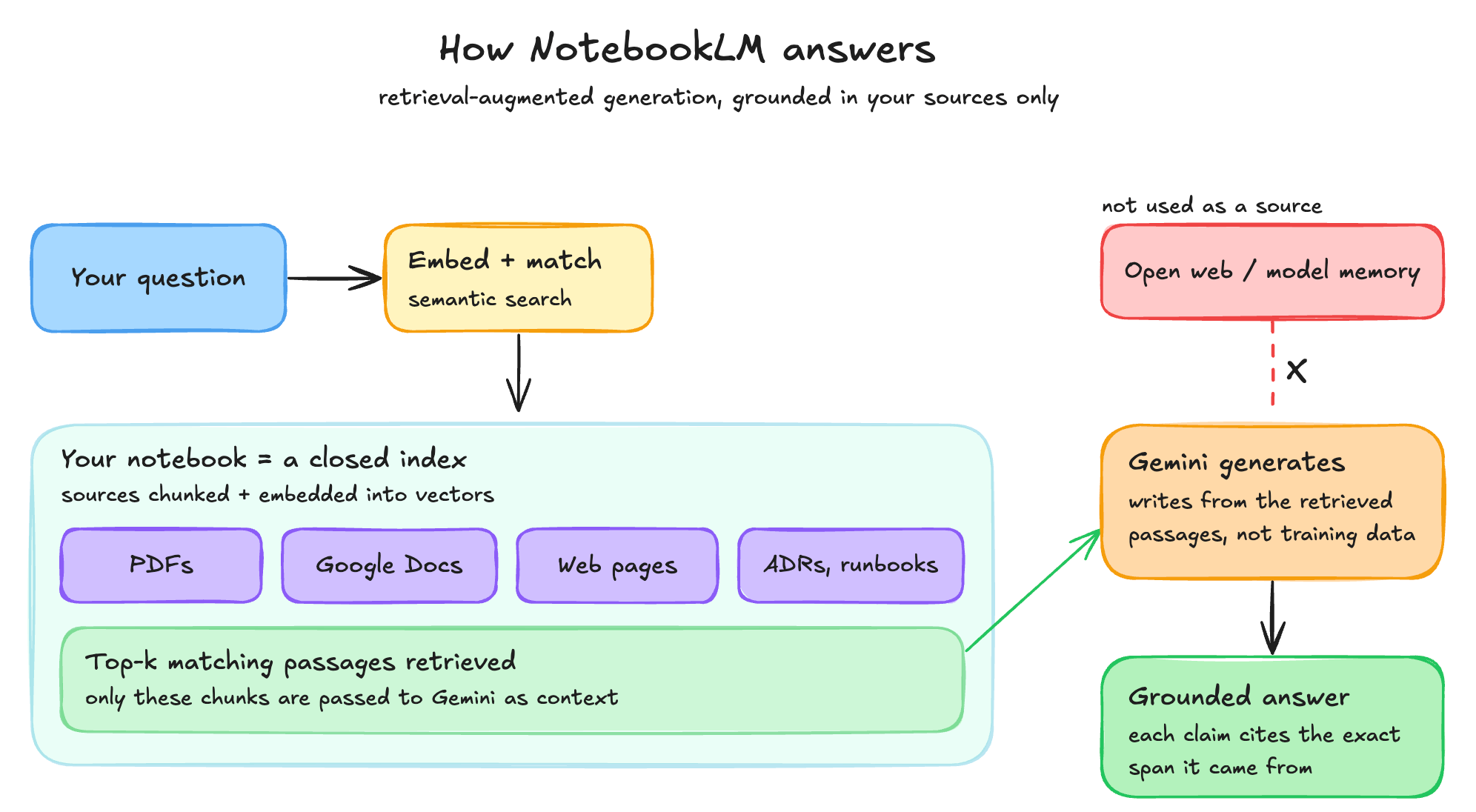
You ask a question in plain language.
NotebookLM searches your sources and pulls only the passages that match it.
Those passages, and nothing from the open web, go to Gemini4 as the context.
Gemini writes the answer from those passages.
Each claim comes back with a citation to the exact line it came from.
The technique has a name: retrieval-augmented generation (RAG).
It also leans on the notebook’s chat history while it answers, so a follow-up still makes sense without you repeating the setup.
Plus, it runs on Google’s Gemini models, which Google keeps upgrading, and it can hold a lot at once.
Each source can run up to about five hundred thousand words, and the chat works across a context window of a million tokens. So you can load real documentation instead of a handful of pages.
The one thing to keep in mind is scope.
Each notebook only knows what is inside it. It does not pull from your other notebooks. The boundary sounds like a limitation until you realize it is exactly what makes NotebookLM safe to put underneath an agent.
Enough about what it is… Let’s set one up.
How to set up NotebookLM?
Visit here,
Click on “Try NotebookLM”,
Then click “Create new notebook”.
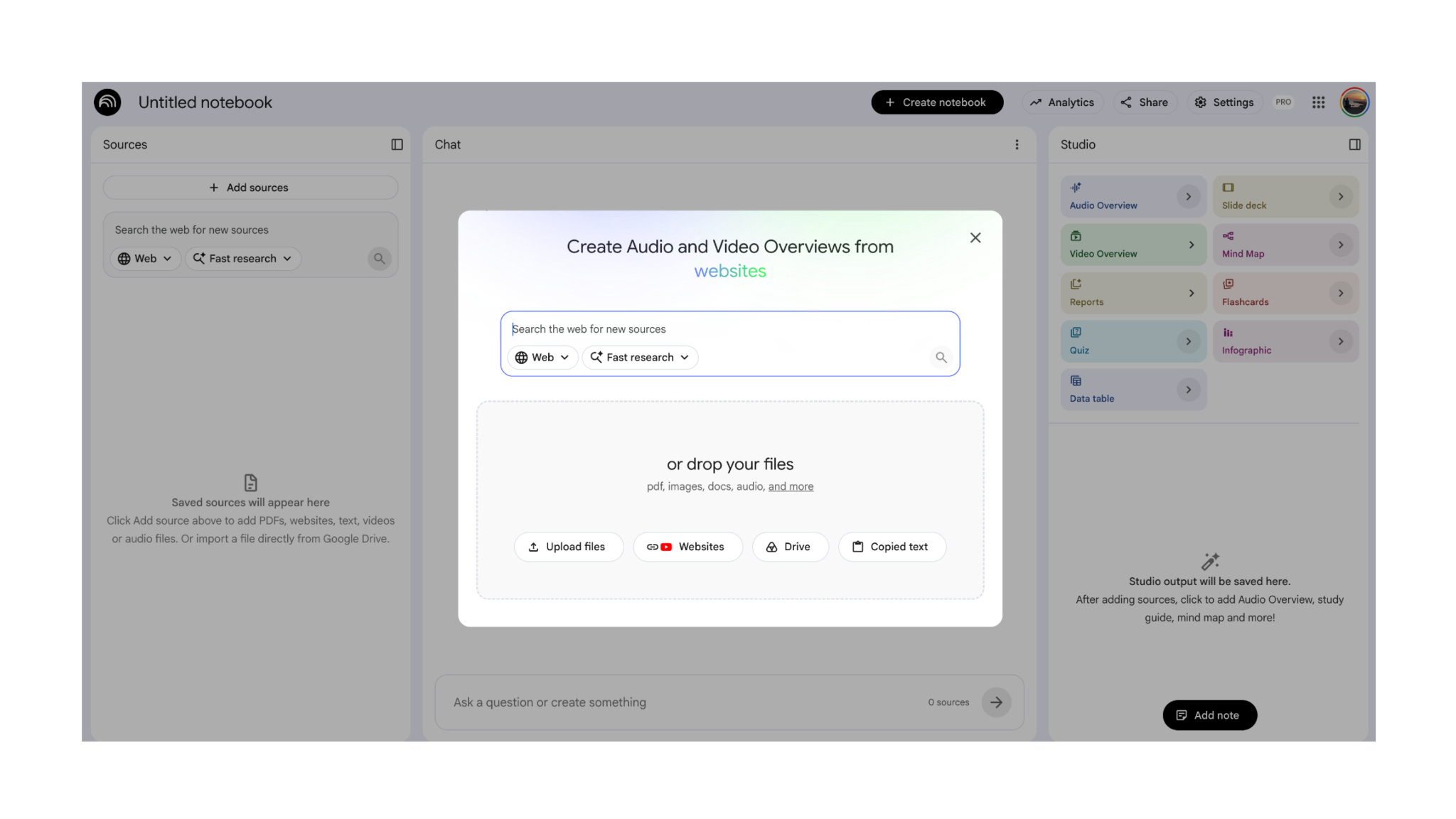
You have a few ways to feed it.
A web search, file upload, websites, a Google Drive connection, or pasted text.
Pick whichever matches where your material already lives.
For this notebook, I used websites.
I clicked “Websites” and pasted the Backstage links I had pulled together. The architecture decision records, the core docs, and the pull requests.
Here are the exact links I added:
https://backstage.io/docs/architecture-decisions/adrs-adr001/

https://backstage.io/docs/architecture-decisions/adrs-adr002/

https://backstage.io/docs/architecture-decisions/adrs-adr003/

https://backstage.io/docs/architecture-decisions/adrs-adr004/

https://backstage.io/docs/architecture-decisions/adrs-adr005/

https://backstage.io/docs/architecture-decisions/adrs-adr006/

https://backstage.io/docs/architecture-decisions/adrs-adr007/

https://backstage.io/docs/architecture-decisions/adrs-adr008/

https://backstage.io/docs/architecture-decisions/adrs-adr009/

https://backstage.io/docs/architecture-decisions/

https://backstage.io/docs/overview/architecture-overview/

https://backstage.io/docs/backend-system/architecture/index/

https://backstage.io/docs/features/techdocs/architecture/

https://backstage.io/docs/deployment/

https://backstage.io/docs/getting-started/

https://backstage.io/docs/overview/what-is-backstage/

https://github.com/backstage/backstage/pulls

https://github.com/backstage/backstage/tree/master/docs/architecture-decisions
A couple of minutes later, the notebook gets trained and is ready to answer.
From here, the notebook is ready, with every Studio output on the right waiting to build from your sources.
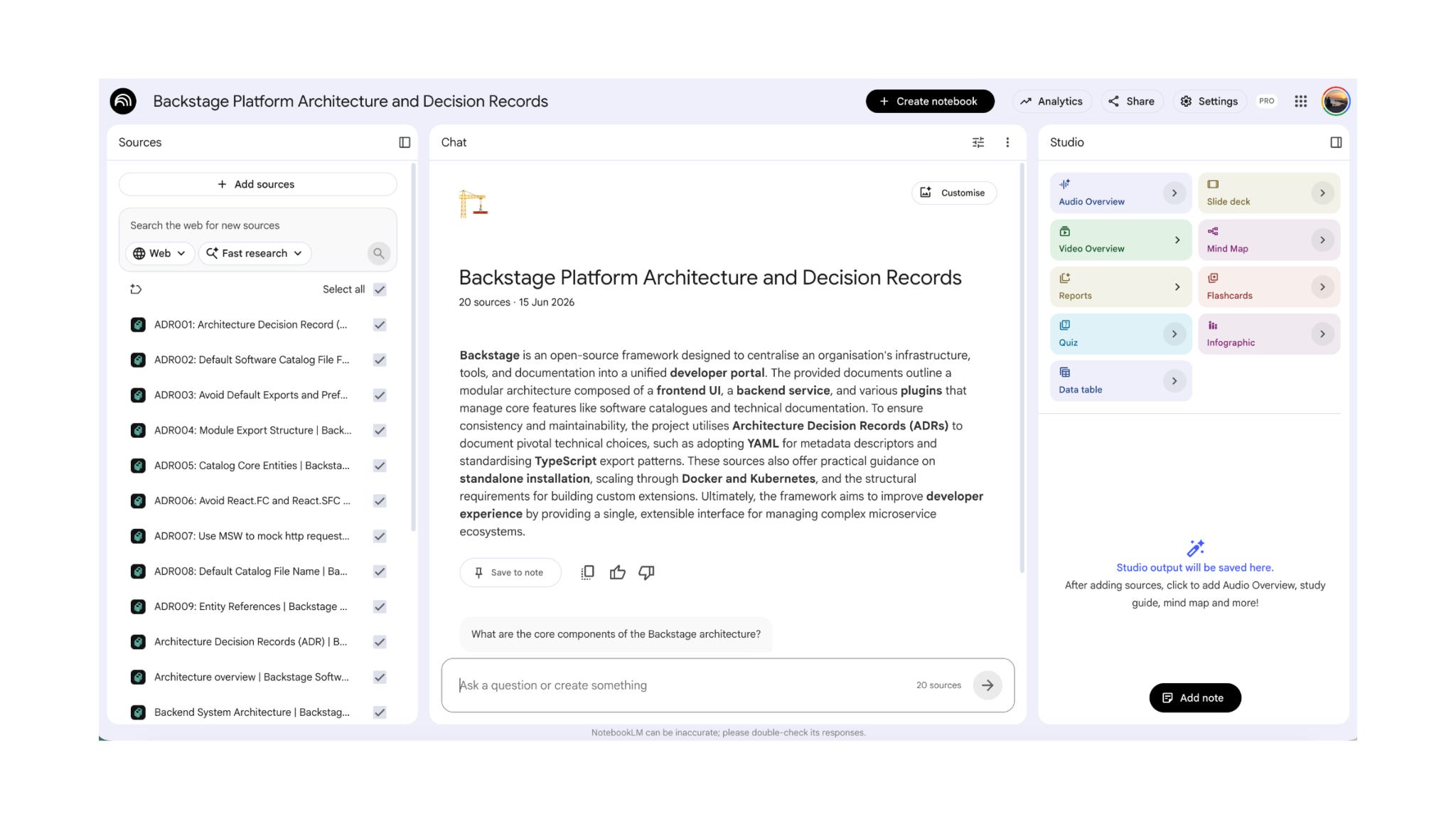
So the notebook is loaded.
But why trust a word it says? This comes down to one idea…
Grounding, in plain language
Here is what grounding looks like in practice:
I asked the notebook about the latest AI model Anthropic released, something nowhere in my sources, and here is its response:
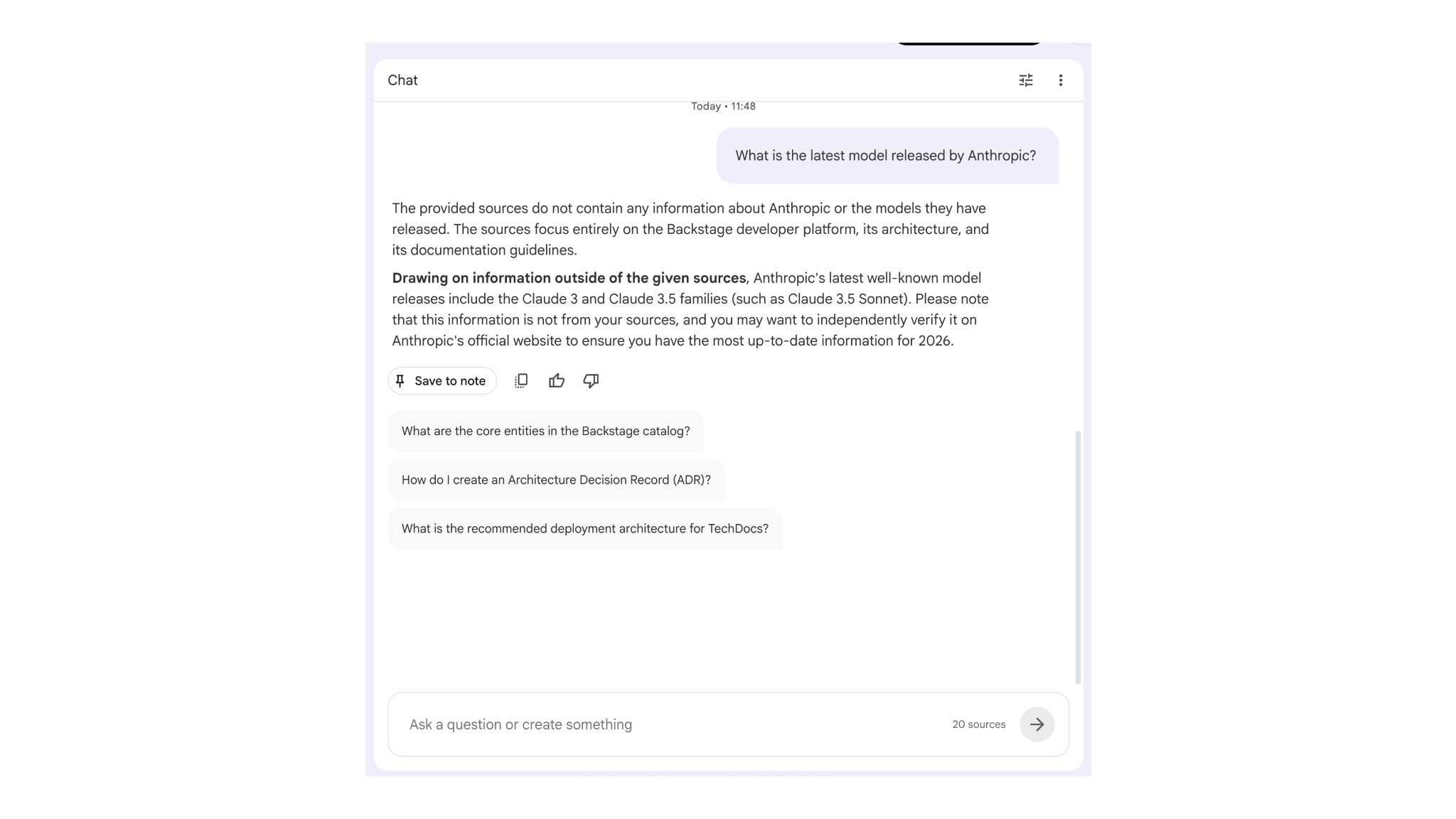
To make the boundary clear, let’s customize the tone, using this prompt:
If the answer is not explicitly supported by the provided sources, respond only with:

Not in source.
I asked the same question after it, and here is the answer:
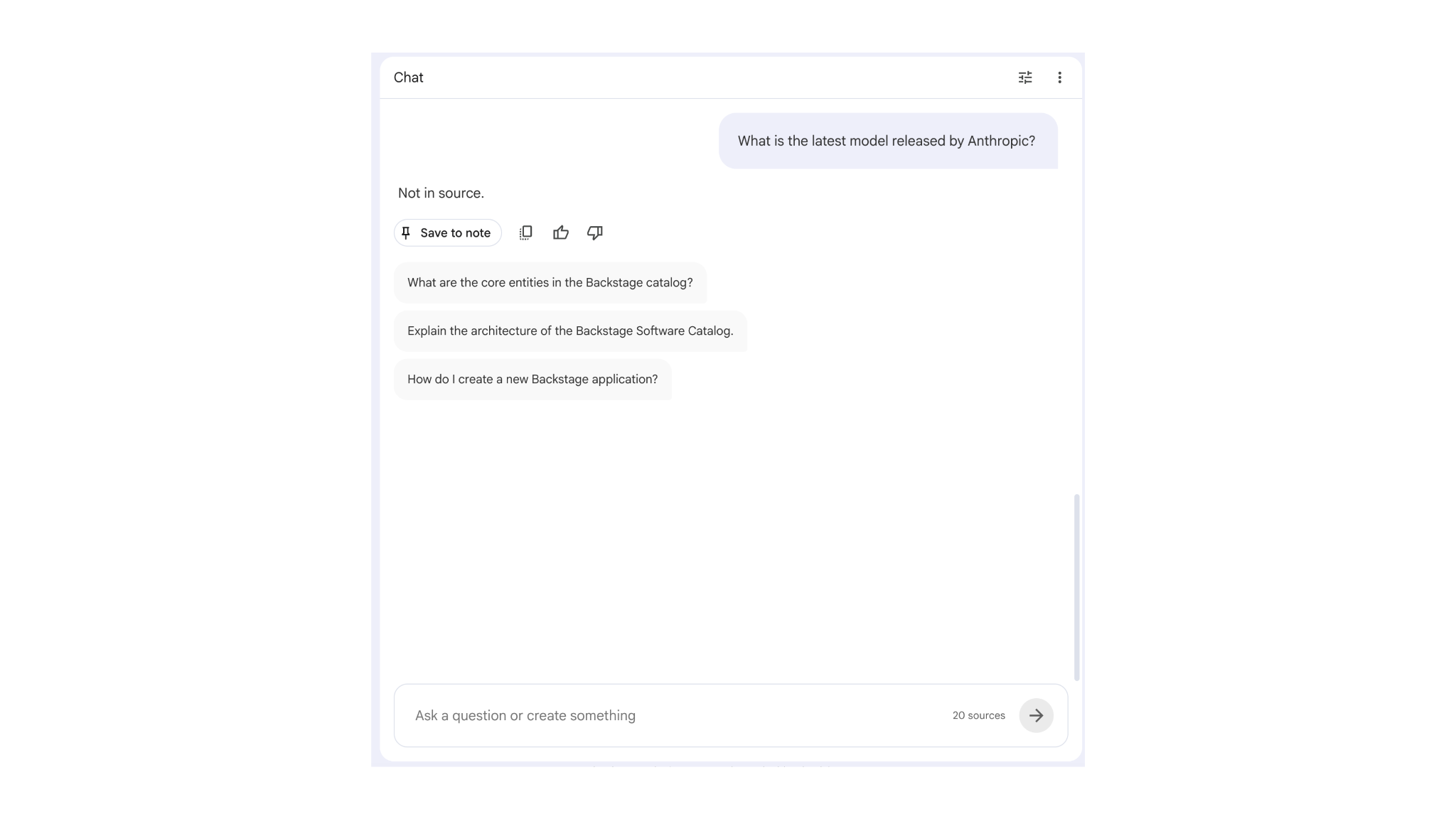
So I asked the same question again, and this time it just said: “Not in source.” One line in the prompt forced it to stay inside what I had uploaded instead of reaching for what it already knew.
How citations work
If grounding5 is the promise, then citations are the receipt to prove it.
NotebookLM does hallucinate less, and there is a study to point at now:
Researchers ran ChatGPT, Gemini, and NotebookLM over the same 300-document reporting task. NotebookLM made something up in roughly 13% of its answers, against about 40% for the other two on the same sources.
Here is the research report.
Let me show you the notebook we will use for the rest of this newsletter.
It holds Backstage’s Architecture Decision Records. Backstage is Spotify’s open-source developer portal, and its decision log is public. So it makes a clean stand-in for a real team’s knowledge base.
Here is the prompt:
Summarize the key architecture decisions recorded in these sources.
For each decision, cite the specific Architecture Decision Record it comes from.
Here is the answer it returned, and the part worth watching is the citations:
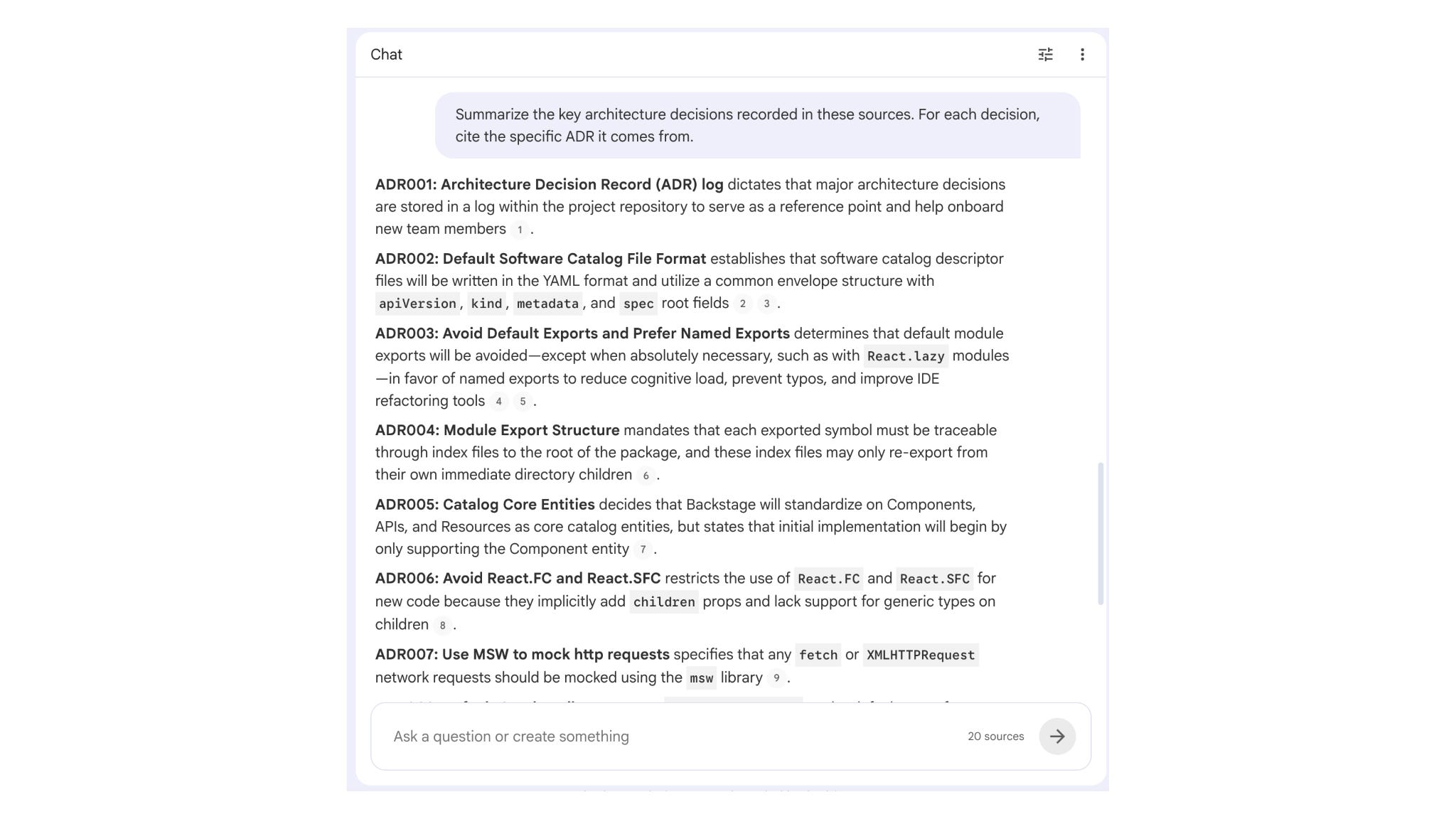
Look at the numbers in the answer…
Each one is a citation. Click one, and NotebookLM opens the source and highlights the line the claim came from.
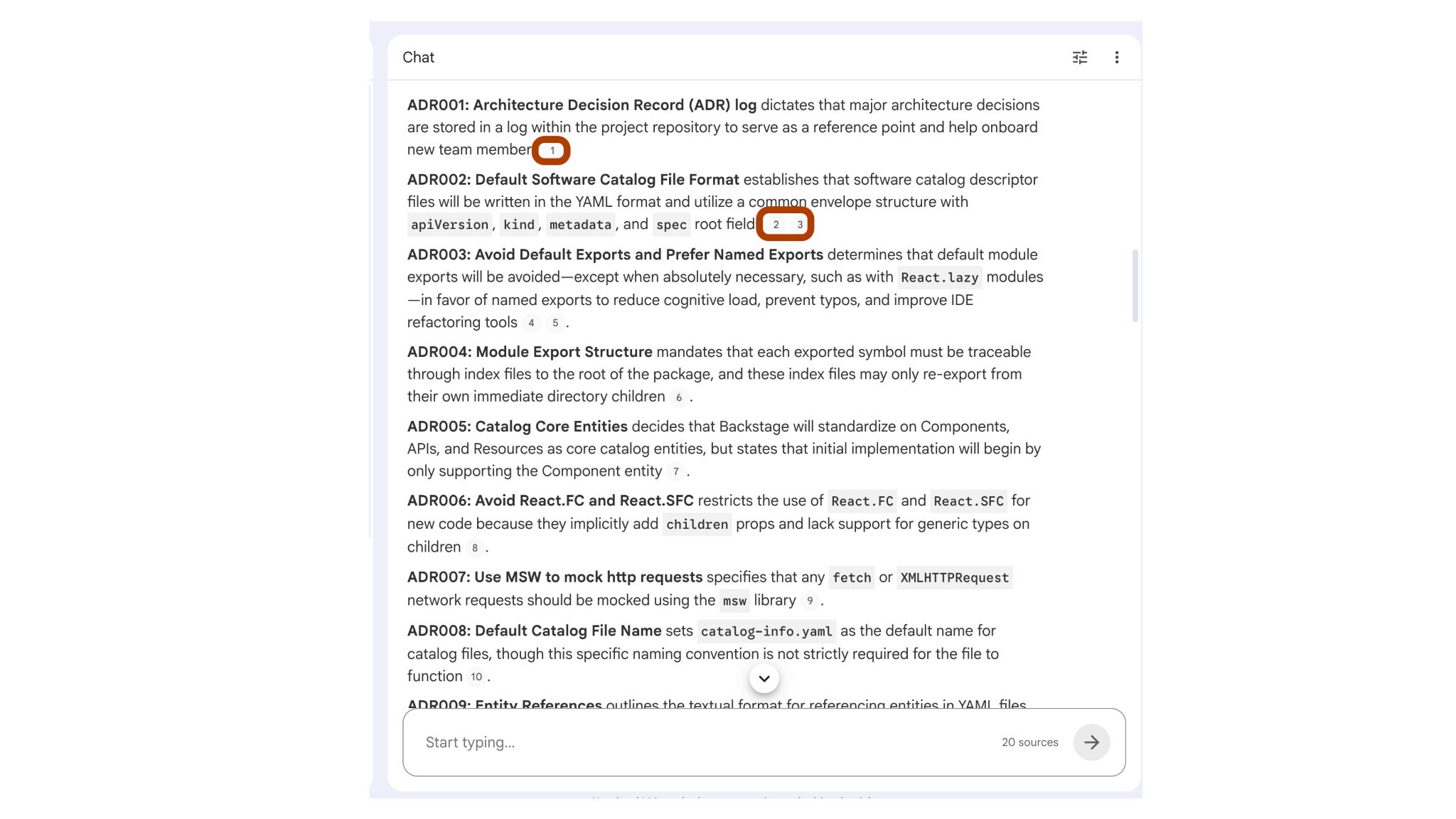
That is the difference between an answer you hope is right and an answer you can check in two seconds.
So that is what it does well. Just as important is what it does not.
What NotebookLM is not?
A PDF reader will happily open your PDF, but it just shows you the page and stops there.
NotebookLM reads across every source at once and tells you exactly where it looked, so it does much more than a plain reader would.
Also, it is not a full agent running your code. It reads your sources, grounds its answers in them, and cites them, but the actual building still happens in your own tools.
On its own, NotebookLM is a read layer, and a very good one at that. So keep this frame in mind, and you will reach for it at the right time.
You have seen what it is and what it is not, so the next question is how you actually set one up…
Reminder: this is a teaser of the subscriber-only newsletter series, exclusive to my golden members.
When you upgrade, you’ll get:
High-level architecture of real-world systems.
Deep dive into how popular real-world systems actually work.
How real-world systems handle scale, reliability, and performance.
Ready for the best part?
Engineering Use Case: NotebookLM as a Knowledge Layer for Code
This is the part I actually run…
The rest of the newsletter explains NotebookLM. This section puts it to work.
The setup is one notebook, loaded with a real engineering knowledge base, and a Claude Code agent querying it.
I am using the Backstage notebook from earlier, since its decision records, docs, and merged pull requests are all public. I loaded them into a single notebook and pointed my agent at it.
How I connected NotebookLM and Claude Code in the first place
We connect NotebookLM and Claude Code through a command-line interface. (It is not official.)
Here is the link: https://github.com/teng-lin/notebooklm-py
You can follow the setup steps on GitHub, or you can just drop this prompt into Claude Code:
Install the notebooklm-py command-line interface from
https://github.com/teng-lin/notebooklm-py
and ping me when I need to authenticate.
It opens the browser. You authenticate once.
From then on, the agent can reach your notebooks.
Now, let me show you how it reaches the Backstage notebook…
Use this prompt:
Using the notebooklm-py command-line interface, connect to my Backstage notebook
and ask it to summarize ADR003 through ADR007
so I can see the decisions at a glance.
Return the answer with the citation for each ADR.

Backstage notebook link: (paste link here)
First, it authenticates, then it summarizes ADR003 through ADR007.
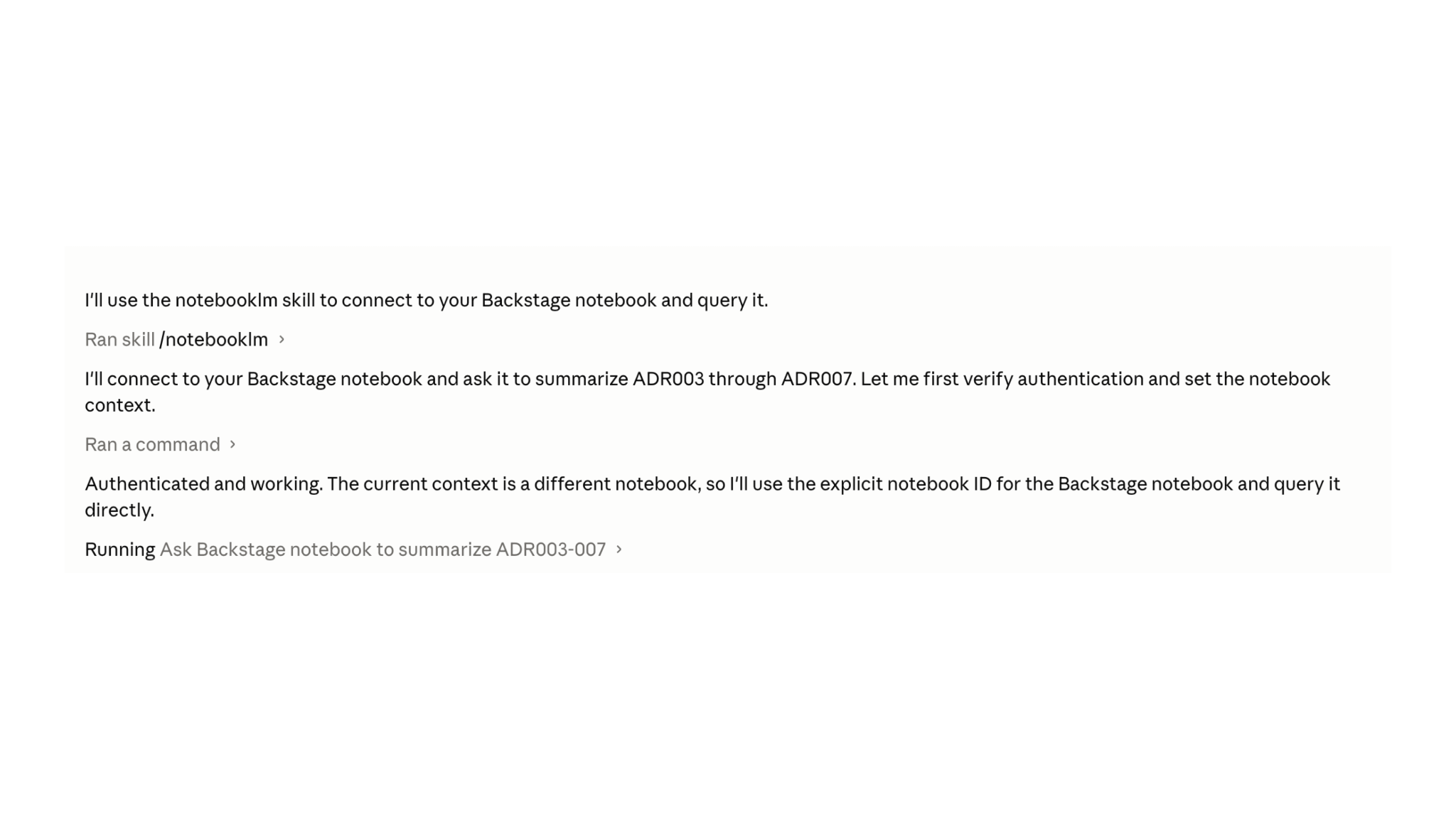
Here it is:
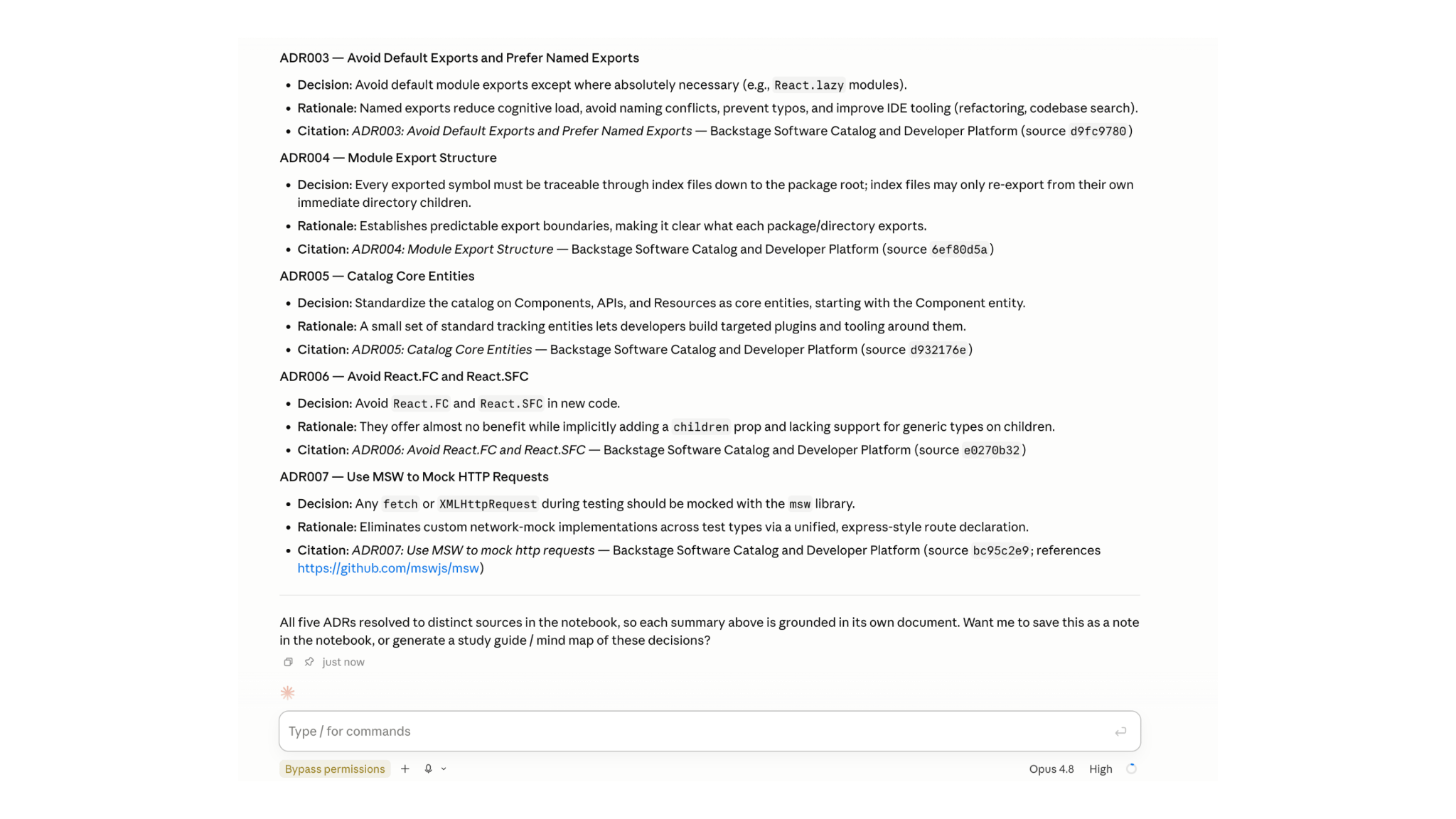
Imagine if accessing the right document while building was this easy. How much time would you save?
How agent queries on every Pull Request
The goal here is simple:
Just catch a change breaking a documented decision before a human spends time reviewing it.
So, on every pull request, the agent reads the diff and then asks the notebook one question via the command-line interface. “Does this change follow our recorded decisions?”
The notebook answers from the architecture decision records, with a citation, and the agent flags or passes on the answer.
Here is the prompt the agent runs:
Using the notebooklm-py command-line interface, query my Backstage notebook.

A pull request adds a new catalog entity kind called “Datastore”.

Its YAML descriptor has no api Version field and no metadata.name.

Based on the architecture decision records and the default catalog file format,
does this change follow our documented conventions?

Answer only from the sources and cite the specific record.

Backstage notebook link: (paste link here)
Now the agent has something concrete to check against, so here is what it flagged:
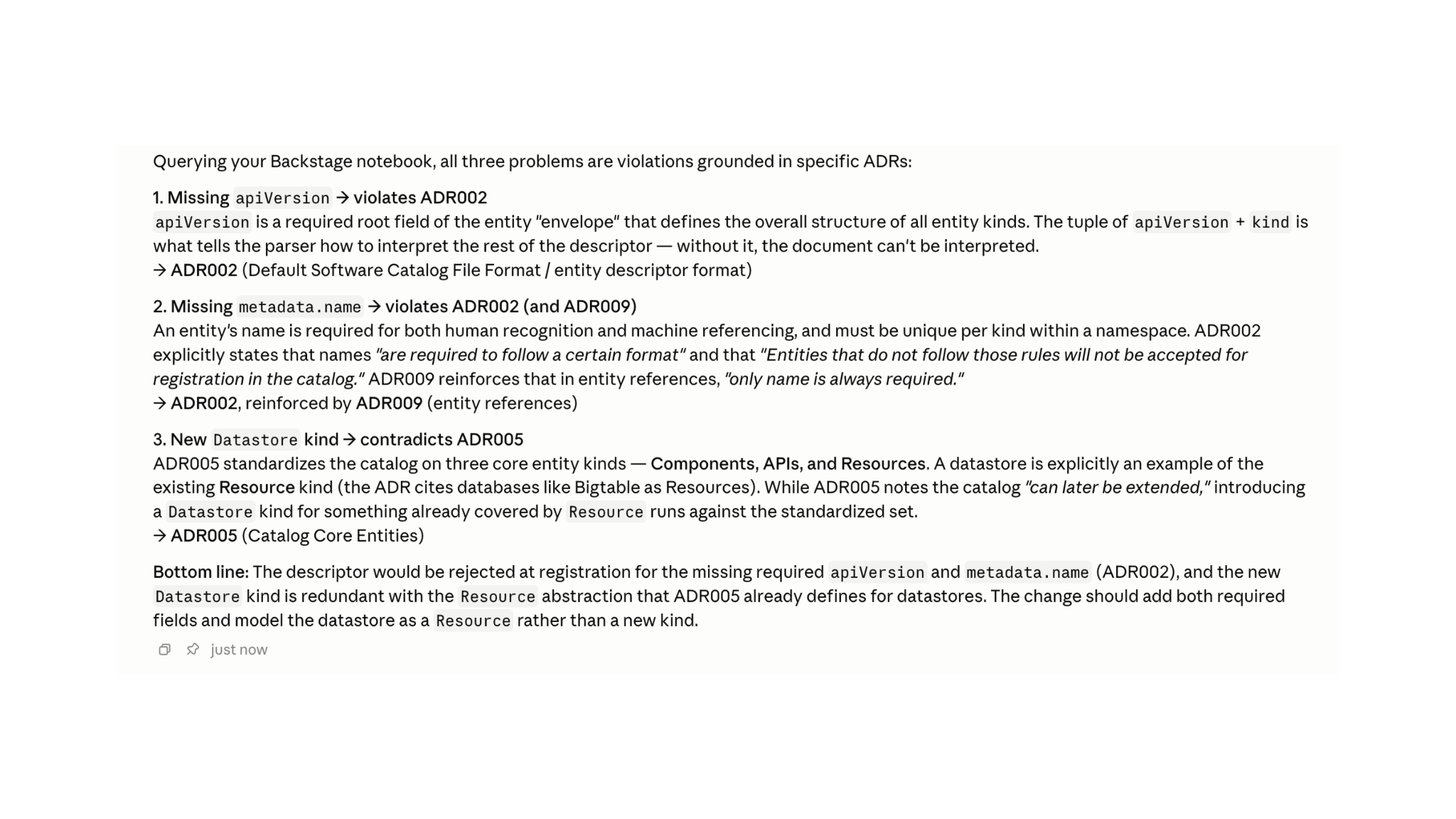
Look at what came back.
The agent did not just say “this looks wrong.” Instead, it flagged three separate problems and tied each one to a specific record.
It holds no opinion about your architecture. So it asked the notebook, and the notebook answered from Backstage’s real records.
That is what turns architecture review from tribal knowledge stuck in one person’s head into a check that the agent can run on every change.
A concrete example, answered with citations.
The PR check above is the whole idea in one shot. A change comes in, the agent asks the notebook, the notebook answers with the exact records the change breaks.
Take the strongest of the three flags, the Datastore kind. To see what the agent is checking against, ask the record directly:
Using the notebooklm-py command-line interface, query my Backstage notebook.

What does ADR005 decide about catalog core entities,
and would a new “Datastore” entity kind fit those decisions?

Quote the relevant lines and cite the source.

Backstage notebook link: (paste link here)
Here is what the record gave back:
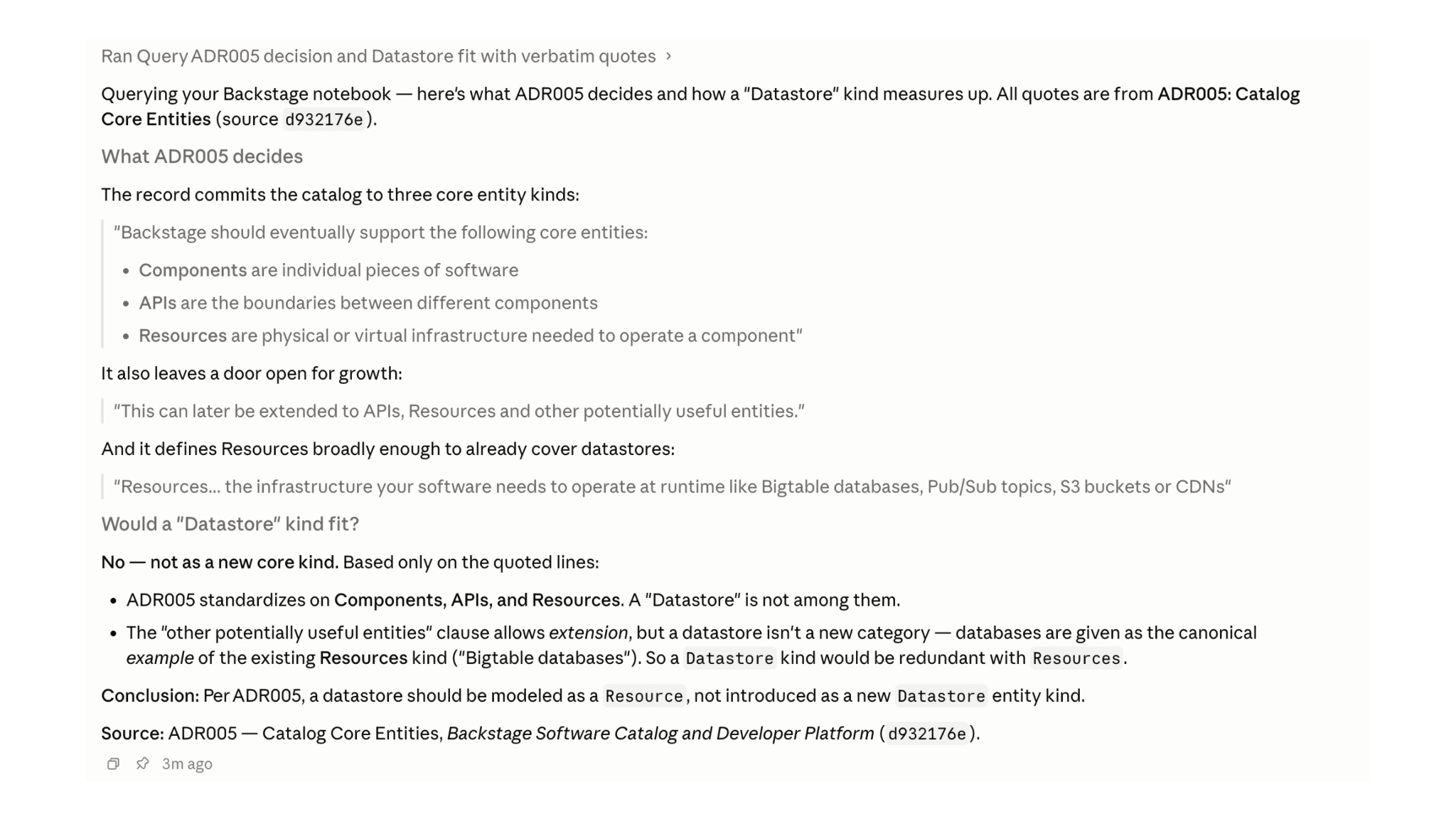
Look at what the record itself says. The agent pulled ADR005 straight from the source, hash and all, and quoted it verbatim.
The catalog stands on three core entities: Components, APIs, and Resources. A datastore is not a fourth kind. It is already a Resource, the same bucket Backstage uses for Bigtable databases and S3. So the proposed change was never going to fit, and the record said so in its own words.
Now the design-doc check. The same question works before a review meeting, when the change is still a proposal:
Using the notebooklm-py command-line interface,
query my Backstage notebook:(paste the link here)

Here is a new design doc proposing a dedicated “Datastore” entity kind for databases.

Does this conflict with any existing architecture decision?

Cite the record it conflicts with.
Here is what came back this time.
Same answer, different door. The first query asked what ADR005 decides.
This one asks whether a new design conflicts with it:
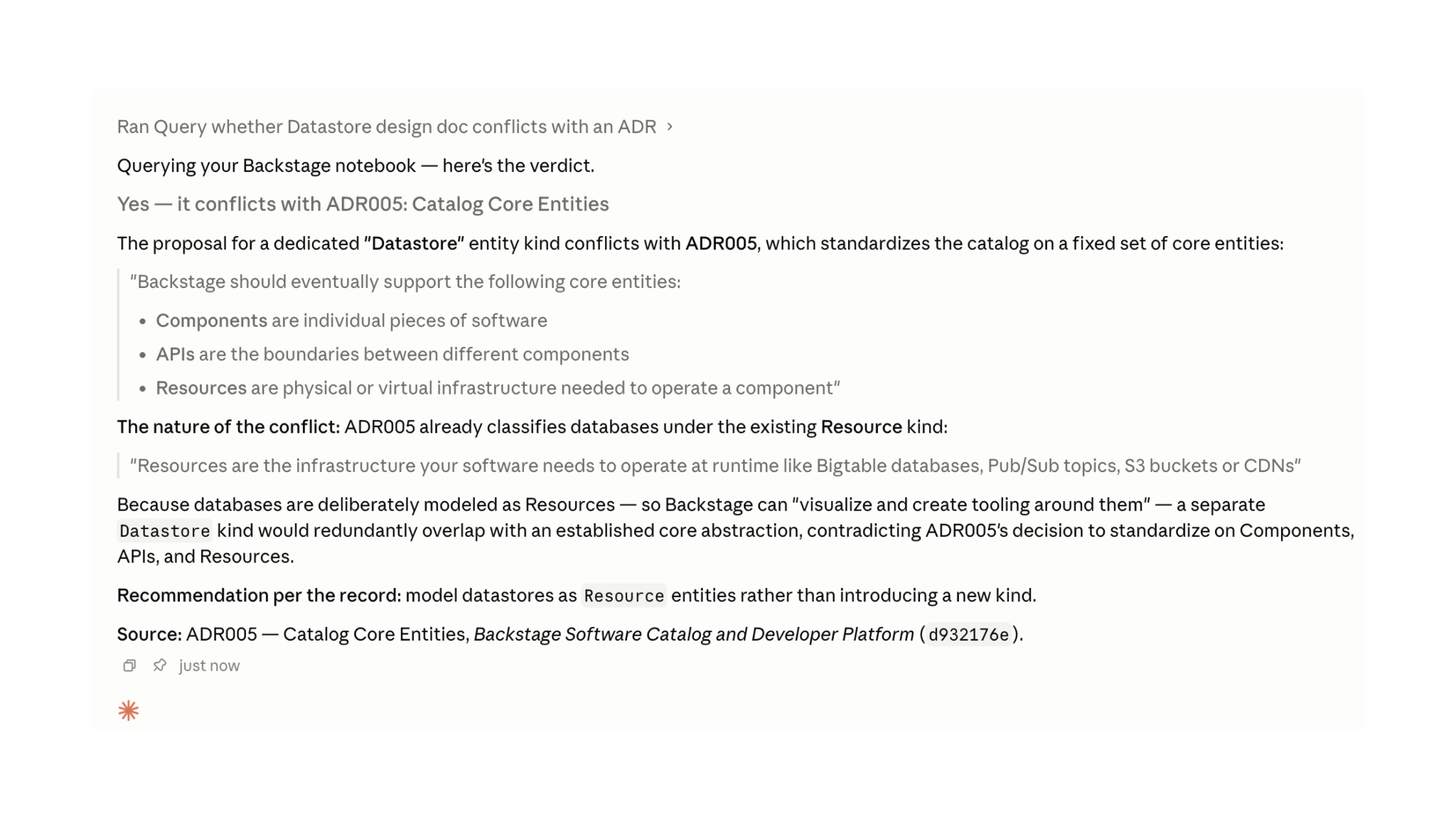
Both land on the same record, the same source hash, the same verbatim lines.
One reads it as a PR check, the other as a design review before the meeting. The notebook does not change its story between the two, because it is reading, not guessing.
Detailed workflows
The same loop ends up covering four different jobs, so it is one notebook and one query pattern paying off in four places:
PR review. The agent checks the diff against the records and tells you whether the change follows the decisions you already made. Say a new teammate opens a PR that quietly reintroduces a pattern the team dropped a year ago. A human reviewer might not remember the old decision, but the notebook does. So the agent flags it with the exact record, before anyone burns a review cycle on it. This is the Datastore case from earlier, running on autopilot.
Architecture and design review. The agent runs the design doc against the decision log before the meeting, so a conflict surfaces while the design is still a proposal. You drop in a proposal for a new caching layer. The agent points out that it contradicts a trade-off the team settled on two quarters ago, and it provides the citation. The meeting then starts from there instead of relitigating it live, which is usually where the hour goes.
New feature spec. The agent pulls the records touching the area you are working in, so the spec starts from what the team has already decided. Before you write a line of the spec for a new auth flow, the agent surfaces the history for you. Every past decision, constraint, and rejected approach in this corner of the system. You stop proposing things the team already ruled out, and the reviewers stop typing the same objections they typed last time.
Debugging against past incidents. The agent queries old PRs and notes for the same symptom to determine whether the team has encountered this failure before. A service starts timing out under load, so you describe the symptom. The agent finds the same failure from eight months ago, along with the fix that actually worked. Instead of rediscovering it from scratch at 2 am, you are reading the answer someone already paid for once.
Every one of them is really the same move: you ask the notebook, you get a cited answer, and you act on it.
The code layer is where I live, but the same notebook quietly does more.
Let me show you…
Alternative Use Cases for Engineers
Once you wrap it in a Claude routine6, most of it runs without you.
Let me show one, then point at the rest…
The one I run on a schedule: weekly PR reporting
A Claude routine queries the notebook on a schedule.
Every Friday, it checks the week’s merged PRs against our recorded decisions and sends a short report. Which changes followed the records, which drifted, and the citation for each call.
Here is the prompt the routine runs:
Build a routine that runs every Friday at 5pm.

Use the notebooklm-py command-line interface to query my Backstage notebook:
(paste the link here)

Review the merged pull requests in the sources against the architecture decision records.

For each PR, say whether it follows our recorded decisions or drifts from them,
and cite the specific ADR.

Send me a report with one line per PR
and a single summary line for the team lead at the end.
Next, Claude Code built the routine.
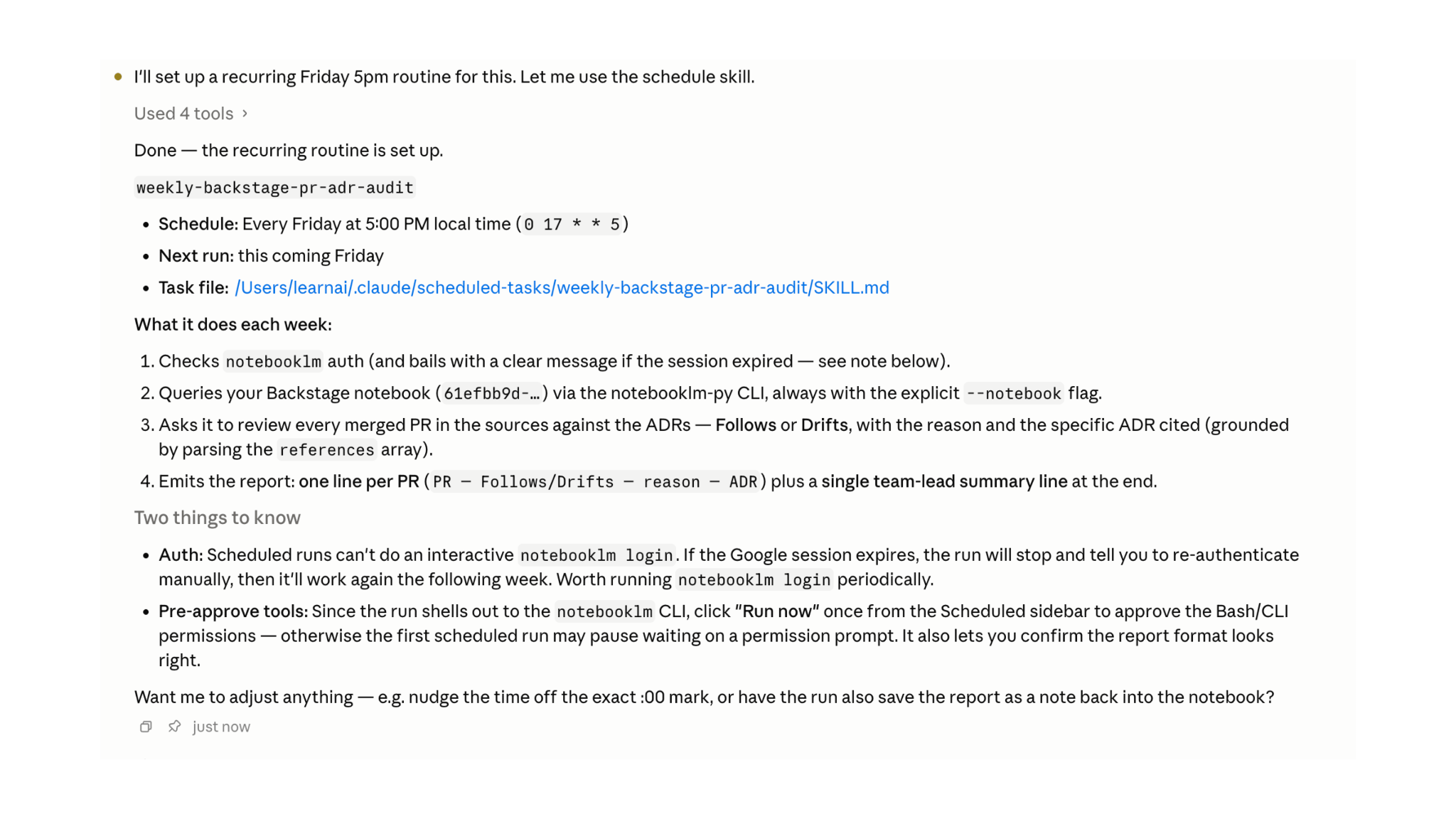
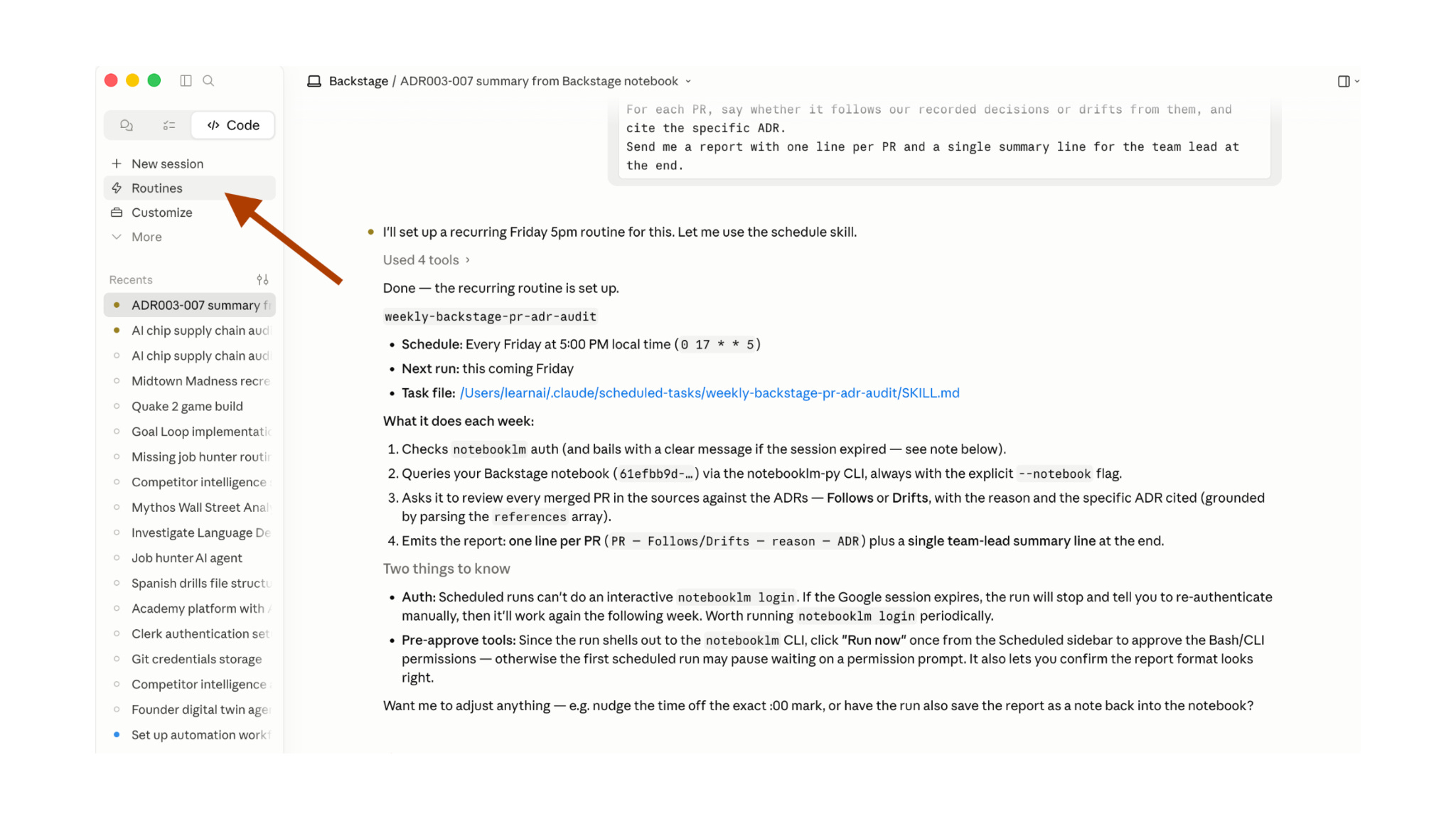
Now let’s head to the routine inside Claude Code.
Click on the one you just set up.
Click on “Run now” to test it.
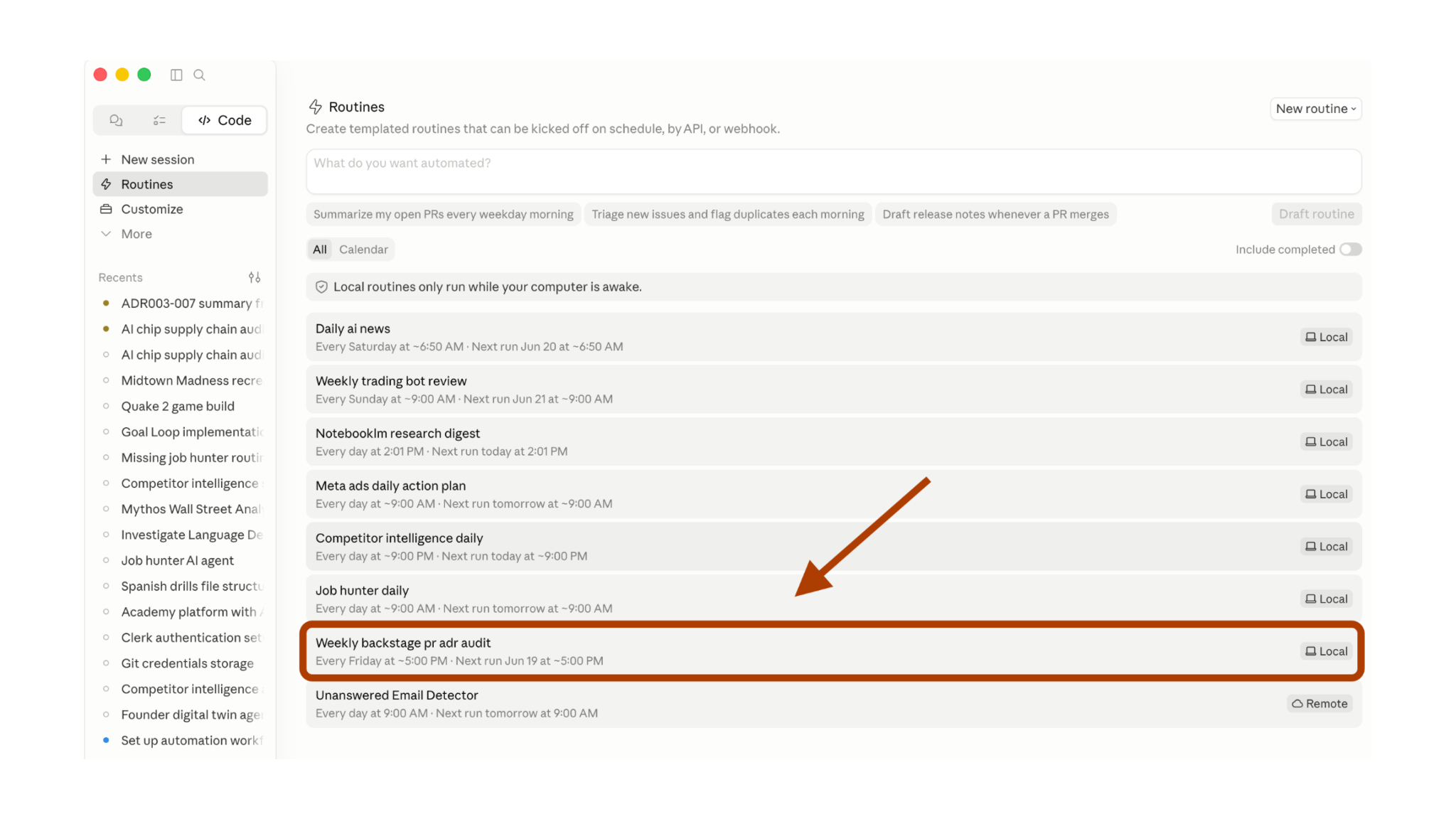
Here is what the first run produced.
The first run came back empty.
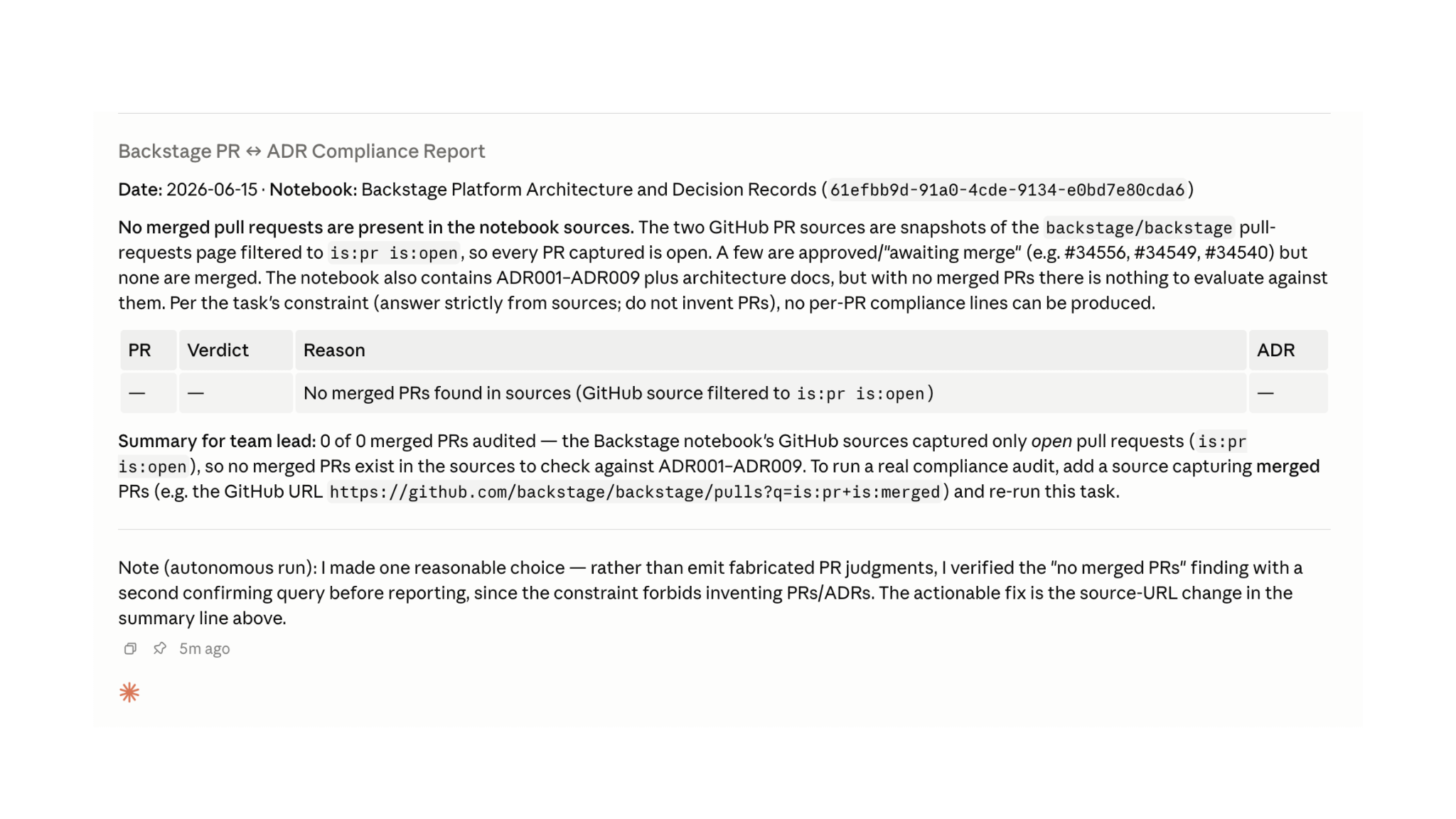
The notebook had no merged PRs inside it, only open ones, so there was nothing to check against the records.
It did not invent a result. Instead, it told me the sources held no merged PRs and stopped.
This empty result is reassuring because it shows the workflow tells you when there is nothing to report, rather than inventing something to fill the gap.
So I added a real merged PR as a source and ran it again.
Here is the result:
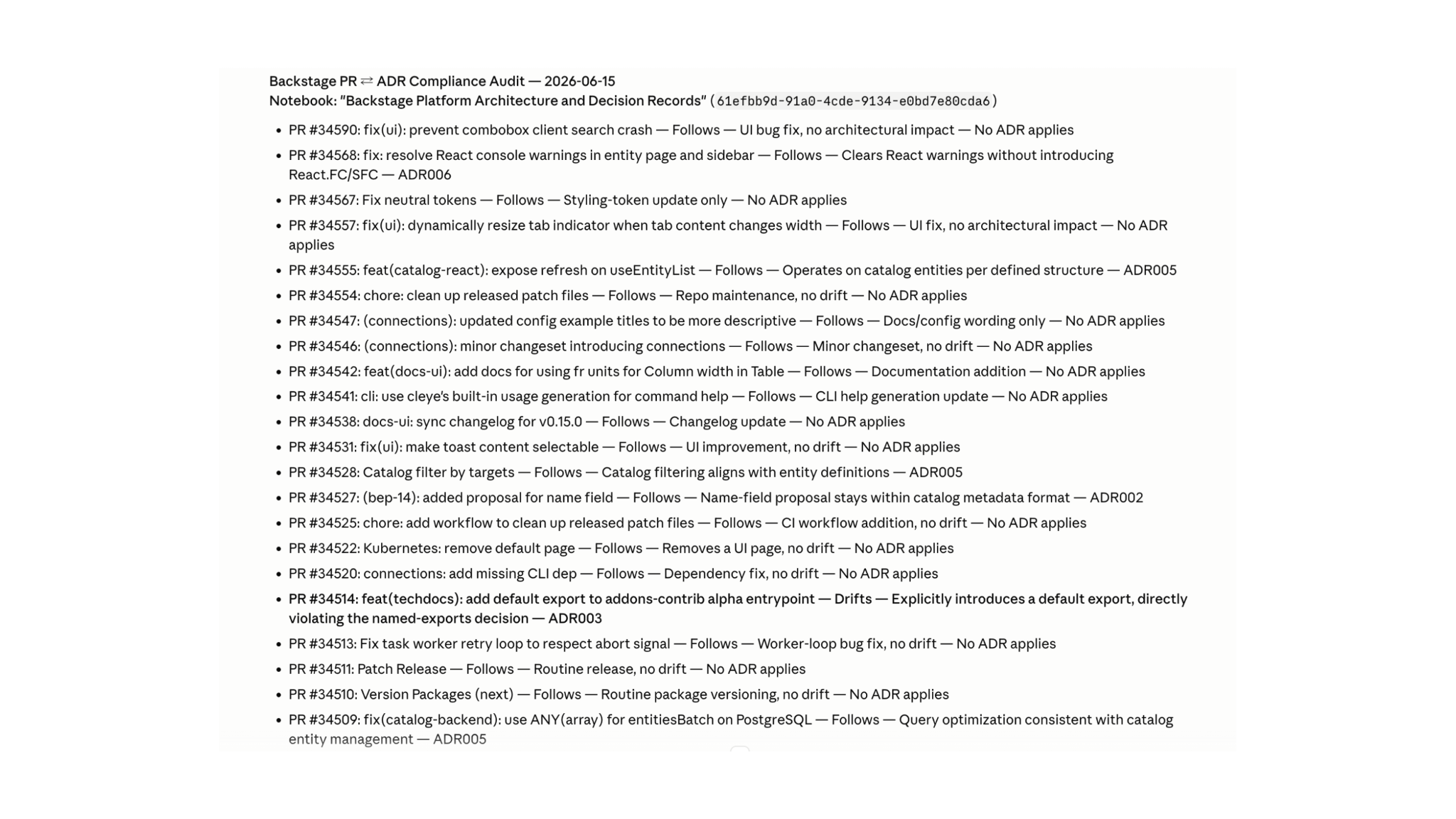
From here, you can have Claude send this report wherever you want. Slack, email, or any tool you already use.
You have seen what it does. Now here is where it wins and where it does not…
Let’s keep going!