


Security at the Architecture Level (Partner)

Most online attacks don’t happen in one step.
A phishing link leads to a fake site, the site pushes a malicious download, and the download delivers the payload.
NordVPN approaches this like a defense-in-depth problem.
As someone who works online every day, I already think about security in layers, so having phishing, scam, and malware protection alongside the VPN is useful to me.
NordVPN’s built-in next-gen antivirus aims to intercept threats earlier in the attack pipeline instead of waiting until a malicious file has already reached your device. NordVPN uses a proprietary machine learning model to block phishing sites before they cause harm, while its malware protection scans downloading files and removes them if they’re dangerous.
What you get:
Anti-phishing protection powered by NordVPN’s proprietary machine-learning model
Protection against scam websites and fake online stores
Malware scanning for downloading files
The VPN remains a core part of NordVPN, alongside these additional security features.
Depending on your plan and operating system, one subscription gives you access to multiple security tools.
Get NordVPN 2Y plan with 4 extra months→
Plus, it comes with a 30-day money-back guarantee.
(Thanks to NordVPN for partnering on this newsletter.)
§
HTTP/2 was supposed to make the web faster.
It introduced multiplexing, header compression & better connection reuse.
But one lost TCP packet could still delay every stream on the connection.
HTTP/3 was built to solve this problem.
In this newsletter, we’ll break down 12 essential concepts behind HTTP/2 & HTTP/3:
Multiplexing,
HPACK header compression,
Flow control,
Stream prioritization,
Server push & early hints,
TCP head-of-line blocking,
QUIC over UDP,
QUIC handshake,
Independent streams & loss recovery,
Connection IDs & connection migration,
QPACK,
Alt-Svc & HTTPS DNS records.
For each, I’ll share:
What it is & how it works in simple words,
A real-world analogy,
Why it matters.
Let’s go!
§
Share this letter & I’ll send you some rewards for the referrals.
§
12. Multiplexing
Multiplexing sends many requests & responses at the same time over ONE connection by interleaving their frames.
The queue disappears…
Request one waits on a slow database while other requests return & render. The server replies in whatever order the data becomes ready.
The result shows up plainly in connection counts:
A desktop page opens fewer connections on HTTP/2 than on HTTP/1.1. The gap roughly doubles on lighter pages, where one connection does the work of two.
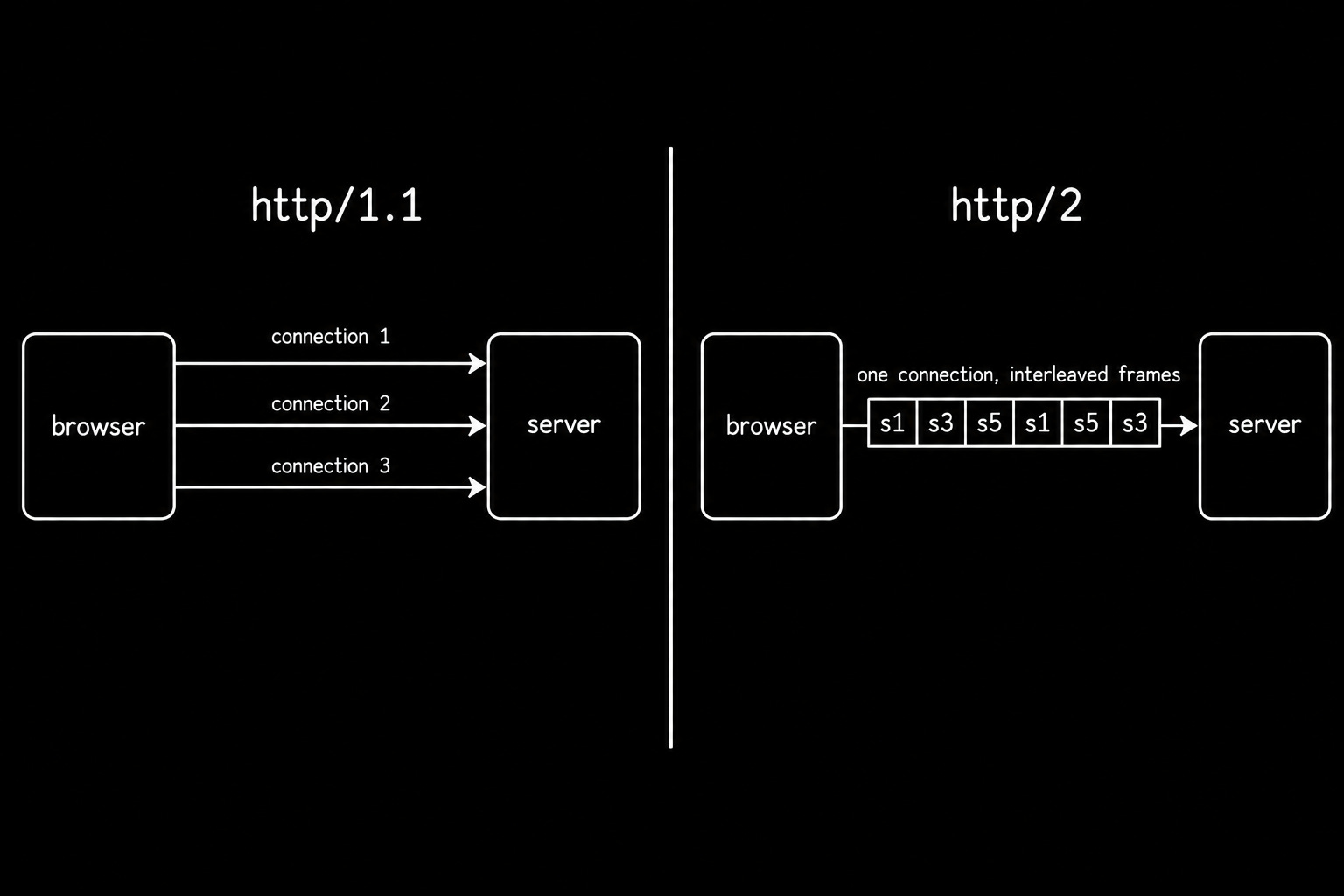
Analogy
One conversation channel where each sentence carries the speaker’s name.
Three people talk at once, and nobody loses the thread.
Why it matters
Multiplexing changes how you bundle because many tiny files beat a large one for cache reuse.
Confirm which protocol your assets use with the devtools protocol column and measure the bundling change in WebPageTest. Yet TCP head-of-line blocking1 marks the limit multiplexing could never remove.
13. HPACK Header Compression
HPACK is the header compression format for HTTP/2.
It’s built from a static table, a dynamic table & Huffman coding2.
Headers repeat almost perfectly. Your user agent string, accept headers, and cookies go out identically on every request, and on an API-heavy page they outweigh the payload.
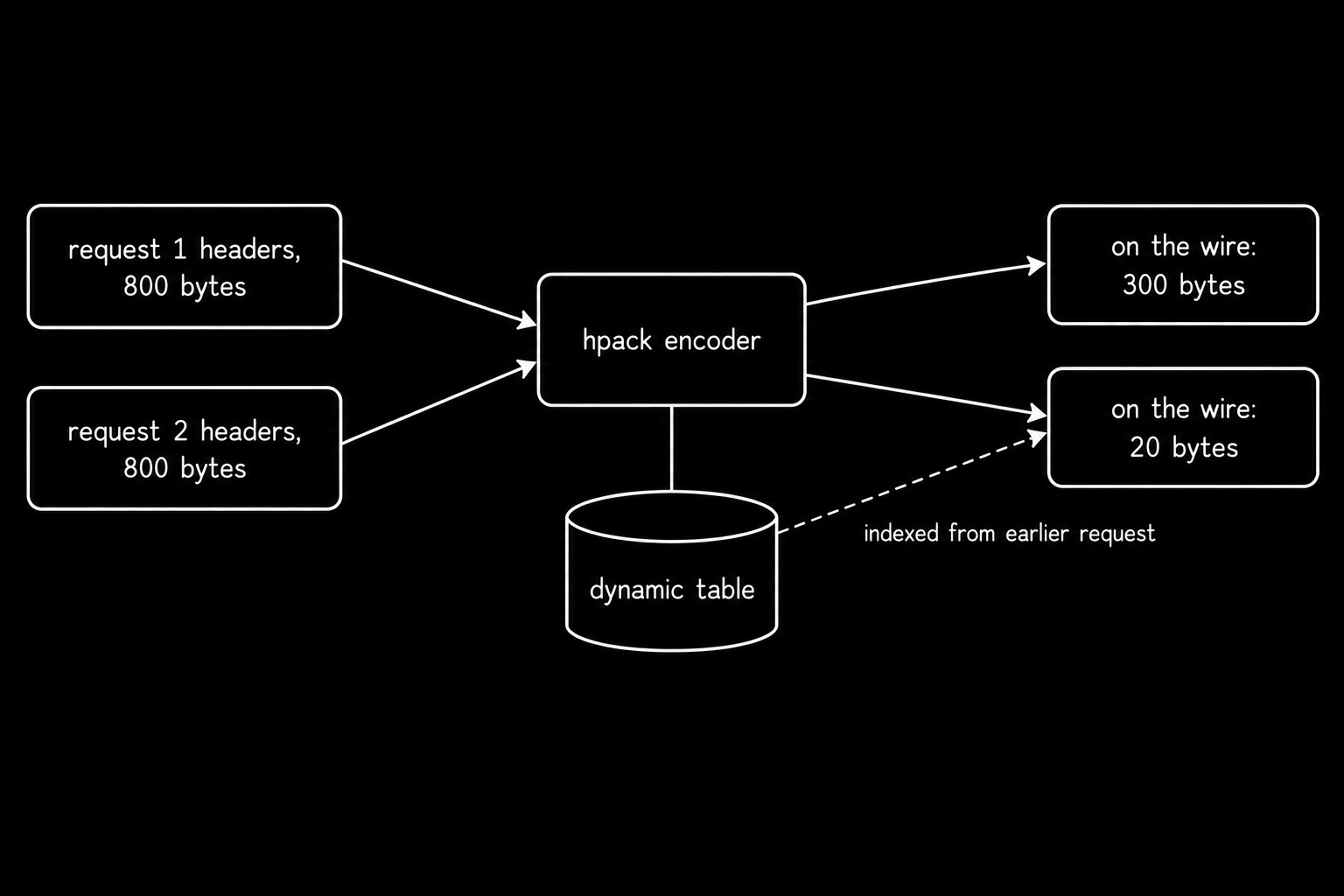
HPACK indexes them:
A fixed table of common header names covers the obvious cases, so a method line becomes a single byte. Headers you have already sent go into a dynamic table shared by both ends.
The second request references those entries by number rather than repeating them, and the saving compounds across every request on the connection.
Analogy
Shorthand between two colleagues who talk daily.
Once you both agree a short name means one specific document, you stop saying the full title.
Why it matters
Header weight decides real latency on pages carrying large authentication tokens.
Inspect encoded header sizes in Wireshark and compare them against the devtools network panel. QPACK rebuilds this idea for out-of-order delivery.
14. Flow Control
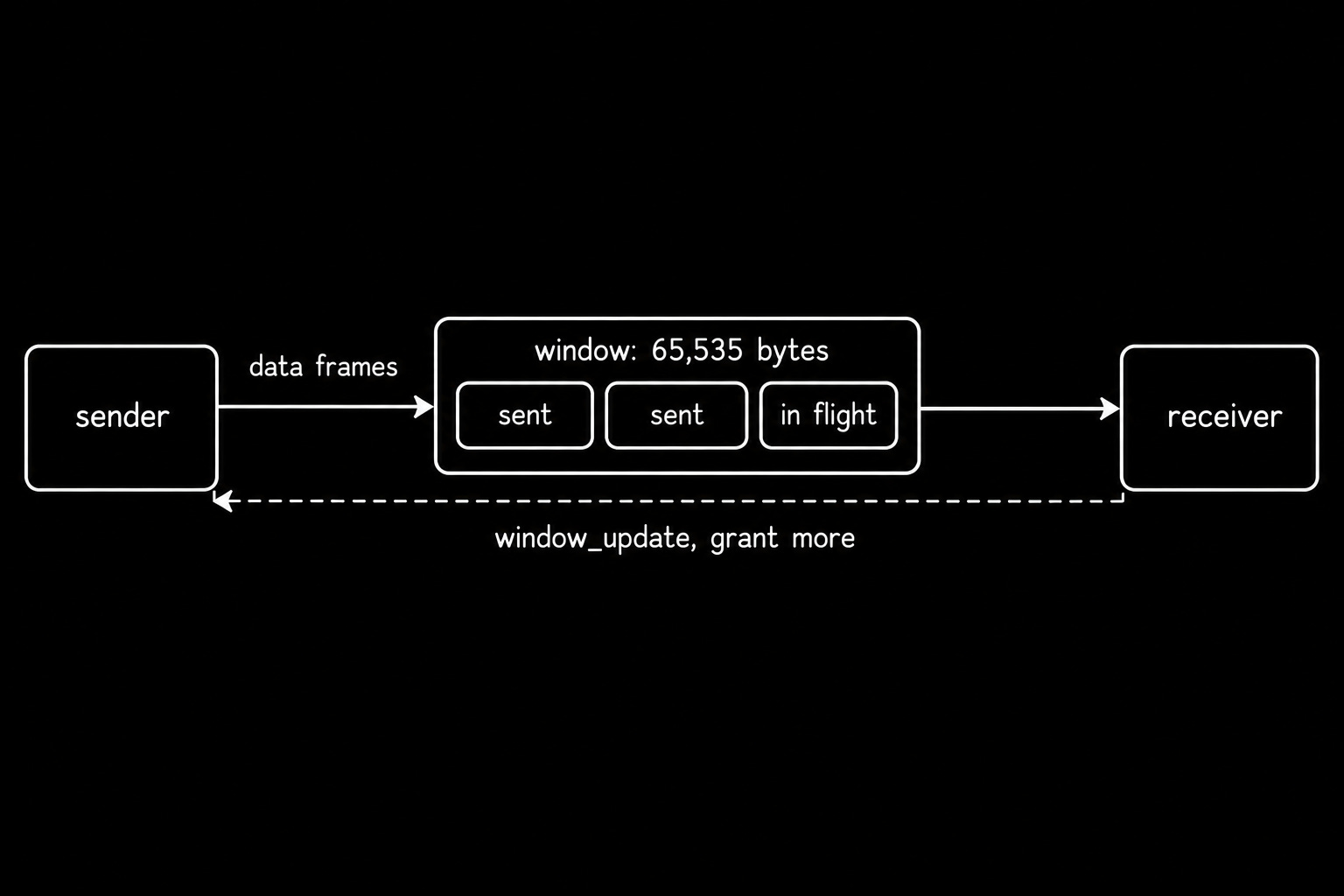
Flow control limits how much data a sender may have outstanding, applied per stream & across the whole connection.
The receiver sets a flow-control window. This limits how much DATA the sender can transmit before receiving additional flow-control credit. A WINDOW_UPDATE frame grants more room as the receiver consumes data, and the default initial window is 65,535 bytes.
This mechanism protects slow consumers3:
A browser decoding a large image should slow the pipe rather than buffer forever, and a proxy feeding a slow client behaves the same way.
Also it stops one greedy stream from monopolizing a connection everything else depends on.
Analogy
A coworker saying, “Send me five files at a time, and I will ask for more.”
They control the pace, so nothing piles up on their desk.
Why it matters
Large uploads, gRPC streams, and video segments all hit this ceiling before they hit bandwidth.
Watch window updates with nghttp and confirm socket-level throughput with ss4. Independent streams show how QUIC applies the same idea per stream.
§
§
15. Stream Prioritization
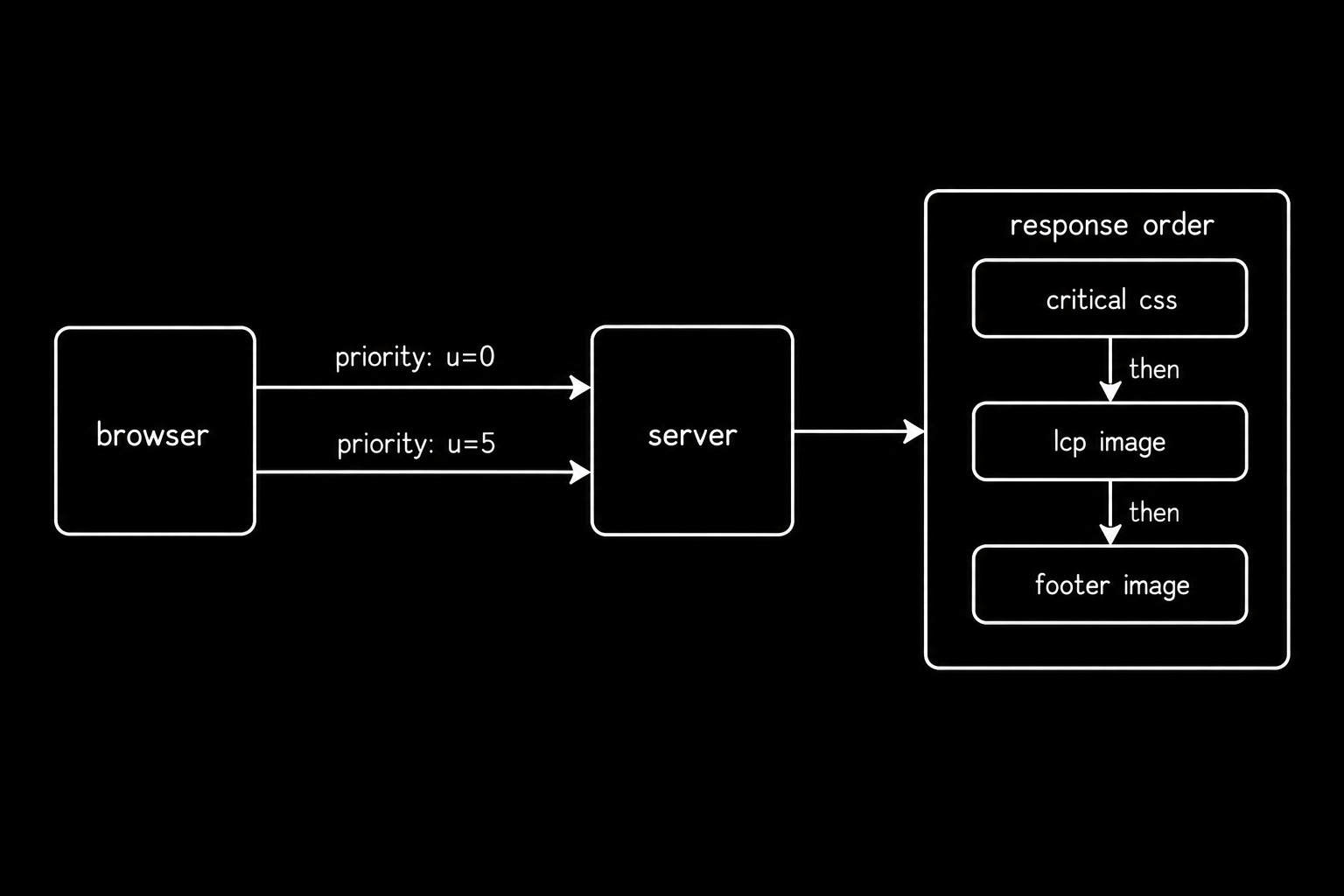
Stream prioritization lets a client tell the server which responses matter most, so the server can send that data first.
A browser needs CSS to render a webpage. Giving CSS higher priority than a large image helps the page become usable quicker, even if the total amount of data stays the same.
HTTP/2 used a complex system of stream dependencies & weights to decide which data to send first. But browsers & servers struggled to implement it consistently!
Then a simpler priority scheme got introduced... It uses 2 signals:
Urgency (0–7): Indicates how important a response is. Zero is the highest priority & seven is the lowest.
Incremental flag: Indicates whether a response can be delivered progressively, thus allowing the server to interleave its data with other responses.
Also browsers provide the Fetch Priority API.
This lets developers influence the priority of resources using attributes such as fetchpriority="high".
The browser uses these hints when scheduling requests and assigning HTTP priorities, although the Fetch Priority API does not directly expose HTTP’s urgency values.
Adoption of the Fetch Priority API grew rapidly after Chrome introduced support.
Analogy
A triage nurse.
Everyone in the waiting room gets seen & order reflects who needs help soonest.
Why it matters
One attribute on your largest visible image moves a headline performance metric.
Set fetchpriority in your markup and verify the assigned value in the Chrome devtools priority column. Early hints reach the same goal from the server side.
16. Server Push and Early Hints
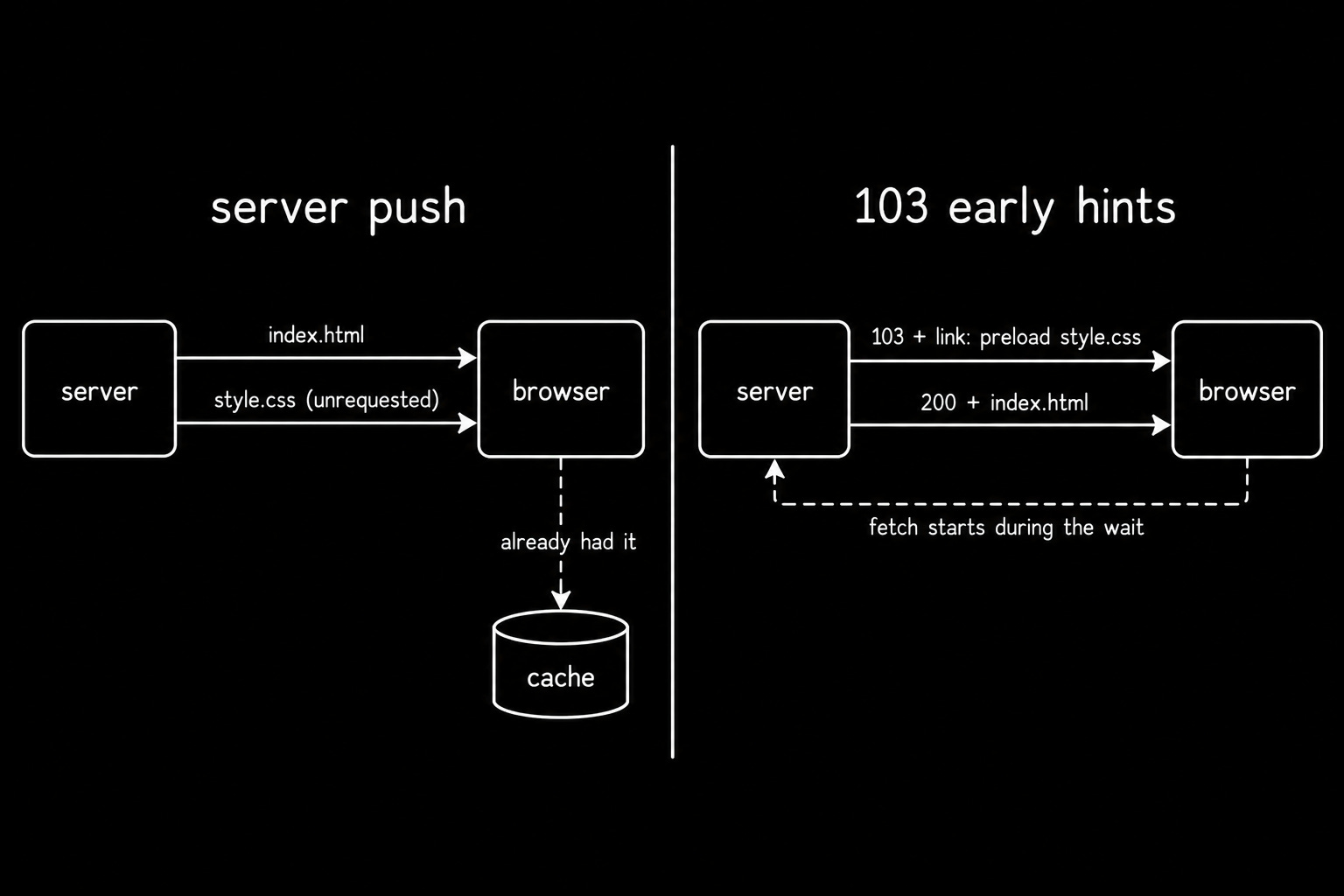
Server Push lets a server send resources to a browser before browser requests them.
It was one of HTTP/2’s most promising features.
But it had its problems:
Servers pushed files already stored in the browser’s cache, thus wasting bandwidth. Also performance improvements were inconsistent, so adoption remained low.
(Chrome eventually disabled Server Push by default, and Firefox removed support.)
Early Hints emerged as a simpler alternative:
Instead of sending the resource itself, the server sends an HTTP 103 Early Hints response containing Link headers while preparing the final response.
The browser then uses these hints to:
Preconnect: Establish connections to other servers before they’re needed.
Preload: Start downloading crucial resources, such as CSS files, before the final HTML arrives.
This helps the browser start useful work earlier & potentially render the page faster.
Yet adoption remains limited… Only 2.9% of desktop pages used Early Hints, with Shopify accounting for roughly 90% of those deployments.
Analogy
Push is a waiter setting down a dish you never ordered & may already have.
Early hints is a waiter handing you the menu while the kitchen warms up.
Why it matters
Dead push configuration survives in production long after browsers stopped honoring it.
Enable early hints at Cloudflare/Fastly and prove the gain with real user monitoring rather than a lab score. Chunked transfer encoding fills the same dead time once the response finally starts.
17. TCP Head-of-Line Blocking
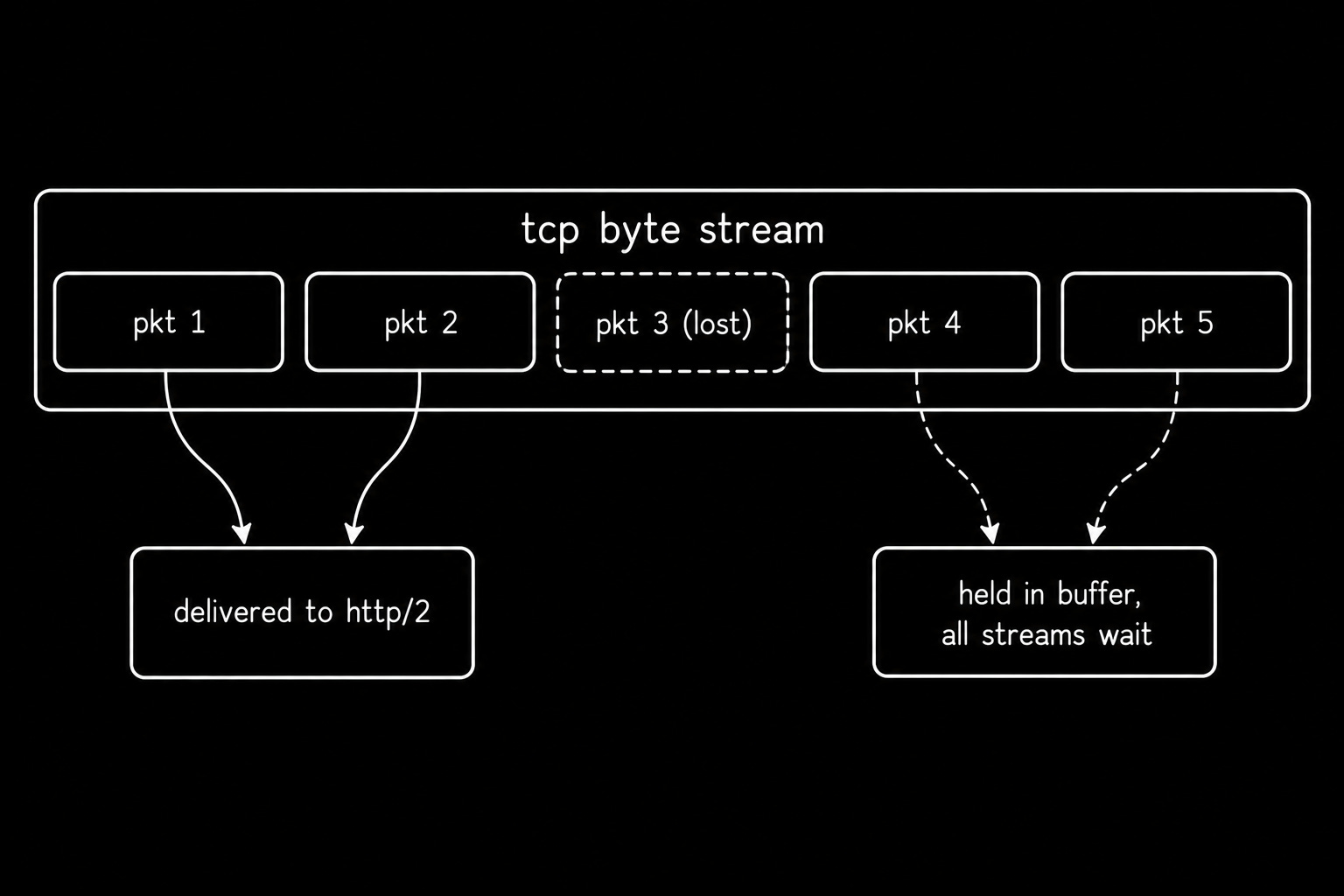
TCP delivers data to applications in a strict order.
If a TCP packet gets lost, later data must wait until the missing packet gets retransmitted. Yet this creates a problem for HTTP/2…
HTTP/2 multiplexes multiple streams over one TCP connection. And TCP sees only a single ordered sequence of bytes, with no knowledge of individual HTTP/2 streams. So one lost TCP packet delays data delivery across multiple streams, even when their data has already arrived.
This is called TCP head-of-line (HOL) blocking.
TCP uses acknowledgments & retransmissions to provide reliable, ordered delivery.
But this ordering can delay otherwise available data… On lossy networks, HTTP/2 using one TCP connection sometimes performs worse than HTTP/1.1 using six parallel connections.
Each TCP connection handles packet loss independently, so a lost packet on one connection does not directly block the others.
Analogy
One conveyor belt at a sorting depot.
Drop a box & everything behind it stops moving, even if those parcels have nothing to do with each other.
Why it matters
This single property is the entire reason HTTP/3 exists.
Confirm retransmits with ss -i and capture the stall itself with tcpdump5. QUIC over UDP replaces the transport rather than working around it.
§
Reminder: this is a teaser of the subscriber-only newsletter, exclusive to my golden members.
When you upgrade, you’ll get:
High-level architecture of real-world systems.
Deep dive into how popular real-world systems work.
How real-world systems handle scale, reliability & performance.
(If this newsletter has helped you become a better software engineer, consider subscribing to support my work.)