



Share this post & I'll send you some rewards for the referrals.
Block diagrams created using Eraser.
Onwards ‘n downwards:
Following is the second of a premium 3-part newsletter series…
If you design backend systems and want to avoid building APIs that break under flaky networks, retries, and real-world usage patterns… read this newsletter and start designing for production apps…
On with part 2 of the newsletter:
Less prototype. More production. 🚀 (Partner)

The biggest hurdle for AI Agents in production is trust.
Hard-coded credentials work for a demo, but production agents need a way to handle critical actions—like making a purchase or sending a document—without over-privileged access.
Auth0 for AI Agents features Asynchronous Authorization backchannel authentication (CIBA), so your agents can work autonomously in the background and only trigger a notification when human approval is required.
Rich Consent: Agents render specific authorization data so users know exactly what they are approving.
Secure User Identity: Link agent actions directly to specific user preferences and history.
Move past the “framework” stage and build agentic workflows that are secure by design.
And stop worrying about DIY-ing auth.
(Thanks to Auth0 for partnering on this post.)
In this newsletter, you’ll learn 20 more concepts:
Conflict Resolution Strategies,
Delta Sync,
Eventual Consistency in Mobile Systems,
Background Sync & Retry Queues,
Optimistic UI Updates,
Authentication (JWT/OAuth),
Secure Token Storage,
Certificate Pinning,
Biometric Authentication,
Code Obfuscation & Tamper Detection,
Secure Deep Linking,
User Data Privacy,
App Lifecycle & State Management,
Background Processing Limits,
Battery Optimisation,
Network Optimisation & Rate Limiting,
Startup Time Optimisation,
Rendering Performance,
Memory Management & Leak Prevention,
App Size Optimisation.
(…and much more in part 3!)
For each concept, I’ll cover:
What it is and how it works
Real-world example
The tradeoffs
Why it matters for mobile
Let’s get into it…
I want to reintroduce Shefali Jangid as a guest author.

She’s a web developer, technical writer, and content creator with a love for frontend architecture and building things that scale.
Check out her work and socials:
You’ll often find her writing about web development, sharing UI tips, and building tools that make developers’ lives easier.
Data Sync
When apps store data on the device, they also need to keep that data in sync with the server.
This section explains how apps synchronize data, handle conflicts when changes occur across multiple places, and maintain app consistency even when the network connection is slow or unreliable.
20. Conflict Resolution Strategies
When mobile apps allow users to edit data offline, a new challenge appears: conflicts.
Why Conflicts Happen
Imagine two users editing the same document:
User A edits the document while offline.
User B edits the same document at the same time.
Later, both devices reconnect and try to sync.
Now, the server has two different versions of the same data. The system must decide how to merge or choose between them.
To solve this problem, apps use various conflict-resolution strategies.
Common Conflict Resolution Strategies
There are several ways apps handle these conflicts:
a. Last-Write-Wins (LWW)
This is the simplest approach.
Each update includes a “timestamp”. When two versions conflict, the system keeps the latest update and discards the older one.
For example:
User A updates at 10:01 p.m.
User B updates at 10:02 p.m.
Since User B’s change happened later, the system keeps that version.
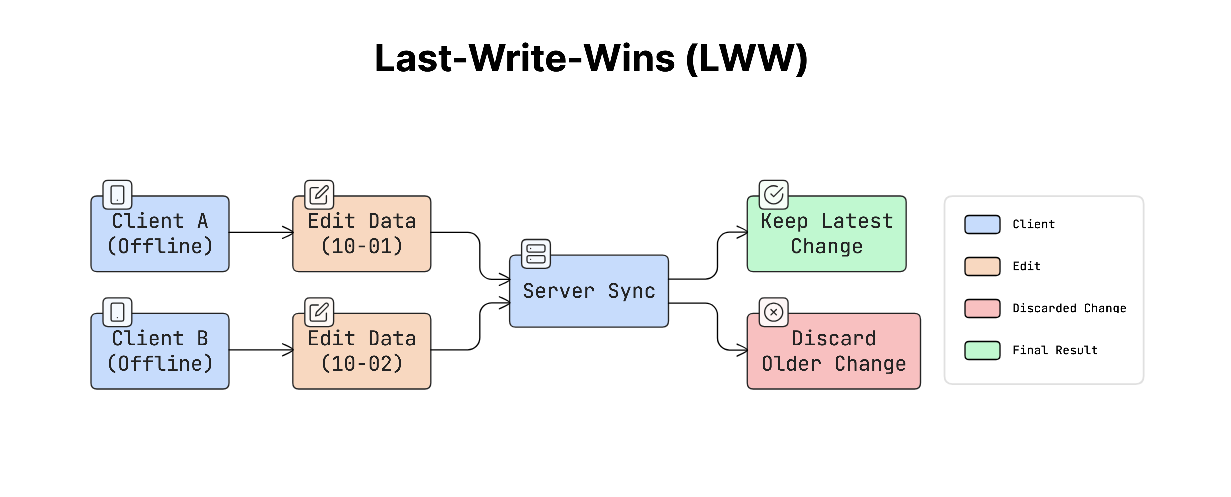
This approach is simple to implement and works well for simple data, but earlier changes may be lost.
b. Versioning
Versioning tracks different versions of the same data.
Each update increases the version number or records which device made the change. When a conflict occurs, the system can compare the versions and either automatically merge them or ask the user to choose.
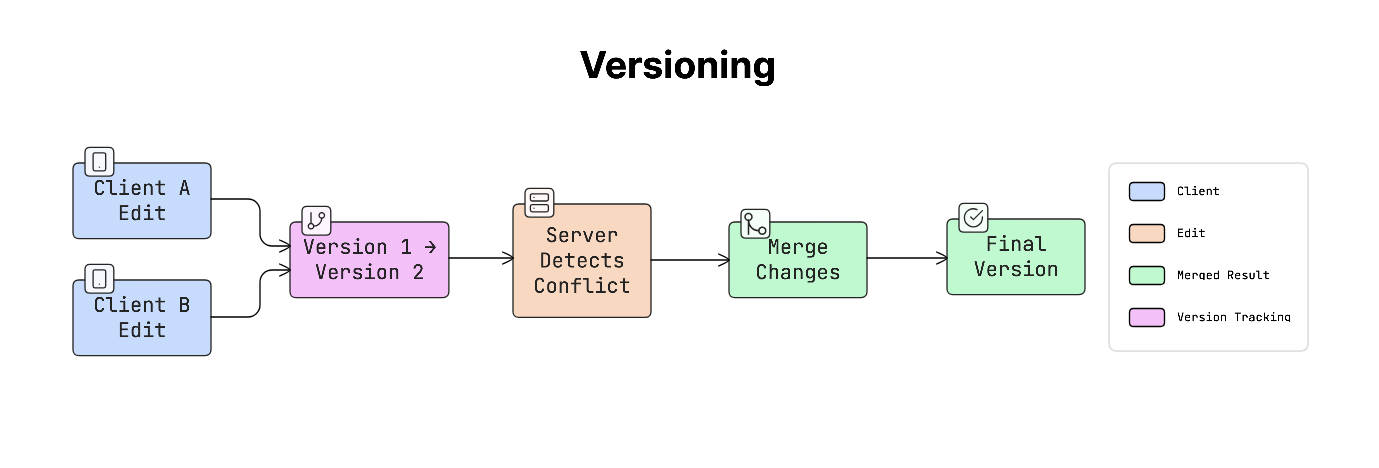
This approach is more flexible, but requires extra logic to manage versions.
c. CRDTs (Conflict-Free Replicated Data Types)
CRDTs are special data structures designed to merge changes automatically without conflicts.
They use mathematical rules that ensure that different versions of the same data can always be merged into a single, consistent result, even when updates occur in different places.
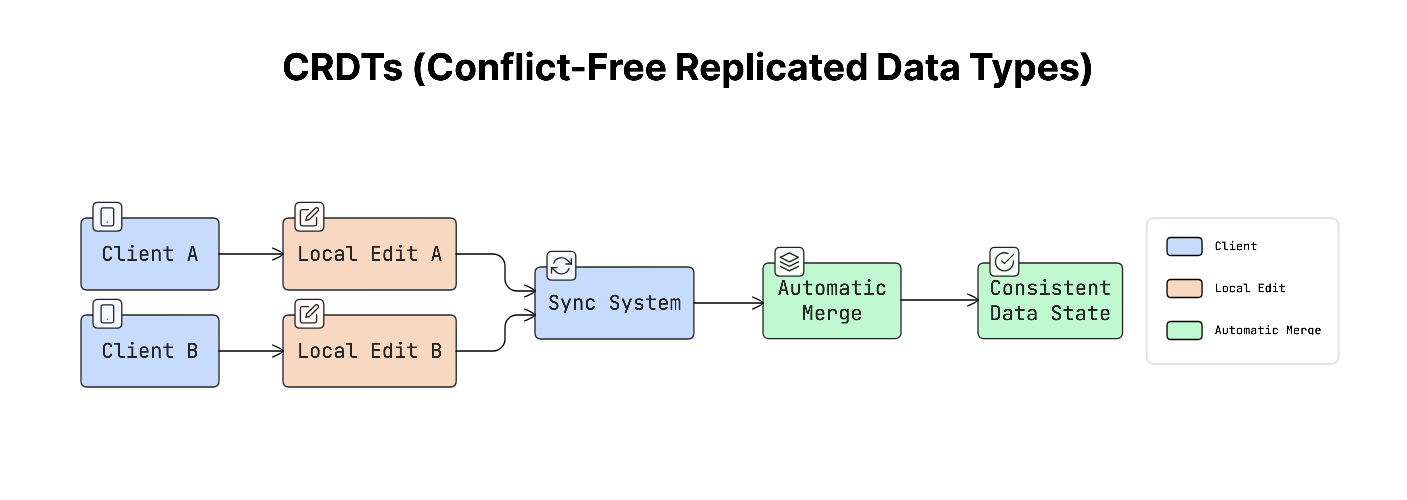
This approach is often used in real-time collaboration tools.
Why It Matters
Without a proper conflict strategy, one user’s changes might silently overwrite another user’s work.
For example, someone may edit a document, sync it later, and suddenly see that their changes have disappeared.
This can break user trust and cause data loss.
Real-World Example
Many well-known applications use these strategies:
Figma and Notion use “CRDT” based systems to support real-time collaborative editing.
Dropbox often uses a “last-write-wins” approach and may generate a “conflicted copy” when it cannot merge two versions.
Trade-offs
Each approach has its advantages and limitations:
Last-Write-Wins: Very simple to implement, but can cause data loss because earlier changes may be overwritten.
CRDTs: Automatically merge changes without conflicts, but are complex to implement and not suitable for every type of data.
Versioning: Keeps track of multiple changes clearly, but may require users to manually resolve conflicts.
Once conflicts can be resolved safely, syncing becomes more efficient when only changes are transferred.
Reminder: this is a teaser of the subscriber-only newsletter, exclusive to my golden members.
When you upgrade, you’ll get:
High-level architecture of real-world systems.
Deep dive into how popular real-world systems work.
How real-world systems handle scale, reliability, and performance.
And much more!
21. Delta Sync
When mobile apps sync data with a server, downloading the entire dataset every time can be slow and waste a lot of data. This is especially true for apps that store large amounts of information.
To make syncing more efficient, many apps use a technique called delta sync.
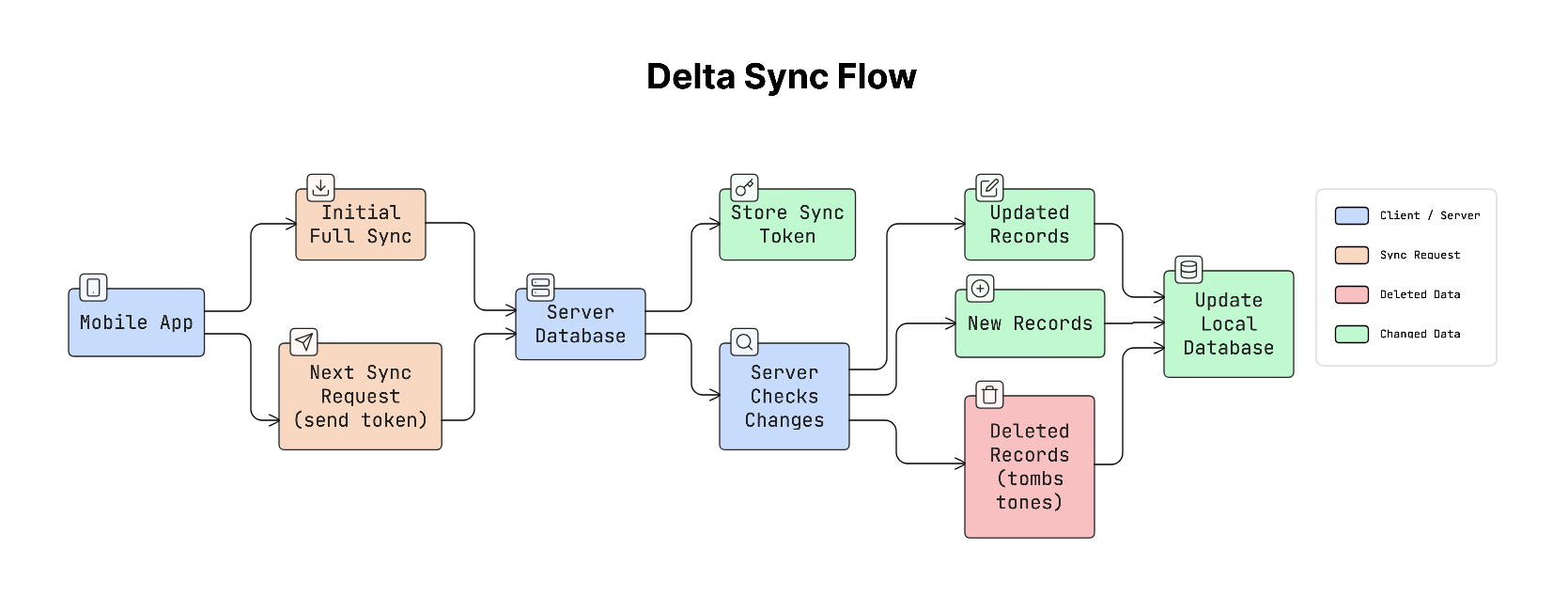
Delta sync means the app downloads only the data that has changed since the last sync, rather than downloading everything again.
How It Works
When the app syncs for the first time, it downloads the full dataset from the server.
After that, the server gives the app a sync token or timestamp that represents the latest state of the data.
On the next sync:
App sends the last sync token to the server.
The server checks what has changed since that token.
Server sends only new, updated, or deleted records.
This makes syncing much faster and more efficient.
Why It Matters
Imagine a contacts app with 5,000 contacts.
If the app downloaded all contacts every time it synced, it would waste a large amount of bandwidth and battery. With delta sync, the app downloads only the contacts that were added or changed, saving both data and processing time.
This makes background syncing practical even on mobile networks.
Real-World Example
Many well-known platforms use delta syncing:
Google Contacts uses a “syncToken” to track changes.
Apple CloudKit uses a “serverChangeToken” for the same purpose.
The app stores this token and sends it during the next sync request, so the server knows exactly what updates to return.
Trade-offs
Delta sync improves efficiency but requires extra work on the server.
The server must keep track of which data has changed. This usually means storing timestamps or maintaining a change log.
Deletions must also be tracked. Instead of completely removing a record, the system may temporarily store a “tombstone” record that indicates the item was deleted, so the client knows to remove it as well.
Practical Tip
The sync system should rely on timestamps or sequence numbers generated by the server, not the client.
Client devices may have incorrect clocks, which can cause sync problems. Using a server-controlled timestamp or sequence number ensures that the order of updates is always correct.
Even with efficient syncing methods like delta sync, distributed systems can still struggle to maintain perfect consistency across devices.
22. Eventual Consistency
Mobile apps often run in environments with slow, unstable, or completely unavailable network connections. Because of this, different devices may not always have the exact same data at the same time.
This situation is called eventual consistency.
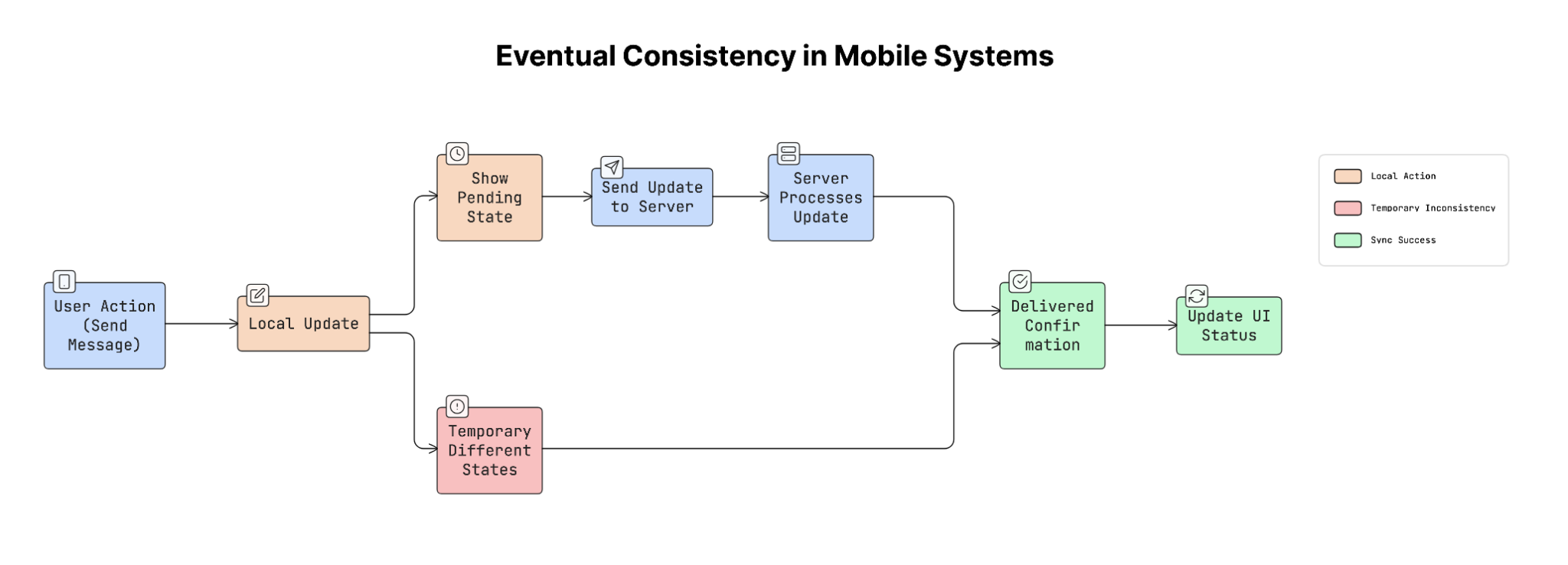
Eventual consistency means that data may temporarily differ across devices, but all devices will eventually reach the same state once they sync with the server.
How It Works
In mobile apps, users may perform actions while offline or on unstable networks.
For example:
A user updates some data on their phone.
The change gets saved locally on the device.
When the network connection becomes available, the app sends the update to the server.
Server then sends the updated data to other devices.
For a short period, different devices may show slightly different versions of the data, but eventually they all become consistent after syncing.
Why It Matters
Trying to keep data perfectly synchronized at all times would require the app to wait for the server to confirm every action before updating the interface.
This would make the app feel slow and unresponsive.
Instead, mobile apps usually update the UI immediately, while server synchronization happens in the background.
This approach makes the app feel fast and responsive while still keeping the data consistent over time.
Real-World Example
Messaging apps are a common example of eventual consistency.
For example, WhatsApp shows different message states:
A single check mark means the message has been sent from the device.
A double check mark means the message has been delivered to the recipient.
The message appears in the chat immediately, even before the server fully confirms it. Later, the status updates when the system finishes syncing.
Trade-offs
Eventual consistency improves user experience, but it also introduces some challenges…
Sometimes the server may reject a change or update the data differently. When this happens, the app must update the UI carefully to avoid confusing the user.
To handle this, many apps display clear states such as pending, confirmed, or failed. This helps users understand what is happening with their actions.
To handle temporary failures during syncing, apps often rely on background processes that automatically retry operations, as discussed in the next section.
23. Background Sync & Retry Queues
Mobile apps often perform actions that need to be sent to a server, such as sending a message, liking a post, or submitting a form. But sometimes the network connection may be weak or unavailable, causing these actions to fail.
Instead of losing these actions, apps use a system called a retry queue.
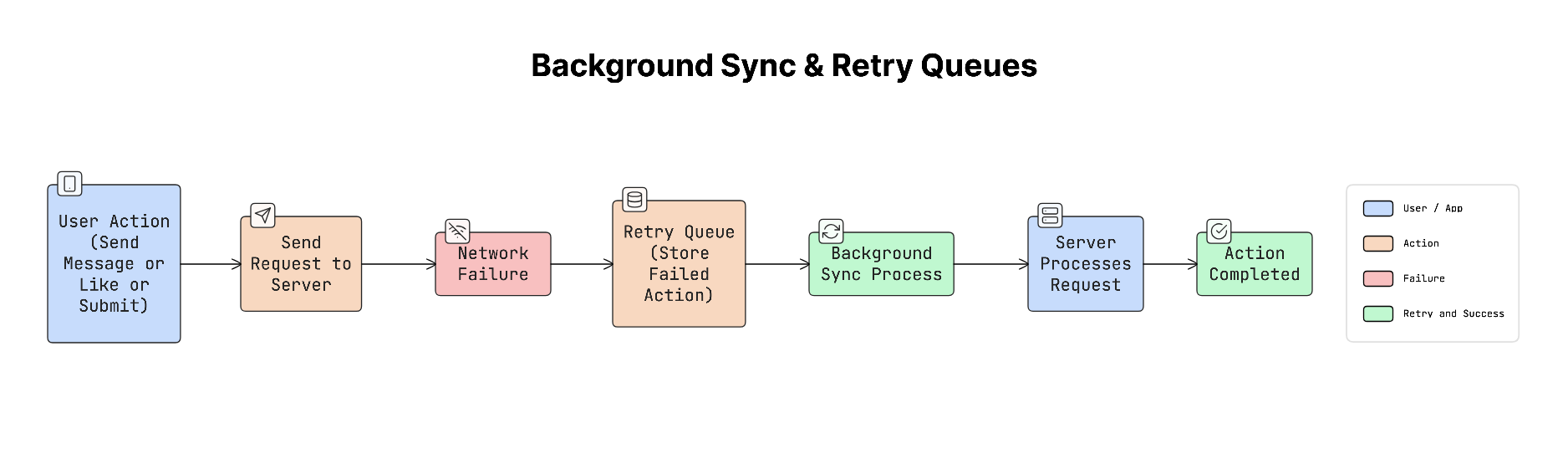
A retry queue stores failed operations locally on the device so they can be retried later when the network connection is available.
Mobile operating systems also provide tools that allow apps to perform tasks in the background efficiently.
For example:
WorkManager on Android
BGTaskScheduler on iOS
These tools allow apps to run background tasks while managing battery usage and system resources.
How It Works
When a user performs an action that requires a network request, the app tries to send it to the server:
User performs an action (for example, sending a message).
If the request succeeds, the server processes it normally.
If the request fails because of network issues, the app stores the action in a retry queue.
When the device reconnects to the network, a background sync process retries the queued operations.
Once the server confirms the request, the action is removed from the queue.
This ensures that user actions are not lost even when the network is unreliable.
Why It Matters
Users expect their actions to work, even if the network connection is unstable.
For example, if a user taps “send message” or “like”, the app should not simply ignore the action because the network was unavailable.
By storing the action and retrying it later, the app respects the user’s intent and completes the action when conditions improve.
Real-World Example
Many apps use retry queues and background syncing:
Email apps like Gmail and Outlook allow users to send emails while offline. The email is queued and automatically sent when the network returns.
E-commerce apps may queue actions such as adding items to a cart or saving user activity and sync them later.
Trade-offs
Background processing on mobile devices has limitations.
Operating systems control how long apps can run in the background to protect battery life. These background windows are usually short and unpredictable. Because of this, apps should not rely only on background syncing. Synchronization should also happen when the user opens the app again.
These mechanisms also allow the app’s interface to respond instantly, while the actual synchronization happens quietly in the background.
24. Optimistic UI Updates
In many apps, users expect actions to happen instantly. For example, when you tap “like”, send a message, or add a comment, you expect to see the result immediately.
If the app waited for the server to respond before updating the screen, it could take a few hundred milliseconds. Even that slight delay can make the app feel slow.
To solve this, apps use a technique called optimistic UI updates.
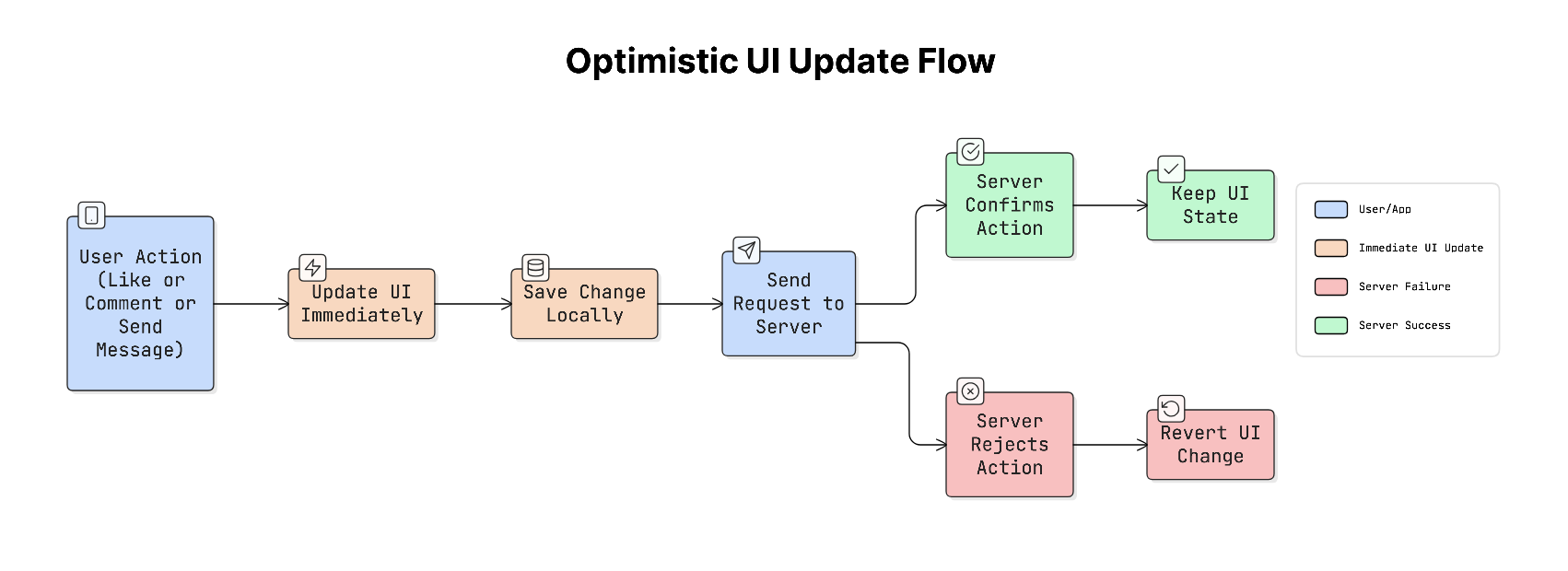
Optimistic UI means the app assumes the request will succeed and updates the interface immediately, even before the server confirms it.
The server request still happens in the background. If everything succeeds, nothing changes. If it fails, the app corrects the UI and shows an error.
How It Works
The process usually follows these steps:
User performs an action (e.g., tapping a like).
App updates the UI immediately and stores the change locally.
App sends the request to the server.
If the server confirms the request, the change remains unchanged.
If the server rejects the request, the app reverts the change and shows a small error message.
This makes the app feel fast while still keeping the data accurate.
Why It Matters
Users expect apps to respond instantly to their actions.
If the app shows a loading spinner every time the user taps a button, the experience feels slow and frustrating.
Optimistic UI removes this delay, making the app feel smooth and responsive, similar to native device interactions.
Real-World Example
Many popular apps rely heavily on optimistic UI:
Twitter shows the like animation immediately when you tap the heart.
Instagram displays your comment instantly in the thread.
Slack shows a message in the chat immediately after you send it.
In the background, the app syncs with the server and updates the data if needed.
Trade-offs
An optimistic UI improves the user experience, but it also adds complexity.
If the server rejects the request, the app must roll back the UI change smoothly without confusing the user. Because of this, optimistic UI is usually avoided for actions that cannot be easily reversed, such as permanent deletion, payments, and financial transactions.
As app stores and sync sensitive user data, security becomes a critical part of system design…
Let’s keep going!