


Share this post & I'll send you some rewards for the referrals.
A single agent1 has one context window2, one set of tools3, and one running loop4.
When a task outgrows any of those three, you need more than one agent. That’s what a multi-agent system is. Instead of one agent doing everything, you split the work across many agents. Each one has its own role, tools, and context.
Most multi-agent systems fail not because the model is weak but because you chose many agents before you actually need them, or chose the wrong architecture once you have many agents.
So you shouldn’t split anything yet.
Onward.
[Webinar] Stop babysitting your coding agents (Partner)

Agents can generate code. Getting it right for your system, team conventions, and past decisions is the hard part – you end up wasting time and tokens in correction loops.
More MCPs give agents access to information, but not understanding. The teams pulling ahead use a context engine to give agents exactly what they need.
Join Unblocked live on May 6 (FREE) to see:
Where teams get stuck on the AI maturity curve
How a context engine solves for quality, efficiency, and cost
Live demo: the same coding task with and without a context engine
(Thanks to Unblocked for partnering on this post.)
Here’s what’s inside:
Why single agents break. Context overflow, slow serial work, and why one agent can’t always hold every tool, model, or permission.
The six architectures. Orchestrator-worker, pipeline, hierarchical, swarm, mesh, and handoffs. Plus, where each one works and breaks.
How agents coordinate. Run loops, MCP vs A2A, shared state, isolated state, memory, and stopping conditions.
The real cost. Why more agents mean more tokens, more latency, more coordination overhead, and more ways to fail.
Failure and security risks. Bad instructions, misalignment, weak verification, prompt injection, context contamination, and privilege creep.
Case study. How Spotify used an orchestrator-worker system to turn ad planning from a 15-minute workflow into 5 seconds.
Limits of single-agent systems
One agent with good prompts and the right tools handles more than most people expect.
For example, Cognition’s Devin processed 5 million lines of COBOL (Common Business-Oriented Language) across 500GB of repositories with a single agent, raising its pull request merge rate from 34% to 67%.
But a single agent has three HARD limits. When your task runs into any of them, better prompts won’t help:
1. Context overflow
A context window can only hold so much.
Past that limit, the earliest information drops out, and the agent starts losing track of its own plan. When compression5 alone can’t fix the overflow, a second agent with its own context can.
2. Parallelism
Independent tasks shouldn’t wait in line.
If you have four research queries that don’t depend on each other, running them one at a time wastes time. Running them across four separate agents takes roughly as long as the slowest one.
Anthropic’s research system uses this exact pattern and reduced total query time by up to 90%.
3. Specialization
Different parts of a task often need different models6, tools, or access levels:
A code-writing agent needs a sandbox
A research agent needs web search
A customer-facing agent needs user data, but shouldn’t have access to production databases
When one agent can’t hold all the tools and permissions the task needs, you give each role its own agent.
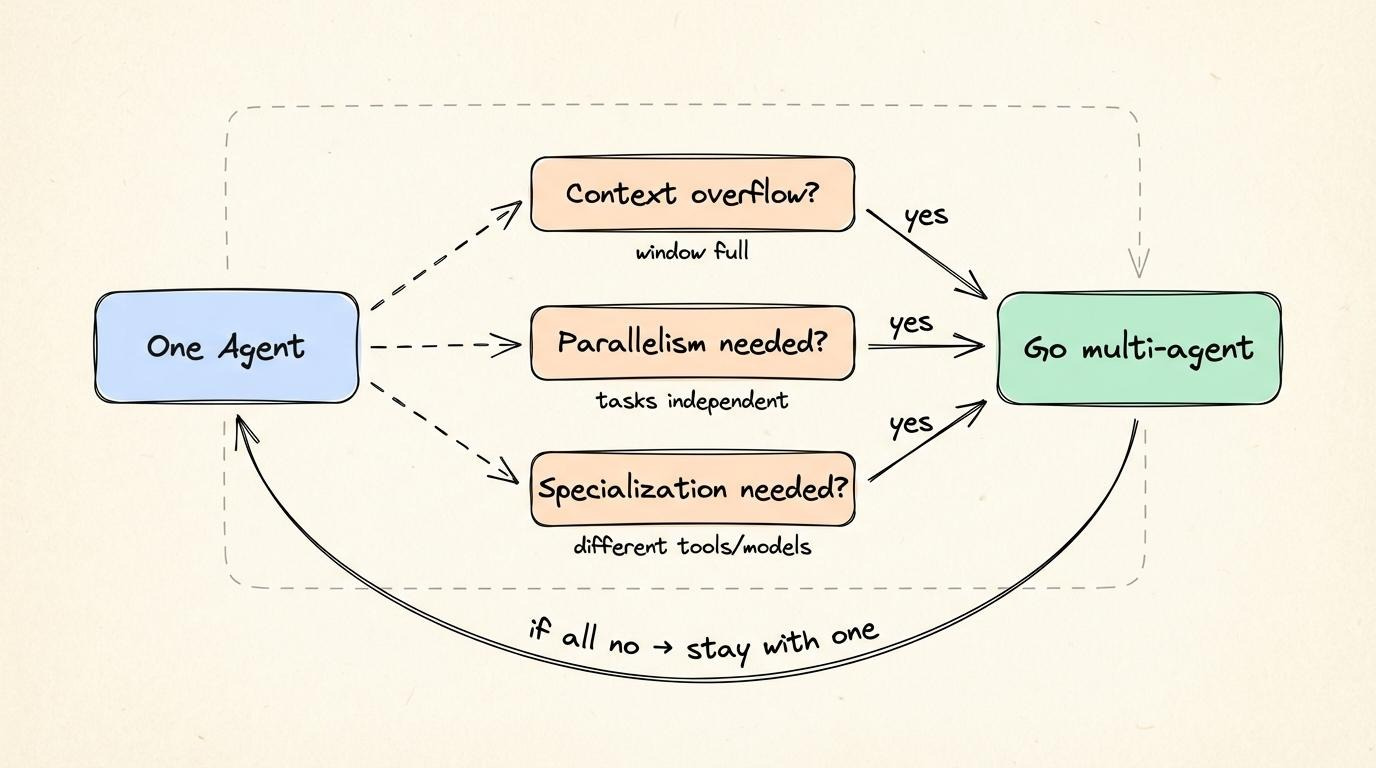
If none of those three conditions apply, stay with one agent.
Better prompts and better tools solve most problems without adding the extra work of coordinating agents. But once you know you need many agents, the next question is what shape the system takes...
Multi-agent architectures
Every multi-agent system makes a different choice about who coordinates work.
Here are 6 architectures that range from tight central control to NO coordinator at all:
1. Orchestrator-worker
One central agent breaks a task into pieces, assigns each piece to a worker agent, and then puts the results together:
Workers don’t talk to each other; all communication goes through a central agent
Orchestrator calls each worker as a tool call7, waits for a result, and decides what to do next
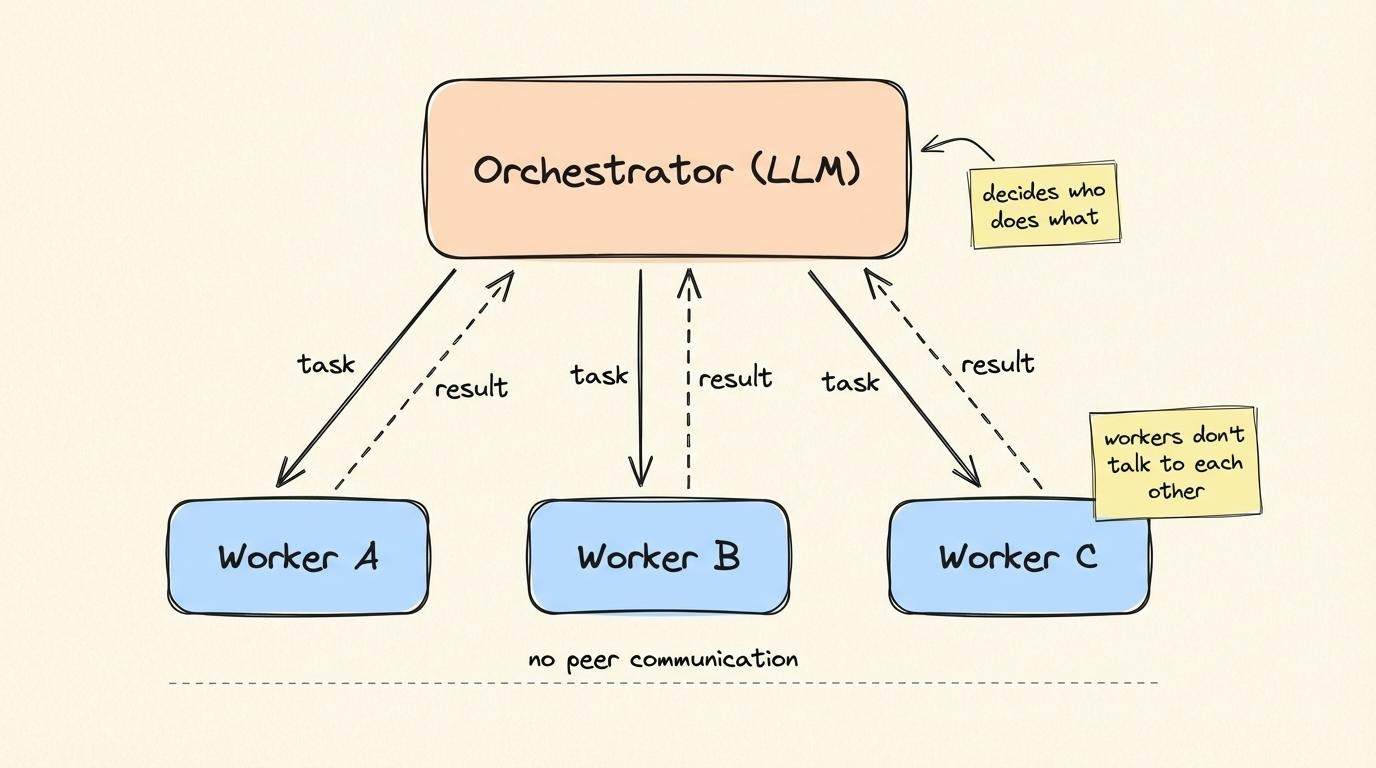
This is like an air traffic control tower that talks to every plane, while no plane talks directly to another.
Anthropic’s Claude Research system works this way:
A central agent running Opus 4 breaks a research query into parts and creates 2 to 10 worker agents on Sonnet 4 (sometimes more), all at the same time. The workers search the web, read documents, and gather evidence in parallel. When they finish, the central agent reads their results and writes a single research report.
This setup beat single-agent Opus 4 by 90.2% on Anthropic’s internal research eval8.
Tradeoffs
Central agent is both coordinator and bottleneck…
It talks to workers one at a time. If each call takes 3 seconds and 20 workers are waiting, the ceiling is about 7 tasks per second. So the central agent becomes the slowest part of the system.
Anthropic’s Claude Research system had this problem as well: workers duplicated each other’s work.
Without specific instructions, many workers run overlapping searches on the same topic, wasting both tokens9 and time. The takeaway is orchestrator-worker depends entirely on the quality of the lead agent’s instructions.
Vague task splitting turns parallelism into duplicated work.
2. Pipeline
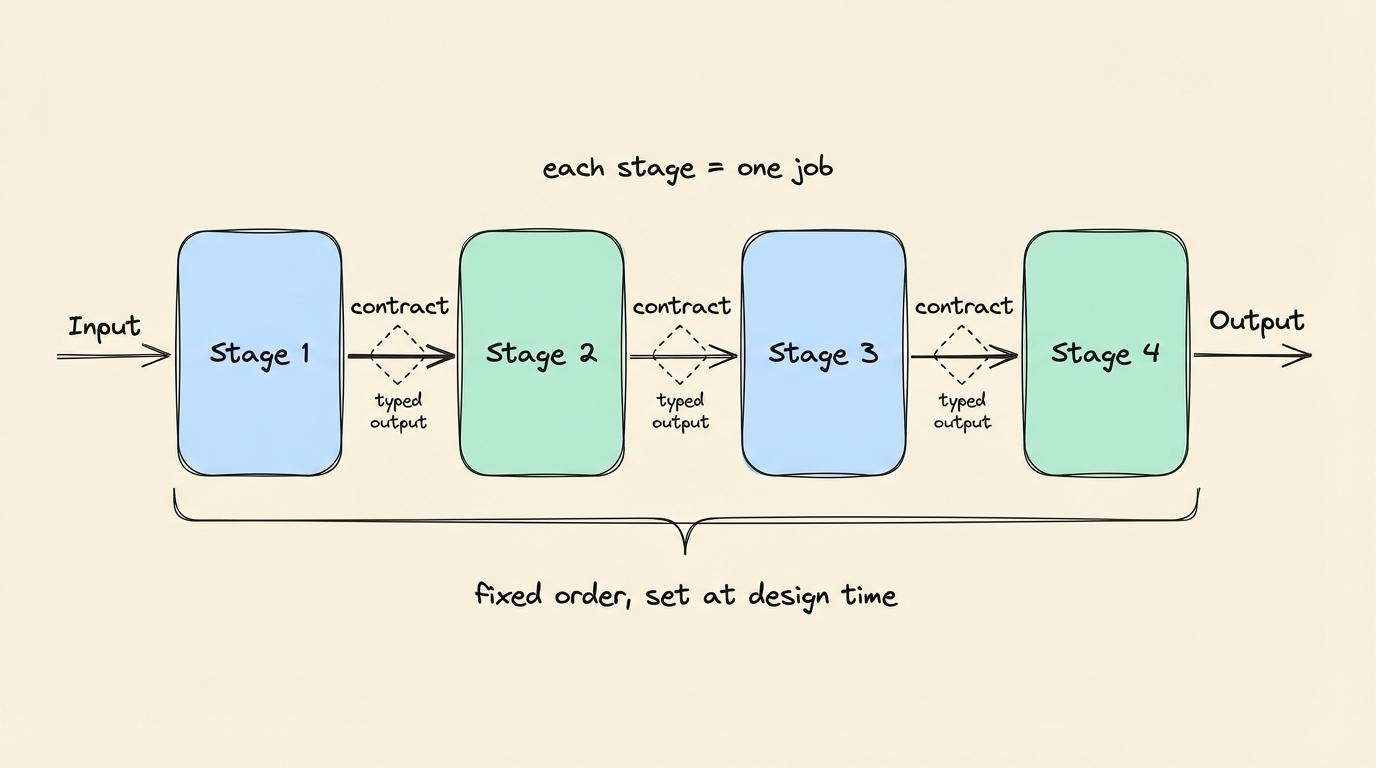
Agents run in a fixed order, one after another.
Each agent’s output becomes the next agent’s input, and entire sequence is set in advance. While orchestrator-worker lets the central agent decide what to do as it goes, pipeline removes that choice.
An assembly line works the same way: each station does one job, passes the result forward, and never sees the finished product.
Stripe uses this pattern to check whether new businesses on its platform are legitimate.
Before agents, a human reviewer had to jump between customer databases, legal sources, and support tickets to decide whether a business was safe to approve. Now their engineering team broke that work into a fixed flow of agent stages using a directed acyclic graph (DAG). So work moves forward through stages without looping back.
Order is set at design time, and each stage has a contract: defined output format next stage expects.
Stripe calls these contracts “rails” because they keep any single agent from spending too much time on irrelevant data. This setup cut their average handling time by 26%, and reviewers rated the agent outputs 96% helpful, with a full record of every decision at every step.
Tradeoffs
Latency adds up.
A 5-stage pipeline where each stage takes 2 seconds means a 10-second wait before any output, and adding a stage to improve quality increases the response time.
Yet the upside is predictability.
When every stage has a narrow contract, you can trace any failure back to exactly one step. That’s why regulated workflows like Stripe’s continue to use pipelines.
When the cost of being wrong is a regulator flagging your process, the extra seconds are a small price to pay.
3. Hierarchical
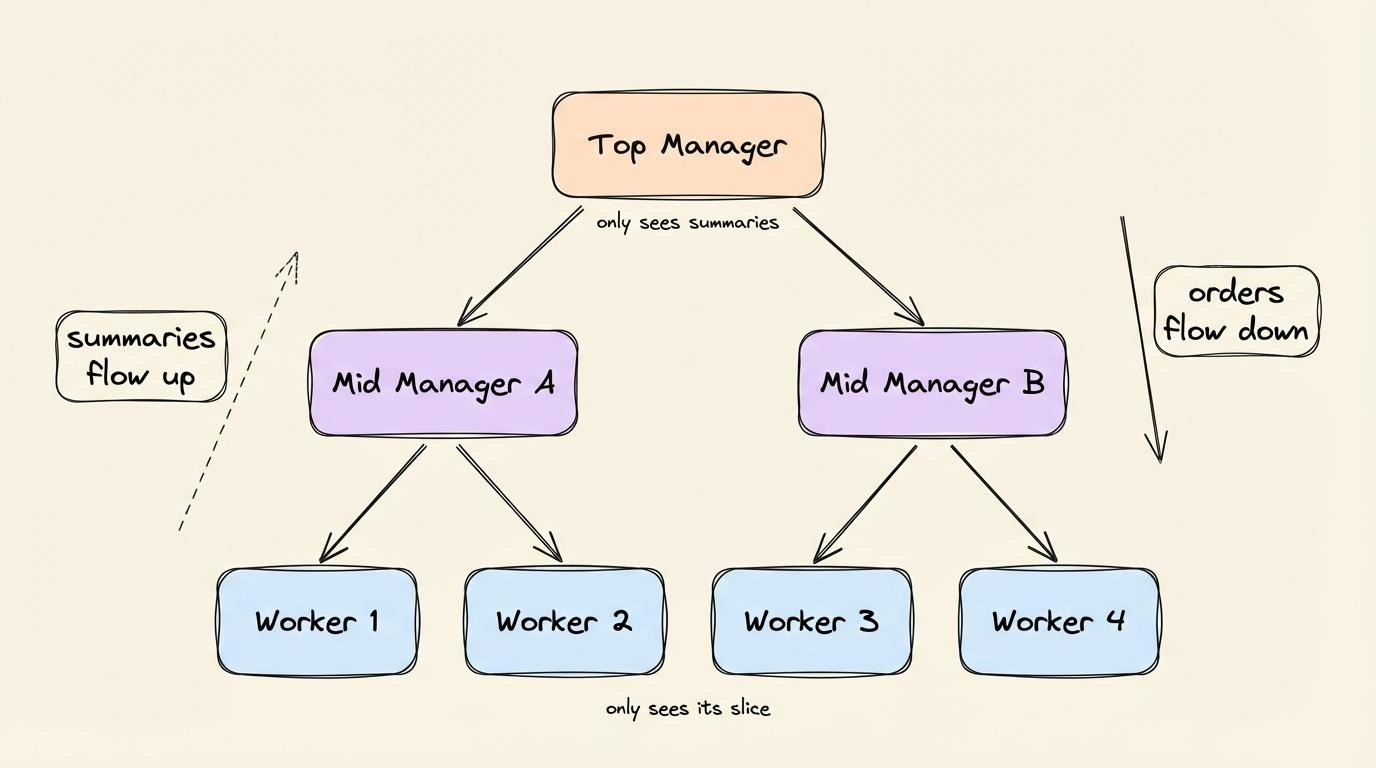
A top-level manager agent gives work to one or more layers of manager agents below it, which then give work to individual workers.
Two levels are the minimum; big systems stack more. The result is a tree…
No single agent needs the full context.
The top-level agent holds the high-level goal and a summary from each branch, while each lower level sees only what its narrower role needs. Picture a military chain of command where orders flow down, reports flow up, and no one skips a level.
IBM watsonx Orchestrate runs on this pattern:
A top-level supervisor agent acts as a router and planner across 80+ pre-built domain agents for HR, sales, and procurement. Let’s say a user tries to “order new laptops for the design team”. The request reaches a Procure Equipment supervisor, who then hands the work to three specialized child agents:
One requests quotes from approved vendors
Another checks responses
A third submits a purchase request
The supervisor decides only who gets called and in which order.
Tradeoffs
Details might get lost at each level.
A worker produces a detailed result. The mid-level manager shortens it to one sentence. By the time it reaches the top, the detail that matters might be gone. Hierarchical structures trade detail for coverage: the higher you go, the wider the scope of each agent and the less it knows about any specific piece.
These three architectures share one thing: a clear chain of command tells you exactly who’s in charge…
The next three architectures drop the chain entirely. So they're harder to debug, but they survive partial failures better…
Reminder: this is a teaser of the subscriber-only newsletter, exclusive to my golden members.
When you upgrade, you’ll get:
High-level architecture of real-world systems.
Deep dive into how popular real-world systems work.
How real-world systems handle scale, reliability, and performance.
4. Swarm
In a swarm, many agents work as equals.
They coordinate through a shared blackboard: a data store (typically Redis cache, database table, or vector store) that every agent can read from and write to. Yet there are NO direct messages between agents…