

Once upon a time, there lived a full-stack engineer named Jung.
He was very good at building apps & deploying them.
Until one day, when the DevOps engineer from his team fell ill.
And he got the task of updating the VPC for their production app.
Yet he had zero knowledge of networking fundamentals.
So his tiny config change took down the entire app…
Onward.
§
The Missing Layer in Your Security Stack (Partner)

Most security tools focus on preventing or detecting an attack.
Password managers protect credentials. Monitoring tools flag suspicious activity. But when a scam succeeds and money is lost, detection alone doesn’t help you recover it.
Coveron adds a recovery layer to your security stack.
As someone who spends most of the day online, I already use tools to reduce security risks, but I like the idea of having a fallback if those protections fail.
Coveron monitors for suspicious activity and exposed personal data, then adds financial protection and hands-on recovery support when something goes wrong.
What you get:
Up to $100K for eligible scam or online fraud losses
Up to $100K for cyber extortion or threats
Up to $2M for eligible identity theft recovery costs
Real people who guide you step-by-step through recovery
Tools reduce risk. Insurance reduces loss. Coveron is built for what happens when prevention isn’t enough.
One scam can cost you everything — protect yourself now, first 100 users get 20% off with code neocoveron
(Thanks to Coveron for partnering on this newsletter.)
§
I spent a few hours putting together this list of foundational networking concepts, so you don’t have to.
Curious to know how many are new to you:
Network stack,
Encapsulation,
IP addressing,
Subnets & CIDR,
VPC,
Routing & forwarding,
NAT,
BGP,
Ports and sockets,
VPN.
For each, I’ll share:
What it is & how it works in simple words,
A real-world analogy,
Why it matters.
Let’s go!
§
Share this letter & I’ll send you some rewards for the referrals.
§
1. Network stack
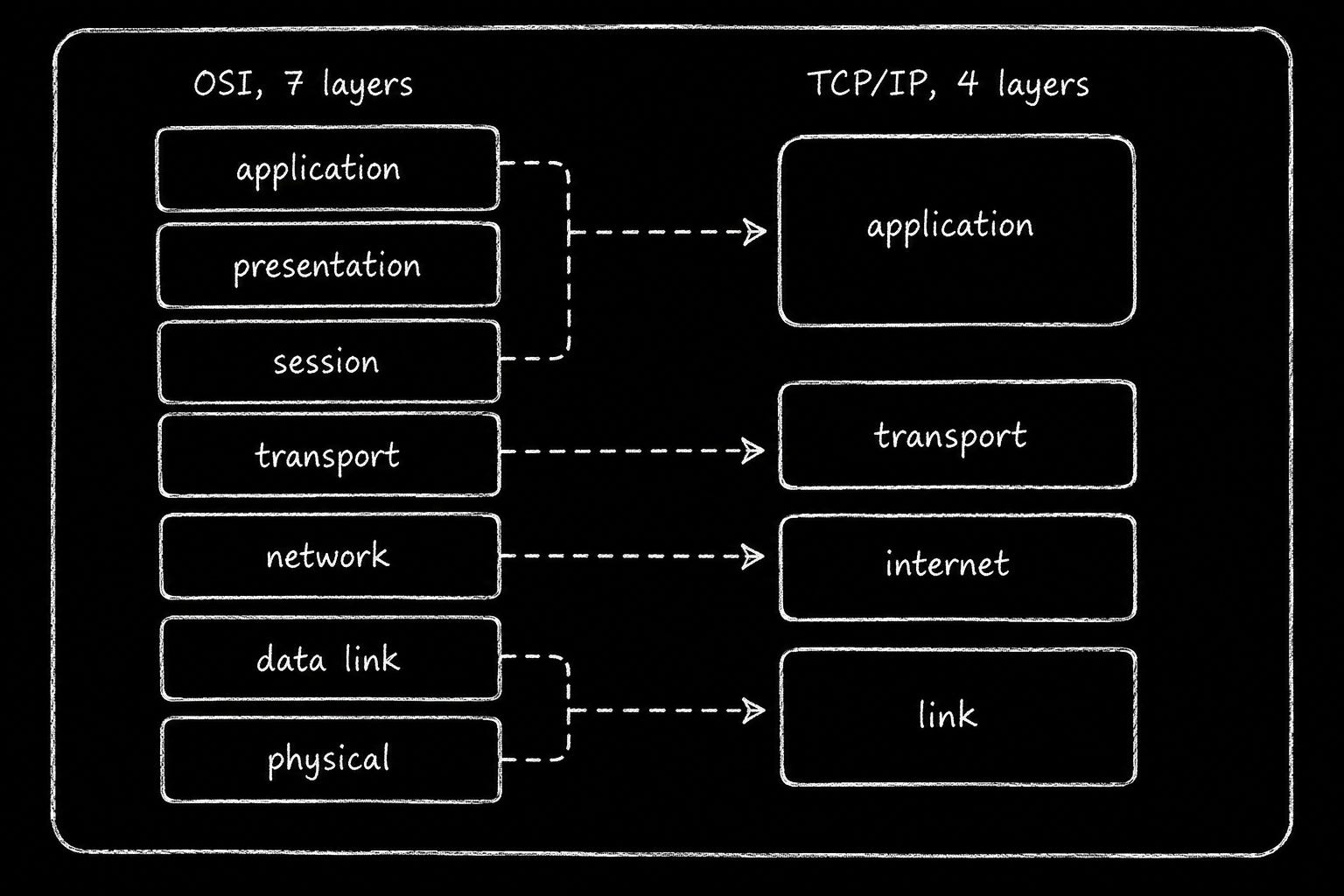
The network stack divides communication into layers. Each layer handles a specific task & passes data to the next layer.
Two models explain how these layers work:
OSI Model: The Open Systems Interconnection (OSI1) model has 7 layers. It helps you understand and troubleshoot network communication.
TCP/IP Model: The Transmission Control Protocol/Internet Protocol (TCP/IP) model has four layers: Application, Transport, Internet, and Link. It reflects how modern internet protocols work.
Think about opening a website:
Your browser sends an HTTP request. The transport layer manages communication between applications, the internet layer routes packets toward their destination, and the link layer delivers data across the local network.
Each layer handles its own responsibility.
So your app does not have to manage packet routing or physical transmission.
Analogy
A letter passing through the postal system:
You write the words. An envelope carries the address; a sorting office picks the route; and a truck moves the physical mail. Each stage trusts the next to do its job.
Why it matters
Imagine your application suddenly loses its database connection…
The problem could occur in several places:
Application layer: DNS fails to resolve the database hostname.
Transport layer: A firewall blocks the database’s TCP port.
Transport/Application boundary: A TLS handshake fails.
Internet layer: A routing issue prevents packets from reaching the database.
Understanding the network stack helps you identify where communication fails & narrow down the root cause.
Reach for tcpdump when you suspect the transport, and curl when you suspect the application. Pair it with encapsulation, which shows what each layer adds to your data.
2. Encapsulation
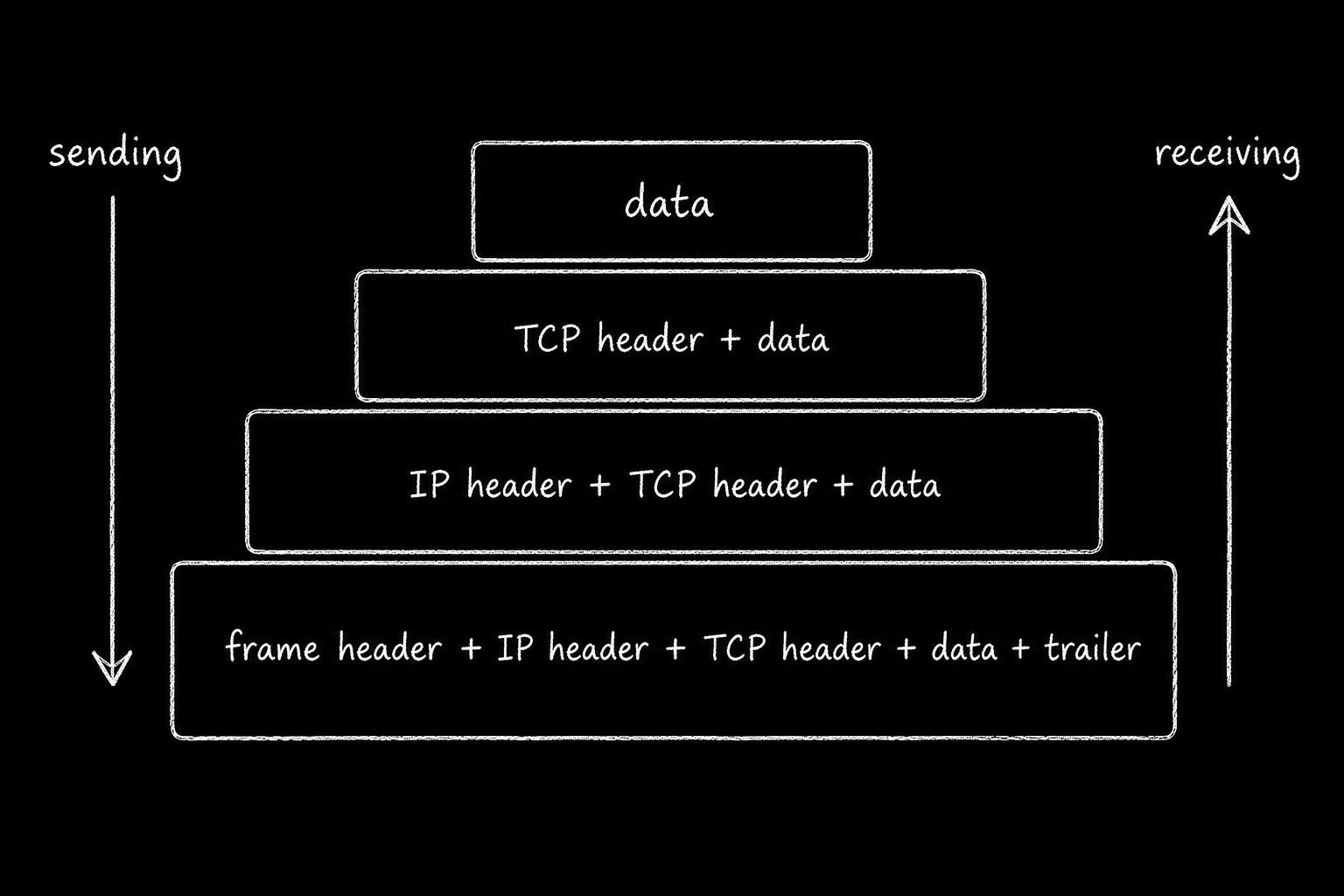
Encapsulation is the process of wrapping data with protocol headers as it moves down the network stack.
When you send an HTTP request, each layer adds information needed to deliver data:
Application Layer: Creates the HTTP request containing the payload.
Transport Layer: Adds a TCP header with source & destination ports, sequence numbers, and control information.
Network Layer: Adds an IP header with source & destination IP addresses.
Data Link Layer: Wraps the IP packet in an Ethernet frame with a header & trailer.
The receiving machine reverses this process; it’s called decapsulation.
Each layer processes its protocol information & passes remaining data to layer above.
Analogy
A gift in a box, inside a padded parcel, inside a shipping crate.
Each wrapper carries the label its own handler needs, and nobody opens more than one layer.
Why it matters
Every header adds overhead to network communication.
Sending a 10-byte payload over TCP/IPv4 and Ethernet requires:
TCP header: 20 bytes
IPv4 header: 20 bytes
Ethernet header and trailer: 18 bytes
Application payload: 10 bytes
That’s 58 bytes of protocol overhead for just 10 bytes of payload, excluding Ethernet padding and other link-level overhead.
Small messages consume significantly more bandwidth than their payload size suggests.
Read frames with Wireshark and set path sizes in your virtual private network config. Read it alongside ports and sockets, which explain the transport header fields.
3. IP addressing
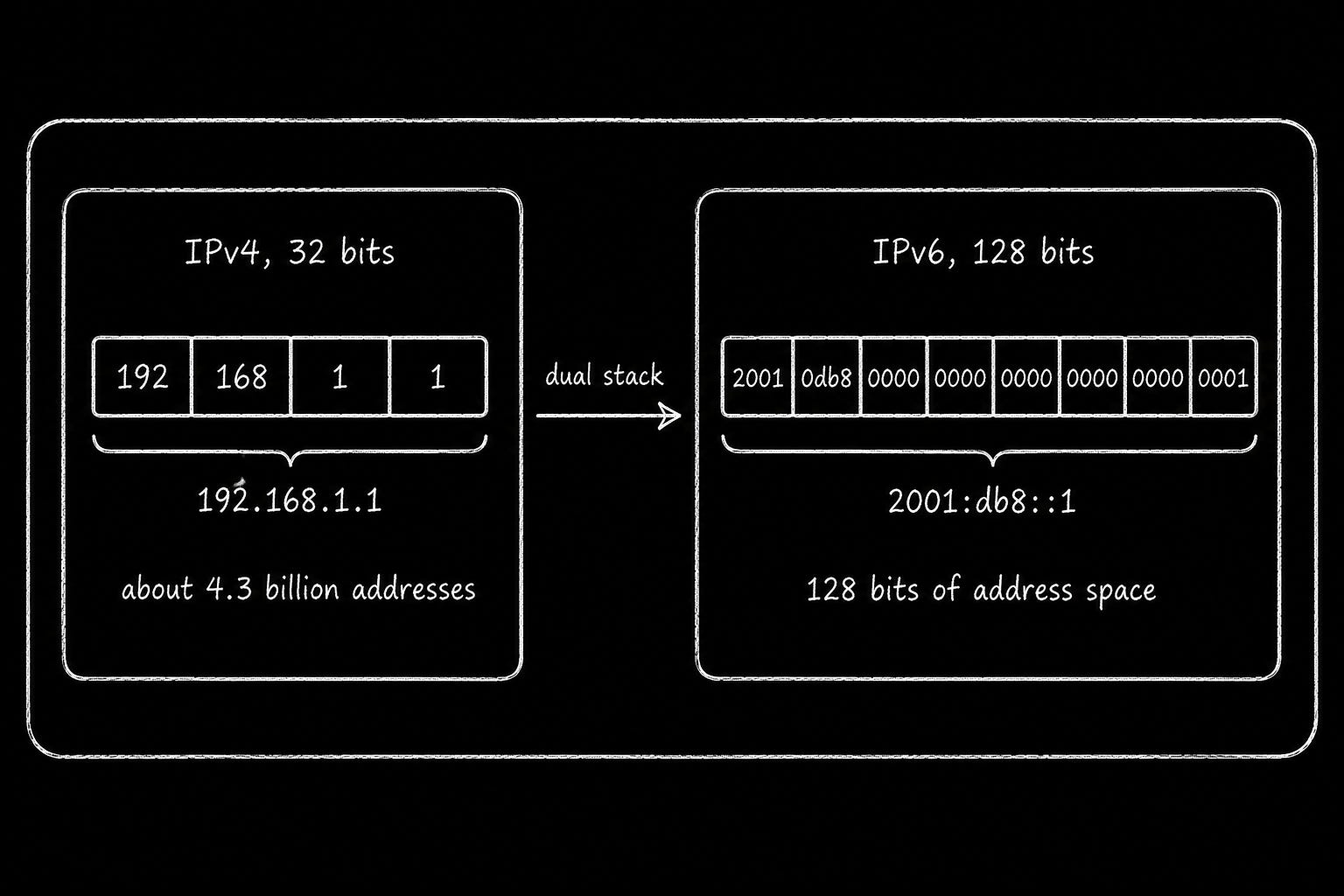
An Internet Protocol (IP) address identifies a network interface & helps routers deliver packets to the correct destination.
There are two main versions:
IPv4: Uses 32-bit addresses, such as
192.168.1.1. It supports 4.3 billion unique addresses.IPv6: Uses 128-bit addresses, such as
2001:db8::1. It provides a vastly larger address space.
IPv4 addresses became scarce as the Internet grew…
To conserve public addresses, networks adopted Network Address Translation (NAT). This allows many devices to share one public IPv4 address.
IPv6 addresses this limitation by providing enough addresses for an enormous number of devices & networks.
Plus, many networks support both IPv4 & IPv6, an approach called dual stack.
Your laptop could have both an IPv4 and an IPv6 address.
A website could publish both IPv4 (A) and IPv6 (AAAA) DNS records.
Your device selects a reachable address & connects using corresponding protocol.
IPv6 adoption varies across networks…
Some mobile carriers and cloud providers support it extensively, while many corporate networks still rely on IPv4.
Analogy
Think of IPv4 as a city running out of house addresses.
IPv6 expands the address space so dramatically that there is room for an enormous number of new buildings.
Why it matters
When designing a cloud network, you need to choose which IP versions to support.
AWS VPC: Configure IPv4-only, dual-stack, or IPv6-only subnets according to your requirements.
Kubernetes: Configure IPv4, IPv6, or dual-stack networking based on your cluster and Container Network Interface (CNI) support.
Also you need to understand subnetting.
It divides an IP address range into smaller networks for routing & address management.