


Share this post & I'll send you some rewards for the referrals.
You ask ChatGPT to write an email.
It drafts it… But you still have to copy the text, paste it into Gmail, and hit send. AI did the thinking,,,YOU did the task.
OpenClaw changes this…
It’s an open-source autonomous AI agent1 that runs on your machine, connects to your messaging apps, and does the work itself. You could message it on Telegram: “Check my inbox, pull any invoices, save the attachments.” Then it connects to your email, finds invoices, downloads the attachments, saves them, and messages you back with a summary.
You don’t have to open a single app…
OpenClaw bridges the gap between the thinking layer and the act layer.
Large language models (LLMs), such as Claude, ChatGPT, and Gemini, provide reasoning. While OpenClaw2 provides hands.
Onward.
Run OpenClaw with MyClaw

The best AI assistants aren’t the ones waiting for your next prompt—they’re the ones that send you the answer before you think to ask.
MyClaw runs OpenClaw in the cloud, schedules recurring tasks, and delivers updates directly to Telegram or WhatsApp, so it feels less like another chatbot and more like an assistant that’s actually on the job.
If this newsletter got you interested in OpenClaw, MyClaw is an easy way to see what an always-on AI assistant feels like.
(Thanks to MyClaw for partnering on this post.)
Here’s what you’ll find inside this newsletter:
What OpenClaw actually does. Why it’s different from every AI tool you’ve already tried.
How the Gateway works. The always-on server running on your machine that makes everything else possible.
Skill system. How to install the right ones first, and what most people get wrong.
What breaks and why. Most common failure modes, with fixes for each.
The real security risks. Documented, avoidable, and worth reading before you touch a single setting.
How to build your own. Full architecture in five layers, from the ground up.
By the end of this newsletter, you will understand OpenClaw well enough to run it.
What Is OpenClaw
OpenClaw is the orchestration layer, the connector between an LLM (like Claude, GPT, or Gemini) and your real-world tools.
The intelligence comes from the LLM you connect to it.
Think of the LLM as the brain: it reasons, plans, and decides what to do. OpenClaw is the hand: it executes those decisions across your files, messaging apps, shell, and APIs.
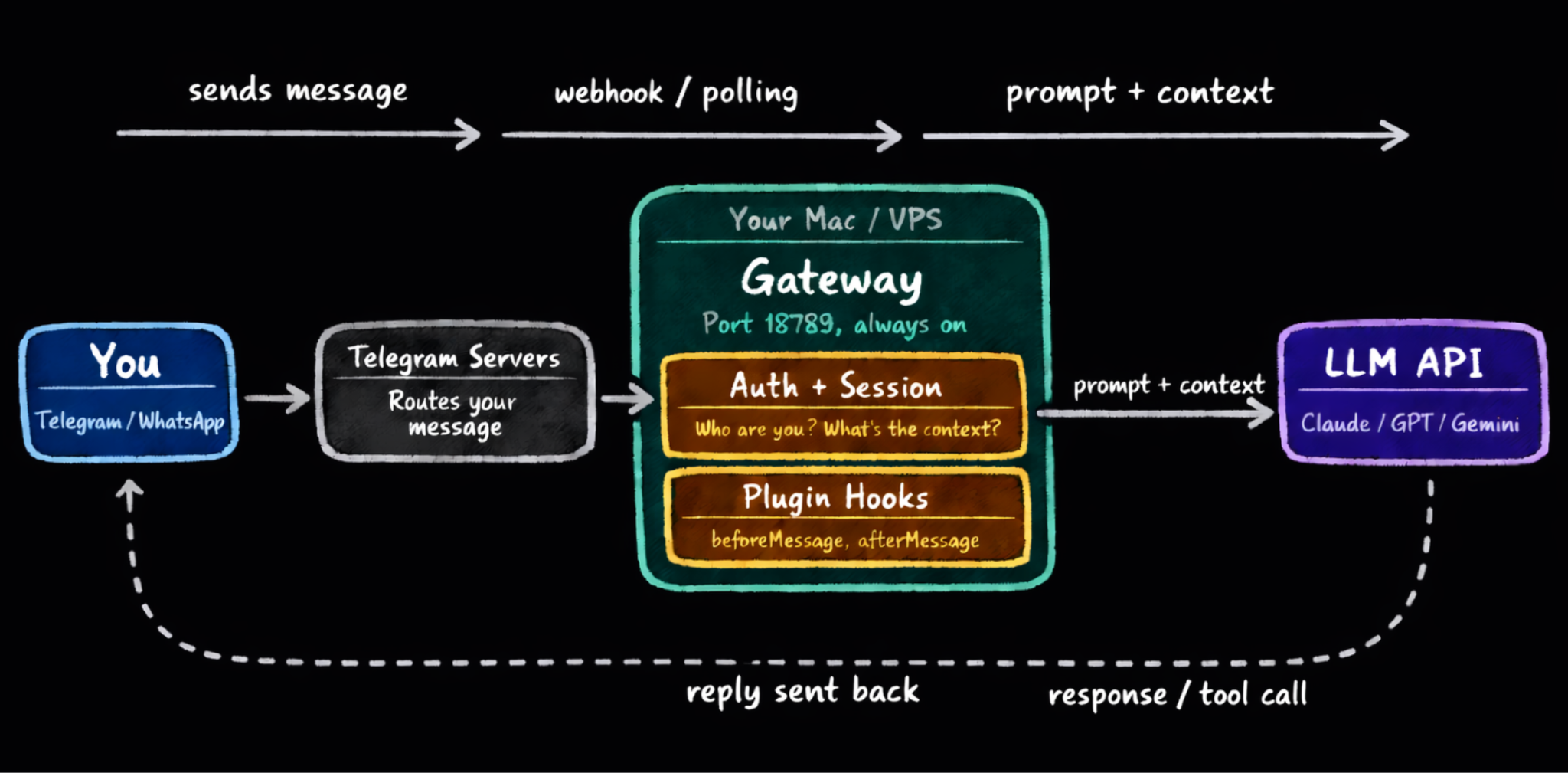
Here’s what OpenClaw offers:
A gateway3 that runs on your machine (Mac, Linux)
This is the always-on server running on your machine that coordinates everything: your messaging apps, LLM, tools4, and memory.
A multi-channel messaging interface: WhatsApp, Telegram, and so on.
You talk to the same assistant from all these apps, with shared context and memory, instead of managing a different bot per platform.
A skills platform with 5,400+ modular capabilities on ClawHub5.
Skills6 are plain Markdown files that tell the agent how to perform a specific task, like checking your GitHub PRs or sending a Slack message.
A persistent memory system in plain Markdown files you own.
The agent’s knowledge, preferences, and logs are stored as editable Markdown on disk, so you can inspect, version-control, and move its LLM context like code.
Proactive scheduling engine (Heartbeat7 + cron jobs) that acts without being prompted.
OpenClaw can wake itself up on a schedule to check servers, triage email, or send summaries, instead of waiting for you to type a command.
Model-agnostic: plug in Claude, GPT, DeepSeek, Gemini, Grok, or local models via Ollama8.
You can mix and match models (cheap vs powerful, cloud vs local) and route different tasks to different providers to optimize cost and performance.
How It Differs From Other AI Tools
Here’s how:
ChatGPT, Claude, Gemini: You prompt them, and they respond. They have no access to your email, no ability to run scripts, and no memory once you close the tab9.
Siri, Google Assistant: Polished products, but closed ones. You can’t add custom skills, connect arbitrary APIs, or self-host them.
LangChain, CrewAI, AutoGen: Developer frameworks. You write the Python, define the chains, and build the interfaces from scratch. OpenClaw ships all of that out of the box.
Claude Code, Codex CLI: Terminal tools for coding sessions. Reactive and session-based. OpenClaw runs 24/7 for everything, not just code.
So OpenClaw is NOT just a product you use in a browser tab.
It is a service that runs on your machine and continues to work while you’re away.
How OpenClaw Processes Messages
Imagine you send a single Telegram message at 9 pm:
“Check my open PRs and let me know if anything needs a response tonight.”
You lock your phone and go to sleep…
By morning, you will have a reply:
Three PRs are open, and one has a teammate's review comment asking about error handling. OpenClaw drafted a response and flagged it for your approval, leaving the other two untouched because they were still in CI. It also remembered that last week you said you prefer to handle auth-related reviews yourself, so it left the one in the auth module alone.
None of this required you to open GitHub, write a prompt, or copy anything between tabs…
Why OpenClaw Runs 24/7 on Your Machine
When you run the OpenClaw gateway, you start a Node.js server that binds to port 18789 and stays running.
This is the fundamental difference between OpenClaw and a browser-based AI tool…
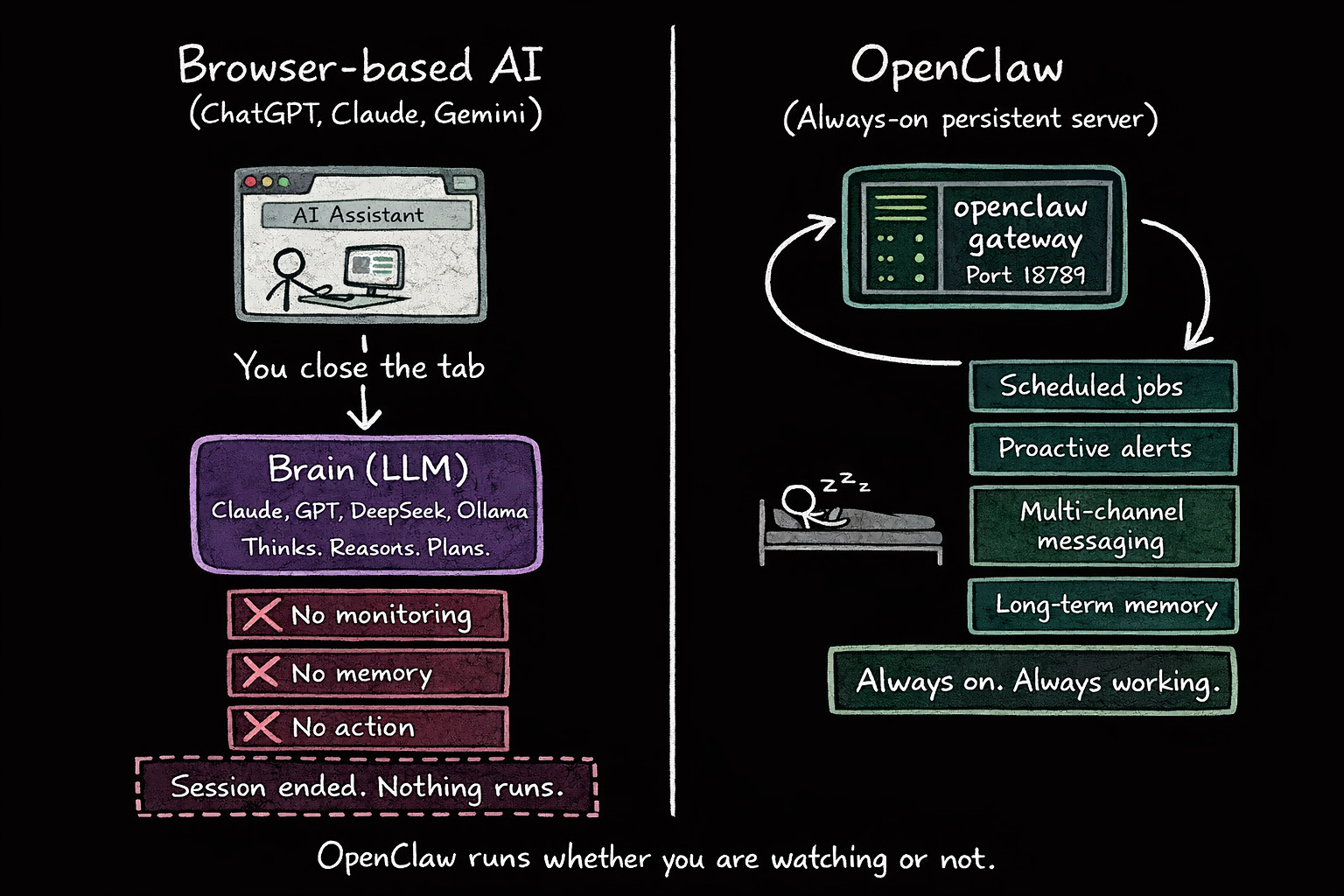
Every mainstream AI assistant, including ChatGPT, Claude, and even DeepResearch mode, only exists while you have a tab open. (DeepResearch can run a long session, but once it’s done, it stops.)
i.e., if you close the tab, everything disappears.
But OpenClaw never stops:
It runs as a background daemon on your local server and stays alive whether you are at your desk or asleep. That persistence is the foundation of everything else: scheduled jobs, proactive alerts, multi-channel messaging, and long-term memory. None of it works without a process that is always on.
This central server is called the Gateway…
Gateway: Control Center of Your Agent
The Gateway orchestrates everything.
It sits between your messaging apps, LLM, and tools, coordinating every request from the moment it arrives until a reply goes back out.
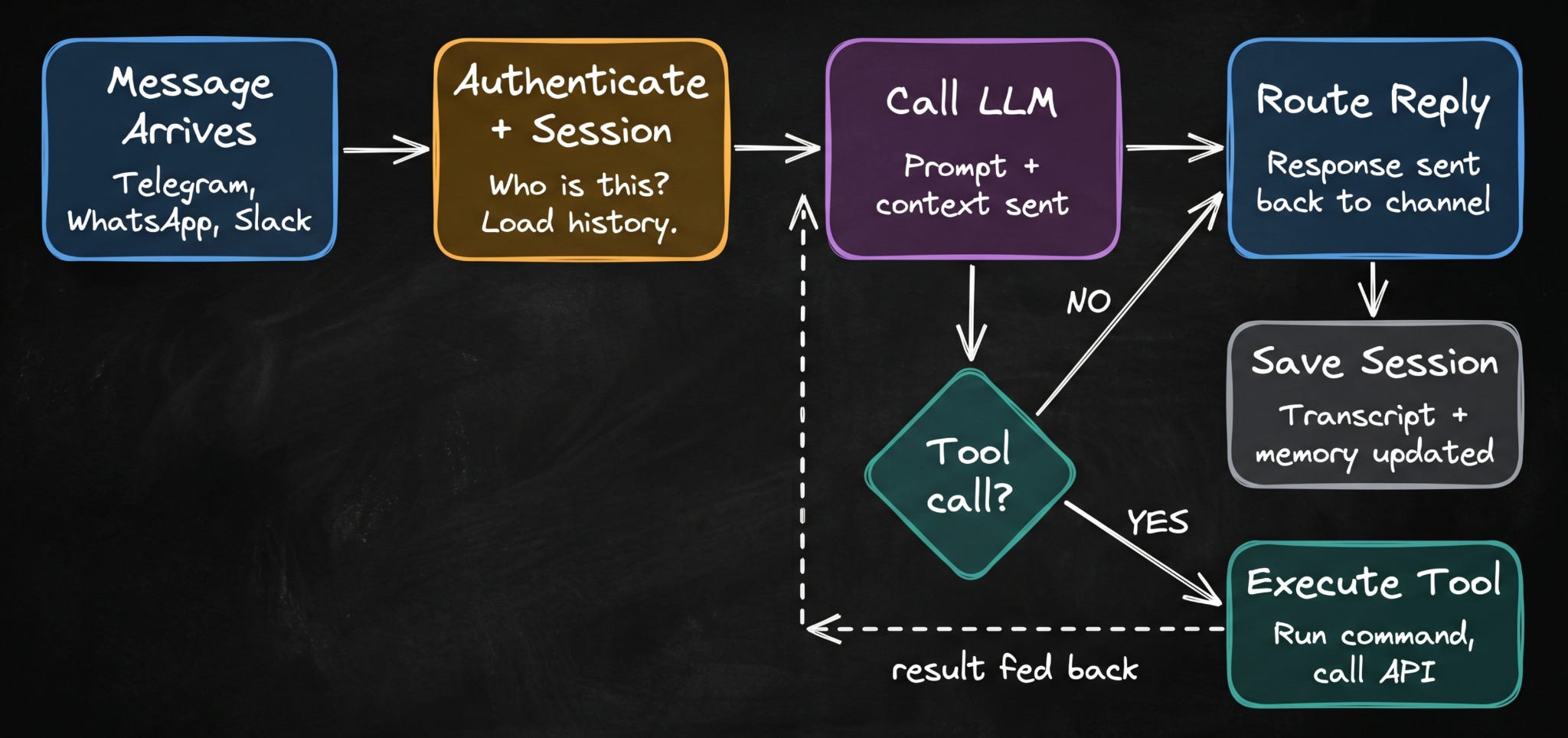
When a message arrives from Telegram, WhatsApp, or Slack, the Gateway authenticates the sender and creates or retrieves a session for the conversation.
It then assembles the full context10, passes it to the LLM, handles any tool calls that come back, and routes the final reply to the correct channel.
Say you ask the agent to clean up old log files:
Before it runs anything, the Gateway intercepts the shell command and sends you a confirmation request through Telegram: “I’m about to run $ rm -rf ~/logs/*.log, approve this?”
Nothing executes until you say yes… If you don’t respond, it waits…
The Gateway also serves the Control UI at http://localhost:18789.
It’s a browser-based dashboard that lets you watch the agent’s reasoning in real time, approve pending commands, and inspect active sessions. Every tool call, model response, and approval request shows up here live. Since the Gateway runs on your Mac Mini or VPS, you can access the Control UI from any browser on the same network. If you use Tailscale11, you can reach it from your phone or laptop without being on the same network.
The Gateway also supports hot configuration reloads…
You can change your model, update permissions, or add a new channel without restarting the process. The running server picks up the changes and applies them immediately.
Channel Layer: How OpenClaw Talks to Messaging Apps
OpenClaw connects to Telegram, WhatsApp, Slack.
Each of these works completely differently at the protocol level:
Telegram uses a bot token with polling or webhook delivery.
WhatsApp uses a reverse-engineered web protocol; it requires QR-code authentication and stores session state locally.
Slack uses Socket Mode with two separate token types.
Discord uses a gateway WebSocket with its own heartbeat requirements.
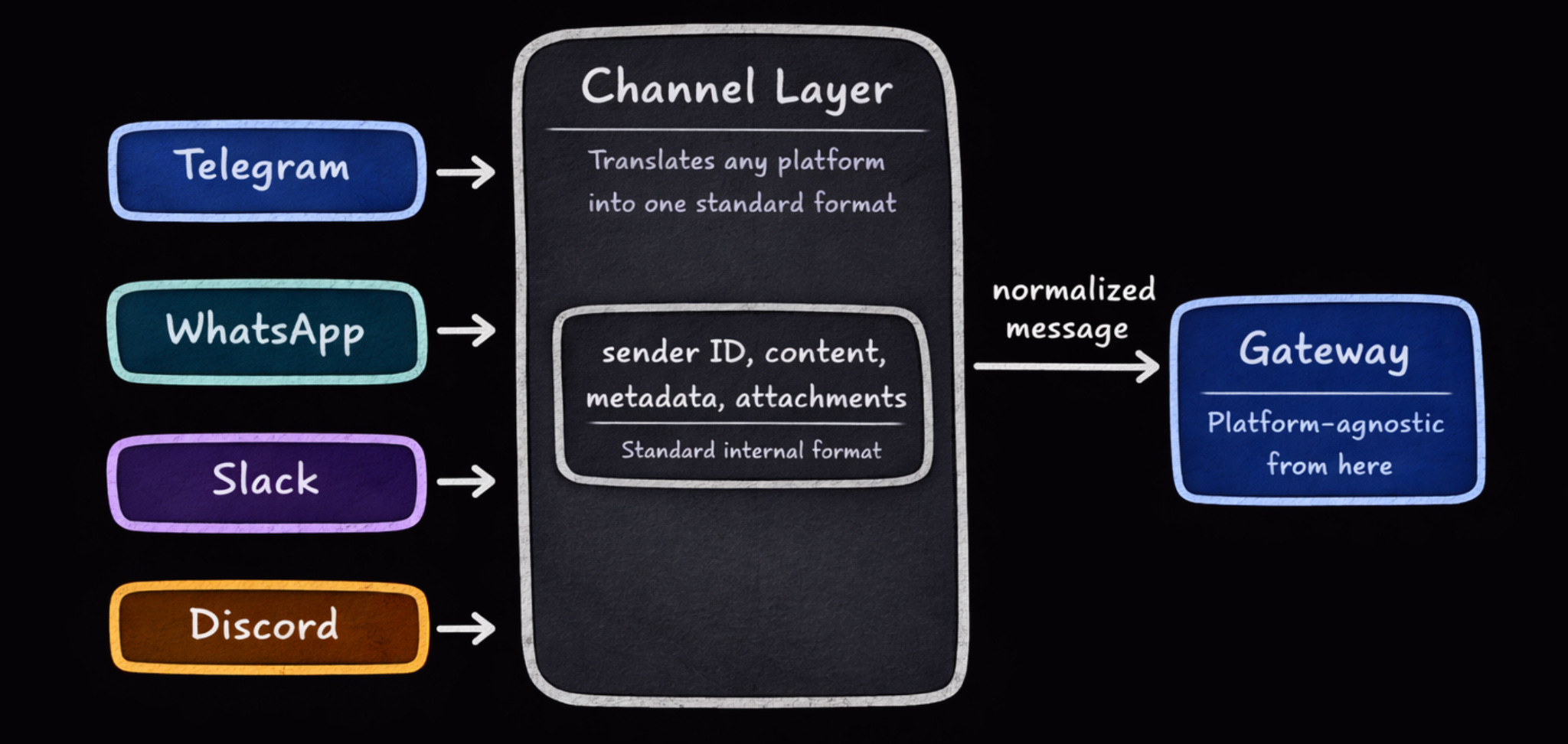
Without a dedicated abstraction layer, each new platform requires touching the routing logic, session management, and message pipeline.
OpenClaw solves this with a Channel Layer:
It treats each platform as a separate plugin acting as a translation adapter. Each adapter translates incoming messages into a standard internal format: a stable identity key, content, metadata, and attachments. Only then does it pass anything to the Gateway. Everything after that boundary is platform-agnostic. The agent has NO idea whether your message came from Telegram or Slack.
It sees a normalized message and responds accordingly…
This also means security policies like allowlists, pairing workflows, and mention-gating apply uniformly across all platforms rather than being reimplemented per channel.
LLM Layer: Where Reasoning Happens
OpenClaw is a brain socket.
You provide the intelligence by connecting an API key. And it provides the infrastructure for everything else.
It means you can use Claude, GPT-4, Gemini, DeepSeek, or a locally run model via Ollama. Plus, you can change models at any time without any reconfiguration.
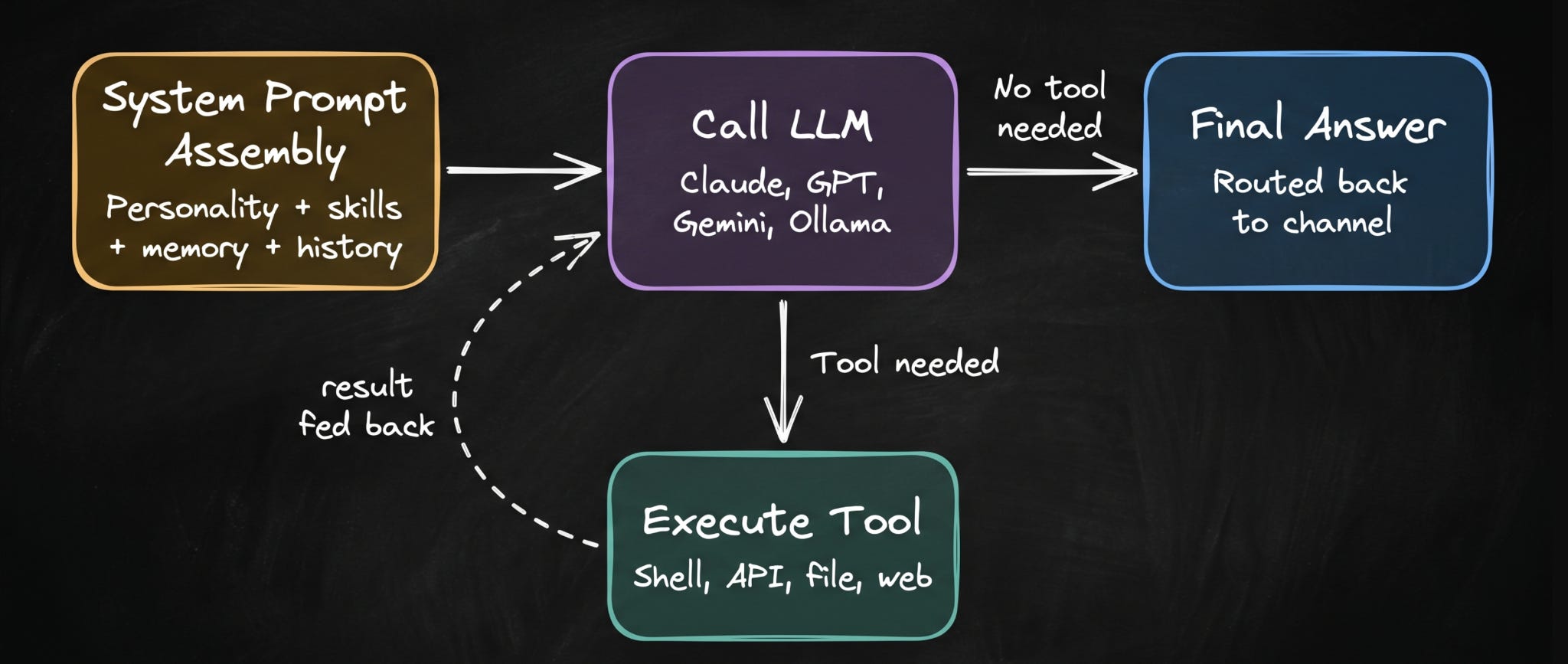
When a message arrives at this layer, OpenClaw assembles a system prompt by combining the agent’s configured personality, list of available skills, relevant memory retrieved from previous sessions, and current conversation history.
It then calls the AI model with the full context.
If the model decides it needs to take an action, run a shell command, search the web, read a file, or call an API, it signals that as a tool call. OpenClaw executes the tool, captures the output, and feeds the result back into the conversation. The model reads the result and decides what to do next: call another tool, or produce a final answer.
This loop continues until the model generates a response with no further tool requests.
You can watch this entire loop unfold in real time in the Control UI at every tool call, every model response, every intermediate step…
And when a conversation reaches the model’s context limit, compaction12 triggers automatically. The agent summarizes the conversation so far and replaces the raw message history with that summary, preserving continuity without the cost of loading thousands of tokens on every reply.
Plugin System: How OpenClaw Stays Modular
Almost everything in OpenClaw that is not part of the core engine is implemented as a plugin13:
Telegram integration is a plugin.
GitHub access is a plugin.
The memory system is a plugin.
This is what makes OpenClaw easy to extend and customize…
When OpenClaw starts, it reads your configuration and loads only the plugins you have enabled. Disabling a capability means changing one line in your config, while adding a community plugin is as simple as placing it in the right directory.
If you want to write your own, you just implement a defined interface and never touch the core engine.
Plugins can hook into lifecycle events at every meaningful point: before and after tool calls, before and after messages, at session start and end.
This is how you add things like audit logging, rate limiting, or custom approval flows without touching the core agent at all…
Memory System: How Agent Remembers You
The memory solution (loading the entire conversation history into every prompt) fails quickly.
A week of active conversation will overflow any context window… Even if it fits,,, loading all of it on every reply is expensive and slow…
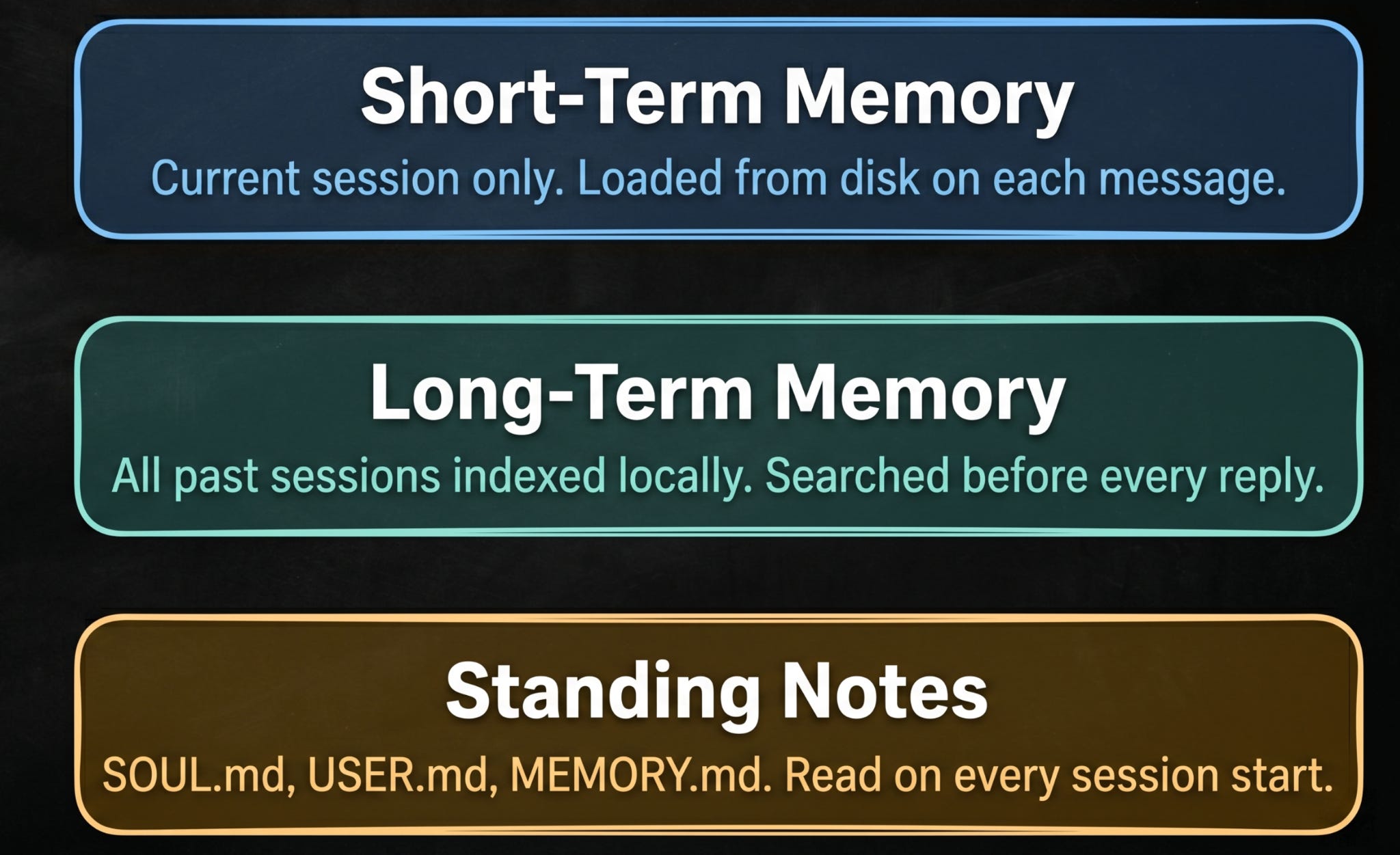
OpenClaw treats short-term continuity and long-term recall as separate problems that need different solutions:
Short-term memory keeps the current conversation on track. Every session is saved as a file on disk. When you send a message, OpenClaw loads only the recent part of that session into context, just enough to keep things flowing without loading everything at once.
Long-term memory handles recall across days and weeks. All past sessions are indexed into a local database. Before the agent answers any message, the memory indexer searches the database and pulls in any relevant information automatically. If a conversation from five days ago is relevant, it gets included. You never have to remind the agent of something it already knows.
Standing notes are a third layer. These are Markdown files you write yourself, stored in
~/.openclaw/workspace/memory/. Think of them as a permanent briefing document. Your preferences, your projects, your context. The agent reads them every time.
Reminder: this is a teaser of the subscriber-only newsletter series, exclusive to my golden members.
When you upgrade, you’ll get:
High-level architecture of real-world systems.
Deep dive into how popular real-world systems actually work.
How real-world systems handle scale, reliability, and performance.
How OpenClaw Handles Tasks That Take Hours
Most interactions with OpenClaw are fast… You send a message; the agent calls a tool, and replies in seconds.
But some tasks take much longer: scraping hundreds of pages, running a full test suite, processing a large dataset, or coordinating a multi-step workflow across several APIs.
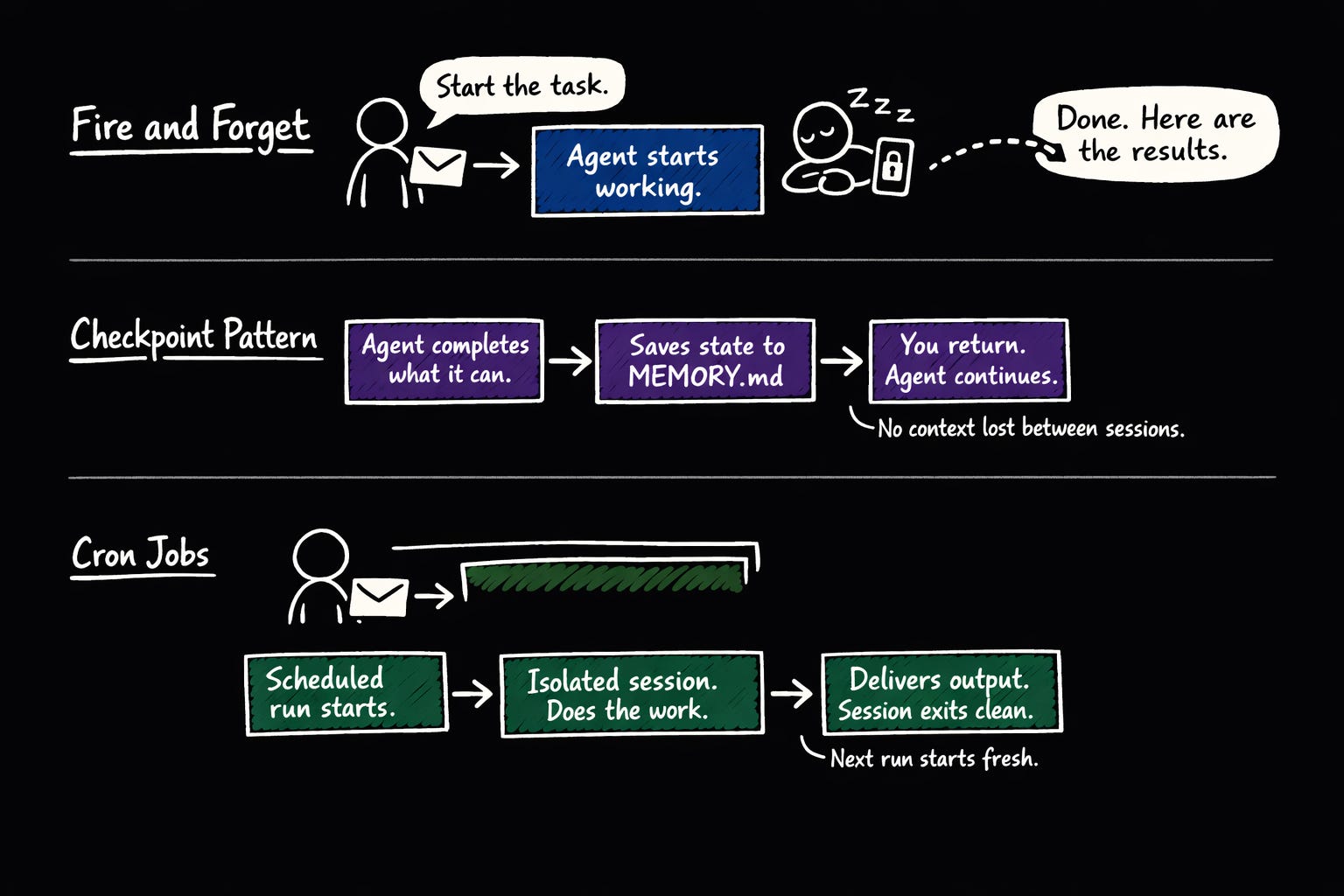
OpenClaw handles these differently:
When a task is going to take a while, the agent does NOT hold the conversation open and make you wait. It acknowledges the task, starts working, and messages you when it’s done. You can lock your phone and walk away.
The Gateway keeps running and messages you when the task is done.
For tasks that span multiple sessions or require human input mid-way, the agent completes what it can, writes the current state to MEMORY.md or a workspace file, and then pauses. When you return and pick up the conversation, it resumes from the saved state.
NO context gets lost between sessions because important state was written to disk, not held in memory.
For truly long-running background jobs, cron jobs in isolated session mode are the right tool. Each run gets its own session, completes its work, delivers output to your channel, and exits cleanly. The next scheduled run starts fresh.
This keeps long-running automation from accumulating stale context over time.
One practical limit worth knowing: if a single tool call takes too long, Gateway will time out waiting for a response.
For tasks like large web scrapes or slow API calls, break the work into smaller chunks. Instruct the agent to process in batches and report progress between each batch, rather than attempting everything in a single tool call.
Ready for the best part?