


Share this post & I'll send you some rewards for the referrals.
Most engineering resume advice you come across is junk.
At best, it comes from a tech recruiter who’s looked at 100s of resumes. At worst, it’s from yet another senior engineer cobbling together a blog post based on their experience applying to MAANGO.
This post is not like that.
I’ve made thousands of hiring and leveling decisions as mobile Hiring Committee Chair at Meta. I also led Meta’s engineering team responsible for finding and ingesting over 2M engineers’ resumes into their internal ATS (Applicant Tracking System).
I’ve seen a lot of resumes :)
And because of that, I know that you should treat your resume like a product. Think of it as a landing page for your career, designed to drive each target user who touches it to take action. And yes, your resume has multiple target users—four, in fact—and you should learn what each one is looking for.
(Oh, and btw, a lot of this applies to your LinkedIn profile too, since that is literally a landing page.)
Onward.
The tax you pay to run multiple agents (Partner)

If you’ve spent any time with coding agents, you know the feeling.
You start the morning with a clean plan. Spin up a few agents. One is refactoring the auth module. Another is writing tests. A third is scaffolding a new API endpoint. You’re flying.
Then, around 10:30 AM, you look up and realize you have 20 terminal windows open. One agent is blocked waiting for a decision you forgot to make. Another finished 40 minutes ago, and you never noticed. A third went sideways three commits back. You’re no longer flying. You’re drowning.
You’ve shifted from human as driver to human as director.
When running coding agents in parallel, the bottleneck isn’t just context. It’s your own attention trying to manage 10 agents across 10 terminals. You’re losing your mind to terminal chaos.
Meet Cline Kanban, a CLI-agnostic visual orchestration layer that makes multi-agent workflows usable across providers. Multiple agents, one UI. It’s the air traffic controller for the agents you’re already running, regardless of where they live.
Interoperable: Claude Code and Codex compatible, with more coming soon.
Full Visibility: Confidently run multiple agents and work through your backlog faster.
Smart Triage: See which agents are blocked or in review and jump in to unblock them.
Chain Tasks: Set dependencies so Agent B won’t start until Agent A is complete.
Familiar UI: Everything in a single Kanban view.
Stop tracking agents and start directing them. Get a meaningful edge with the beta release.
Install Cline Kanban Today: npm i -g cline
(Thanks to Cline for partnering on this post.)
I want to introduce you to Austen McDonald as a guest author.

Austen is a former Senior Engineering Manager and Hiring Committee Chair at Meta, where he spent almost 10 years and conducted over 1,000+ interviews. He’s the industry’s resident expert on behavioral interviews and writes about them on his Substack and in his book, Mastering Behavioral Interviews. As AI raises the bar for ownership and independent judgment, behavioral interviews matter more than ever.
For a few days only, use code SDN26 for 20% off Premium Access, which includes a print copy of his book and an AI copilot that helps you find your best career stories, shape them into high-signal answers, and deliver them well.
Part 1: Your Resume is a Product
Your resume is a landing page for your career search.
It’s the first thing these four personas see when they consider you for an engineering job:
Machines (Applicant Tracking System),
Recruiters (we’ll include sourcers for all you sticklers),
Interviewers,
And Hiring Managers.
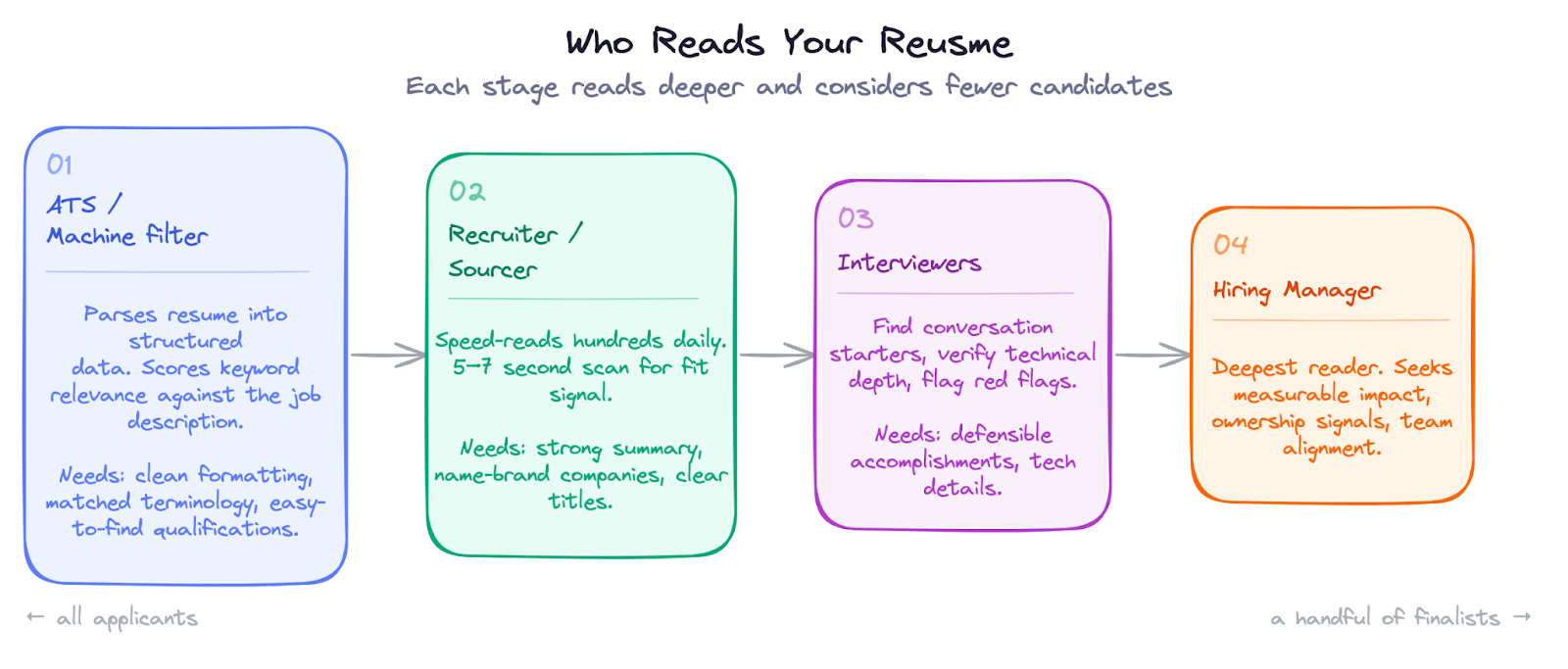
Each of these personas looks progressively deeper into the content in the resume. Each one also extracts different, but overlapping, information.
Let’s consider the needs of each of these personas, what they look for in a resume, how they read it, and the decisions they make along the way…
Machines (ATS)
Unless your profile is handed directly to a recruiter, your hiring process starts with software. Whether you apply online, get referred, or turn up in a sourcer’s keyword search, you need to pass this automated filter first…
How ATS systems work:
When you submit a resume, the ATS parses it into structured data: your name, contact info, work history, education, and skills.
It then scores you against the job description on keyword relevance, years of experience, and other recruiter-configured criteria. High-scoring candidates float to the top of the pile; low-scoring ones may never be seen by a human.
Of course, companies use AI-powered search that goes beyond keyword matching. These systems understand that “built ML pipelines” and “machine learning infrastructure” mean the same thing. This is good news—it means you don’t need to stuff your resume with every keyword—but it also means your accomplishments need to be substantively relevant to the role and described as such.
What they need:
Clean, parseable formatting. Fancy designs can break text extraction: tables, some multi-column layouts, text boxes, icons, or images. Even creative section titles like “My Journey” instead of “Professional Experience” are risky.
Easy to find minimum qualifications since an automated tool is probably filtering first on whatever is stated in the job description.
Keywords matching the job posting and role requirements.
Technologies named where they can be easily indexed.
Hot Take: I have no data for this, but numerous companies have buttons on their career sites that say, “Upload your resume to see if you’re a fit.” Seems like it would be valuable to iterate on your resume until the site tells you you’re a good fit, lol.
Recruiters
Recruiters (or, more properly, sourcers) are speed readers scanning hundreds of resumes daily.
After basic machine filtering for experience, education, and past companies, they’ll skim your summary and a few accomplishment bullets, then make an in/out call in 5–7 seconds.
They’re looking for two things: candidates who meet the stated requirements, and candidates who fit the hiring manager’s mental model of a great hire. Those who clear both bars move forward to the next stage.
This is either a direct screening process, such as a phone call, or a final call to the hiring manager or committee before they begin screening process.
What they need:
To immediately see that your profile fits the minimum requirements. They will reject you immediately if you don’t have the years of experience or the proper degrees, or have worked in similar roles (based mostly on title) that are identified in the job description.
A quick visual path to something that excites them about you and convinces them you fit the idea of what the hiring manager is looking for. This could be a name-brand company, a project relevant to the hiring team, or frequent use of technology related to the role. Give them a reason to take action and move you to the next step.
Brevity. Obviously, with 100s of these to review, the shorter the time all this takes, the better. So keep it to one page unless you’re a CEO.
Interviewers
There are a couple of places where interviewers or members of the engineering team read your resume.
Sometimes there is a layer of reviewers who approve the resume before they green-light a technical screen. It could be the hiring manager or a committee of ICs. You can see them more as a technical version of a recruiter, as they have the same needs.
Technical screeners are a different type of reader. They’re looking for conversation starters and signals that you’d contribute to the team.
Onsite interviewers (especially behavioral interviewers) are gauging your level based on the business impact you’ve driven. They’re also looking for red flags, such as performance challenges: short stints at a workplace or career gaps.
What they need:
Easy to find accomplishments that look like they fit with the work of the company/team
Evidence you can defend your claims under scrutiny: those accomplishments need technical details
Signals of technical depth and leadership
A minimum of reasons to be suspicious
Hiring Managers
Hiring managers are sometimes the first, as we talked about above in “Interviewers,” but almost always the last person to touch your resume.
At this stage, they’re reviewing a handful of finalists, which makes them the most thorough readers of your resume. They know what their team needs and look for specific evidence of alignment with those needs.
What they need:
Evidence that your past work resembles what they’re hiring for
Measurable impact with appropriate scope
They want ownership and growth signals: can you self-direct, drive work to completion, and adapt fast, i.e., you’re ready for agentic coding.
Clear visual hierarchy so they can find what matters
Now that you know who’s reading your resume and what they’re scanning for, there’s a natural question: what do you actually put on the page?
The answer isn’t “everything you’ve ever done.” Instead, curate a story of the impact you’ve made in your career. The next part walks you through that step by step...
Part 2: Resume Content that Converts
Now that we understand the users of your resume, let’s build a product that converts, moving you through the recruiting pipeline to a hire!
The Basics: What Goes In and What Stays Out of Your Resume
Before diving into content, we should get the basics out of the way.
Here’s the standard structure that readers expect, roughly in this order:
Contact Information – name, email, LinkedIn (maybe GitHub, if it’s good; more on that later)
Summary – Who you are and why you’re right for the role in 2-3 sentences
Work Experience – Your professional history with accomplishments
Education – Degrees, relevant coursework, honors
Projects – Side projects, open source, portfolio work
Skills – The keyword soup for machines, as we’ll see
This order should vary depending on who you are: experienced candidates can de-emphasize education; new grads should surface projects higher.
But readers expect to find things in roughly this order, so don’t make them hunt.
Contact Information
Of course, you should include basics like name and email.
If you want a phone call, include your phone number. Recruiters will ask for it later if you don’t give it now.
I also believe you should include a LinkedIn URL, linkified in the PDF form of the resume. Companies expect engineers to have LinkedIn profiles and may ingest that profile data automatically (don’t tell the LinkedIn lawyers). Much of the advice I give in this newsletter applies to LinkedIn profiles as well, especially the summary and bullet-point writing.
And please get a decent profile photo and cover photo for your LinkedIn profile.
Anything else you put in this contact information section should be additive to your candidacy. Like, don’t include a GitHub or personal website link if that’s there, it’s unimpressive. GitHub profiles need at least some recruiting-friendly repos that are deployed somewhere and well-documented. Personal websites should work (lol) and be a high-quality representation of yourself. Otherwise, don’t include them.
If you’re a US citizen applying to US roles and your citizenship isn’t obvious from your resume, note it in your contact section.
Write a Summary
Most resume advice is subjective.
Here’s my most opinionated take in this newsletter: always include a summary and put it at the top.
Two or three sentences max. And tailor it to the role. After reading it, I should immediately come away with the idea that you’d be a good fit for the role. Again, recruiters will heavily depend on this summary to help them decide.
⚠️ Warning: Don’t let AI write your summary. AI-generated summaries are an epidemic. They all sound the same—vague, buzzword-laden, and interchangeable. Recruiters and hiring managers can spot them instantly, and they leave readers with zero understanding of who you actually are.
These all say nothing:
Results-driven Front End Engineer with 4+ years of experience building scalable, user-centric web applications. Proven track record of delivering high-quality code in fast-paced environments. Passionate about creating seamless user experiences and collaborating with cross-functional teams.
Dynamic and detail-oriented Front End Engineer with expertise in modern JavaScript frameworks. Adept at translating complex requirements into elegant, performant solutions. Strong communicator with a passion for continuous learning and staying current with industry trends.
Innovative Front End Engineer bringing 4 years of hands-on experience crafting responsive, accessible interfaces. Committed to writing clean, maintainable code and driving technical excellence. Thrives in collaborative environments and passionate about mentoring junior developers.
My mind just numbs over reading these.
Phrases like “results-driven,” “passionate,” and “cross-functional teams” are filler. They fit any candidate, which means they describe none of them.
What kind of products have you built? (B2B dashboards? Consumer apps? E-commerce?)
What’s your technical specialty? (Performance optimization? Design systems? Accessibility?)
What makes you different from the other 500 front-end engineers applying?
A Better Summary
Let’s build something better, remembering to tailor the summary to the role.
Suppose you were applying to some B2B SaaS company as this same front-end engineer who’s looking to replace their AI-built summary.
What about this one, that I typed with my own meat sticks:
I make complex data feel simple. I’m a front-end engineer with 4 years experience building B2B decision platforms at multiple fast-moving startups.
First, it’s shorter, and therefore more likely to be read.
My technical writing instructor in college told me, “Every line decreases your readership by half.” I don’t know if that’s true, but it’s a good principle to live by.
Next, it’s interesting and attractive. Who doesn’t want someone who makes complex data feel simple?
It also immediately communicates who you are: a front-end engineer with 4 years of experience at startups. Now I know whether your profile is relevant to me or not.
Finally, it connects to the role.
Note: Let’s talk about the “cute summary”. I actually prefer something like “Assistant to my local Claude Code instance” over a buzzwordy AI summary. At least it communicates some creativity and humanity. But I think you can do better and should do better unless it’s really obvious your resume matches the target role—like you’re applying for a senior ML safety engineering role at Big Tech X and just came from Big Tech Y with the same title.
Writing Bullets That Get Read
Resume readers are hiring you to deliver business value using technology.
That’s why they need an engineer. So give them confidence that you can do that with the bullets you list under your experience.
Here’s how you can do this:
Lead with results, not activities. Start with what happened, not what you did. The activity is the supporting detail. Use a formula like: “Delivered [business value] using [technology/approach].”
Quantify and show scope. Percentages, dollar amounts, user counts, latency improvements, and length of the project. Let the numbers imply how hard the work was.
Your bullets become interview topics. The accomplishments you list will get asked about. Make them interesting enough to discuss and defensible under scrutiny.
Include leadership signals. Highlight moments where you took initiative, managed others, or drove a project forward—even if you weren’t a manager.
Lead with your best. Don’t sort accomplishments chronologically within a role. Place the most relevant and impactful ones first in each section.
Embed tech in your accomplishments. Mentioning technologies within achievement bullets improves your ranking for those keywords, not just in a separate skills section.
Here are some examples of weak vs strong bullets:
Weak: Worked on the checkout system and fixed bugs.
Strong: Reduced checkout abandonment by 12% by identifying and resolving a race condition in the payment flow using React and Stripe’s API.
Weak: Responsible for migrating the database to a new system.
Strong: Led a 6-month migration of 50M records from MySQL to PostgreSQL, coordinating across 3 teams and achieving zero downtime during cutover.
Weak: Helped improve the CI/CD pipeline.
Strong: Cut deploy times from 45 minutes to 8 minutes by parallelizing test suites and implementing Docker layer caching, adopted by 12 engineering teams.
Weak: Mentored junior engineers on the team.
Strong: Mentored 3 junior engineers through their first production launches, with one promoted to mid-level within 8 months.
Projects & Proof of Work
I don’t think projects or other non-paid work are super valuable on a resume, unless you are in one of two positions:
You’re a new grad with little paid experience, and projects are actually what you’ve done most of in your life,
Or you’re trying to land a role in a new technical area where you haven’t technically worked (*cough* AI).
Outside of those two cases, projects are marginal. They might tip the scales if a recruiter is on the fence, but they rarely move the needle on their own.
Generally, though, prioritize contributions from paid work and don’t spend too much vertical space on projects.
GitHub can be useful. If your GitHub profile has a lot of green squares and/or a few polished repos deployed somewhere, with good READMEs, tests, and documentation, then great. Be sure to pin repos that showcase your best work. But if your contribution chart doesn’t look like a Christmas tree and/or you don’t have meaningful projects, just leave it off.
Side projects have some value. I don’t think side projects do a ton for you, since working by yourself with no expectation of production-level code is just a different environment than a real job. But they do show initiative and genuine interest. Skip the generic description (”AI-powered todo app in React Native”). Write something that shows personality: “Maximalist AI approach to running my life — a case study in build-fast-with-Claude-Code development.”
Technical blogs or writing are worth considering. Publishing shows communication skills and depth of understanding. If you provide anything, make sure it’s easy for me to find the 2-3 best pieces.
The Skills Section
If there’s one part of the resume that’s most often overlooked by readers, it’s the skills section. Even though that’s true, it still serves a purpose.
Include a skill soup section. A ranked list of technologies ensures you show up in keyword searches and reassures recruiters when hiring managers say, “They must know React.”
Keep it limited to what you actually know. Don’t list everything you’ve ever touched—only what’s relevant and what you can actually discuss. Some interviewers will probe for depth if you include an unholy number of skills. Also, I feel like I should charge you for my AI tokens if you include things like “HTML.”
Tailoring Your Resume Per Job
Honestly, most people don’t tailor their resume to roles because it’s just too much work. That’s probably true, especially if you’re applying to dozens of jobs.
Rather than tailoring per job, tailor for big-name companies, which are worth the extra effort, and keep a small set of versions for different role types. Perhaps you have one focused on your front-end work for tech-heavy senior IC roles, and another on your leadership skills for tech lead roles. Maybe one that highlights your AI personal projects and one that focuses on your full-time data engineering experience.
If you’re going to tailor, you need to know what to tailor to. Leverage the job description for this:
Look for repeated terms. If “distributed systems” appears three times, it matters more than “familiarity with GraphQL,” which only appears once.
Separate requirements from wish list. Most job postings have a “must have” and “nice to have” section—or they bury the real requirements in the first few bullets and pad the rest. Focus your tailoring energy on what appears at the top.
Identify the core problem they’re hiring for. “Looking for someone to own our data pipeline” means they want reliability and ownership signals. “Help us scale to 10x users” means they want performance and system design experience. Mirror this kind of language back to them.
Note specific technologies vs general skills vs filler. “Experience with Kafka” is a keyword you either have or don’t. “Experience leading teams” means they’re looking for some kind of people leadership and cross-functional signals. “Strong communication skills” is a filler that every job post includes. Don’t waste resume space on filler.
A quick trick: paste the job description into an LLM and ask, “What are the top 10 concepts in this job description and what are they looking for in this candidate?” Upload your resume and ask it to compare.
Now that you’ve identified what to focus on, here are some specific tactics to apply:
Adjust your summary. Emphasize the aspects of your experience that align with the needs of that role or company that we just discussed, identifying.
Reorder the sections. We’ll talk more about formatting below, but if you’re applying to AI roles but don’t have AI experience other than personal projects, leaving those projects at the bottom is a sure way to get ignored. Lift them up, even above the professional experience section if needed.
Reorder your bullets. Lead with accomplishments most relevant to the target role.
Expand or condense roles. Similar to reordering bullets, you can expand or condense on certain past roles that are most relevant, or even completely remove some experience if you think it’s distracting.
Match the skills. If different skills are needed, then include those or reorder them to the front of the skills listing.
Now you have the raw materials: a summary, impact-driven bullets, and content tailored to your target roles. But even the best content fails if it’s buried in a cluttered design.
The next section is about making your resume visually effortless for each type of reader…
Part 3: Designing a Resume for Ease of Use
Your resume doesn’t have to be pretty, but it needs to fulfill the visual needs of the four readers. Aim for a simple, easy-to-use formatting:
Most important stuff at the top: top of the page and the top of each new section
Optimize for a clear visual flow, top to bottom
Draw the reader’s eye to the most important parts with text size and weight. Be careful with color.
Make it easy for machines to read
Formatting for Both Machines and Humans
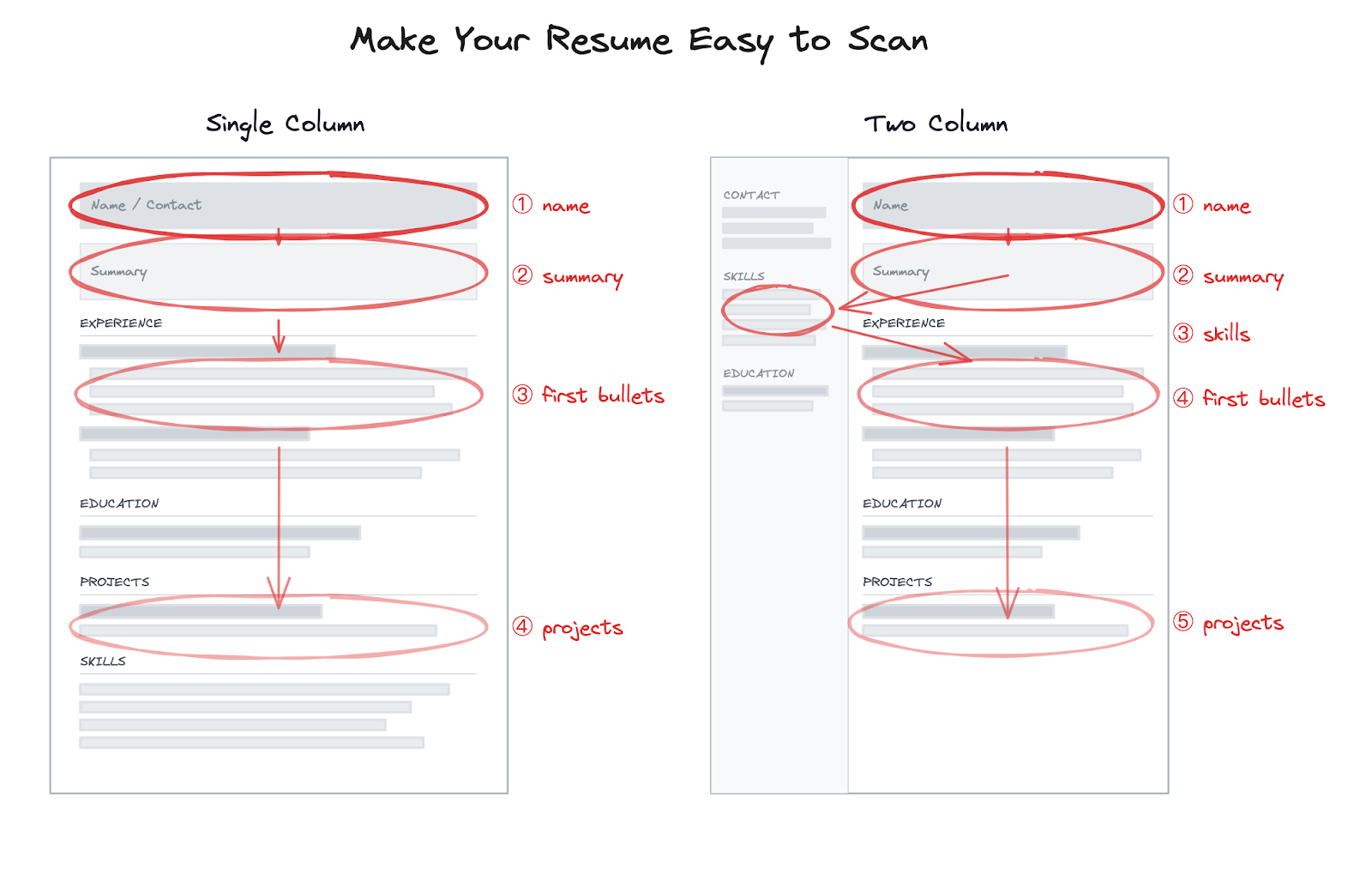
Use simple formatting. Avoid overly creative designs. Distribute it as a PDF that exports cleanly to text. You can test this by uploading to Google Docs—if formatting breaks, the ATS may misread it too.
Keep it to one page. Admittedly, part of this is convention, but having everything on one page makes it easy for your readers to review. It’s like having the key elements “above the fold” on a product page. Here are some space-saving tips:
Adjust margins, even all the way down to 1/2” on every side.
Think about what you can fit on one line, such as the company name, title, years.
Older or shorter experiences can sometimes be summarized in one line instead of a series of bullets. The farther the experience is down your resume, the less likely a reader is to actually read it, so feel free to reduce fidelity for those roles.
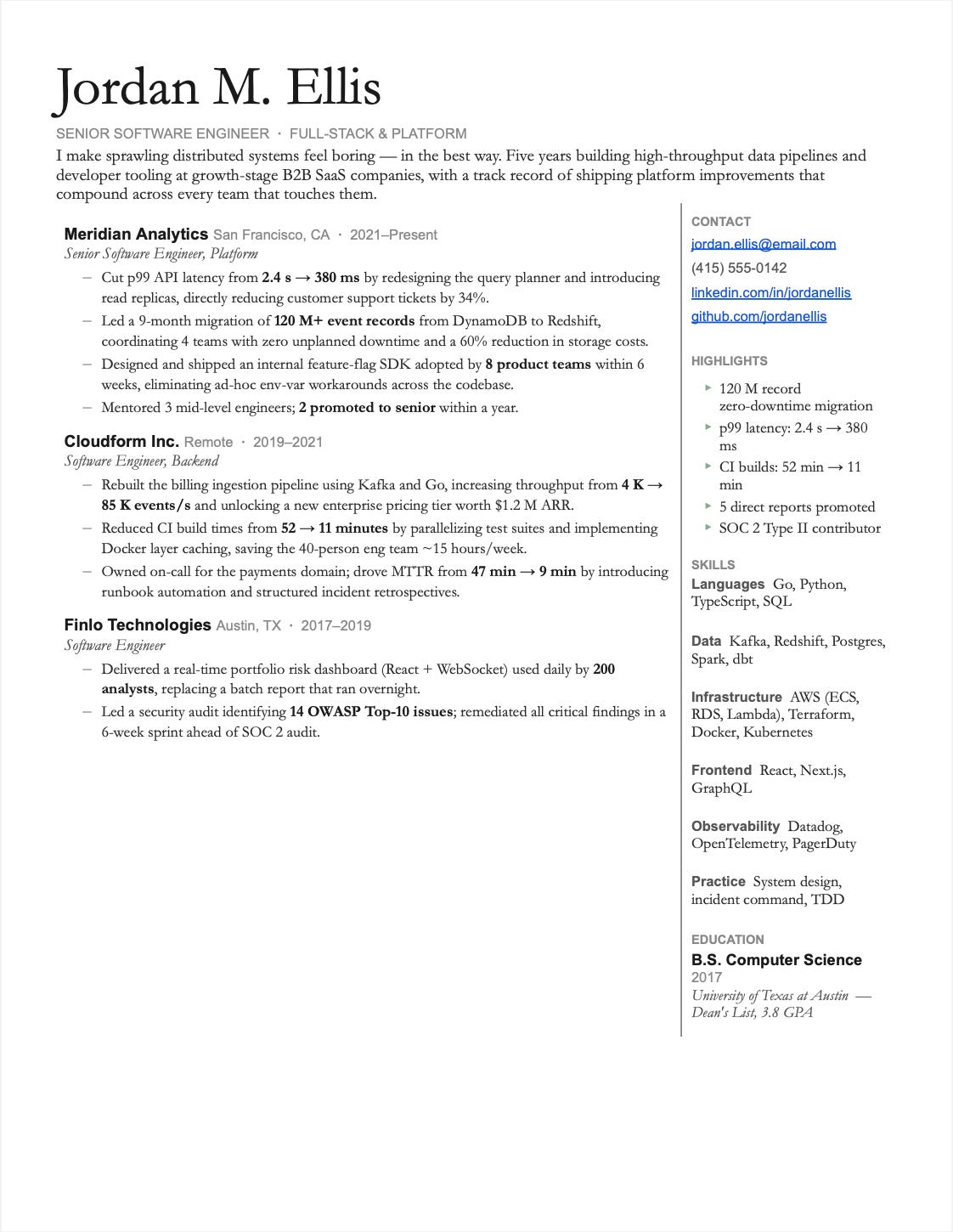
Consider a two-column format, with the lesser-read parts like contact information, skills, and education in a smaller, side column.
Use formatting to guide the eye. Sub-bullets, bolding, and visual hierarchy. If every bullet looks equally weighted, eyes glaze over.
Don’t overthink templates. You’re not going to get hired because of your amazing resume template. Don’t spend too much energy on this. Find something that matches the principles here and then put your energy into the content.
Suggested Templates
I almost didn’t include templates at all, since there are so many good ones and the final formatting choices don’t matter that much. But how can this newsletter about resumes be complete without a couple of resume templates?
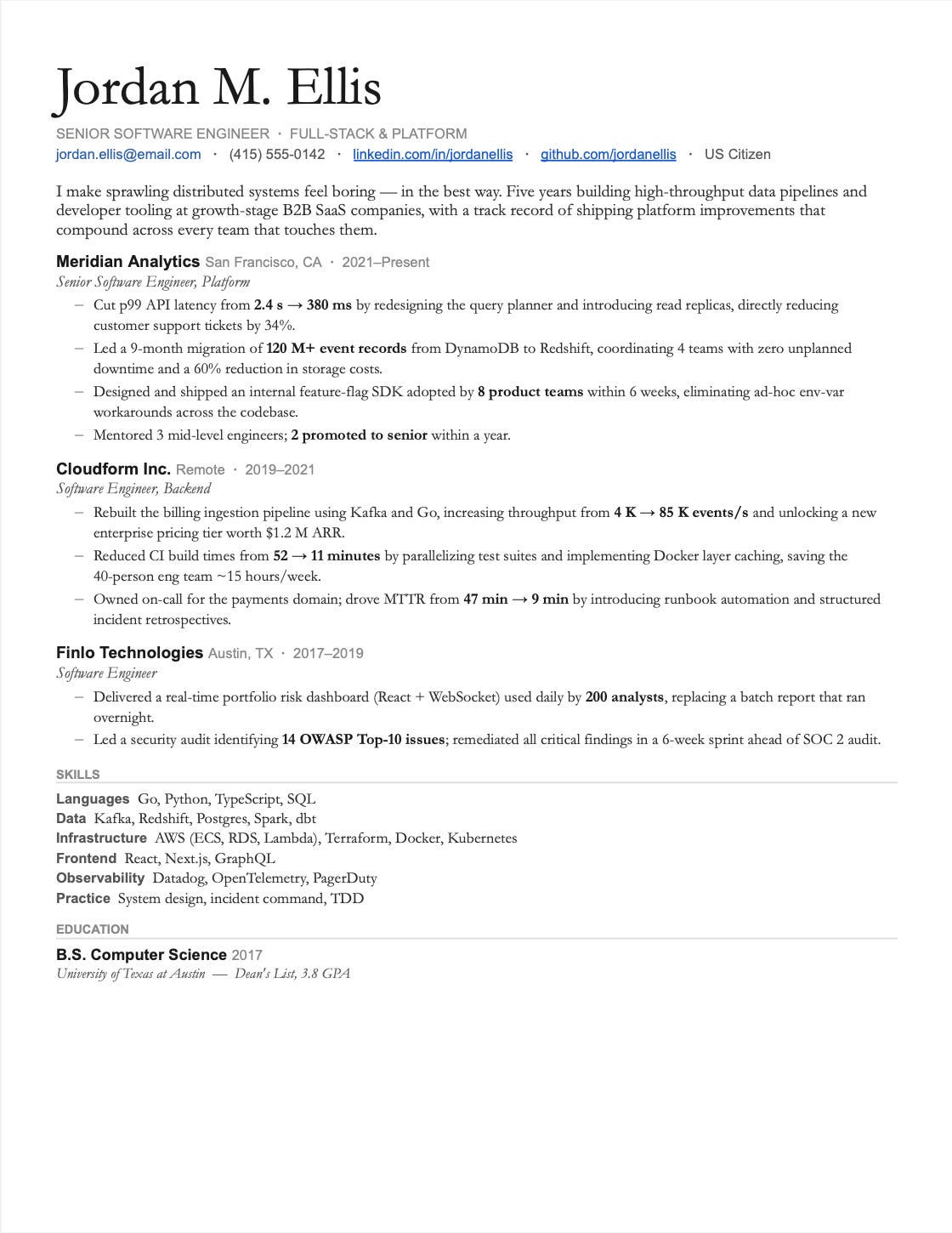
Here are a couple of templates that follow our guidelines: a single-column example and a two-column example. Notice how much more vertical space you save with the two-column format.
Making Your Experience Scannable
Make recognizable names visible. Make sure the eye jumps directly to household-name companies and high-impact projects. Recruiters notice brand recognition quickly, and readers only read the first part of each section.
Surface minimum qualifications. Many companies require recruiters to verify basic criteria, such as education or years of experience. Make this information prominent, as in the summary.
Prioritize your recent or flagship experience. Give more visual weight and spend more vertical space on the recent experience. Similarly, for experience at a name-brand company. Both of these will be the most-read content by reviewers. To accomplish this, compress older experience by removing bullets or shortening them.
Handling sticky situations: gaps and layoffs. Minimize these if you can. You don’t want to get screened out b/c of these before you can talk to someone:
Remove the month indicators on roles that hide an intra-year gap.
If you were recently let go, don’t update the current role with an end date yet. You can probably get away with this for 6-12 months since people expect resumes to be somewhat out of date.
If you have recent stints at startups that folded after a year, add a brief one-liner explaining what happened. Otherwise, reviewers may assume it reflects on you.
At this point, you know what to write and how to format it.
But there are a lot of common mistakes I see in resumes. The good news is they’re fixable in five minutes.
Part 4: Common Mistakes & What to Avoid
Writing resumes can be tricky, so let’s consider some common advice I give coaching clients when we’re talking about resumes…
Common Resume Mistakes
Too many buzzwords. “Results-driven,” “synergy,” “leverage” all mean nothing really. If you can swap your bullet with any other candidate’s and it still makes sense, it’s too generic.
Zero impact. Describing activities without outcomes. “Worked on the payments team” tells me nothing. What shipped? What changed because you were there?
Hard-to-read templates. Fancy designs with unusual typefaces, lots of white space, etc., that prioritize aesthetics over scannability are pretty risky unless you’re applying to a design-heavy role. A reader should be able to make a decision about your resume in about 3 seconds.
Irrelevant information. Remove that summer lifeguarding job from 2015 when you’re a senior engineer in 2026. Every line that doesn’t serve the reader is a line they might stop reading at.
Wall of text. If I can’t immediately see where the key information is and there‘s no hierarchy, no bolding, and no visual breaks, then I just get overwhelmed and close your profile.
What NOT to Include
Unnecessary personal info. Age, photo (in the US), full address. These create opportunities for bias and waste space.
Irrelevant jobs. Unless they demonstrate transferable skills or fill a gap, cut them. Nobody hiring a backend engineer cares about your retail experience from a decade ago.
Social media links. Exception: LinkedIn. Your Twitter, Instagram, or TikTok is irrelevant noise unless you’re applying to a social media company and they showcase relevant work.
References available upon request. Everyone assumes this. It’s a filler.
Hobbies and interests. Unless directly relevant (you’re applying to a gaming company and list game development as a hobby), these just take up space.
ATS tricks. Don’t try things like packing your resume with white text to rock the ATS layer. Recruiters and engineers who write ATS systems know about these tricks and despise them.
Closing Thoughts
Your resume is never done.
That might sound exhausting, but it’s actually liberating. You don’t need to craft the perfect resume before you start applying. You need a good enough resume that you improve over time.
Treat your resume like a product. We started this newsletter with that idea, and it’s worth restating here. Products ship, get feedback, and iterate; your resume should too. If an interviewer or recruiter asks you about something on your resume, consider adding it. Did you bomb a question about an accomplishment you listed? Either cut it or prepare better.
Get human feedback early and often. Have friends, mentors, or peers review your resume. If you can, get feedback from someone who’s actually hired engineers.
Iterate ruthlessly. When I’ve worked with coaching clients on their resumes, it usually takes 3-4 revisions before it’s good.
The takeaway: Your resume has four readers—machines, recruiters, interviewers, and hiring managers—and each one needs something different. Build for all of them. Make it easy to scan, with the information each persona needs. Quantify your impact. Make it scannable. And then iterate.
Now go get that interview.
👋 I’d like to thank Austen for writing this newsletter!
Also, subscribe to his free newsletter, Mastering Behavioral Interviews, and check out his book by the same name.
It will help you prepare for the interview round you’re underinvesting in, the one that separates Senior engineers from Staff and above. He’s got a lot of practical advice similar to what he shared in this post.
Remember, you can claim 20% off Premium Access to his interview prep content with code SDN26, but only for a few days!
If you find this newsletter valuable, share it with a friend, and subscribe if you haven’t already. There are group discounts, gift options, and referral rewards available.

Want to reach 200K+ tech professionals at scale? 📰
If your company wants to reach 200K+ tech professionals, advertise with me.
Thank you for supporting this newsletter.
You are now 210,001+ readers strong, very close to 210k. Let’s try to get 211k readers by 17 April. Consider sharing this post with your friends and get rewards.
Y’all are the best.

This is a really strong piece very clear, practical, and honestly closer to product thinking than traditional resume advice.
The idea of a resume as a “landing page with four users” is especially useful. It explains why most resumes fail: people optimize for themselves, not for each reader’s decision-making speed.
The biggest takeaway for me is that clarity beats cleverness at every stage: machines, recruiters, and hiring managers all reward signal, not storytelling fluff.
Also like the reminder that impact > activity. That alone fixes most resumes.
Hi Neo, fantastic post! Will share with my students :)