



Share this post & I’ll send you some rewards for the referrals.
The following is the third of a premium 3-part1 newsletter series… where everything comes together for mobile system design: architecture, how the platform behaves, and what happens after you ship.
On with part 3 of the newsletter:
===
In this newsletter, we’ll learn 14 concepts that shape how production apps are built and operated:
Modular Architecture/Feature-Based Modules,
Backend for Frontend (BFF) for Mobile,
App Versioning & Backward Compatibility,
Feature Flags & Remote Configuration,
Deep Linking for Navigation & Growth,
Navigation & Screen Flow Architecture,
Permissions Model,
Accessibility (a11y),
Localisation & Internationalisation (i18n),
Graceful Degradation,
Geo Location Usage,
Crash Reporting & Performance Monitoring,
Crash-Free Rate as an SLI,
Staged Rollouts & Safe Releases.
For each concept, you’ll learn:
What it is and how it works
Real-world example
Tradeoffs
Why it matters for mobile
Onward.
Do you want to become an AI Engineer in 2026?

AI Engineer is LinkedIn’s #1 fastest-growing job, with many roles paying $180K–$350K.
The challenge isn’t learning AI tools.
It’s learning how to design, build, and deploy AI systems that work in production.
That’s why Saras AI Institute created the Advanced AI Engineer Certificate.
Co-designed with AI leaders from Microsoft (Eduardo Kassner, Chief Data & AI Officer) and Google (Tomas Pfister, Head of AI Research @ Google Cloud).
In 5 months, you’ll build a portfolio of 4 real-world AI projects, including agentic workflows, RAG systems, LLM applications, and production-ready AI solutions.
Turn your AI product idea into a production-ready solution with hands-on mentorship from industry experts.
Weekly live masterclasses with AI practitioners
100% online, designed for working engineers
Engineers from Microsoft, Apple, AWS, and other leading technology companies have already joined.
By graduation, you’ll have a GitHub portfolio that demonstrates your ability to design, build, and lead AI initiatives—not just talk about them.
Cohort starts August 1.
(Thanks to Saras AI Institute for partnering on this post.)
I want to reintroduce Shefali Jangid as a guest author.

She’s a web developer, technical writer, and content creator with a love for frontend architecture and building things that scale.
Check out her work and socials:
You’ll often find her writing about web development, sharing UI tips, and building tools that make developers’ lives easier.
Architecture
This section explains different architectural patterns and design approaches that help build apps that are modular, easier to maintain, and can grow without becoming difficult to update.
Let’s dive in!
40. Modular Architecture/Feature-Based Modules
As mobile apps grow, the codebase can become very large and difficult to manage.
If everything is written in one BIG project, it becomes harder to understand the code, make changes, and test new features.
To solve this problem, you can use modular architecture.
In modular architecture, app is divided into separate modules, where each module represents a specific feature of the app.
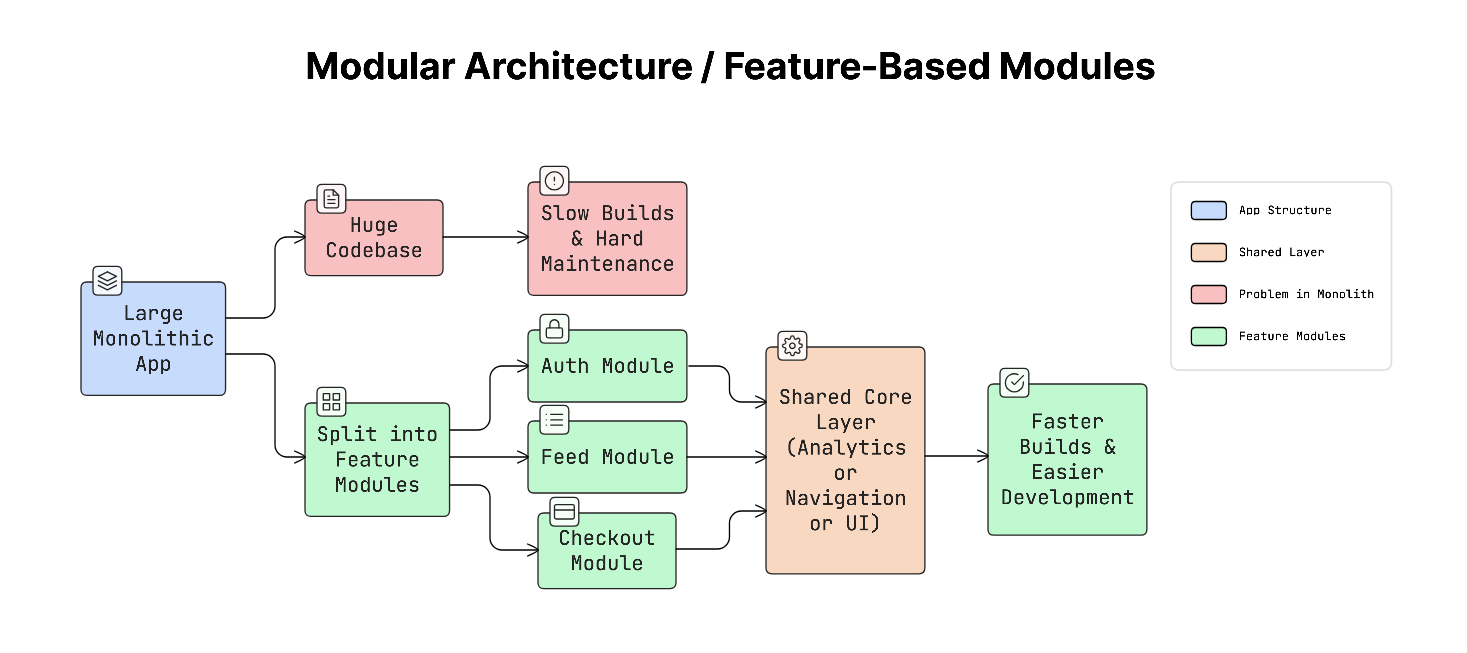
An app could have modules like:
Auth module: Handles login and signup.
Feed module: Shows posts or content.
Checkout module: Handles payments and orders.
Each module contains its own code and exposes only the parts other modules need.
This keeps features separate and prevents different parts of the app from interfering with each other.
This structure makes the app easier to understand and maintain.
Why It Matters
In a very large app, building the entire project can take a long time…
If a single codebase contains hundreds of thousands of lines of code, compiling the app could take several minutes.
With modular architecture, only the module that changed needs to be rebuilt. This makes builds much faster and helps you work more efficiently.
Real-World Example
Airbnb, Uber, and Spotify use modular architecture in their mobile apps.
They adopted this approach to accelerate development, improve code organization, and allow different teams to work on separate features simultaneously.
Trade-offs
Modular architecture also introduces some challenges.
You need to carefully design the boundaries between modules and define clear interfaces for how modules communicate with each other. Some shared functionality, such as analytics, navigation, or design systems, may need to live in a common core module that all features can use.
It can also be difficult to convert an existing large app into a modular structure after it has already grown.
Practical Tip
It’s useful to visualize how modules depend on each other.
Tools like dependency graph visualizers can help teams see how modules are connected and identify problems such as circular dependencies, where two modules depend on each other. This usually means the architecture needs improvement.
While modular architecture improves how the app code is organized, mobile apps also depend heavily on backend systems designed specifically for them.
41. Backend for Frontend (BFF) for Mobile
Mobile apps often need data from “many” different backend services.
A single screen requires data from a user service, a recommendation service, and a content service.
If the mobile app directly calls all these services, it would need to make several network requests and combine the results on the device. This can SLOW down the app and increase battery usage.
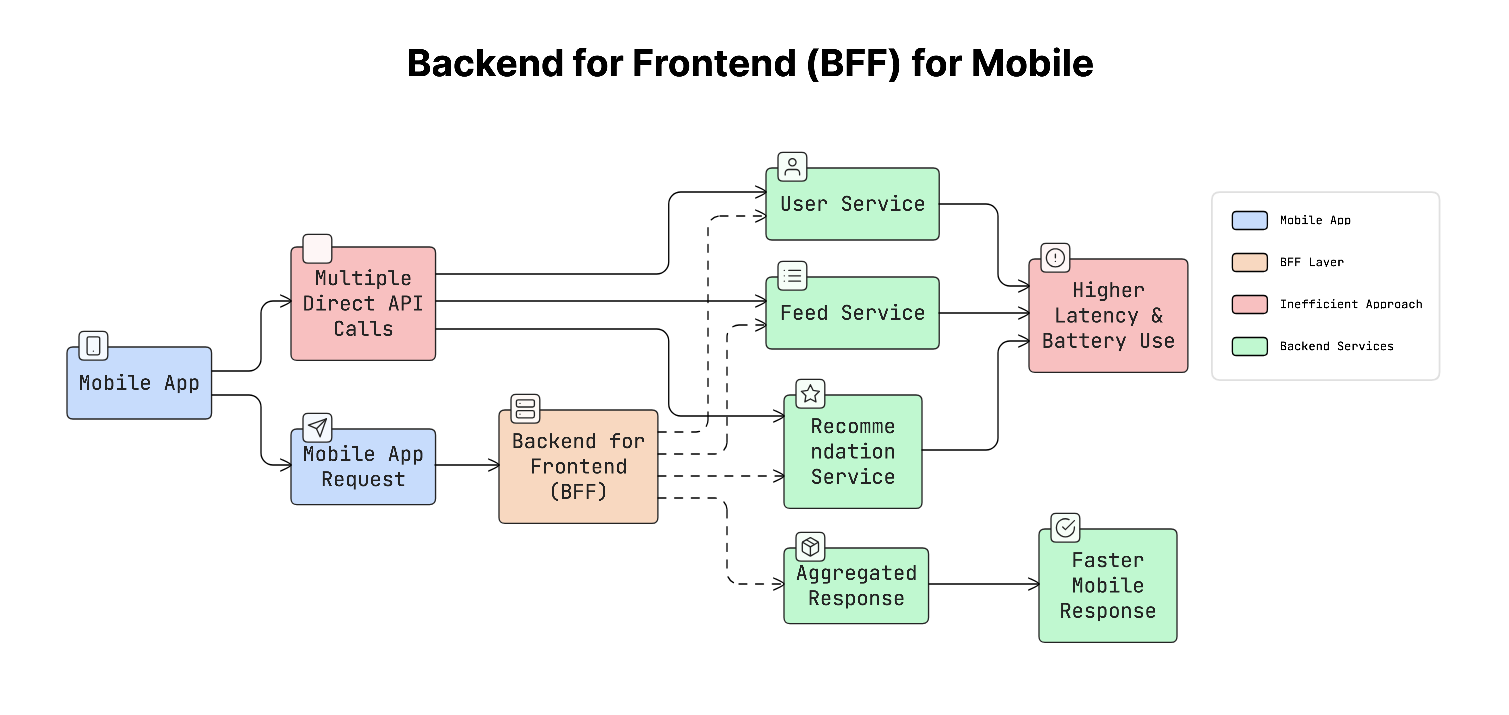
To solve this, use a technique called Backend for Frontend (BFF).
A BFF2 is a special backend layer designed specifically for a specific type of client, such as a mobile app.
Instead of the mobile app calling many services, it sends one request to the BFF. The BFF then communicates with the required services, gathers the data, combines it, and sends back a single optimized response.
This makes the mobile app simpler and reduces the number of network requests.
Why It Matters
Every network request adds delay & consumes battery.
If a mobile screen requires data from five services, the app will make five separate API calls. This increases latency and slows down the user experience.
With a BFF, the mobile app only makes one request, and the server handles the rest. This improves performance and keeps the app more efficient.
Real-World Example
Netflix uses the BFF approach to serve different types of clients.
They maintain separate backend layers for iOS apps, Android apps, TVs, and web browsers.
Each BFF returns data formatted specifically for that device.
A mobile BFF sends smaller responses optimized for mobile screens, while the TV version may include higher-resolution metadata.
Trade-offs
Using a BFF also introduces an additional service that needs to be maintained.
It is important BFF does not become overly complex. Its main responsibility should be to aggregate and transform data for the client. Core business logic should remain in the backend services that actually own the data.
As backend APIs evolve, another challenge appears: users often run older versions of the app...
42. App Versioning & Backward Compatibility
When mobile apps are released, users do NOT always update them immediately.
Some people update right away, but others may continue using an older version of the app for weeks or even months.
So the backend system must support many versions of the app simultaneously.
i.e., server should continue to work with older app versions while also supporting the latest version.
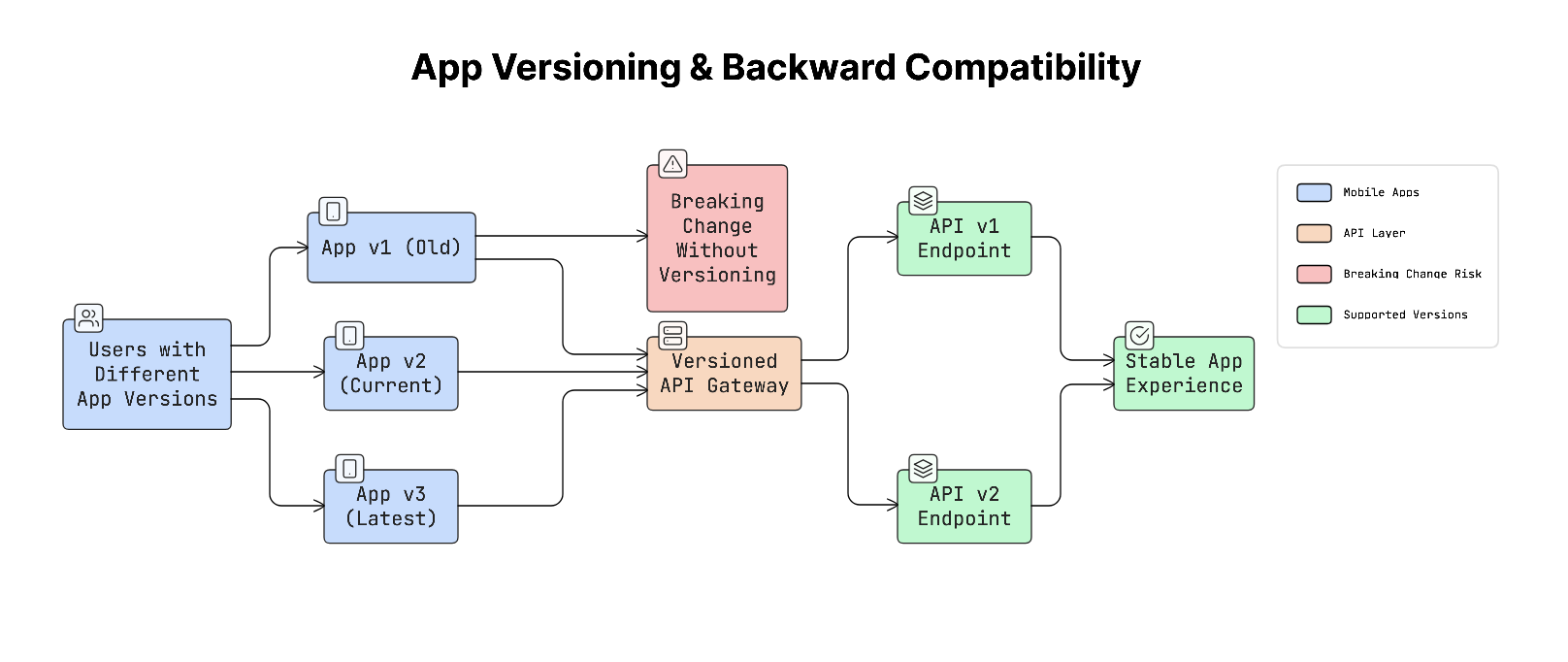
To manage this, use versioning:
Versioning assigns each API, or app release, a version number so the server knows how to communicate with different app versions.
Check these API endpoints:
/v1/users
/v2/users
Each version can return data in a format that matches what that specific app version expects.
Why It Matters
If the backend changes something in the API without considering older app versions, older apps will suddenly stop working…
If the server removes a field that an older app depends on, the app could crash or show broken screens.
Unlike websites, mobile apps cannot be updated instantly for every user. This is why systems must remain backward compatible.
Real-World Example
Stripe uses API versioning to maintain compatibility.
When a client makes an API request, it specifies which API version it expects. Even if Stripe changes the API later, older clients still receive responses in the format they were built for.
This allows the platform to evolve without breaking existing apps.
Trade-offs
Supporting many versions of an API requires extra maintenance.
You need to keep older fields or response formats in the system for some time.
A common strategy used to manage this safely is called the Expand–Contract pattern:
First, add new fields or features without removing the old ones.
Gradually update apps to use the new fields.
Once all users have updated, remove the old fields.
This approach prevents breaking older versions while still allowing the system to evolve.
Even when APIs remain backward compatible, you still need safe ways to release new features…
43. Feature Flags & Remote Configuration
When you add a new feature to a mobile app, you must release a new version of the app and wait for users to update it.
This process can take time because apps must go through the app store review, and not all users update their apps immediately.
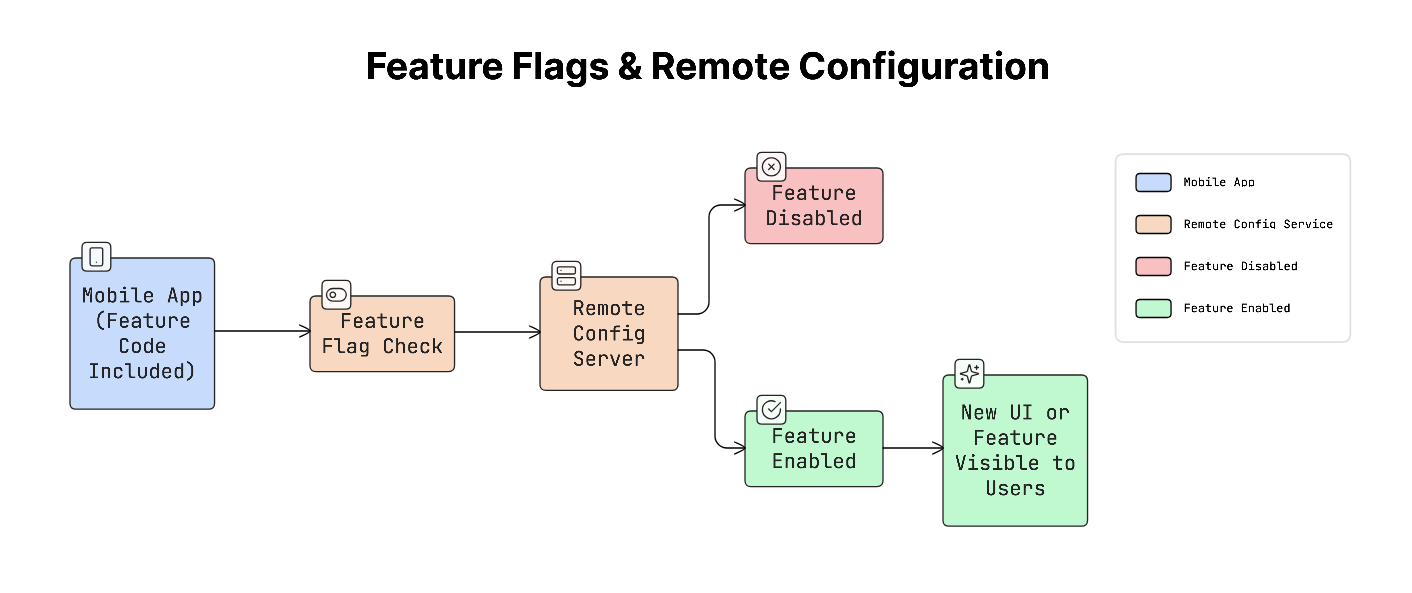
Feature flags solve this problem:
A feature flag is a switch that lets you remotely enable or disable a feature without releasing a new version of the app.
The feature’s code is already included in the app, but it stays disabled by default. You can later enable it from a dashboard for specific users or for everyone.
This allows you to control when features are released.
Remote configuration extends this idea even further. It allows you to change certain app behaviors remotely, such as:
UI text or labels
Feature limits
Layouts or design elements
Experiment settings
Tools such as Firebase Remote Config are commonly used for this.
Why It Matters
Submitting an app update to the app store can take up to 3 days for approval.
If a new feature has a bug and has already been released to millions of users, fixing it through another app update can take time.
With feature flags, you can disable the feature instantly from a dashboard without waiting for another release.
This makes apps safer and easier to manage in production.
Real-World Example
Many companies use feature flags to run A/B testing3 experiments.
Airbnb tests two different versions of a feature:
One group of users sees the original version.
Another group sees a new version.
Feature flags control which users see which version, allowing the company to measure which design performs better.
Trade-offs
While feature flags are powerful, they can also create complexity.
If too many flags are added and never removed, the codebase can become cluttered with outdated flags. To avoid this, you should define a lifecycle policy where every feature flag has a purpose and an expiry date. Once the feature becomes permanent, the flag should be removed from the code.
Feature flags help control when features are released, but navigation systems determine how users actually reach those features inside the app.
Reminder: this is a teaser of the subscriber-only newsletter, exclusive to my golden members.
When you upgrade, you’ll get:
High-level architecture of real-world systems.
Deep dive into how popular real-world systems work.
How real-world systems handle scale, reliability, and performance.
And much more!
Ready for the next technique?