

Share this letter & I’ll send you some rewards for the referrals.
System design can feel overwhelming, but a small set of patterns carries most of the weight in real-world systems.
In this newsletter, I’ll cover the 10 most important system design patterns to solve common problems.
For each, I’ll share:
What problem it solves,
How it works,
Tradeoffs.
Let’s start!
§
Superblocks just launched something big for enterprise AI (Partner)

Until now, CIOs and CISOs had two choices:
Block vibe coding completely.
Or open the floodgates and risk sensitive company data.
Neither is a good option!
INTRODUCING SUPERBLOCKS 3.0
The secure, governed way to vibe code enterprise software…
Business teams can now build production-ready internal apps from a single prompt.
Unlike consumer tools such as Replit & Lovable, every app runs inside your own AWS account and VPC, so your data “never” leaves your private cloud.
Instead of relying on one big AI agent, Superblocks orchestrates specialized agents across the build, routes simpler work to lower-cost open-source models, and cuts token costs by up to 30%.
Before anything ships, a swarm of security agents scans every deployment for business logic flaws, chained authentication bypasses, and supply-chain vulnerabilities.
Company login, role-based permissions, audit logs, encryption, and governance are enforced automatically across every app.
So everyone builds and nothing ships ungoverned.
(Thanks to Superblocks for partnering on this letter.)
§
1. Caching
Imagine the “same” API route gets called a thousand times per second.
And each call hits the database for the result.
i.e., every read will:
access disk storage,
lock tables during reads,
consume connection pool slots.
But all this work just to return data that has NOT changed since the last request…
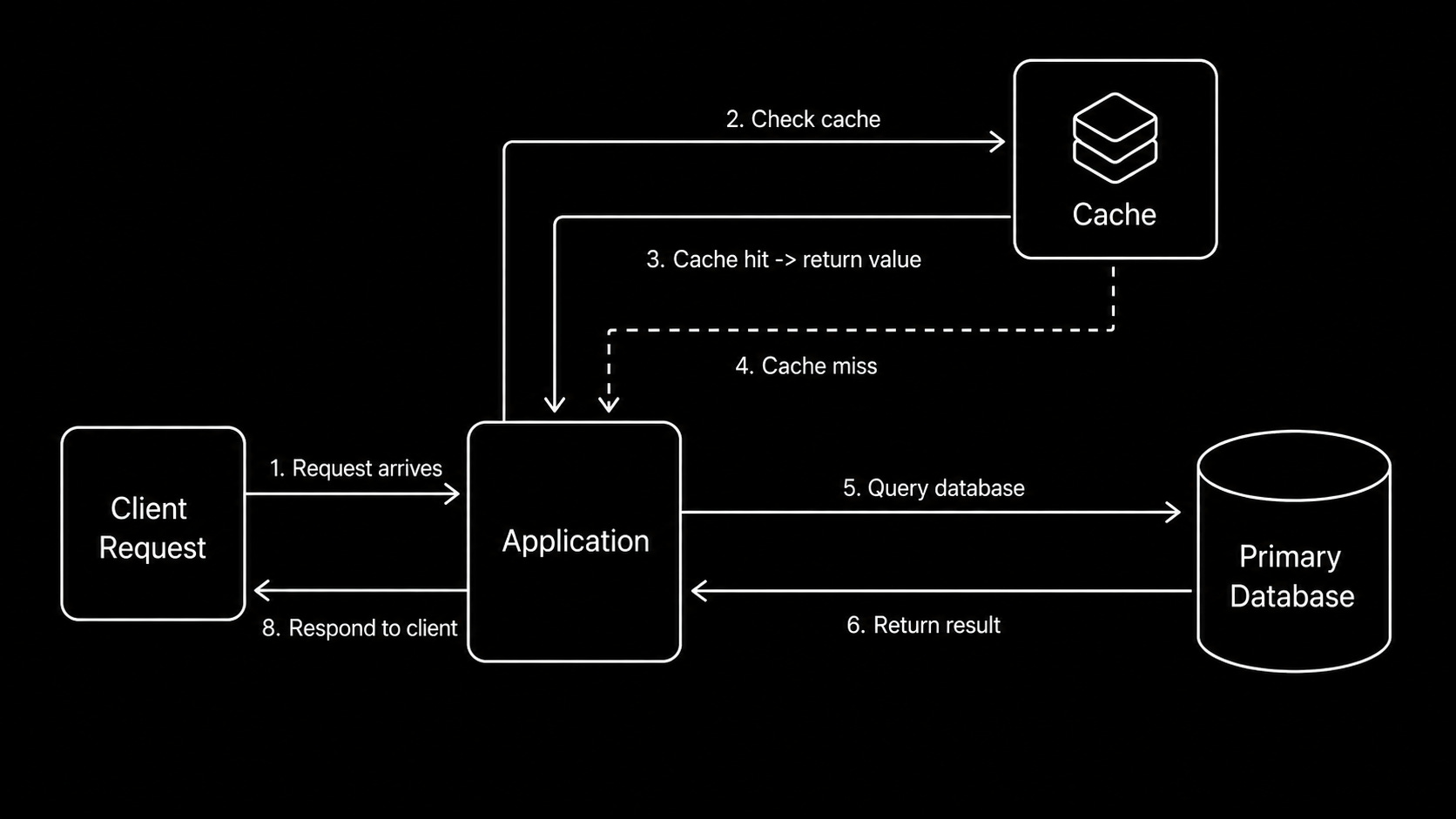
You can use in-memory caching to solve this problem by storing frequently accessed data in memory.
Your app checks the “cache” first before querying the database. Cache hits return data from memory, while cache misses query the database & then store the result for later.
Advantages
You get extremely fast response times because memory access is 100x faster than disk.
Plus the database handles fewer requests since only cache misses reach it. Also, this lets you scale “read” capacity without adding more database replicas.
Disadvantages
But cache invalidation becomes difficult because it's hard to know exactly when cached data must be removed/refreshed.
Also you need to keep the cache & database in “sync” to avoid stale data. Plus, memory is significantly more expensive than disk storage.
This increases infrastructure costs.
Best practices
So cache only the data that can tolerate some staleness, such as product catalogs & user profiles.
Besides, set an appropriate Time-to-Live (TTL) based on how often the data changes. Also use the cache-aside pattern1 to keep the cache populated only when data is requested.
Caching gives you fast reads for data that doesn’t change often.
But it only helps when the same data gets requested over & over. So what about systems where users read “different” data?
§
2. Scaling reads
Your query performance looks good,,, but your database is “struggling”.
The problem is NOT slow queries; instead, it’s the volume. Thousands of users hit your API at the same time…
Every query runs fast, but every request still:
Uses CPU on the database server
Consumes a database connection
Waits in line when the server gets overloaded
To overcome slow reads, you can add indexes and tune query execution plans.
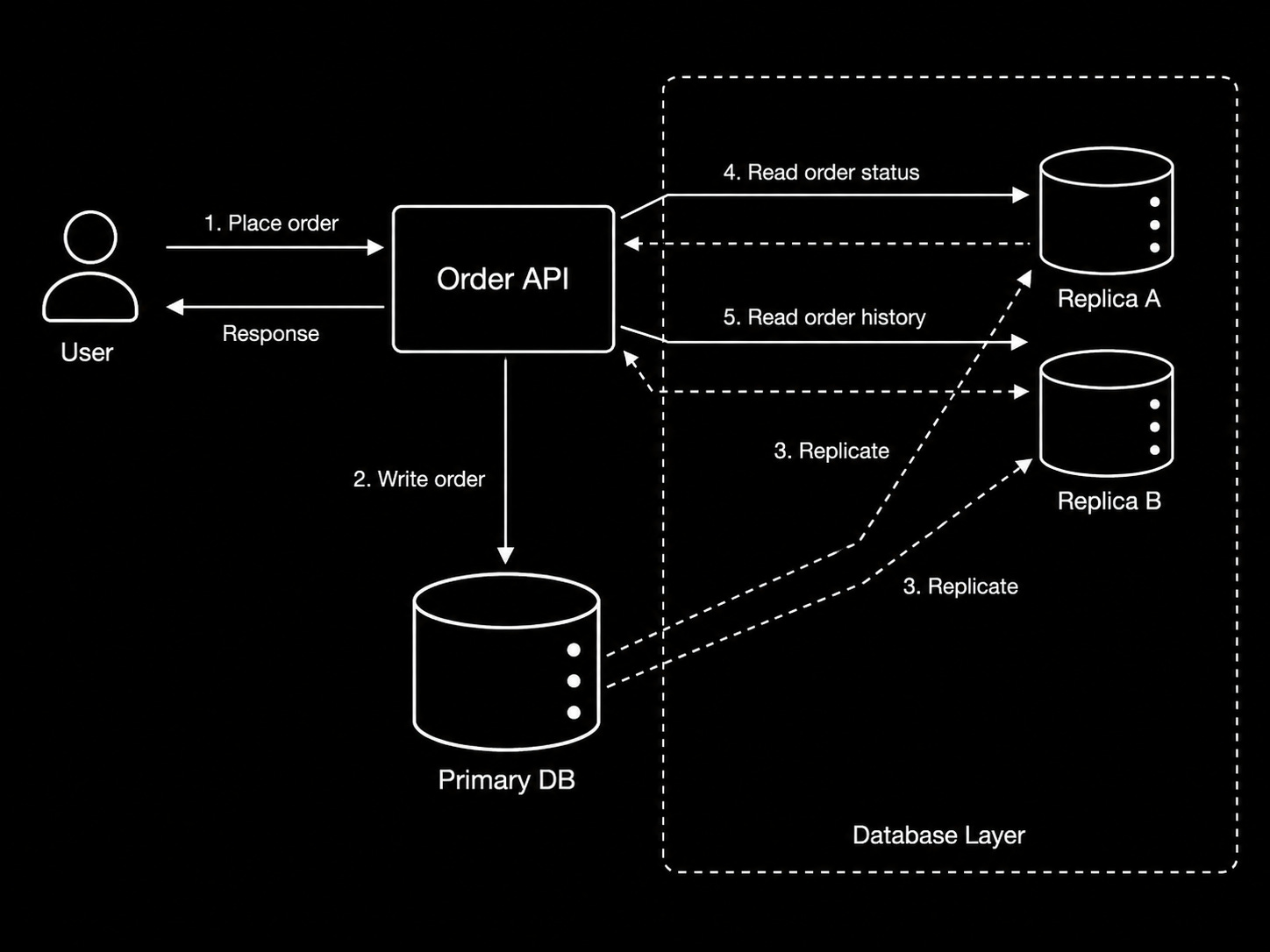
This lets you get the most out of your existing servers. Then, when your servers reach their limits, add read replicas…
Your application sends writes to the primary database and routes reads to replicas…While the replicas stay synchronized through replication.
Advantages
You can scale reads simply by adding more replicas instead of upgrading a single database server.
Also, you can reduce latency by placing replicas closer to your users. Plus distributing reads across many servers prevents one database from becoming a bottleneck.
Disadvantages
Yet replication is NOT instant; replicas need time to copy changes from the primary.
Also, read-after-write requests may receive stale data if they hit a replica too soon. Plus, running replicas adds operational complexity because they must be monitored, maintained, and kept healthy.
Best practices
So optimize your existing database before adding more infrastructure.
Also, use read replicas only when eventually consistent reads are acceptable. Besides, route critical read-after-write operations to the primary database to guarantee fresh data.
Read replicas are great for high-read traffic applications where some stale data is acceptable. But how do you manage high-write traffic?
§
3. Scaling writes
Your database handles every write,,, but eventually:
You’ve already optimized inserts & added batching,
You cannot keep upgrading to a larger database instance,
CPU and IOPS2 (Input/Output Operations Per Second) has reached their limits.
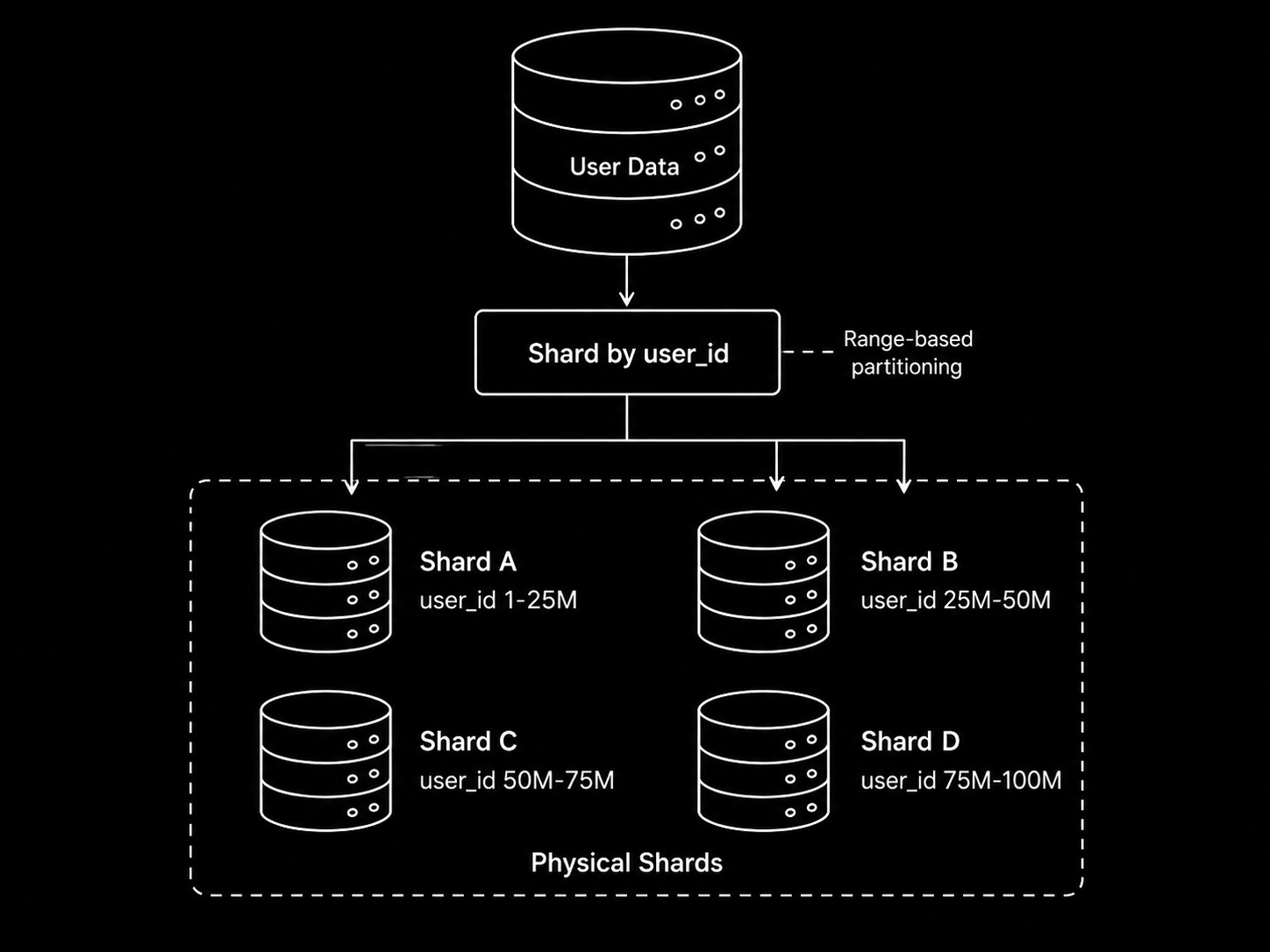
You can solve this through sharding.
i.e., distribute writes across many database nodes…
You choose a partition key, and a hash function routes each record to a specific shard. Think of sharding like splitting a large phone book by region, where every region has its own book.
Yet each shard stores only a “subset” of the entire data…
So it’s important to choose a good partition key:
User IDs: many of them, evenly distributed
Geographic regions: related data stays together for better local queries
Time windows: great for time-series data where older shards become read-only
This lets you scale writes...
You can add shards to increase capacity & reduce latency by placing shards closer to users.
Advantages
You can scale write capacity simply by adding more shards instead of relying on a single database server.
Plus, each shard handles only part of the total traffic, which reduces the load on individual machines. Also, placing shards closer to users can reduce write latency.
Disadvantages
But resharding is difficult because moving data between shards requires downtime and/or complex migrations.
Also, changing your partition key later requires relocating large amounts of data (this is expensive!). Plus, queries spanning many shards require extra coordination to combine the results.
Best practices
So choose partition keys with many distinct values to distribute traffic evenly.
Also monitor for hot partitions and rebalance shards if necessary. Besides, design your schema to minimize queries that must access many shards.
Sharding distributes writes across different machines. But what about distributing them across time?..
§
4. Message queues
Imagine your API receives a burst of 10,000 requests in one minute.
Each request triggers database writes. And this could make your system performance BAD. Some requests succeed, while others fail/time out!
Then the problems cascade:
One slow service blocks the entire request chain
Services must scale together even with different workloads
Retry logic makes it worse, as clients repeatedly hit the same overloaded endpoint
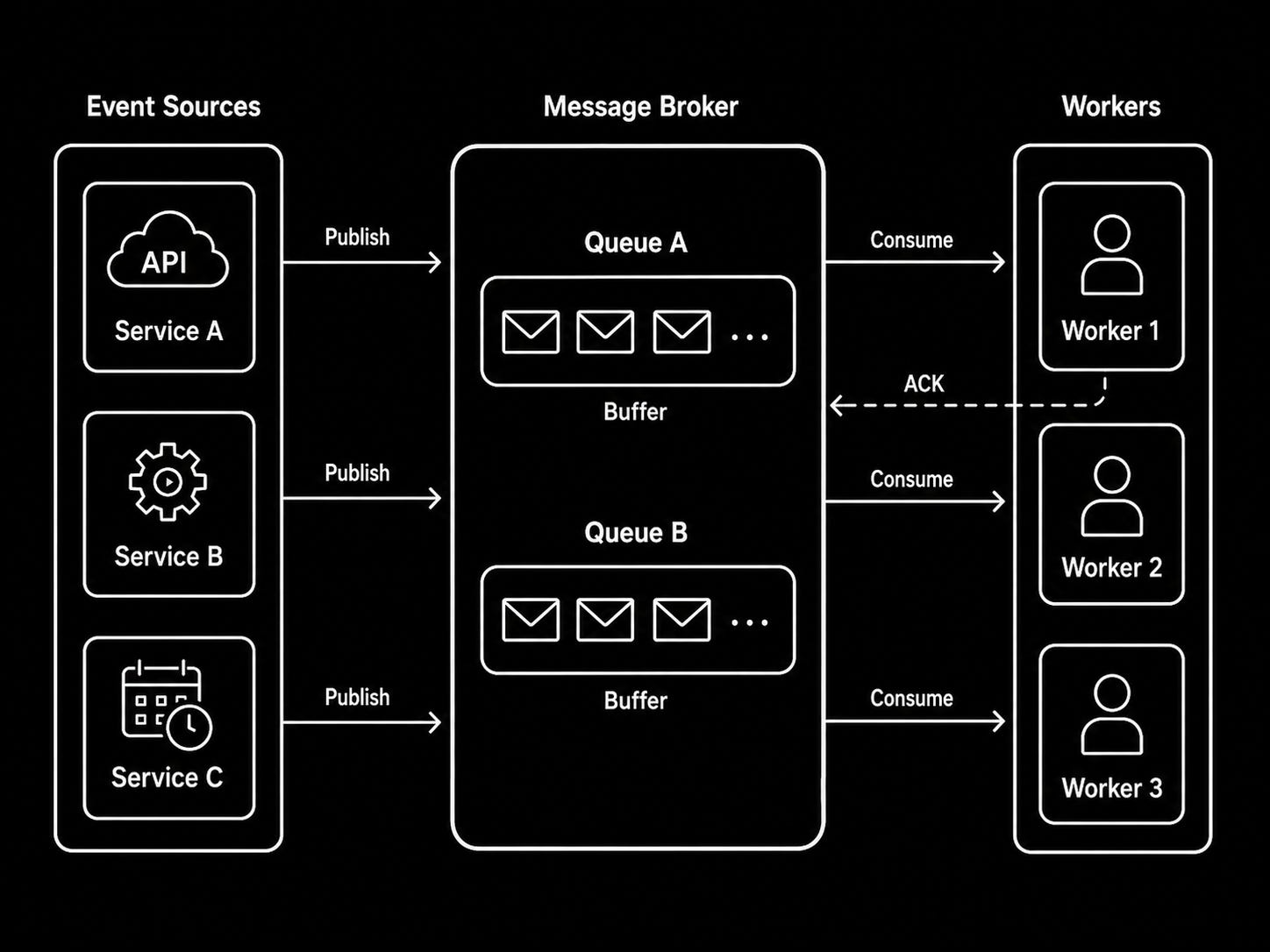
You can solve this problem using message queues such as Amazon SQS, RabbitMQ, or Kafka.
They buffer messages between services. So when one service slows down, it has less impact on the others.
Here’s how a message queue works:
Producers send messages to the queue
The queue stores messages until they’re ready to be processed
Consumers retrieve messages at their own pace, process them, & then acknowledge completion
So instead of processing requests immediately, your API places them in a message queue.
Background services then process the messages asynchronously…
Advantages
Message queues “absorb traffic spikes” because messages get stored until workers can process them.
Plus, they decouple services, so each one can scale independently. Besides they set the foundation for event-driven architectures where services communicate through events instead of direct API calls.
Disadvantages
But in asynchronous processing, clients do NOT immediately know whether a request has completed successfully.
Also, message queues add latency because work happens later instead of during the request. Plus, they introduce another piece of infrastructure that must be deployed, monitored & maintained.
Best practices
So make consumers idempotent3 because messages could be delivered more than once.
Also use dead letter queues4 to isolate failed messages. Besides, monitor queue depth because growing backlogs are often an early sign of system problems.
Message queues make asynchronous processing possible. But what does asynchronous processing actually look like from a user’s perspective?
§
Reminder: this is a teaser of the subscriber-only newsletter, exclusive to my golden members.
When you upgrade, you’ll get:
High-level architecture of real-world systems.
Deep dive into how popular real-world systems work.
How real-world systems handle scale, reliability, and performance.
(If this newsletter has helped you become a better software engineer, consider subscribing to support my work.)