



Share this post & I’ll send you some rewards for the referrals.
When people talk about Artificial Intelligence (AI), they often refer to models such as Generative Pre-trained Transformers (GPTs), Large Language Models (LLMs), and neural networks.
It sounds like magic, software that thinks…
But here’s the uncomfortable truth:
The biggest breakthroughs in AI are not coming from better models; they’re coming from better infrastructure.
If AI were only about the models, there would be no need for huge, warehouse-sized data centers packed with specialized hardware and powered by massive amounts of electricity.
So what’s actually going on inside those buildings?
To make sense of everything that follows, we need a simple mental model.
Let’s find out one layer at a time…
Onward.
Review the actual change, not the file list (Partner)

CodeRabbit Review reorganizes any pull request from a flat file list into a structured, layer-by-layer walkthrough - the logical reading order of the change, not the order your platform happens to sort it. Every range gets its own plain-language summary, with sequence diagrams, state machines, and ERDs generated inline wherever a visual earns its place.
Cohorts group related files and chunks so you review one idea at a time. Layers order them so foundational changes - data shapes, contracts - come before the code that depends on them. Code Peek lets you click any variable, function, class, or type to see its definition and usages without leaving the tab, while Semantic Diff view cuts past formatting noise to show what actually changed.
Open it straight from the Review Change Stack button in the PR Walkthrough. Navigate cohorts and layers from the keyboard, comment against exact line ranges, and submit native reviews, comments, and approvals post back to GitHub or GitLab right where your team expects them.
In the early access, available for free to everyone.
From the team that pioneered AI code reviews. 2M reviews every week. 6M repos. 15K customers.The review interface built for the way modern PRs are actually written.
>>> Review your next PR with CodeRabbit Review Today
(Thanks to CodeRabbit for partnering on this post.)
I’d like to introduce Ashish Prajapati.

He is an AI infrastructure specialist and technology educator who helps engineers understand the technologies powering modern AI.
With expertise spanning data centers, cloud computing, GPU infrastructure, Generative AI, and Agentic AI, he focuses on turning complex concepts into practical, real-world knowledge.
His training programs have reached over 39,000 learners worldwide, and through his free mentoring initiative, Become a Solutions Architect (BeSA), he has helped over 23,000 professionals accelerate their careers.
As AI adoption continues to grow, understanding the infrastructure behind AI systems is becoming a valuable skill for architects, engineers, and IT professionals.
For a limited time, this newsletter's readers can use code SYSTEM-DESIGN to get 25% off Ashish’s live NCA-AIIO bootcamp.
This intensive one-day workshop covers the fundamentals of NVIDIA AI infrastructure, GPU networking, accelerated computing, and AI operations, and prepares you for the NVIDIA-Certified Associate: AI Infrastructure and Operations (NCA-AIIO) certification.
Learn, Prepare, and Pass NCA-AIIO in a Day.
Here’s what you’ll find inside this newsletter:
The hidden architecture behind AI. Why models are only the visible tip of a much larger infrastructure stack.
The physics that limit AI growth. How power, cooling, and space shape every AI data center.
Why GPUs became the backbone of AI. The architectural advantages that made modern AI training possible.
The real bottlenecks in modern AI. Why memory, networking, and coordination determine performance at scale.
How thousands of GPUs work together as one system. The software, networking, and orchestration layers that enable large-scale AI.
Think of an AI Data Center as a Factory
Before we go deep, build this mental model; it will explain almost everything that follows:
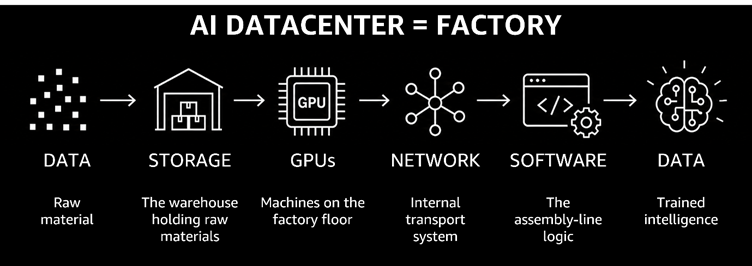
AI Data Center = Factory
Data = Raw material
Graphics Processing Units (GPUs) = Machines on the factory floor
Network = Internal transport system
Storage = Warehouse holding raw materials
Software = Assembly line logic
Output = Trained intelligence
Now imagine a car factory.
It doesn’t just need skilled workers; instead, it needs conveyors, warehouses, and power. Remove any of those, and production stops.
An AI data center works the same way…
AI infrastructure processes vast amounts of data using mathematical operations, similar to how a factory transforms raw materials into finished goods.
Remove any one ingredient, and the entire system stalls…
Once you see AI as a factory, the next question becomes obvious: what limits how fast this factory can run?
First Problem: Physics
Before AI is a software problem, it’s a physics problem…
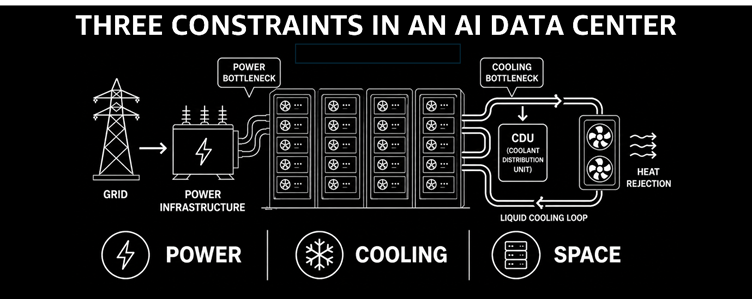
Here are three hard physical constraints that shape every design decision in an AI data center:
1. Power
Modern AI workloads rely on high-density GPUs that consume enormous amounts of electricity.
A single server rack of GPUs can draw 80-120 kilowatts. i.e., roughly equivalent to 40 homes running at full load simultaneously. Yet you can’t just add more GPUs forever.
You’re limited by how much electricity your facility can physically receive and distribute.
2. Cooling
More power means more heat, and heat is the enemy…
Here’s what happens if you don’t remove it fast enough:
Hardware fails prematurely,
Performance throttles back to avoid damage,
In extreme cases, systems shut down entirely.
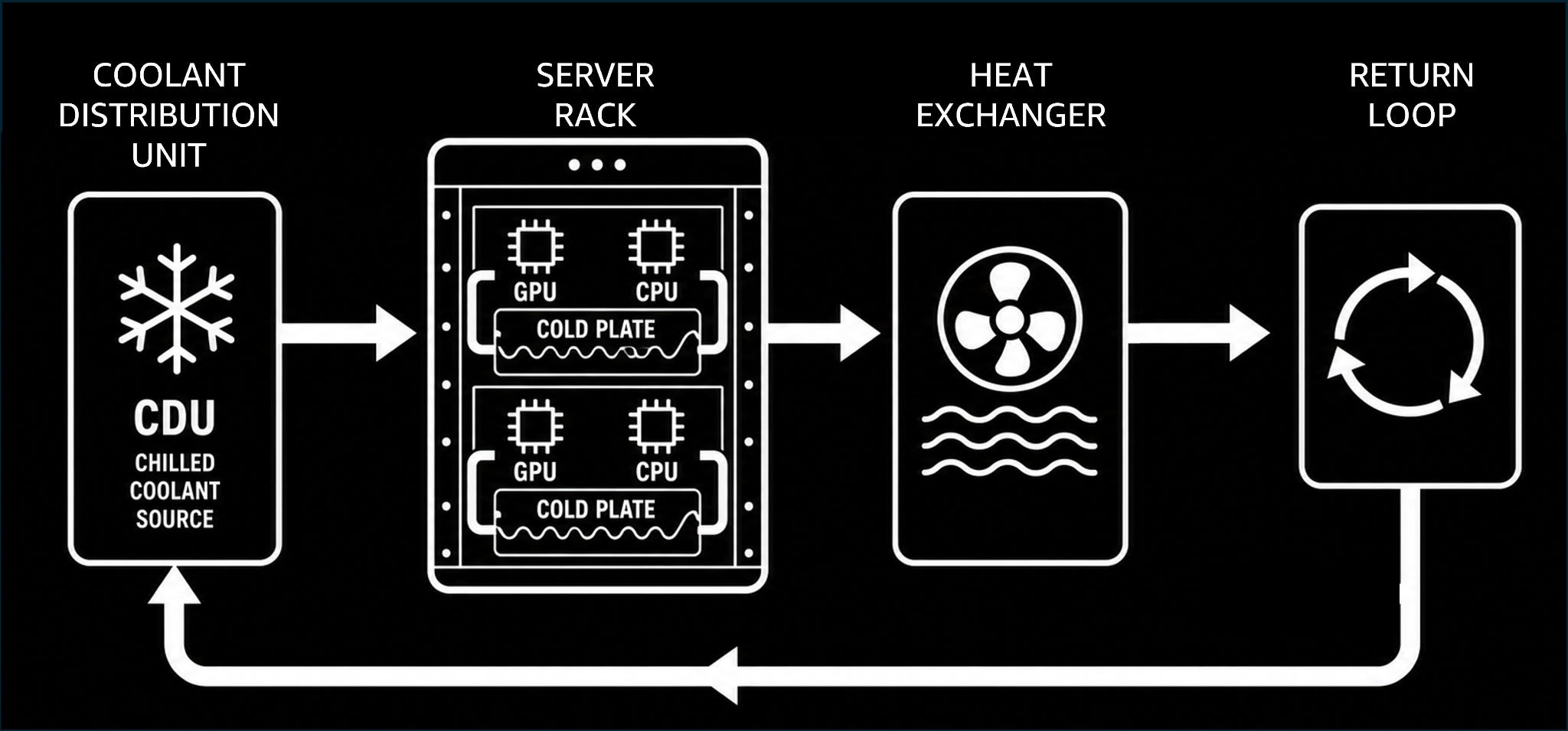
To manage the intense heat generated by AI workloads, modern data centers are increasingly adopting liquid cooling, which is far more effective than conventional air cooling.
Coolant is circulated through cold plates attached directly to GPUs and CPUs, absorbing heat much more efficiently than air. The warmed liquid is then pumped to heat exchangers, where the heat is removed before the coolant is recirculated.
This approach enables higher rack densities, lower cooling power consumption, and more consistent performance for large-scale AI training and inference1 workloads.
3. Space
Even if you had unlimited chips and unlimited power, you still need racks to mount them and floor space to put those racks.
Scaling AI is not just software--it’s real estate, energy infrastructure, and thermodynamics combined.
Takeaway
A data center is, at its core, a power plant combined with a massive, precisely controlled air-conditioning system. Every engineering decision flows from managing this reality.
After dealing with the physical challenges, the next question is: how we perform the computation?
Compute: Why GPUs Took Over
To understand why GPUs dominate AI, picture a very simple task…
Imagine you have 1,000 fence posts to paint:
Option A: One expert painter, working post by post. Slow, but the painter can handle any unexpected situation--a broken post, a curved section.
Option B: 1,000 workers, each painting exactly one post simultaneously. Extremely fast, but each worker knows only one simple task.
That’s the difference between a CPU and a GPU.
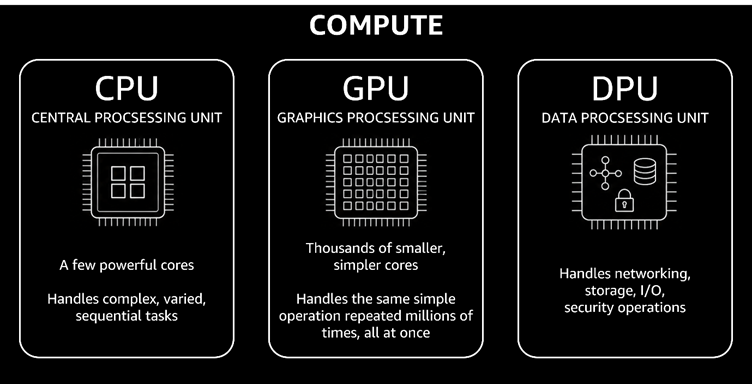
CPU (Central Processing Unit)
A few very powerful cores
Handles complex, varied, sequential tasks
Acts as the “manager” making decisions and coordinating work
GPU (Graphics Processing Unit)
Thousands of smaller, simpler cores
Handles same simple operation repeated millions of times, all at once
Acts as the “factory workers” doing mass production
AI training repeatedly performs matrix multiplications billions of times, making minor adjustments after each step. GPUs are specifically designed for this type of work.
DPU (Data Processing Unit)
As AI systems grow, a third processor becomes important.
DPU handles networking, storage I/O, and security operations--tasks that would otherwise steal cycles from the GPU and CPU.
Here’s the system view:
CPU = manager (decision-making)
GPU = factory workers (mass production)
DPU = logistics and operations (keeping materials moving and systems secure)
But even with powerful GPUs, computation alone isn’t the limiting factor; the real challenge is keeping them fed with data…
Hidden Bottleneck: Memory and Storage
Here’s something that surprises most people:
GPUs don’t fail because they’re slow. They fail because they’re hungry—constantly starved for data.
Memory Hierarchy
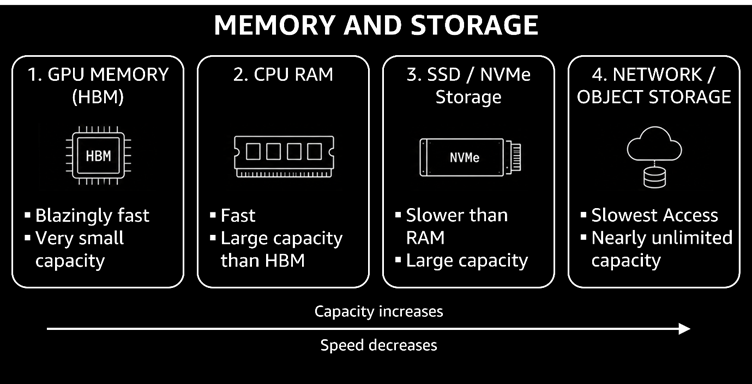
Data doesn’t live in one place. It moves through a layered system, trading speed for capacity:
GPU Memory (HBM2): Blazingly fast but tiny; usually tens of gigabytes. This is the GPU’s working memory.
CPU RAM: Larger (hundreds of gigabytes), but slower than HBM.
SSD/NVMe3 Storage: Enormous capacity at a lower cost, but still slower.
Network/Object Storage: Nearly unlimited, but the slowest link in the chain.
Every time the GPU needs data that isn’t already in its fast local memory, it must wait... And a GPU sitting idle costs just as much money as one doing useful work.
Takeaway
AI performance is not determined solely by how fast the GPU computes. Instead, by how fast data can be fed into the GPU.
A faster chip with a slow data pipeline is like a faster car stuck in traffic.
Tiered storage in practice
In real AI data centers, storage is organized into tiers that roughly map to hot, warm, and cold data:
Hot: NVMe SSDs holding active training datasets and model checkpoints.
Warm: Parallel file systems4, such as Lustre, General Parallel File System (GPFS), provide high-speed shared access across many GPUs.
Cold: Object storage, such as Amazon Simple Storage Service (Amazon S3), for storing raw datasets and older checkpoints.
As models grow larger, a single GPU is no longer enough…
Techniques such as model sharding5 and distributed training6 distribute the model across multiple GPUs and memory layers.
And once data starts moving across machines, a new bottleneck appears: how those machines communicate with each other.
Reminder: this is a teaser of the subscriber-only newsletter series, exclusive to my golden members.
When you upgrade, you’ll get:
High-level architecture of real-world systems.
Deep dive into how popular real-world systems actually work.
How real-world systems handle scale, reliability, and performance.
Networking: Bottleneck Nobody Talks About
When training a large AI model, you typically use thousands of GPUs working together rather than a single GPU…
And those thousands of GPUs must constantly communicate with each other, sharing what they’ve learned at every step…
Every second a GPU waits for data or synchronization is a second of lost productivity and wasted investment.
Cluster topology and fabrics
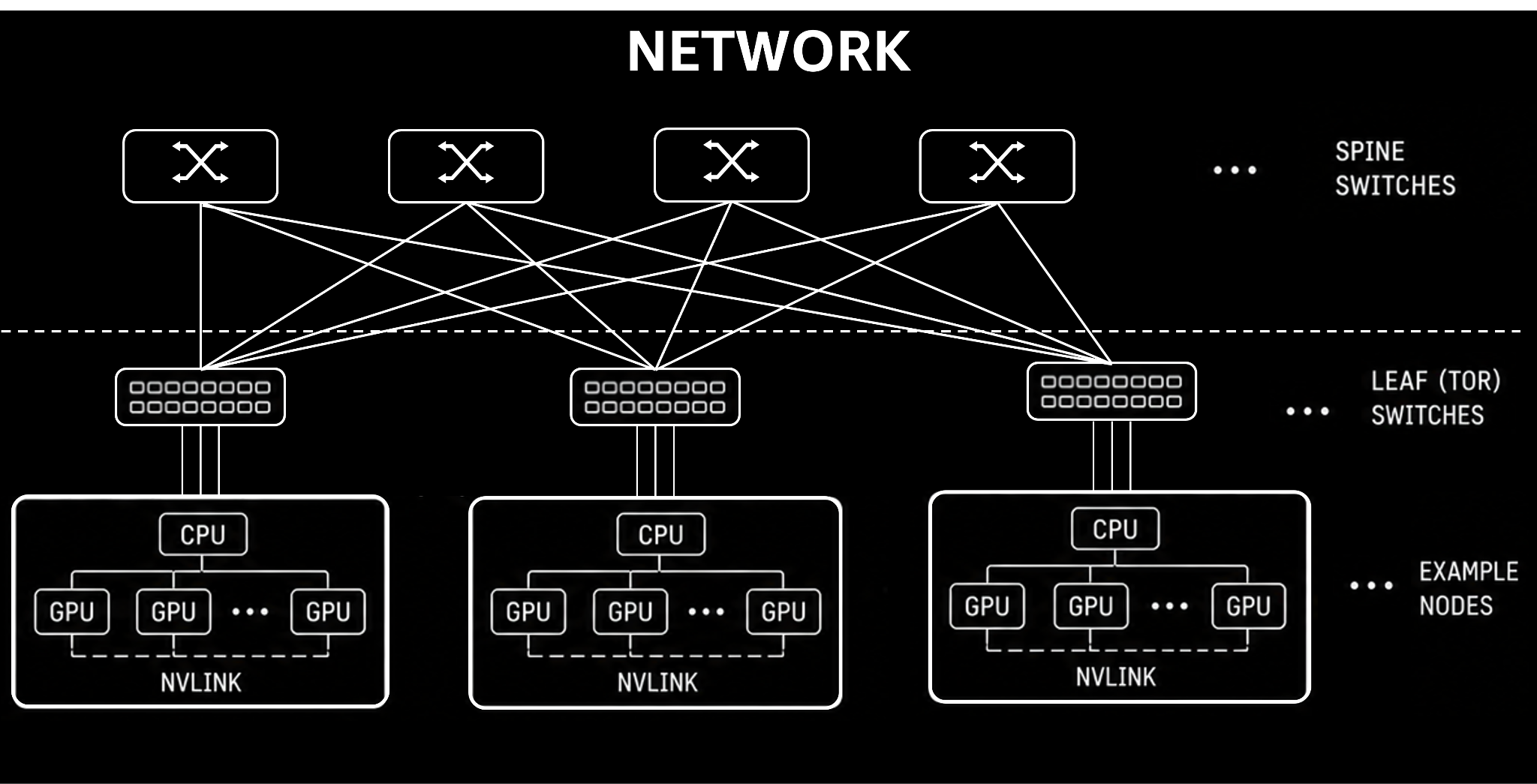
Modern AI clusters typically use leaf-spine network architectures7: a design built for high throughput and low latency at scale.
Every GPU server can reach every other GPU server in at most ‘two’ hops.
Within a node, GPUs talk over NVLink (intra-node fabric). Between nodes, traffic flows over InfiniBand or RDMA over Converged Ethernet (RoCE), the inter-node fabric8.
There’s also a clear speed hierarchy:
NVLink9: fastest path, a direct, private highway connecting GPUs within the same server.
InfiniBand/RoCE10: very high-speed interconnect between separate servers. Imagine it as the “bullet train” of the data center.
Ethernet: general-purpose, flexible, and ubiquitous, but not designed for AI’s most extreme bandwidth and latency demands.
Amdahl’s Law: Why More GPUs Aren’t Always Better
There’s a fundamental principle in distributed computing called Amdahl’s Law.
In plain English: if parts of your system must wait for other parts, adding more workers eventually stops helping.
In AI workloads, adding more GPUs increases computing power but also increases communication overhead. As GPUs spend more time sharing and synchronizing data, the bottleneck gradually shifts from computation to communication.
Smarter data movement
Modern AI systems address this with several techniques:
Remote Direct Memory Access (RDMA): Provides low-latency, high-throughput communication by enabling direct memory-to-memory data transfers between servers.
RDMA kernel11 bypass: Lets the network adapter access application memory directly from user space12, eliminating unnecessary operating system overhead.
GPUDirect: GPUs can read from and write to storage or network cards directly, bypassing the CPU entirely.
Zero-copy pipelines: Data takes the shortest path from source to GPU, with no redundant copying along the way.
The goal of AI networking is to make thousands of GPUs behave like one giant, unified processor, as if the data never had to travel at all.
Once communication is in place, the next challenge is dividing the work efficiently across all those GPUs…
