

Share this letter & I’ll send you some rewards for the referrals.
How do you speed up your API?
Every request requires work…Parse the payload, query the database, package the response, then send it back. i.e., each step takes time…
As traffic increases, these tiny delays add up:
Servers struggle under load,
Users wait longer for responses,
Costs increase as you add more machines.
The solution is NOT to write faster code.
Instead, build smarter systems that do less work, handle more traffic, and stay fast under pressure.
Let’s dive into proven ways to build high-performance APIs…
§
Turn your ideas into interactive prototypes in mins (Partner)
Everybody has product ideas…
But the HARD part is turning them into something people can click, test, and give feedback on before you spend weeks building it.
This is where Figma Make comes in…
With Figma Make, you can turn ideas or existing Figma designs into realistic, interactive prototypes to explore user flows, validate concepts, and iterate faster.
Here’s what you can do:
Turn ideas into clickable prototypes in minutes.
Explore different user flows before development.
Create realistic interactions for usability testing.
Iterate quickly inside Figma using prompts.
Whether you’re a designer, PM, founder, or engineer, Figma Make helps you move from concept to a testable prototype much faster.
(Thanks to Figma for partnering with this newsletter.)
§
Here’s what’s inside this newsletter:
Why latency grows even when your code is efficient. The real bottlenecks hiding in databases, networks, and downstream services, and why scaling an API is mostly about reducing unnecessary work.
The architecture patterns behind high-performance APIs. What caching, asynchronous processing, connection pooling, load balancing, rate limiting, and circuit breakers each solve, and why production systems combine them instead of relying on one optimization.
Every optimization has a failure mode. Why stale caches, pool exhaustion, retry storms, payload bloat, and poorly tuned autoscaling can reduce reliability while trying to improve performance.
Your API is only as fast as its slowest dependency. Why databases, external services, network round trips, and inefficient payloads usually dominate end-to-end request latency, long before your application code becomes the bottleneck.
Nine prompts to review your API architecture. Audit latency bottlenecks, database access, caching strategy, scaling readiness, observability, and resilience to identify high-impact performance improvements before traffic exposes weak points.
§
1. Caching and compression
If responses didn’t change, you should STOP recomputing them.
This is the core idea behind caching: store responses so you can reuse them later. This skips expensive operations such as database queries, data manipulation, and/or API calls.
Here’s how it works:
Your API receives a request X for the first time
It does the usual steps: parse, query the database, package it into a response Y, and send the response
Right before/after sending, it stores Y somewhere in-memory; Y is now a cached response to request X
Your API receives a request X for the second time
It checks the cache first and sees that the response Y is already there, so it returns it; this is a cache hit
It’s a lot faster because there were NO database queries, API calls, or data manipulation
But what happens when the response to X is no longer Y?
If the cache serves outdated data, your users see stale results (this is bad)
Your API needs to remove the stale data and update it with a fresh copy; this is called cache invalidation
There are different techniques for invalidation: time-to-live (TTL), manual removal, cache-control headers

Caching is useful for data that does NOT change often.
Think of requests like profile lookups or product catalog searches. Popular implementations are in-memory caches (Redis, Memcached) and edge caches (Fastly, Cloudflare).
Downsides of caching
Stale data: cache can serve outdated responses if invalidation is not managed well
Complexity: invalidation logic adds extra logic when to remove/refresh entries
Hard to debug: behavior depends on timing, not just code logic
“There are only two hard things in computer science: cache invalidation & naming things.” -- Phil Karlton
Compression explained
If the responses are too BIG, then make them smaller.
This is the core idea behind compression: shrink the payload before sending it over the network. It removes redundancy, such as repeated characters or formatting. A smaller, but equal result travels faster & uses less bandwidth.
Here is how it works:
Your API and the client agree on which compression format to use
This process often happens through the
Accept-EncodingandContent-EncodingHTTP headersFor example, a client requests
Accept-Encoding: gzip, and the API replies withContent-Encoding: gzip
Your API prepares the response data Y
Before sending, it runs Y through a compression algorithm
This makes Y smaller, so it uses less network bandwidth & gets sent faster
The smaller, compressed version of Y gets sent over the network
Client receives this compressed version of Y
Before using it, the client runs the response through a decompression algorithm
This makes it grow to its original size again

Compression works well for large JSON/binary responses.
Some popular compression formats are Gzip and Brotli. Other options are using Protobuf or Avro formats that reduce payload size by design.
Downsides of compression
CPU cost: each encode/decode cycle consumes processing power
Only helpful for large payloads: best used when responses exceed 1KB
Diminishing returns: for small responses, CPU cost could outweigh network savings
Takeaway
Caching avoids recomputation and saves processing time, but adds memory cost and invalidation complexity.
Compression reduces payload size and network latency, but increases CPU usage.
Both speed your API when used selectively & measured against their tradeoffs.
§
2. Load balancing and autoscaling
How do you keep your API fast as demand grows?
Every request your API gets is a “job”.
As traffic grows, one machine can’t do it all. The system slows down, queues form, and users wait. Adding more servers helps, but only if you can share the work and manage them properly.
This is what load balancing & autoscaling do.
Load balancing explained
If one server is busy, you should route new requests to other servers.
That’s the key idea behind load balancing. It spreads incoming traffic across many servers so NO single one gets stuck doing all the work. It’s like a traffic cop directing cars to open lanes.
Here’s how it works:
Your API receives a request
The load balancer sits in front of all servers and decides where it goes
It checks which servers are healthy & how busy they are
Load balancer sends the request to the best option
That server handles it and returns the response
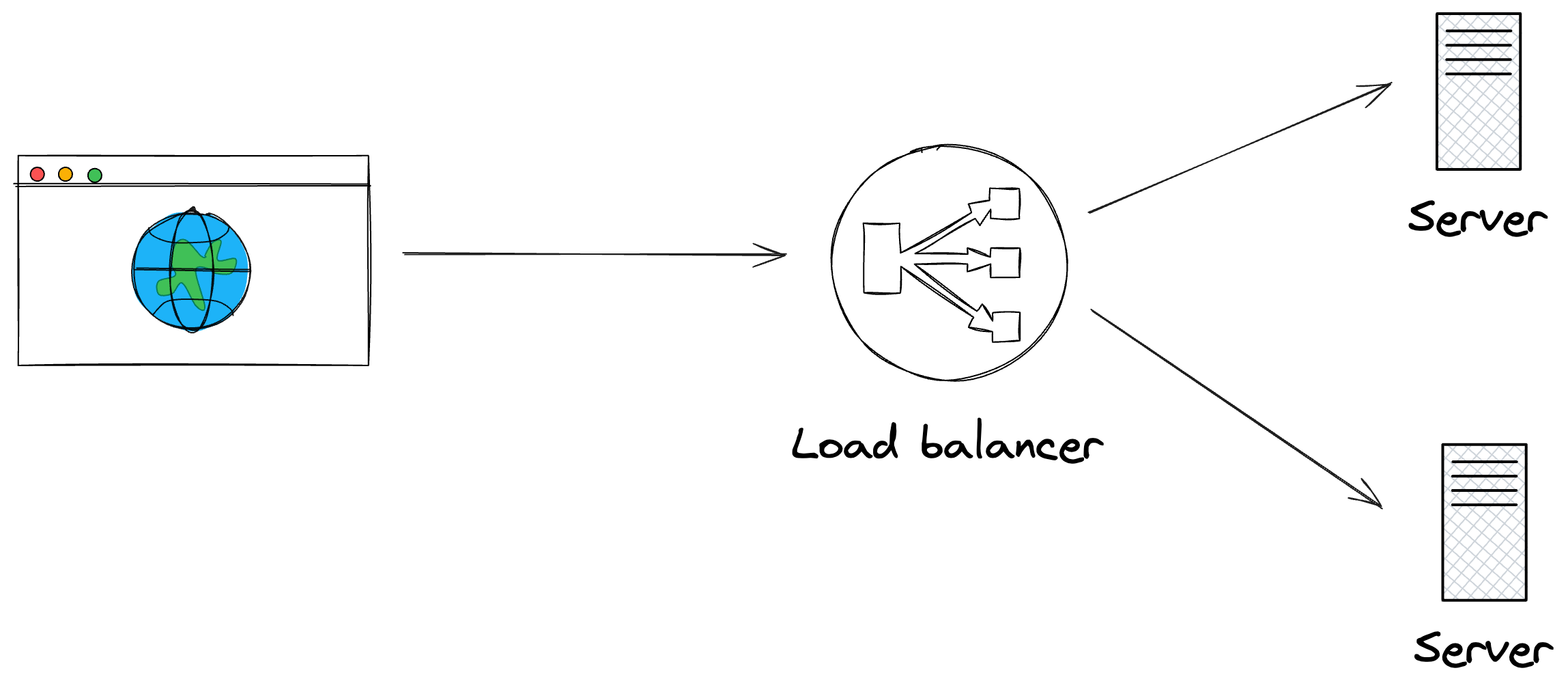
Load balancing makes your system faster and more reliable.
If one server fails or gets overwhelmed, others take over. Load balancing is great for web APIs, microservices, and high-traffic systems. You rarely build one yourself, but use existing solutions.
Some popular implementations are AWS ELB, HAProxy, and Nginx.
Downsides of load balancing
Setup overhead: adds configuration & management work
Single point of failure: can become one without “redundancy”
Session problems: stateful sessions break when requests go to different servers
Extra complexity: sticky sessions/shared storage fix sessions, but add complexity
Autoscaling explained
If servers can’t keep up, you shouldn’t add more manually; let the system do it for you.
This is the idea behind autoscaling. It adds/removes servers automatically when the load changes. It’s like calling in extra chefs when a restaurant gets a rush of orders, then sending them home when it quiets down.
Here’s how it works:
System tracks metrics such as CPU, memory, and/or request rate
When traffic gets high, it adds more servers based on pre-defined rules
New servers join & start taking requests
When traffic drops, extra servers get shut down
The system stays stable & doesn’t waste money
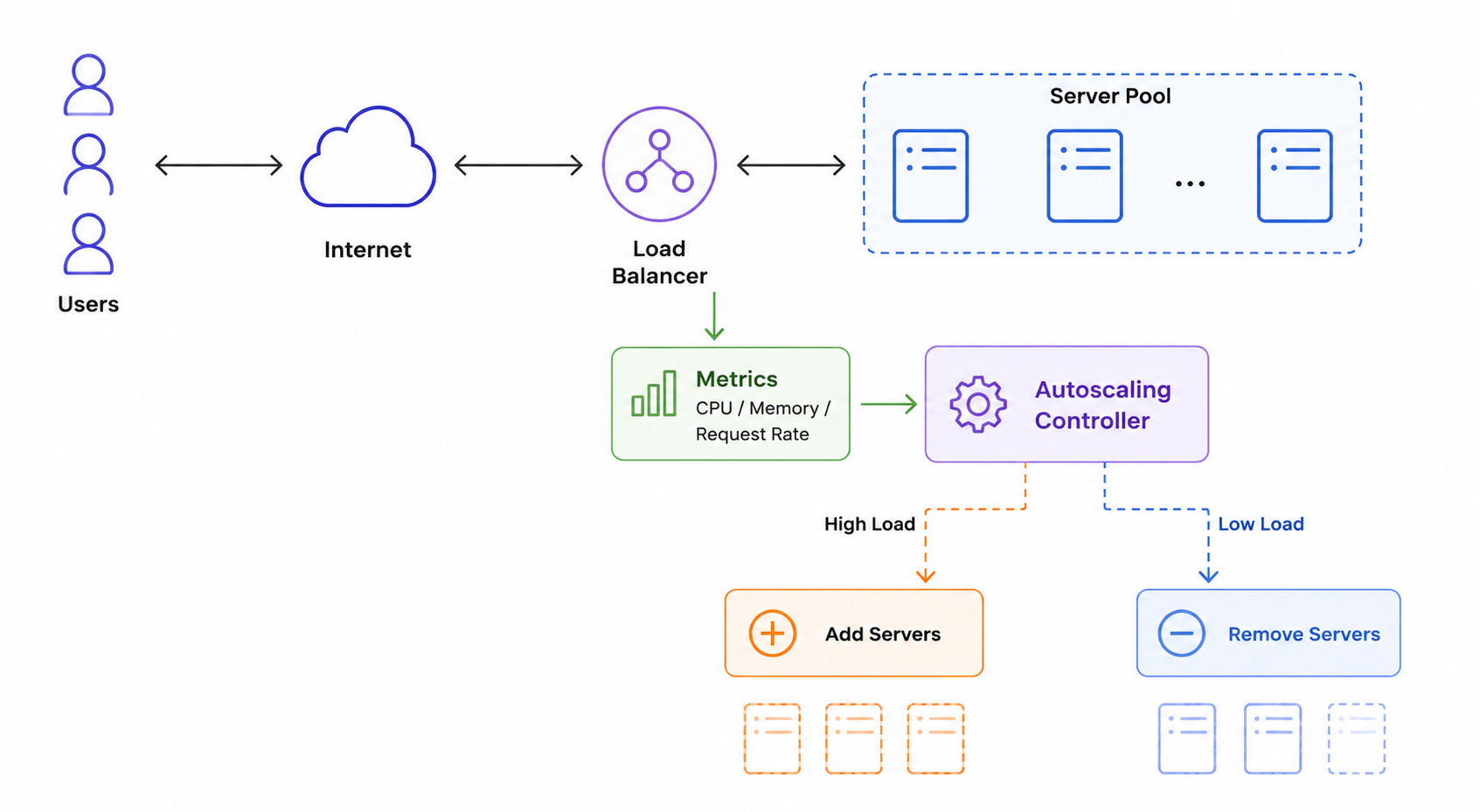
Autoscaling is common in systems with unpredictable workloads & traffic spikes.
Popular tools are Kubernetes HPA & AWS Auto Scaling Groups.
Downsides of autoscaling
Rule sensitivity: triggering too early wastes resources, while triggering too late hurts performance
Startup delays: slow server startup affects performance during scaling
Configuration work: requires tuning trigger rules & thresholds
Takeaway
Load balancing spreads work across servers & prevents overloading.
Autoscaling adds/removes servers in the system and manages system capacity. Together, they make APIs faster, stable, and ready for traffic changes.
§
3. Asynchronous processing
How do you keep your API responsive when some tasks take a long time?
Tasks like sending emails, reading files, or calling services spend a lot of time waiting for input/output (IO).
During the wait, the server isn’t using the CPU efficiently. If your API waits for these long tasks to finish, users experience slow response time. Asynchronous processing solves this problem. It lets the API respond immediately while heavy tasks run in the background.
Here’s how it works:
API receives a request that triggers an IO-bound task
Instead of processing it right away, it puts a message in a queue
The API responds to the client immediately with a job ID/status
Background workers read from the queue and process tasks independently
Workers notify the client when the job is done (OPTIONAL)
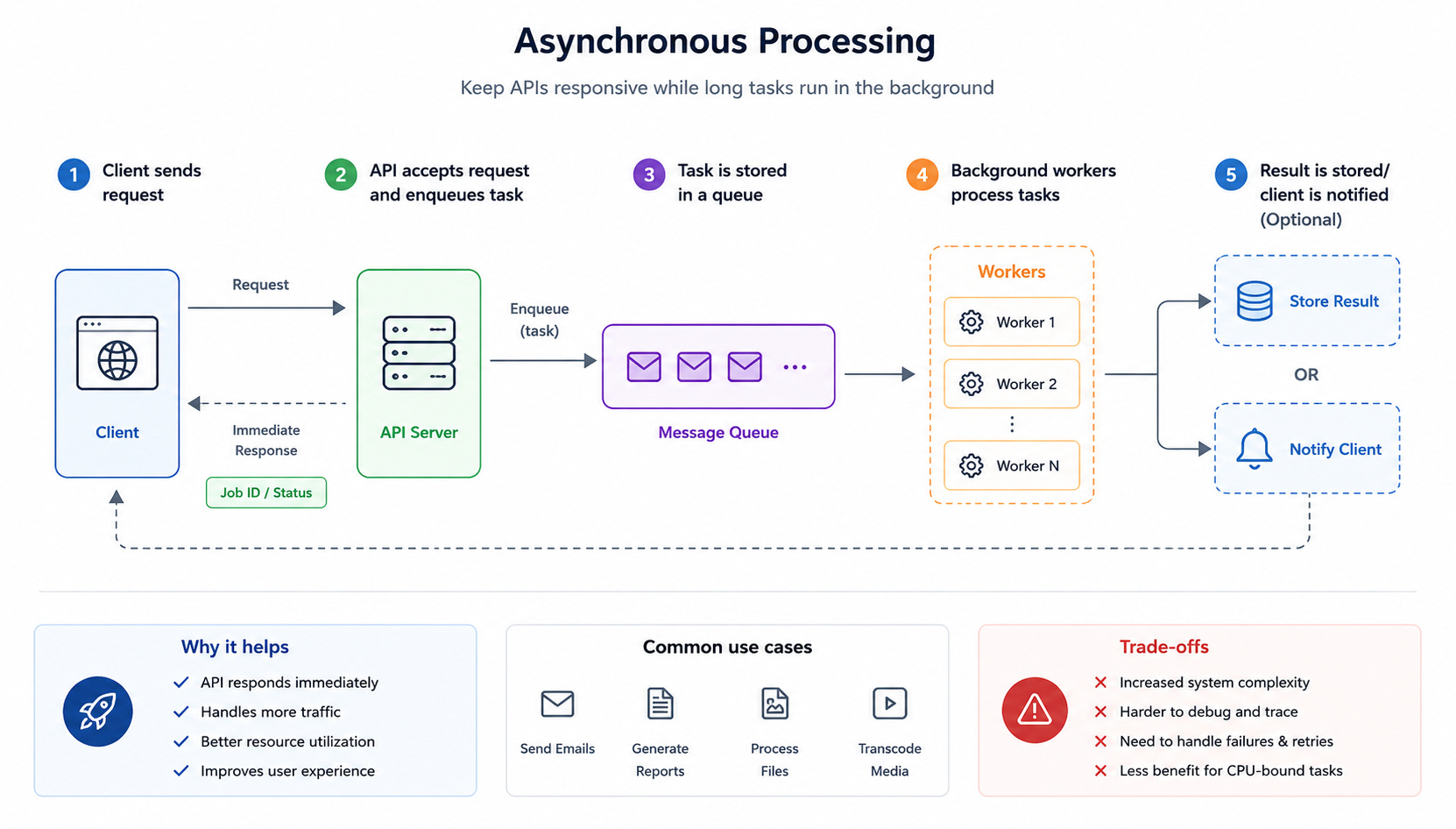
It’s like placing an order at a restaurant and receiving a buzzer:
You can keep doing other things while the kitchen finishes your meal, and the restaurant keeps serving new customers.
Asynchronous processing is ideal for high-traffic systems, unpredictable workloads, or slow IO tasks. It decouples request handling from heavy work, keeping APIs fast and responsive.
Popular tools are RabbitMQ, Kafka & Celery.
Downsides of asynchronous processing
Increased complexity: must manage queues, workers, retries, and error tracking
Harder debugging: execution happens outside the main request flow
Failure handling: workers that fail need to retry/re-queue tasks
Limited CPU benefit: offers little help for CPU-bound work where waiting isn’t the problem
Takeaway
Asynchronous processing keeps APIs responsive by offloading slow IO tasks to background workers.
It trades simplicity for scalability, making systems faster under load but harder to monitor and debug.
§
Reminder: this is a teaser of the subscriber-only newsletter, exclusive to my golden members.
When you upgrade, you’ll get:
High-level architecture of real-world systems.
Deep dive into how popular real-world systems work.
How real-world systems handle scale, reliability, and performance.
Ready for the best part?