
Amazon S3 - A Deep Dive
#136: How S3 Actually Works


Share this post & I'll send you some rewards for the referrals.
Block diagrams created using Eraser.
Object storage isn’t just “upload a file, get a URL back.”
That’s true for a small side project. It stops being true when you’re storing 100 trillion objects like AWS S3 does today.
Amazon Simple Storage Service (S3) launched in 2006.
In 2013, Amazon reported storing 2 trillion objects. By 2021, that number crossed 100 trillion. The system handling all of that doesn’t look anything like a file server or a relational database. It’s a fundamentally different class of infrastructure, built around a different set of tradeoffs.
This problem shows up in senior- and staff-level interviews at companies building storage-heavy products…
It tests the exact skills that separate mid-level engineers from seniors: understanding why different storage types exist, designing for durability at a scale where hardware failures occur daily, and making smart trade-offs between consistency, cost, and performance.
We’re going to build this from scratch:
We’ll start with what object storage actually is and how it differs from other storage systems, then work through requirements, capacity estimation, the high-level architecture, disk-based data persistence, durability strategies, metadata design, object versioning1, large-file uploads, and garbage collection.
At each step, we’ll explain the why behind each decision…
Find out why 150K+ engineers read The Code twice a week (Partner)

Tech moves fast, but you’re still playing catch-up?
That’s exactly why 150K+ engineers working at Google, Meta, and Apple read The Code twice a week.
Here’s what you get:
Curated tech news that shapes your career - Filtered from thousands of sources so you know what’s coming 6 months early.
Practical resources you can use immediately - Real tutorials and tools that solve actual engineering problems.
Research papers and insights decoded - We break down complex tech so you understand what matters.
All delivered twice a week in just 2 short emails.
Sign up and get access to the Ultimate Claude code guide to ship 5X faster.
(Thanks for partnering on this post and sharing the ultimate claude code guide.)
I want to reintroduce Hayk Simonyan as a guest author.

He’s a senior software engineer specializing in helping developers break through their career plateaus and secure senior roles.
If you want to master the essential system design skills and land senior developer roles, I highly recommend checking out Hayk’s YouTube channel.
His approach focuses on what top employers actually care about: system design expertise, advanced project experience, and elite-level interview performance.
What is Object Storage?
Before we design anything, we need to understand what object storage actually is…
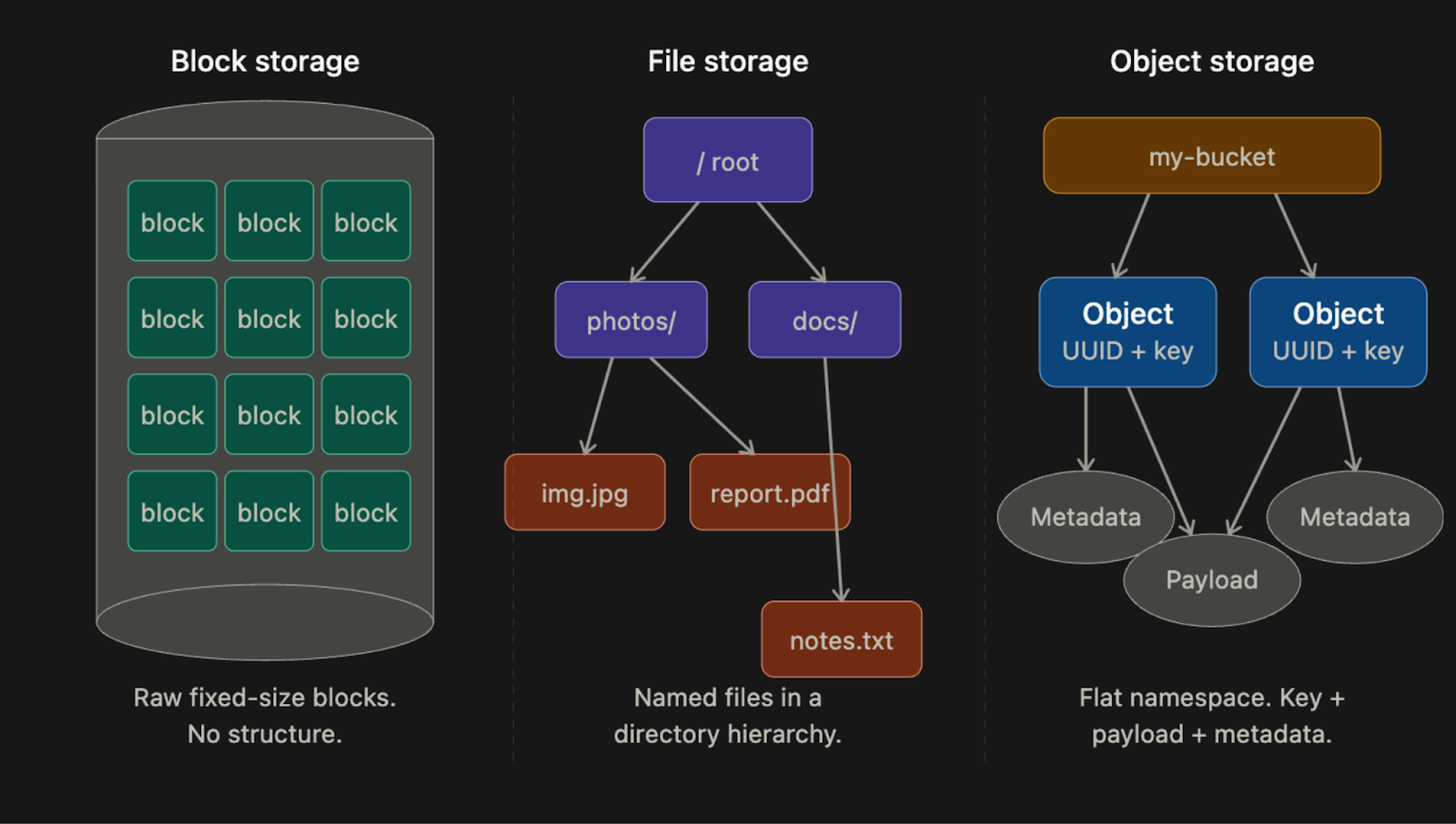
Engineers often confuse the three main storage categories. Each one exists for a reason, and choosing the wrong one at design time is expensive to fix later.
Block Storage
Block storage is the oldest and lowest-level.
When you plug a hard drive or SSD into a server, the operating system (OS) sees it as a sequence of raw blocks, each typically 4KB in size. The OS decides how to format those blocks and build a file system on top of them. Some applications, such as databases and virtual machine engines, skip the file system entirely and manage blocks directly, which gives them maximum control and performance.
Block storage doesn’t have to be physically attached…
You can connect to block storage over a network using protocols like Fibre Channel or iSCSI2. The server still sees raw blocks, as if the drive were directly attached, but the data resides elsewhere on the network. This is how cloud providers like AWS offer Elastic Block Store (EBS): you attach a network drive to your VM, and it behaves like a local disk.
Block storage is fast and flexible, but it’s also expensive and doesn’t scale cheaply to petabytes.
File Storage
File storage is built on top of block storage.
It adds a layer that handles the complexity of managing blocks and gives you a familiar directory hierarchy: folders, subfolders, and files. You don’t deal with blocks at all. You just read and write files using paths like /documents/report.pdf.
File storage becomes especially useful when many servers need to share the same files.
Protocols like NFS and SMB/CIFS3 allow many machines to mount the same file share and read and write to it concurrently. This is how shared drives inside organizations typically work, and it’s how many legacy enterprise applications store data.
File storage is easier to use than block storage, but it still doesn’t scale to the level object storage does. Hierarchical directory structures become slow and complex when you have billions of files.
Object Storage
Object storage is the newest of the three and the most different…
It makes a deliberate tradeoff: give up performance and mutability in exchange for near-unlimited scalability, very high durability, and low cost.
There are no directories in object storage.
Everything lives in a flat namespace inside containers called buckets. Every object is accessed via a RESTful HTTP API using a unique key. You can’t partially update an object. If you want to change a file, you replace the entire object or create a new version. This immutability4 constraint sounds limiting, but it’s actually what makes object storage so cheap to operate at scale, because it simplifies replication and consistency considerably.
AWS S3, Google Cloud Storage, and Azure Blob Storage are all object storage systems. They’re the foundation of most modern cloud architectures: video files, backups, data lake storage, machine learning datasets, static website assets, and more.
Comparison Table
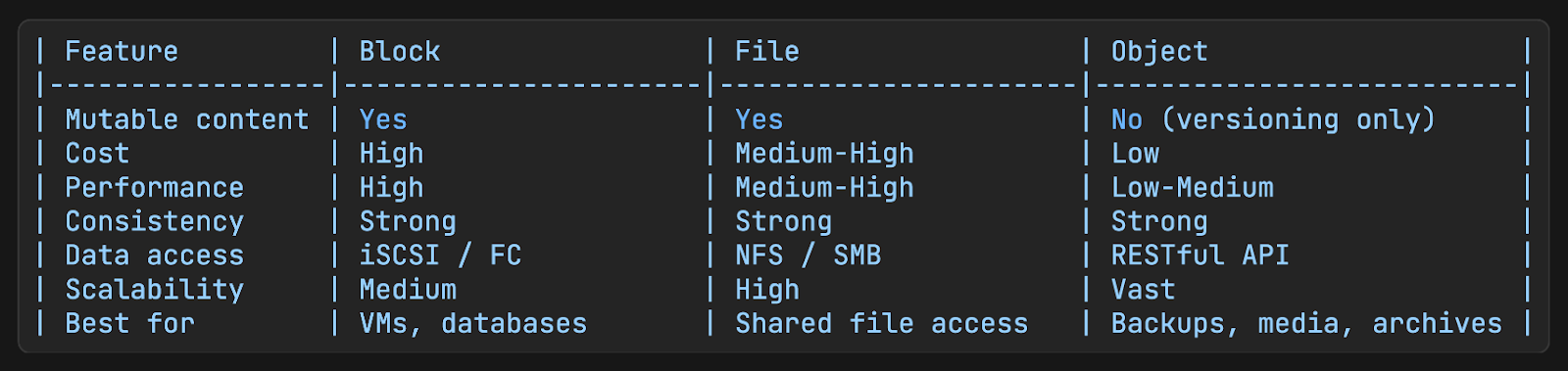
The key constraint to internalize: objects are immutable.
You cannot edit part of an object. You replace the whole thing, or you version it. This constraint is not an accident. It’s a deliberate design choice that enables the durability and scale properties that make object storage useful in the first place.
Key Terms
These are the concepts you need to know before we get into the design:
Bucket
A bucket is a logical container for objects.
Think of it like a top-level folder, except it’s not really a folder since there’s no hierarchy inside it. Bucket names must be globally unique across all system users, not just within your account.
You have to create a bucket before you can store anything in it.
Object
An object is an individual piece of data stored in a bucket.
It has two parts:
Payload is the actual data bytes, which can be anything: a photo, a video, a CSV file, a binary blob.
Metadata is a set of key-value pairs that describe an object, such as content type, creation timestamp, custom tags, and anything else the application needs to store alongside the data.
The metadata is stored separately from the payload and is much smaller.
Object Key
Every object is identified by a key, which is just a string.
In S3, that key looks like a file path: photos/2024/vacation.jpg. But there are no actual directories. The entire string, slashes and all, is just the key. S3 lets you use slashes as a convention to simulate folders, but under the hood, it’s still a flat namespace.
This distinction matters when we design the listing feature later.
Versioning
Versioning is a bucket-level feature that keeps all previous versions of an object instead of overwriting them.
When versioning is enabled, uploading an object with the same key as an existing object doesn’t replace it. Instead, it creates a new version alongside the old one. You can retrieve, restore, or delete any version at any time.
This protects against accidental overwrites and deletions.
Durability SLA
S3 Standard storage class is designed for 99.999999999% durability, also known as eleven nines.
In practical terms, if you store 10 million objects for 10,000 years, you’d expect to lose one. That’s not an accident. It comes from specific engineering decisions around replication and error correction, which we’ll get into in the durability section.
Clarifying Requirements
Before touching any design, you need to understand what you’re actually building and at what scale. Candidates who skip this step in interviews fail immediately, because they end up designing the wrong thing at the wrong scale…
Questions to Ask
What are the core operations? Upload, download, delete, list?
Do we need versioning?
How much data do we need to store in year one?
What durability and availability targets do we need?
Do we need to support large file uploads, such as files over multiple gigabytes?
Any access control requirements? Do different users own different buckets?
Our Assumptions
For this design, we’ll assume:
Core operations: bucket creation, object upload and download, object versioning, and listing objects in a bucket by prefix
100 petabytes of total data
Durability target: six nines, which is 99.9999%
Availability target: four nines, which is 99.99%
Must handle both small objects (tens of kilobytes) and large objects (several gigabytes)
Now, let’s figure out what these requirements actually mean for infrastructure…
Capacity Estimation
Math matters in system design because it tells you what kind of infrastructure you need. Vague statements like “we’ll need a distributed database” aren’t useful without concrete numbers.
Let’s work through the estimates:
Object Size Distribution
In practice, object storage systems see a mix of object sizes. A reasonable assumption for a general-purpose system:
20% of objects are small, under 1MB, with a median size of about 0.5MB. These might be thumbnails, config files, or short documents.
60% of objects are medium-sized, ranging from 1MB to 64MB, with a median of about 32MB. These might be images, audio files, or compressed datasets.
20% of objects are large (>64MB), with a median of about 200MB. These might be videos, database backups, or large archives.
Total Object Count
We’re targeting 100 petabytes of stored data.
In practice, storage systems don’t fill to capacity, so let’s assume 40% utilization, meaning we provision enough storage to hold 100PB when 40% full.
100 PB = 10^11 MB

Weighted average object size: (0.2 x 0.5MB) + (0.6 x 32MB) + (0.2 x 200MB)

= 0.1 + 19.2 + 40.0

= 59.3 MB per object (average)

Total objects at 40% utilization: (10^11 x 0.4) / 59.3

= approximately 680 million objects
680 million objects are a lot.
This tells us immediately that no single machine can store or index all of this. We need distributed storage and a distributed metadata index from day one.
Metadata Storage
Each object needs a metadata record. If we assume roughly 1KB per record (object name, bucket, timestamps, UUID, tags), then:
680 million objects x 1KB = ~680GB of metadata680GB of metadata is manageable in a database, but the access patterns will require sharding as we scale. The metadata store is separate from the data store, which we’ll cover in the design.
IOPS Constraints
A standard SATA hard drive5 spinning at 7200 RPM can handle roughly 100-150 random seeks per second.
This is called IOPS6, or input/output operations per second. At 680 million objects spread across many disks, the IOPS constraint becomes a real bottleneck, especially for small object workloads where you’re doing many small reads and writes rather than a few large sequential ones.
This is one reason we’ll later choose to merge many small objects into a single larger file on disk, instead of storing each object as its own file.
Design Philosophy: Separating Metadata from Data
Before we look at the full architecture, there’s one core design principle that shapes everything else: metadata and data are stored separately, and for good reason.
This idea comes from how UNIX file systems work:
In UNIX, when you save a file, the filename and the actual data bytes are not stored together. The filename and other file information (size, permissions, timestamps, disk location) live in a data structure called an inode7. The actual data bytes live in separate disk blocks that the inode points to.
Object storage works the same way.
The metadata store is like the inode layer. It holds the object name, bucket, size, and a UUID that points to the location of the actual bytes. The data store is like the disk. It holds the raw bytes, and it only knows about UUIDs, not names or paths.
So why separate them?
Because they have completely different characteristics. The data is immutable. Once written, it never changes. The metadata is mutable. You can update tags, rename objects (in some implementations), or add versioning records. They need different consistency guarantees, different storage engines, and different scaling strategies.
Keeping them separate lets us optimize each independently.
High-Level Architecture
With that principle in mind, here’s how the full system is structured:
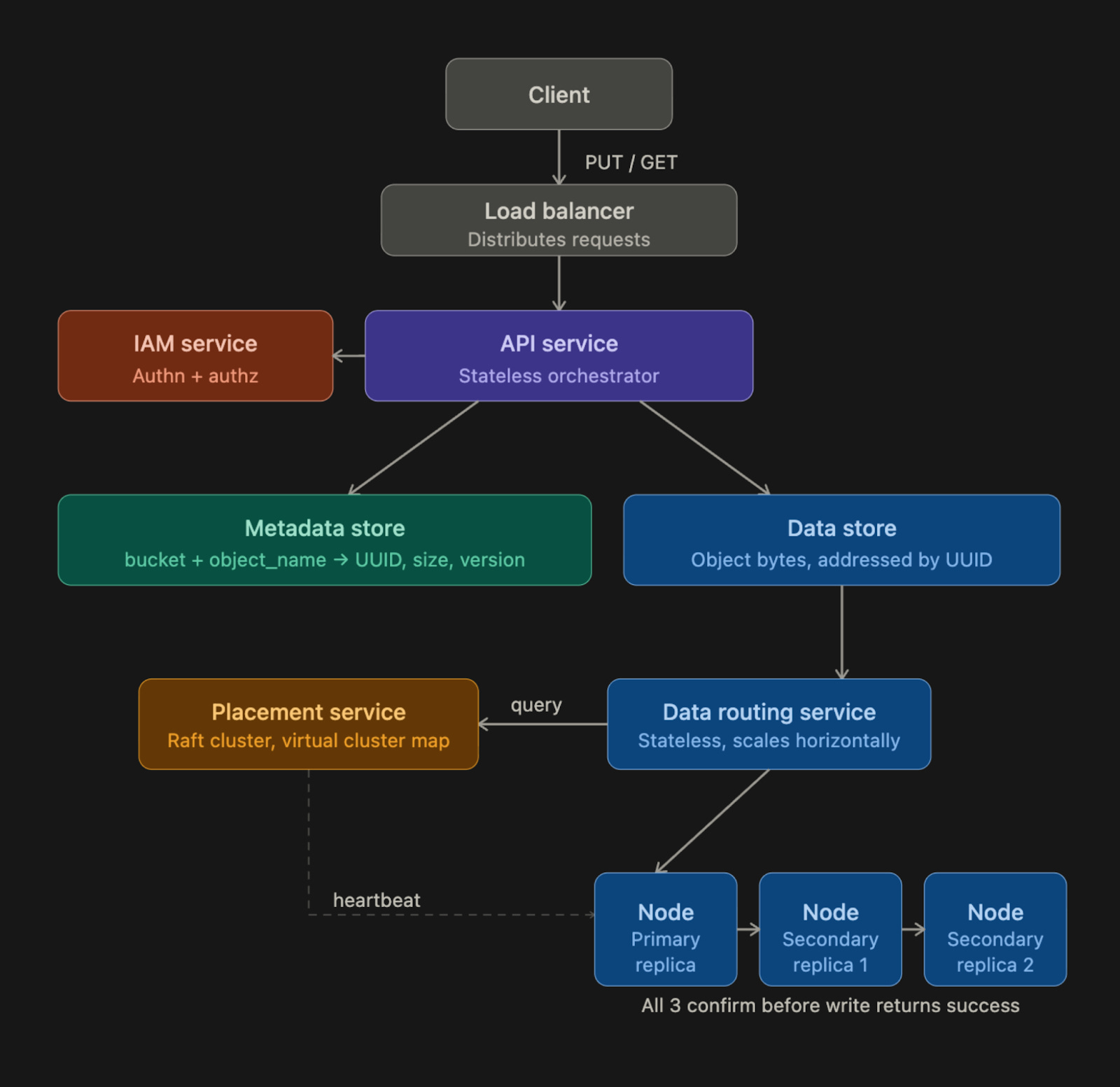
Components
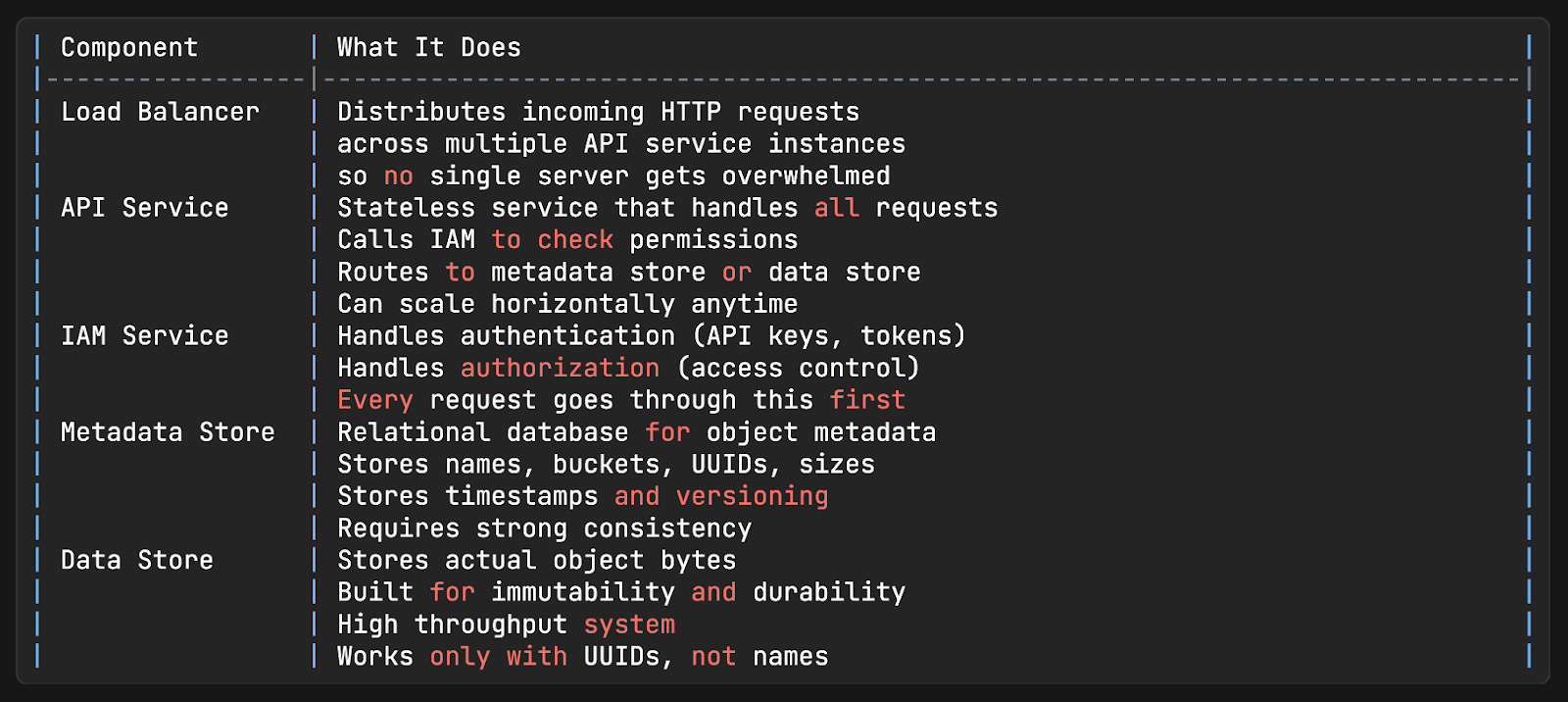
Upload Flow
Let’s trace exactly what happens when a user uploads a file named report.pdf to a bucket called company-docs:
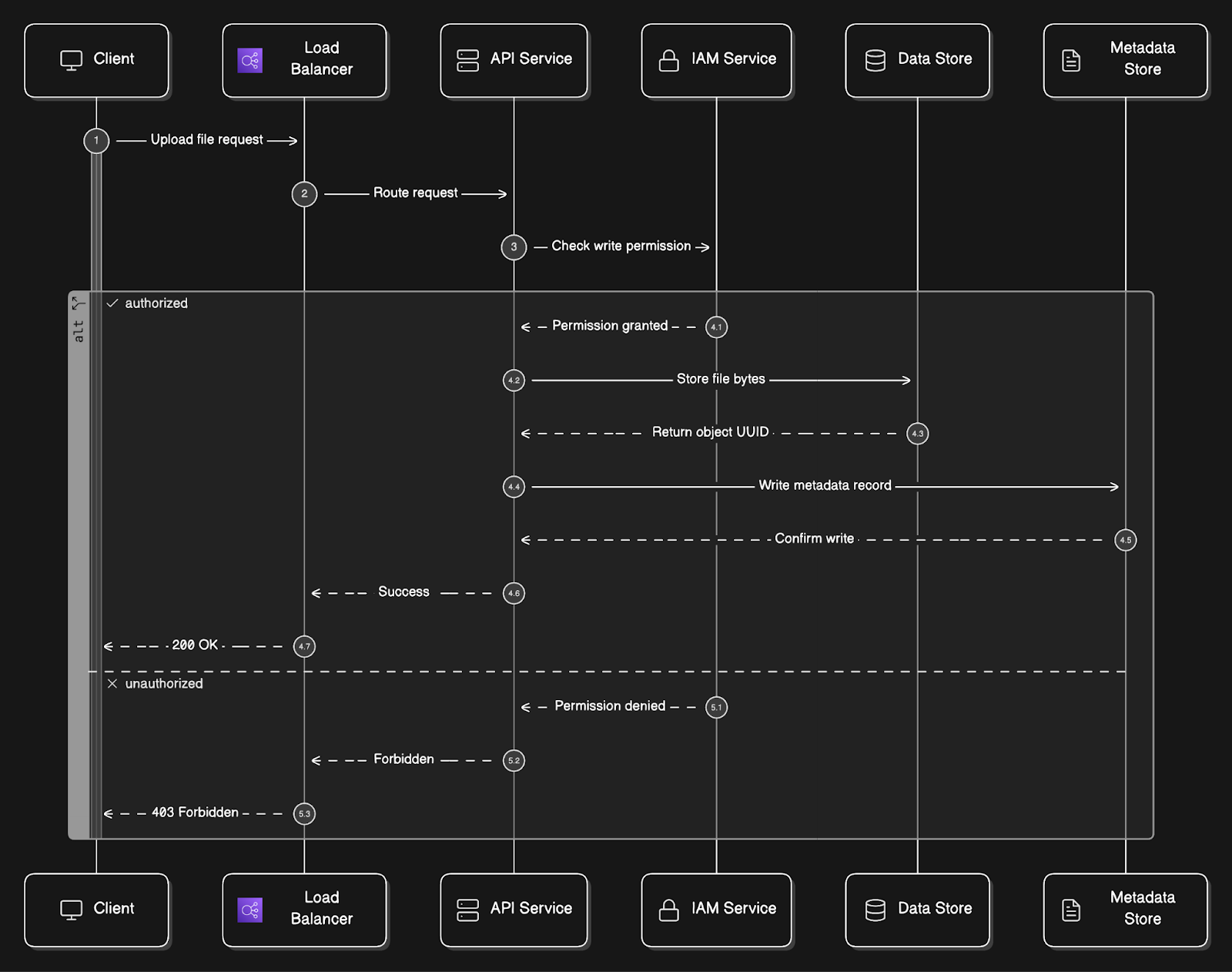
Client sends a
HTTP PUT /company-docs/report.pdfrequest with the file bytes in the request body.Request hits the load balancer and gets routed to one of the API service instances.
API service calls the IAM service8 to confirm the user has WRITE permission on the
company-docsbucket. If not, the request is rejected immediately with a 403 Forbidden.API service forwards the file bytes to the data store. The data store persists the bytes and returns a UUID, a unique identifier for this specific object.
API service then writes a metadata record to the metadata store. This record contains the object name (
report.pdf), bucket ID, UUID returned from the data store, file size, creation timestamp, and any metadata tags the user provided.A
200 OKresponse is returned to the client.
The metadata record now serves as the bridge between the human-readable path (company-docs/report.pdf) and the actual bytes stored under the UUID in the data store.
Download Flow
Now, let’s trace what happens when someone requests the same file:
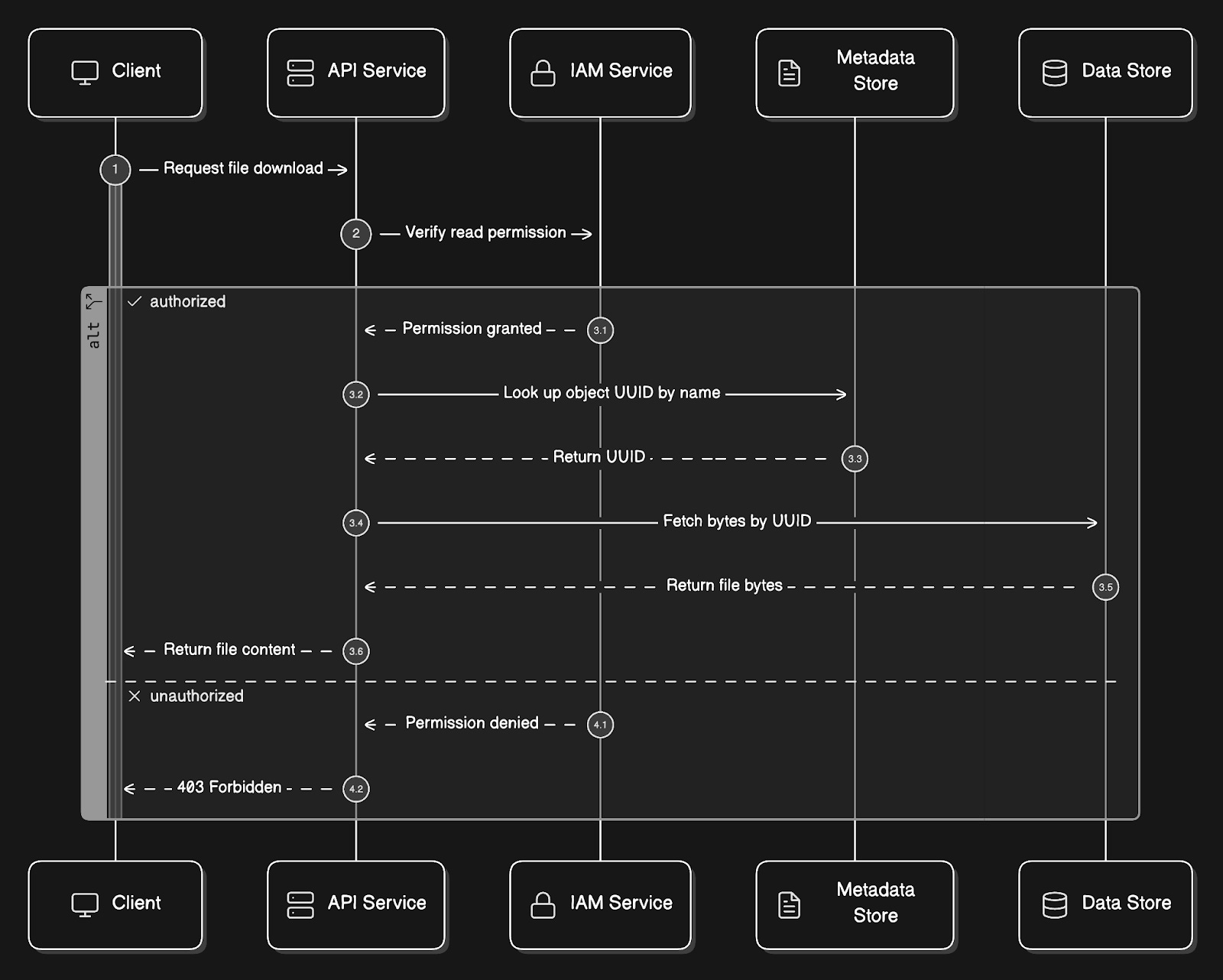
Client sends a
GET /company-docs/report.pdfrequest.API service calls IAM to verify READ permission.
API service queries the metadata store: “What is the UUID for the object named report.pdf in the bucket company-docs?”
API service then uses that UUID to fetch the actual bytes from the data store.
The bytes get returned to the client.
Notice that the data store never knows the file was called report.pdf.
From its perspective, someone asked for the object with a specific UUID, and it returned the bytes. The translation from name to UUID always happens in the metadata store.
Reminder: this is a teaser of the subscriber-only newsletter series, exclusive to my golden members.
When you upgrade, you’ll get:
High-level architecture of real-world systems.
Deep dive into how popular real-world systems actually work.
How real-world systems handle scale, reliability, and performance.
Deep Dive: Data Store
The data store is where most of the interesting engineering happens…
Let’s break down its internal architecture:
Internal Components
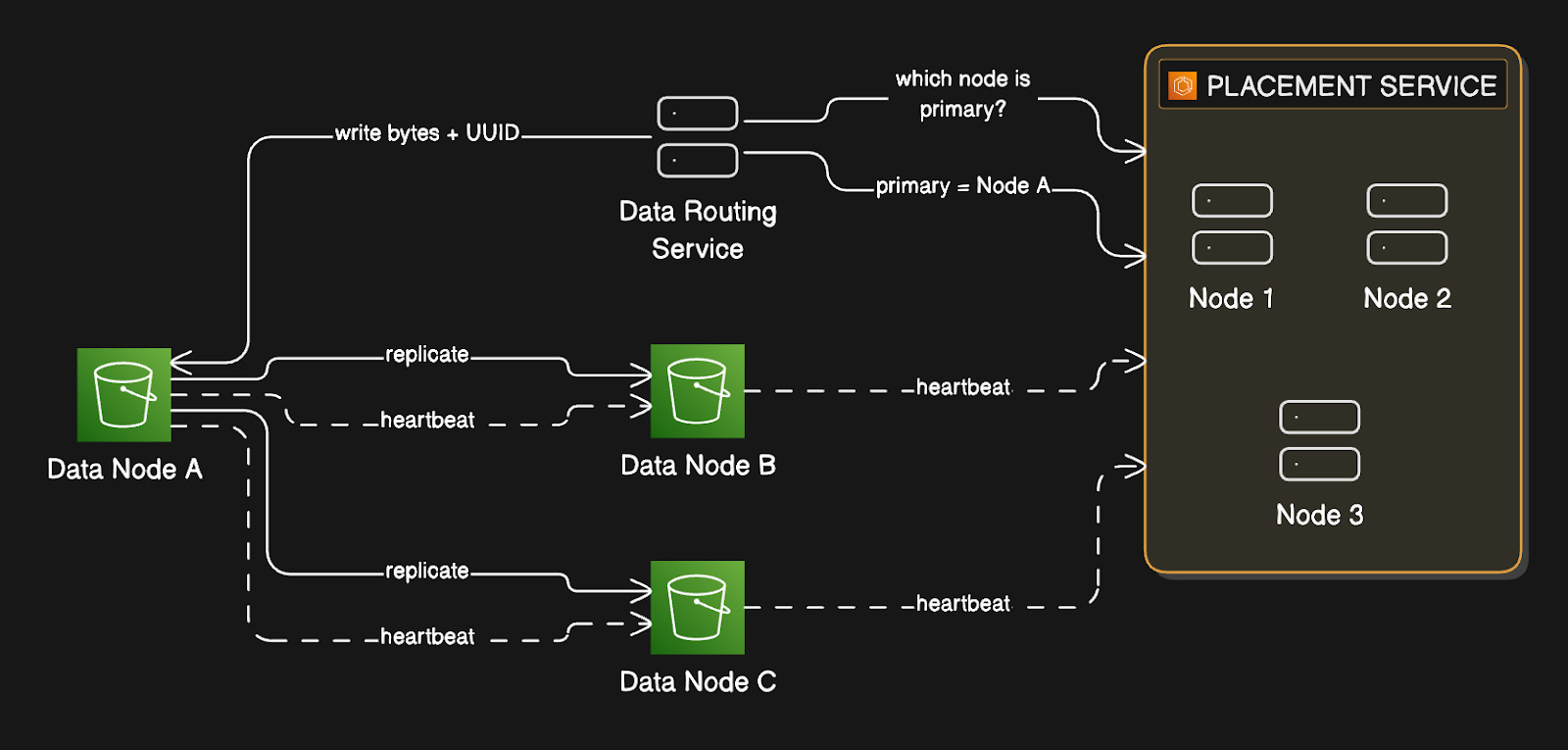
Data Routing Service
The data routing service is the entry point into the data store…
It’s stateless, meaning it holds no state itself, so you can scale it horizontally by adding more instances. When a write comes in, the placement service determines which data node should receive the data, then sends the data there.
When a read comes in, it asks the placement service where the data lives, then fetches it.
Placement Service
The placement service9 is responsible for knowing the physical layout of the entire storage cluster…
It maintains a virtual cluster map10, which is essentially a registry of every data node, including the rack and availability zone it’s in, how many disks it has, and how much space is used on each disk.
Placement service continuously receives heartbeat messages from every data node.
A heartbeat is a small message a node sends every few seconds, saying, “I’m alive, here’s my current state.” If the placement service doesn’t hear from a node within a configurable grace period (typically 15 seconds), it marks that node as down and stops sending new data to it.
Because the placement service is so critical, you run it as a cluster of 5 or 7 nodes using a consensus algorithm11 like Raft or Paxos.
A consensus algorithm ensures the cluster agrees on a single consistent view of the world, even if some nodes fail. With a 7-node cluster, you can lose 3 nodes simultaneously, and the service keeps running. With a 5-node cluster, you can lose 2. You never run this as a single instance, because if it goes down, the entire storage cluster becomes unavailable for writes.
Data Nodes
Data nodes are where the actual bytes live…
Each data node manages one or more physical disks. Each node runs a daemon process that sends heartbeats to the placement service with information about disk count and available space. When the placement service receives a heartbeat from a new node it hasn’t seen before, it assigns that node an ID, adds it to the virtual cluster map, and tells the node where to replicate data.
Durability is the central promise of object storage and the hardest engineering problem in this design.
We'll get there.
But before we can talk about how data survives hardware failures and entire node outages, we need to understand exactly how a write moves through this system.
The decisions made in the next few steps determine whether durability can be guaranteed…
 | A guest post by
|