



Share this post & I'll send you some rewards for the referrals.
Block diagrams created using Eraser.
Most engineers think designing an AI chat system is just “calling OpenAI API and saving messages to a database”.
That approach doesn’t work when you need to handle ChatGPT’s scale:
5.8 billion visits per month
1 billion weekly active users sending 2.5+ billion prompts per day
Your database can’t store 500TB per year. API costs will hit $145 million per month. And you’ll need 11.4 million concurrent connections that no single server can handle.
This problem shows up in senior and staff-level interviews at companies building AI products because it tests the exact skills that separate mid-level engineers from seniors:
handling stateful connections at scale,
managing expensive external dependencies,
keeping costs under control while maintaining good UX,
and designing for failures when parts of your system go down.
We’re going to build this from scratch at ChatGPT’s real scale, starting with clarifying requirements, then moving through frontend and backend design, database sharding1, the complete user flow, GPU infrastructure, and finally explaining how to scale even further to 1 billion users.
Before we design anything, we need to understand exactly what we’re building and at what scale…
Unblocked: The context layer your AI tools are missing (Partner)

Give your agents the understanding they need to generate reliable code, reviews, and answers. Unblocked builds context from your team’s code, PR history, conversations, documentation, planning tools, and runtime signals. It surfaces the insights that matter so AI outputs reflect how your system actually works.
(Thank you, Unblocked, for partnering on this post.)
I want to reintroduce Hayk Simonyan as a guest author.

He’s a senior software engineer specializing in helping developers break through their career plateaus and secure senior roles.
If you want to master the essential system design skills and land senior developer roles, I highly recommend checking out Hayk’s YouTube channel.
His approach focuses on what top employers actually care about: system design expertise, advanced project experience, and elite-level interview performance.
Clarifying Requirements
In interviews, candidates who skip this step fail immediately.
Questions to ask:
Are we building the AI model itself or integrating with existing ones?
Do we need streaming responses (word by word) or complete responses?
What’s our expected scale? Thousands or millions of users?
Do users need accounts and conversation history?
Are conversations private or shareable?
Do we support multiple languages?
How do we handle rate limiting2? Free vs paid tiers?
Text only, or images and files too?
Do we need content moderation?
For this design, let’s assume:
Integrating with existing LLM (not building the model ourselves)
Streaming responses required for good UX
As of January 2026, ChatGPT has 800-900 million weekly active users, with an average of 2.5+ billion prompts per day
Users need accounts, private conversations with history
Text only, English first
Rate limiting on both requests and tokens
Basic content moderation required
Now that we’ve defined our requirements, let’s start with what users actually see and interact with.
Frontend Interface Design
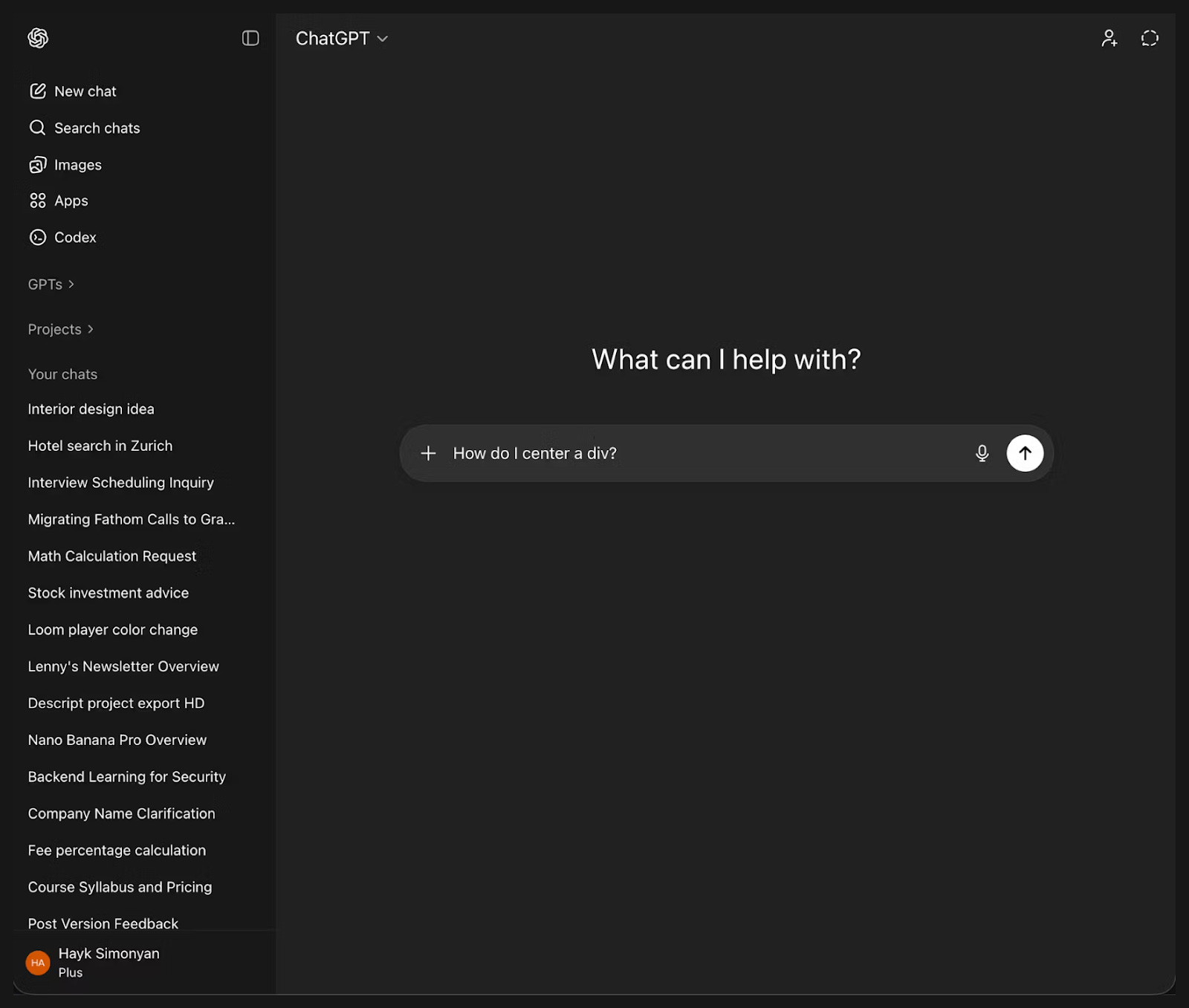
Let’s visualize what we’re building. This clarifies requirements and influences backend decisions.
Main Interface:
Critical frontend decision: Streaming
You have two options:
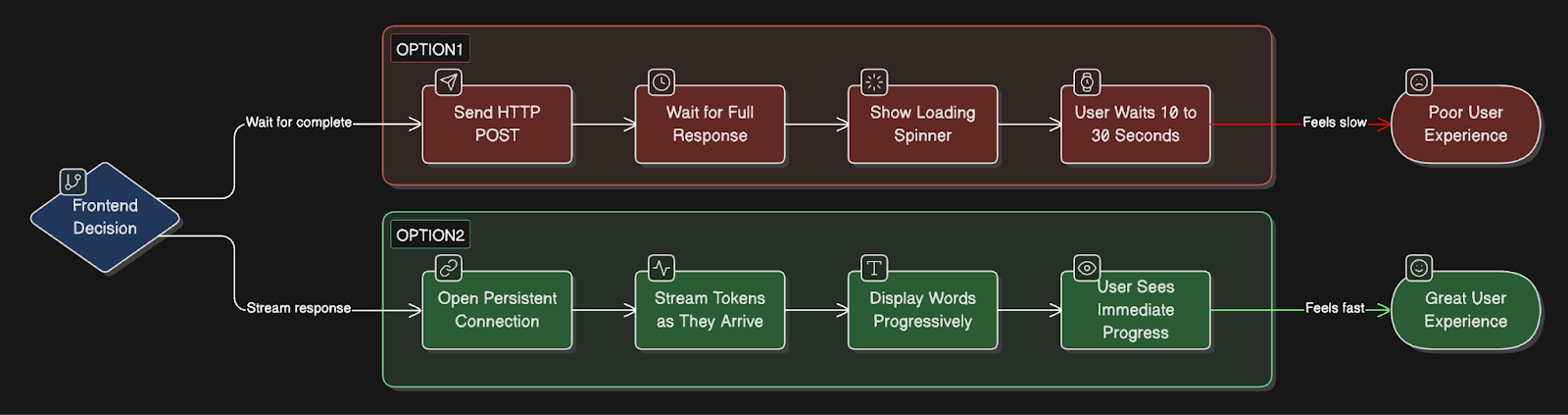
Option 1: Wait for complete response
Simple HTTP POST, and get a full response back
User waits 10-30 seconds staring at the loading spinner
Poor UX, feels slow
Option 2: Stream word by word
Requires a persistent connection
User sees progress immediately
Much better UX
ChatGPT, Claude, and Gemini all use streaming.
Let me verify the exact implementation.
How streaming actually works:
All major AI chat products use Server-Sent Events3 (SSE), not WebSockets.
Let me explain why:
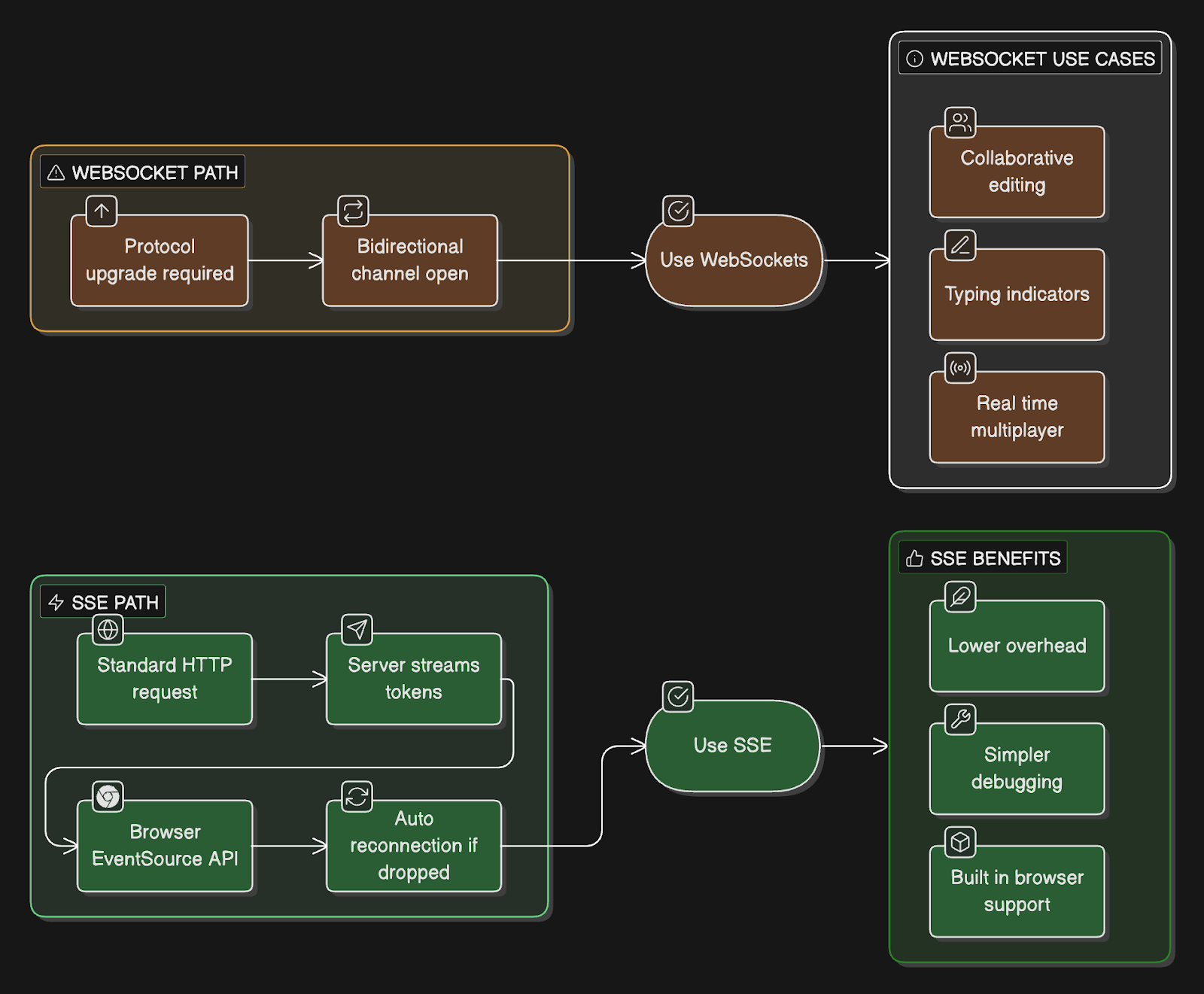
SSE (what ChatGPT uses):
Works over standard HTTP
Browser has a built-in EventSource API
Auto-reconnection handled automatically
One-way communication (server to client)
Simpler to implement and debug
Lower overhead than WebSockets
WebSockets (what ChatGPT doesn’t use):
Requires protocol upgrade from HTTP
Bidirectional communication
More complex to implement
Useful for collaborative features, typing indicators
Overkill for just streaming AI responses
Example of SSE streaming:
User types: “Explain React hooks”.
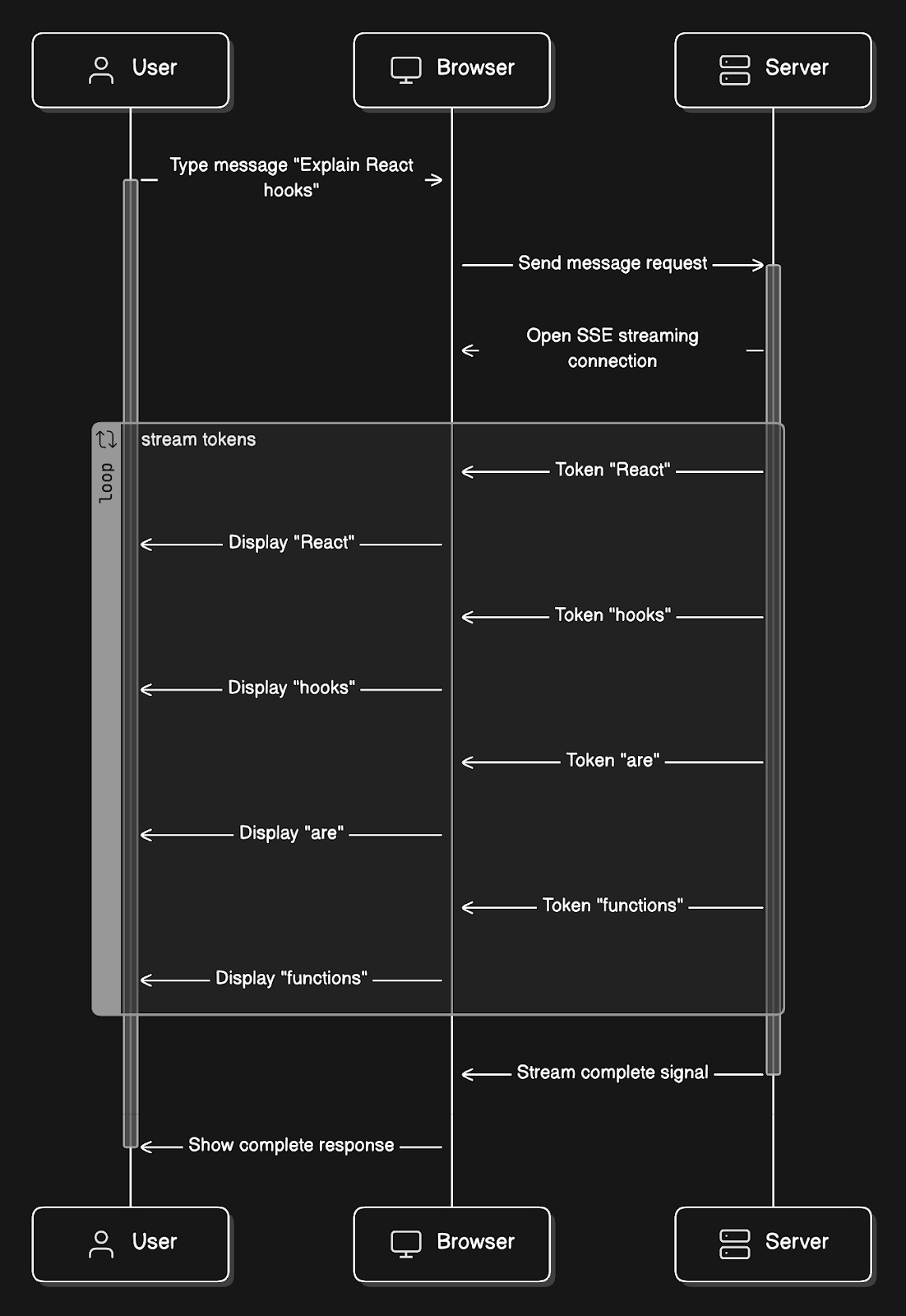
Each word appears in the UI as it arrives, creating the typing effect.
Frontend tech stack:
React for UI components
EventSource API for SSE connection
State management (Zustand or Redux) for conversations
Optimistic updates (show user message immediately)
Error handling for network failures, rate limits
The frontend sets user expectations for real-time streaming.
Now, let’s formalize what our system must do.
Functional Requirements
User registration and authentication
Create and manage conversations
Send messages and receive streaming AI responses via SSE
Save all conversations with full history
Retrieve past conversations
Stream responses token4 by token
Rate limiting (requests + tokens)
Content moderation for harmful requests
We’ve defined what the system does. But how well must it perform?
These requirements will drive our architectural decisions.
Non-Functional Requirements
How well it must perform (we’ll connect these to design decisions later):
Availability: 99.9%
Max 43 minutes of downtime per month
Latency: First token < 2 seconds
Users wait no more than 2 seconds
Scalability: 200M DAU, 20M concurrent conversations
Assuming 10% concurrency
Consistency: Zero message loss
Every message must be saved
Cost efficiency
LLM APIs are expensive and need optimization
Security: End-to-end encryption
Private conversations
We’ll show how our design achieves each of these.
We’ve set our performance targets. Now let’s run the numbers to see what infrastructure we actually need.
Capacity and Storage Estimation
Math matters because it drives infrastructure decisions.
Let’s use ChatGPT’s actual scale of growth projections:
Traffic:
1 billion weekly active users (WAU)
The current sources show 800-900 million weekly active users.
To accommodate growth and simplify our calculations, let’s design for 1 billion weekly active users.
~200 million daily active users (DAU)
2.5 billion prompts/messages per day
ChatGPT’s actual processing volume
12.5 messages per user per day average
Peak hours (20% of daily traffic in 2 hours)
69,444 messages/second
Concurrent conversations at peak: ~20 million
Assuming 10% of DAU are chatting simultaneously
Storage per conversation:
User message: 100 characters = 100 bytes
AI response: 500 characters = 500 bytes
Per exchange: 600 bytes
12.5 exchanges/day/user: 7.5 KB/user/day
200M DAU × 7.5KB = 1.5TB/day
Annual: 548 TB/year
Metadata storage:
User profiles (1KB each): 1B × 1KB = 1TB
Conversation metadata (500 bytes each, 10 per user average): 10B conversations × 500B = 5TB
Total Year 1: ~554TB (need distributed database, single PostgreSQL won’t cut it)
Connection overhead:
20M concurrent SSE connections at peak
Each connection: ~10-30 seconds average
Need infrastructure that can handle millions of long-lived connections
Bandwidth:
Average response: 750 bytes streamed over 20 seconds
20M concurrent: 20M × 750B / 20s = 750 MB/s = 6 Gbps
Peak outbound bandwidth requirement
Key insight: At ChatGPT’s scale, single-server solutions don’t work. We need distributed systems, sharding, and multi-region deployment from day one.
Now that we know the scale we’re dealing with, let’s design the actual system that can handle it.
High-Level System Design
Before diving into costs and implementation details, let’s map out the complete system architecture.
OpenAI uses a multi-cloud setup to secure enough compute power and avoid relying on a single vendor:
Microsoft Azure: Still their leading provider. They have a massive, long-term partnership in which Microsoft builds specialized supercomputers for training OpenAI’s models.
AWS: OpenAI signed a $38 billion deal with Amazon in late 2025. They now run significant workloads on AWS’s GPU clusters and specialized AI hardware.
Google Cloud (GCP): As of mid-2025, OpenAI uses GCP to power parts of ChatGPT Enterprise and the Team tiers, as well as their API.
Oracle: They have a multi-billion dollar agreement to use Oracle’s data center capacity, specifically for the massive “Stargate” infrastructure project.
CoreWeave: They also use this specialized “neocloud” provider for dedicated access to high-performance NVIDIA GPUs.
Components Overview
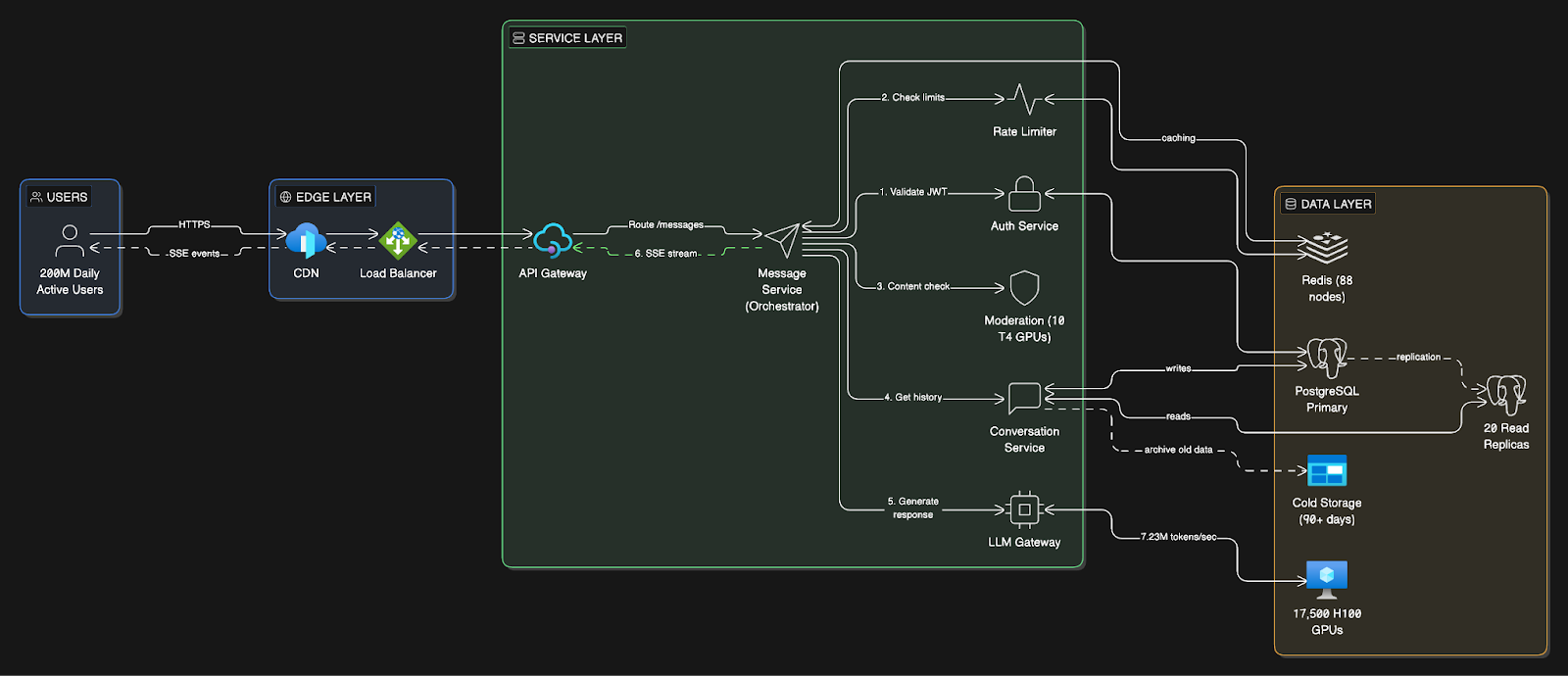
Our system has three main layers:
Client Layer
React web application
Mobile apps (iOS/Android)
SSE connections for real-time streaming
Service Layer (Microservices5)
API Gateway: Entry point, SSL termination, request routing
Auth Service: JWT6 authentication, user session management
Message Service: Core orchestrator for message processing and streaming
Conversation Service: CRUD operations for conversations and message history
Rate Limiter Service: Track and enforce request/token limits per user
Moderation Service: Content filtering for harmful requests
LLM Gateway Service: Routes requests to GPU clusters, handles streaming responses
Why this order?
Load Balancer is “dumb” - it just distributes TCP/HTTP connections across servers.
API Gateway is “smart” - reads the URL path and routes:
/auth/*→ Auth Service,/conversations/*→ Conversation Service, etc.
Data Layer
How Does the User Receive the Response?
The response flows back through the SAME connection path, reversed:
The HTTP connection stays open from:
Browser → Load Balancer → API Gateway → Message ServiceMessage Service writes tokens to the response stream
Each token flows backward:
Message Service → API Gateway → Load Balancer → BrowserBrowser’s EventSource API receives each event in real-time
Connection closes when streaming completes
Think of it like a phone call:
You call (request) → they answer and KEEP TALKING for 20 seconds (streaming) → then hang up.Same connection, just stays open longer.
Key Architectural Decisions
Single Primary PostgreSQL (not sharded)
Why: ChatGPT’s workload is 90% reads, 10% writes
OpenAI’s proven architecture: handles 800M users without sharding
Writes: All go through a single primary instance
Reads: Distributed across 20+ replicas in 6 regions
Trade-off: Single writer bottleneck, but application simplicity wins
Why reads dominate despite 2.5B prompts/day
Think about what happens per user prompt:
Load user account
Load subscription/quota info
Load conversation metadata
Load recent messages for context
Check rate limits
Maybe load feature flags, experiments, and so on.
Those are all reads.
Writes usually happens only when:
A new message is stored
Conversation metadata is updated
Usage counters are incremented
Logs are persisted
So one prompt can trigger many reads, but only a few writes.
Microservices Architecture
Why: Independent scaling and deployment
Each service scales independently based on its load
LLM Gateway can scale GPU clusters without touching other services
Rate Limiter needs different scaling than Conversation Service
Trade-off: Operational complexity vs scaling flexibility
SSE for Streaming (not WebSockets)
Why: Simpler, one-way communication is sufficient
Browser has a built-in EventSource API with auto-reconnection
Lower overhead than WebSockets
Most AI products (ChatGPT, Claude, Gemini) use SSE
Trade-off: Can’t do bidirectional communication (acceptable for chat)
Self-Hosted GPU Infrastructure
Why: At 2.5B messages/day, API costs would be $159M/month
Self-hosting: $52.4M/month (67% cheaper)
Requires: 17,500 H100 GPUs across multiple cloud providers
Trade-off: $525M upfront cost vs ongoing API expenses
Multi-Region Deployment
6 regions: 2 Americas, 2 Europe, 2 Asia-Pacific
Why: Global low-latency (users connect to the nearest region)
Each region has a full application stack + read replicas
GPU clusters are centralized in 3-4 major data centers
Trade-off: Operational complexity vs user experience
We've mapped out the architecture.
The interesting part comes next: how much this actually costs to run, why OpenAI made the controversial choice to not shard their database, and what changes at 500M and 1B users.
First, let's trace a message from the send button to the AI response…
