



Share this post & I'll send you some rewards for the referrals.
Cloud computing has changed the way we build and run systems:
It gives us managed services that improve reliability. But this flexibility also means small mistakes can spread quickly. One incorrect setting, a missing tag policy, or a bad scaling rule can affect many environments at once. These issues can quickly become expensive or risky.
Many teams run into “similar” problems… not because they’re careless, but because cloud platforms behave differently from traditional on-premise systems.
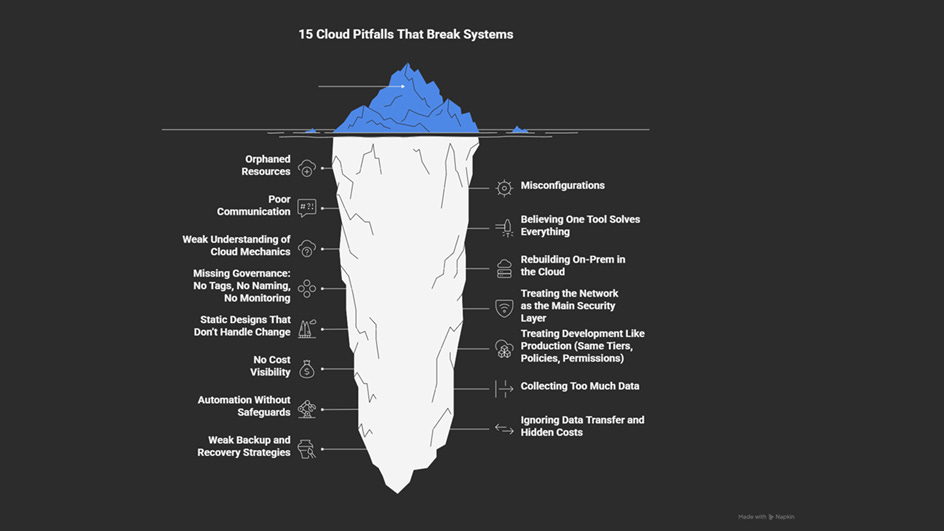
This newsletter will walk you through 15 common pitfalls in cloud environments.
Each section contains:
The pitfall - quick example or pattern
Why it happens - what design mistake causes it
Architectural impact - which parts of the system it affect
How to prevent it - ways to avoid it
The goal is simple:
Design systems that adapt to change instead of breaking under it… and build systems that stay reliable even when things go wrong.
Let’s start!
Learn Python, SQL, and AI with 50% Off — Become a Certified Data Analyst or AI Engineer! (Sponsor)

My favorite Black Friday deal is here! DataCamp is offering 50% off for 600+ hands-on courses, certifications, and career tracks.
Explore their top tracks to boost your career in 2026!
Or learn some of the most in-demand skills:
DataCamp makes learning practical with:
✅ Hands-on coding
✅ Guided projects
✅ Industry-recognized certifications
👉 Don’t miss it - 50% off ends soon!
I want to introduce Magdalena as a guest author.

She’s an infrastructure and cloud architect passionate about automation and security.
Check out her blog and social media:
You can learn in depth about the most common cloud pitfalls and how to avoid them with “Mind the Gap: Most Common Cloud Mistakes”.
You’ll also get a 50% discount for the ebook on Gumroad when you use the code–SYSTEMDESIGN. (Valid until 6 December.)
1. Orphaned Resources
Orphaned resources are cloud assets that are no longer in use but continue to run.
Examples:
unattached storage disks,
unused public IPs,
old snapshots.
They pile up over time, cost “money”, and clutter dashboards… thus making it harder to track what’s important.
A typical example is running a proof-of-concept on a large, expensive virtual machine and forgetting to shut it down or delete it. The VMs keep running, and the bill keeps growing until someone notices it.

Why it happens
Cloud makes it easy to create new resources. But deleting them is usually a manual task—and people forget. As every resource has a cost, even tiny leftovers add up. If left untracked, nobody knows what can be safely removed.
Architectural impact
Orphaned resources make it hard to understand where money is going. They can also create security risks. For example:
A forgotten test VM might still hold credentials.
An old IP address might still be allowed in firewall rules.
A leftover snapshot might contain sensitive data.
How to prevent it
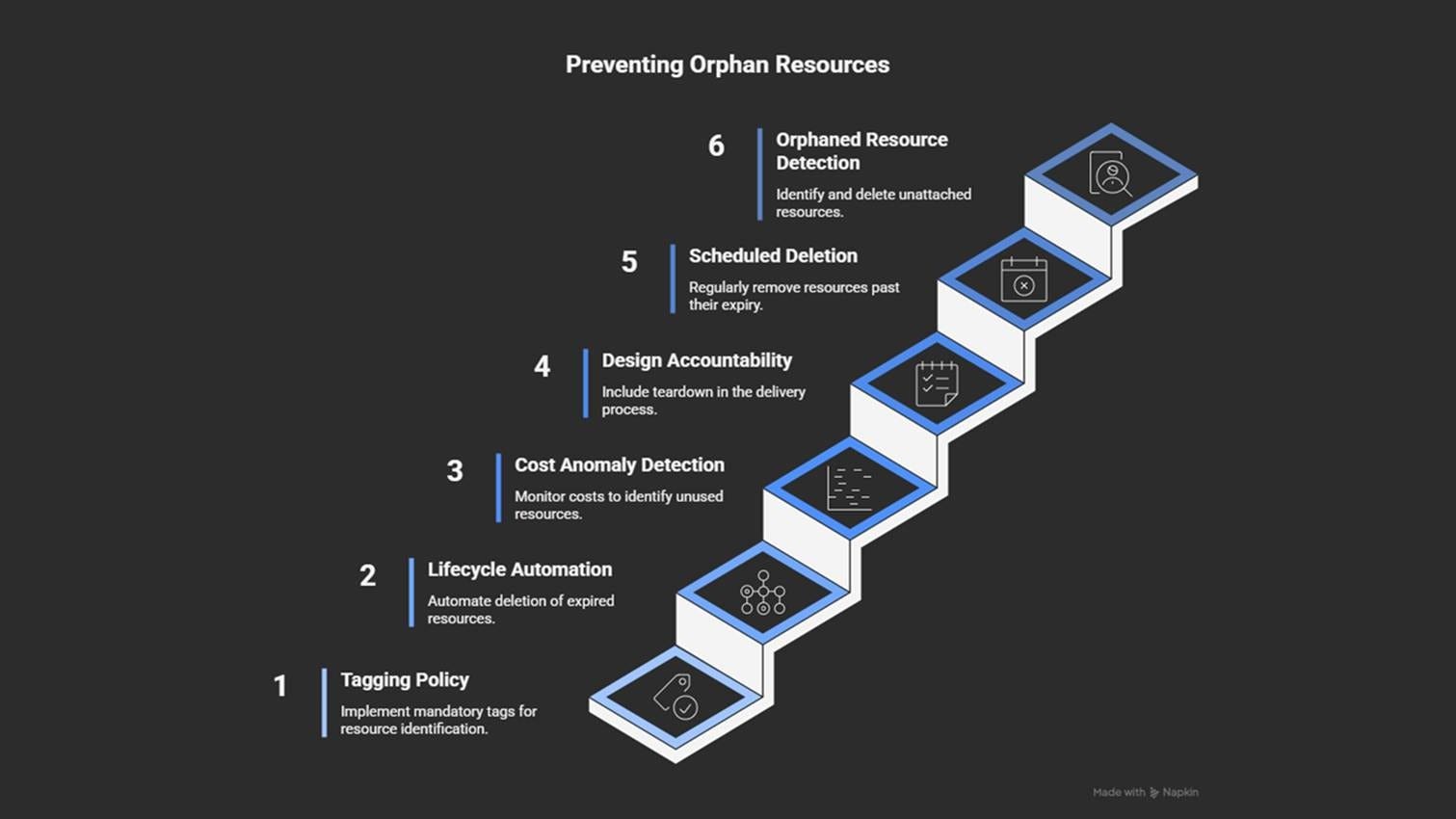
Use tags: owner, purpose, and expiry date.
Automate the cleanup of unused or expired resources.
Send regular cost reports grouped by tags and resource age.
Add cleanup to every project’s “done” checklist.
Schedule automatic scans to find and remove old resources.
Forgotten resources quietly waste money. While configuration mistakes break systems quickly.
2. Misconfigurations
Misconfiguration is one of the most common causes of cloud incidents.
A single wrong setting or missing rule can affect reliability, security, or cost. And its impact often spreads long before anyone notices.
Examples:
Wrong autoscaling limits
Encryption not turned on for storage
A storage bucket accidentally left public
Copy-pasting templates without checking differences
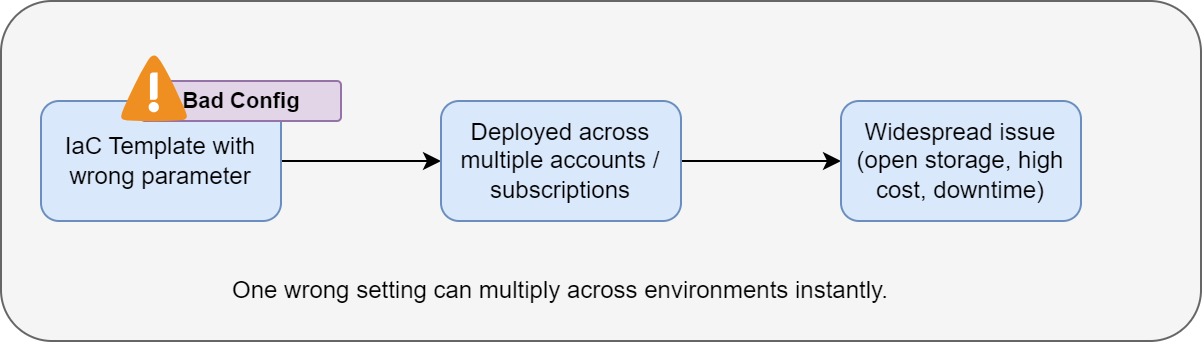
When these patterns are automated, a single mistake amplifies across multiple accounts or regions.
Why it happens
Cloud services offer hundreds of settings: permissions, scaling rules, encryption options, network controls, and so on.
Teams often rely on defaults or copy settings between environments without reviewing them. When Infrastructure as Code1 (IaC) templates contain errors, those errors propagate every time the template is used.
And fast release cycles make it worse; there’s rarely enough time for reviews.
Architectural impact
Misconfiguration can:
Expose sensitive services to the public
Destabilize performance
Disable encryption
Break scaling logic
Increase costs
Because cloud automation pushes changes at scale, a tiny error can impact an entire production environment within minutes.
How to prevent it
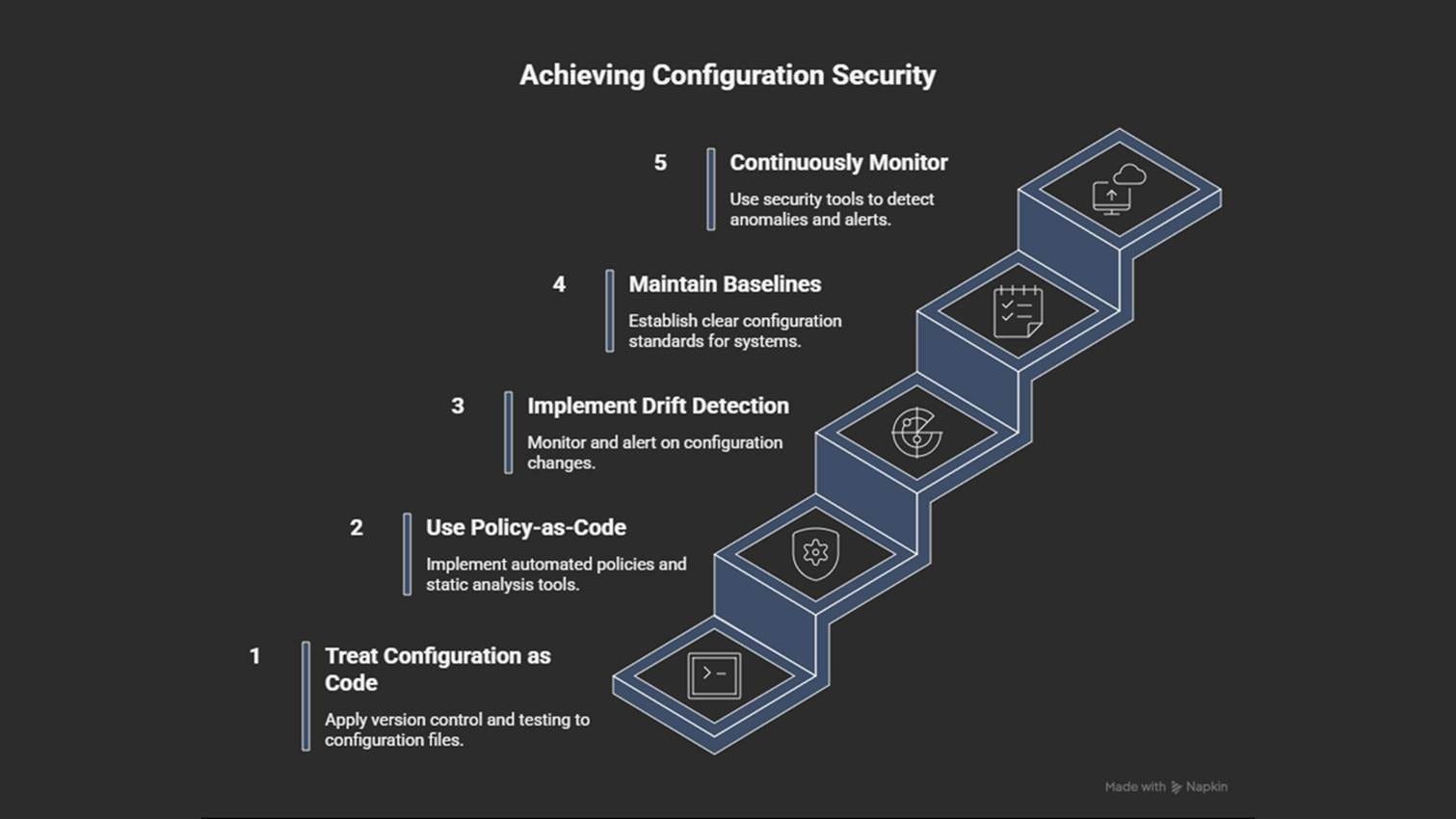
Keep configurations in version control; review and test every change.
Use policy-as-code tools (Terraform Validate, AWS Config, Azure Policy).
Detect configuration drift and automatically enforce compliance.
Keep clear configuration baselines for production and non-production systems.
Monitor continuously for anomalies or security alerts.
Strong configurations are helpful, but they only work if teams communicate effectively. The next challenge isn’t in the code… it’s in coordination.
3. Poor Communication Between Teams
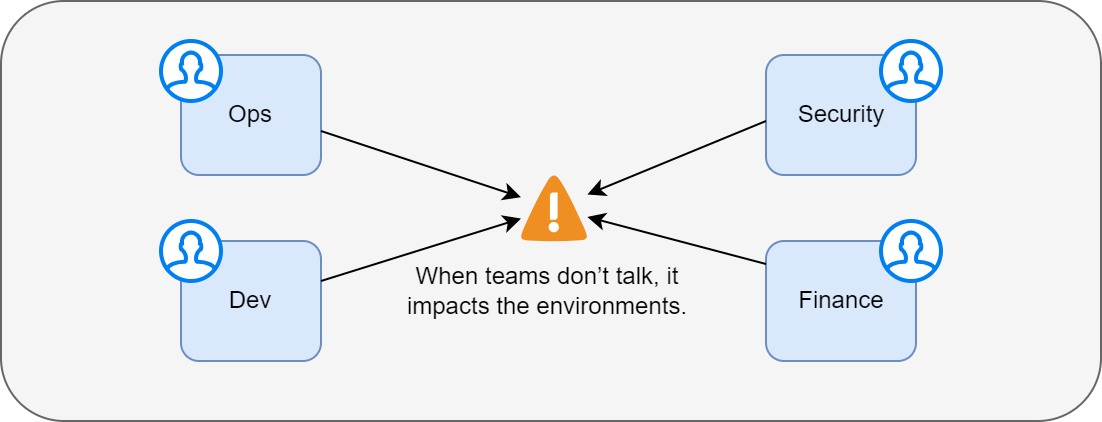
Cloud systems rely on effective coordination among development, operations, security, networking, and finance teams.
If they don’t share information clearly, assumptions drift, ownership becomes unclear, and issues surface late in production.
For example:
A networking team updates routing rules for compliance, but doesn’t inform data engineers who depend on that network.
Pipelines fail the next day - not because of a bug, but because one team didn’t know what another had changed.
Why it happens
Cloud projects involve many specialties:
Developers focus on features.
Operations focus on reliability.
Security focuses on compliance.
Each team uses different tools and has different priorities.
If teams don’t share information clearly, critical details get lost. Teams may not know which workloads are important or how specific changes impact cost or performance.
Architectural impact
Poor communication causes:
Duplicate services
Inconsistent architecture
Pipelines that fail to integrate
Security exceptions approved without full context
Conflicting Identity and Access Management2 (IAM) roles
During incidents, no one is sure who owns what, which slows down the response and recovery.
How to prevent it
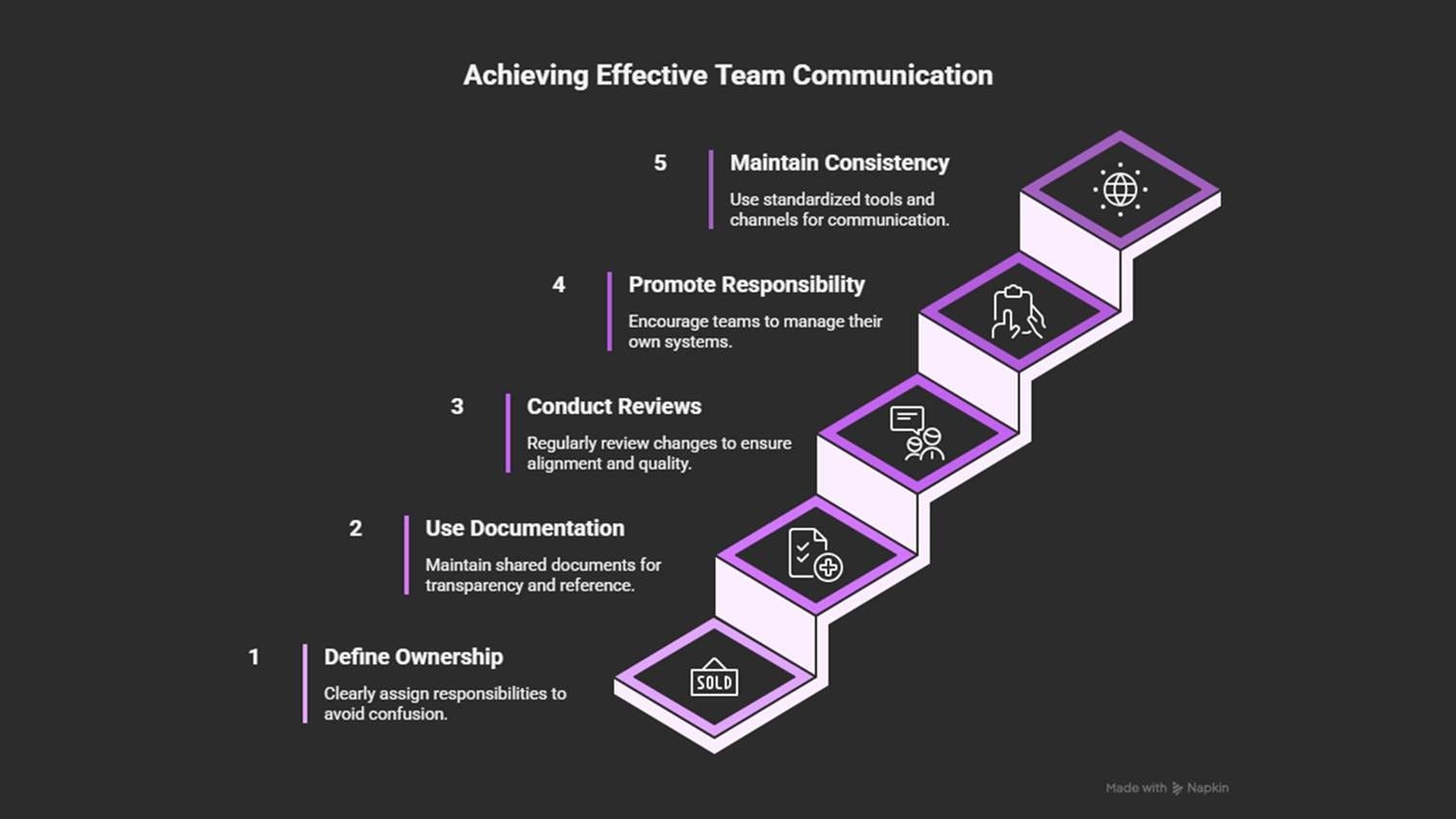
Define clear ownership and contact points for each system or account.
Keep shared documentation and Architecture Decision Records3 (ADRs).
Hold cross-team reviews for key infrastructure or cost changes.
Encourage a “you build it, you run it” mindset.
Use consistent tagging, naming, and shared communication channels (shared dashboards and so on).
Communication gaps often cause teams to take shortcuts, such as relying on a single tool to solve every problem. But that approach can backfire!
4. Believing One Tool Solves Everything
Many teams assume that a single cloud platform, monitoring tool, or automation system can handle every need.
It feels efficient at first:
One interface, one workflow, one place to learn.
But as systems grow, this approach limits flexibility… and creates more problems than it solves.
Example:
A team standardized on a single deployment tool that worked well for virtual machines (but didn’t support containers).
And developers began writing custom scripts to fill the gaps, and environments drifted apart.
So tracking changes became difficult.
Why it happens
Cloud tools evolve fast, and many are marketed as “all-in-one” solutions.
Teams under pressure to simplify or reduce costs often choose a single tool for everything: observability4, CI/CD5, security, deployments, and so on.
At first, it seems easier to manage and train people on a single platform. But it becomes difficult over time:
The tool doesn’t scale across many accounts.
It doesn’t work well in hybrid or multi-cloud environments.
It lacks the features needed for new services.
What started as “simplicity” ends up as inflexibility.
Architectural impact
Relying on one tool can cause:
Hidden dependencies
Poor multi-cloud or hybrid support
Large parts of the system break if the tool fails
Missing metrics, especially for newer workloads
Slow innovation, as teams wait for features that may never arrive
How to prevent it
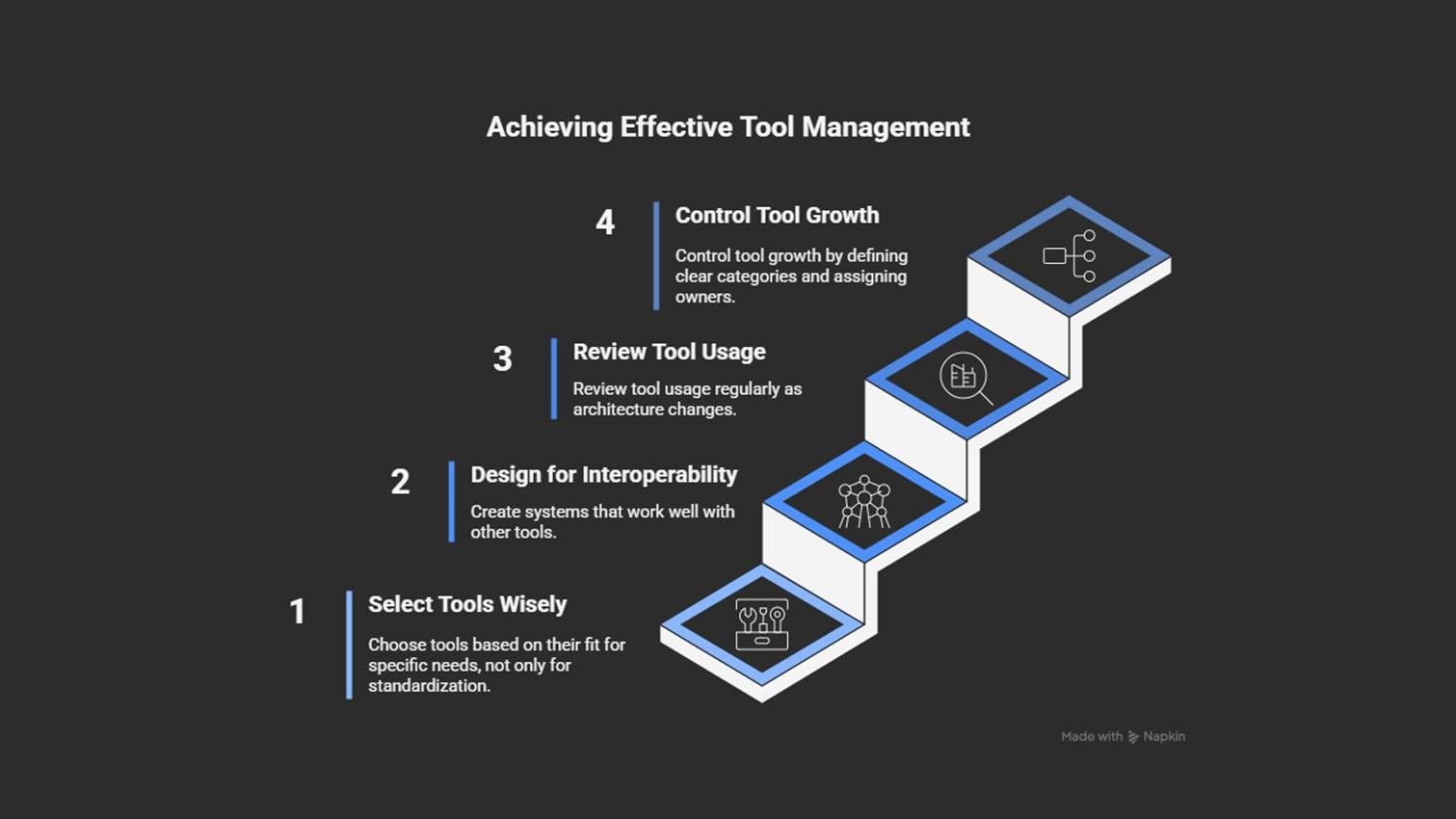
Choose tools based on fit, not just standardization.
Review tool usage regularly as your architecture evolves.
Design for interoperability6 using APIs and modular pipelines7.
Limit the number of tools you use. Also, group tools by purpose (monitoring, IaC, deployment). Plus, assign clear ownership.
Relying just on one tool is risky. However, a deeper issue arises when there’s a lack of understanding about how the cloud actually works.
5. Weak Understanding of Cloud Mechanics
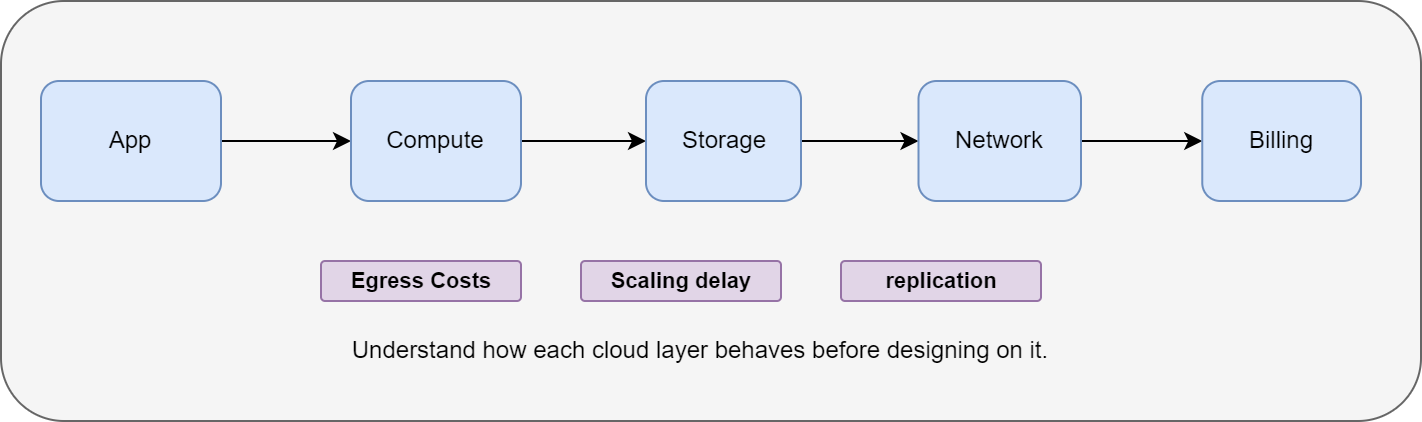
Many cloud problems come from a lack of understanding of how the cloud actually works: from billing and scaling to data movement and networking.
Without this knowledge, even well-designed systems can become expensive or unreliable.
Example:
A team built a data analytics job that copied large datasets between regions daily.
They assumed transfers were free, just like in their on-premise data center.
Their first month’s bill showed network charges higher than the compute costs.
Why it happens
Cloud platforms hide many infrastructure details.
Although this makes things easier, it doesn’t remove responsibility. Teams used to traditional environments expect fixed costs and predictable performance.
But in the cloud, everything is usage-based:
How much data you store
How much data you move
How much data you process
Services scale automatically, but not always as teams expect. There’s often a gap between how a service is described and how it behaves with real workloads.
Architectural impact
A weak understanding of cloud mechanics can cause:
Systems that scale too slowly or too fast
Inefficient storage usage (e.g., active data on slow, cheap tiers)
Silent cost growth in data transfer and API calls
Misunderstanding reliability features8 like regional redundancy9 or eventual consistency10
These issues can cause high costs, data loss, or availability risks.
How to prevent it
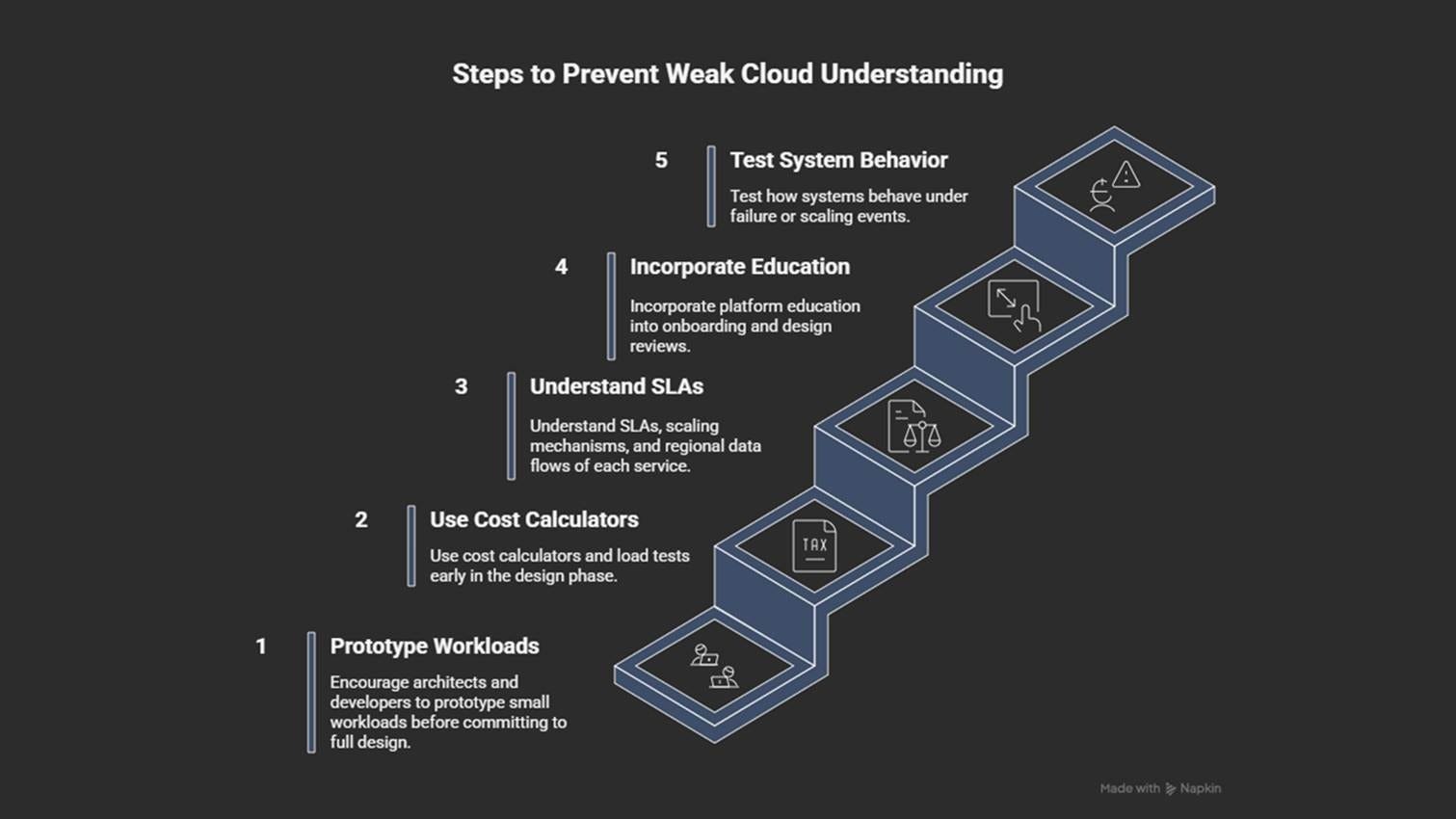
Use cost calculators and load tests early.
Build and test small prototypes before scaling up.
Understand SLAs11, scaling mechanisms, and regional data flows.
Add platform training to onboarding and architecture reviews.
Test how systems behave during failures or heavy load.
Misunderstanding the platform often leads to copying old data-center patterns in the cloud. This could limit the benefits of using the cloud.
6. Rebuilding On-Prem in the Cloud
A common and costly mistake is treating the cloud like a traditional data center.
Many teams migrate their virtual machines, networks, and firewalls without changing the design. This feels safe and familiar. But it overlooks key cloud benefits, such as elasticity, automation, and managed services.
Example:
A company copied its data-center VMs and networks directly into the cloud.
Costs increased, updates remained manual, and scaling was limited.
Only after moving to managed databases and autoscaling groups did the system become efficient.
Why it happens
Most migrations happen under time pressure.
Teams take the fastest route… and lift their on-premise environment into the cloud to avoid redesign work (“lift-and-shift” strategy12).
But if these old habits,
Manual patching
Fixed-size servers
Strict network zones
… continue, it brings technical debt into a platform that charges for every resource used by the unit (time/call/execution).
Architectural impact
Rebuilding on-premise in the cloud can cause:
Poor use of managed services
High costs from fixed-size infrastructure
Limited scalability because of manual maintenance
Weak resilience compared to cloud-native designs
Overreliance on network-based security instead of identity-based access
These issues make systems harder to scale, more expensive to run, and slower to recover.
How to prevent it
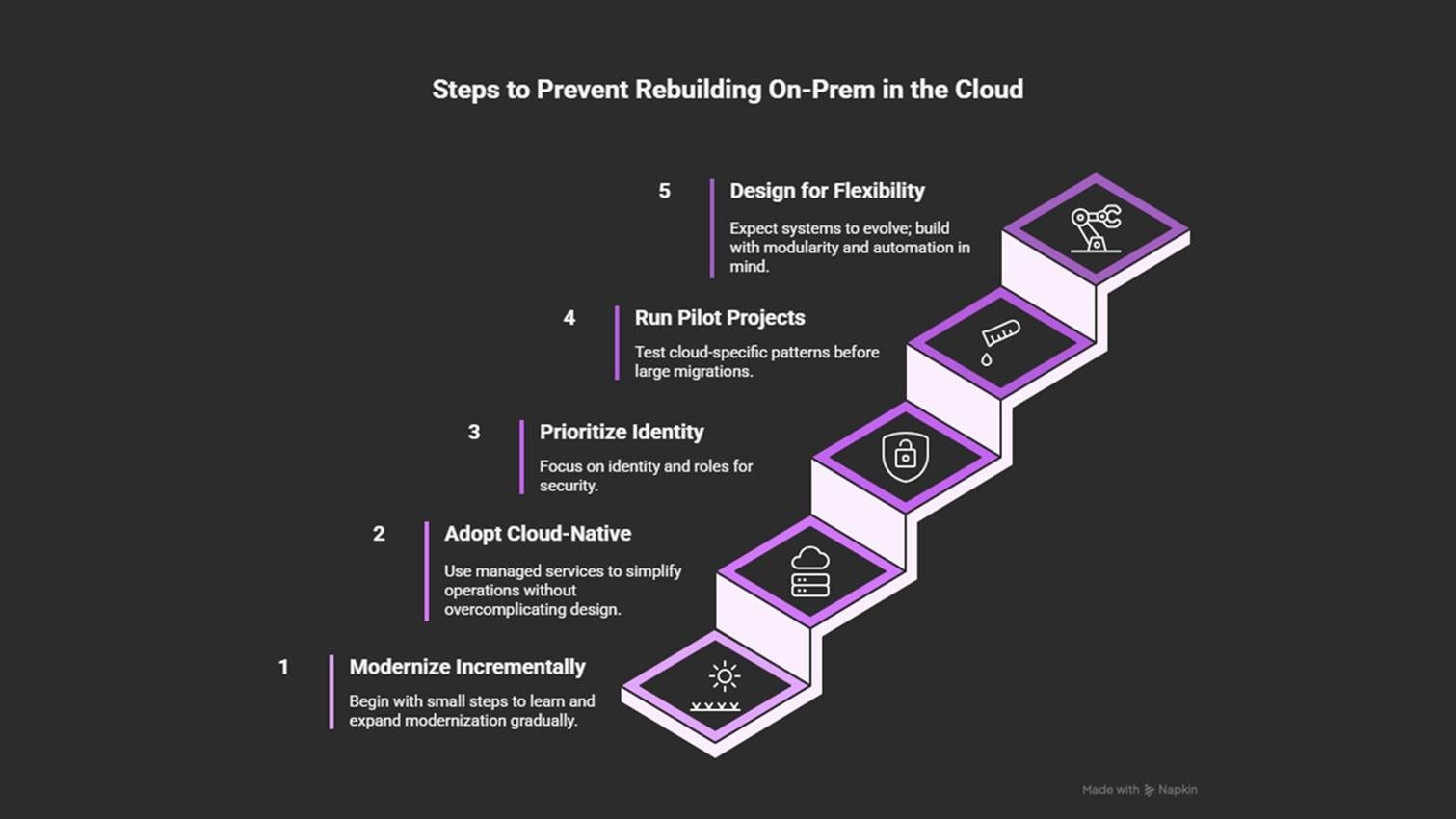
Modernize step by step: start small and iterate slowly.
Adopt cloud-native services where they reduce effort.
Use identity and roles as the primary security boundary.
Design for flexibility and modularity, so the system evolves.
Run pilot projects to test scaling, recovery, and automation patterns.
After moving to the cloud, structure and visibility become critical. Without proper governance, even small setups can turn chaotic.
7. Missing Governance: No Tags, No Naming, No Monitoring
Without clear governance, even well-built cloud environments quickly become confusing.
When resources have unclear names, lack tags, or are not monitored, costs increase and ownership becomes unclear.
Teams can’t answer simple questions like:
Who owns this?
What is it for?
Can we delete it?
Example:
A company discovered that half of its monthly bill was because of untracked compute instances and unused storage.
None had tags or meaningful names.
It took weeks to trace the ownership.
And only after adding tagging rules and cost dashboards could they safely remove the unnecessary resources.
Why it happens
Early in the cloud adoption process, teams focus on speed rather than structure.
They create resources fast, without standard tags or names. And as the environment grows across projects and regions, these missing details become a problem:
Monitoring and cost alerts are added too late
Nobody knows which VM supports production
Or which storage bucket belongs to a retired project
As a result, the environment becomes difficult to understand.
Architectural impact
Missing governance leads to:
Poor visibility and unclear ownership
Security teams unable to trace exposed resources
Finance unable to link costs to owners or projects
Untracked resources piling up and wasting money
Automation tools failing because of missing tags and names
How to prevent it
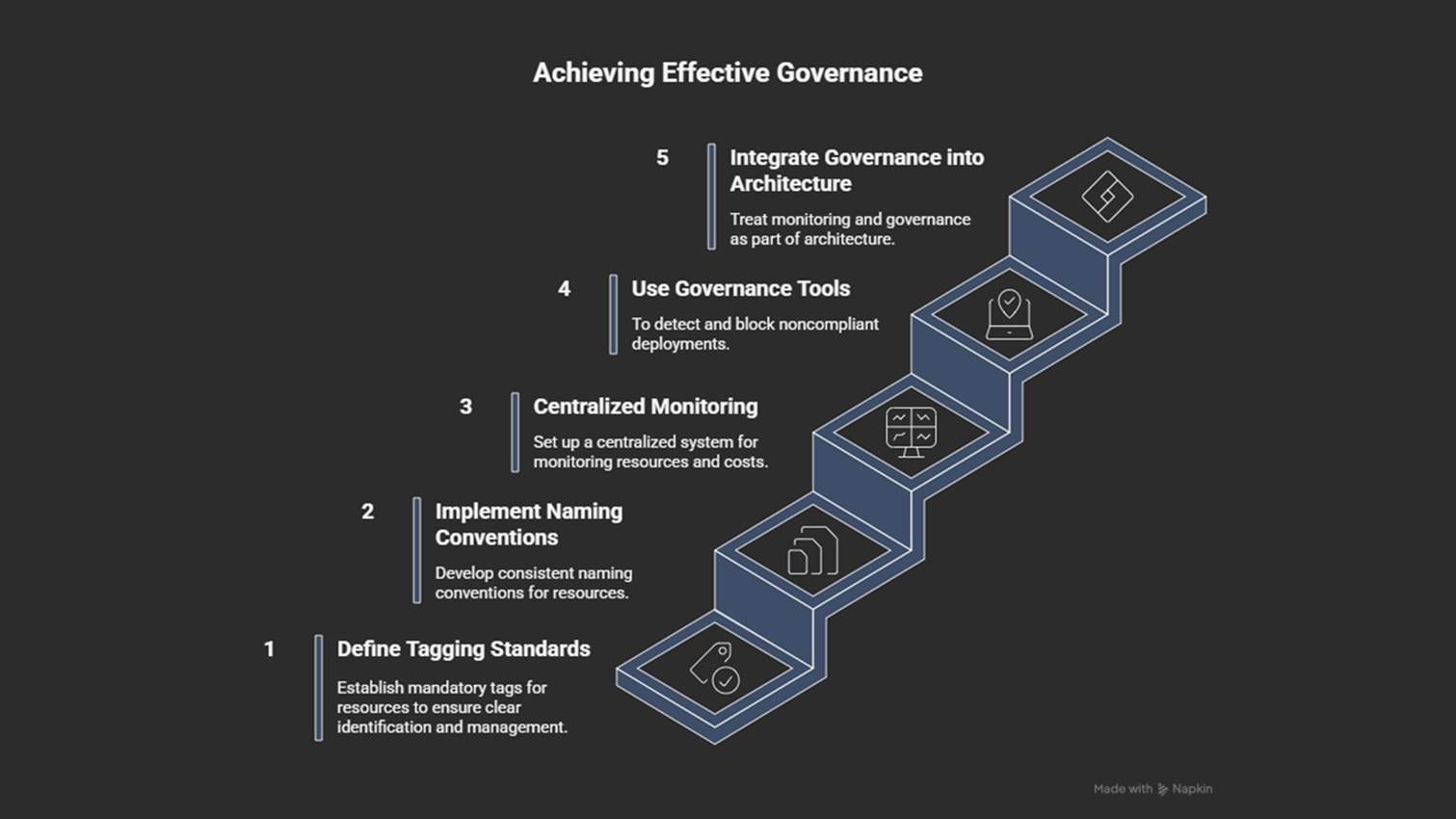
Use clear and consistent naming conventions.
Treat governance as core architecture, not as cleanup work.
Centralize monitoring, cost reporting, and alerting across all accounts.
Use governance tools (AWS Config, Azure Policy, GCP Organization Policies).
Define mandatory tagging standards: owner, environment, purpose, cost center, and expiry.
Good governance improves visibility. But it doesn’t guarantee security, especially when teams rely too much on network boundaries and overlook identity and access controls.
8. Treating Network as the Main Security Layer
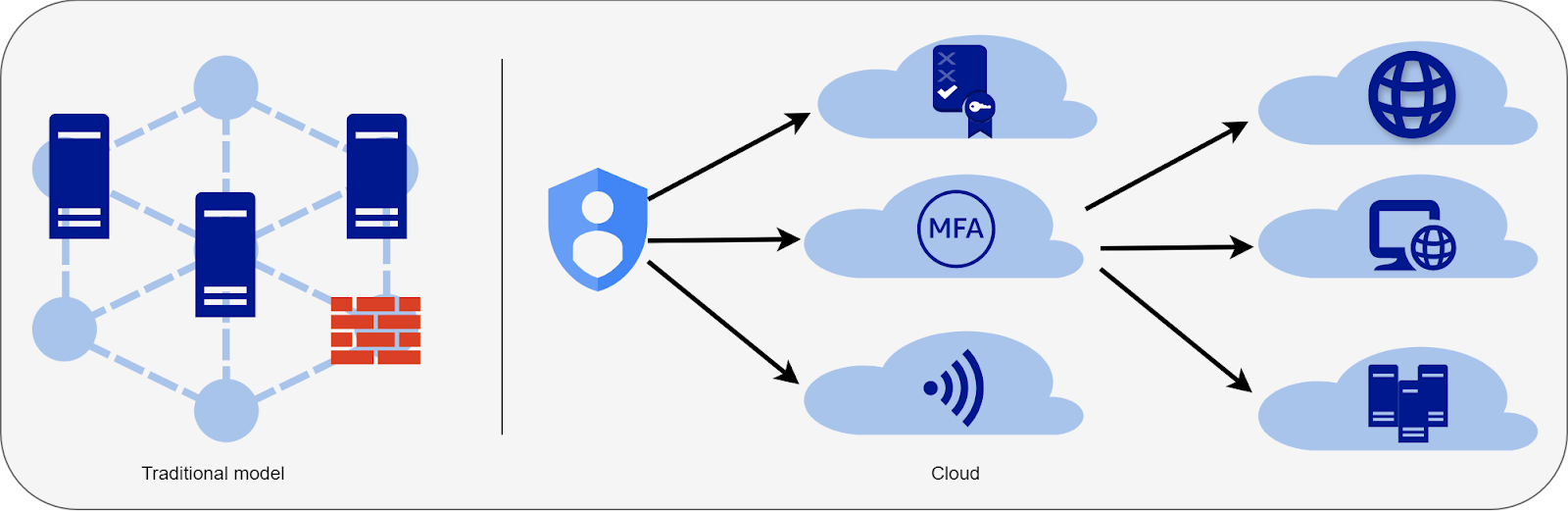
In traditional data centers, the network perimeter is usually the primary line of defense:
You could isolate systems, add firewalls, control traffic, and so on.
But in the cloud, that model no longer works. Identity and permissions now define the real security boundary… yet many teams still rely mainly on network rules and overlook identity.
Example:
A company isolated workloads in private subnets.
But they gave broad permissions to their automation tools.
When a CI/CD credential was compromised, attackers could access data directly through APIs.
The network stayed closed, but identity access was enough to cause damage.
Why it happens
Teams coming from on-premise environments often bring the same perimeter-based mindset into the cloud.
They continue using:
VPNs13
IP allow lists
Tight subnets
This approach may work in small setups, but cloud environments are constantly evolving. Many services, such as serverless functions and managed databases, live outside fixed networks altogether.
Architectural impact
Relying too heavily on network controls causes:
Blind spots in security
Strict rules blocking valid communication
Misconfigured firewalls exposing internal systems
No protection against identity-based attacks (the most common breach type)
How to prevent it
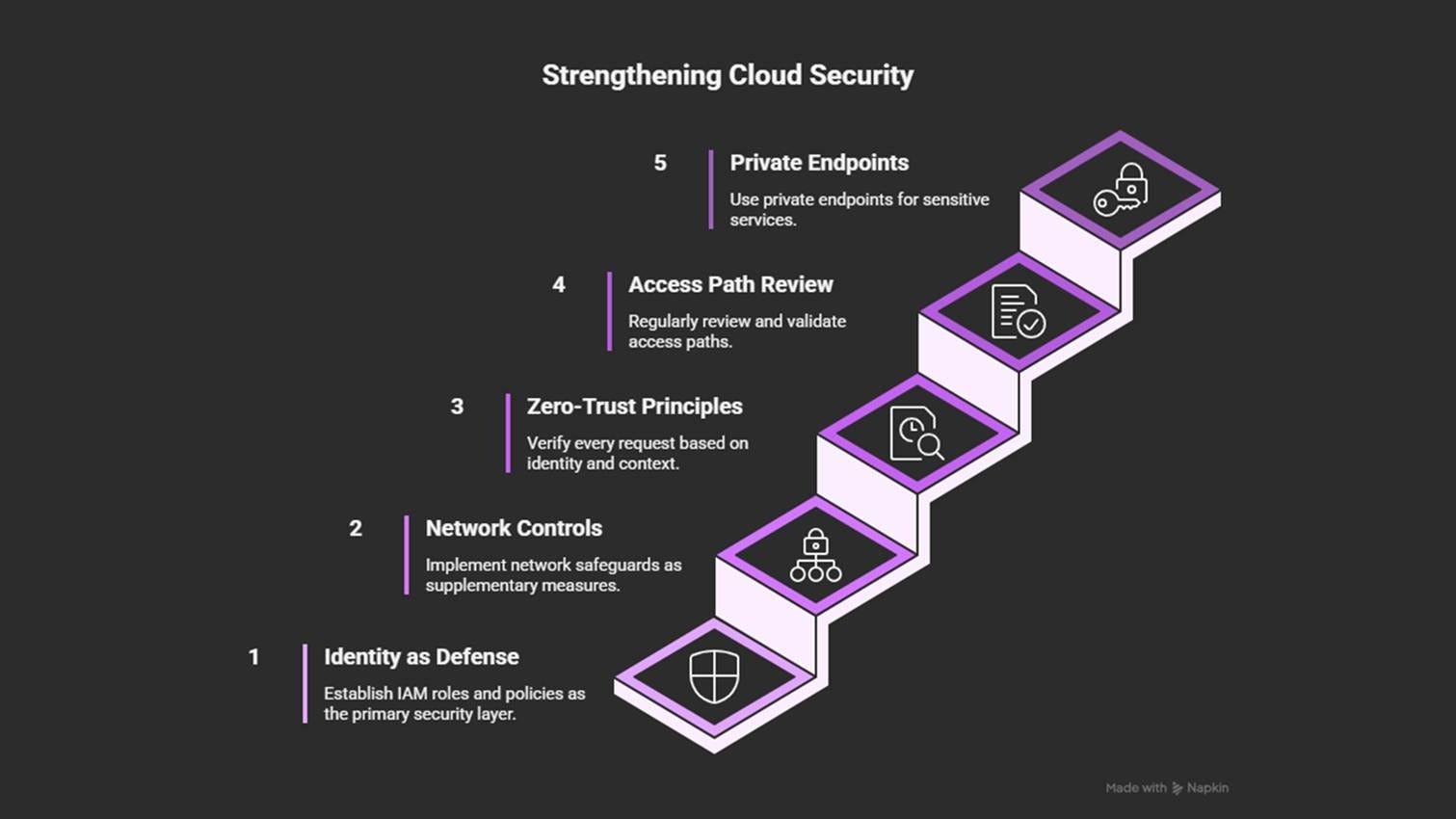
Treat identity (IAM roles, service accounts, least-privilege policies14) as the first layer of defense.
Use network rules as an extra layer of protection, not as the core security layer.
Apply zero-trust principles15: verify every request based on identity and context, not location.
Review access paths regularly and use automated policy validation tools.
Prefer private endpoints16 and managed connectivity for sensitive services over custom VPNs.
Solid security foundations are essential, but resilience also requires flexibility. Static designs fail… as soon as conditions change.
9. Static Designs That Don’t Handle Change
Cloud systems are built to adapt:
Services evolve, usage changes, and regions shift.
But many teams design architectures as if nothing will ever change. Static, rigid designs may look stable at first… yet they fail the moment workloads, connections, or platform features change.
Example:
An application launched with fixed VM clusters and manual scaling.
During seasonal peaks, performance dropped sharply, so engineers had to add capacity manually.
After switching to autoscaling (with limits) and serverless processing, the system automatically handled the load and “reduced costs” during quiet periods.
Why it happens
Teams coming from on-premise environments often use a “set it and forget it” mindset. They keep the old patterns:
Hardcode limits
Fixed-size clusters
Manual deployments
Sometimes internal rules (long approval queues or fear of automation mistakes) also slow down change. The result is a system that works for current traffic but can’t grow with demand.
Architectural impact
Static designs lead to:
Poor scalability
Crashes during traffic spikes
Slow recovery during incidents
Wasted money during low traffic
Infrastructure that becomes outdated as services evolve
They also discourage testing and experimentation.
How to prevent it
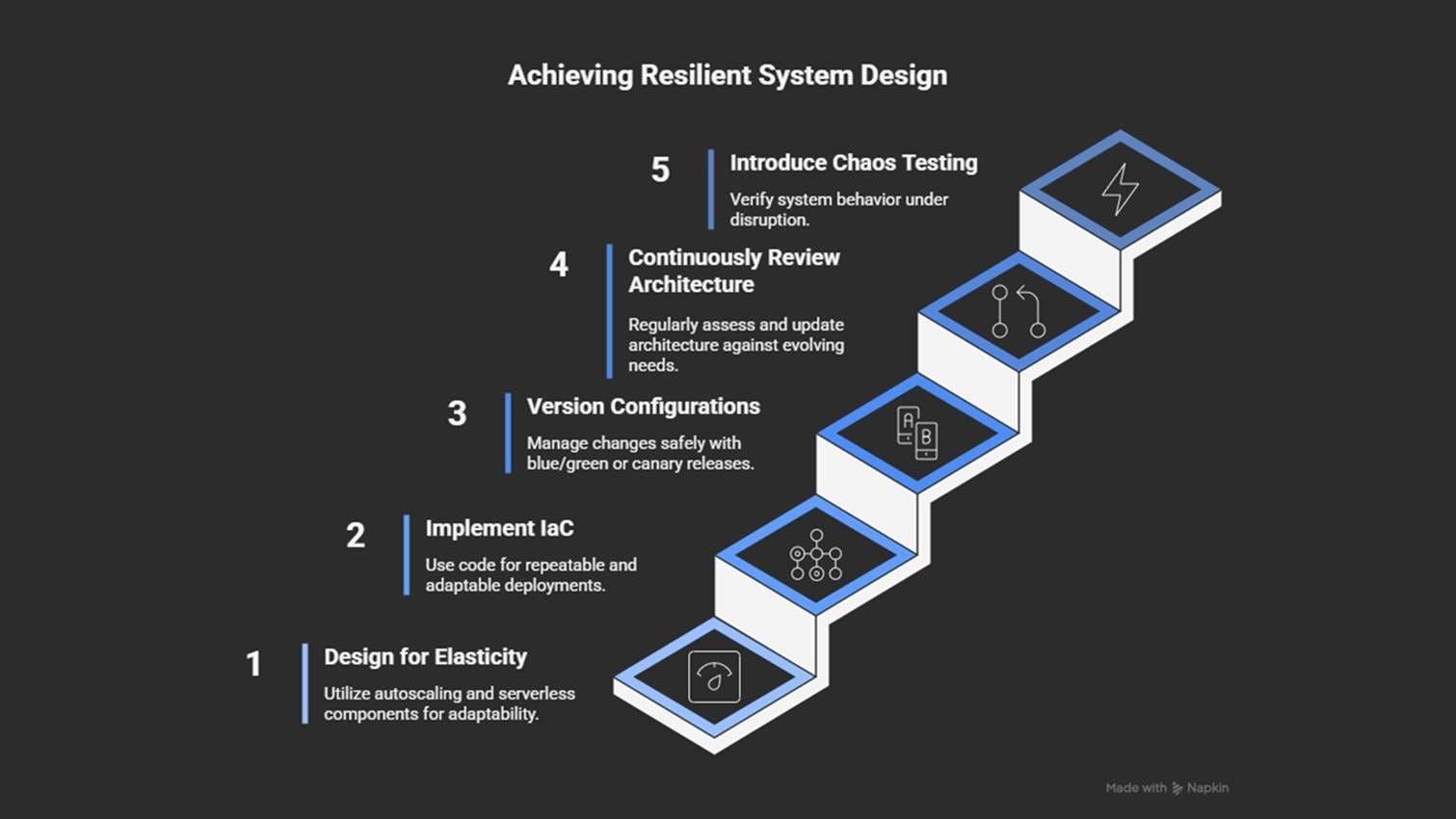
Design for elasticity: autoscaling, serverless, and event-driven models.
Use infrastructure as code for flexible and repeatable deployments.
Version configurations and test changes with blue-green or canary releases.
Review the architecture regularly as usage and platform features evolve.
Introduce chaos testing to validate how systems respond to failure.
A system that can’t adapt is one problem. But even flexible systems waste money if development environments mirror production too closely.
10. Treating Development Like Production (Same Tiers, Policies, Permissions)
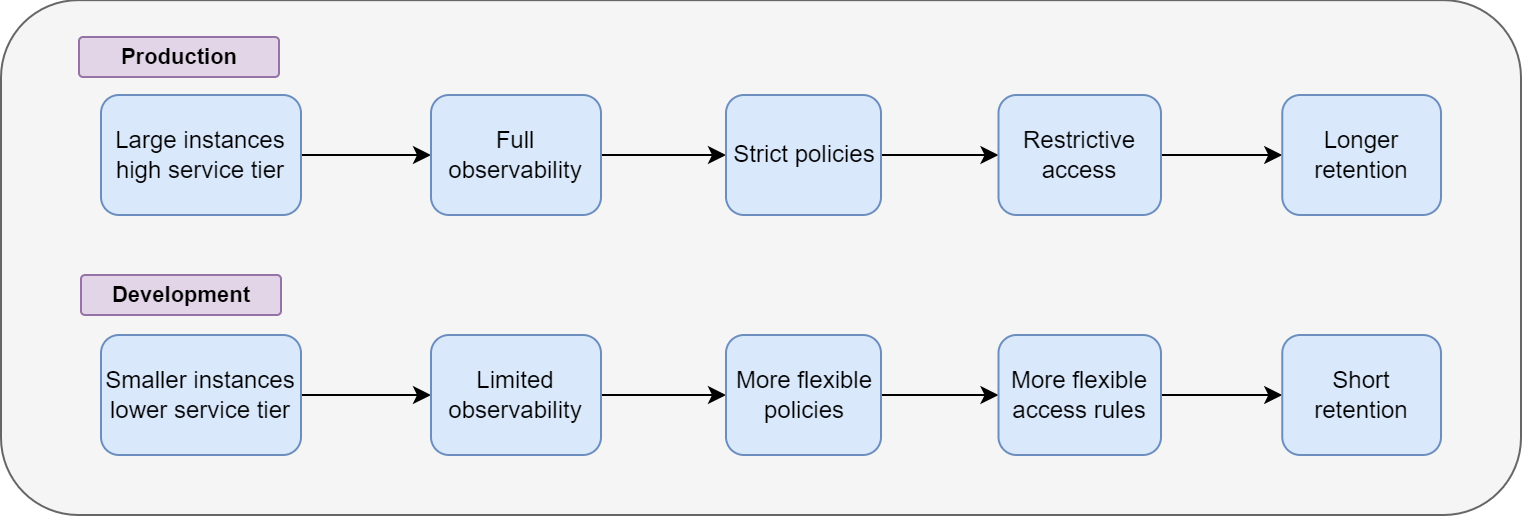
Development and production should NOT look identical.
When both environments use the same instance sizes, retention rules, and permissions, the result isn’t better control; it’s unnecessary cost and reduced flexibility.
Development should be a safe environment for testing ideas… not a complete replica of the production environment.
Example:
Every test stack used the same compute tiers, observability tools, and storage.
A company cloned its entire production setup into development to “keep things consistent”.
Within months, development costs reached almost half of the production costs.
Why it happens
Teams often copy production settings into dev or test environments to avoid surprises. But in the cloud,
Broad permissions
Long retention rules
Strict production policies
… and identical configurations slow development, increase costs, and limit experimentation.
Architectural impact
Treating all environments the same leads to:
Unused data piling up
Broad permissions exposing secrets
High costs from expensive dev resources
Strict rules blocking quick tests or experiments
A slow, rigid setup that adds little value between releases
How to prevent it
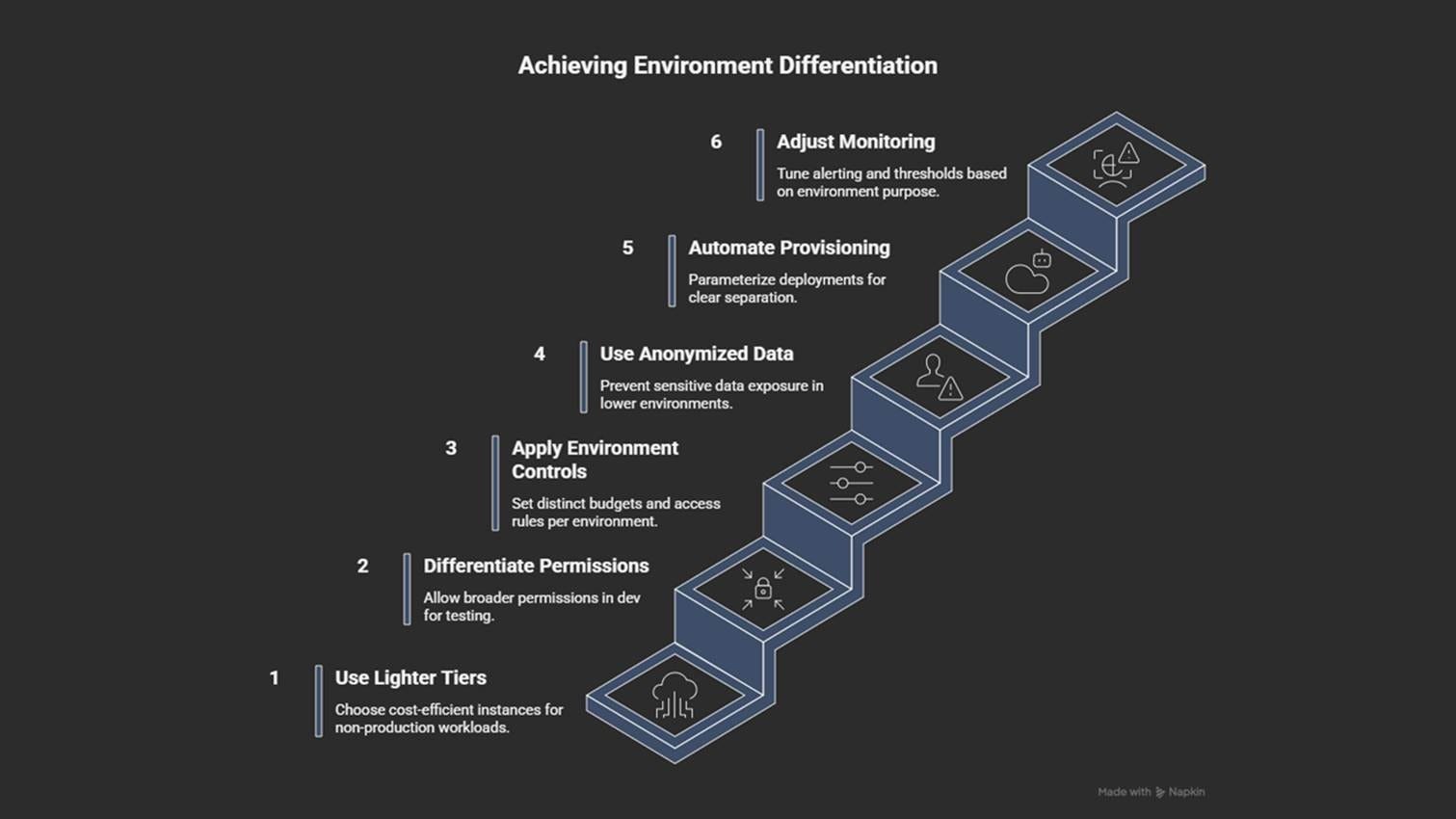
Use smaller, cheaper instance types for non-production environments.
Set different permission levels for development and production.
Define separate budgets, data retention rules, and access policies.
Use anonymized or synthetic data17 instead of production data.
Tune monitoring and alerts for each environment’s purpose.
Automate provisioning with clear parameters per environment (dev, test, prod).
As environments grow, tracking costs across accounts becomes difficult. Without visibility, spending becomes hard to explain and control.
11. No Cost Visibility
Cloud costs become clear only when someone actually tracks them…
Many teams run for months without knowing where their money is going. And this can quickly erode trust from finance and leadership.
Example:
A project stored large datasets across many buckets.
Without cost reports, nobody noticed that storage and data transfer costs were growing faster than compute.
After adding tagging rules and cost dashboards, the team identified unused datasets and significantly reduced the monthly bill.

Why it happens
Cloud billing provides detailed information but involves complexity.
Costs spread across services, regions, and accounts. And without proper structure, it’s hard to understand who is spending what.
Common causes:
No tagging
No centralized reporting
No shared dashboards
If you prioritize speed without tracking costs, it creates “mystery spend”, where everyone assumes someone else is monitoring usage.
Architectural impact
Poor cost visibility leads to:
Slow or stalled optimization efforts
Over-provisioned or idle resources staying online
Design and scaling decisions disconnected from financial reality
Storage and autoscaling choices that cost more than expected
Teams afraid to delete resources because the impact is unknown
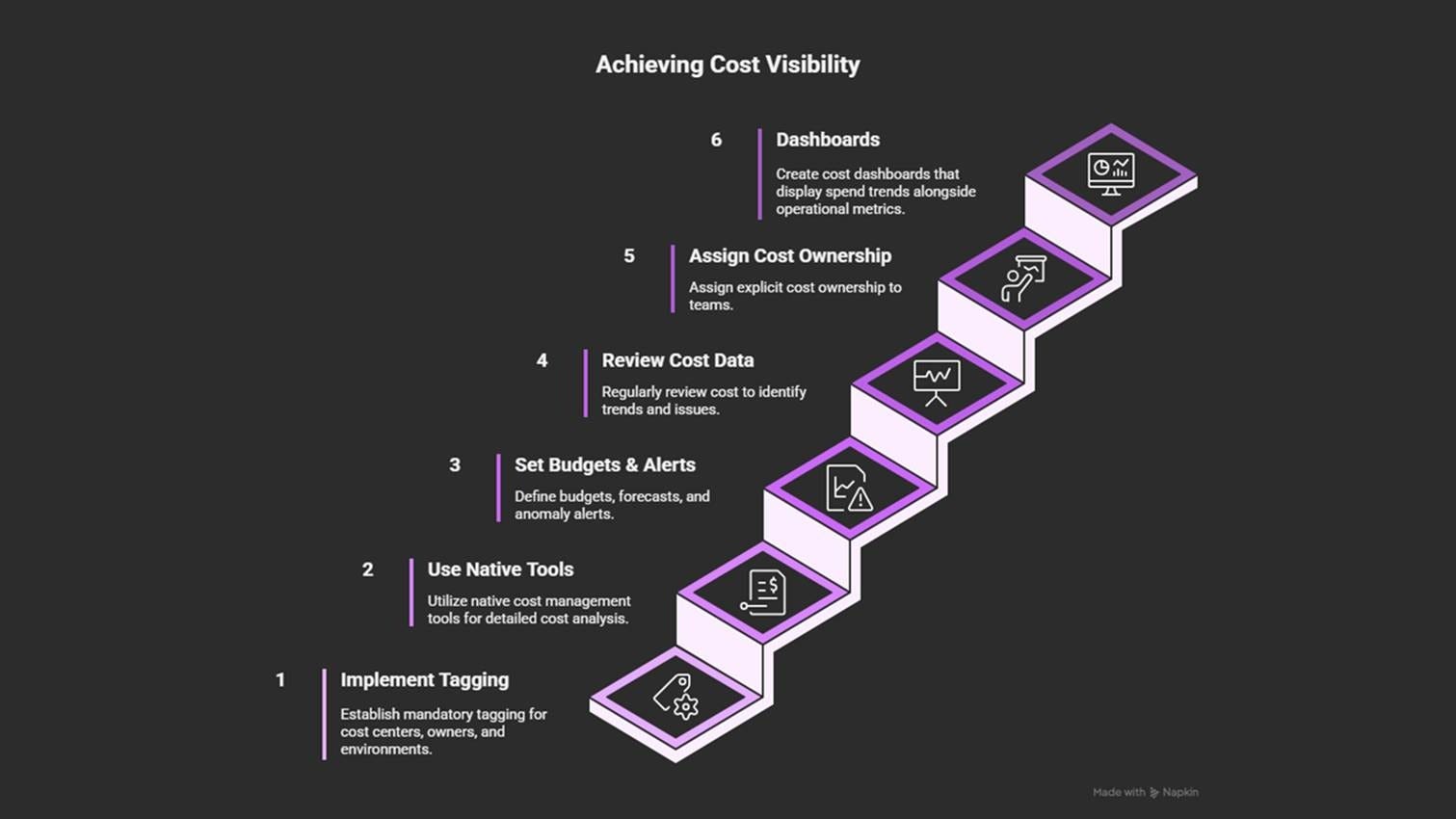
How to prevent it
Assign clear cost ownership to teams.
Tag resources by cost center, owner, and environment.
Use built-in cost tools (AWS Cost Explorer, Azure Cost Management, GCP Billing Reports).
Set budgets, forecasts, and anomaly alerts per project or account.
Review cost data regularly in architecture and operations meetings.
Add dashboards that show spend trends alongside performance metrics.
Poor cost visibility often hides waste, and one common reason is collecting too much data.