


Share this post & I'll send you some rewards for the referrals.
Cybersecurity used to feel like something only a few people in the office cared about.
Not anymore…
Every engineer writes code that touches users, data, and money. One small gap in logic can expose an entire system. And it happens faster than most people expect.
These things look minor when you’re building features… They don’t feel dangerous.
But attackers think in patterns.
They look for the smallest crack, then push until it opens wide.
That’s why engineers can’t write code with a “someone else will secure it” mindset. Instead, think like the person trying to break what you built.
What comes next is a short security handbook for engineers…
It’s designed to help you think more clearly while you’re building. You’ll learn how small decisions add up, where systems usually weaken, and how to spot risk early instead of reacting later.
If you write code that touches users, data, or money, these ideas will shape how you design and ship software. They help you build systems that stay steady under real-world pressure.
Read it with an open mind.
That’s often enough to level up your engineering.
Onward.
Passbolt: Password and Secrets Manager Built for Modern Software Teams (Sponsor)

Passbolt is built first for modern IT teams, yet simple enough for everyone.
With Passbolt, you can:
Share credentials securely and granularly (per item, per person, per version)
Enforce encryption on the client side (servers never see your secret)
Keep full audit logs of who did what
Make rotation mandatory when access is revoked
Integrate secrets into CI/CD workflows
Deploy on your own stack (or using their EU cloud)
Stay fully open source, with 15+ published audits
If your team still passes around credentials the old way, this is your sign to fix it.
I want to introduce Saed Farah as a guest author.

Saed Farah is a Senior Security Engineer at Google and a well-known voice in the cloud security and DevSecOps community. He is also a Kubestronaut and writes extensively about real-world security engineering, cloud infrastructure, and career growth in tech.
Saed’s journey into tech is anything but conventional. He is entirely self-taught and has worked his way up through roles including IT Support Specialist, Technical Specialist, Sales Engineer, Junior and Senior DevOps Engineer, before eventually joining Google.
Along the way, he also held non-tech roles, including working as a doorman and selling mobile phones, experiences that shaped his grounded and practical perspective on careers in technology.
You can follow Saed and explore his work here:
The Foundations
Let’s dive in!
1. Attack Surface
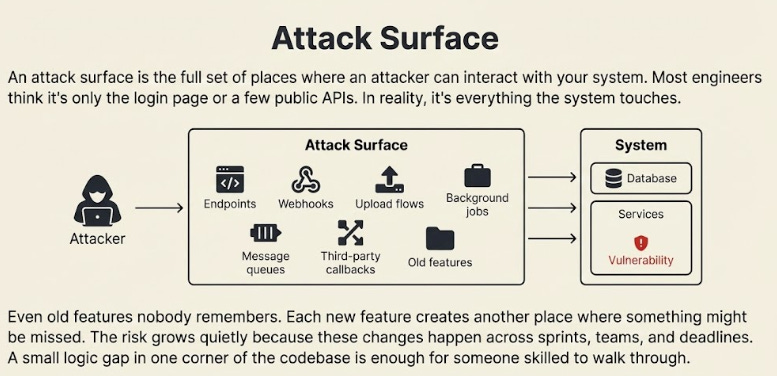
An attack surface is the full set of places where an attacker can interact with your system. Most engineers think it’s only the login page or a few public APIs.
In reality, it’s everything the system touches.
Even old features nobody remembers.
Each new feature creates another place where something might be missed. The risk grows quietly because these changes happen across sprints, teams, and deadlines.
A small logic gap in one corner of the codebase is enough for someone skilled to walk through.
Good engineering teams map their attack surface often, remove dead paths, and treat every new feature as a new door that needs to be locked before release.
2. Threat Model
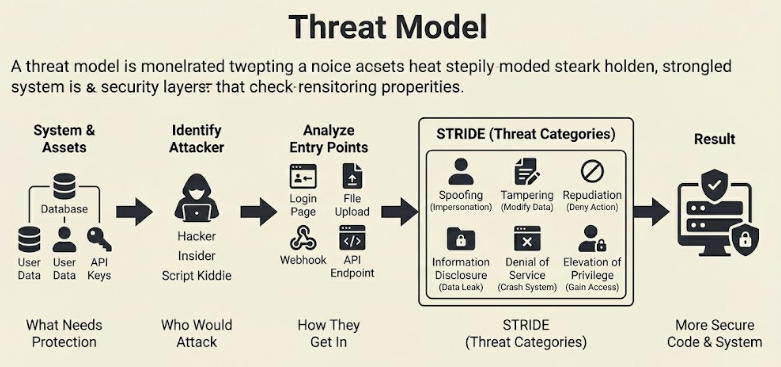
A threat model is a way to ask one simple question:
“If someone wanted to break this system, how would they do it?”
You start by listing what needs protection.
Then you list who might try to attack it.
After that, you look at every entry point and imagine how each one can be abused.
This exercise slows you down usefully… Instead of thinking like a feature builder, you think like someone who wants to cause damage.
STRIDE5 helps because it gives you a pattern to follow:
Spoofing,
Tampering,
Repudiation,
Information disclosure,
Denial of service,
Elevation of privilege.
These six ideas cover most real attacks you will face.
A good threat model changes how you write code. You stop trusting defaults and start questioning everything.
3. CIA Triad
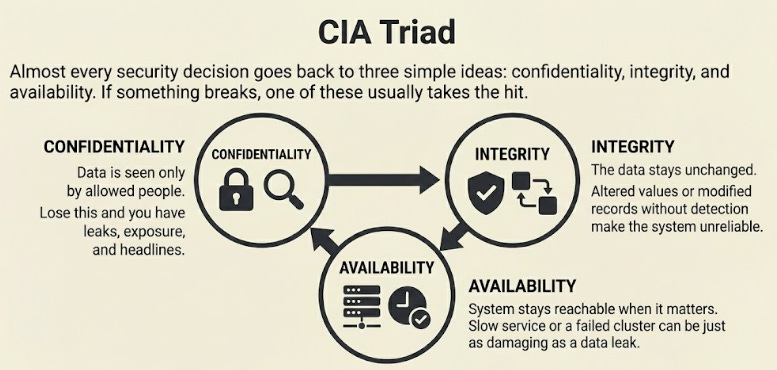
Almost every security decision goes back to three simple ideas: confidentiality, integrity, and availability.
If something breaks, one of these usually takes the hit:
Confidentiality means data is seen only by the people who are allowed to see it. Lose this, and you have leaks, exposure, and headlines.
Integrity means the data stays unchanged. If someone can alter values, switch IDs, or modify a record without detection, the entire system becomes unreliable.
Availability means your system stays reachable when it matters. A slow service, a blocked queue, or a failed cluster can be just as damaging as a data leak.
The CIA triad is not a checklist… It’s a lens.
It helps you judge decisions fast and see where the system is weak before someone else does.
Identity and Access
Let’s keep going!
4. Authentication
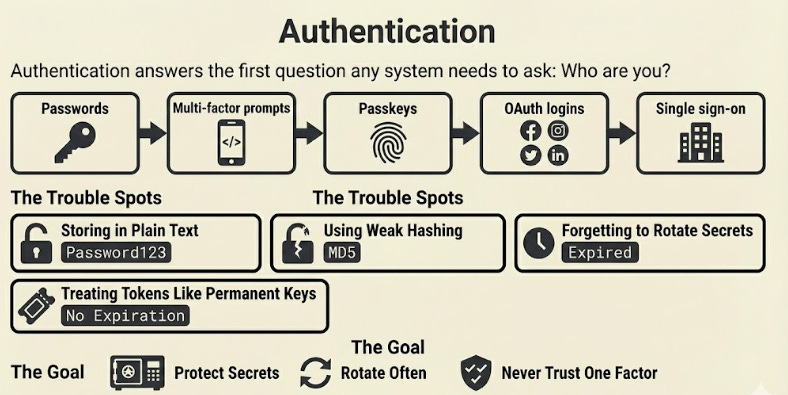
Authentication answers the first question any system needs to ask:
“Who are you?”
The common methods include:
The trouble usually lies in how passwords are handled.
Storing them in plain text.
Using weak hashing.
Forgetting to rotate secrets9.
Even token systems fail when teams treat access tokens as permanent keys rather than temporary proof.
A good system protects secrets, rotates them frequently, and never trusts a single factor. The goal is simple. Make it hard for anyone to pretend to be someone else, even if one layer gets exposed.
5. Authorisation
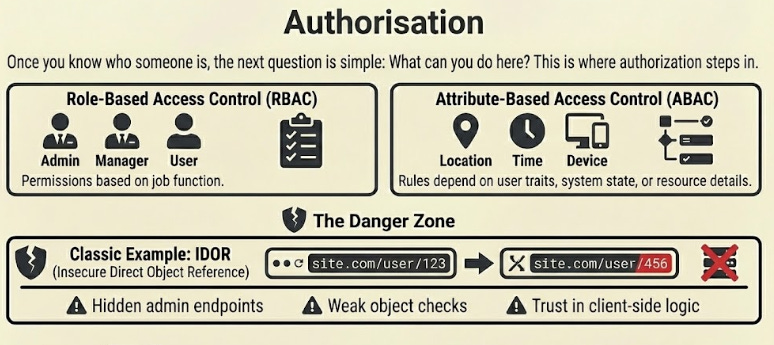
Once you know who someone is, the next question is simple:
What can you do here?
This is where authorisation steps in…
Two common models drive this:
Role-based access control (RBAC), where users get permission sets based on their job.
Attribute-based access control (ABAC), where rules depend on user traits, system state, or resource details.
Most breaches happen here, not in authentication.
The classic example is Insecure Direct Object Reference (IDOR).
A user changes an ID in a URL and suddenly sees data they shouldn't. Broken access control also shows up in hidden admin endpoints, weak object checks, and trust in client-side logic.
Strong authorisation means checking permissions at every step and treating every action as something that must be earned, not assumed.
NOTE: Want to read more on this?
Look up “NIST RBAC” for role-based models and “OWASP IDOR” for real-world access control failures.
6. Least Privilege
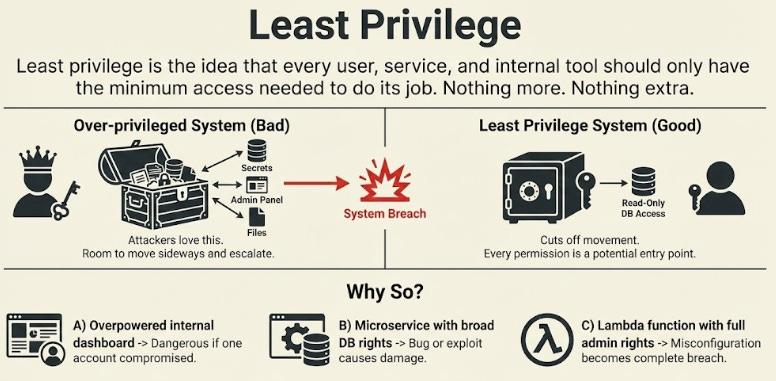
Least privilege is the idea that every user, service, and internal tool should have only the minimum access needed to do their job.
Nothing more.
Nothing extra.
But why so?
An overpowered internal dashboard becomes dangerous if a single account gets compromised.
A microservice with broad database access rights can cause damage if a bug or exploit lets someone execute unsafe queries.
A Lambda function10 with full admin rights can turn a minor misconfiguration into a complete system breach.
Attackers love over-permissioned systems…
It gives them room to move sideways and escalate. Least privilege cuts off that movement.
Good teams review permissions often, trim them down, and treat every permission as a potential entry point.
Core Defenses
Ready for the best part?
7. Encryption (Symmetric and Asymmetric)
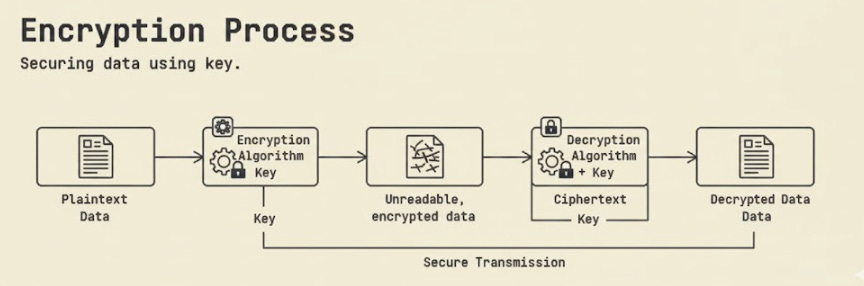
Encryption protects data by turning readable text into something unreadable without the right key.
Two approaches to encryption usually dominate systems today:
1. Symmetric encryption
One key is used for both locking and unlocking the data.
AES (Advanced Encryption Standard) is the common choice in modern systems. It is a fast, well-tested symmetric cipher used almost everywhere today.
Use case: encrypting files, tokens, database fields, and anything that needs high performance without too much overhead.
2. Asymmetric encryption
Two keys are used: a public key to lock the data and a private key to unlock it. RSA (Rivest–Shamir–Adleman) is a common example.
Use case: secure key exchange, digital signatures, and verifying identity.
What engineers often get wrong:
Storing keys on GitHub
Hard-coding keys inside the source code
Keeping private keys on application servers
A leaked key brings the entire system down.
Encryption is strong only when the keys stay protected.
8. Hashing
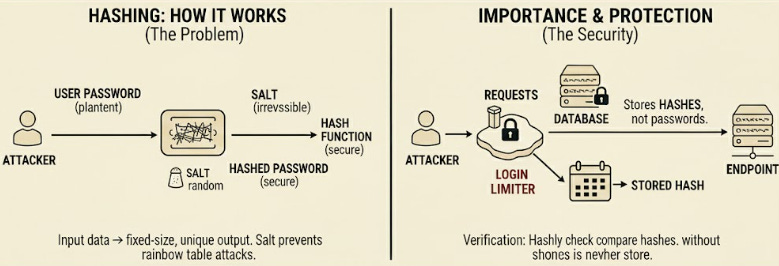
Hashing takes an input and produces a fixed-length output.
It cannot be reversed. And that is the entire point.
This is why hashing is used for passwords and integrity checks.
For passwords, use:
These functions slow down brute-force attempts.
That slowdown protects your users.
Hashing is not encryption because you can never unlock the original value. This is why storing hashed passwords is safe even if the database leaks, as long as strong hash functions are used.
Old hash algorithms like MD5 and SHA-1 are no longer safe!
They produce patterns attackers can crack in seconds with cheap hardware.
If you see them in a codebase, replace them before anything else.
9. TLS/HTTPS
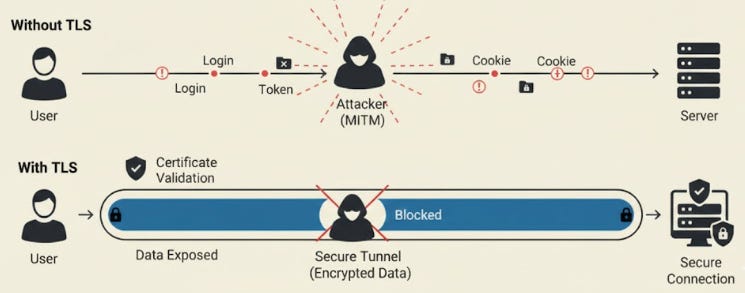
TLS (Transport Layer Security) is the protocol that protects data as it moves over the network.
When you see HTTPS, it usually means two things are happening:
The server is proving it is the server you expect.
The data is encrypted, so nobody can read or modify it while it travels.
Certificates make this trust possible.
Your browser checks them before sending anything sensitive. If the certificate is fake, expired, or signed by an unknown source, the browser blocks the connection.
A man-in-the-middle attack occurs when someone sits between you and the server, pretending to be both sides. TLS helps prevent this by validating certificates and creating a secure tunnel that outsiders cannot tamper with.
With TLS in place, logins, tokens, and cookies are much safer on the network than they would be on plain HTTP.
Network-Level Security
Let’s dive in!
10. Firewall
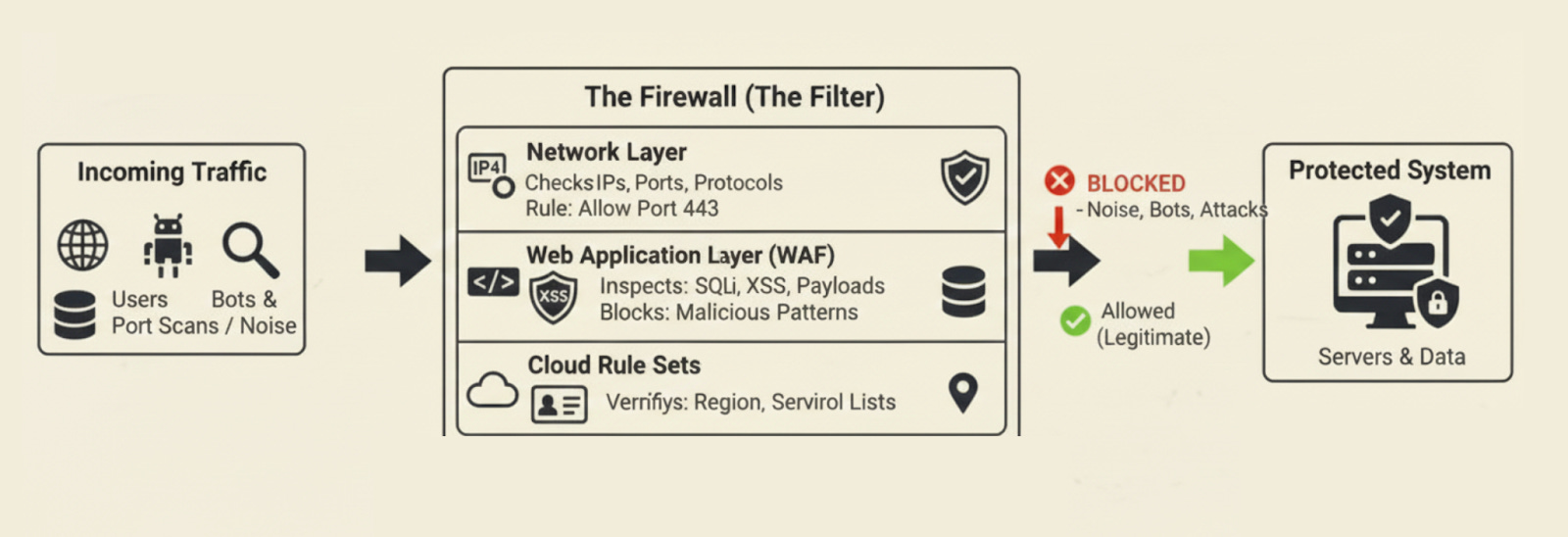
A firewall filters traffic before it reaches your system… Think of it as a guard that decides what gets in and what gets blocked.
There are a few layers to this:
Network firewalls check IPs, ports, and protocols. Example: only allow traffic on port 443.
Web application firewalls look deeper into requests. They block SQL injection14, XSS patterns15, and abnormal payloads.
Cloud rule sets add another layer by tying access to identity, region, or service type.
Firewalls stop a lot of noise. Port scans. Random bots. Known malicious patterns.
But they fail when the rules are too open:
A single “allow all” entry wipes out the entire benefit.
Strong teams keep rules tight and review them often.
11. Zero Trust
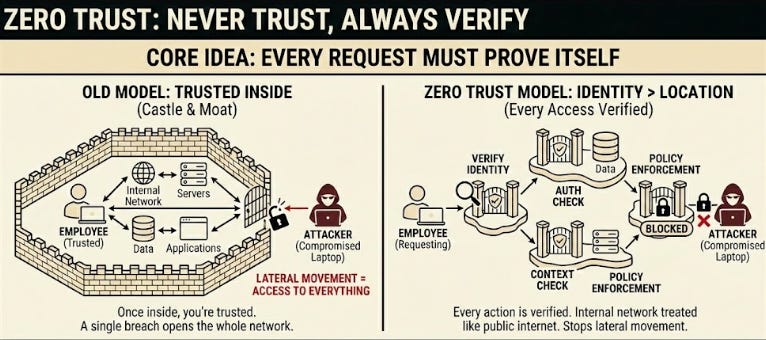
Zero trust works on one simple idea: trust nothing by default.
Every request must prove itself, even if it comes from inside the company network.
Key points:
Identity matters more than location
Every action is verified
Internal networks are treated like the public internet
Google pushed this culture shift with BeyondCorp16.
They moved from “once you’re in the office, you’re trusted” to “every request must earn trust.” It changed how companies think about internal attacks, phishing, and compromised laptops.
Zero trust closes a blind spot… Attackers often enter through a stolen laptop or an employee’s exposed key.
With zero trust, that first step doesn’t automatically give them access to the rest of the system.
12. VPN
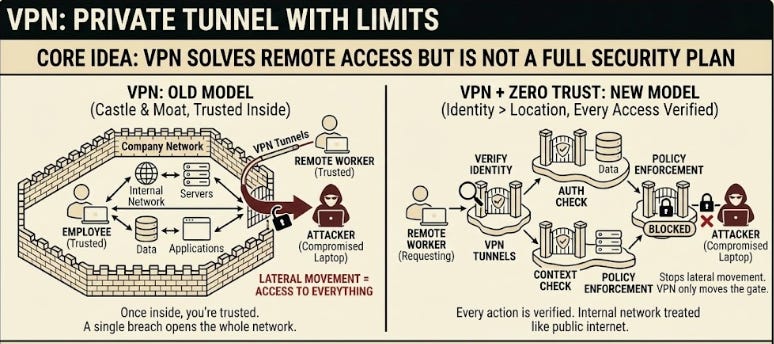
A Virtual Private Network (VPN) creates a private tunnel between a device and the company network.
It solves one problem well: letting remote workers access internal systems safely.
But it comes with limits:
Once someone is in, they often have access to far more than they need
A stolen VPN key gives attackers the same access as an actual employee
Internal systems can be exposed if VPN rules are poorly configured
This is why many teams still rely on VPNs but combine them with other layers:
Short-lived access tokens
Network segmentation
Device checks
VPNs are useful, but they are only one part of a security plan.
On their own, they mostly move the gate instead of reducing how much damage someone can do if they slip through.
Application-Level Risks
Let’s keep going!
13. SQL Injection
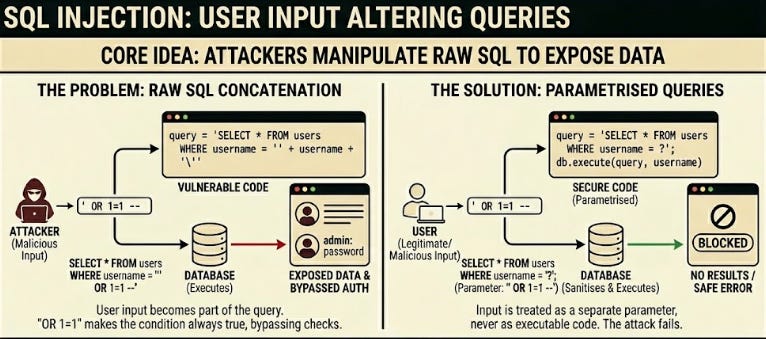
SQL injection occurs when user input becomes part of a raw query.
An attacker changes the input in a way that alters the query itself. This can expose data, modify records, or wipe entire tables.
The safest fix is simple:
Use parametrised queries17
Never build SQL strings by hand
Treat all input as untrusted
Many engineers think Object Relational Mapper18 (ORMs) protect them by default... Some do. Some don’t.
Plenty of large companies have been breached because a single query used string concatenation inside a rarely touched service.
An example: attackers added OR 1=1 to a login field, bypassing the entire auth check.
SQL injection is old, but it survives because busy teams take shortcuts.
14. Cross-Site Scripting (XSS)
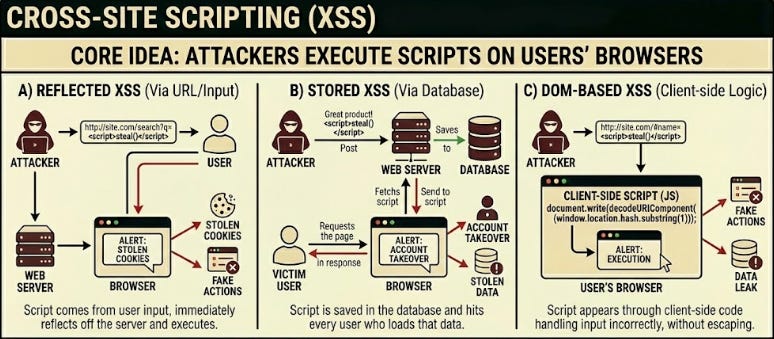
XSS19 lets attackers run their own script on someone else’s browser.
There are three common forms:
Reflected: the script comes from the user’s input and returns in the response
Stored: script is saved in the database and hits every user who loads that data
DOM based: the script appears through client-side code that handles input incorrectly
The fix is simple: escape your output.
Not your input, but your output.
Escaping turns unsafe characters into safe ones before rendering. If you rely only on input sanitising, something will slip through.
XSS leads to stolen cookies, fake actions, and complete account takeovers.
15. Cross-Site Request Forgery (CSRF)
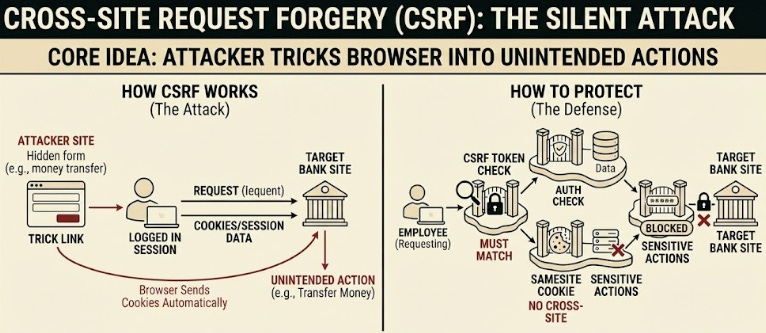
CSRF20 tricks a user’s browser into performing an action they didn’t mean to perform.
For example, a hidden form that submits a money transfer while the user is logged in. The browser automatically sends cookies, so the action appears real.
Protection methods:
CSRF tokens that must match
Same site cookies, so cross-site requests don’t include session data
Requiring re-authentication for sensitive actions
Modern browsers help a lot, but not all systems use the right cookie settings.
A single misconfigured session cookie can allow attackers to perform actions on behalf of real users.
16. Server Side Request Forgery (SSRF)
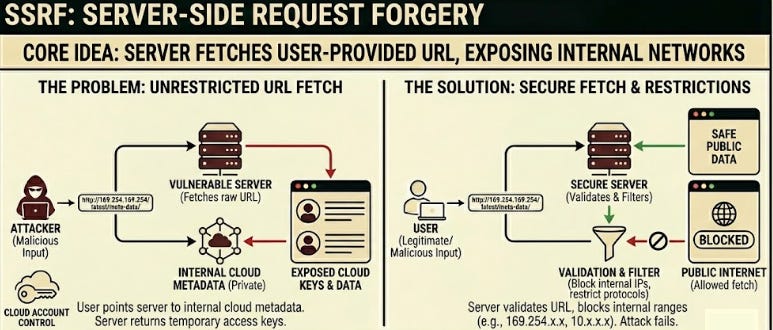
SSRF21 happens when your server fetches a URL provided by the user.
If the fetch is not restricted, the attacker points it to internal addresses instead of public ones. This is how attackers reach cloud metadata services. Those endpoints often return temporary access keys.
A short URL fetch can turn into control over your cloud account.
Common causes:
Server-side URL previews
Image processing features
Webhooks that fetch external data
To prevent this, block internal IP ranges, restrict allowed protocols, and avoid raw URL fetches based on user input. SSRF looks small in code reviews, but becomes massive the moment it touches cloud infrastructure.
Modern Infrastructure Security
Ready for the next technique?
17. IAM (Identity and Access Management)
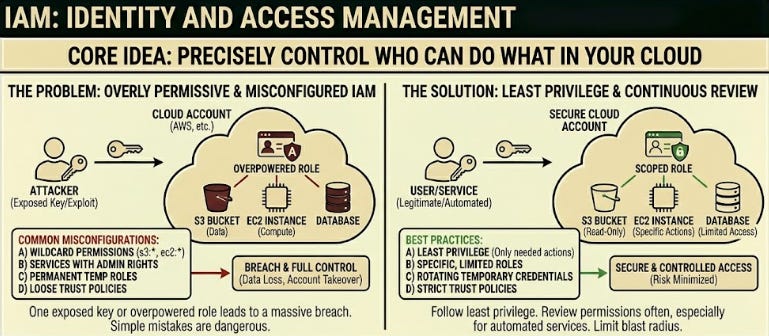
IAM controls who can do what inside your cloud account.
In AWS, this usually means policies attached to users, roles, and service accounts. The power of IAM lies in its precision. The danger lies in how easy it is to misconfigure.
Common issues:
Wildcard permissions like
s3: or ec2:Services running with admin-level rights
Temporary roles that become permanent
Trust policies that allow assume role abuse
Some of the biggest breaches in the last decade came from IAM mistakes, not fancy exploits.
One exposed key. One overpowered role. One forgotten policy.
Good IAM setups follow least privilege and review permissions often, especially for automated services.
18. Secrets Management
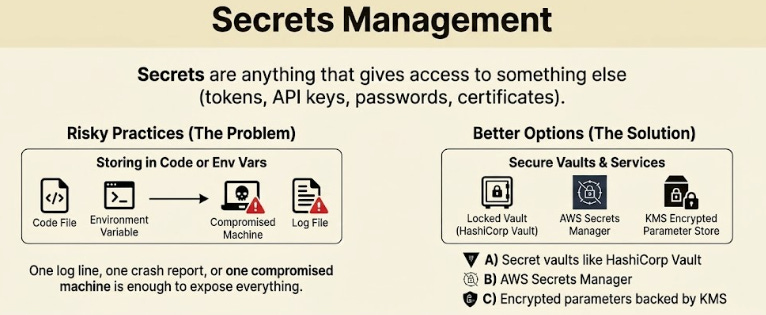
Secrets are anything that gives access to something else: Tokens, API keys, passwords, certificates.
Storing them in environment variables or inside code is risky. One log line, one crash report, or one compromised machine is enough to expose everything.
Better options include:
These tools securely store secrets, automatically rotate them, and track access.
Rotation matters because even a well-protected secret becomes dangerous if it leaks and stays valid for months. A strong secrets setup assumes every machine can fail and protects secrets even in that event.