


Share this post & I’ll send you some rewards for the referrals.
Block diagrams created using Eraser.
Designing a real-time chat app like WhatsApp is a popular system design interview question.
In a short period, you need to show you understand not just the happy path, but also all the things that can go wrong when messages fly between disconnected users on mobile networks.
In Part 1, we covered:
Core architecture and data models
Service discovery and presence management
Handling online and offline message delivery
And many more!
Today we’ll cover:
Scaling from one server to thousands with Redis Pub/Sub
Database sharding and replication strategies
Message storage service internals
Scheduled jobs and cleanup
Message deduplication, failure recovery, and edge cases
End-to-end encryption1 and key management
Rate limiting and abuse prevention
Analytics and monitoring infrastructure
Multi-region deployment and global distribution
Schema versioning and backward compatibility
By the end, you’ll understand not just what to build, but why each decision is made and what breaks when you get it wrong.
Onward.
Software engineers, are you prepared if layoffs happen again? (Sponsor)

Build a GitHub portfolio with 4 production-grade projects.
Build real AI systems: autonomous agents, recommendation engines, and multimodal pipelines.
Master the modern stack: LangChain, TensorFlow, PyTorch, multi-agent architectures, and RAG systems.
Flexible & Practical:
5-month, fully online, project-based program for working engineers
Live hands-on workshops + 24/7 support
Earn up to 56% more by mastering production-grade AI.
Next cohort starts on 19 January 2026.
Imagine leading AI initiatives with confidence:
I want to reintroduce Hayk Simonyan as a guest author.

He’s a senior software engineer specializing in helping developers break through their career plateaus and secure senior roles.
If you want to master the essential system design skills and land senior developer roles, I highly recommend checking out Hayk’s YouTube channel.
His approach focuses on what top employers actually care about: system design expertise, advanced project experience, and elite-level interview performance.
Scaling
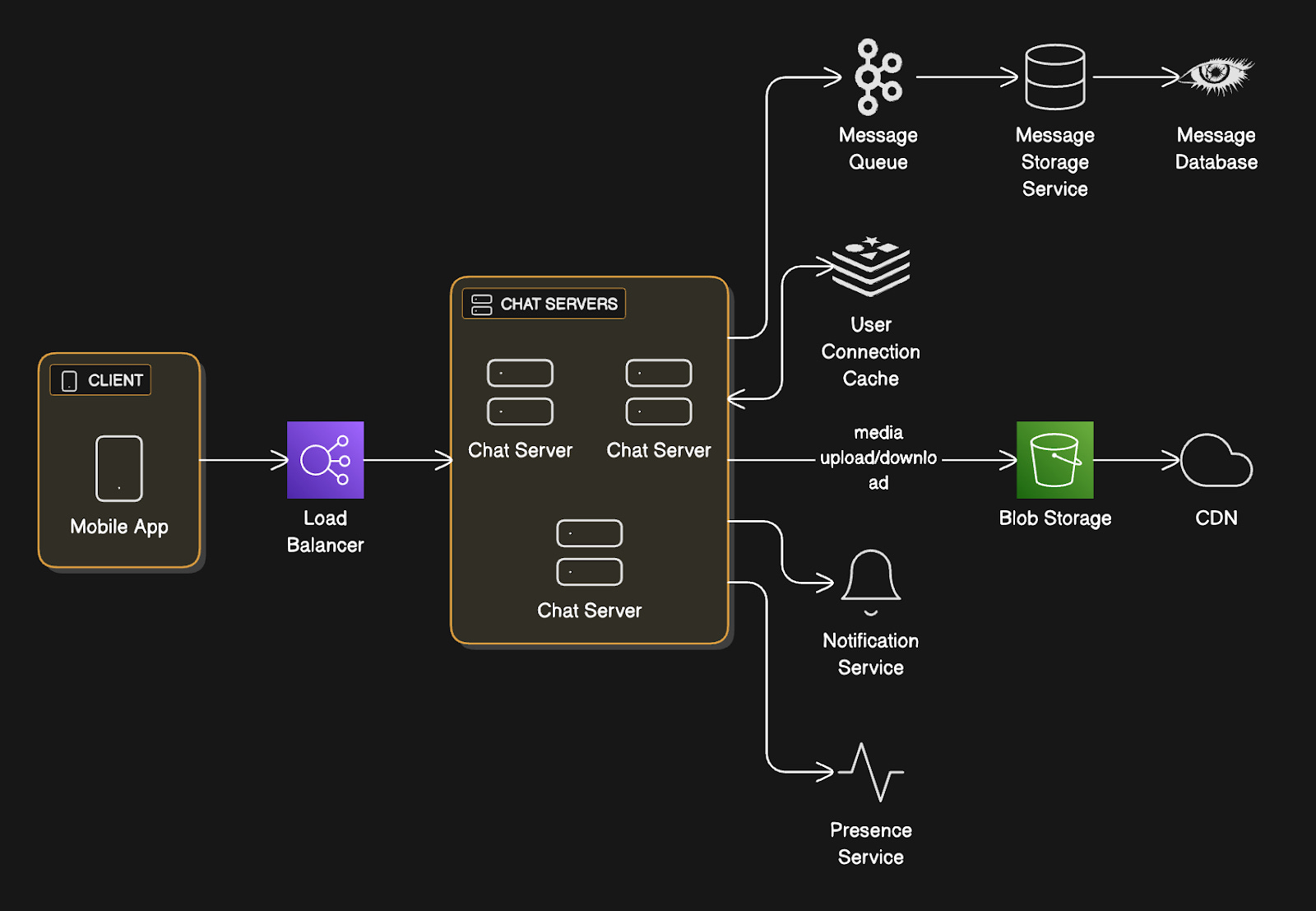
Our single chat server design works great for 1000 users. But it’s terrible for a billion.
So let’s scale horizontally...
Problem: Users on Different Servers
User A connects to Server 1. User B connects to Server 2.
So how does a message from User A reach B?
Option 1: Load balancer does nothing
This approach doesn’t work. Server 1 receives the message but has no connection to User B.
Option 2: Kafka topics per user
Create a Kafka topic (a category or feed name to which messages are published) for each user. Servers subscribe to topics for their connected users.
Why this approach won’t work?
Kafka needs about 50KB of overhead per topic.
1 billion users = 50 TB just for topic metadata.
Kafka wasn’t built for billions of topics. It’s designed for thousands of high-throughput topics, not billions of low-throughput ones.
Option 3: Consistent hashing
Hash user IDs to specific servers2.
Always route the same user to the same server. When a message arrives for User B, forward it directly to Server 2.
Pros:
Direct server-to-server communication,
No extra infrastructure.
Cons:
All-to-all connections between servers (if you have 1000 servers, each needs connections to 999 others).
Adding new servers requires careful coordination to avoid dropping messages during the transition.
Servers need to be big to keep the fleet small.
Option 4: Redis Pub/Sub (what we actually use)
This is the cleanest solution at our scale.
How it works:
Redis Pub/Sub3 is a lightweight messaging system built into Redis. It lets servers subscribe to channels and publish messages to those channels. Think of it like a radio station (channel) where servers can tune in to listen and broadcast messages.
When User B connects to Chat Server 2, Server 2 subscribes to Redis channel of user:B.
When Server 1 needs to deliver a message to User B, Server 1 publishes the message to Redis channel user:B.
Redis routes it to Server 2. Then Server 2 delivers to User B via WebSocket4.
Why we chose this:
Redis Pub/Sub uses only a few bytes per channel (versus Kafka’s 50KB per topic).
It’s “at most once” delivery, meaning if no one’s listening when you publish, the message is lost. But that’s fine for our use case. We already have durability through the Message Queue5 and database. Pub/Sub is just for real-time delivery to online users. If they’re offline, they still get messages from their inbox.
The beauty is that chat servers don’t need to know about each other. They talk only to Redis. Add or remove chat servers at will. No coordination needed.
Tradeoffs:
Redis Pub/Sub adds a few milliseconds of latency (single-digit, usually under 5ms) because messages bounce through Redis.
But this is negligible compared to network latency.
We also need to run a Redis cluster for high availability, which adds operational complexity. Yet the simplicity of not managing server-to-server connections makes it worth it.
Message Storage Service: The Detailed Flow
The Message Storage Service sits between Message Queue and Database.
Let’s break down exactly what it does…
Architecture:
→ Message Queue (Kafka)
→ Message Storage Service instances
→ Database Cluster
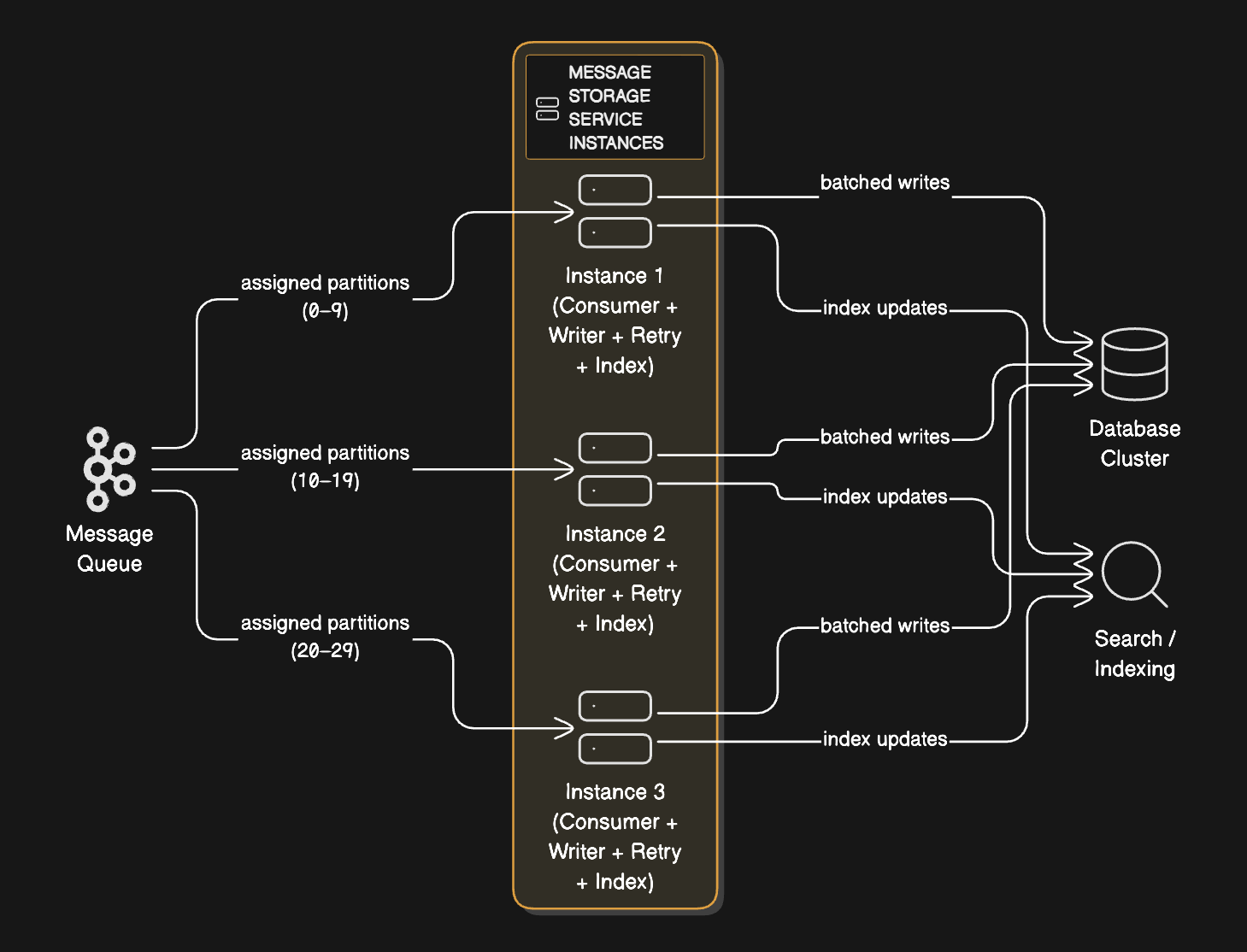
Each instance:
Consumes from assigned Kafka partitions
Batches writes for efficiency
Handles retries and failures
Updates indexes
Detailed Processing Flow:
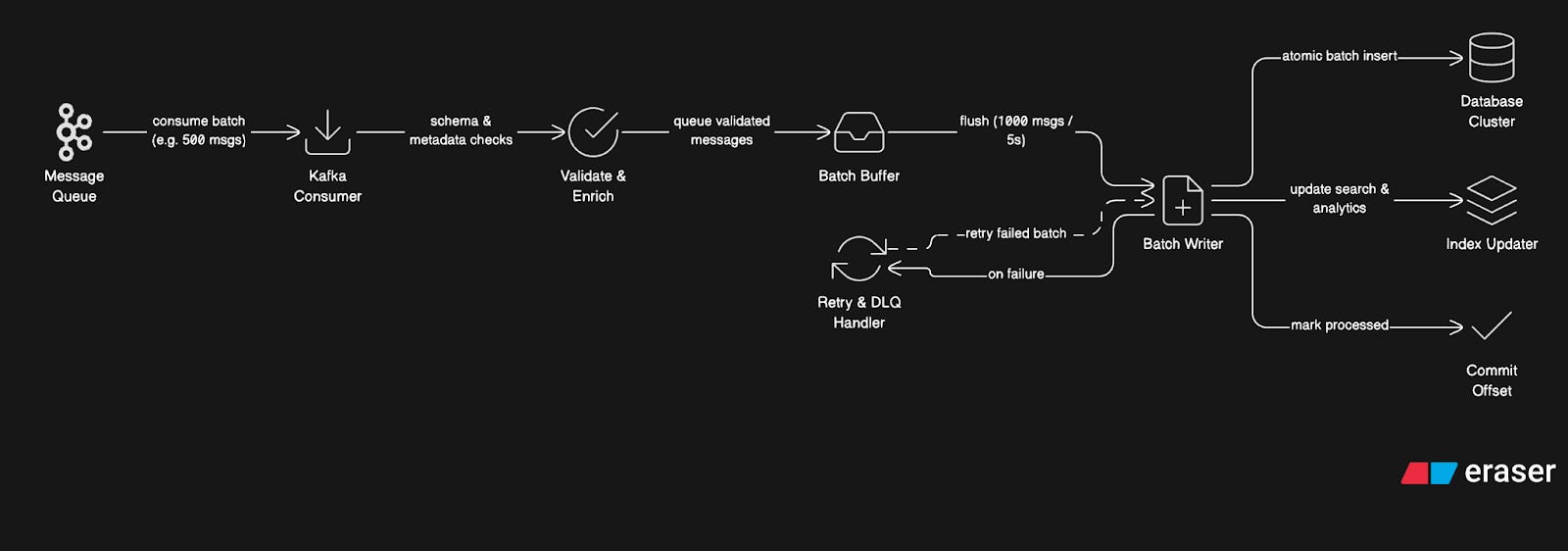
Step 1: Consuming from Queue
Storage Service Instance:
Subscribes to Kafka partitions 0-9 (out of 100 total)
Polls for new messages every 100ms
Receives a batch of 500 messages
Processes batch in parallel (thread pool of 20 workers)
Step 2: Message Validation and Enrichment
For each message:
Validate schema (required fields present)
Check message size limits (text < 4KB, no huge strings)
Enrich with metadata:
Calculate message hash (for deduplication)
Extract mentions (
@usernamepatterns)Identify links for preview generation
Classify content type
Generate indexes needed for queries
Step 3: Batch Writing
Instead of writing messages one-by-one:
Accumulate messages in the memory buffer
When buffer hits 1000 messages OR 5 seconds elapsed:
Sort messages by target shard
Group messages by conversation
Prepare batch
INSERTstatements
3. Write the entire batch in one operation per shard
Why batching matters:
A single database INSERT takes ~5ms.
1000 individual INSERTs = 5 seconds.
One batched INSERT of 1000 messages = 50ms.
That’s a 100x throughput improvement.
Step 4: Writing to Database (Cassandra)
For each shard:
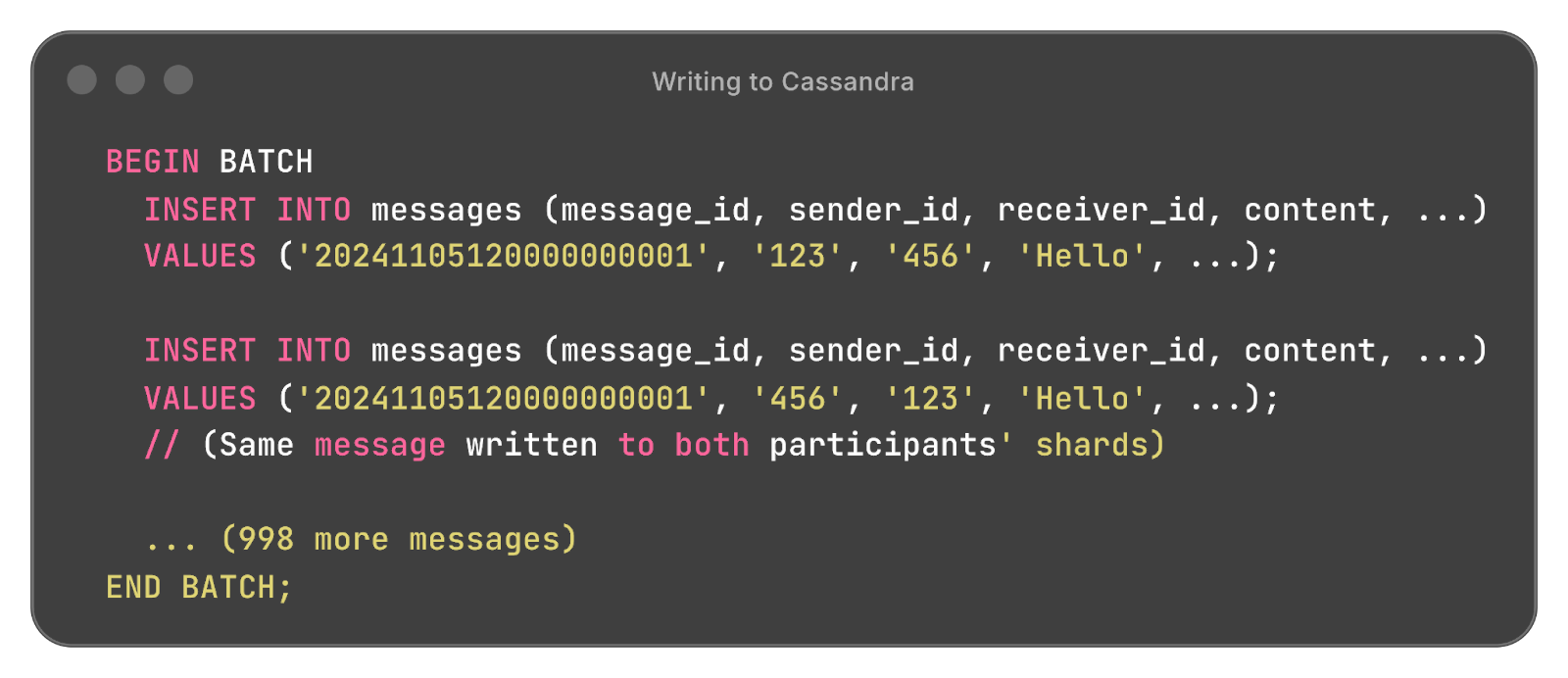
Cassandra processes this batch atomically. All succeed, or all fail.
Step 5: Updating Indexes
Simultaneously with message write:
Update conversation index:
Latest message timestamp
Unread count
Last message preview
Update search index (if full-text search enabled):
Extract keywords
Send to Elasticsearch cluster
Update analytics:
Increment counters (messages/day, active users)
Send to analytics pipeline (separate Kafka topic)
Step 6: Handling Failures
If write fails:
Log error with message details
Check error type:
Don’t block other messages
Update monitoring metrics
Step 7: Committing Offset
After a successful write:
Commit Kafka offset (mark messages as processed)
This ensures we don’t reprocess on restart
If service crashes before commit:
On restart, reprocess from last committed offset
Duplicates handled by checking
message_id
Scaling the Storage Service:
Each instance is stateless. To handle more throughput:
Add more instances (they auto-distribute Kafka partitions)
Each instance processes independently
No coordination needed between instances
Kafka handles partition assignment
If you have 10 instances and add an 11th, Kafka automatically rebalances. Some instances give up partitions to the new instance. Within seconds, the load is redistributed.
Monitoring Critical Metrics:
Consumer lag: How many messages behind are we?
(Alert if lag > 10,000 messages)
Write latency: How long does each batch take?
(Alert if p99 > 500ms)
Error rate: How many failures?
(Alert if > 0.1%)
Throughput: Messages per second processed
(Scale up if maxed out)
Tradeoffs:
Message Storage Service adds latency (messages sit in the queue before being written).
But it decouples chat servers from database performance. Chat servers can acknowledge messages immediately without waiting for database writes.
This keeps user-facing latency low even if the database is temporarily slow.
End-to-End Encryption and Key Management
WhatsApp’s defining feature is end-to-end encryption.
Messages are encrypted on the sender’s device and only decrypted on the recipient’s device. Even WhatsApp’s servers can’t read the content.
The challenge is how to encrypt messages when users might have multiple devices, be offline, or need to verify identities?
Signal Protocol (What WhatsApp Uses):
WhatsApp implements the Signal Protocol, which provides:
End-to-end encryption
Forward secrecy8 (compromising one message doesn’t compromise others)
Future secrecy (compromising a key doesn’t compromise future messages)
Key Exchange Flow:
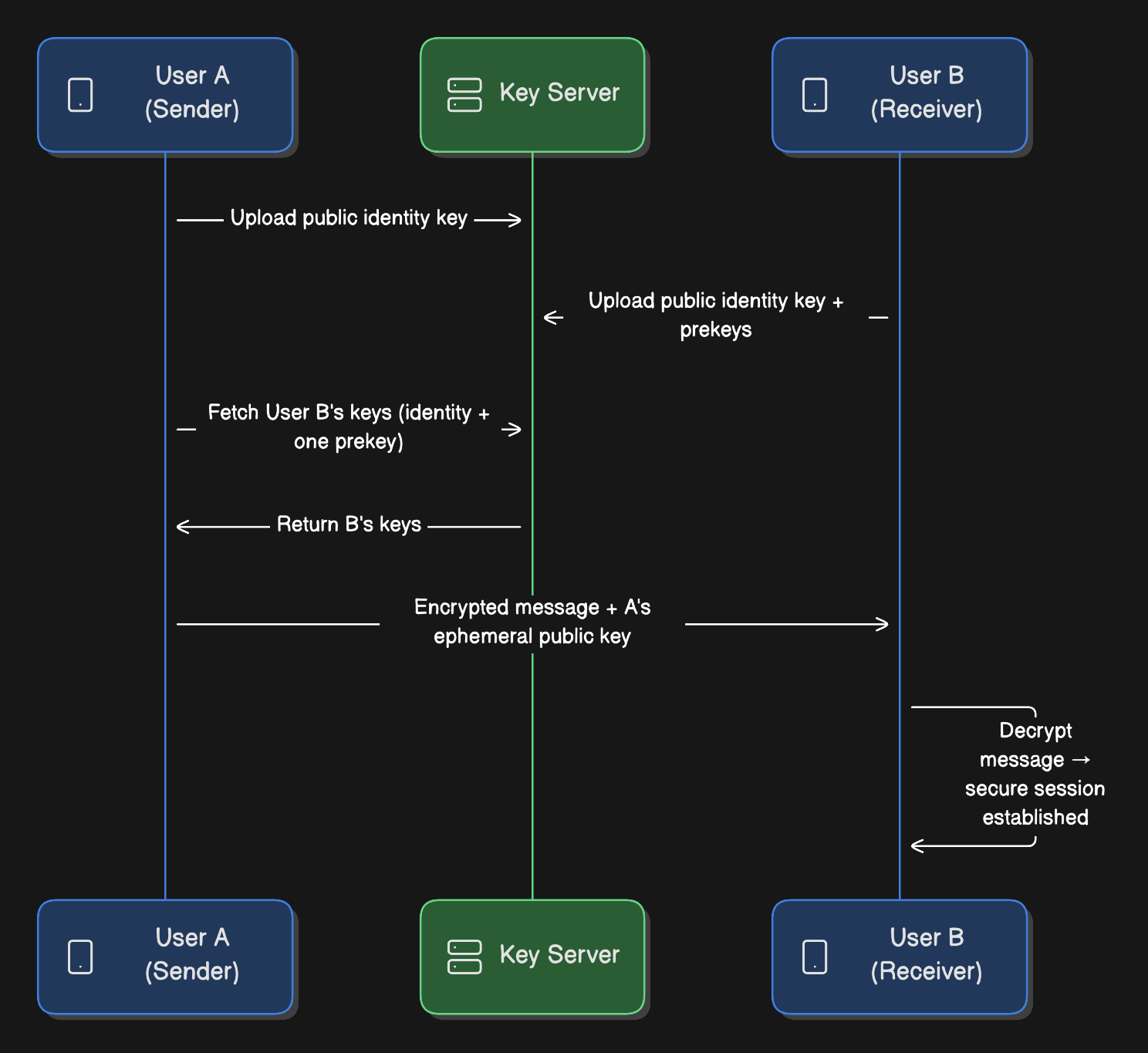
When User A first messages User B:
Identity Keys (long-term):
Each user generates an identity key pair on registration
Public key gets uploaded to server
Private key never leaves device
Prekeys (medium-term):
User B generates 100 signed prekeys
Uploads to server
Server stores them for future initiators
One-time Prekeys:
User B generates additional one-time prekeys
Used once and discarded
Provides forward secrecy
Session Establishment:
User A fetches User B’s public identity key and a prekey from server
User A generates ephemeral key pair
Performs Diffie-Hellman key exchange
Derives shared secret (session key)
Encrypts message with session key
Sends encrypted message + A’s ephemeral public key
User B receives:
Uses their private keys + A’s ephemeral public key
Derives the same session key
Decrypts message
Establishes bidirectional encrypted session
Message Encryption:
Each message is encrypted with:
Encrypted Message = AES-256(message, session_key + message_counter)

MAC = HMAC-SHA256(encrypted_message, mac_key)
The message_counter prevents replay attacks. Each message increments the counter.
Ratcheting (Forward Secrecy):
After each message, keys are “ratcheted” forward:
New ephemeral key pair generated
New session key derived
Previous keys discarded
This means compromising today’s key doesn’t reveal:
Yesterday’s messages,
Or tomorrow’s messages.
Multi-Device Support:
User A has a phone and a laptop.
How does encryption work?
Approach 1: Sender Keys (Groups):
For groups, sending individual encrypted copies to each device is expensive.
Instead:
User A generates a sender key for the group
Encrypts sender key for each member using their session key
Distributes sender key
All future messages get encrypted with sender key
Much more efficient for large groups
Approach 2: Session Per Device (1:1):
For 1:1 chats.
Each device has its own identity
User A’s phone and laptop are separate entities
When messaging User B, send two encrypted copies (one for each of B’s devices)
Tradeoffs:
End-to-end encryption adds complexity.
Can’t search messages server-side
Can’t provide message previews in push notifications9 (would require server decryption)
Server can’t filter spam/abuse (content is opaque)
Multi-device sync is harder
But the privacy benefits are worth it. Users trust WhatsApp because messages are truly private.
Ready for the best part?