

Share this letter & I’ll send you some rewards for the referrals.
You know that feeling when a job runs for ten minutes, gets closer to the end, and then fails?
You check the logs & one API timed out!
So you run it again…
And now you wait another ten minutes for the “same work” to start all over again.
This is annoying enough for a tiny background job. But imagine the job was a “long-running” AI agent workflow1. It searched through dozens of documents, called an LLM several times, extracted the necessary information, and prepared most of the final answer.
And then all the work is gone because one step failed near the end.
It could get worse…
What if the agent had already sent an email before it failed? Or updated a database? Running the whole workflow again could “repeat” those actions as well.
Plus, an AI agent could call a model, search a database, call an external API, wait for someone to approve something, and then continue later. The longer the workflow gets,,, the more painful it becomes to start over whenever something goes wrong.
So workflow needs to “remember” what has already happened…
If the first five steps succeeded, but the sixth failed, then you want to pick up from step six. (i.e., you don’t want to run the first five steps again!)
This is the problem durable execution is designed to solve…
It tracks progress as the workflow runs, so a failure does NOT have to erase everything before it.
But how does it actually work? What happens when a workflow needs to retry a failed step, wait for a person, or recover after the process running it disappears?
I’ll use Inngest as the case study for this newsletter.
(It’s a durable execution platform for background functions, workflows, and AI agents.)
Onward.
§
What Is an AI Agent
You already know what an AI chatbot looks like…
You probably use it every day to ask questions, write something, summarize a document, and/or help you solve a problem. In a typical interaction, you ask for something & the model gives you an answer. Period.
An AI agent takes this idea one step further…
Instead of stopping after one response, it keeps working toward a goal, deciding what it needs to do next as the work unfolds. Give a research agent a topic, and it can work through the research before coming back with the final answer.
The catch is this work does NOT always finish in one simple request.
It can take several steps, involve external systems, wait for something to happen, and/or fail midway. And once an AI agent starts working like a real workflow, simply retrying the request is NOT enough.
So let’s see what happens when these workflows have to deal with “real” failures & how to make them reliable…
§
Why AI Agents Need Durable Execution
A simple & self-contained background job is “easy” to retry from the start.
Yet a single agent run chains together LLM calls, tool calls, database reads, and external API requests. And any of those can fail on its own.
Let’s look at what actually makes “agents” different…
What Makes Agent Workflows Different
Here’s what:
1. Individual steps are slow and expensive
A single LLM call can take several seconds & cost real money.
Repeating five completed steps to get back to the one that failed is never a rounding error. Instead, wasted time & tokens on work already done.
2. Outputs are not deterministic
LLM outputs can vary between executions.
Rerunning a completed step does not “guarantee” the same result, so restarting from the beginning can change the workflow’s outcome.
3. Some steps create real side effects
If the agent already sent an email, updated a record, and/or charged a card before the failure, restarting the workflow will repeat those actions…
A duplicate charge is NOT a retry problem, but a correctness problem.
4. Some steps wait on people
A workflow pausing for editor approval would stay paused for hours/days.
And holding a worker process open the entire time does not “scale”. A basic job queue is NOT designed to track where a multi-step workflow was waiting & resume it later.
When an Agent Fails Mid-Workflow
Think of a research agent:
It retrieves sources, extracts evidence, generates a draft, waits for editor approval, & publishes the result.
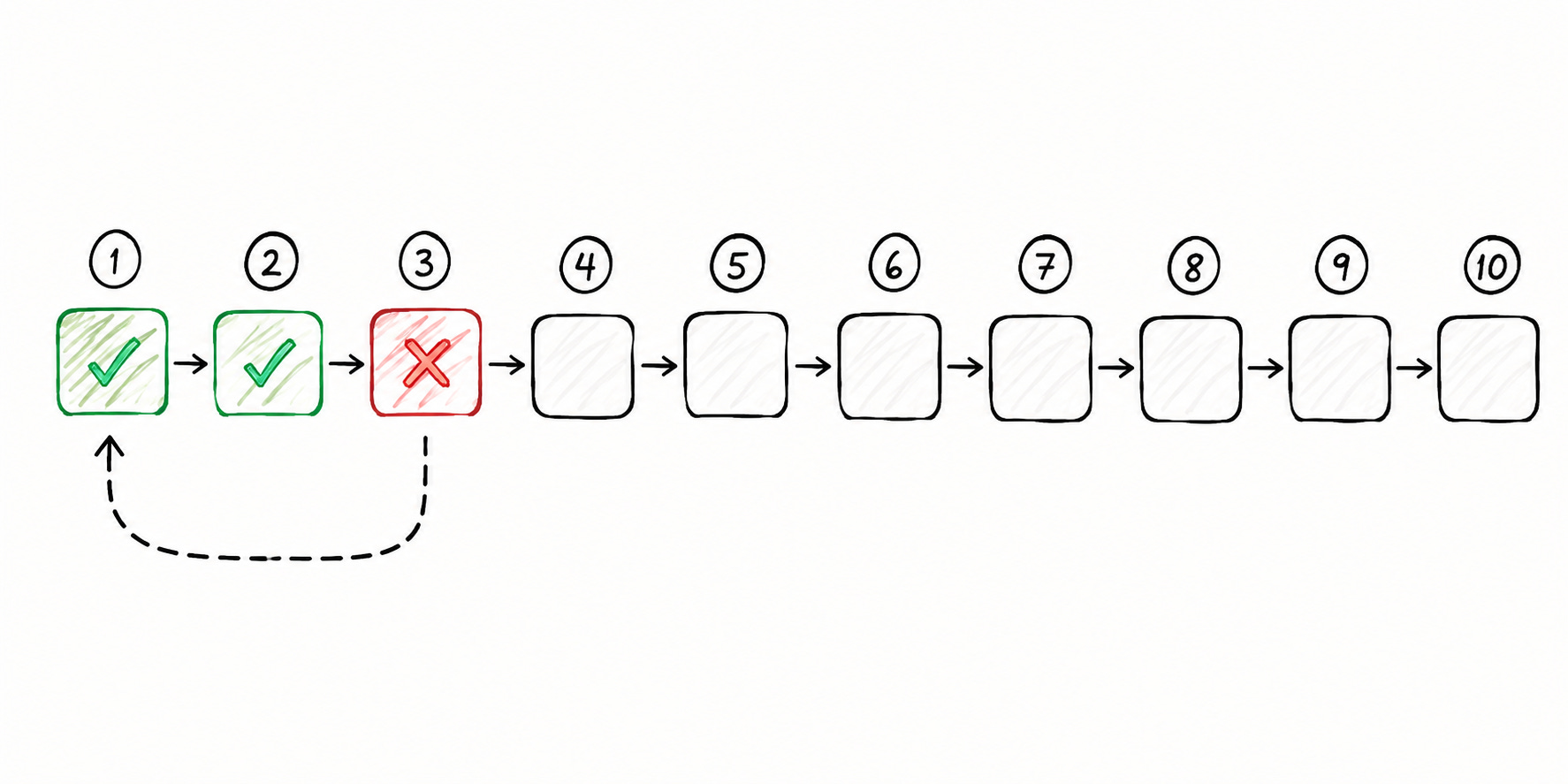
Say the model provider times out during the drafting step:
Retrieval & extraction already finished. In a system with NO memory of progress, the entire workflow must restart. And the completed steps have to rerun for no reason.
So if any “side effects” fired before the failure, those repeat too…
Reliability is not just a property of the model/agent framework. It also depends on the execution layer running underneath them.
Now we understand what makes agent workflows different; let’s look at where the traditional queue & worker model starts to fall short…
§
I’m happy to partner with Inngest on this newsletter.

Agents, like all of us, often need to recover from failure. But they shouldn’t start from scratch.
Inngest’s durable execution checkpoints your agents every step of the way.
So your agents can pick up where they left off and avoid doubling up on token & compute spend.
Inngest offers a generous free tier and a sleek local dev server for testing.
§
Why Traditional Job Queues Are NOT Enough
The basic idea is simple:
An event creates a job, the job enters a queue, and a worker processes it. If something goes wrong, the job gets retried…
For simple, self-contained work, such as sending an email/resizing an image, retrying the entire job from the beginning is reasonable.
Yet the problem becomes DIFFICULT when the job represents a long-running workflow. Instead of one piece of work, you now have several steps, each depending on results from earlier steps.
AI agent workflows “amplify” this problem2 because a single run could involve many LLM calls, tool calls, external APIs, intermediate results & side effects…
Queue vs Workflow
This is where the difference between a queue & a workflow matters:
A queue mainly focuses on getting work to a worker & making sure failed work gets another chance.
A workflow needs to remember what happened along the way, including which steps finished, which ones failed, and what needs to happen next.
BullMQ, Celery & SQS3 give you useful building blocks for queues.
You get workers, retries, rate limiting, job dependencies, and parent-child flows. But once you need checkpointing, resumability, human-in-the-loop coordination, and/or a complete history of every step, you’ve more work to do…
You can build those pieces yourself,,, but now the queue is no longer the whole solution. You’re starting to build a workflow system around it…
So what does it take to make these workflows recover properly?
Let’s take a look…
§
§
What Durable Execution Actually Means
Durable execution is a simple idea with a ton of work happening underneath it…
The system remembers what has already been completed. So when something fails, execution can resume from the last successful step instead of starting from zero.
Let’s dive in!
Checkpointing
A checkpoint records a “completed” unit of work.
When a step finishes successfully, it saves the result. If the process crashes, restarts, or a deployment occurs mid-workflow, the result is still available when execution continues…
The workflow can then reuse the completed result instead of running the same step again.
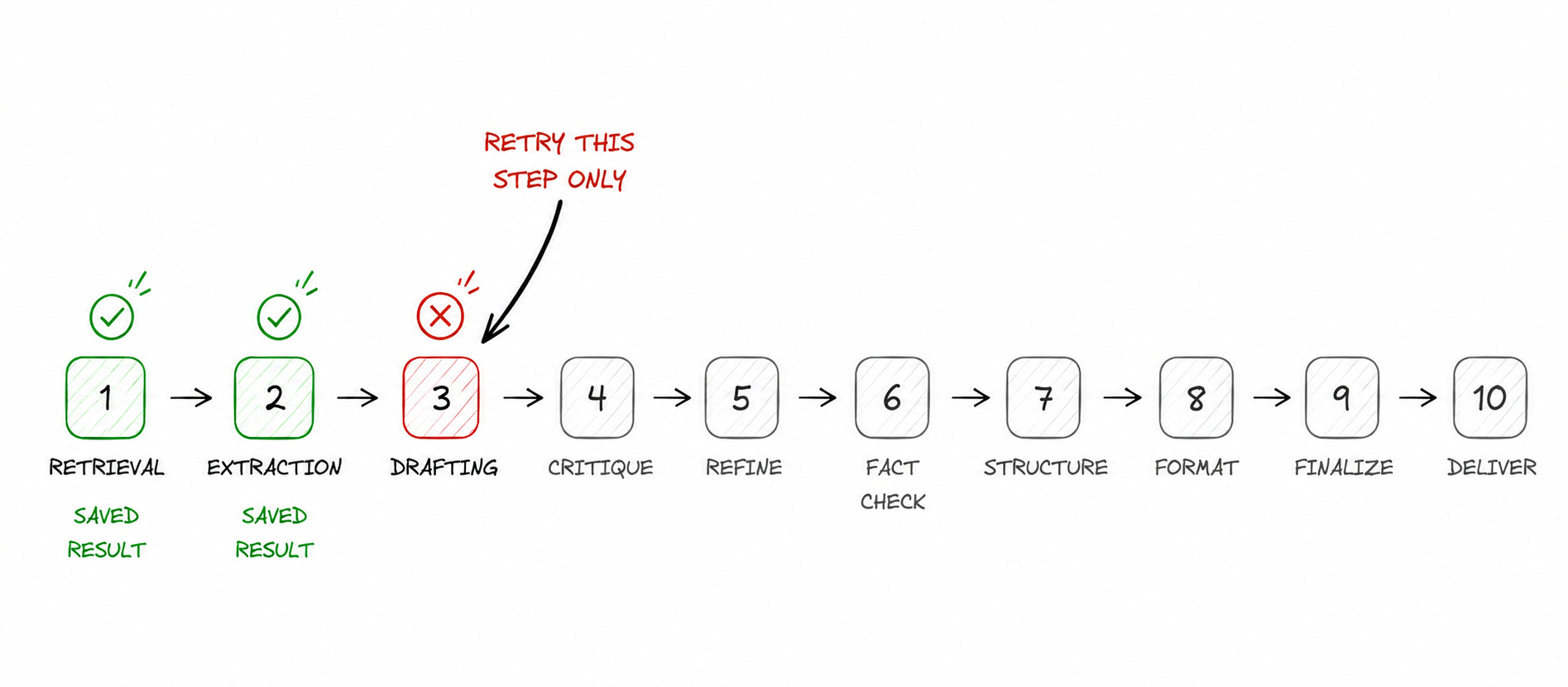
Each step can also be retried independently, so a later failure does NOT undo the work already completed.
Inngest memoizes4 completed steps in the function’s stored state and skips on later executions.
Resumability
You can resume a workflow after an “interruption” with checkpointing.
The workflow does not need to stay tied to the same process/machine while it runs. If the process disappears, execution can continue using the progress already saved.
This matters even more for long-running tasks…
A workflow could run for hours, pause for an external event, or survive a deployment mid-execution. The workflow keeps its progress even while the process running it changes.
i.e., the workflow is the full job; the process is just what runs it.
Why Retries Are NOT Enough
Retries & checkpoints solve different problems…
A retry reruns a failed task, while a checkpoint remembers completed tasks.
Think of a research agent:
It already retrieved the documents & extracted useful information. Then times out on the drafting step …
With a retry, the whole workflow must run again from the beginning, repeating the retrieval & extraction work.
With durable execution, those completed steps get saved. And their results can be reused, so only the failed drafting step needs to run again.
For an agent workflow, this can save a lot of time & reduce LLM usage costs. This is the difference between retrying a job & recovering a workflow.
Now we understand what durable execution means…But what does it take to build it yourself?
Let’s keep going!
§
How to Build Durable Execution Yourself
You need a way to track progress & recover from failures.
The workflow must handle retries and long waits without causing duplicate actions. Also, it needs traffic controls & history to explain what happened.
Let’s get into it!
1. Persisting Workflow State
You need a place to store the “workflow’s progress”.
Plus, you need to save the “result” outside the process running the workflow when a step finishes. Otherwise, a crash/deployment can take the progress with it.
You also need to connect each result to the right workflow & step, so execution knows where to continue later…
2. Retries and Recovery
Once progress is persisted, the next problem is handling failures…
Some failures are worth retrying, while others are not. So you need retry rules, backoff between attempts, and a defined path once those attempts run out.
And when a retry occurs, workflow needs to know which work has already finished.
3. Idempotency
Then there is the problem of doing something twice.
Imagine an agent sends an email & fails immediately afterward. When the step runs again, the application needs to know whether sending the email again is “safe”.
Idempotency keys, upserts, existence checks, and deterministic identifiers can help. The exact approach depends on the system, but protecting the side effect is still the application’s job.
4. Waiting and Scheduling
Long-running workflows should wait somewhere.
An agent could finish a draft & sit for days while an editor decides what to do. Keeping a worker alive during the entire wait “wastes” resources. Instead, the workflow should save its state & release the compute. It resumes when the event arrives.
Also it needs a defined path if the approval never comes, arrives too late, and/or gets rejected.
5. Flow Control
A workflow recovering correctly can cause problems when too much work arrives at once…
A single customer could trigger thousands of agent runs, consuming shared capacity & hitting an LLM provider’s limits. The resulting failures can then create even more retries.
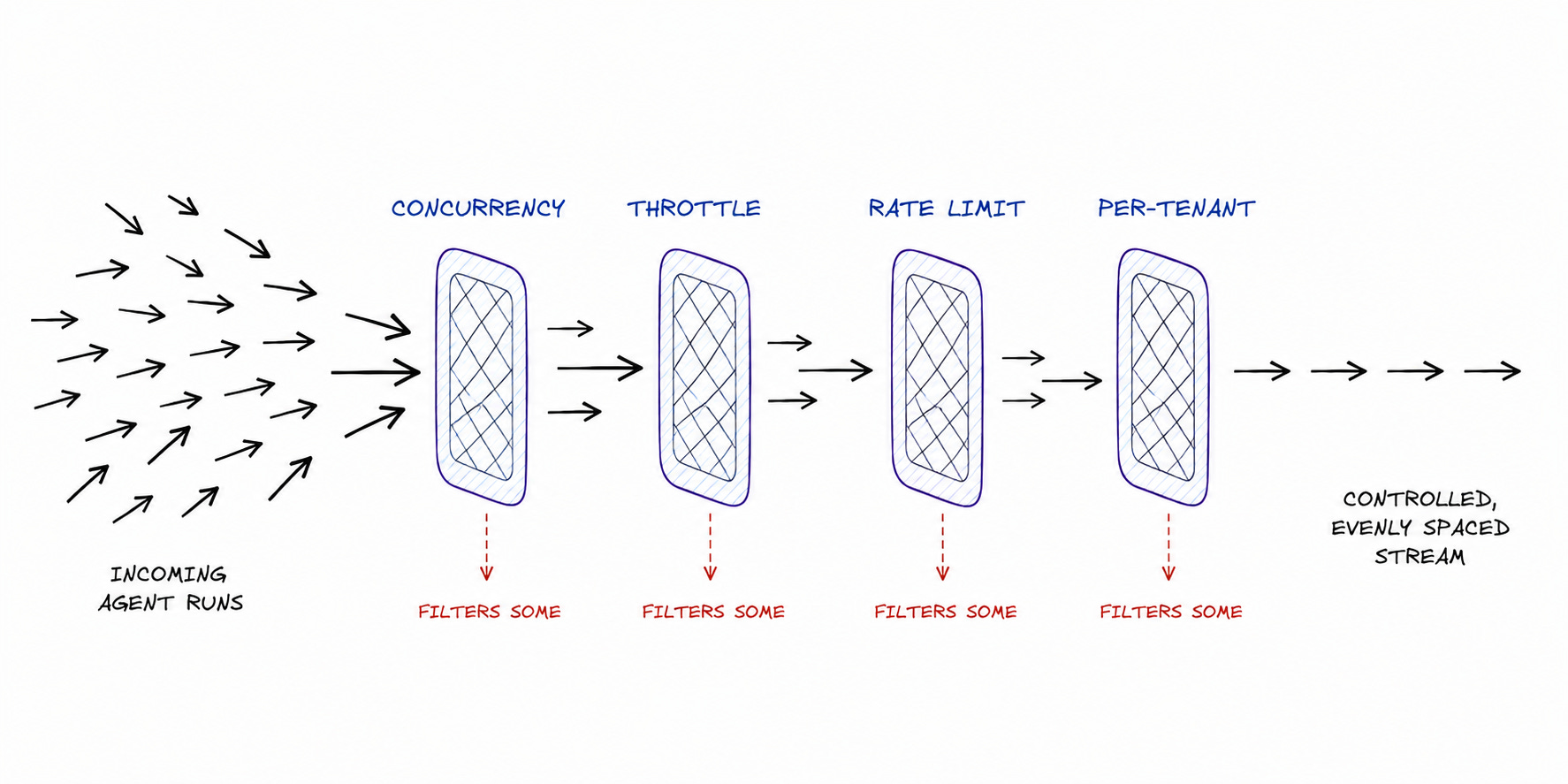
Here are the necessary controls:
Concurrency: Controls how much work can run at the “same time”, so one workflow/customer cannot consume all available capacity.
Throttling: Spreads work over time when a sudden burst would overwhelm downstream services.
Rate limiting: Keeps requests within the limits imposed by external providers.
Per-tenant isolation: Stops one customer’s traffic from consuming capacity needed by others.
6. Observability
Finally, you need enough history to understand what happened when something goes wrong…
A basic queue can tell you a job failed. A long-running workflow needs more context around the steps, retries, results & failures.
Without this history, you have to piece together what happened from queue logs, application logs & tracing tools.
Now let’s see how Inngest handles all of this…so you don’t have to build this yourself…
§
§
What Inngest Is
Inngest is a durable execution platform for background functions, workflows & AI agents.
It sits between your application logic & infrastructure running underneath it. Your model handles generation, while your agent code handles tools & workflow logic.
And Inngest takes care of the execution around them, including retries, pauses, recovery & observability.
Your functions still run on your own compute & can run in environments such as serverless platforms.
i.e., Inngest provides the execution layer without requiring you to build all the workflow infrastructure yourself.
Ready for the best part?
step.run() as the Core Primitive
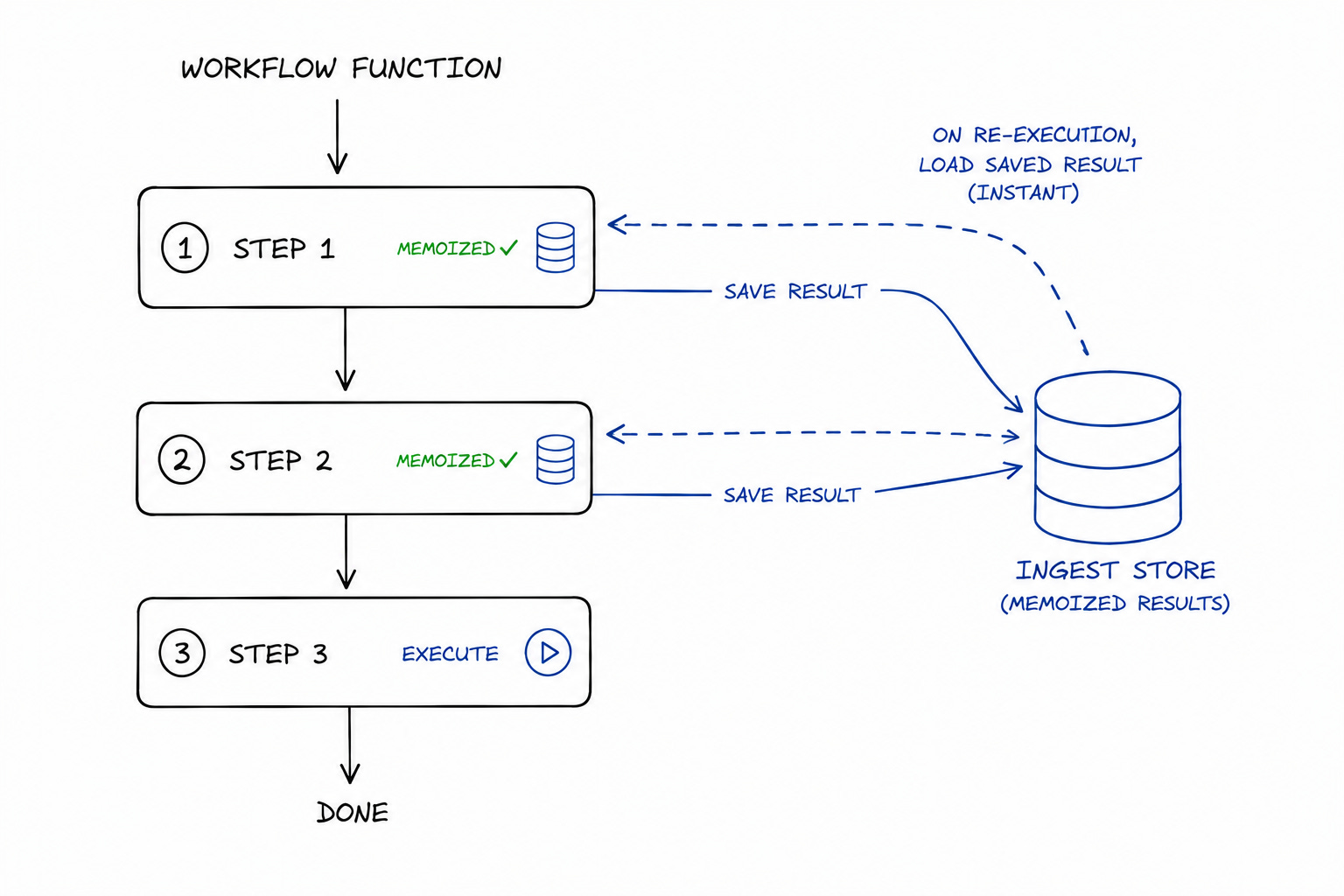
Everything in Inngest starts with step.run()5.
It wraps a unit of work & gives Inngest a point where it can save the result. Once the step finishes, its result is stored & can be reused if the workflow runs again.
So if a later step fails, Inngest does NOT need to rerun earlier steps. Instead, completed results can be reused & execution can continue from the step that still needs to run.
Your workflow logic stays in your application code. And Inngest handles the execution around it, while step.run() gives the runtime a clear “boundary” for each piece of work.
Long-Running and Waiting Workflows
Not every workflow finishes in one go.
Some need to pause for a while before they can continue…
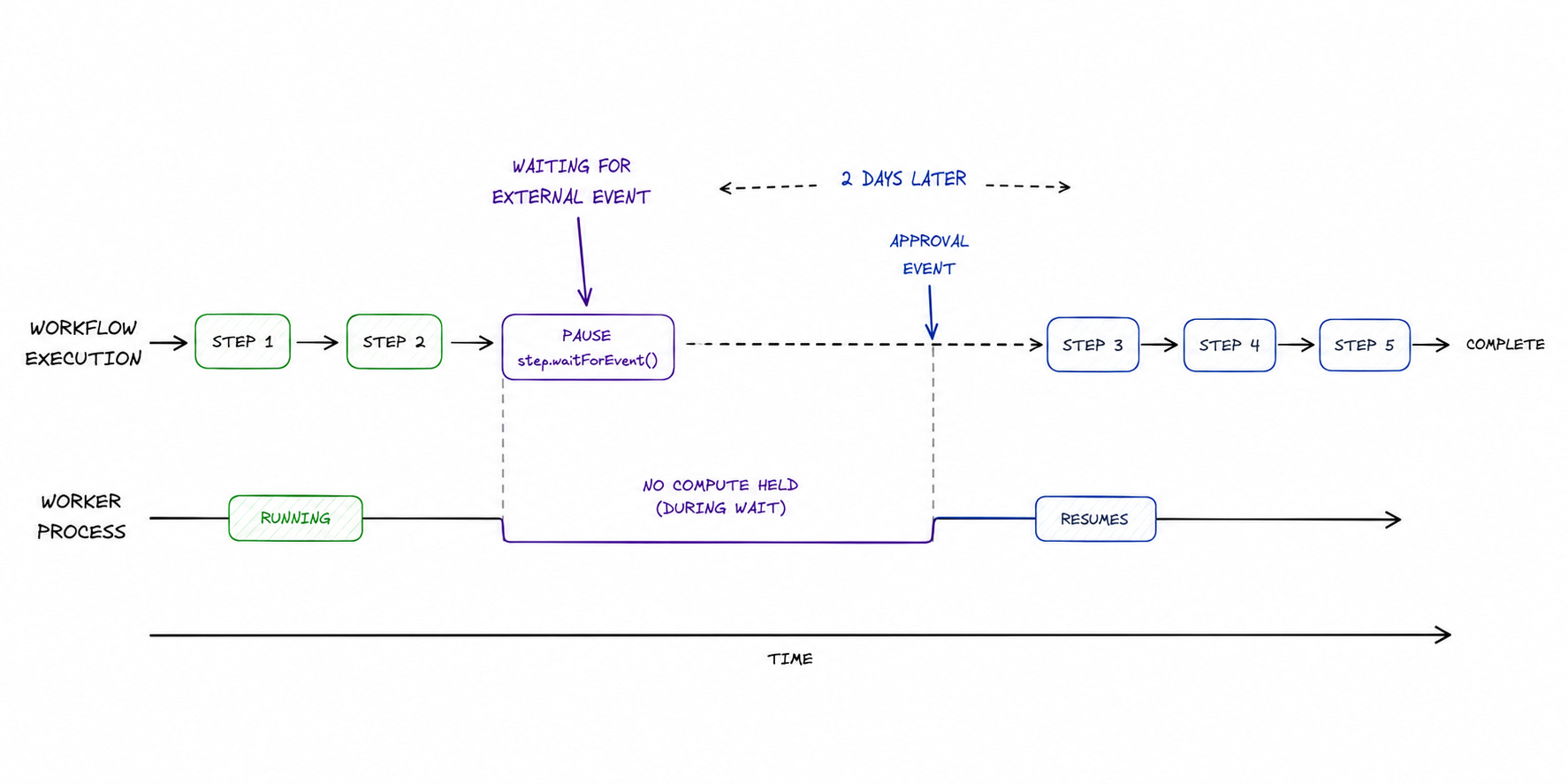
step.sleep()6 lets a workflow wait until a specific time.step.waitForEvent()7
The crucial part is what happens during the wait…
A worker does NOT need to sit there doing nothing. The workflow can pause, keep its state, and continue when the required time/event arrives.
This becomes extremely useful for workflows involving human approval and/or external systems, where the next step would not happen for hours/days.
Durable Functions and Durable Endpoints
Inngest supports two ways to run these workflows based on how they are triggered:
Durable functions run “asynchronously” in the background. They can start from an event, schedule, or webhook and continue until the workflow finishes. This fits research agents, ingestion pipelines, and other work where the result does not need to come back immediately.
Durable endpoints are designed for “user-facing calls” where the response needs to come back to the user, while the steps inside the request still need durable execution.
The entry point is different, but both use the same underlying execution model.
Now let’s see how Inngest compares with other ways to build durable workflows…
§
BullMQ vs Temporal vs Inngest
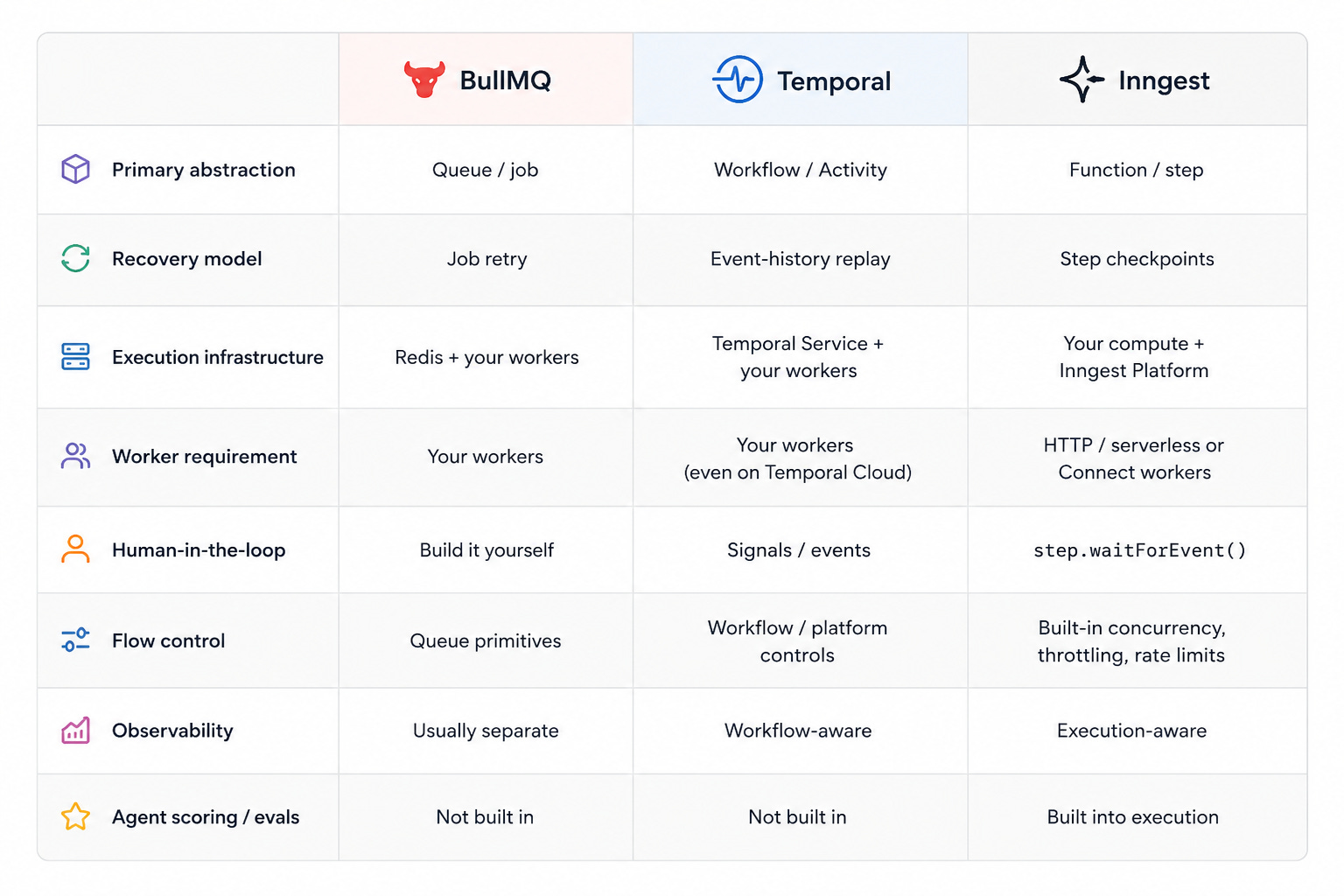
Here are three ways to solve the same problem (along with their tradeoffs):
BullMQ: Queue-First
BullMQ makes sense if you need fine-grained control over background work.
Also it works well when your team already has the expertise to operate the required infrastructure. You get queues, workers, retries, rate limiting & job dependencies out of the box. Your team controls how those pieces are configured & how the workflow is built around them.
Yet the tradeoff is the “operational” work.
Someone has to own the infrastructure, tune the system & deal with the cost when a configuration does not behave as expected in production.
So this fits well for organizations with a dedicated infrastructure team seeking that level of control.
Temporal: Workflow-First
Temporal takes a more workflow-centric approach…
Its biggest advantage shows up when workflows become very complex & depends on/call many other workflows. A dedicated workflow model can make a large web of dependencies easier to keep straight.
Yet the tradeoff is “complexity”.
Temporal is more involved for developers & operators. The extra machinery makes sense when workflows actually need it.
Inngest: Application-Code-First
Inngest takes a simpler approach…
The workflow stays in your application code, with steps as the basic units of durable work. Completed steps are saved & reused during recovery, while failed steps can retry independently.
Your functions run on your existing compute, while Inngest handles the orchestration around them. You get durable execution without building the workflow infrastructure yourself.
So you take on less infrastructure & workflow complexity.
Yet the tradeoff is less low-level control than BullMQ.
Choosing Between Them
There is NO one right choice.
BullMQ works well when you have the infrastructure team & want to control the system yourself.
Temporal becomes more compelling as the workflow graph grows more complex.
Inngest fits when you want durable execution around application code. It avoids much of the infrastructure & workflow complexity.
So the question is not which tool has the most features….Instead, how much control & complexity your workflow actually needs….
Let’s keep going!
§
Don’t let agent failures blow the budget (Partner)
Agents, like all of us, often need to recover from failure. But they shouldn’t start from scratch.
Inngest’s durable execution checkpoints your agents every step of the way.
So your agents can pick up where they left off and avoid doubling up on token & compute spend.
Build durably with Inngest - includes a generous free tier and a sleek local dev server.
§
Under the Hood: How Inngest Executes a Function
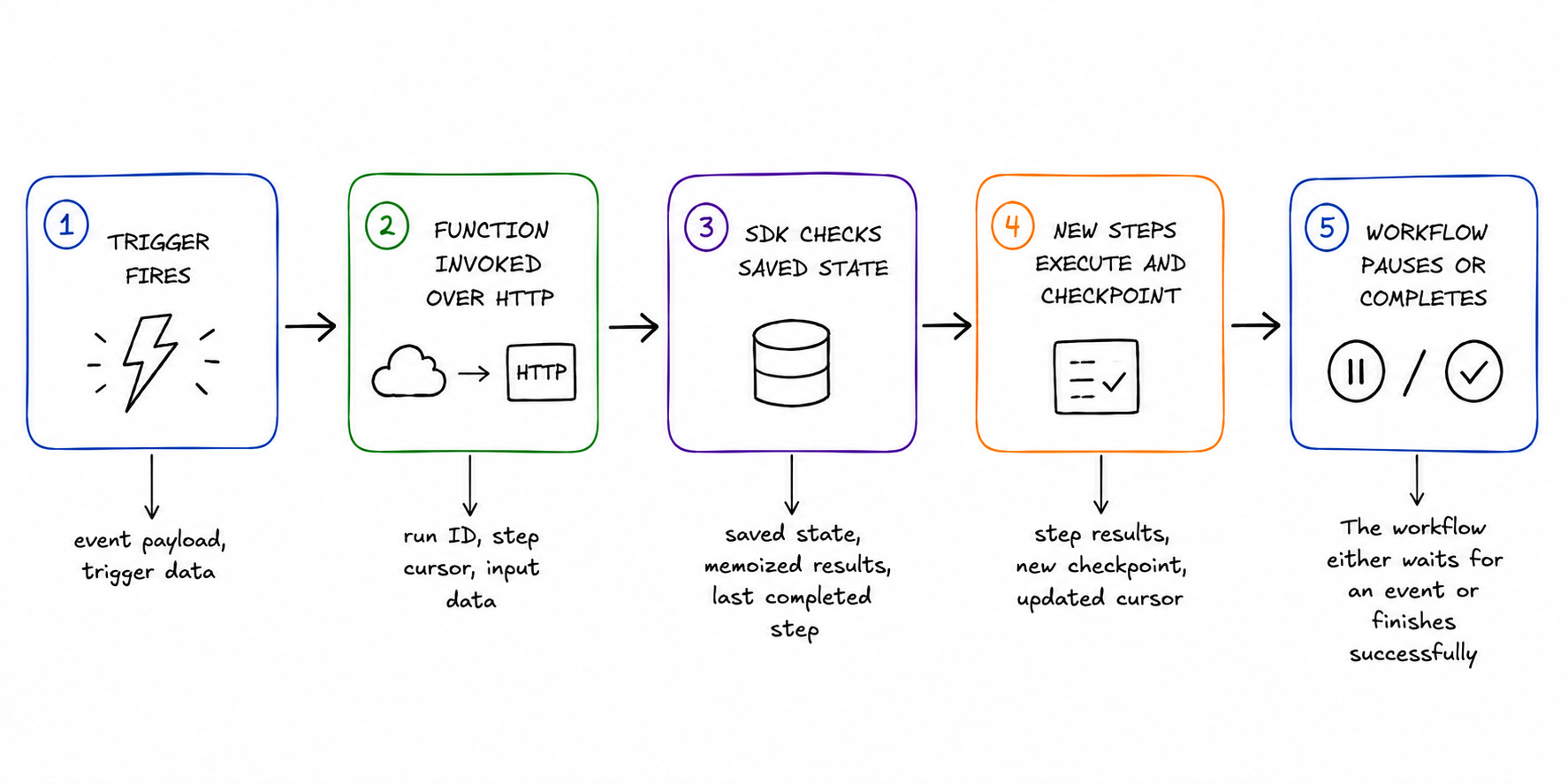
Every Inngest function follows the same basic execution pattern:
A trigger starts the run, steps execute one by one, their results get saved, and later executions reuse the work already completed.
Once you see this flow, the recovery behavior becomes much easier to understand…
Step 1: Starting an Execution
A run can start from an event, a schedule, or a webhook.
When the trigger fires, Inngest invokes your function over HTTP. Your function still runs on your own compute. You could be using a serverless platform, a container, or a traditional server.
There is NO separate worker process sitting there waiting for your function.
Inngest coordinates the execution, while your existing application environment runs the code.
Step 2: Discovering Completed Steps
The interesting part starts when the function should rerun...
The function begins from the top, but Inngest already knows which steps have been completed. Before running a step, the SDK checks its saved state.
If the step has a recorded result, the SDK returns this result instead of running the code again.
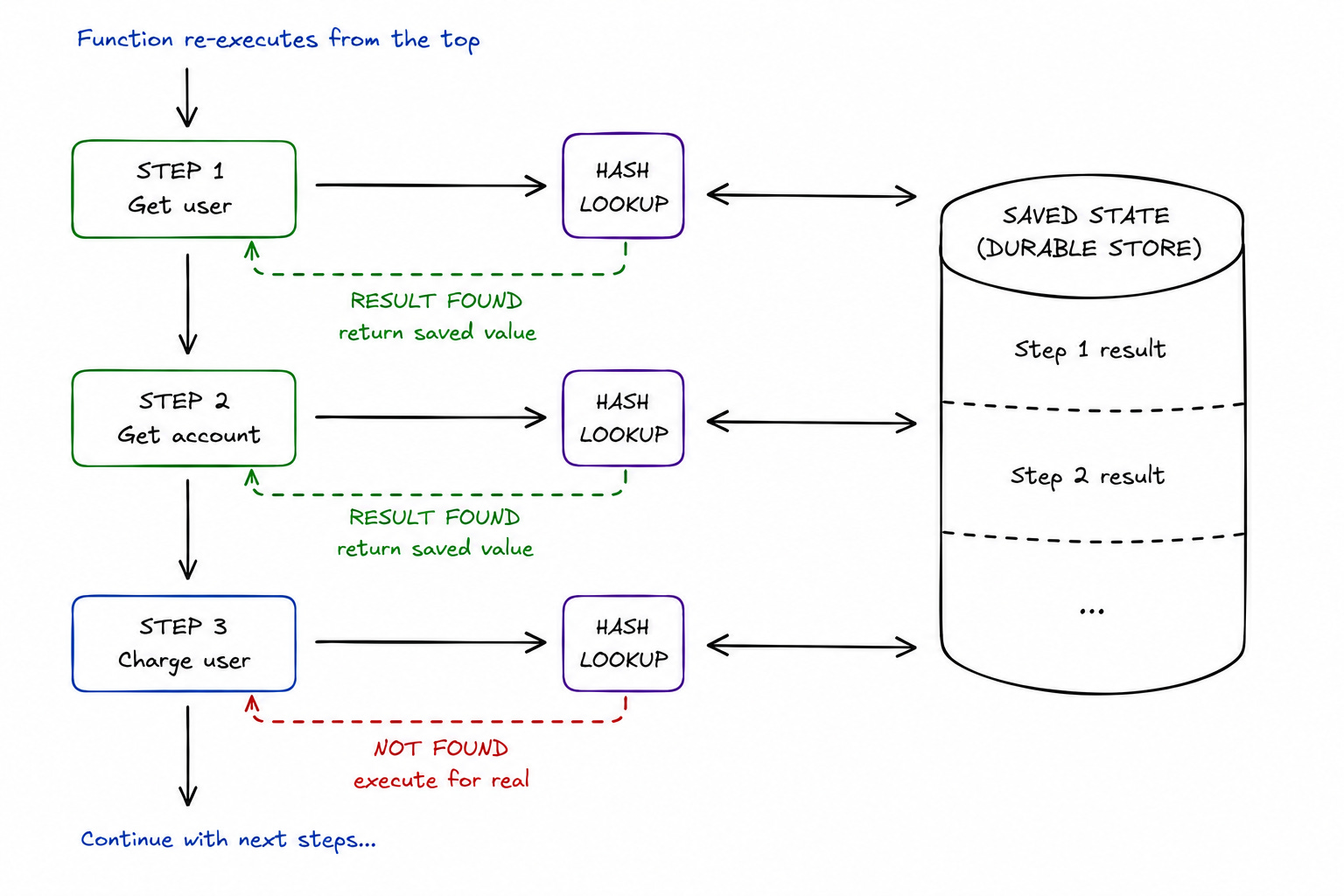
Each step has its own ID, and Inngest uses the step ID to identify its stored state.
SDK hashes the ID & use it to look up the previous result. This is also why completed steps can be reused across later executions & deployments.
So the function would run from the start again, but the completed work does not.
Step 3: Executing New Steps
Any step without a saved result still needs to run.
Inngest executes each step separately & records the result when it finishes. The result then becomes available to the next part of the workflow.
If the function runs again later, Inngest can use the recorded result instead of re-executing the same step. This lets a workflow move forward without repeating everything it has already finished.
Step 4: Checkpointing
Inngest can checkpoint progress as the function runs instead of waiting for the full workflow to finish.
With checkpointing enabled, the SDK can execute steps immediately and send progress back to Inngest as those steps complete. This reduces extra latency between steps while still recording the workflow’s progress.
This is especially useful for AI workflows, where a function could contain many small steps and even tiny extra latency between each one can add up.
If a step fails & needs to retry, Inngest can fall back to its standard orchestration path to handle the failure safely. So you get faster execution when things go well, without losing recovery behavior when they don’t.
Step 5: Waiting Without Holding Compute
Some workflows reach a point where they simply need to wait…
step.sleep()can pause execution until a specific time.While
step.waitForEvent()waits for an external event, such as an editor approving a draft or another system confirming a payment.
Also you can configure a timeout for an event wait.
Your function does NOT need to keep a worker process running just to sit there while waiting. Inngest tracks the workflow, and when the required time/event arrives, execution can continue with the recorded progress.
So a workflow can start on one machine, pause for hours/days, and continue later without keeping compute occupied the entire time.
Everything looks pretty smooth so far…But real workflows rarely stay this way.
Let’s see what happens when something goes wrong…
§
How Inngest Handles Failures
Once a workflow runs for a while, things can go wrong in different ways.
A retry is useful in some cases but not in others…
A temporary failure can usually be retried, while a process crash requires the workflow to recover its previous progress. Duplicate execution brings its own problems, and some workflows simply need to wait for a person before they can continue.
There is also one more case to consider:
The workflow can finish without technical errors and still produce a BAD result.
So instead of treating each failure the same way, let’s look at what each one requires...
Transient and Permanent Failures
An LLM request could time out, or the provider could return a 429 HTTP status because you have hit a rate limit.
In either case, the problem could disappear on the next attempt, so retrying the step makes sense.
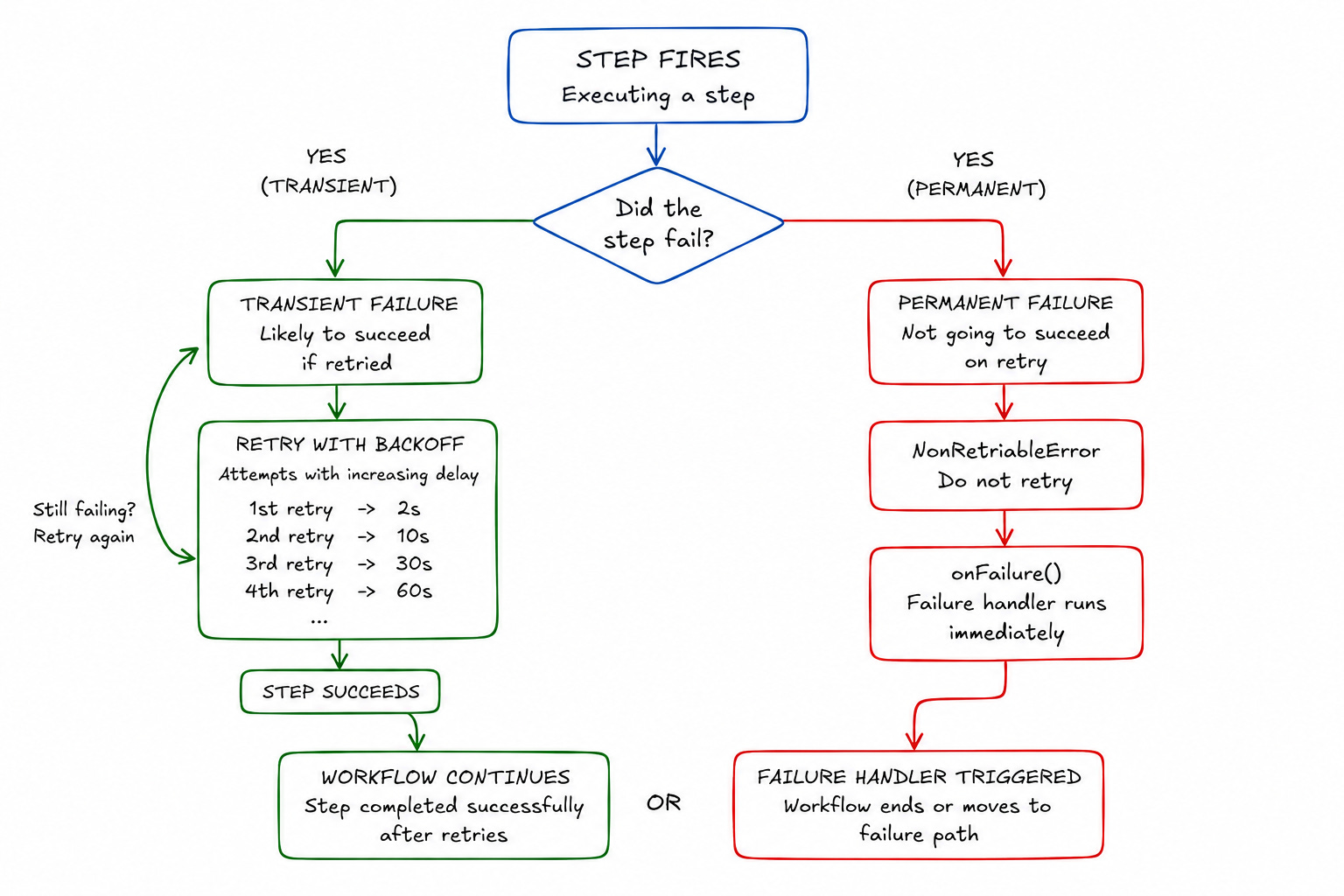
Inngest retries steps independently.
i.e., a failed drafting step can run again without repeating the retrieval & extraction steps.
If you configure retries: 58, the step gets five retries after its initial attempt, while the completed steps keep their recorded results.
But some errors won't fix themselves…
If the request is invalid/API key is wrong, running the same step again will most likely produce the same error. Inngest lets you mark an error as non-retriable, so it skips the remaining attempts & moves the run toward its failure path.
Once all retries have been used, onFailure can handle the failed run.
It can send an alert, notify a user, trigger a fallback, or pass the problem to another part of the system.
Infrastructure Failures
Retries are NO help when the process running the workflow disappears…
Suppose several steps have already completed but the process restarted before the next step finished. When the function reruns, it needs to know which work has already been done.
Inngest keeps the results of completed steps; so those results can be reused when execution starts again. The workflow can then continue from its saved progress instead of rerunning all the earlier steps.
So even though the process itself did not survive, the work it had already completed does.
Duplicate Execution
Recovery can also create a different problem:
If the same operation runs again, you need to make sure it does NOT accidentally perform the same action “twice”.
A webhook could arrive more than once, or a function could get re-triggered after a failure. Inngest provides event IDs & function-level idempotency keys to prevent duplicate function executions for the same operation.
Yet the external action still needs its own protection.
If the workflow sends emails and/or writes to a database, you’d need an idempotency key, an upsert, an existence check, or a deterministic identifier so the operation remains safe to reattempt.
Inngest can help prevent the function from running twice, but “your” application still needs to make its side effects safe.
Human Delays
Think of a research agent…
Once the draft is ready, an editor would need to approve it before publishing. Approval could arrive in a few minutes/days, so keeping compute running the entire time wouldn't make much sense.
Instead, the workflow can wait for the required event with step.waitForEvent(). Also you can set a timeout for cases where the event never arrives. Once the matching event arrives, the workflow continues with its previous progress intact.
From there, you can handle the result normally…
An approval can continue the workflow, a rejection can stop it, and a timeout can trigger an escalation/fallback.
Disconnected Clients
Sometimes the workflow is fine, but the connection to the user breaks.
Token streaming is a good example:
An agent can be in the middle of a model turn/tool call when the browser closes or the connection drops. The agent can keep running in the background, while the browser simply reconnects later & catches up with the stream.
This separates the agent’s execution from the connection delivering its output.
i.e., the browser can disappear without taking the workflow with it, and when the user comes back, the result is still there.
Outcome Failures
The workflow can finish successfully but still give you a BAD result.
An agent could choose the wrong tool, miss an important source, or produce an answer a reviewer rejects. Technically, everything worked because every step completed without an error.
But completing the workflow is NOT the same as producing a good outcome.
The execution system can tell you whether the work finished… yet it cannot decide by itself whether the result was actually good…
For this, you need scoring and evaluation; let’s look at it next…
§
§
Other Pieces That Matter in Production
Let’s dive in!
Handling Traffic and Concurrency
A workflow recovering correctly can cause problems if too much work arrives at once.
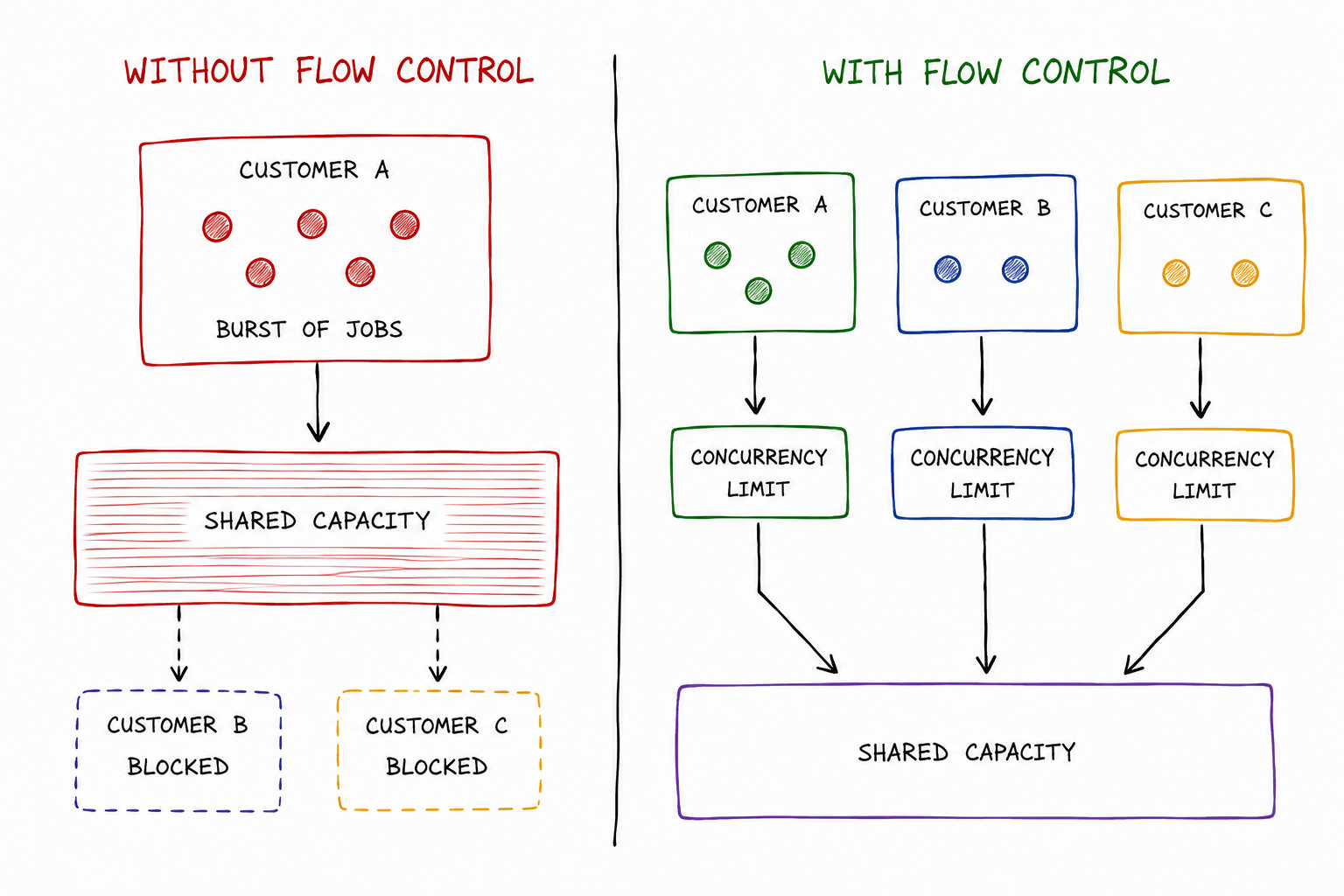
A burst from one customer can fill the queue, hit a shared LLM provider’s rate limit, and “slow down” everyone else. So the system needs ways to control how much work runs & how quickly new work starts.
Here are the flow-control tools used by Inngest:
Concurrency: Controls how much work can run at the same time. If a database struggles beyond 20 concurrent writes, a concurrency limit keeps the workflow from overwhelming it.
Throttling: Controls how quickly new work starts. If an API allows 100 requests per minute, throttling spreads the work out instead of sending everything at once.
Rate limiting: Instead of holding excess work for later, it skips events once the configured limit is reached. This is pretty useful when some events are better dropped than processed later.
Debouncing: Helps when many events arrive within a short period, but only the final state matters. Instead of running the function for every event, the system waits until the burst settles before starting it.
Priority: Lets more important work move ahead when capacity is limited. A critical workflow does not have to sit behind a large amount of lower-priority work.
These controls sit alongside the execution…so traffic management does not become another layer around the workflow.
Seeing What Happened
Once something fails, you need to see what happened before you can fix it.
A basic queue usually gives you the job & its final status. For a long-running workflow,,, you need more. You need to see where the run spent its time, which steps completed, what retried & where execution stopped.
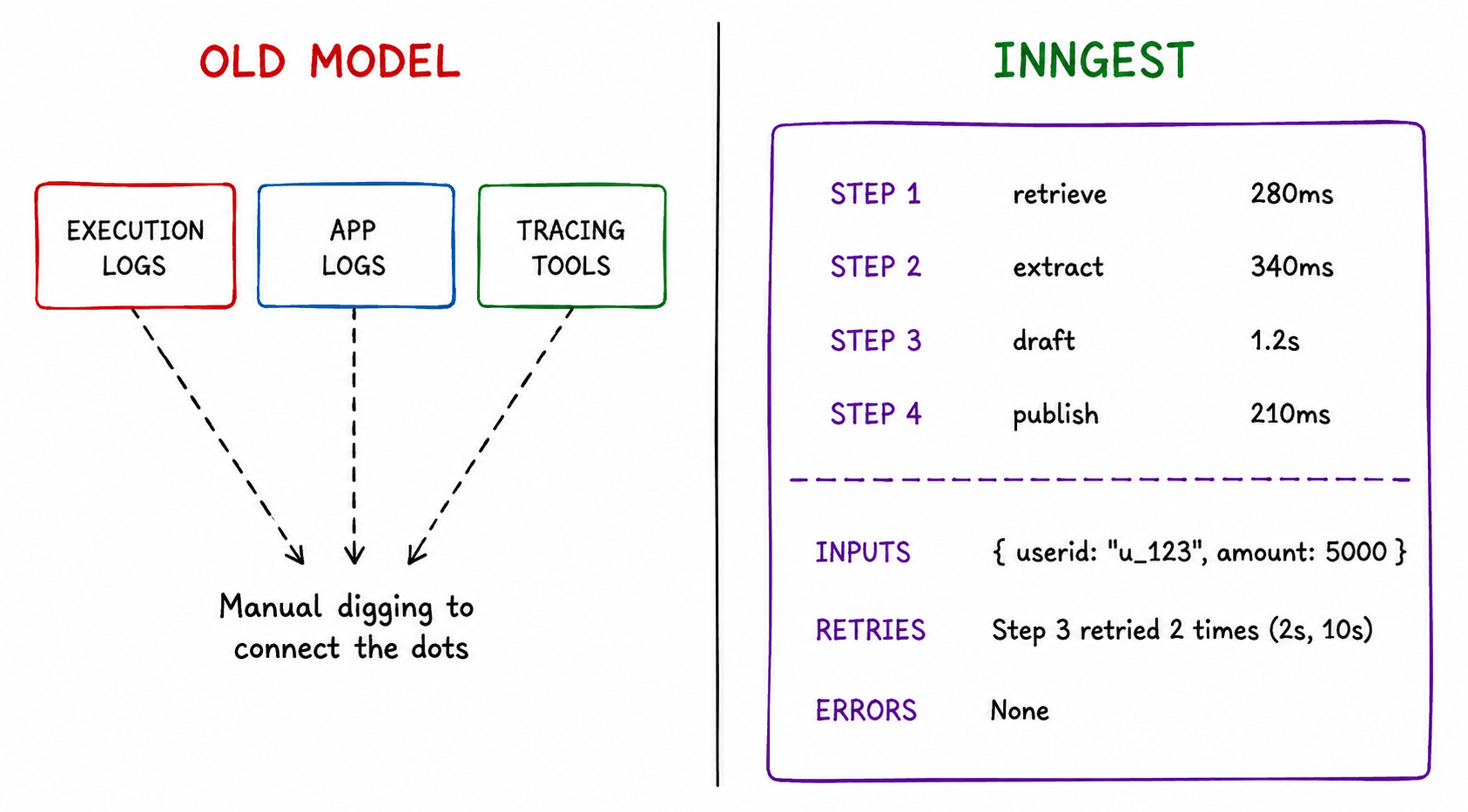
Inngest automatically traces function runs.
The trace shows step timing, queue delays, retries, and the data going into & coming out of each step. You can follow the whole workflow in one place instead of piecing it together from queue logs, application logs & separate tracing tools.
And when you fix the problem, you can replay the affected runs instead of rebuilding them manually. Inngest lets you select runs by time range and status and replay them in bulk.
Plus, replays are spread over time so a large recovery does NOT overwhelm the application.
Execution Success vs Outcome Success
Execution tells you whether the workflow finished…but it does NOT tell you whether the result was good.
Inngest lets you attach scores to a run/step.
This keeps user feedback, human review, or business outcomes connected to the execution that produced them. The score can also arrive after the workflow has finished. This is extremely useful when a result's quality only becomes clear later.
It gives you two different things to look at:
You can see whether the workflow completed.
And you can see whether it actually did the right thing.
But you still need to handle a few pieces yourself.
Let’s have a look at what they are…
§
What You Still Have to Handle
Here are some responsibilities that still belong to your application:
Idempotent Side Effects
A step can rerun after an error, so the code inside it needs to be “safe”.
For example, inserting a new user twice can create two records if the first write succeeded, but the response never reached the application. An upsert/deterministic identifier can make the second attempt harmless.
The same applies to emails, payments, API calls, or/and other external actions.
Inngest can control when a step runs again, but the application still needs to decide what happens when the external operation is attempted again.
Good Step Boundaries and Stable Step Identities
How you split the workflow into steps is still a design decision…
A step should represent a meaningful “unit of work”. Put too much inside one step, and a retry could repeat more work than necessary. Split everything into tiny steps, and the workflow becomes harder to reason about.
Step IDs matter for the same reason…
Inngest uses them to memoize completed work, so changing an existing step’s ID makes Inngest treat it as a different step. The SDK also uses a counter when the same step runs inside a loop, so the ID can stay stable across iterations.
The execution layer can preserve the state, but it cannot decide where your workflow should draw its boundaries.
Retry and Failure Policies
Inngest handles retries automatically,,, but the application still needs to decide when a retry makes sense.
A network timeout is usually worth another attempt, but an invalid API key is not. You can mark permanent errors as non-retriable, while onFailure9 gives the workflow a place to go once its retries are exhausted. The default is four retries after the initial attempt, and you can configure this per function.
The right response after failure depends on the workflow:
Sometimes you need an alert, and sometimes you need a fallback. In other cases, the user needs to be told that the operation could not finish.
Data Consistency Across External Systems
Durable execution keeps the workflow’s progress.
Yet it does NOT combine several external systems into one transaction.
Suppose a workflow records a payment & then creates an order. If the payment succeeds but the process fails before the order gets created, retrying the workflow does not automatically undo the payment.
The application still needs a way to make the two operations work “safely” together. Idempotency, compensating actions, and careful ordering can help based on the systems involved.
This becomes highly crucial when a workflow touches many external systems.
The execution layer can keep the workflow moving, but the application still owns the consistency of the data it changes.
Let’s put all of this into one workflow & see how it works together…
§
Putting It All Together: A Durable Research Agent
Let’s see what all of it looks like in a real workflow using a research agent:
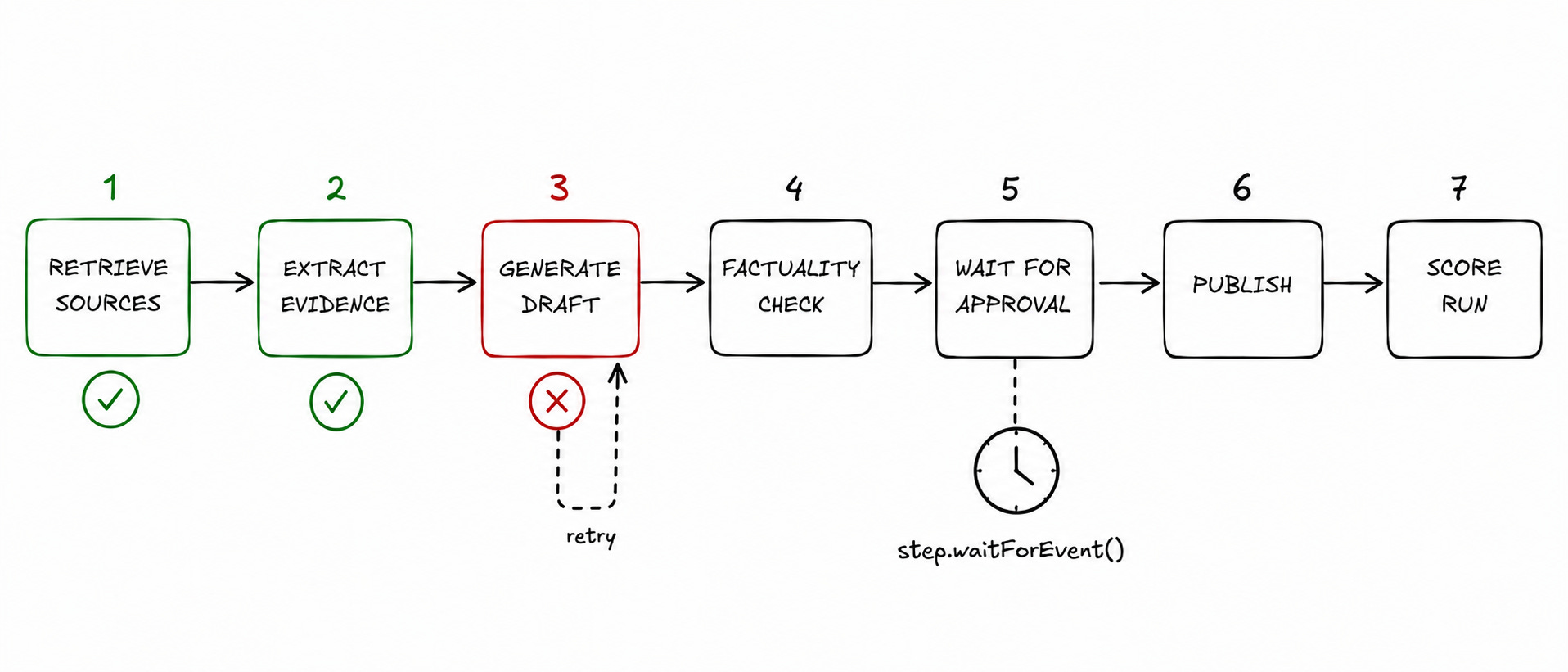
Workflow Starts
The agent first retrieves its sources & extracts the evidence it needs.
Each part runs as its own step, and once a step finishes, its result is saved.
So when retrieval & extraction are done, the workflow already has two completed pieces of work it can reuse later.
Failure and Recovery
The agent moves on to drafting, but the model provider times out halfway through the step…
Yet the workflow does NOT start over. The drafting step retries, while the retrieval & extraction results stay untouched. Once the draft succeeds, its result is saved & the workflow can move on.
This is where checkpointing becomes very useful…
The workflow does NOT need to remember everything in the worker process because the completed work is already persisted.
Waiting for Human Input
The draft now needs editor approval…
So the workflow calls step.waitForEvent() and pauses.
Nothing needs to keep running while the editor decides. Two days later, the approval event arrives, and the workflow continues with the publishing step.
The same workflow has now survived a model failure & a two-day wait without losing its progress.
Execution History and Replay
Once publishing finishes, the run still has a complete execution history.
You can see how the workflow progressed, where it retried, and how long each part took.
If the final answer turns out to be poor, a score can be attached to the run later. And if a fix needs to be tested against previous executions, the affected runs can be replayed instead of rebuilding them manually.
By the end, the workflow has done more than simply finish.
It has recovered from a failure, waited for a human without holding compute, preserved its progress, and left behind a history of what happened along the way.
§
Closing Thoughts
Reliable AI agents need more than a model that produces good answers…
Once an agent runs long workflows, calls external tools, waits for people, and handles real traffic, the execution layer becomes just as important.
Here are the key takeaways for you:
Durable execution saves progress. Completed steps can be reused after a failure instead of rerunning the whole workflow.
Retries need protection. Idempotency, backoff & clear failure paths keep retries from creating bigger problems.
Waiting is part of the workflow. Human approvals and external events can take hours/days without keeping compute running.
Flow control is part of reliability. Concurrency, throttling, and rate limits keep one traffic spike from affecting everyone else.
Execution history matters. Knowing what ran, what failed, and what retried makes debugging much easier.
A successful run is not always a good run. Scoring and evaluation help measure result quality.
BullMQ gives you queue primitives. Temporal gives you a workflow model. Inngest puts durable execution around the application code you already write.
For AI agents, that application-centric approach is what makes Inngest particularly compelling.
§
Don’t let agent failures blow the budget (Partner)
Agents, like all of us, often need to recover from failure. But they shouldn’t start from scratch.
Inngest’s durable execution checkpoints your agents every step of the way.
So your agents can pick up where they left off and avoid doubling up on token & compute spend.
Inngest offers a generous free tier and a sleek local dev server for testing.
If you find this newsletter valuable, share it with a friend, and subscribe if you haven’t already. There are group discounts, gift options, and referral rewards available.

Want to reach 241K+ tech professionals at scale? 📰
If your company wants to reach 241K+ tech professionals, partner with me.
Thank you for supporting this newsletter.
You are now 240,001+ readers strong, very close to 241k. Let’s try to get 241k readers by 27 August. Consider sharing this letter with your friends and get rewards.
Y’all are the best.

References
An AI agent workflow is the sequence of steps an AI agent follows to complete a task.
You can build an AI agent workflow as a chain of queue-worker jobs, but as the workflow becomes longer & more dynamic, you also need to build the state, recovery, coordination, and observability that connect those jobs into a durable workflow. This can become very complex.
BullMQ and Celery are job queue systems for running background work, while Amazon SQS is a managed message queue service used to send messages between distributed components.
Memoization: A technique where the result of a previously completed computation is stored and reused when the same computation is encountered again, avoiding unnecessary repeated work.
step.run(): Inngest SDK function that wraps a unit of workflow work and gives Inngest a durable execution boundary. When the step completes, its result can be persisted and reused during later executions instead of re-running the same work.
step.sleep(): Inngest SDK function that pauses a workflow until a specified amount of time or a specified point in time. The workflow does not need to keep a worker process running while it waits.
step.waitForEvent(): Inngest SDK function that pauses a workflow until a matching event is received. It can be used for workflows that need to wait for external events such as human approval, payment confirmation, or another application's response.
retries: An Inngest function or step configuration that determines how many additional attempts are made after an execution fails before the failure is considered exhausted.
onFailure: An Inngest failure-handling mechanism that runs when a function's retries have been exhausted, allowing the application to perform actions such as sending alerts or triggering fallback logic.
Would love to see a use case study comparing the implementations of 3 solutions together. This would give us even better idea of where Inngest shines.
Treating agent state machines as durable execution workflows is the only way to scale real workloads. Without checkpointed intermediate states and deterministic replay, non-idempotent side effects like external mutations will continually break production systems under transient API failures. Well framed.