


Share this letter & I’ll send you some rewards for the referrals.
We’ve all created infrastructure manually at some point.
A few clicks in a cloud console, some configuration changes, and our servers, networks & databases are up and running.
Sounds simple enough, right?
But what if you need to recreate the same infrastructure for another environment? You’ll have to go through all those settings & reconfigure the resources. Then you’ll need to set up their dependencies and make sure that everything matches the original environment.
And if you miss even one setting, you could spend hours figuring out why something works in staging but fails in production.
Now imagine managing hundreds of resources across multiple environments…
Different engineers are changing these resources regularly. Keeping track of everything manually would become a headache…!
You could use scripts to automate some of this work.
But scripts need to handle resources already running. They must account for changes to existing configurations and failures along the way.
Wouldn’t it be easier if you could write down how our infrastructure should look? You could keep it in Git and let a tool figure out what needs to change whenever you update it.
Well, this is the basic idea behind Infrastructure as Code (IaC)… And Terraform is one of the most widely used tools for managing infrastructure this way.
With Terraform, you define infrastructure using configuration files.
You preview changes before applying them and manage existing resources without repeating every step manually.
But have you ever wondered how Terraform knows which resources already exist? And how it decides what needs updating and what should be created first?
Onward.
§
Mermaid diagrams are the floor

Your coding agent can already paste a Mermaid chart into a PR description.
You still read every file to learn what it does to your system.
PR Lens draws each pull request as a live architecture canvas, right in your pull request. Press play and it walks you through the change, one step at a time.
On every PR, you see:
What changed, marked on the parts of the system it touches
What else it reaches, including services the diff never names
How a request moves through the system now
What could break, flagged before you merge
2,200+ GitHub stars and 45,000+ pull requests drawn.
(Thanks to Coldtea for partnering on this newsletter.)
§
I want to introduce Ayaan as a guest author.

He’s a Certified Kubernetes Administrator (CKA) who writes about Kubernetes, cloud infrastructure, and cloud-native systems. He builds in public and shares practical tips, projects, and lessons learned along the way.
Check out his work & socials:
§
Inside this newsletter:
How Terraform turns a few lines of configuration into real cloud infrastructure, and what happens behind the scenes.
The architecture behind Terraform: how Terraform Core, providers, and backends work together to manage infrastructure.
How Terraform knows which resources already exist, what needs to change, and which resources to create first.
How to stop managing infrastructure manually and start using state, dependency graphs, and reusable modules to manage changes.
What really happens when you run
terraform init,plan, andapply, and why a failed deployment doesn’t automatically roll back.How to detect configuration drift, import existing infrastructure, and prevent unexpected resource replacements.
How to safely manage Terraform in production with CI/CD pipelines, state locking, plan reviews, and access controls.
Let’s keep going!
§
What Is Infrastructure as Code
IaC is a way to create & manage infrastructure through configuration files.
Instead of setting up resources manually, you define them in files and use those files to manage the infrastructure.
A file could describe a network, a subnet within it, a server connected to the subnet, and the rules that control access. These details stay in Git, making changes visible before they reach the cloud. The configuration remains useful after deployment. It describes what should continue to exist.
There are two main approaches to managing infrastructure through code: imperative and declarative…
The difference lies in how you tell the system what to do.
Imperative vs Declarative Infrastructure
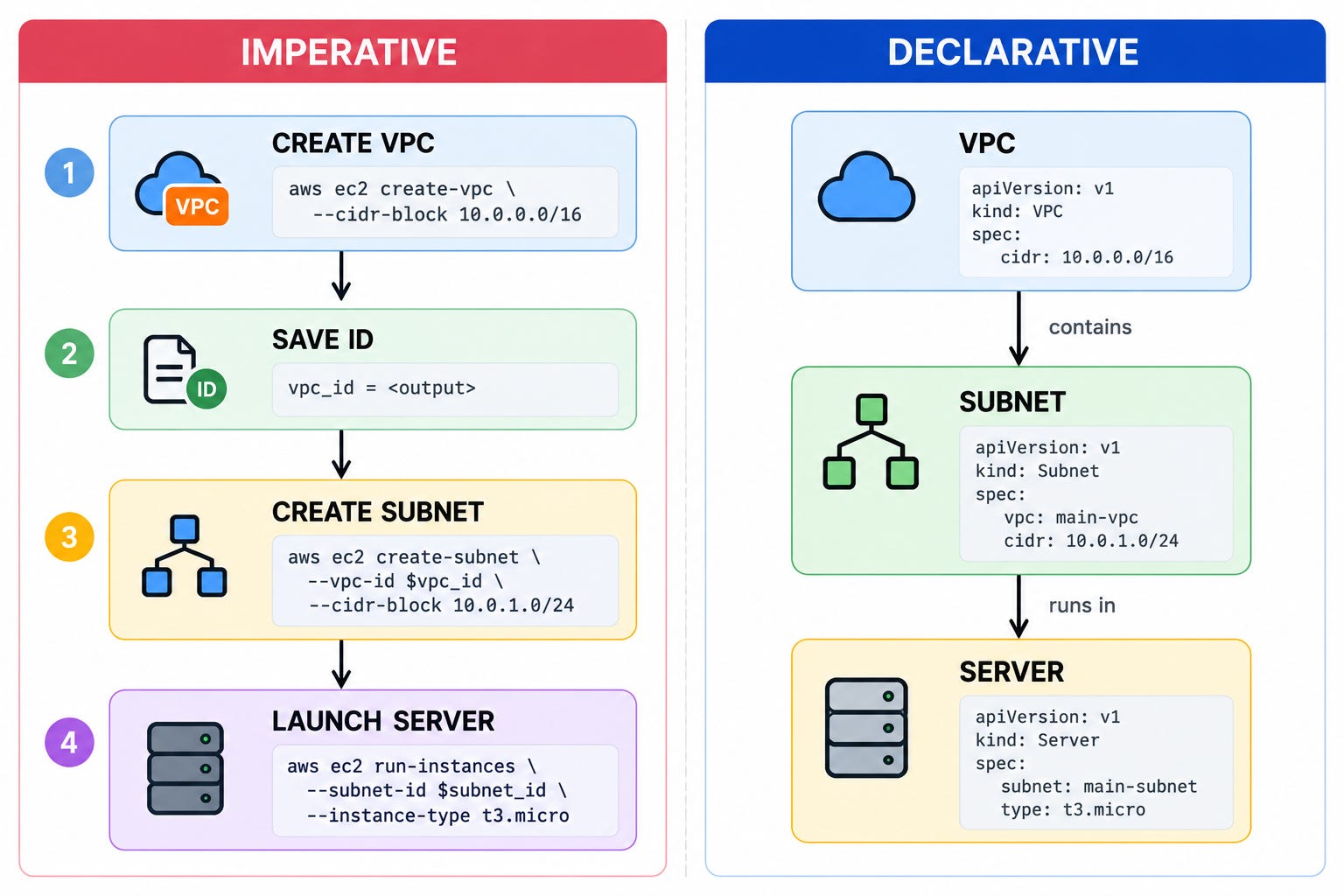
The imperative approach focuses on how to create infrastructure:
You write a series of instructions explaining each step & order in which they should run. A script could first create a network, save its ID, create a subnet inside it, and finally launch a server… The script follows these instructions in sequence.
But what happens if you run the same script again?
It needs extra checks to avoid creating duplicate resources. You also need to handle situations where some steps succeed while others fail.
The declarative approach works differently:
Instead of writing instructions for every step, you describe what the final infrastructure should look like.
Consider a setup where you define a network, a subnet within it, and a server connected to that subnet. Terraform uses these relationships to determine the execution order. Plus, it checks the existing infrastructure to determine which changes are necessary.
The main difference is simple:
Imperative tells the system how to do something, while declarative describes the desired final state.
What Infrastructure as Code Changes
Once the infrastructure is defined in files, changes start with a pull request instead of a series of console clicks.
You review & check the proposed edit before it reaches production. Git keeps a history of the configuration. The same files also help recreate development, staging, or replacement environments with different values.
Mistakes are still possible…
Someone could change resources directly in the cloud console. Also they could approve a configuration with incorrect settings. But the written definition provides a clear reference. It lets you compare intended infrastructure with what actually exists.
Terraform uses this description to plan which resources to create, update, or remove.
Now, let’s look at how Terraform uses this approach to manage real infrastructure…
§
Terraform as an Infrastructure as Code Tool
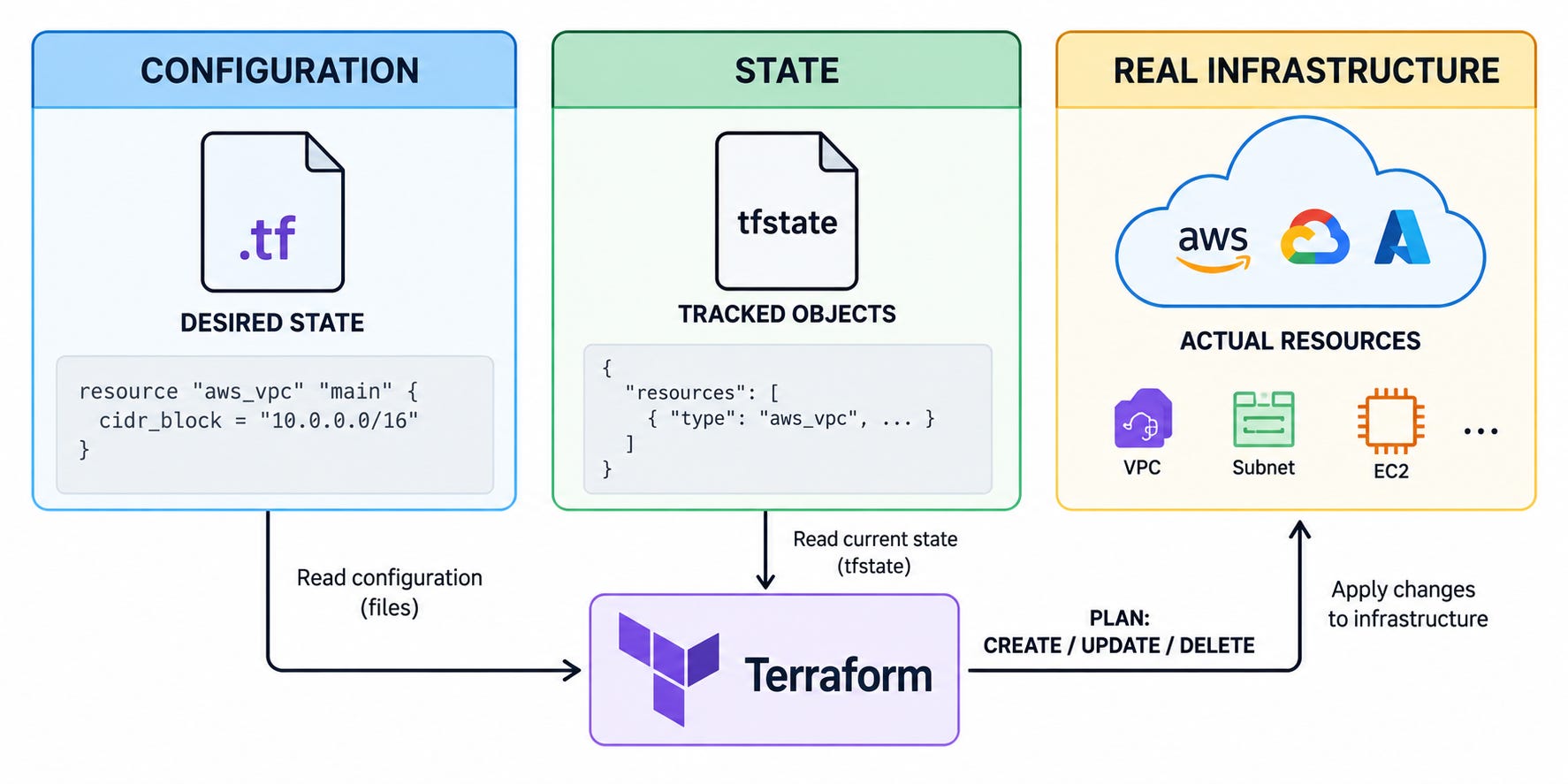
Terraform uses a declarative approach:
It helps manage infrastructure across different cloud platforms & services. The same workflow works for networks, databases, and DNS records. It works even when these resources belong to different platforms.
You define the infrastructure using HashiCorp Configuration Language (HCL1). Terraform reads these files to understand which resources should exist and how they connect.
Providers then handle platform-specific operations.
Terraform Configuration
A Terraform configuration consists of plain text .tf files.
Terraform reads all files in the same working directory as one configuration.
You could keep network resources in one file and servers in another to organize the setup. The file structure makes the configuration easier to manage. But it does not control the order in which Terraform creates resources.
Instead, Terraform follows the relationships between resources.
A server could reference a subnet defined in another file. You don’t need to copy its ID manually. Also HCL supports expressions & conditional values for configurations that need different settings.
The Core Building Blocks
Resources are Terraform's main building blocks.
Each resource represents an object Terraform manages, such as a virtual machine or DNS record.
Providers connect Terraform to the platforms where these objects exist. They define which resource types are available. They also handle operations such as creating, updating, and/or deleting those resources.
Other components serve different purposes…Data sources read information about existing infrastructure without taking ownership of those objects.
Variables let you pass values into a configuration, while locals help reuse values within it. Outputs expose useful information, such as a server’s IP address. Modules group related resources into reusable configurations. i.e., you don’t have to repeat the same setup.
Terraform also provides meta-arguments2 to control how resources get created and connected.
count and for_each create multiple instances of a resource. Meanwhile, depends_on defines dependencies Terraform cannot identify through references.
Configuration, State, and Real Infrastructure
A resource block alone does not give Terraform enough information to manage infrastructure… The configuration describes what should exist.
But Terraform also needs to know which real objects it already manages.
The state tracks which resource addresses in the configuration belong to which objects on the remote platform. Providers read those objects to determine their current condition.
Terraform uses this information to decide what happens to each resource. It determines whether to create, update, replace, remove, or leave it unchanged.
NOTE: Terraform only checks infrastructure when you run a command. It does not automatically detect & fix every change made outside its configuration.
Let’s look at the components responsible for this process…
§
Terraform Architecture
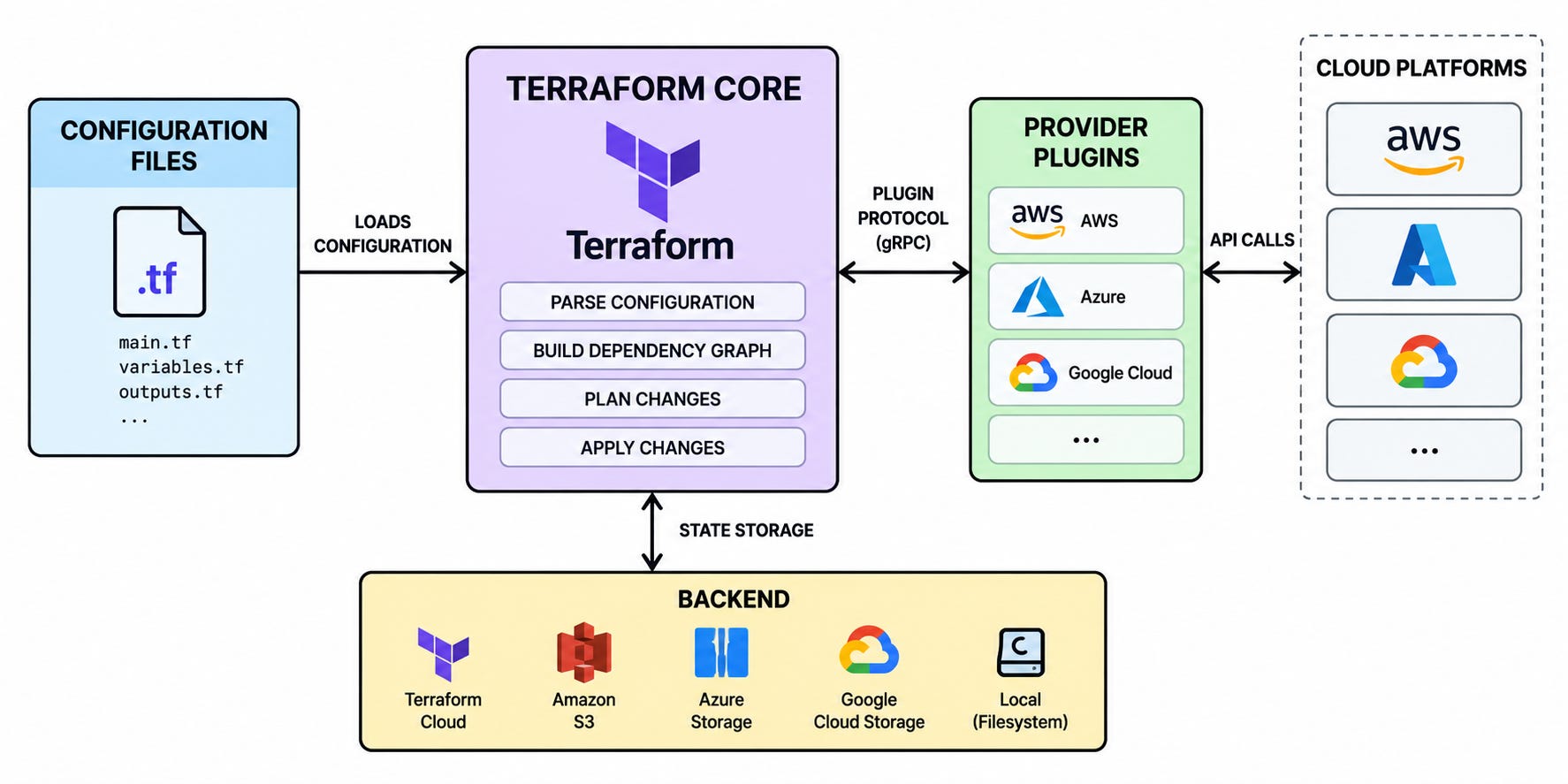
Terraform needs more than a configuration file to manage infrastructure.
It needs an engine to plan the work & plugins to communicate with each platform. Plus, it needs a place to keep its state between runs.
These responsibilities belong to Terraform Core, provider plugins & backend.
Terraform Core
Terraform Core is the engine behind the terraform command.
It reads configuration, evaluates variables & expressions, and loads the existing state. Providers also supply Core with schemas. These describe available resources & settings each resource supports.
With this information, Core determines how resources depend on each other.
Take a subnet as an example: It needs its network to exist first. Meanwhile, Terraform can create unrelated resources at the same time.
Using these relationships, Terraform builds a dependency graph3 and creates an execution plan. During terraform apply, Terraform Core coordinates the operations and records their results in state as they succeed.
Provider Plugins
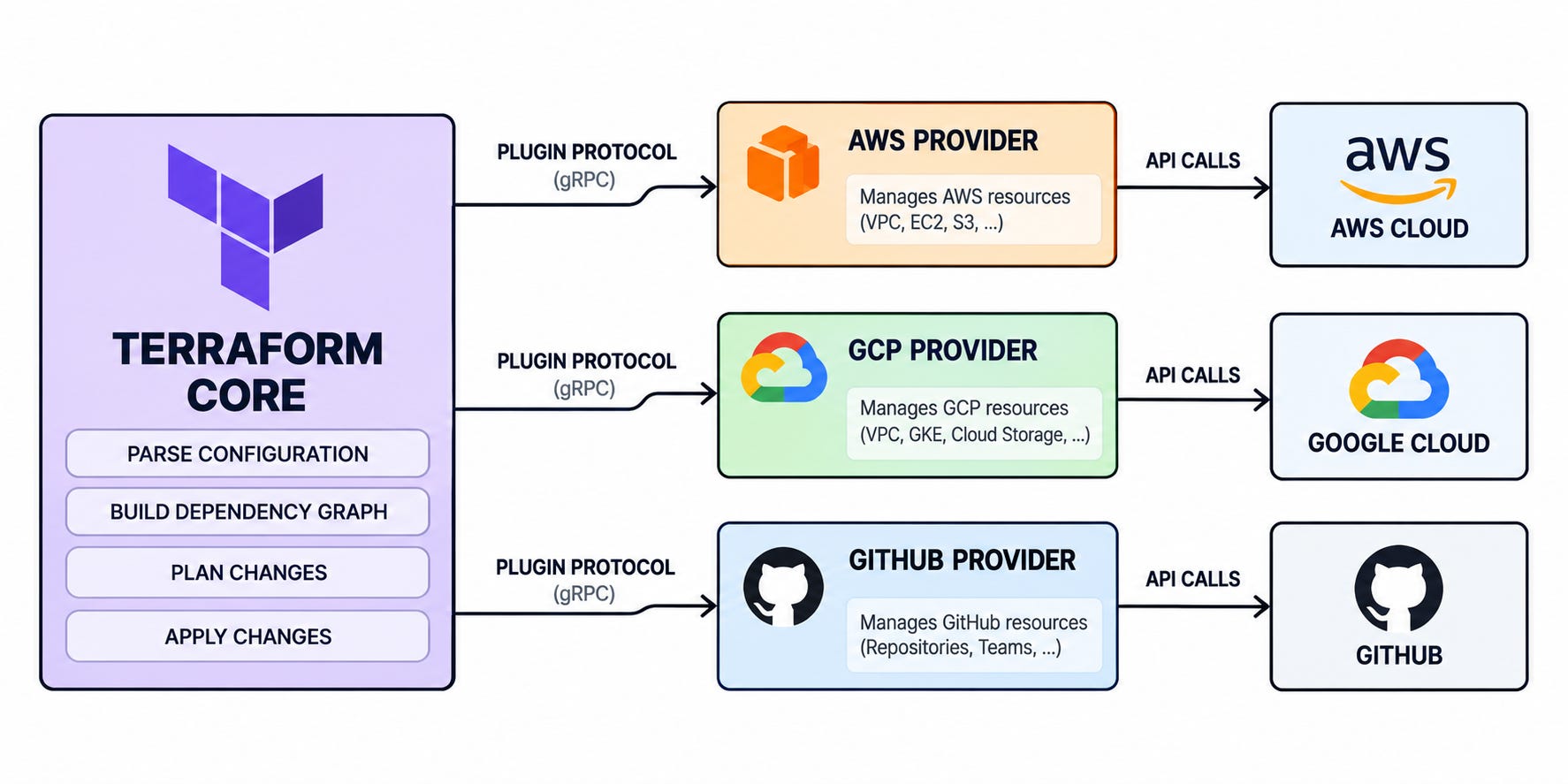
Terraform Core follows the same general process across different platforms.
But each platform has its own APIs & resource types…
Provider plugins handle these differences.
Providers run as separate processes. They communicate with Terraform Core through a plugin protocol based on gRPC4. This allows Core to request information & operations without knowing each platform’s API.
Each provider defines the resources & data sources available for its platform, along with the settings it supports.
During planning, providers help Terraform check existing resources. This determines whether they need an update/replacement. When you run terraform apply, they communicate with the remote APIs to create, read, update, and/or delete resources.
This way, Terraform Core manages the overall execution. Providers handle platform-specific operations.
Backends
Terraform needs to remember which resources it manages after a run ends.
The backend determines where Terraform stores this state and how it accesses it.
By default, the local backend saves state on the machine running Terraform. For shared infrastructure, a remote backend allows many engineers and CI/CD pipelines to access the same state.
Some backends also support state locking5. It ensures that only one Terraform run can modify the state at a time.
Features such as encryption, backups & version history depend on the storage service.
But storing state remotely doesn’t mean Terraform runs remotely. The command could still run on a laptop or in a pipeline unless you configure remote execution separately.
So providers communicate with the actual infrastructure. Meanwhile, the backend stores the state Terraform uses to track those resources.
To understand this better, let’s look at why Terraform needs state and how it uses it to keep track of infrastructure...
§
Why Terraform Needs State
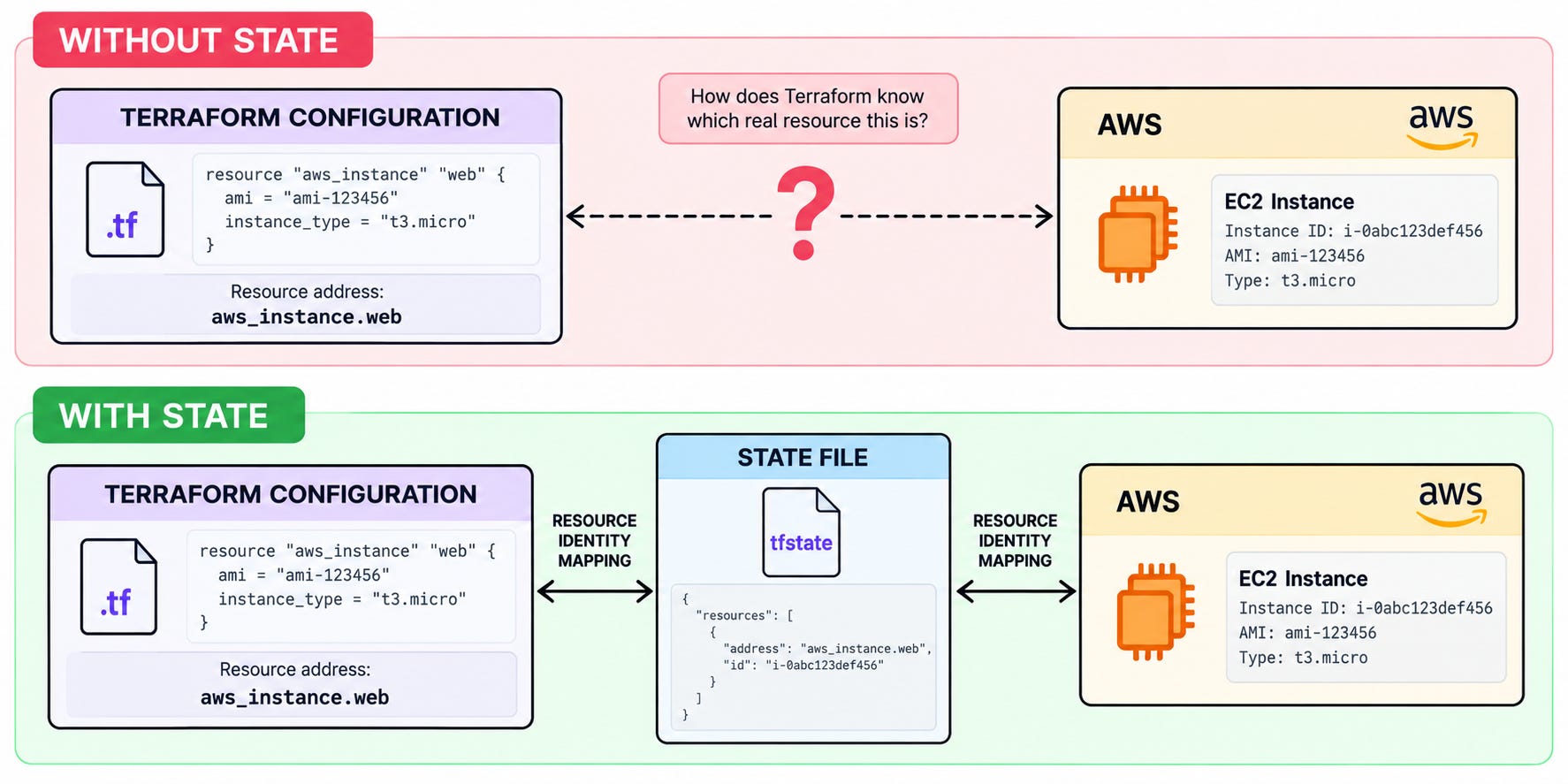
Terraform needs to recognize the infrastructure from earlier runs.
This includes resources it created & those it started managing.
To understand this, you could define an EC2 instance as aws_instance.web in our configuration. But AWS identifies the actual instance using a unique ID. Terraform stores this connection in state so it knows which EC2 instance belongs to the resource defined in our files.
Resource Identity and State Data
State stores more than resource IDs.
It contains attributes6 returned by providers & output values. Terraform uses this information to track resources inside modules. When you use count or for_each to create multiple resource instances, Terraform tracks each one separately.
This information becomes crucial when you modify the configuration.
Consider what happens when you remove a resource block. The actual resource is not immediately deleted from the cloud.
Terraform still has a state entry that identifies the remote object associated with the removed block. During planning, it uses this information to determine which resource to delete.
Local State vs Remote State
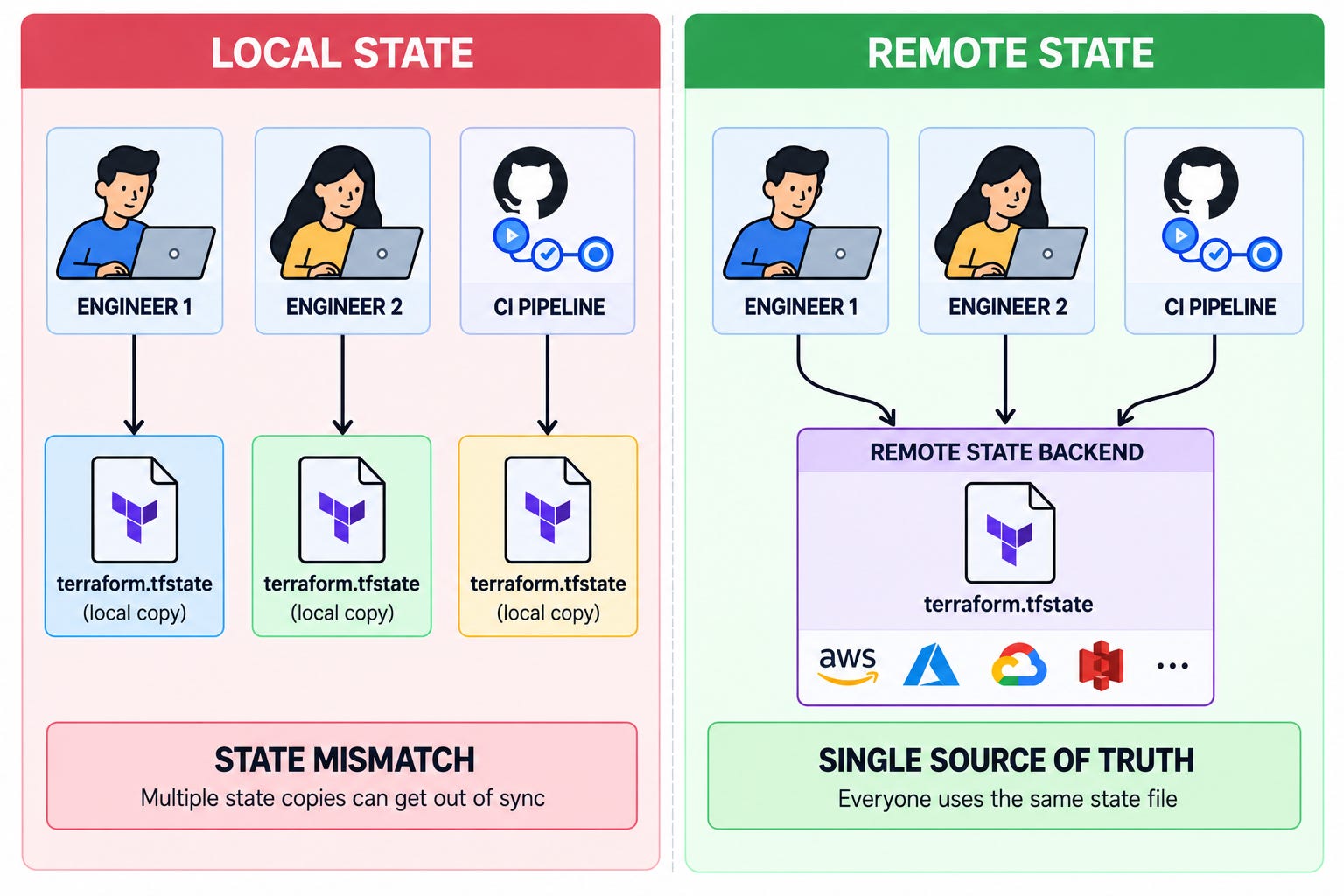
By default, Terraform stores state in a local file.
This works well for learning or managing a small project alone.
But things get more complicated when many engineers or CI/CD pipelines work on the same infrastructure. If everyone maintains a separate copy, one person could make changes without the others having the latest state.
A remote backend solves this problem by providing authorized Terraform runs with access to a shared state file. Depending on the storage service, it also offers better access control and recovery.
Moving state to a remote backend only changes where Terraform stores its records. The actual servers, networks, and other infrastructure remain where they are.
State Locking and Security
When many Terraform runs access same state, there’s a risk of conflicting changes.
To prevent this, supported backends provide state locking. Terraform locks the state when needed, which prevents other runs from modifying it at the same time.
State also needs proper security because it can contain sensitive information. Terraform hides these values from command output, but they still remain in the state file.
For production environments, a few precautions are important:
Restrict access to state files.
Keep state files & saved plans out of Git.
Enable encryption, backups & versioning in the storage service.
Avoid the force-unlocking state unless the original operation has ended.
The .terraform.lock.hcl file is different from the state file.
It records the selected provider versions and checksums7, so it normally belongs in Git.
Along with tracking existing resources, Terraform needs to understand how they depend on each other. It uses these relationships to determine how to make changes.
§
How Terraform Understands Resource Dependencies
Infrastructure resources often depend on one another.
A subnet needs a Virtual Private Cloud (VPC) to exist before it gets created, while other resources require specific permissions or settings to be in place.
Terraform identifies these relationships as dependencies. It then uses them to decide the order in which resources should be managed.
Implicit Dependencies
Most dependencies get identified through references in the configuration.
When creating a subnet inside a VPC, you need to specify which VPC it belongs to. Instead of manually entering the VPC ID, you reference aws_vpc.main.id in the subnet’s vpc_id setting.
Terraform uses this reference to understand which VPC the subnet belongs to. First, it creates the VPC & then proceeds with the subnet.
The resources don’t need to be defined in the same .tf file either. Terraform follows their relationships regardless of how the configuration files are organized.
Explicit Dependencies
Not every dependency involves referencing another resource’s value.
An EC2 instance may need an IAM policy attachment completed before its application starts. Yet the instance configuration does not necessarily reference the attachment directly.
In such cases, you use depends_on to declare the dependency explicitly. Terraform then waits for the required operation to finish before proceeding.
You should avoid using depends_on unnecessarily…Resources could end up waiting for each other, even when Terraform could create them in parallel.
Dependency Graph
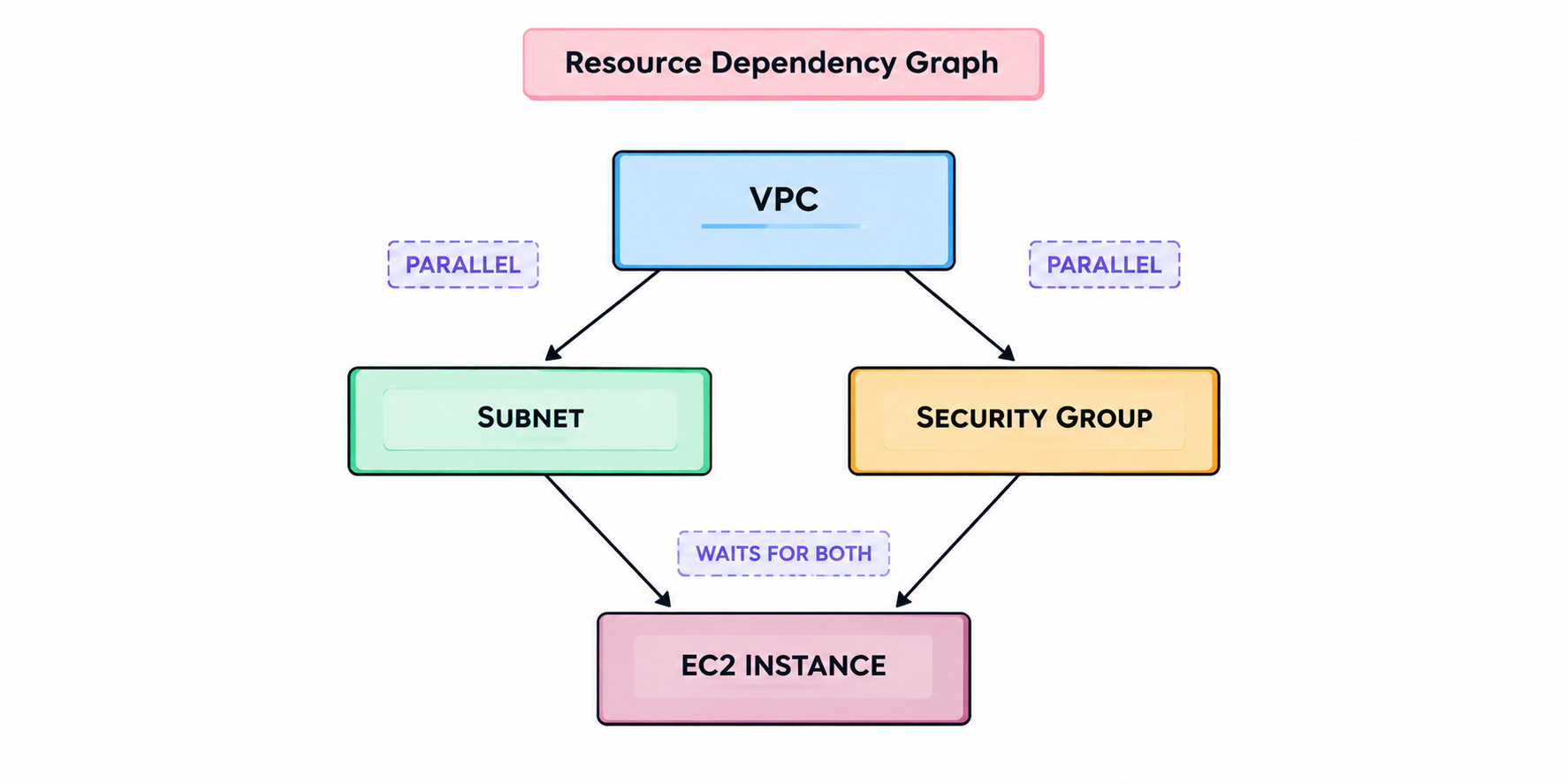
Terraform brings these relationships together in a dependency graph.
This helps it decide which resources to create first.
If a VPC must exist before a subnet is created, the VPC gets processed first. Meanwhile, independent resources could be created in parallel because they don’t rely on each other.
Yet a circular dependency creates a problem. If two resources depend on each other, neither has a valid starting point, so Terraform reports an error instead of proceeding.
During destruction, the order reverses. Dependent resources get removed before the infrastructure they rely on.
Terraform uses these dependencies to order the changes in a plan.
Now, let’s look at what happens to each resource throughout its lifecycle.
§
Reminder: this is a teaser of the subscriber-only newsletter, exclusive to my golden members.
When you upgrade, you’ll get:
High-level architecture of real-world systems.
Deep dive into how popular real-world systems work.
How real-world systems handle scale, reliability & performance.
(If this newsletter has helped you become a better software engineer, consider subscribing to support my work.)