



Share this letter & I’ll send you some rewards for the referrals.
The smartest AI models in the world cannot decide, mid-answer, they need more information and go get it…
They can reason at length, draft legal memos, and score in the 99th percentile on standardized tests. But every response they produce comes from what is already in the context window.
They have no mechanism to act on the world, observe the results, and adjust.
For most tasks, this is enough. For any task where the answer requires searching, reading, discarding dead ends, and circling in over many steps, a passive model is the wrong architecture.
An agent gives the model this ability…
Instead of generating a response from a single prompt, the model decides what to do next, calls a tool, reads the result, and keeps going until it has enough. The model stops being something you call and becomes something that runs.
This loop is the entire idea behind agents, and it is how Perplexity Deep Research, ChatGPT agent mode, Claude Code, and Cursor all work under the surface.
Those products handle general use cases well.
While building your own is worth it when you need to control the runtime: which tools the model can call, how the loop is structured, when it stops, and how you measure its success.
Onward.
[Webinar] Can you prove AI is working?

AI is in your engineering workflow. While the token spend shows it, the throughput doesn’t. The human is very much still in the loop, and that’s a context problem.
Join live on Aug 19 (FREE) to learn:
The 4 metrics to measure where AI gains leak out before production.
The 8 stages of context maturity, the specific walls capping your metrics, and a free tool to pinpoint where your team is.
Why more MCPs and bigger context windows aren’t enough, and what it takes to get real value from your agents.
(Thanks to Unblocked for partnering on this newsletter.)
This newsletter builds a research agent from scratch:
A complex question goes in… The system breaks it into focused sub-questions, calls tools in a loop, reads the sources worth reading, and then returns a structured report with citations.
Think about how a person actually answers a HARD question.
They do not produce the answer in one pass. They search for something, read what comes back, realize it raises a new question, search again, discard a dead end, and circle in on an answer over many steps.
The model we built in the last newsletter cannot do any of this.
Its knowledge is frozen at training; its memory ends at the context window, and every response comes from what it already knows. For explaining a concept or drafting a document, answering in one pass is fine.
For a question where the answer has to be found rather than recalled, one pass is the wrong shape entirely.
I want to reintroduce Louis-François Bouchard as the author of this newsletter.

He’s a best-selling author (Building LLMs for Production), the co-founder of Towards AI, and the creator of the YouTube Channel, What’s AI, where he helps people understand AI and learn how to apply it in the real world.
Through his development work with clients and his content, teaching, and AI training programs on the Towards AI Academy, Louis focuses on making AI practical for builders, engineers, and curious learners alike.
At Towards AI, he and his team train AI engineers through courses built for every stage, from beginner to advanced. That educational mission and the real-world experience building for his clients are exactly why I wanted him in this newsletter series.
Inside this newsletter, you’ll get:
The agent loop. The think-act-observe cycle that makes an agent an agent, and why most agents fail not at reasoning but at knowing when to stop.
Tool design. Why the model’s success depends almost entirely on how a tool is described, how to make errors recoverable, and why quality drops once you pass about 20 tools.
MCP and the tool ecosystem. How one protocol lets any model talk to any tool, when a ready-made server is enough, and when writing your own is worth it.
Multi-agent patterns. How orchestrator-worker and parallel-and-synthesize patterns work, and what the cost multiplier looks like in practice.
Evaluating agents. Why scoring the final answer is not enough, and how to catch the failure where the agent gets it right in 50 tool calls when 5 would have done.
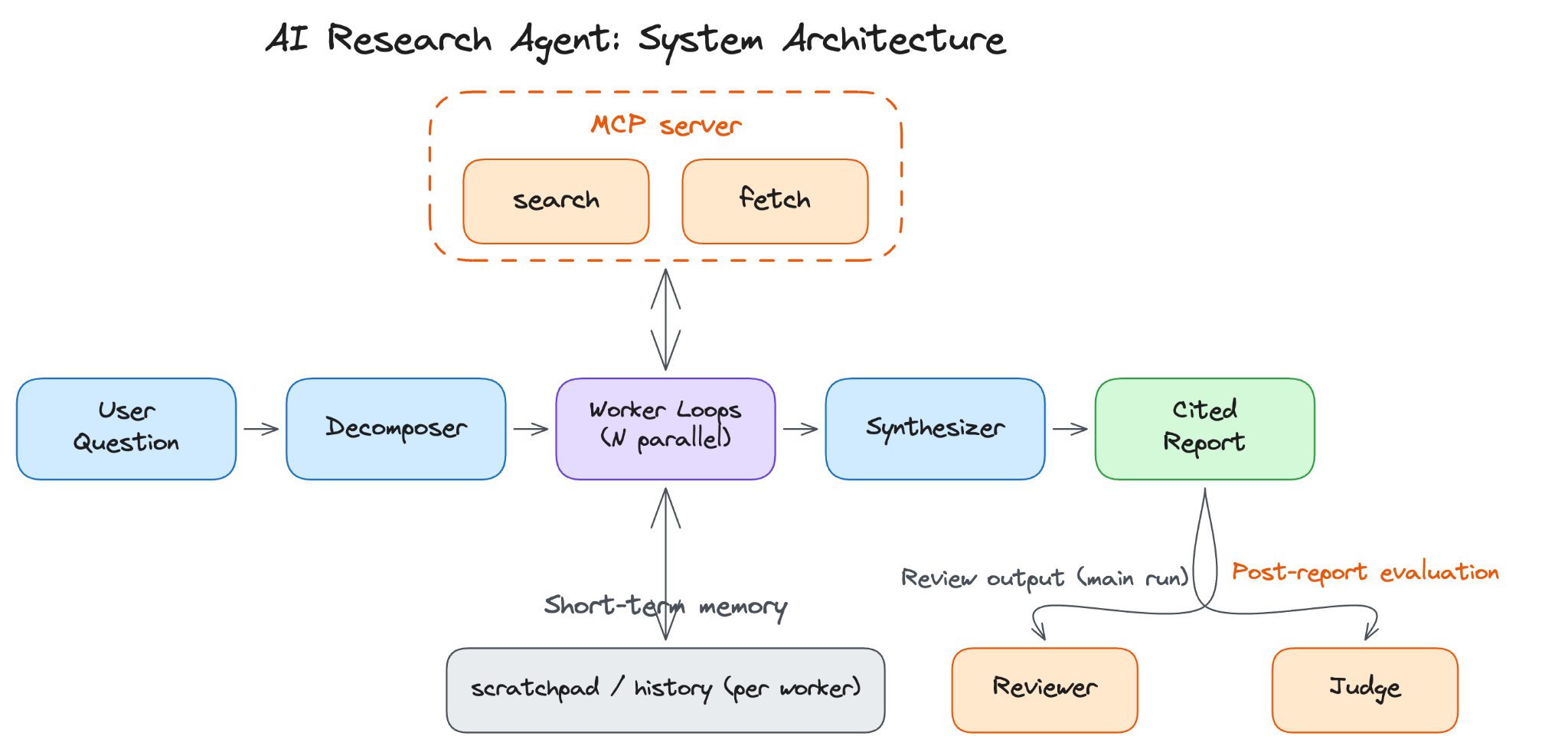
Practical build. A small research agent in plain Python: an MCP server that exposes
searchandfetch, an agent loop with native function calling, a deep-research flow that decomposes, fans out, synthesizes, and reviews, and a binary judge.
Why Build Your Own Agent?
For many tasks, a hosted agent/agent mode is a good choice.
ChatGPT Agent Mode, Perplexity Deep Research, Claude Code for coding tasks, Manus, and Devin already give you the convenience of an agent: a model that reasons across steps, calls tools, and keeps going until it has enough.
For generic web research, coding in a local repo, or a single person using it interactively without audit/cost constraints, a hosted product will usually be faster to deploy than anything you would build yourself.
The case for building your own comes down to what hosted products cannot give you: ownership of the runtime.
Let’s dive in!
Tool control. Hosted agents do not know your customer relationship management system (CRM), your warehouse, or your internal services. They cannot read your pipeline tracker, write to your ticketing system, or trigger a deployment. Your own agent exposes only the tools you allow, with the scopes you set. A literature research agent that searches PubMed first, ranks results by impact factor, and checks for retractions is a different artifact from a generic web searcher. The value is in the actions only your tools can take, and the safety model follows directly from that: a tool that does not exist in your runtime cannot be called.
Workflow control. With your own agent, you decide the sequence, stopping rules, and escalation path. Always search these sources first. Require a citation after every claim. Cap the loop at ten turns. Route low-confidence answers to a human reviewer instead of letting the model guess. Hosted agents ship with whatever defaults the vendor chose, and you cannot change them.
Audit and evaluation. Every tool call, every observation, and every model decision can be written to a trajectory log you own and can replay. You can run your own evaluation on this trajectory, not just on the final answer. Regulated industries need that trail by default, and your own agent emits it. A hosted agent gives you, at best, what the vendor decides to expose.
Cost and latency. A scoped agent over your own tools typically spends fewer tokens per task than a general-purpose agent, because it does not need to discover which sources to trust on every run. Tight retrieval loops over your own infrastructure also avoid the multi-second round-trip that external web calls introduce. The fastest tool is one you control.
Also, building your own agent does not mean building the primitives from scratch.
Native tool calling, the loop itself, and context handling are now standardized across providers, and frameworks such as LangGraph and OpenAI Agents SDK ship them. So what you build is the tool layer, workflow, and evaluation.
The loop is the runtime; your application is the set of tools, prompts, and stopping rules you run on it.
If the task is generic, data is public, and a hosted product already meets the bar, building your own is the wrong investment…
What We Are Building
The system we’re building is a research agent.
A user types a question, the model breaks it into focused sub-questions, calls web search and page fetch in a loop to gather sources, and writes a structured report with citations when it has enough.
A typical input is a question like “Summarize the recent literature on LLM agent evaluation, focused on trajectory metrics,” and it returns a 600 to 1,200-word report with two/three sections, 8 to 15 inline citations, and a confidence rating per section. A run takes 10 to 20 tool calls and 2 to 4 minutes, almost all of it spent reading fetched pages rather than on the model’s own reasoning.
These numbers are design targets, not measurements from a specific run.
The build runs under a few fixed constraints:
The loop stops on a completion signal or at an iteration cap of ten turns. Every claim in the final report has to cite a retrieved source, which a reviewer checks at the end of the run. Token-budget caps and a low-confidence escalation path are production guardrails we describe but do not implement (in Part 6 walkthrough).
Every run writes a trajectory log of model calls, tool calls, observations, and stop reasons.
Building this system means designing several layers that depend on one another.
The model picks the next action. The harness is everything that makes the action useful: the loop that runs the model in a cycle, the tools it can call, the protocol it uses to reach external services, the memory it carries between turns, and the evaluation that tells you whether any of it worked. Each layer has its own failure modes, and none of them work in isolation.
This newsletter works through five questions in order:
How the agent loop runs and when it stops,
How to design tools the model uses correctly,
When to use MCP and what it provides,
When one agent is not enough and how memory changes the design,
And how to measure whether the system works without letting it run up an unbounded bill.
The loop comes first because nothing else in the system matters if it does not terminate.
Let’s start!
Part 1: The Agent Loop
The agent loop is the core of the system.
Everything else--tools, memory, multi-agent patterns, evaluation--sits on top of it.
Getting the loop right means understanding what it is, how each turn runs, and most importantly, how it stops.
What is an Agent
Anthropic’s engineering team describes an agent as an LLM that uses tools in a loop, autonomously, until it has accomplished a task.
There is a model that decides what to do next, a set of tools it can call, and a loop that runs the model, executes the tool call, feeds the result back, and repeats.
Remove the tools, and you have a chat assistant.
Remove the loop, and you have a one-shot function call, like a chatbot that queries a weather API once and reports back with no iteration.
Remove the model, and you have a workflow.
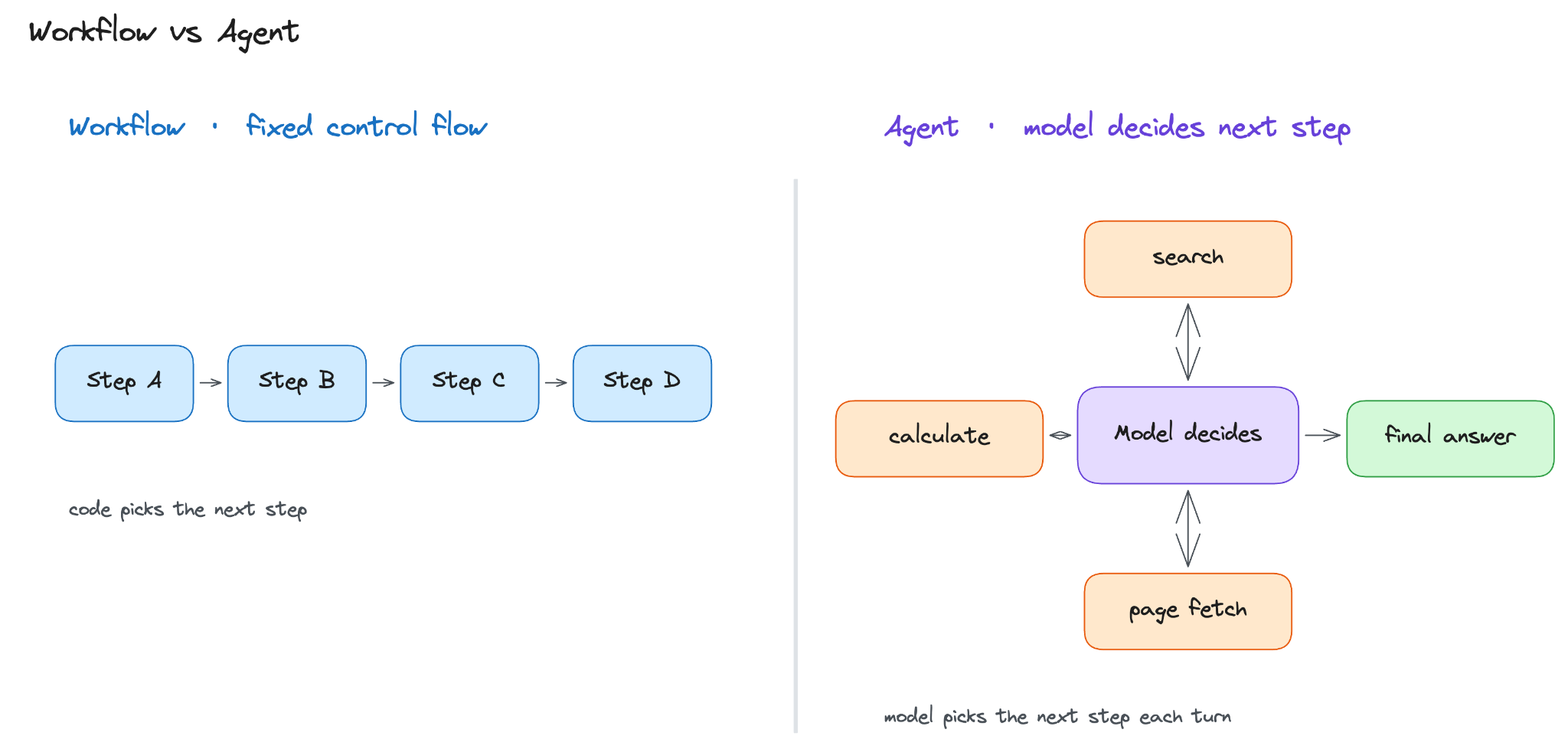
The easiest way to see where the agent sits is to plot it on a line.
At one end is a single LLM call. You ask a question; the model thinks once, and returns an answer. There is no opportunity to gather new information/change course.
In the middle is a workflow. Your code fixed the steps in advance. For example: search the web, fetch the top result, then summarize it. Every task follows the same sequence, whether it is the correct sequence or not.
At the other end is an agent. Instead of following a fixed path, the model decides what to do next. It could search the web, read a page, search again with a better query, or stop and answer when it has enough information.
The key difference is who controls the next step…
In a workflow, your code decides. In an agent, the model decides based on what it has learned so far.
How One Run Executes
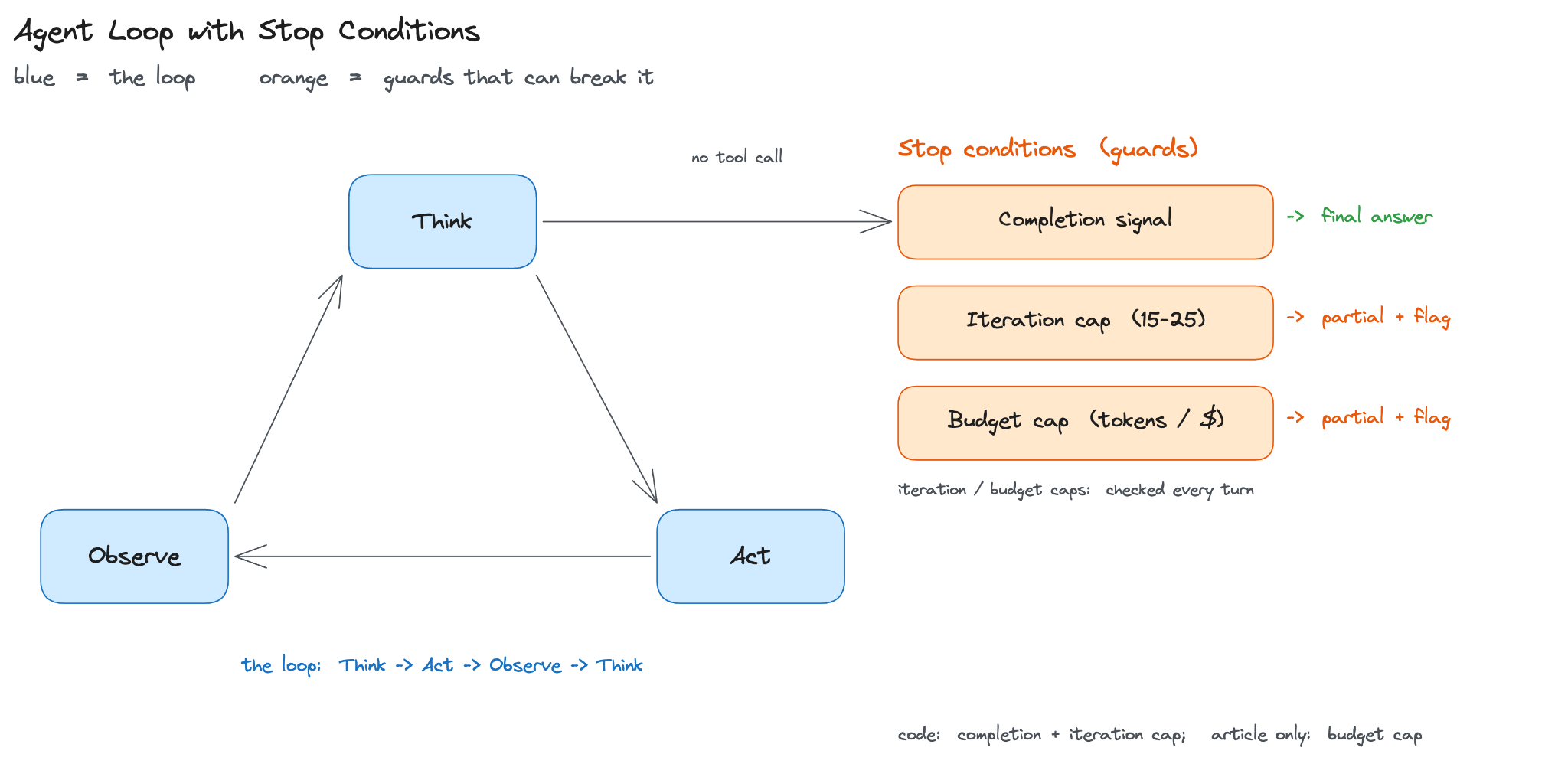
Each turn of the loop has three steps:
Model thinks and emits either a tool call or a final answer.
The code acts, running the tool the model picked.
Result is observed by being appended to the context for the next turn.
This is the think-act-observe cycle, and it runs until one of the stop conditions trips.
A typical research run takes 10 to 20 turns before the model decides it has enough to answer.
The cycle itself is fixed… Yet how the model organizes its thinking inside each turn is not, and this choice is the loop pattern.
Loop Patterns
Here are three named patterns that cover most real systems:
ReAct1 (Yao et al., 2022) interleaves a reasoning trace with each tool call (”I need X, so I search Y”) and is the “most common” shape for prompted agents.
Plan-and-Execute2 (LangChain, 2023, building on Wang et al.’s Plan-and-Solve) separates planning from execution: a first call returns a short-step plan, a second loop executes it, and the agent replans on failure. It’s better for “long tasks” where wandering off-plan is expensive.
Reflection3 (Shinn et al.’s Reflexion, 2023) adds a critic step: the agent reads the draft answer, lists problems, and feeds them back. It earns its keep when single-pass quality plateaus.
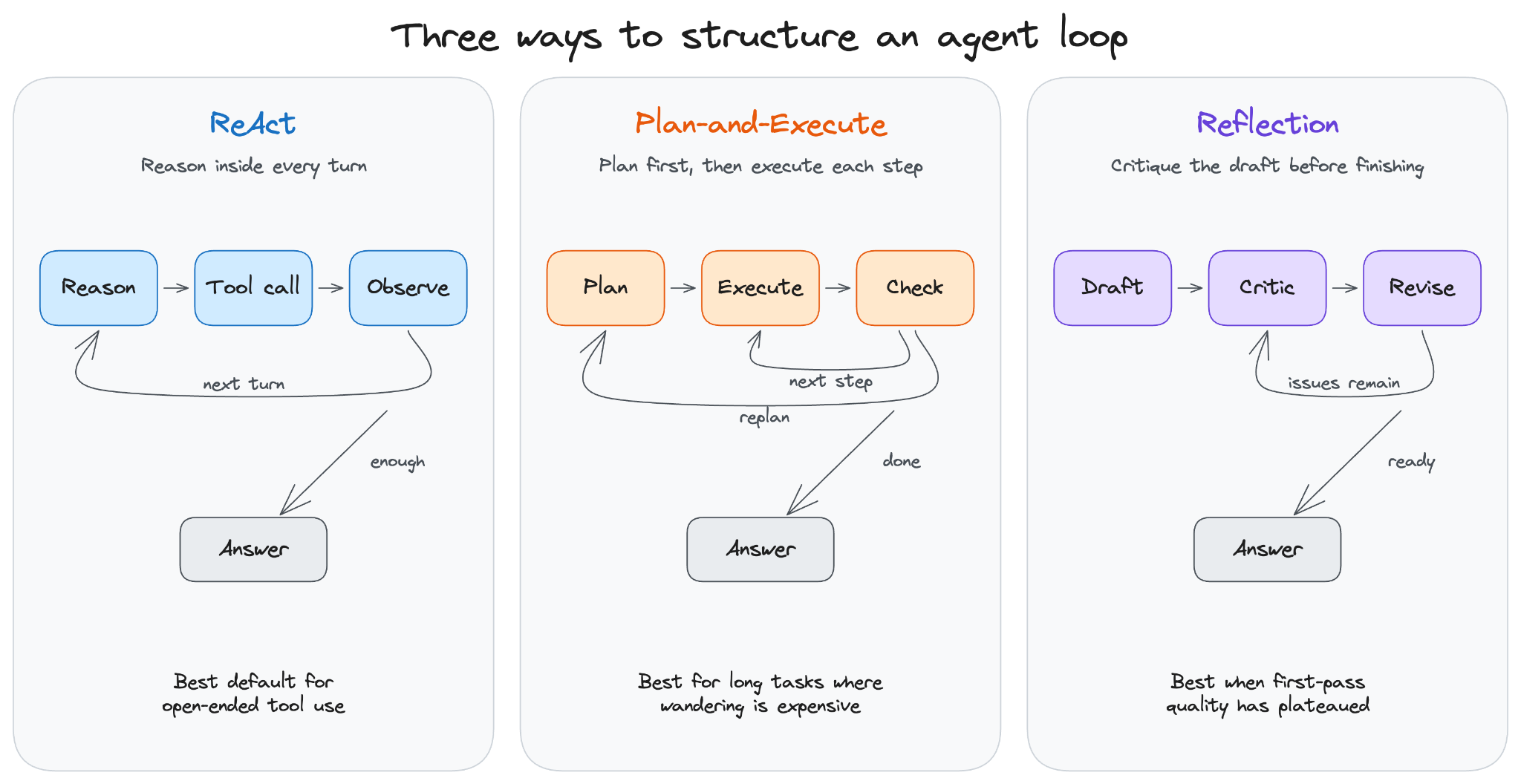
A reasonable starting point is a prompted ReAct loop.
Move to Plan-and-Execute when exploration is expensive, and add Reflection when quality plateaus. Reasoning models like the o-series and Claude with extended thinking are an orthogonal choice that move the planning inside the model; try one when planning quality is the bottleneck.
Whichever pattern you pick, the loop has to stop.
This is the part most people get wrong.
Stopping the Loop
Most agent failures are termination failures.
The model keeps searching, refining, and searching, never deciding it has enough. Without a hard stop, one stuck task burns $50 of tokens.
A system needs three stop conditions4, and the loop fires on whichever trips first:
Completion signal: the model emits a final answer with no tool call.
Iteration cap: a hard limit of 15–25 turns for research, and fewer for simple tasks.
Budget cap: maximum number of tokens or dollars per task that returns partial results plus a flag when it trips.
When either cap consistently fires on a given question type, it usually signals that a tool is broken or the question is mismatched with the agent’s design.
Before reaching for an agent at all, it is worth asking whether the task actually needs one. Most tasks are workflows with known steps. An agent is the “right” choice when the path cannot be determined until you see the data.
If the steps are known up front, hard-coding them is faster, cheaper, and easier to debug…
Reminder: this is a teaser of the subscriber-only newsletter series, exclusive to my golden members.
When you upgrade, you’ll get:
Simple breakdown of real-world architectures
Frameworks you can plug into your work or business
Proven systems behind ChatGPT, Perplexity, and Copilot
Ready for the best part?