


Live demo: give AI agents the access they need without credentials they can leak

Infisical’s Agent Vault gives AI agents access to services without ever handing them secrets. A proxy attaches credentials on the way out, with no code changes. You control what agents can reach and when access expires.
See it in a 30-minute live demo on Wednesday, October 21 at 1 PM ET.
(Thanks to Infisical for partnering on this newsletter.)
§
Why does a site take several seconds to load, even if server responds in milliseconds?
Before a single page appears, the browser must establish connections, send requests, and receive responses…
Understanding underlying mechanisms changed how I think about HTTP & web performance.
In this newsletter, I’ll break down must-know HTTP concepts. Some of these are foundational & some are quite advanced.
All of them are useful to engineers building production-ready systems:
Request-response cycle,
TCP handshake,
Persistent connections,
Pipelining,
HTTP head-of-line blocking,
Chunked transfer encoding,
Caching & conditional requests,
Parallel connections & domain sharding,
TCP slow start,
The binary framing layer,
Streams, messages & frames.
(…and much more in Part 2!)
For each, I’ll share:
What it is & how it works in simple words,
A real-world analogy,
Why it matters.
Let’s go!
§
Share this letter & I’ll send you some rewards for the referrals.
§
1. Request-Response Cycle
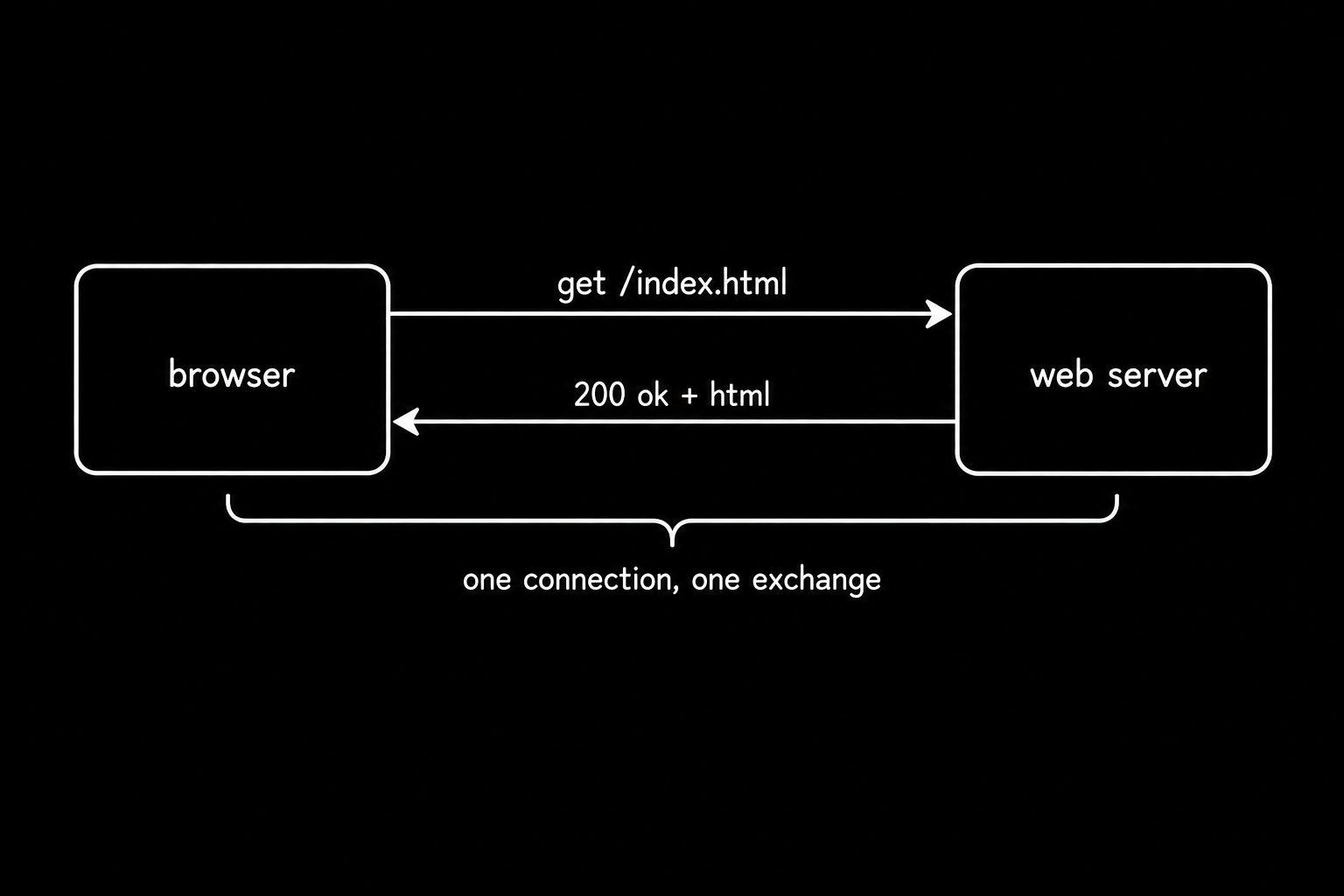
Every HTTP exchange is one request and one response.
The client sends a method, a path, and a set of headers. The server replies with a status code, its own headers, and usually a body. In HTTP/1.x, the message format is text-based, so you could type a request by hand into a terminal and read the reply with your own eyes1.
The earliest version of the protocol supported a single method and returned a single file type. The next version added headers, status codes, POST, and HEAD.
Also, it opened a fresh connection for every exchange and threw it away afterward. (This decision shaped the next 20+ years of workarounds.)
Analogy
Ordering by postcard:
You write one item, mail it, and wait for one parcel.
To order a second item, you write a second postcard.
Why it matters
Debugging an unexpected status code starts with reading the raw exchange, not your application logs.
Send requests by hand with curl and inspect real traffic in the Chrome DevTools Network tab. The binary framing layer picks up from here, keeping these semantics and changing the bytes.
2. TCP Three-Way Handshake
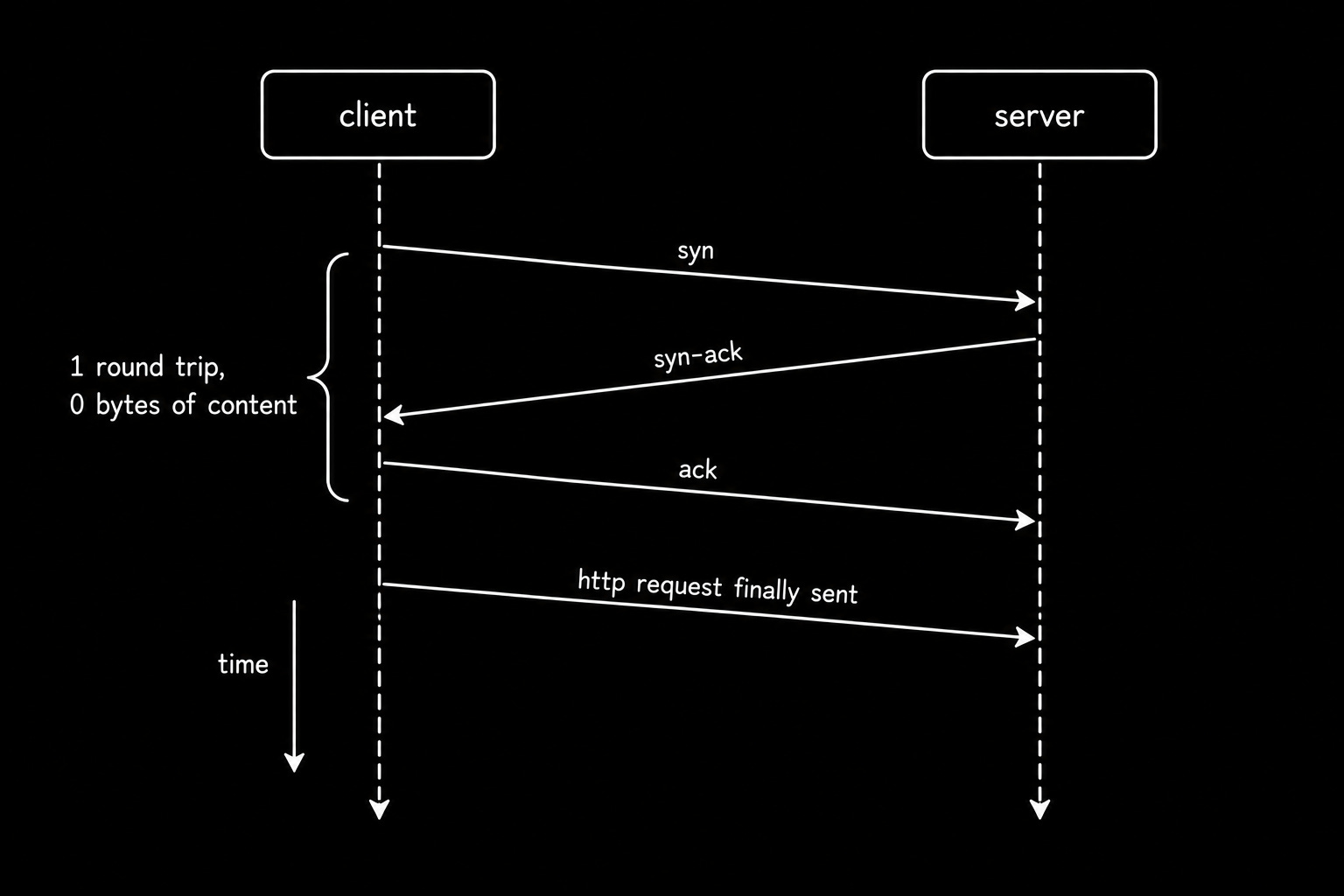
Transmission Control Protocol (TCP) opens a connection with 3 messages before either side sends data.
Client sends a synchronize packet.
Server replies with an acknowledgment plus its own sequence number.
Client acknowledges the number & connection opens.
Three messages cost one full round trip…
i.e., on a link with 100ms of latency, you burn 100ms before the first byte of your request leaves the machine.
Encryption adds more on top…
A Transport Layer Security (TLS) 1.2 handshake costs two extra round trips, and TLS 1.3 cut that to one.
Analogy
A phone call:
You dial, they say hello, and you say hello back. And only on the fourth breath does anyone say something useful.
Why it matters
Connection setup shows up in your p99 long before your handler code does.
Measure it with curl -w and watch it across a full page load in WebPageTest. Persistent connections spread that cost across many requests.
3. Persistent Connections
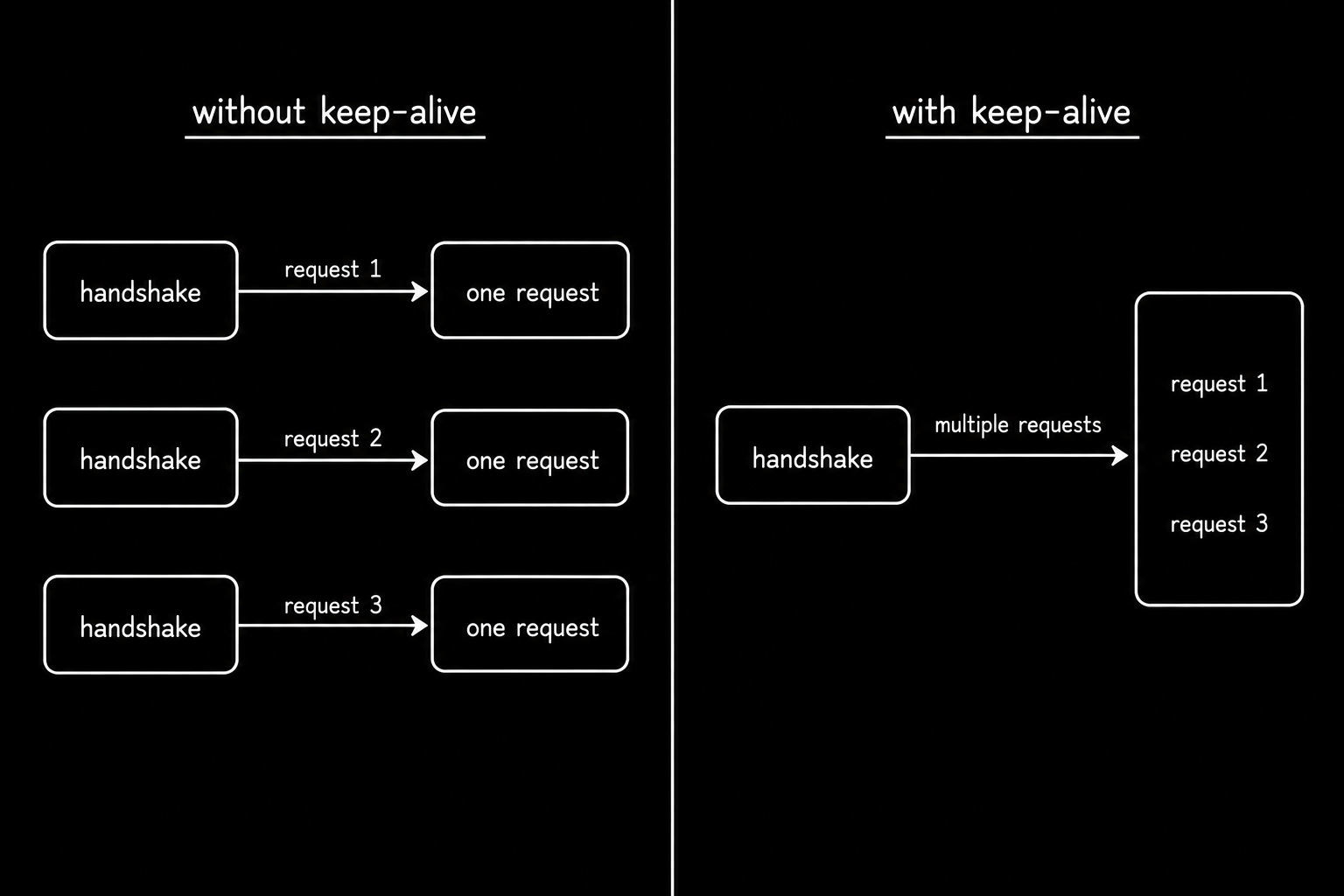
A persistent connection stays open after a response, so the next request reuses it.
HTTP/1.1 made this the default behavior. The connection lives until either side sends a close header or a timeout fires, so one handshake now covers dozens of requests.
The saving compounds on real pages.
A page with 40 assets used to pay 40 handshakes; on a single persistent connection, it pays one.
Analogy
Keeping the phone line open between questions instead of hanging up and redialing every time you think of something new.
Why it matters
Connection churn on a busy proxy exhausts temporary ports well before it exhausts bandwidth2.
Tune keepalive_timeout in nginx and server.keepAliveTimeout in Node.js, then check both against your load balancer. TCP slow start explains why a reused connection also runs faster.
§
§
4. Pipelining
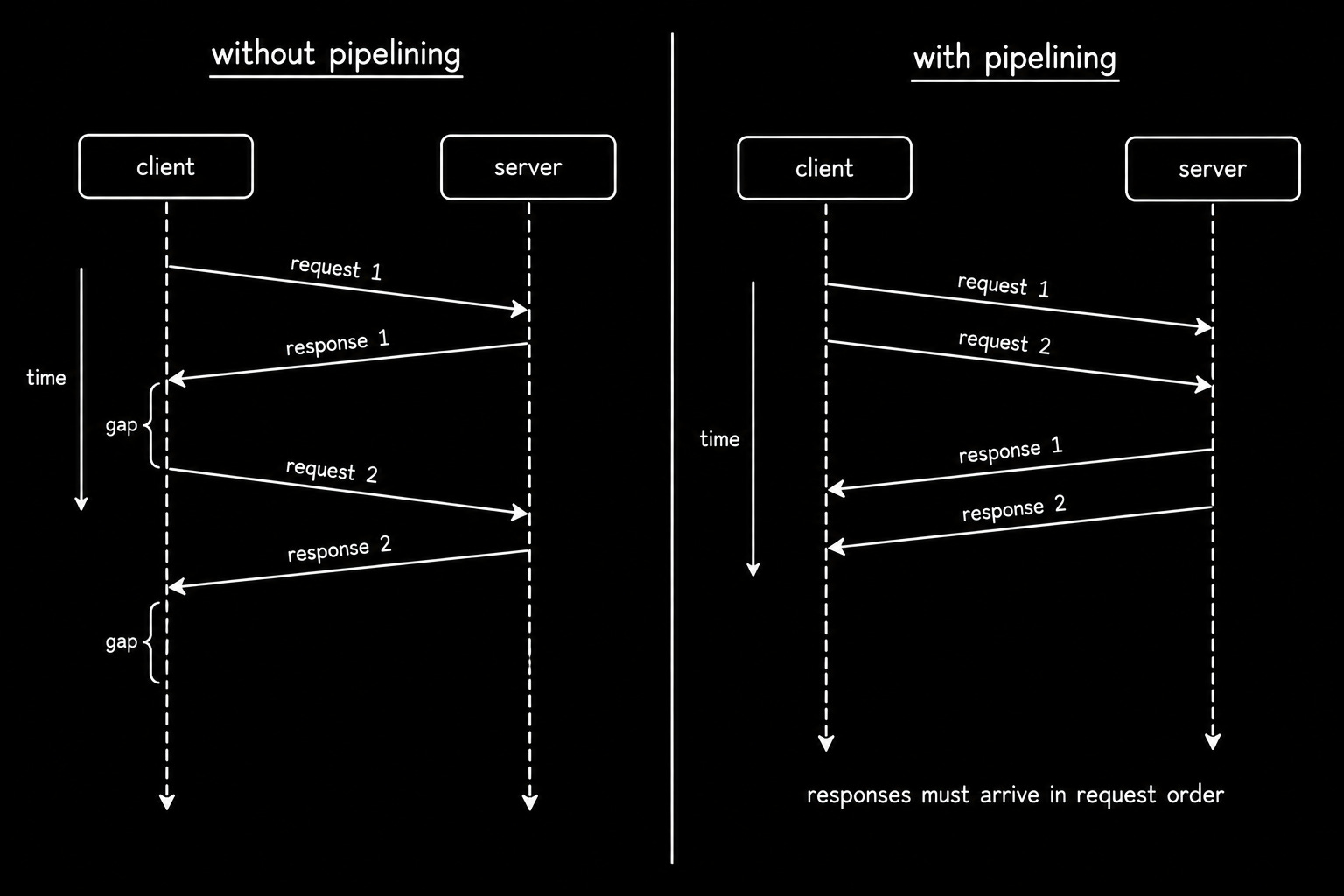
Pipelining lets a client send several requests back-to-back on one connection without waiting for each response.
The browser asks for two images at once rather than asking, waiting, then asking again. On paper, it removes a full round trip per request while using nothing more than the connection you already have.
Yet one rule ruined it:
Responses must return in the exact order the requests went out, so a slow first response stalls everything behind it. Buggy proxies mangled pipelined traffic on top of that.
(NOTE: Because of these problems, major browsers disabled HTTP/1.1 pipelining, and it never gained widespread adoption.)
Analogy
Ordering all three courses at once:
The kitchen still serves them in the order you named them, so a slow starter holds up your main.
Why it matters
You will find pipelining disabled in curl and every browser, and now you know why.
Confirm the behavior with curl and watch real request ordering in Wireshark3. Multiplexing solves the same problem without the ordering rule.
5. HTTP Head-of-Line Blocking
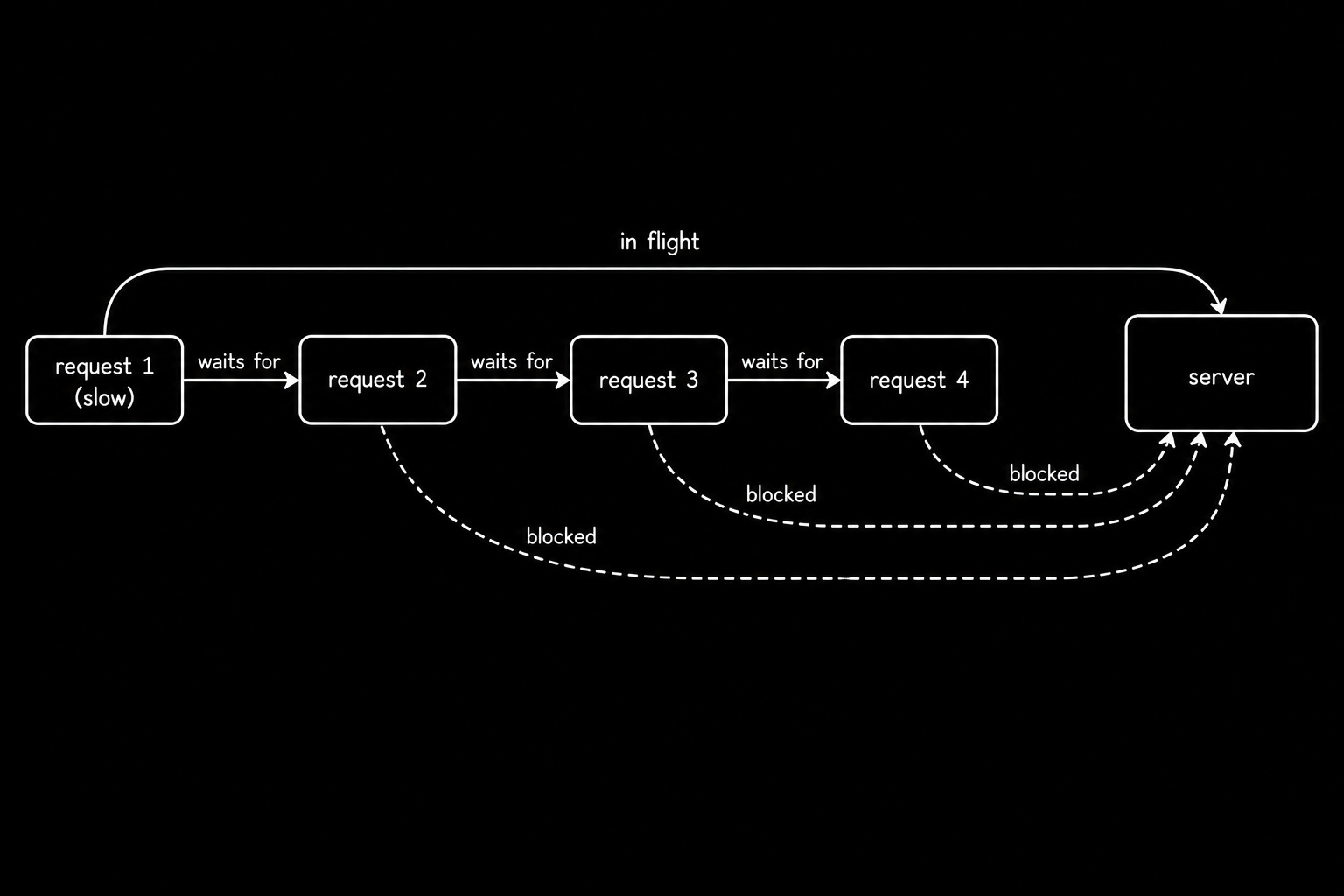
Head-of-line blocking occurs when first item in a queue delays every item behind it4.
One HTTP/1.1 connection processes one exchange at a time:
A slow database query on request one could keep four other requests waiting, and the network sits idle while the queue holds.
This is the ceiling HTTP/1.1 could never lift… Persistent connections removed the handshake cost and left the queue completely intact.
Every workaround built on top of it, from parallel connections to asset bundling, exists to hide this single property.
Analogy
A single supermarket checkout:
The shopper at the front needs a price check, and the four people behind them stand still.
Why it matters
Stair-stepped requests with visible gaps in a waterfall chart point straight at this.
Read the waterfall in WebPageTest and count concurrent requests in the Chrome DevTools Network panel. Parallel connections show the workaround the browsers actually picked.
6. Chunked Transfer Encoding
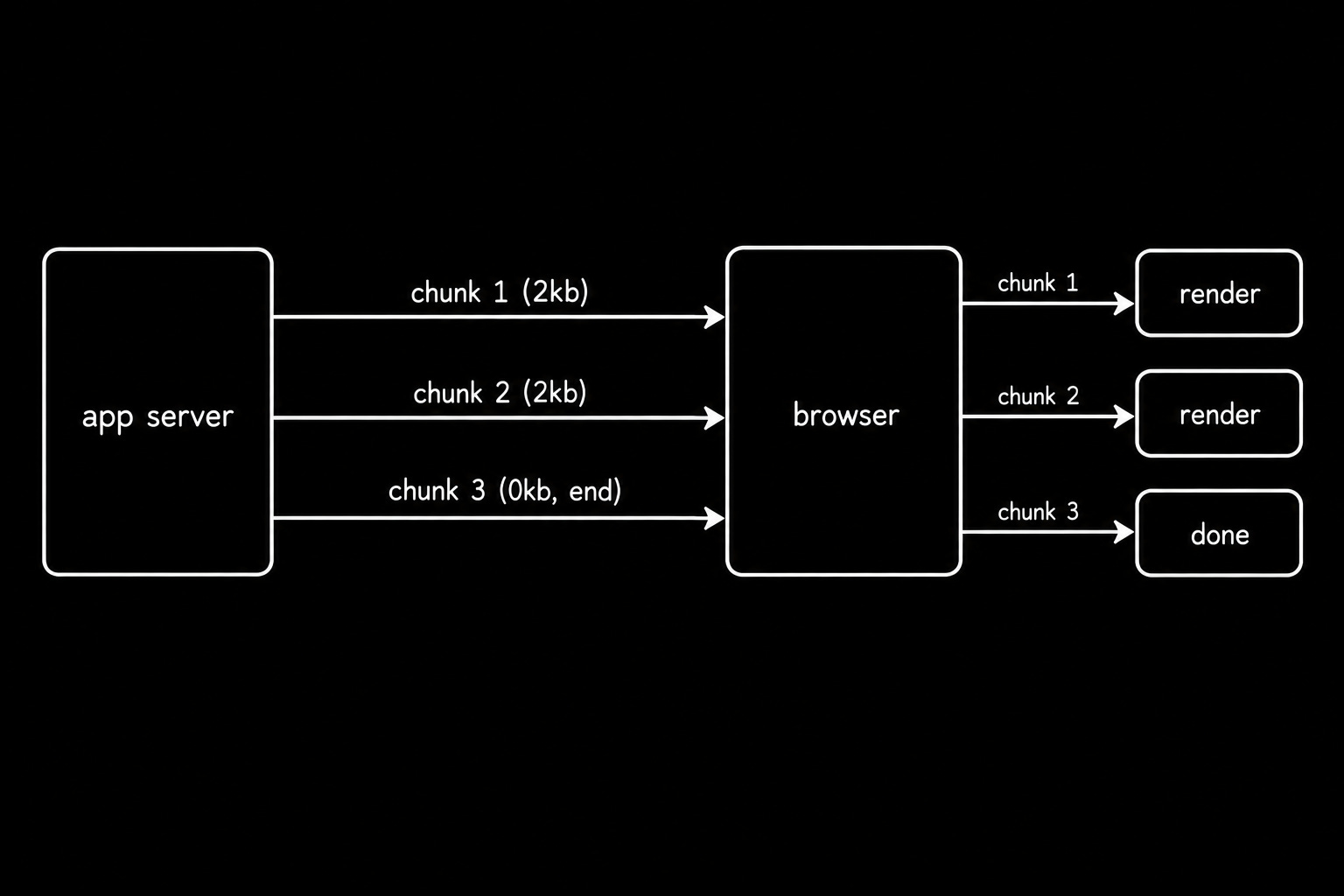
Chunked transfer encoding lets a server send a response in pieces without knowing the total size in advance.
The server marks the response as chunked and writes each piece with its size in hexadecimal on the line above. A “zero-length” chunk marks the end.
The browser could start rendering before the full response arrives.
In HTTP/1.1, chunked transfer encoding supports streaming generated HTML, server-sent events, and token-by-token model responses.
HTTP/2 and HTTP/3 use DATA frames instead.
Analogy
A publisher shipping a book one chapter at a time.
You start reading chapter one while the author is still writing chapter four.
Why it matters
Streaming responses depend on the HTTP version’s framing mechanism, and accidental buffering often stops streaming.
Check proxy_buffering in nginx and res.flushHeaders in Express before you blame your application code. Early hints apply the same idea to the wait before a response starts.
7. Caching and Conditional Requests
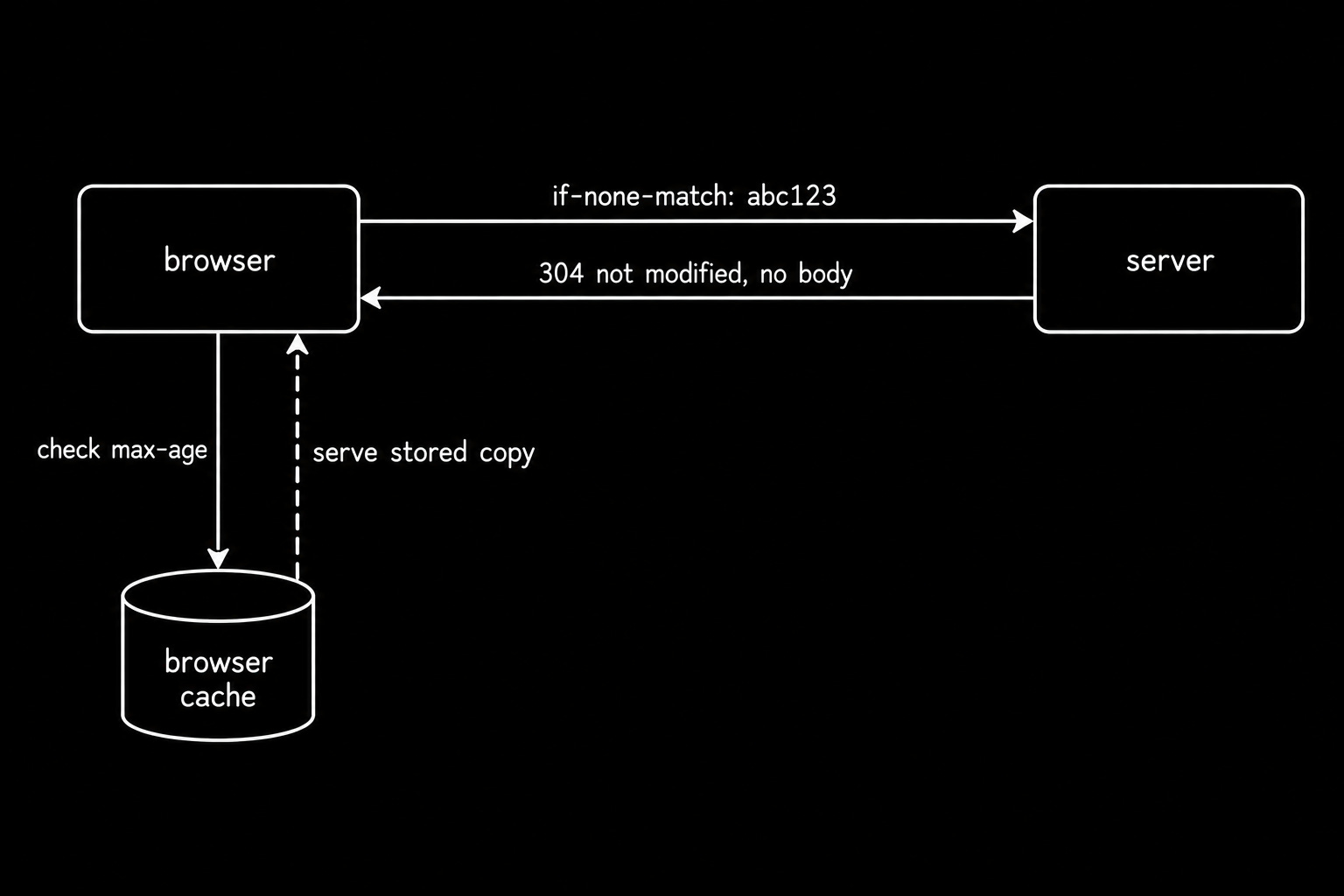
Caching stores a copy of a response so a later request skips the network entirely.
Cache-Control sets the rules:
A max-age directive says how long a copy stays fresh; no-cache forces a check on every use, and immutable promises the file never changes under its URL.
Conditional requests handle the check cheaply:
The client sends its stored entity tag in an If-None-Match header, and a server holding the same version answers 304 Not Modified without a body.
A cache hit costs zero bytes on the wire and zero milliseconds of server time, thus making it the cheapest performance work available to you.
Analogy
Asking a librarian whether the report changed since your last visit.
If nothing changed, you read the copy already on your desk.
Why it matters
Static assets & API responses need opposite caching policies, and mixing them up costs freshness or bandwidth.
Set the rules at the edge in Cloudflare/Varnish and read the real cache hit ratio there rather than trusting your config. Conditional requests lose their value once you version filenames properly.
§
§
8. Parallel Connections and Domain Sharding
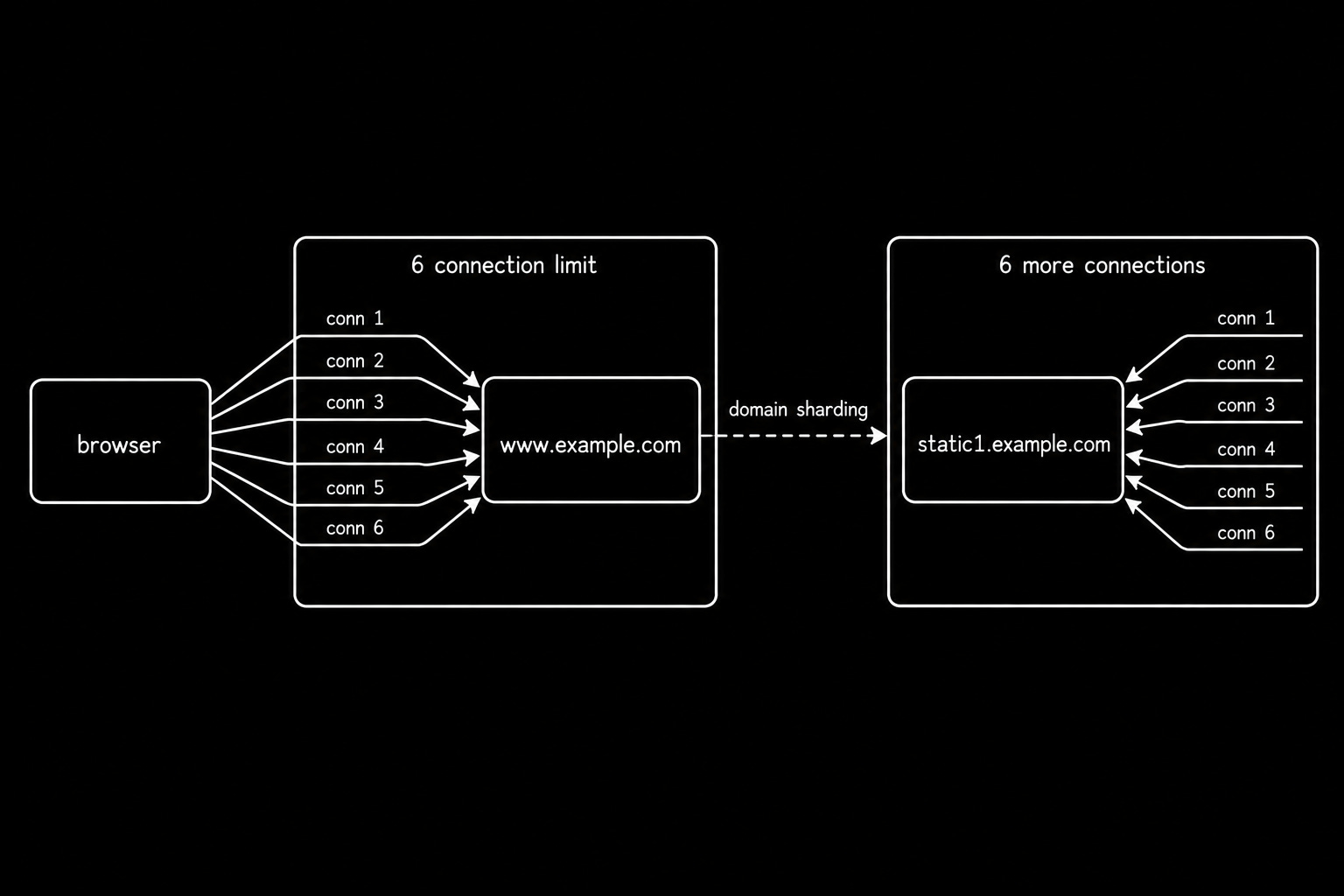
Browsers open several TCP connections (typically 6) to the same origin at once.
Six lanes beat one lane, so head-of-line blocking hurts less. Sites wanting more than six invented extra hostnames, serving images from one subdomain & scripts from another. That bought another six per name.
This technique is called domain sharding… It shaped front-end architecture.
But it became obsolete the moment multiplexing arrived… yet survives in production long after the sites that used it moved on…
Analogy
Opening more checkout lanes.
When six lanes fill up, you rent the shop next door and open six more.
Why it matters
Removing dead shards is one of the easier wins available on an older codebase.
Measure the before and after in WebPageTest and let Lighthouse5 flag the redundant origins. TCP slow start explains why those extra connections start slow.
9. TCP Slow Start
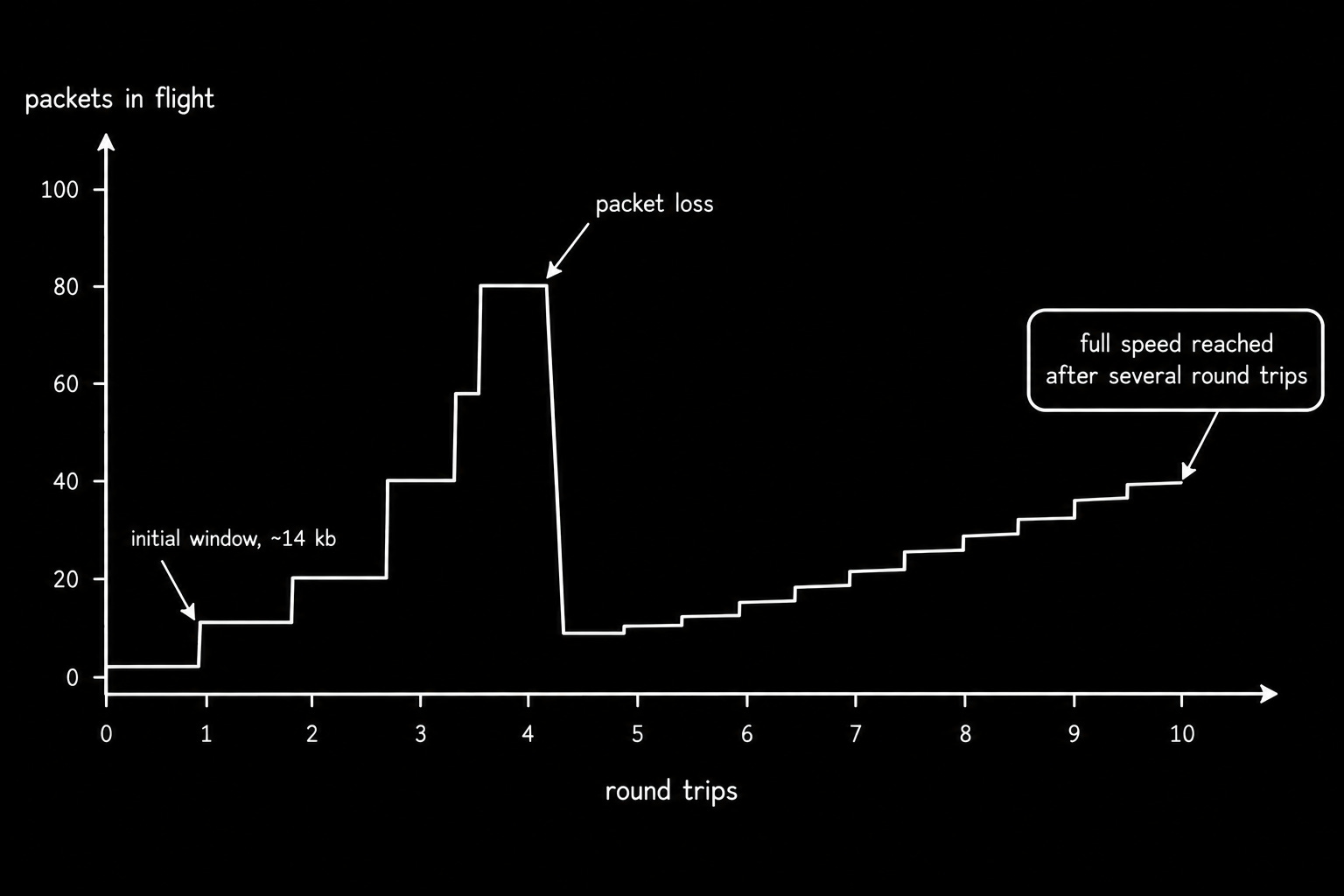
Slow start is a congestion control algorithm where a new connection begins with a small send window & then grows it each round trip.
TCP has no idea how much bandwidth sits between you and your user. Guessing high floods the path and drops packets, so it guesses low and probes upward instead.
The window typically starts at 10 packets, roughly 14 kilobytes, and doubles on every successful round trip. Packet loss halves it and switches the sender to a slower climb6.
Without this algorithm, every new connection would flood the path and collapse throughput for everyone sharing it.
Analogy
Merging onto a motorway:
You accelerate in stages instead of flooring it blind into traffic you cannot see yet.
Why it matters
The first 14 kilobytes of your HTML carry more weight than the next 500.
Put critical CSS & your hero image reference inside that window and let Lighthouse confirm the render path. Persistent connections keep the window you already earned.
10. Binary Framing Layer
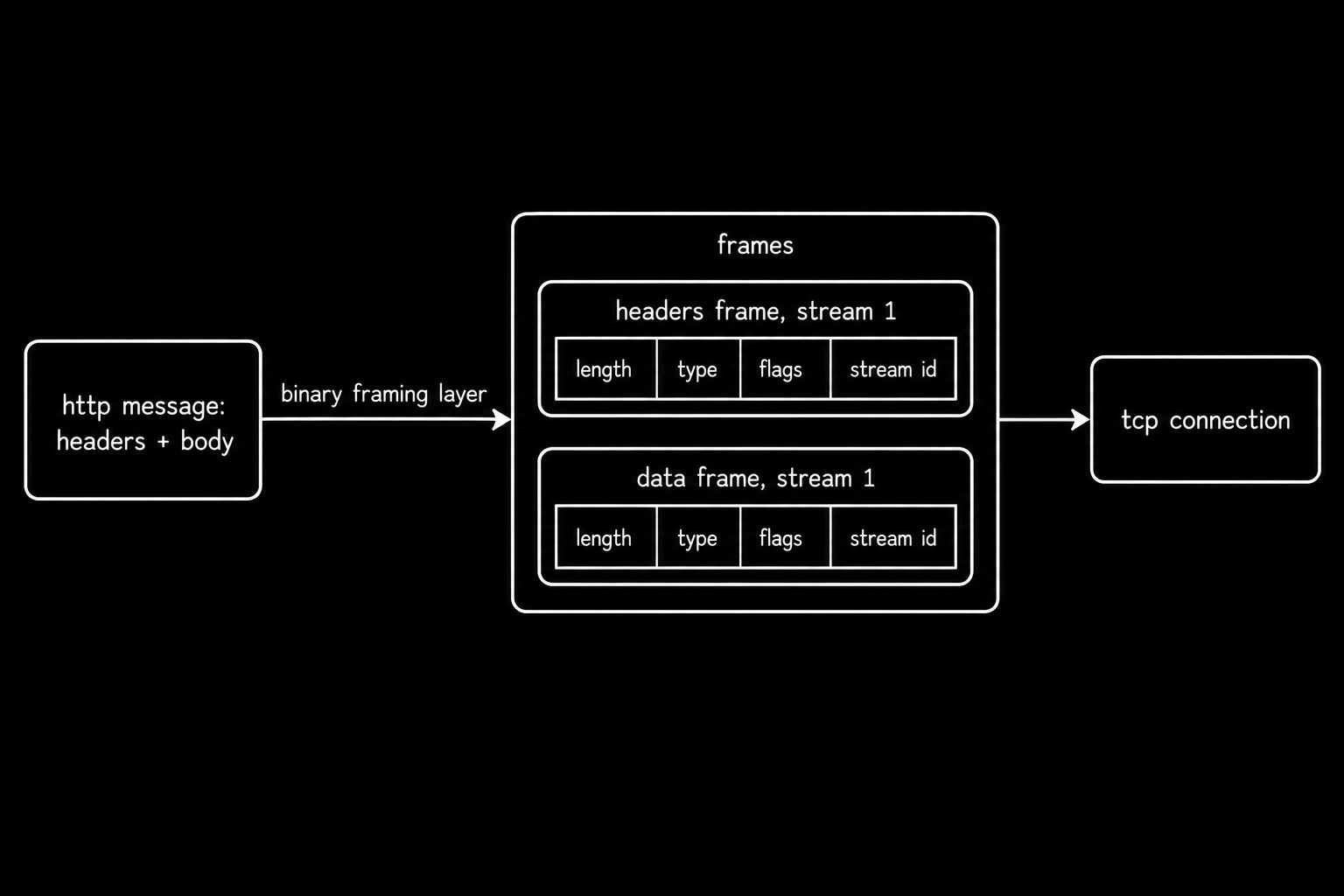
Binary framing layer encodes HTTP messages as binary frames instead of plain text lines.
Each frame carries a length, type, set of flags, and a stream identifier in a fixed nine-byte header. The methods, headers, and status codes stay exactly as they were.
You still send GET… You still read 404. The bytes on the wire look completely different, and frames parse faster and pack tighter than text ever did.
The stream identifier is the important part, and the next concept explains why.
Analogy
Shipping containers replacing loose cargo.
The goods are identical, and the uniform box is what lets a crane stack, sort, and interleave them at speed.
Why it matters
Reading HTTP/2 traffic needs different tools than reading HTTP/1.1 traffic.
Dump frames with nghttp and decode full sessions in Wireshark with a TLS key log. Streams & frames explain what the identifier inside each frame does.
11. Streams, Messages, and Frames
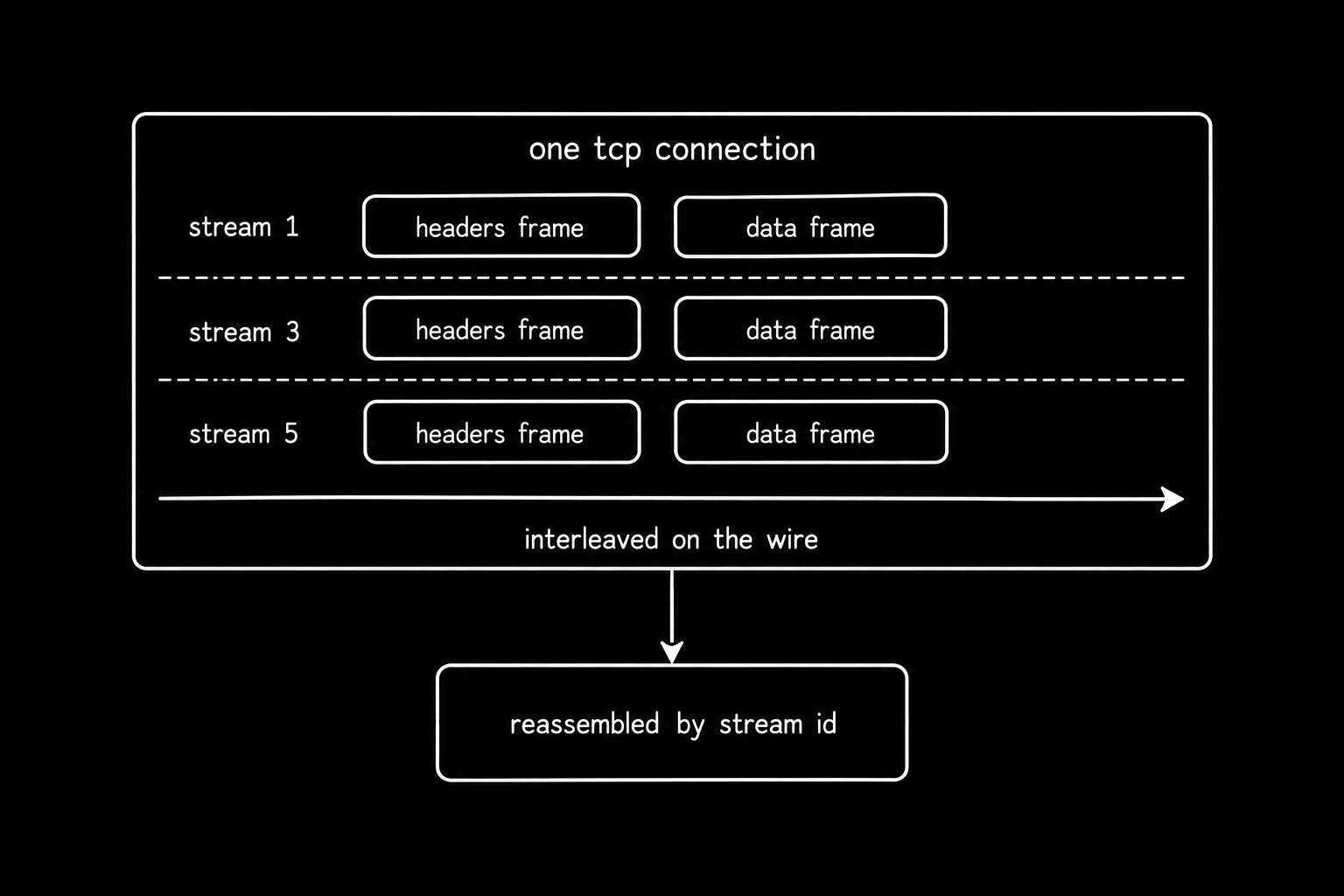
A connection carries many streams; each stream carries one request-response pair, and each message splits into frames tagged with a stream identifier.
i.e., three levels, one job.
The identifier lets frames from different requests share the wire and still reassemble correctly at the far end.
Numbering follows a simple rule:
Client-initiated streams take odd numbers, server-initiated streams take even ones, and identifiers always increase.
A stream costs only a few bytes per frame to label; this is what makes concurrency on a single connection practical.
Analogy
One highway with many lanes.
Every car carries a destination label, so they travel together and still arrive at different lanes.
Why it matters
Default stream limits rarely match the concurrency your service actually sees.
Set http2_max_concurrent_streams in nginx and the matching limit in Envoy against your real p99. Flow control decides how much data those streams may send.
§
Final Words
HTTP/1.1 made the web faster, but it left one major problem unsolved: responses still had to arrive in order on each connection.
HTTP/2 addressed this with multiplexing… But TCP’s head-of-line blocking remained.
In Part 2, we’ll explore how HTTP/2 & HTTP/3 tackled these bottlenecks, and why the web needed another major upgrade.
If you find this newsletter valuable, share it with a friend, and subscribe if you haven’t already. There are group discounts, gift options, and referral rewards available.

Want to reach 250K+ tech professionals at scale? 📰
If your company wants to reach 250K+ tech professionals, advertise with me.
Thank you for supporting this newsletter.
You are now 250,001+ readers strong, very close to 251k. Let’s try to get 251k readers by 17 October. Consider sharing this letter with your friends and get rewards.
Y’all are the best.

References
RFC 9110, HTTP Semantics: https://www.rfc-editor.org/rfc/rfc9110.html
RFC 9111, HTTP Caching: https://www.rfc-editor.org/rfc/rfc9111.html
RFC 9112, HTTP/1.1: https://www.rfc-editor.org/rfc/rfc9112.html
RFC 9113, HTTP/2: https://www.rfc-editor.org/rfc/rfc9113.html
RFC 7541, HPACK: Header Compression for HTTP/2: https://www.rfc-editor.org/rfc/rfc7541.html
RFC 9218, Extensible Prioritization Scheme for HTTP: https://www.rfc-editor.org/rfc/rfc9218.html
RFC 8297, An HTTP Status Code for Indicating Hints: https://www.rfc-editor.org/rfc/rfc8297.html
RFC 9000, QUIC: A UDP-Based Multiplexed and Secure Transport: https://www.rfc-editor.org/rfc/rfc9000.html
RFC 9114, HTTP/3: https://www.rfc-editor.org/rfc/rfc9114.html
RFC 9204, QPACK: Field Compression for HTTP/3: https://www.rfc-editor.org/rfc/rfc9204.html
HTTP Archive, Web Almanac, HTTP chapter: https://almanac.httparchive.org/en/2024/http
Chrome for Developers, Removing HTTP/2 Server Push from Chrome: https://developer.chrome.com/blog/removing-push
HTTP/2 and HTTP/3 preserve the core HTTP semantics but use binary framing instead of HTTP/1.x’s text-based message format.
Connection churn: Opening and closing too many connections wastes resources.
Temporary ports: Each outgoing connection uses a temporary port. Too many short-lived connections can exhaust available ports.
Keep-alive timeout: Controls how long an idle connection stays open for reuse.
Load balancer: Its timeout settings should work with your server’s settings to avoid unexpected disconnections.
TCP slow start: New connections start with a limited sending rate. Reusing an existing connection avoids repeating this slow growth phase.
Reuse connections to reduce connection setup overhead, avoid port exhaustion, and improve performance.
Wireshark is a free, open-source network analysis tool that captures and examines network traffic in detail.
Head-of-line blocking: One slow request delays other requests waiting behind it.
HTTP/1.1: A single connection handles responses one at a time, in order.
Example: Five requests share one connection. The first request takes 5 seconds because of a slow database query. The other four must wait.
Persistent connections: Reuse the same connection to avoid repeated TCP handshakes, but they don’t solve head-of-line blocking.
Parallel connections: Browsers open multiple connections so a slow request on one connection doesn’t block requests on others.
HTTP/2 addresses this with multiplexing!
Google Lighthouse is a free, open-source tool that analyzes a website and identifies ways to improve its performance, accessibility, and SEO.
The initial congestion window varies by implementation. Traditional loss-based TCP congestion control reduces its window after detecting congestion, while algorithms such as BBR use different mechanisms. The diagram illustrates a simplified loss-based congestion-control scenario.