
Kubernetes - A Deep Dive
#161: Part 3 - DevOps Mastermind


Share this letter & I’ll send you some rewards for the referrals.
In the early days, running apps was simple.
Most applications ran on a single server, and managing them was quite easy. Then microservices became popular. Instead of a single app on a single server, companies were running hundreds of apps across hundreds of servers.
But managing this became extremely difficult.
Engineers had to decide where apps should run, what to do when apps crash, how to handle more traffic, and how to update apps without downtime. Most people handled this with scripts and manual work. It worked for a while, but as systems grew, system started breaking more often, and downtime became more common.
Google faced this problem on a massive scale.
So they built an internal system called Borg. Borg was used to manage apps across thousands of servers. It automates scheduling, scaling, and self-healing across many servers. Years later, Kubernetes (k8s) was built based on many of the same ideas as Borg and got released as an open-source system. Since then, it has become the standard platform for running distributed systems and microservices.
Kubernetes could look simple from the outside, but within the cluster, many components constantly work to keep your apps running.
Let’s look at what is happening behind the scenes…
The most dangerous app in your company was built by someone in finance last Tuesday (Partner)

The number of vibe-coded apps in enterprise environments has skyrocketed.
Yet most vibe-coded apps cannot handle customer data securely, comply with your internal workflows, or pass production processes.
i.e., they “break” your company standards.
So your apps become an IT problem when you ask yourself these questions:
Where does the data live & who can access the app?
Where are the audit logs & how to enforce company security policies?
Can this safely reach production?
INTRODUCING SUPERBLOCKS…
(Instead of cleaning up later, it makes IT the foundation from day one.)
Apps deploy inside your own AWS account and VPC, so sensitive data stays under your control.
Company login, role-based permissions, audit logs, and governance get enforced automatically across all apps.
Every deployment gets scanned for vulnerabilities before it reaches production.
So you build production-ready apps instead of demos that need to be rebuilt later…and your business moves faster.
If you’re serious about enterprise AI app development, try Superblocks right now:
(Thanks to Superblocks for partnering on this post.)
I want to introduce Ayaan as a guest author.

He’s a Certified Kubernetes Administrator (CKA) who writes about Kubernetes, cloud infrastructure, and cloud-native systems. He builds in public and shares practical tips, projects, and lessons learned along the way.
Check out his work & socials:
Here’s what you’ll find inside this newsletter:
The mental model that makes Kubernetes click. The reconciliation loop, what it is, why it matters, and why most Kubernetes confusion comes from not understanding it early enough.
A complete breakdown of the Kubernetes architecture. Every component in the control plane and worker nodes, what each one does, how they talk to each other, and what breaks when any one of them goes wrong.
From
kubectl applyto a running pod, step by step. The exact sequence of events inside the cluster from the moment you hit enter to the moment your app is live.Every core Kubernetes object explained. Pods, deployments, daemonsets, statefulsets, services, ingress, secrets, what each one does, when to use it, and when people reach for the wrong one.
What Kubernetes genuinely gets right and where it gets complicated. An honest look at the trade-offs most explainers skip over, including etcd as a single point of failure, the complexity floor, and the hidden cost nobody talks about.
When NOT to use Kubernetes. The answer most posts won’t give you.
Most Kubernetes posts teach you how to use it…
This newsletter is about how it actually works, because that’s the part that makes everything else make sense.
Kubernetes Architecture Overview
To understand Kubernetes, we first need to look at its architecture.
Then we can dive into the individual components…
Kubernetes architecture is a distributed system:
It doesn’t run on just one server. Instead, it operates on a group of servers that work together, known as a Kubernetes Cluster. These servers could be virtual machines or bare metal servers. The components of Kubernetes are distributed across these servers over a single network.
At the highest level, the Kubernetes cluster consists of two key components: control plane and worker nodes.
We will go through each of these components in detail later...
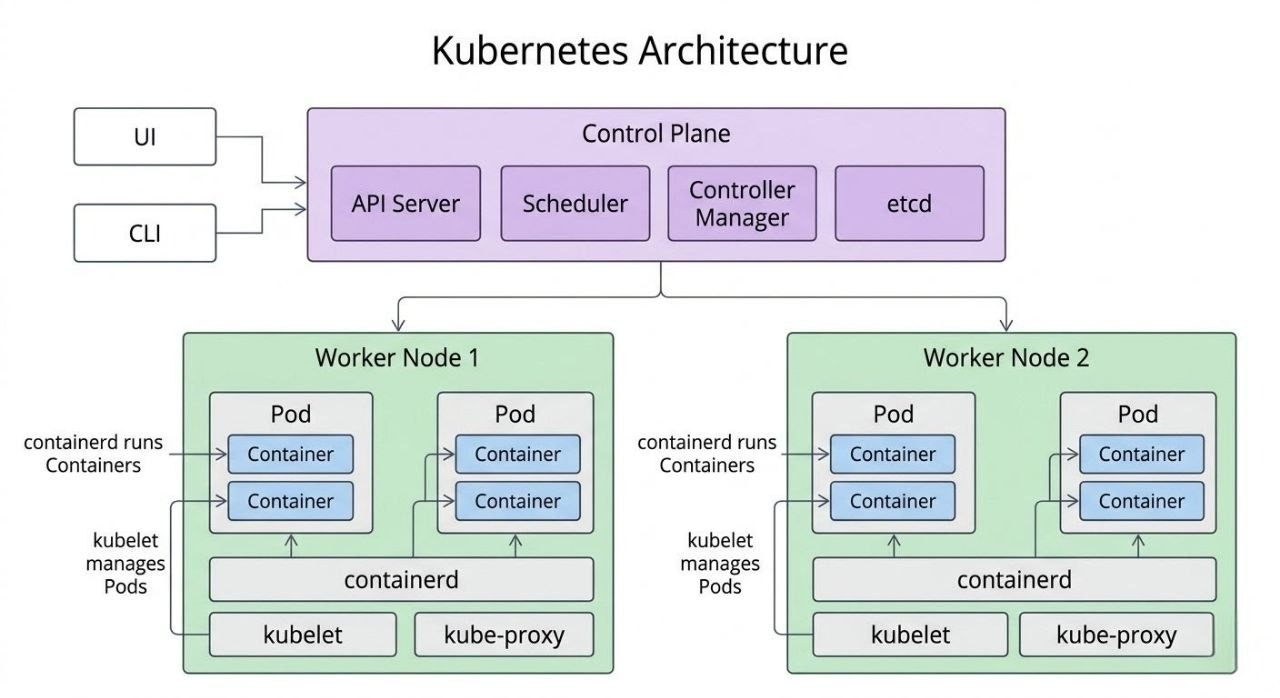
Control Plane Node
Think of the control plane as the brain of the Kubernetes cluster.
It manages global decisions for the cluster. Plus, it schedules apps, checks system health, and ensures the cluster remains in the desired state.
The control plane contains these components:
kube-apiserver
etcd
kube-scheduler
kube-controller-manager
Cloud-controller-manager
Worker Node
Imagine the worker node as the muscle of the Kubernetes cluster.
It’s responsible for running workloads (containerized applications) in the cluster. And it contains these components:
kubelet
kube-proxy
Container runtime
i.e., control plane decides what runs where; worker nodes run the containers.
Kubernetes continuously checks and fixes the system. This ensures everything runs as expected…
A cluster can have many control plane nodes and worker nodes; this usually depends on the number of workloads to be deployed.
In production systems, it’s typical to have many control plane and worker nodes. This setup keeps the system stable. It also ensures applications run smoothly, even if some machines fail or are unavailable.
Plus, Kubernetes has a strong, decentralized structure. It automatically moves workloads to healthy nodes upon node failure. This keeps your system running smoothly.
This makes Kubernetes the foundation of a reliable and self-healing distributed system.
Desired State and Actual State
One of the most important ideas in Kubernetes architecture is the concept of desired state and actual state.
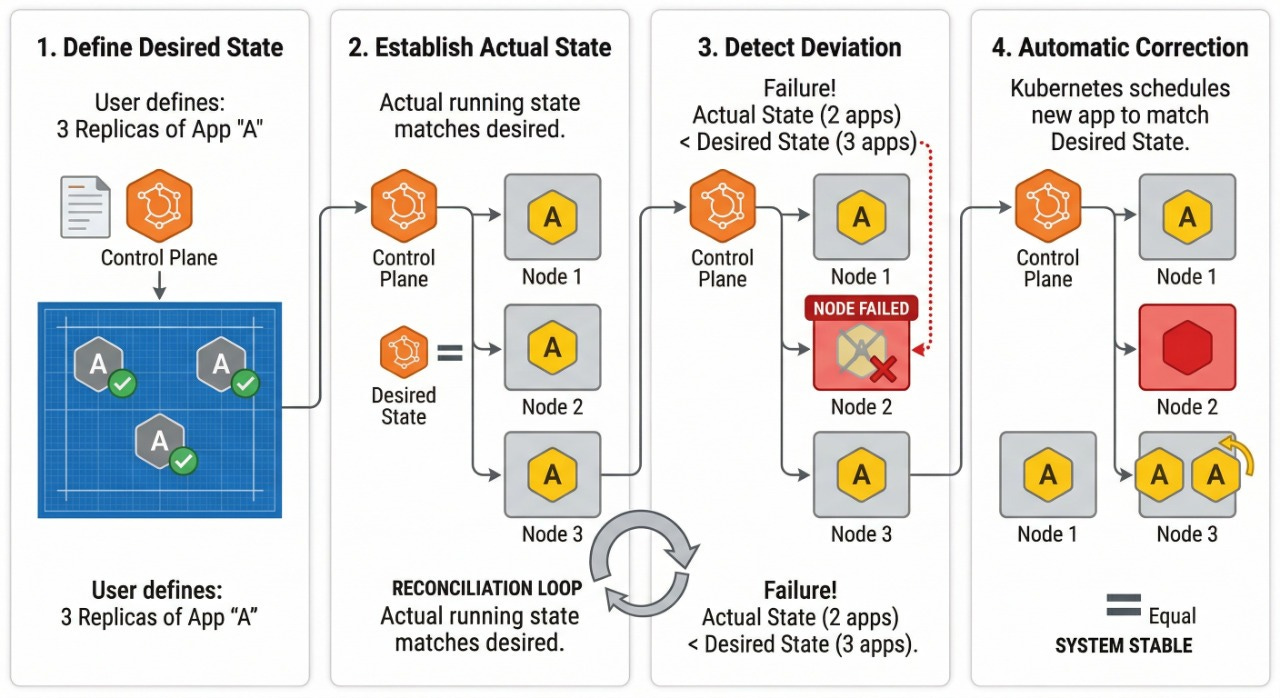
When we deploy an application to Kubernetes, we don’t start it in the cluster ourselves. Instead, we tell Kubernetes what we want the system to look like; for example, we could say we want three replicas of an application running.
This description of what we want is called the desired state.
The actual state is what is currently running in the cluster.
Kubernetes always checks the desired state against the actual state. If it finds a difference, it automatically tries to fix it.
For example, if one app crashes or a node fails, the actual state no longer matches the desired state. Kubernetes detects this and automatically creates a new app on healthy nodes to bring the system back to the desired state. The ongoing task of checking and fixing the system is called the reconciliation loop.
This is a key concept in how Kubernetes operates.
Now we understand Kubernetes architecture, let’s learn the control plane and worker nodes…
Kubernetes Control Plane Core Components
We already saw how the control plane makes global decisions for the cluster, but it does NOT do that as a single component.
Instead, control plane is divided into five components that work together to manage the entire cluster state.
These components have their own specific roles:
One component is the central hub for all cluster communication.
Another stores the cluster data.
One makes scheduling decisions.
Another continuously monitors cluster health and keeps it in the desired state.
And the last one integrates Kubernetes with your cloud provider to manage resources such as load balancers, routes, and storage volumes.
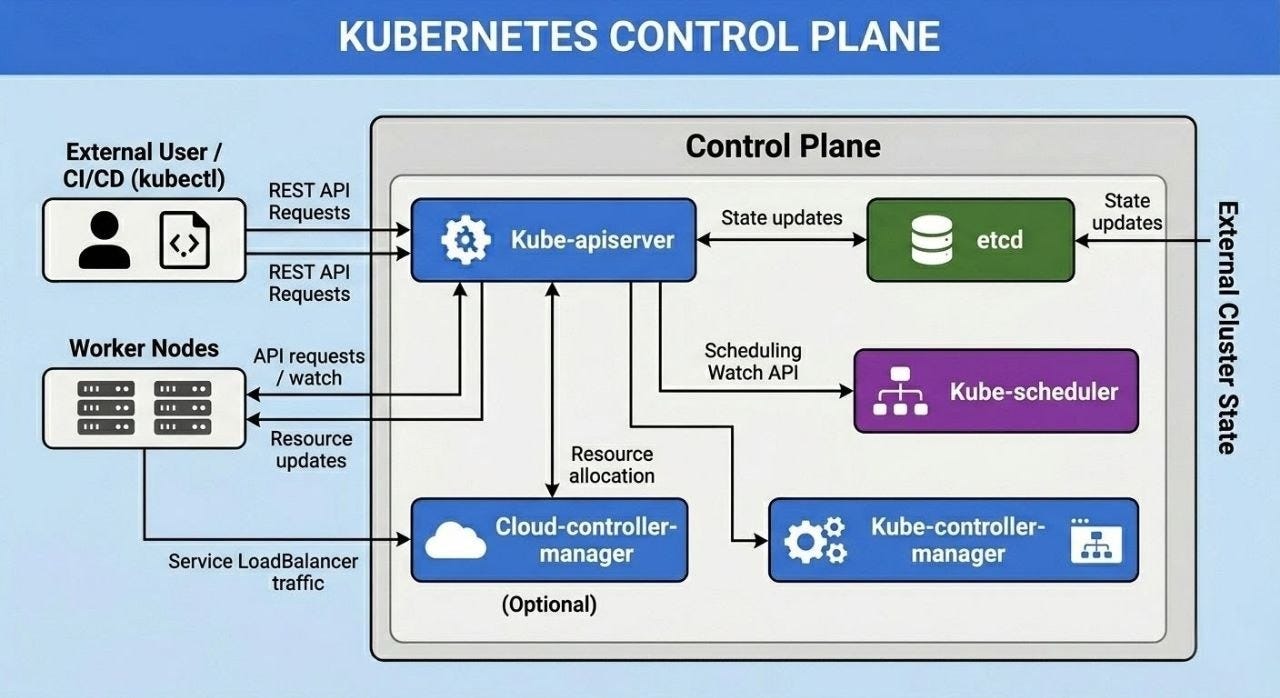
Let’s look at each of the control plane components and the concepts behind each:
1. Kube-Apiserver
The kube-apiserver is central to the Kubernetes control plane.
It serves as the key hub of the cluster, exposing the Kubernetes API. Almost every operation in the Kubernetes cluster goes through the API server. The other cluster components don’t talk directly with each other. Instead, they use the kube-apiserver to read and update the cluster state. This lets the parts work independently but still connect through a central system. Also, when you interact with Kubernetes, you do not interact with the Kubernetes nodes and their components directly.
Instead, you interact with it via kube-apiserver.
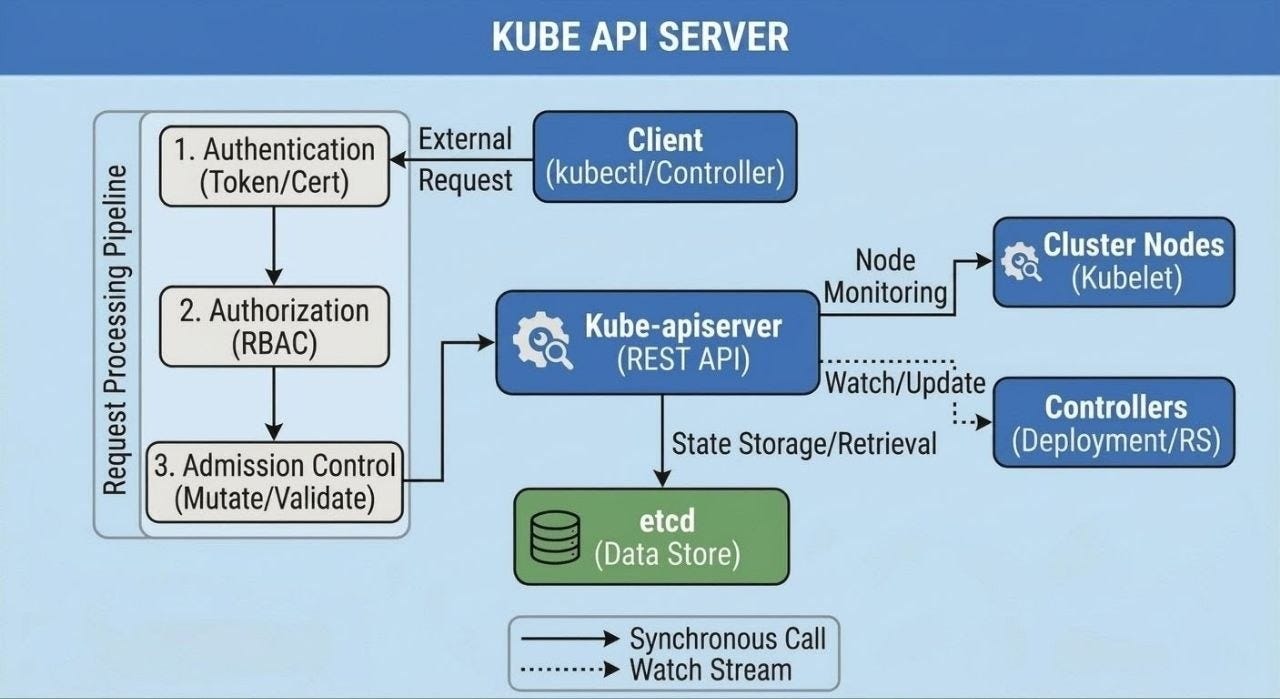
It handles your requests and updates the cluster state.
All messages between the API server and other components are encrypted using TLS1. This keeps unauthorized users out and protects communication within the cluster.
i.e., API server is central communication hub of Kubernetes; without it, the cluster cannot function.
Key Responsibilities of Kube-Apiserver
Exposes cluster API endpoint: It’s the only component in the control plane that the outside world can talk to. When you run a
kubectlcommand (kubectlis the command-line tool to interact with Kubernetes), it sends a request to the API server over HTTPS. When your app gets deployed in the cluster, it’s talking to the API server.Single entry point for all operations: All requests to the cluster go through the API server. This includes requests from you and from internal Kubernetes components. Components do NOT communicate directly with each other. They talk only to the API server. Because of this, API server always has a complete picture of what is happening in the cluster.
Authentication and Authorization: It checks who is making the request. Then, it confirms if they have permission to take the action. If either check fails, the request stops right there.
Notifies the rest of the system when something changes: Once a change is saved, API server notifies every interested component.
Stores cluster state in etcd: Kubernetes keeps all cluster details in etcd. This is a fast, lightweight database made for storing cluster state. Nothing reads or writes to it directly except the API server. Every change has to go through it first, this keeps the data clean and consistent.
Since the API server stores all cluster state in etcd, etcd becomes the source of truth for the entire Kubernetes cluster.
Let’s now look at etcd and understand its role in the control plane…
2. Etcd
etcd is a distributed key-value store (distributed database) that Kubernetes uses to store the entire cluster data.
It keeps track of what is running, what should run, and how each Kubernetes component is set up. Since it stores all data about the cluster, it is also called the single source of truth for the Kubernetes cluster.
Kubernetes API server stores all information ever received in etcd.
The scheduler and controller manager monitor the API server for changes. They help keep the cluster in its desired state. The API server reads data from etcd. This makes etcd the central storage system for the entire cluster.
etcd is a key part of the Kubernetes control plane.
It’s crucial to back it up regularly in production settings. If etcd data is lost, the cluster loses its state. So Kubernetes won’t know what applications are running, what nodes exist, or what the system’s desired state is.
i.e., etcd is the database that stores everything about the cluster.
Key Responsibilities of Etcd
Stores cluster state: All Kubernetes objects are stored in etcd. This includes Pods, Deployments, Services, Nodes, ConfigMaps, and Secrets.
Acts as the source of truth: The entire cluster state is stored in etcd, and all the components in the cluster rely on this data to make decisions.
Enables cluster recovery: Backups of etcd can be used to restore the entire cluster state in case of failure.
Also, etcd is the only StatefulSet component in the control plane.
i.e., etcd must be carefully managed and backed up, as it contains the entire cluster state.
Now we know how Kubernetes stores its cluster state; let’s explore how it decides where to run applications…
3. Kube-Scheduler
The kube-scheduler decides which node will run a pod.
A pod is the smallest unit you can deploy in Kubernetes. It acts as a wrapper for one or more containers. Whenever a pod is created, it remains in the cluster without a node being assigned to it.
The scheduler always checks for these pods.
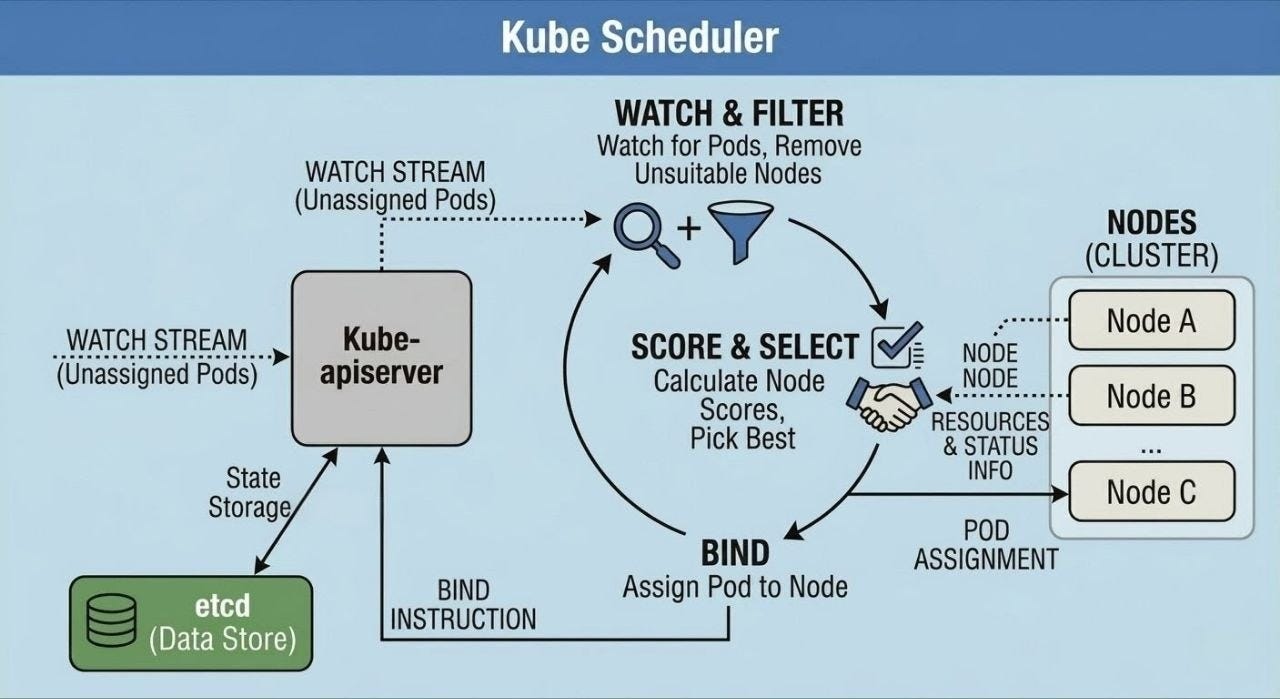
It assigns them to the right node based on available resources and pod setup.
Let’s learn how the scheduler works:
Watches for unassigned Pods: The kube-scheduler monitors the API server. It checks for pods that haven’t been assigned to any node after creation.
Gets the list of available nodes: It gets the information about all worker nodes and their available resources.
Filters Nodes: The scheduler removes nodes that don’t meet the pod's requirements. This includes:
Not enough CPU or memory
Not enough GPU
Node is under maintenance
Pod needs a GPU, but the node lacks one
Scores for remaining nodes: After removing some nodes, it scores each remaining node. It considers resource availability, scheduling policies, load balancing, and so on. Then, it selects the node with the highest score from the filtered list.
Updates the Pod information: The scheduler updates the Pod object via the API server and assigns the selected node.
i.e., scheduler does not run the pod itself; it only decides which node the pod should run on.
Once the scheduler assigns a Pod to a node, kubelet on that node is responsible for actually running the container.
4. Kube-Controller-Manager
The kube-controller-manager is part of the control plane.
It monitors the cluster and ensures the actual state matches the desired state. It runs multiple controllers, each handling a specific task in the cluster. These controllers monitor the cluster’s state using the Kubernetes API.
If they find a mismatch between the desired and actual state, they work to correct it.
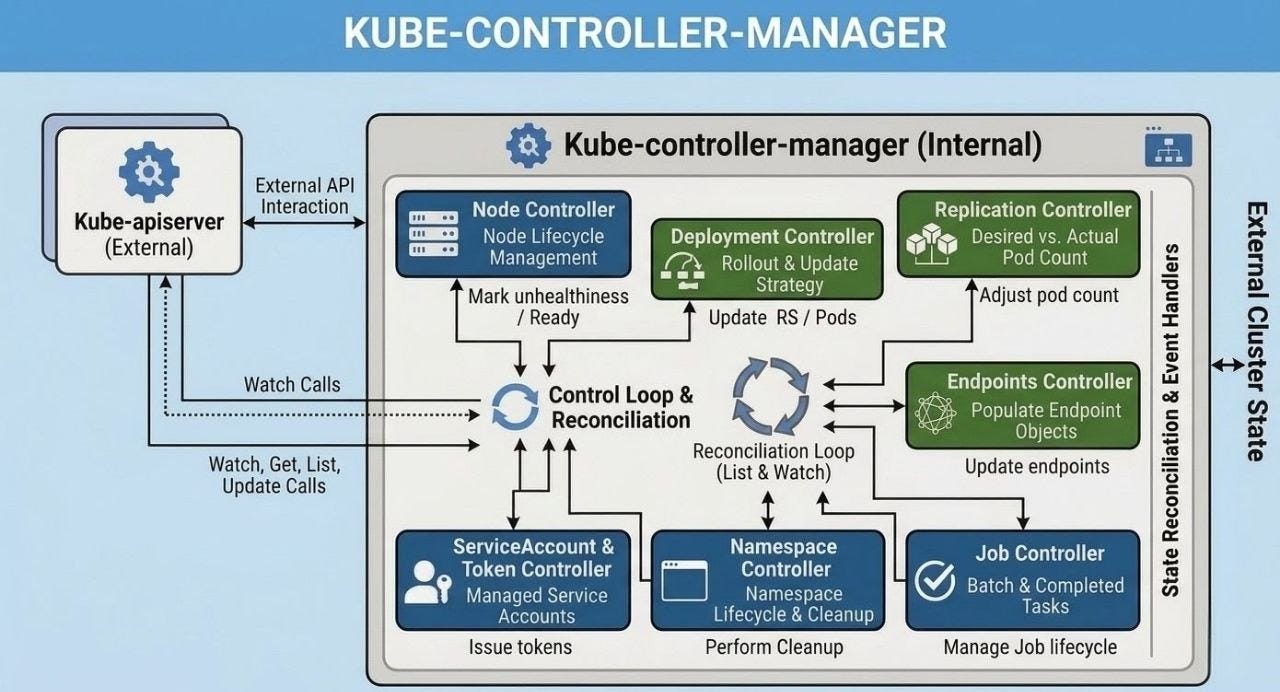
To understand this better, let’s look at an example:
Imagine an application on Kubernetes set to run three replicas. This is the cluster’s desired state. But one of the replicas crashes, and the actual state becomes 2 instead of 3. The controller will detect this difference and will automatically create a new replica of the application to make it three again. This is how the controller continuously monitors the cluster state and matches it with the desired state.
Kubernetes is self-healing and highly automated because it continuously monitors the cluster. It resolves differences between the desired and actual states.
Here is a list of important built-in Kubernetes controllers:
Node Controller: Detects node failures and responds when nodes become unavailable.
Replication Controller: Ensures the correct number of Pod replicas are running.
Deployment Controller: Handles rolling updates and ensures Deployments maintain the desired state.
Endpoint Controller: Updates endpoints for Services when Pods change.
Namespace Controller: Manages namespace lifecycle and resource cleanup.
Service Account Controller: Creates and manages service accounts and tokens.
Job Controller: Ensures jobs are completed successfully.
All the controllers in Kubernetes work as a control loop.
i.e., it continuously monitors the cluster state via the API server and compares the actual state with the desired state. Kubernetes has a control loop feature that’s key to its design.
This allows for self-healing, auto-scaling, and rolling updates.
5. Cloud Controller Manager (CCM)
The kube-controller-manager manages internal cluster tasks.
But Kubernetes must also connect to cloud providers for resources.
This includes:
Load balancers for services
Storage volumes for persistent data
Virtual machines for nodes
The cloud controller manager handles this.
The cloud controller manager helps Kubernetes stay cloud-agnostic. It does this by keeping cloud-specific logic separate from the main Kubernetes components. Kubernetes can run on various cloud providers, such as AWS, Google Cloud, and Azure. It can also work in on-premises environments. Best of all, there’s no need to change the core Kubernetes code.
The cloud controller manager connects Kubernetes to the cloud provider’s infrastructure.
We have looked at the control plane components that manage the cluster and make decisions. But the control plane does not run applications itself. The actual applications run on the worker nodes.
So let’s look at the worker node components and see how they work…
Reminder: this is a teaser of the subscriber-only newsletter, exclusive to my golden members.
When you upgrade, you’ll get:
Architecture breakdown of core DevOps systems.
Deep dives into Docker, Kubernetes, Terraform, and so on.
Practical insights into how real-world systems achieve scalability, automation, and reliability.
Let’s keep going!
Keep reading with a 7-day free trial
Subscribe to The System Design Newsletter to keep reading this post and get 7 days of free access to the full post archives.
 | A guest post by
|