



Share this letter & I’ll send you some rewards for the referrals.
Traditional software gets cheaper per user as it scales.
Yet AI software on an API does not!…
Every request runs a model, every model call has a per-token price, and the price stays “flat” whether ten people use it or a million do.
Self-hosting changes this, as GPU costs amortize across users.
But it introduces a new problem: capacity planning, hardware management, and a minimum spend that has to be justified before the first user arrives.
So scaling an AI product forces cost decisions most software never encounters, and most engineering teams face them only after users have already arrived.
Building an AI system that produces correct, grounded, and safe responses is one challenge…Serving those responses reliably and affordably to a million users is another.
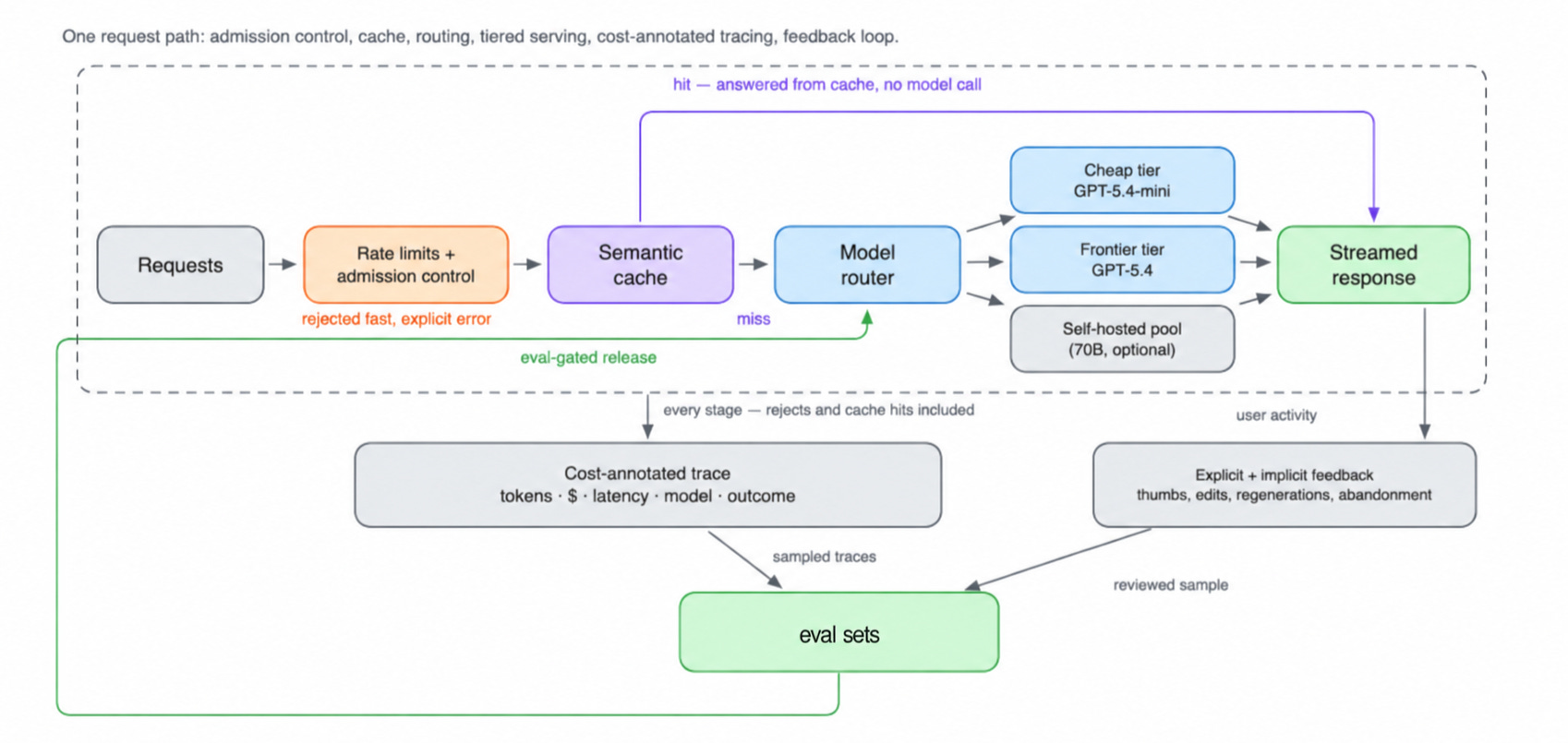
This newsletter shows you how to redesign a chat assistant for large-scale production, reduce inference costs & build the infrastructure needed to handle millions of users.
§
Make your agents realtime (Partner)

Agents are killing your apps with compounding latency across workflows.
Your customers want their agent workflows to be efficient, so you’re losing deals if you don’t make them event-driven. Webhooks solve this issue, but implementing them is harder than it looks.
If you homebrewed your webhooks and are getting pinged at 4 in the morning for failed deliveries, this is for you.
Svix handles everything: retries, idempotency, security, and compliance. Qualified startups get $12,000 in free credits.
(Thanks to Svix for partnering on this newsletter.)
§

I want to introduce Louis-François Bouchard as a guest author.
He’s a best-selling author (Building LLMs for Production), the co-founder of Towards AI, and the creator of the YouTube Channel, What’s AI, where he helps people understand AI and learn how to apply it in the real world. Through his development work with clients, content, teaching, AI training programs, and the new Mentorship program at Towards AI Academy, Louis focuses on making AI practical for builders, engineers, and curious learners alike.
At Towards AI, he and his team train AI engineers through courses and mentorship built for every stage, from beginner to advanced. That educational mission and the real-world experience building for his clients are exactly why I wanted him in this newsletter series.
§
Here’s what’s inside this newsletter:
Your $193,000 AI bill could drop to $48,000. Three optimizations cut the projected monthly cost by 75% at 100,000 daily conversations. Most teams overlook where the biggest savings actually come from.
Your smartest AI model could be your biggest money leak. Up to 70% of requests in our example go to a cheaper model, while the expensive one handles the rest. The surprising part is what happens to the total bill.
At 100K users, renting AI could beat owning GPUs. A $48,000 API bill competes with a $49,560 self-hosted setup. At 1 million daily conversations, the economics flip dramatically.
One GPU benchmark could wipe out $182,000 in monthly savings. Self-hosting looks 38% cheaper at scale, until lower throughput forces you to rent dozens of additional GPUs.
Your AI could pass every test and still break in production. The hidden gaps between evaluations, guardrails, and real user behavior, and why production failures need to become tests before the next release.
§
Should You Plan for a Million Users?
For most AI products, planning for a million users too early wastes time & money.
An API key and a credit card are often enough to launch a prototype. You should focus on building a useful product before investing in complex infrastructure.
But as your user base grows, these challenges become HARD to ignore:
Cost increases with usage. A chat assistant costs approximately $0.064 per conversation using GPT-5.4.
At 100 daily users, the monthly model bill reaches roughly $193.
At 100,000 daily users, it grows to $193,000.
At one million, it reaches $1.93 million.
Model routing & caching reduce the cost per conversation, but total spending still grows with usage.
Latency increases under heavy traffic. An AI system that responds in 400 milliseconds with ten concurrent users could take two seconds with a thousand. As incoming requests approach the system’s serving capacity, queues grow & response times increase.
Small prompt changes become expensive. Adding 200 tokens to your system prompt across one million daily requests produces six billion additional input tokens per month. At GPT-5.4’s input price of $2.50 per million tokens, that adds $15,000 to your monthly bill before prompt caching.
API rate limits restrict scalability. AI providers enforce limits on requests & tokens per minute. As traffic grows, these limits could prevent your application from serving more users, even when your infrastructure has spare capacity.
Unit economics determine profitability. If each conversation costs more than the revenue it generates, acquiring more users increases your losses. You need to measure cost per conversation against the revenue it produces.
These challenges determine when your AI application needs more advanced production infrastructure.
So before moving beyond a managed API, evaluate these four constraints:
Unit economics: Does the cost per successful conversation support your target profit margin?
Service level objectives (SLOs): Does the system meet your latency, availability, and reliability targets?
Rate limits: Does your provider support your expected request and token volume?
Data residency: Does the provider meet your requirements for where user data gets processed & stored?
As long as your API provider meets these requirements, staying with managed infrastructure is often the “simplest” choice.
The rest of this newsletter shows you how to estimate costs, identify scalability bottlenecks, and decide when more advanced infrastructure becomes necessary.
§
Target System Design
Our goal is to scale an AI chat assistant to one million daily users while keeping inference costs under control.
For simplicity, we assume each daily active user starts one conversation. Each conversation contains eight requests to the language model.
Let’s define the token usage for each request:
Static input: 1,024 tokens for the system prompt and a fixed few-shot examples. This meets OpenAI’s minimum prefix length for prompt caching.
Dynamic input: 400 tokens for conversation history & current user message.
Output: 300 billed tokens generated by the model.
Each request therefore processes 1,424 input tokens & generates 300 output tokens.
With eight requests per conversation, the total becomes:
Input: 11,392 tokens per conversation.
Output: 2,400 tokens per conversation.
(These are illustrative assumptions. In production, you should replace them with actual token usage collected from your application.)
System Requirements
Our production system must meet seven requirements:
Cost: Keep model costs below a budget of $0.02 per conversation. Determine your actual budget from revenue per successful conversation and required gross margin.
Latency: Define service level objectives (SLOs) for each workload, including time to first token (TTFT) for interactive chat & completion deadlines for asynchronous jobs.
Availability: Maintain 99.9% uptime, including during model & prompt updates.
Safe deployments: Support model changes with a reliable rollback mechanism.
Observability: Record token usage, cost, latency & model information for each request.
Feedback: Collect user feedback & incorporate reviewed examples into evaluation datasets.
Cost forecasting: Estimate the financial impact of every change before deployment.
Our Approach
We’ll make five major design decisions:
Cost engineering: Reduce model costs by 50% to 80% through model routing, semantic caching, and prompt optimization.
Inference optimization: Explore quantization, GPU utilization, and serving frameworks to determine when self-hosting makes financial and technical sense.
Production infrastructure: Handle concurrent traffic, control overload, and deploy model updates without disrupting users.
Data flywheels: Use production feedback to improve evaluation datasets & model quality over time.
Capacity and cost estimation: Calculate infrastructure requirements & monthly costs at 10,000, 100,000, and one million daily users.
We’ll start with cost engineering because the budget per request influences every infrastructure decision that follows…
§
Part 1: Cost Engineering
Let’s dive in!
Three Types of Token Costs
Every request to a language model creates costs based on token usage.
For this example, we’ll focus on three types:
Uncached input tokens: Tokens you send to the model, including the system prompt, conversation history, and user message, without a cached-input discount.
Cached input tokens: Previously processed input prefixes that the provider reuses at a discounted rate.
Output tokens: Tokens the model generates, including any billable reasoning tokens.
Output tokens typically cost more than input tokens because generating tokens one at a time (decode) has lower throughput than processing input tokens in parallel (prefill).
Some providers charge separately for extra features:
Cache writes: Anthropic charges approximately 1.25 to 2 times the standard input rate to create a cache entry, depending on its duration. Cache reads cost approximately 10% of the standard input rate.
Tool usage: Certain tools or external services introduce extra charges.
Priority processing: Higher-priority inference tiers could have different pricing.
Data residency: Regional processing requirements could affect the final bill.
So check your provider’s billing structure before estimating production costs.
For the two OpenAI models below, output tokens cost six times as much as uncached input tokens.
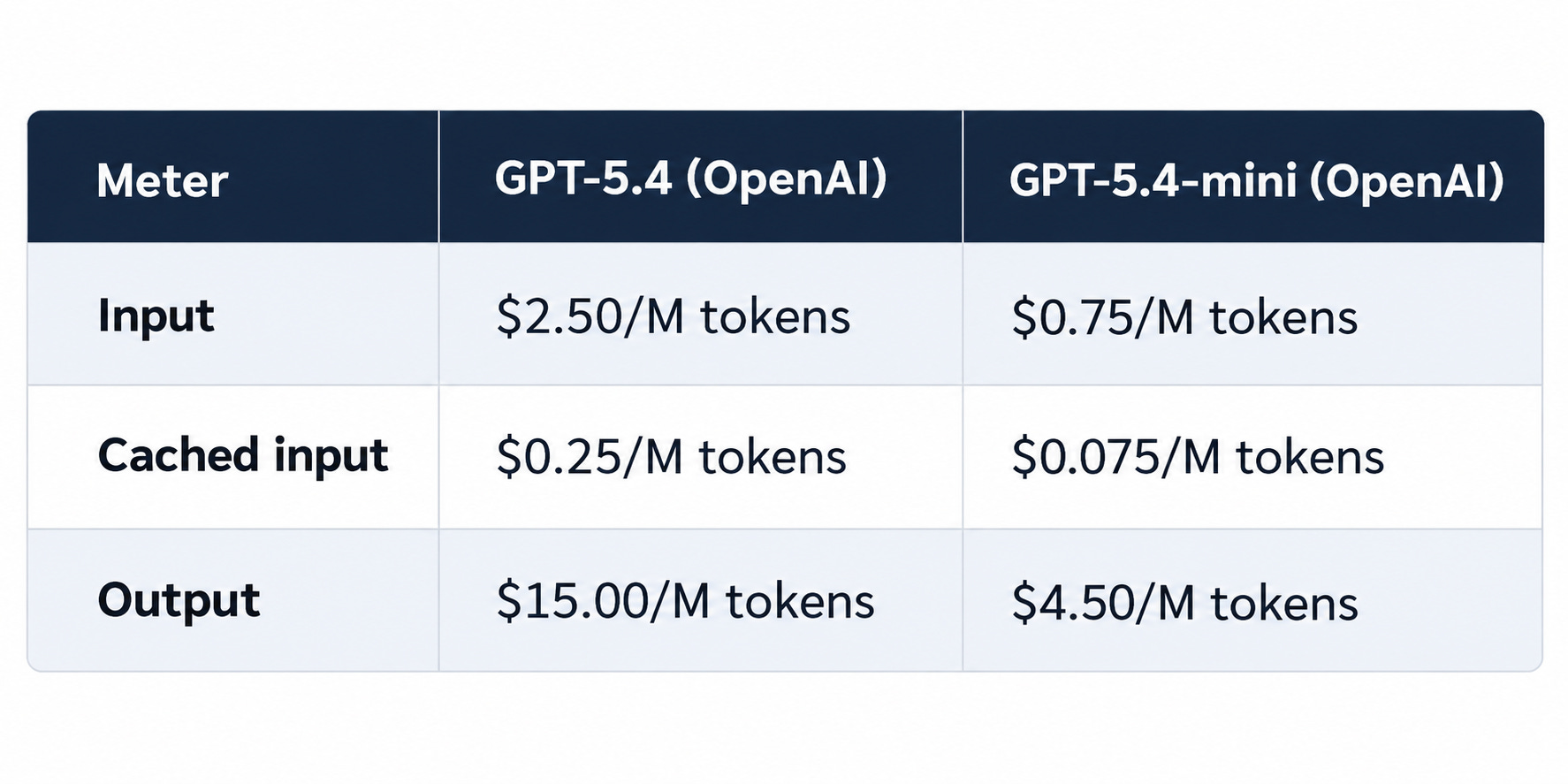
These prices are a historical snapshot… Model availability & pricing change over time, so verify the latest rates before making deployment decisions.
Next, let’s use these token prices to calculate the monthly cost of serving thousands/millions of conversations.
Estimation Funnel
Estimate costs before building the system.
Start with requests per day, estimate input, output, and cached-input tokens per request, then apply their respective rates. Multiply the daily cost by the number of days to get the monthly bill.
The arithmetic is straightforward…The challenge is accounting for every cost.
Retries & failed calls increase usage.
Agent loops multiply model calls per task. Embeddings and reranking add separate costs. Image and video processing introduce media-specific charges.
Semantic caching adds infrastructure costs, while provider-side prompt caching may introduce cache-write charges. Storage, network egress, observability, and idle GPU capacity when self-hosting also contribute to the total.
Even a complete cost estimate does not tell you whether the system produces useful answers. Track cost per successful task alongside total spending to measure efficiency.
Cost per Successful Task
Cost per successful task measures total spending divided by the number of tasks completed successfully.
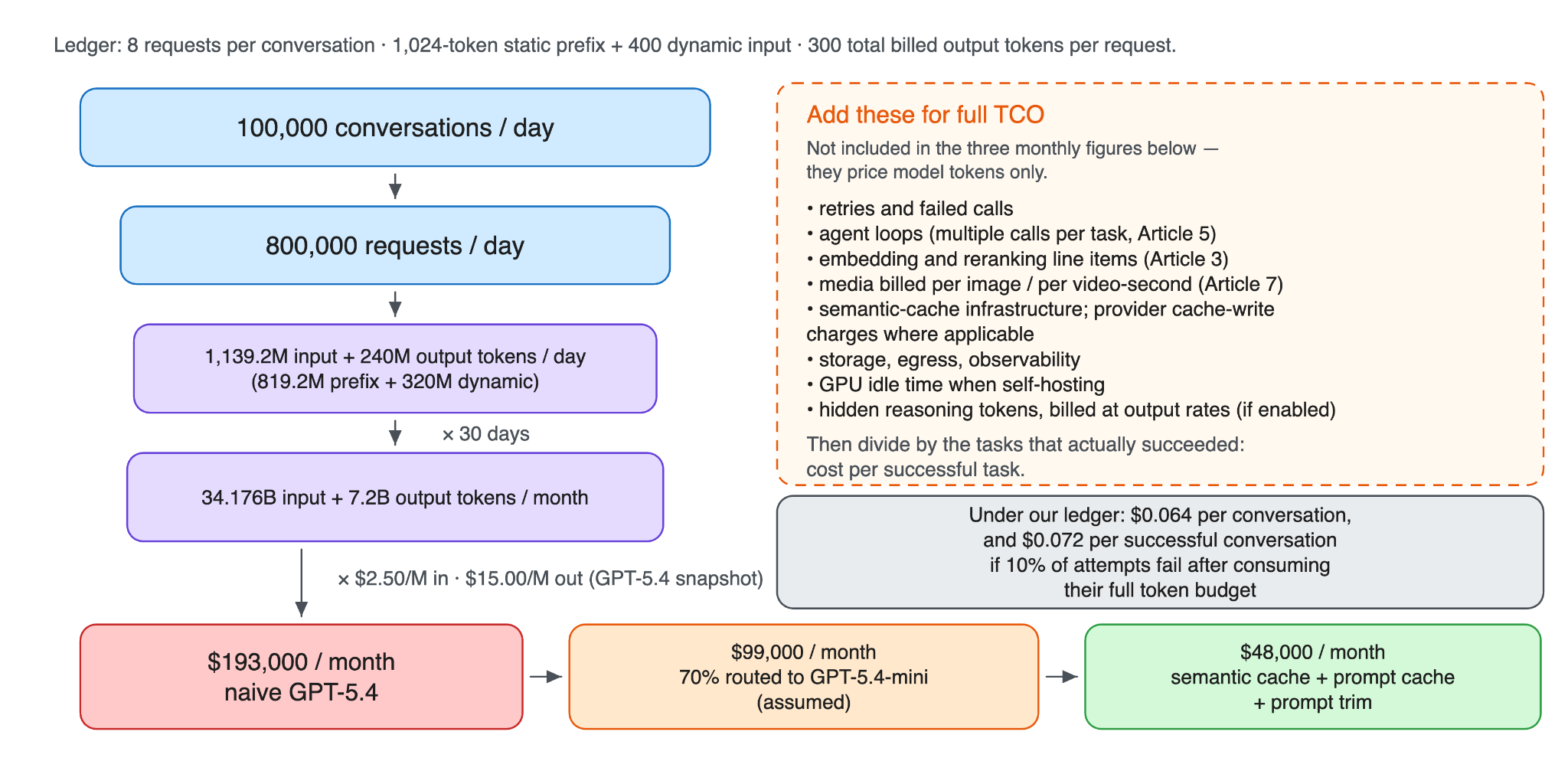
Track it alongside quality and latency to understand the actual cost of delivering useful results. For example, suppose each conversation costs $0.064 on average. If 10% of conversations fail, the cost per successful conversation increases to approximately $0.071, assuming the average cost already includes failed attempts and retries.
The same principle applies to self-hosted models. Estimate the required token throughput, translate it into GPU capacity & calculate infrastructure costs.
H100 GPU rentals may cost around $2 to $6 per GPU-hour, depending on the provider, region, and rental terms. Newer Blackwell-class accelerators may have higher hourly rental prices.
But GPU rental prices alone do not determine inference cost:
Utilization, batching efficiency, memory requirements & model quality also affect the cost per successful task.
Faster or Cheaper, and When You Get Both
Latency & cost typically involve tradeoffs.
More powerful GPUs and lower batching levels reduce response times but increase cost per request.
Some optimizations improve both.
Smaller models require fewer resources, while shorter prompts reduce input processing. Prompt caching, quantization, and efficient attention kernels also reduce latency and cost, depending on the workload.
Streaming lets users see the response as it’s generated.
This improves perceived responsiveness without necessarily reducing total computation. Measure time to first token (TTFT), total response time & stream reliability separately.
Batching improves GPU utilization by processing multiple requests together.
Yet excessive batching can increase tail latency (p99). So interactive applications need different batching configurations from background workloads.
For tasks that do not require immediate responses, consider a provider’s Batch API. These asynchronous endpoints process requests within a specified window at a lower price.
OpenAI’s Batch API offers a 50% discount on supported workloads with a 24-hour completion window. Other providers have different pricing and processing limits.
Reasoning-Token Line Item
Some reasoning models generate internal reasoning tokens that users never see.
These tokens count toward output usage & get billed at output token rates.
This increases costs when switching models. Different models use different default reasoning-effort settings. If you leave the setting unspecified, a model upgrade could generate more reasoning tokens and increase the bill, even when the visible response stays the same.
Set reasoning effort explicitly where supported.
Track reasoning-token usage and total output costs for each request. Increase reasoning effort only when evaluations show enough improvement in answer quality to justify the extra cost.
The Anchor: 100K Conversations a Day
Picture an AI assistant handling 100,000 conversations per day, with eight model requests per conversation.
Each request uses 1,424 input tokens and 300 billed output tokens.
Over 30 days, the system processes 34.176 billion input tokens and 7.2 billion output tokens.
At GPT-5.4 rates of $2.50 per million input tokens and $15 per million output tokens, the monthly cost is:
Input: $85,440
Output: $108,000
Total: $193,440 or $0.064 per conversation.
Suppose 70% of requests use GPT-5.4-mini, which costs $0.75 per million input tokens and $4.50 per million output tokens.
Assuming identical token usage across both models, routing reduces the monthly bill to approximately $98,635, a 49% reduction.
Plus, adding semantic caching, provider-side prompt caching, and shorter prompts could further reduce costs. Under a scenario with a 30% semantic-cache hit rate and additional prompt optimizations, the monthly bill could approach $48,000.
That represents approximately 75% savings compared with the original system.
Actual savings depend on traffic patterns, cache hit rates, token usage & model quality. Validate these assumptions against production measurements before relying on the estimate.
Model Routing
Model routing sends simpler requests to a cheaper model & complex requests to a more capable model.
A lightweight classifier or a smaller language model could decide which model should handle each request.
At scale, this significantly reduces inference costs. For example, routing 70% of requests to a cheaper model could lower the monthly bill. But the actual split depends on your workload and should come from production traffic & evaluation results.
The biggest risk is routing a complex request to a model that cannot handle it reliably. The smaller model may produce a confident but incorrect answer, reducing quality without an obvious failure.
To prevent this, evaluate the route system against the original system using a representative test dataset. Measure task success, factual accuracy, relevance, and other application-specific metrics.
The router should reduce costs while keeping quality within predefined acceptance thresholds. Track routing accuracy and cost per successful task to verify that the savings are worthwhile.
Semantic Caching
Model routing reduces costs by sending simpler requests to cheaper models.
Semantic caching goes further by reusing previously generated answers for similar questions, thus avoiding repeated model inference.
Semantic caching uses embeddings to find previously answered questions with similar meanings. If a cached answer passes the similarity and validity checks, the system returns it without calling the language model.
GPTCache is one open-source library for implementing this approach.
Cache effectiveness depends on traffic patterns. Frequently repeated questions, such as FAQs, produce higher hit rates, while unique or context-dependent queries benefit less.
Yet two failure modes require attention:
1. False cache hit
Two questions may have similar embeddings but require different answers.
Reusing an incorrect or outdated response silently reduces answer quality. Similarity thresholds, time-to-live (TTL) policies, and extra validation help reduce this risk.
2. Cross-user data leakage
Cache entries must be isolated by tenant & authorization scope.
Cache validity should account for relevant prompt, model, and retrieval-index versions, along with data freshness requirements. Authorization checks must remain enforced even when a cached answer exists.
Personalized responses should only be cached within properly isolated scopes.
Requests that perform actions or modify data must execute the required operations rather than replay a cached response.
Finally, semantic caching has its own costs, including embedding generation, vector search, and cache storage. So measure cache hit rate, false-hit rate, latency, and net cost savings to determine whether it improves the system.
Prompt Optimization
The system prompt gets included in every model request.
So its length directly affects input-token usage and cost. In our example, the static prefix accounts for nearly three-quarters of each request’s input tokens.
Shortening instructions and removing unnecessary few-shot examples reduce token usage. But the actual savings depend on how much of the prompt already benefits from caching. Plus, removing important instructions reduces answer quality, so evaluate every change before deployment.
Prompt caching introduces another consideration:
Providers reuse previously processed input when requests share an identical token prefix. To maximize cache hits, place reusable instructions and examples first, followed by dynamic content such as user questions and retrieved documents.
For OpenAI’s automatic prompt caching, eligible prompts must contain at least 1,024 tokens. Shortening a reusable prefix below this threshold eliminates its caching benefit and potentially increases costs, even when the prompt becomes shorter.
In our cost example, we retain the 1,024-token static prefix and optimize the dynamic portion instead. This preserves the opportunity for prompt-cache savings while reducing unnecessary input tokens.
The goal is to minimize total input cost without sacrificing response quality.
Compare cached-token usage, total spending, and evaluation results before deciding which prompt version performs best.
When Smaller Models Are Good Enough
Smaller models significantly reduce inference costs, but only if they maintain acceptable answer quality.
Evaluate each candidate model against a representative test dataset that includes common requests, complex queries, and edge cases. Measure task success, factual accuracy, relevance, and other application-specific metrics.
If the smaller model meets predefined quality thresholds, it passes the quality gate. Before deployment, it must also satisfy latency, reliability, security & rollback requirements.
Use evaluation results to decide when a smaller model is sufficient rather than relying on model size or benchmark rankings alone.
Model routing reduces average inference costs by selecting cheaper models, while semantic caching avoids repeated model calls.
The next step is optimizing the inference stack itself to reduce the computational cost of generating each token…
§
Reminder: this is a teaser of the subscriber-only newsletter series, exclusive to my golden members.
When you upgrade, you’ll get:
Simple breakdown of real-world architectures
Frameworks you can plug into your work or business
Proven systems behind ChatGPT, Perplexity, and Copilot
Ready for the best part?