



Share this letter & I’ll send you some rewards for the referrals.
I used to treat large language models like “search engines”…
I wrote a tiny prompt, pressed Enter, and expected a good answer.
But the model often ignored my constraints and/or solved a different problem. I didn’t realize until now that my prompt left too much open to “interpretation.”
A prompt tells the task, provides context, defines constraints, and makes the expected outcome clear. When the prompt is CLEAR, the model has less to guess.
But prompts are only one part of the story…
Modern AI systems do much more than respond to prompts. They retrieve documents, call external tools, remember useful information, and validate the outputs before responding.
They work well because they deliver the right “context” at the right time.
Onward.
[Webinar] Can you prove AI is working?

AI is in your engineering workflow. While the token spend shows it, the throughput doesn’t. The human is very much still in the loop, and that’s a context problem.
Join live on Aug 19 (FREE) to learn:
The 4 metrics to measure where AI gains leak out before production.
The 8 stages of context maturity, the specific walls capping your metrics, and a free tool to pinpoint where your team is.
Why more MCPs and bigger context windows aren’t enough, and what it takes to get real value from your agents.
(Thanks to Unblocked for partnering on this newsletter.)
I want to introduce Tina as the guest author.

She’s a data engineer specializing in AI, machine learning, and large language models. She explains the why behind AI and data engineering concepts. Her work has been featured through Medium’s Boost program, and she also publishes the AI Cartographer.
You can follow her on:
Here’s what’s inside this newsletter:
Why good prompts still produce weak answers. How tokenization, context windows, attention, and in-context learning shape every response, and why relevance matters more than stuffing more text into the prompt.
The prompting techniques behind reliable outputs. What zero-shot, few-shot, chain-of-thought, ReAct, reflection, structured outputs, and function calling each solve, and when adding more reasoning only increases cost.
Prompting is only one layer of the system. How context engineering, Retrieval-Augmented Generation, memory, reranking, compression, and long-context design determine what the model knows before it answers.
Every AI workflow has a failure mode. Why tool loops, retrieval overload, prompt injection, stale memory, invalid JSON, benchmark gaming, and weak evaluation can break an application even when the prompt looks correct.
Eight prompts and a production checklist you can reuse. Classify, extract, summarize, ground answers in documents, control tool use, improve reasoning, revise drafts, and review customer replies before shipping them into a real system.
Why Prompt Engineering Matters
If you ask a language model to “write something,” the model has to make several decisions on its own…
Should the response be a story, an email, or a poem? Who is the audience? How long should the response be?
Prompt engineering is the process of designing prompts to help a language model produce better responses.
A language model cannot ask follow-up questions.
And the response depends entirely on the information available in its context window. So clear prompts typically lead to better results.
Still, a “good” prompt has its limitations:
When the required information is missing, no prompt can fill the gap. Modern AI systems also rely on retrieval, memory, tool use, and safety mechanisms to produce reliable responses.
Before learning how to write better prompts, let’s understand how a language model reads a prompt…
How Large Language Models Read a Prompt
A prompt does NOT go directly into a language model.
Instead, text gets broken into smaller pieces before processing begins. This representation makes it easier for the model to work with text of any length/language.
A token is the basic unit of text the language model processes, representing a word, part of a word, punctuation mark, or other text fragment. The model then works with a sequence of tokens instead of complete words/sentences.
Those tokens become part of the model’s context window1, its workspace for the current request.
It contains everything the model can use to generate a response, such as the system prompt, instructions, examples, retrieved documents, conversation history, and your current prompt. As the model generates new tokens, they also become part of the same context2. Yet the context window has a “fixed” size, so the prompt & the response share the same token budget.
The model does NOT treat every token equally…
It decides which part(s) of the context deserve the most focus before generating the next token. This process is called attention. i.e., the model focuses more on the information most useful for predicting the next token.
Imagine listening to several conversations at once…
You hear every voice, but you pay more attention to the most important one.
You’d expect more context could improve the response. But this is NOT always true. Once the model has the information it needs, extra details can compete for attention instead of helping.
i.e., relevance matters more than quantity.
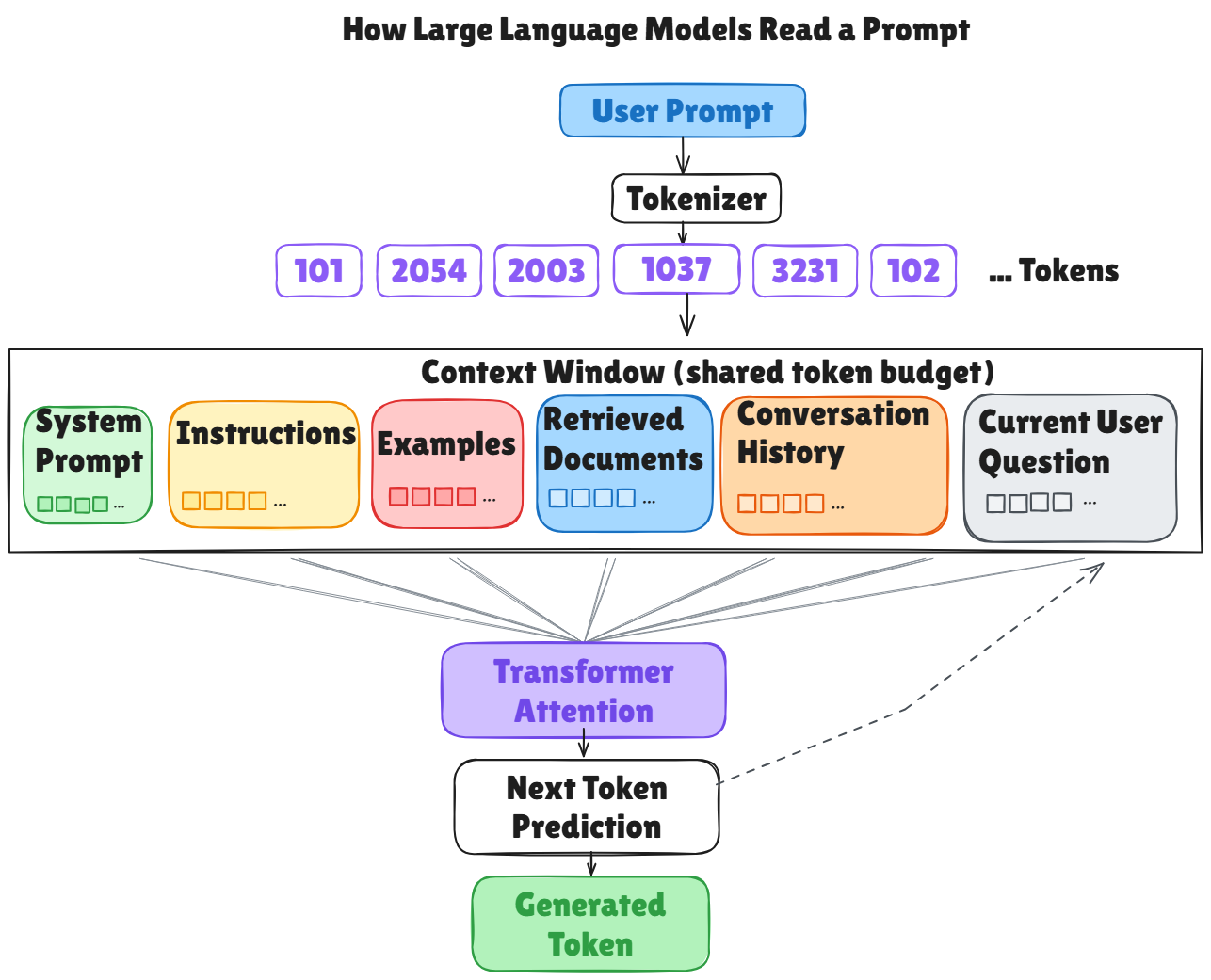
Let’s return to this idea later to discuss Retrieval-Augmented Generation (RAG) and long-context systems…
What is In-Context Learning
Spend a little time using different AI assistants, and you’ll notice something…
We often upload images to Gemini, ask ChatGPT general questions, and use Claude for coding. You’d also notice something else. After rewriting the same prompt a few times, many people try a different approach… They add an example of what they want, and the response often “improves” immediately.
The model has NOT learned a new skill.
Instead, it uses the examples in the prompt to figure out the pattern and applies it to the next input. Larger instruction-tuned models usually do this more reliably than smaller ones.
This ability is called in-context learning.
One explanation is the model recognizes patterns similar to those encountered during training. Another comes from Bayesian inference3, where each example provides another clue about the current task.
Yet this works only if the examples represent the task well.
If a customer support prompt contains only straightforward complaints & praise, the model will struggle with a review like “The package finally arrived. Better late than never.” The prompt never showed sarcasm, so the model has to infer the missing pattern…
i.e., a few carefully “chosen” examples usually work better than many similar ones.
Next, let’s look at how to design effective prompts…
Design Effective Prompts
Many people treat a prompt as one long block of text…
When the response isn't what they expected, they rewrite the entire prompt & hope for a better result. Instead, think of a prompt as a “collection of components” and not ONE long instruction.
Each component has a specific purpose.
Some tell the model what to do, while others provide background information, examples, retrieved documents, conversation history, and/or the desired output format.
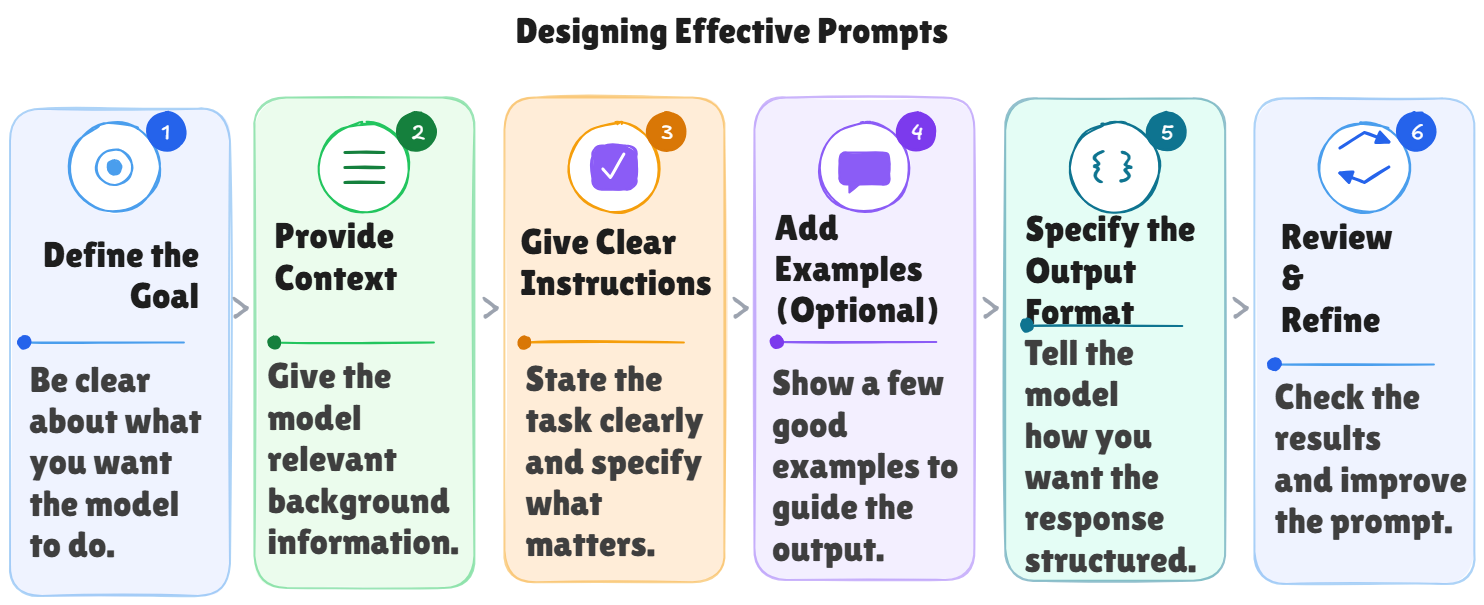
You do NOT need every component for each prompt.
A simple question only requires clear instructions, while a more complex application combines several components to give the model the context it needs. This way of thinking also makes it easier to improve the prompts.
And when a prompt produces poor results, the issue is often a missing/unclear component rather than the entire prompt. i.e., don’t rewrite everything when a problem occurs, but identify the component & then refine it.
Let’s take an example…You want to generate a project status update for your team…
You could write:
Write a project update.The model can certainly generate a response, but it has to guess the project, the audience, the level of detail, and the desired format…
Now check this:
Write a weekly project update for the engineering team.
Summarize the progress of the authentication service,
mention that API integration is complete,
database migration is in progress, and testing begins next week.
Keep the tone professional and format the response as three bullet points.
The second prompt is better because it provides the components the model needs: a clear instruction, relevant context, specific information to include, and the expected output format.
Prompt Diagnosis Matrix
Some tasks need more than clear instructions…
Here’s a quick diagnostic guide:
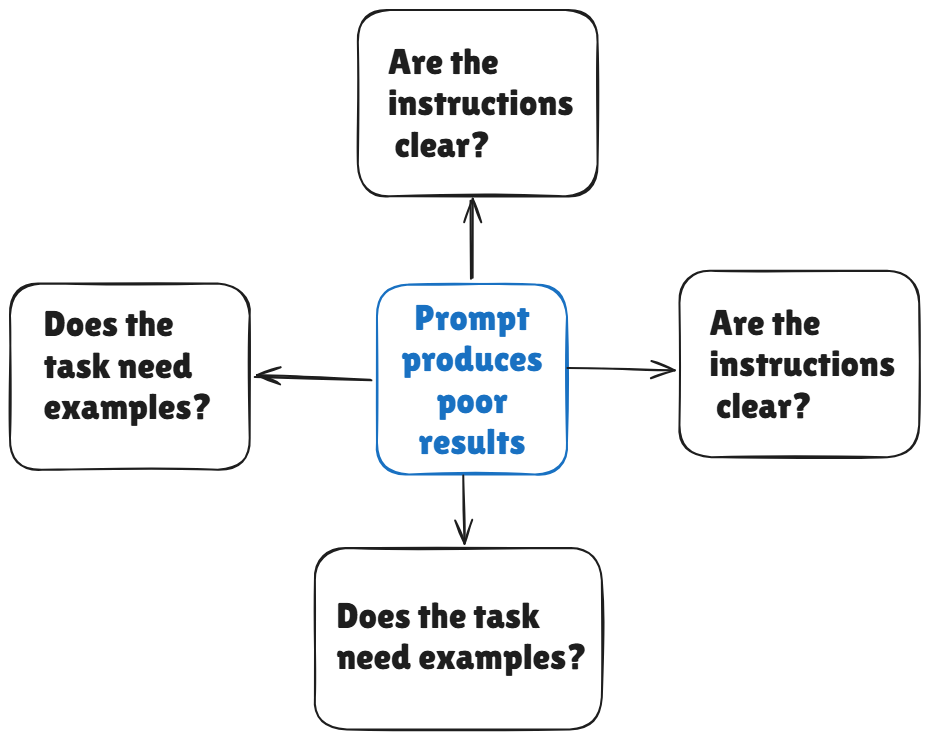
So far, we have focused on the building blocks of a prompt…
The next question is: How many examples should you include?
Prompting Strategies and Reasoning Techniques
You ask a model to classify customer reviews as positive, negative, or neutral.
Sometimes a simple instruction is enough. But for trickier tasks, especially when you care about a specific style, format, or way of reasoning, just telling the model what to do is NOT sufficient. In those cases, giving one or more examples usually helps it perform more reliably.
The amount of guidance you provide gives rise to different prompting strategies…
Here are the common prompting strategies based on the number of examples they use:
Zero-shot prompting: you provide only the instruction and the task.
One-shot prompting: you add a single example to show the expected behavior.
Few-shot prompting: you include several examples so the model can recognize the underlying pattern.
Many-shot prompting: extends few-shot prompting by using dozens or even hundreds of examples.
It could be tempting to keep adding examples when the model makes mistakes…
Yet more examples are NOT always better. Every example consumes part of the context window. A small set of diverse examples often works better than a long list of similar ones.
Plus, a tiny instruction such as “Let’s think step by step” can improve performance on many reasoning tasks.
You do not need to provide examples. Instead, you ask the model to work through the problem step by step before answering. This technique is called zero-shot chain-of-thought prompting.
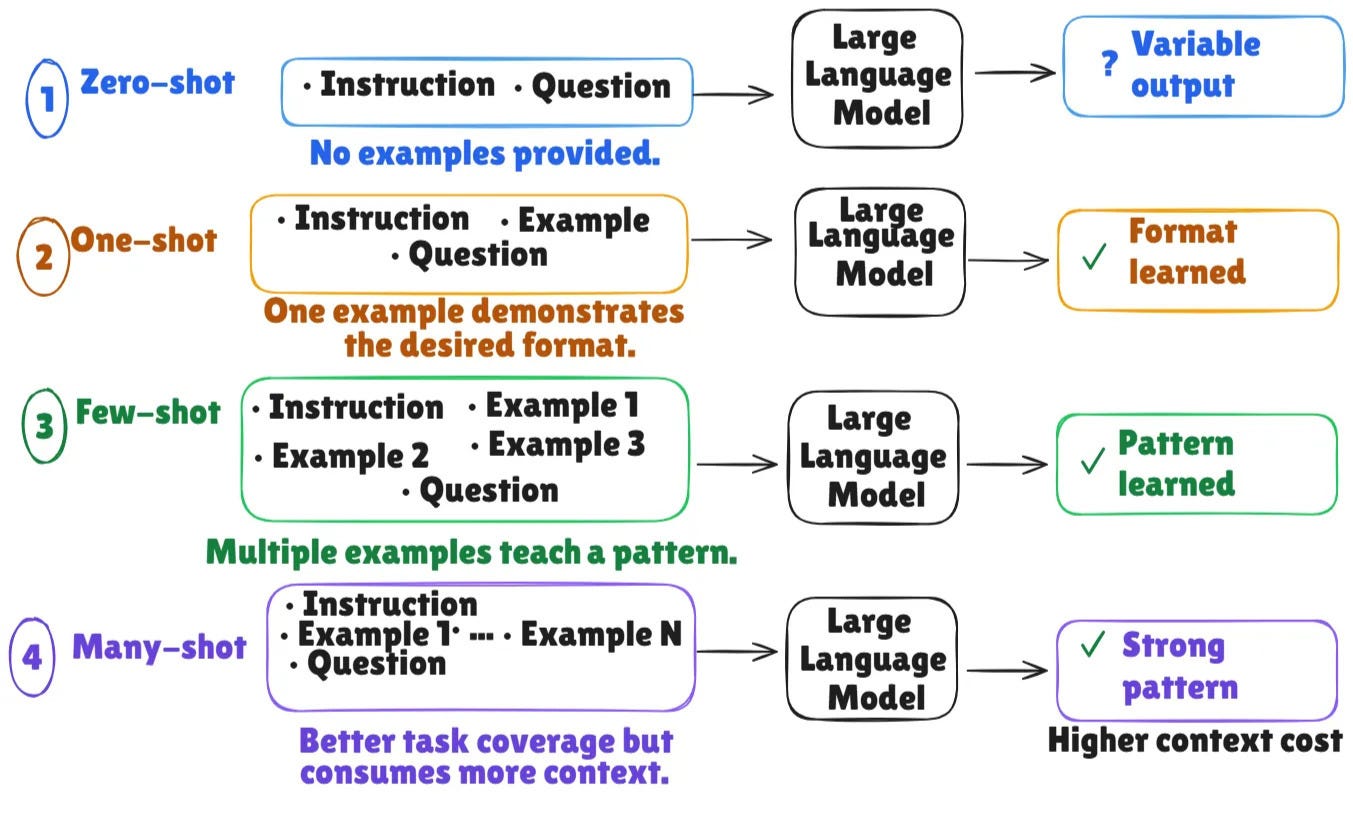
Different tasks benefit from different prompting strategies.
A prompt that works well for factual questions may struggle with complex reasoning.
Let’s explore the most widely used techniques and when to apply each one in coming sections…
ReAct and Tool: Augmented Reasoning
Ask ChatGPT, “What was your company’s revenue for last quarter?“
The answer already exists, but it’s stored in the company’s database and NOT in the model’s memory. If ChatGPT can access the database, it first retrieves the relevant information, then uses it to answer the question.
Good reasoning is only part of the solution…The model also needs the right information. Without it, even perfect reasoning cannot produce the correct answer…
This is the idea behind Reason & Act (ReAct).
The model can decide when to use an external tool, retrieve the information it needs, and then continue reasoning with the new evidence.
This is similar to how we solve problems:
When you realize you’re missing a piece of information, you stop, look it up, and then continue. ReAct follows the same pattern… The model alternates between reasoning and using tools, with each result becoming part of the context for the next step.
Language models can use different tools for different tasks:
They could search the web, retrieve documents from a company database, perform calculations, and/or interact with external systems.
So the model is no longer limited to the information already in its context by combining these tools with reasoning…
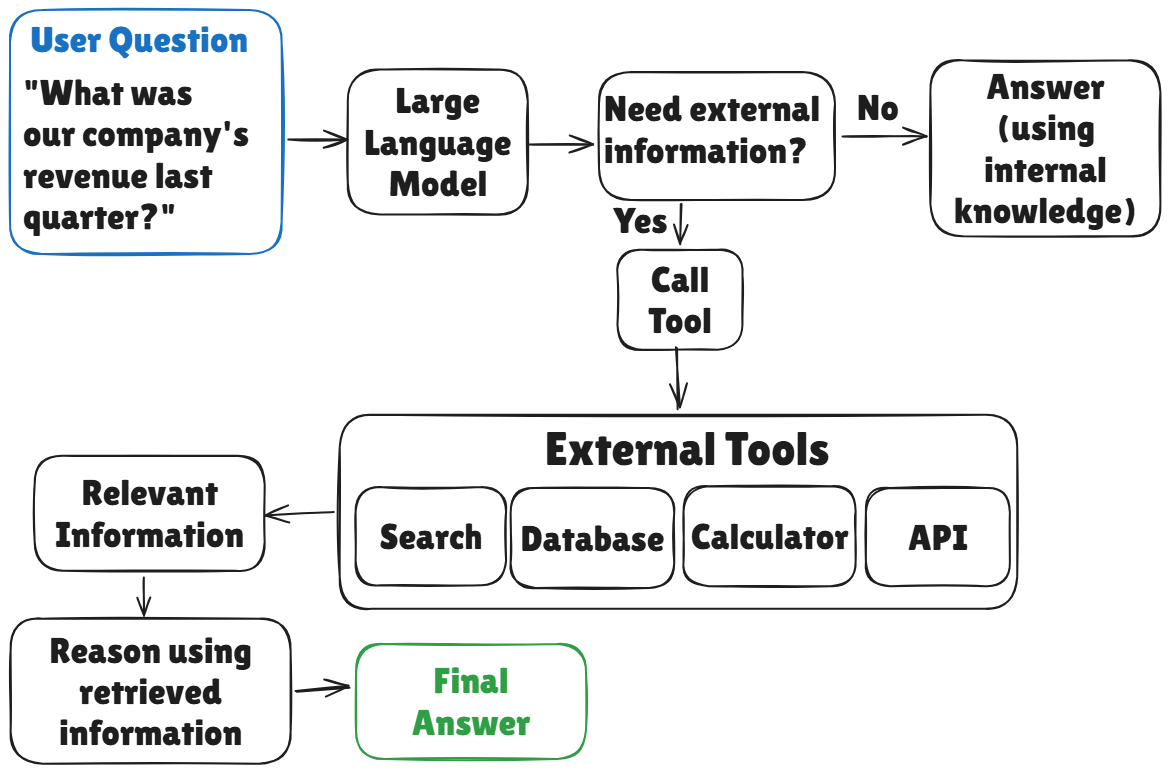
It can gather what it needs before producing an answer…
And this typically leads to accurate & reliable responses.
Worked Example: Stopping a Tool Use Loop From Repeating Itself
Imagine you’re building an assistant with access to a search tool…
Your first prompt could look like this:
BEFORE

You have access to a search tool.
Use it to answer the user’s question.
This seems reasonable…the model knows it has a tool & knows its objective.
But nothing tells it when to stop searching or how to decide whether a search was “successful”. If the search results are incomplete/irrelevant, the model would repeat the same query several times or continue searching unnecessarily.
A better prompt adds explicit decision rules:
AFTER

You have access to a search tool.
Use it when the answer requires current
or specific information you do not already have.
Before each search, briefly state what you still need to find out.
After each search result, state explicitly whether it answered
what you needed or not; if it did not, try a different query
rather than repeating the same one. You may search up to 3 times.

If you still cannot answer after 3 searches, say so directly instead of guessing.
Notice what changed…
The revised prompt doesn't simply tell the model to use a tool. It defines when to use the tool, how to evaluate the result, when to try a different strategy, and when to stop.
These tiny additions reduce unnecessary tool calls & make the model's behavior more predictable.
Reminder: this is a teaser of the subscriber-only newsletter, exclusive to my golden members.
When you upgrade, you’ll get:
High-level architecture of real-world systems.
Deep dive into how popular real-world systems work.
How real-world systems handle scale, reliability, and performance.
(If this newsletter has helped you become a better software engineer, consider subscribing to support my work.)