



Get my system design playbook for FREE on newsletter signup:
This post will help you prepare for the system design interview.
Share this post & I’ll send you some rewards for the referrals.
Building a music streaming platform like Spotify is a classic system design problem.
It includes audio delivery, metadata management, and everything in between.
Let’s figure out how to design it during a system design interview.
I want to introduce Hayk Simonyan as a guest author.

He’s a senior software engineer specializing in helping mid-level engineers break through their career plateaus and secure senior roles.
If you want to master the essential system design skills and land senior developer roles, I highly recommend checking out Hayk’s YouTube channel.
His approach focuses on what top employers actually care about: system design expertise, advanced project experience, and elite-level interview performance.
Onward.
Zero Trust for AI: Securing MCP Servers eBook by Cerbos (Sponsor)

MCP servers are becoming critical components in AI architectures, but they are creating a fundamental new risk that traditional security controls weren’t designed to address.
Left unsecured, they’re a centralized point of failure for data governance.
This eBook will show you how to secure MCP servers properly, using externalized, fine-grained authorization. Inside the ebook, you will find:
How MCP servers fit into your broader risk management and compliance framework
Why MCP servers break the traditional chain of identity in enterprise systems
How role-based access control fails in dynamic AI environments
Real incidents from Asana and Supabase that demonstrate these risks
The externalized authorization architecture (PEP/PDP) that enables Zero Trust for AI systems
Get the practical blueprint to secure MCP servers before they become your biggest liability.
Requirements & Assumptions
We’re looking at roughly 500k users listening to about 30 million songs. The core requirements include:
Artists can upload their songs.
Users can search and play songs.
Users can create and manage playlists.
Users can maintain profiles.
Basic monitoring and observability (health checks, error tracking, performance metrics).
Nothing fancy yet.
For audio formats, we use Ogg and AAC files1 with different bitrates2 for adaptive streaming3. For example,
64kbps for mobile data saving,
128kbps for standard quality,
320kbps for premium users.
On average, one song file at normal audio quality (standard bitrate) takes about 3MB of storage.
While the main constraints are fast playback start times, minimal rebuffering, and straightforward operations. We handle rebuffering using adaptive quality switching.
Capacity Planning
Let’s crunch some numbers to understand what we’re working with:
Song storage:
3MB × 30M songs ≈ 90TB of raw audio data.
This doesn’t include replicas across different regions.
It also doesn’t include versioning overhead when artists re-upload songs.
That’s why we’re looking at 2-3x this amount.
Song metadata:
Each song needs a title, artist references, duration, file URLs, and so on.
At roughly 100 bytes per song × 30M songs ≈ 3GB.
That’s not so much compared to the audio.
User metadata:
User profiles, preferences, and playlist data are ~1KB × 500k users ≈ 0.5GB.
Daily bandwidth:
The average listen time is 3.5 minutes at 128-160kbps; that’s roughly 3-4MB per stream.
Let’s assume each user streams 10-15 songs daily.
This leads to significant egress costs4.
The key insight is that audio dominates both storage costs and bandwidth. The metadata is just a small part in comparison.
Let’s dive in!
Spotify System Design: High Level Architecture
The architecture breaks down into these key components:
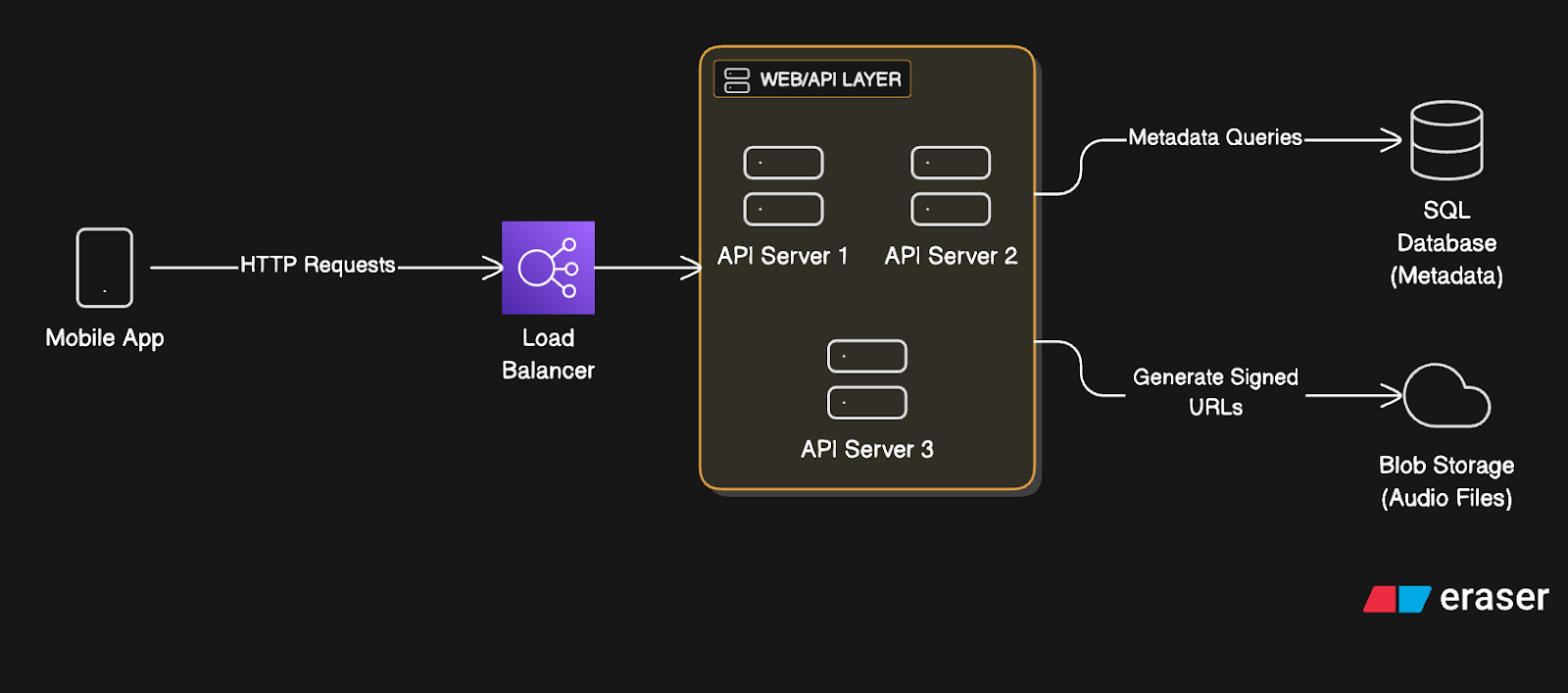
1. Mobile App (Client)
The user-facing application handles UI, search, playback controls, and playlist management.
It makes REST API5 calls to fetch metadata and manages local playback state.
Client streams audio directly from blob storage6 or CDN7 using signed URLs8.
And cache recently played songs locally for faster playback on the same song replay.
When things go wrong, it uses retry logic9 for API calls.
The client handles network interruptions gracefully by pausing playback until connectivity returns.
2. Load Balancer
The load balancer spreads incoming requests across many API servers to prevent server overload.
It could use round-robin or least-connections algorithms.10
Also it performs health checks every 30 seconds and removes unhealthy instances from rotation.
This is essential for managing traffic spikes during album releases.
Besides, it provides high availability against server failures and enables zero-downtime deployments11.
3. Web/API Layer
The application servers are stateless; they handle business logic, authentication, and data access.
They validate JWT tokens12 and query the database for song metadata.
They generate signed URLs for audio access and also save user actions for analytics.
For reliability, they implement circuit breakers for database connections. Circuit breakers stop requests to failing services, preventing cascading failures.
They use connection pooling to manage resources. This means reusing database connections instead of creating new ones for each request.
They also provide fallback responses for non-critical features when dependencies are down.
4. Blob Storage
Object storage systems like AWS S313 could hold all the audio files.
Files are organized in a hierarchical structure like /artist/album/song.ogg
They’re accessed via signed URLs that expire after a few hours for security.
Blob storage offers virtually unlimited scalability. It also comes with built-in durability and cost-effectiveness for large files. They replicate the storage across many regions for durability.
However, it has higher latency than local storage and potentially higher egress costs. We could instead use a distributed file system14 like Hadoop Distributed File System (HDFS). But blob storage is more managed and reliable for most use cases.
System Workflow
Now that we’ve covered the high-level architecture, let’s explore the request workflow:
Read Workflow
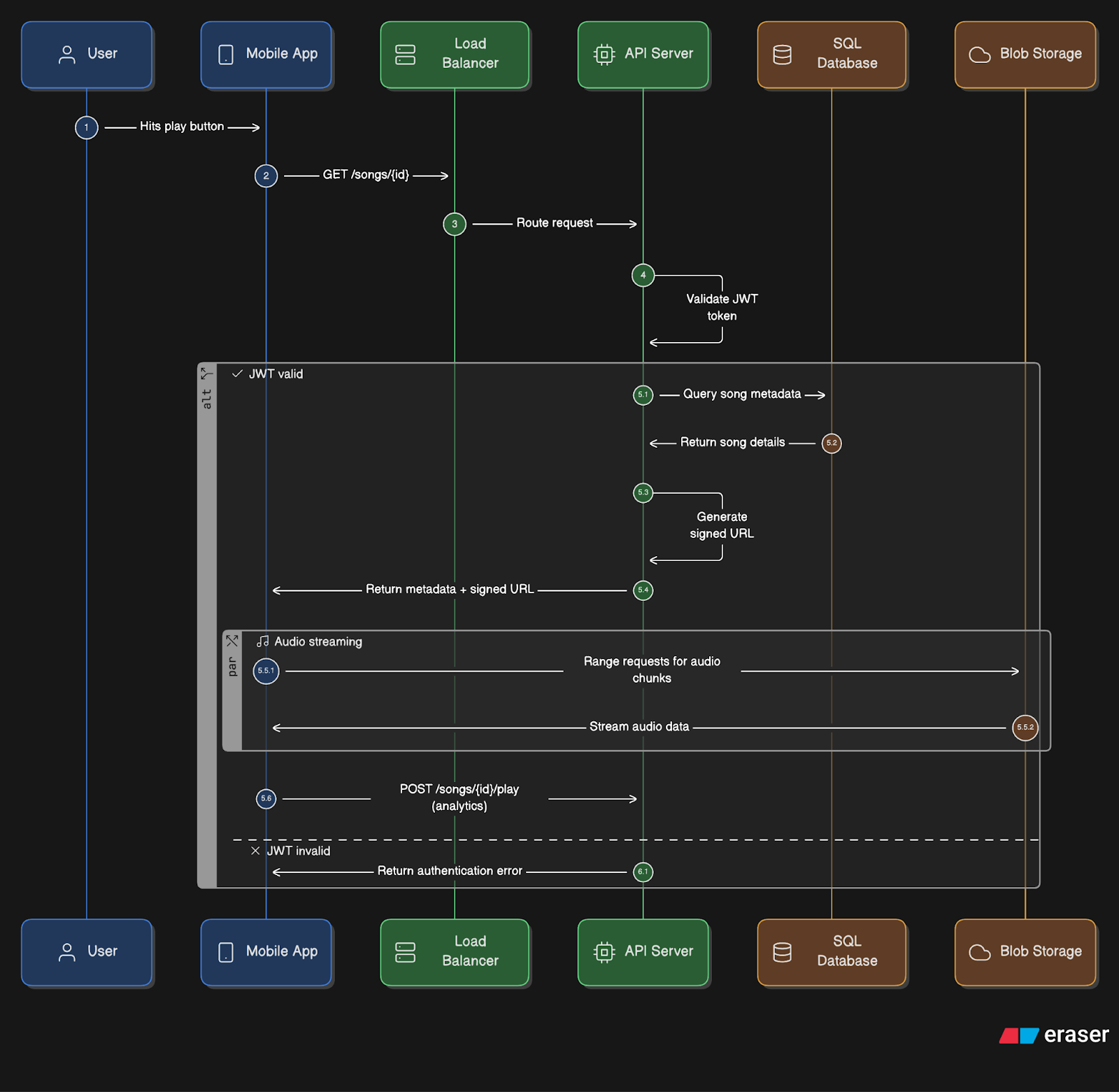
Here’s what happens when the user plays a song:
User hits play → App sends a GET request
/songs/{id}API authentication → API server validates the JWT token.
Metadata lookup → API server queries SQL database for song details (metadata).
URL generation → API server creates a signed URL for blob storage access.
Audio streaming → App fetches chunks of audio (range requests15) directly from blob storage using HTTP-based adaptive streaming (HLS or DASH16), which allows smooth playback, automatic bitrate switching, and broad device compatibility.
Analytics → App periodically calls
POST /songs/{id}/playto track plays and listening time.
Write Workflow
Here’s what happens when the artist uploads a song: