



Share this post & I'll send you some rewards for the referrals.
I created block diagrams for this newsletter using Eraser.
Today is a big day because I’m excited to announce that the doors are officially open for our brand-new newsletter series...
INTRODUCING: Design, Build, Scale
This newsletter series will elevate your software engineering career.
If you’ve ever thought:
“I want to ace system design interviews, but don’t know where to start.”
“I want to master system design so I can become good at work.”
“It’s time. I should learn how big companies engineer their systems.”
Then this is for you.
Here’s what you’ll get inside Design, Build, Scale:
High-level architecture of real-world systems.
Deep dive into how popular real-world systems actually work.
How real-world systems handle scale, reliability, and performance.
And here’s the best part:
You’ll get 10x the results you currently get with 1/10th of your time, energy, and effort.
Onward.
Give Your AI Tools the Context They Need So They Stop Guessing (Sponsor)

Your AI tools are only as good as the context they have. Unblocked pieces together knowledge from your team’s GitHub, Slack, Confluence, and Jira, so your AI tools generate production-ready code.
What is a Stock Exchange? (The Simple Answer)
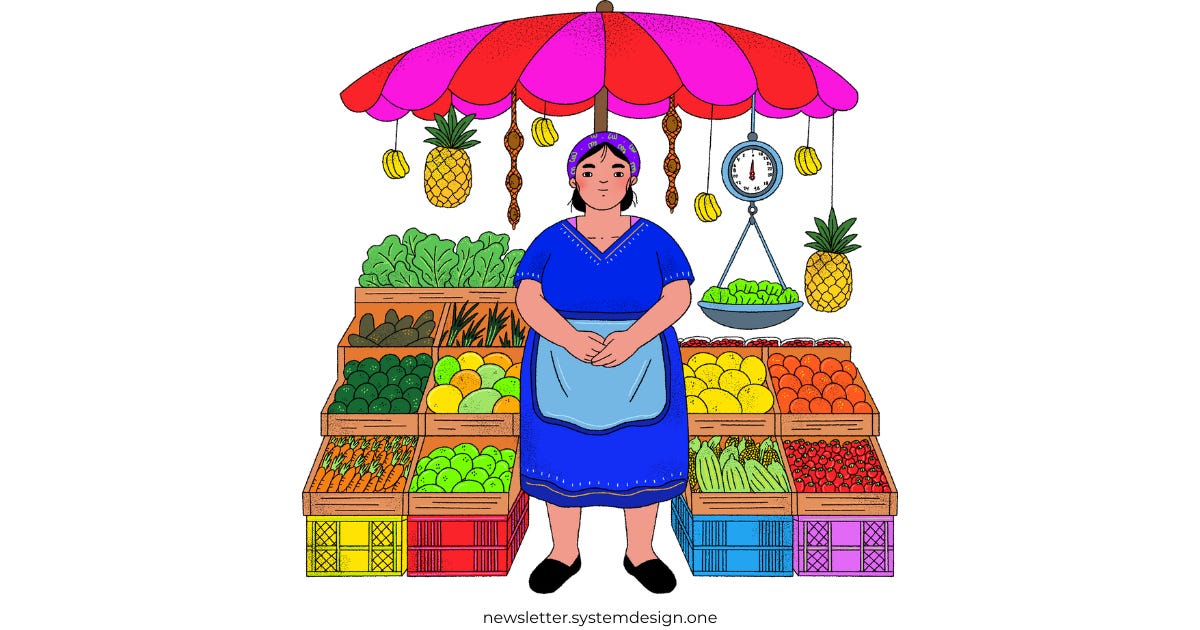
Imagine the stock market as a farmer’s market.
Each stock is like a stall area in the market where people gather to buy or sell a product. More trade brings more PROFIT for the stock exchange through fees. So their job is to facilitate as many “transactions” as possible. Each seller can set up a stall and specify the price they’re willing to sell for.
If nobody buys, they might lower their price.
Buyers want the cheapest price, so they usually go to the stall offering the lowest price first.
In an “ideal” world, buyers would stand in a queue, ordered by the price they’re willing to pay for fairness. This means buyers offering higher prices stand closer to the front. Plus, a buyer can adjust their position in the queue by changing the price they’re willing to pay. A trade occurs when a buyer’s price meets or exceeds a seller’s price.
That’s when the exchange matches them!
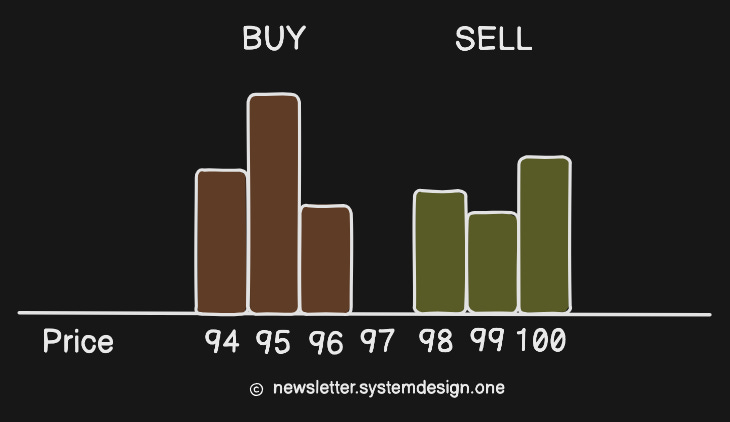
In simple words:
BUY orders get sorted in decreasing order (highest bid first).
SELL orders get sorted in increasing order (buy as cheaply as possible).
The point where they overlap is the market price.
In reality, it’s much more complicated… but this is the basic idea.
Let’s Start with Requirements
Don’t worry, it’s simple!
An exchange that trades ONLY stocks.
Users can place a BUY or SELL order.
Also users can cancel their order at any time.
Exchange must match buyers and sellers in real time.
And restrict the number of shares a user can trade per day.
It should also publish market data1 in real-time.
Exchanges2 make trading fair and transparent.
In most of them:
New orders = ~50% messages,
Cancels = ~40% messages,
Executions = ~2% messages.
The rest is... noise.
Trading Terms (Simplified)
Broker:
An app or site3 that lets users BUY or SELL, and view prices from an exchange.
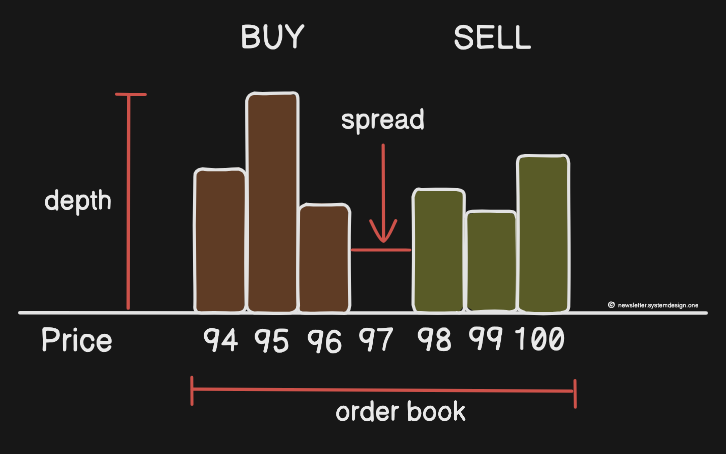
Order Book:
A list of all current BUY and SELL orders for a stock, showing who wants to buy or sell, how much, and at what price.
Market Order:
A BUY or SELL order where you don’t set a price. It executes immediately at the current market price, as long as there’s enough liquidity4. Plus, it receives priority in the order book.
Limit Order:
A BUY or SELL order where you choose the “exact” price.
Example:
Buy at $100 → fills5 at $100 or lower.
Sell at $100 → fills at $100 or higher.
Spread:
The difference between the highest BUY price and the lowest SELL price.
Profit Formula:
Profit = Sell price - Buy price
(So buy low, sell high.)
Stock Exchange Architecture
An exchange interacts with many “external” services:
Live chat support.
CAPTCHA implementation.
User data management & tracking.
Service for sending emails, text messages, and mobile app notifications.
But let’s focus on the core design itself…
Its architecture is asynchronous and event-sourced.6
Here are the three key components of an exchange:
Broker - allows people to buy and sell stocks on the exchange.
Gateway - entry point for brokers to send BUY or SELL orders to the exchange.
Matching Engine - component that matches buy and sell orders to create trades.
Let’s dive in!
1. Broker
A broker interacts with an exchange to:
Send order requests - place orders, receive status updates, and access trade information.
Receive market data - historical data for analysis, stream live trade data, and so on.

A user connects to the broker using REST APIs and WebSockets for real-time data transfer. While brokers use the Financial Information Exchange (FIX) protocol to communicate with the gateway.
FIX is a bidirectional communication protocol for secure data exchange through a “public network”.7 It assigns unique sequence numbers to order messages. Besides, it uses checksums and message length to verify data integrity8.
2. Gateway
It receives orders from brokers and converts9 them into the exchange’s internal format. Then it sends10 the trade execution results back to the users. It’s also possible to put a gateway near exchange servers (co-location) for low latency.

A gateway has three key parts:
Risk Manager - ensures the user has enough funds and blocks any unusual trading activity. Also, it determines exchange fees.
Wallet - stores the user’s funds and assets for trading.
Order Manager - assigns sequence numbers for fairness and updates order states. Plus, it sends cleared orders to the matching engine.
Let’s dive in…
Gateway validates an order11 with the risk manager and wallet service.
Then it passes the request to the order manager. Think of the order manager12 as a lightweight list containing ALL orders: open, cancelled, and rejected ones. It updates the order state and handles cancel requests.
Order manager assigns a globally increasing sequence number to each order (trade or cancel) and execution fill (for both BUY and SELL).

A sequence number guarantees:
Ordering for fairness, timeliness, and accuracy.
Fast recovery and deterministic replay.
Exactly once guarantee.
Plus, sequence numbers make it easy to find missing events in both inbound and outbound sequences13.
After clearance, the order manager routes the order to the matching engine.
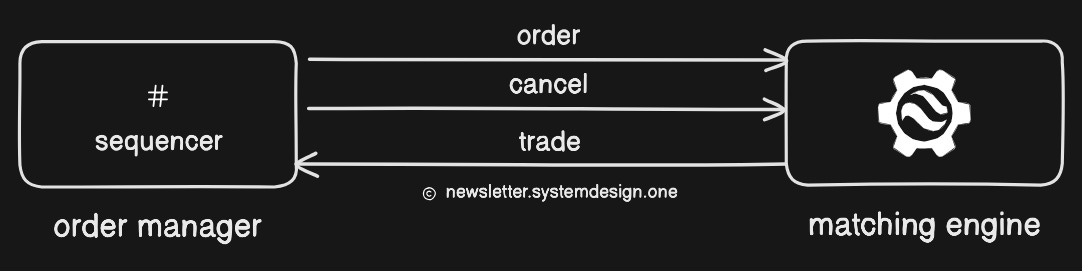
Each message type (new order, cancel, trade) has its own topic queue, with its own sequence numbers. This separation helps to:
Maintain order within each stream.
Process each message type independently and reduce contention.
And make recovery easier as the exchange could “replay” events per topic in exact order.
Let’s keep going!
3. Matching Engine
It verifies sequence numbers, matches BUY and SELL orders, and creates market data based on trades14.
A matching engine has two key parts:
Order Book15 - an in-memory list of BUY and SELL orders.
Matching Logic - matches BUY and SELL orders and sends those trade results as market data.
Let’s dive in…
Order Book
It keeps an in-memory list16 of open orders for each stock17 (symbol).
There are actually two lists for each stock:
One for BUY orders,
Another one for SELL orders.
Each list gets sorted by price and timestamp in a first-in, first-out (FIFO) manner.
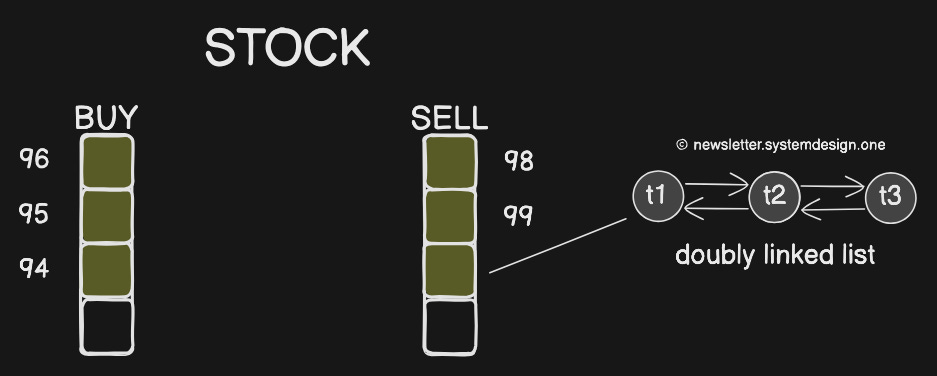
And each price level gets a separate queue of orders (doubly linked list):
New orders get added at the tail - O(1) time complexity.
Filled or canceled orders get removed from the queue using a pointer18 - O(1) time complexity.
It keeps track of the highest bid and lowest ask for quick matching. For example, BUY@96 and SELL@98.
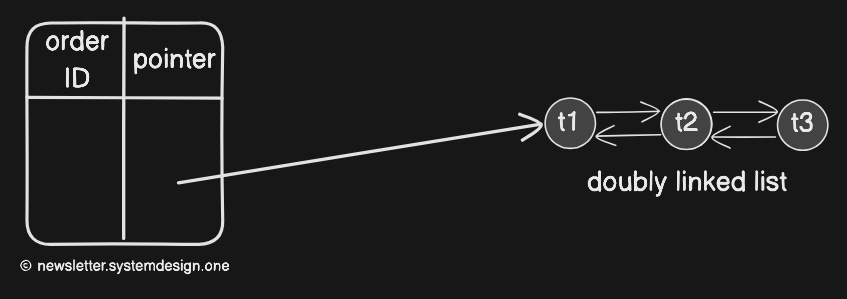
Searching through all price levels and linked lists could be slow - O(n). So it uses an index to map order IDs to the order object in memory: order ID → pointer (reference). It allows fast cancellations by looking up the order by ID in the index in O(1) and then setting the amount to 0.
A closed order gets removed from the order book and gets added to the transaction history.
Matching Logic
It checks if a message follows the correct sequence and matches BUY and SELL orders when:
buy price ≥ sell price
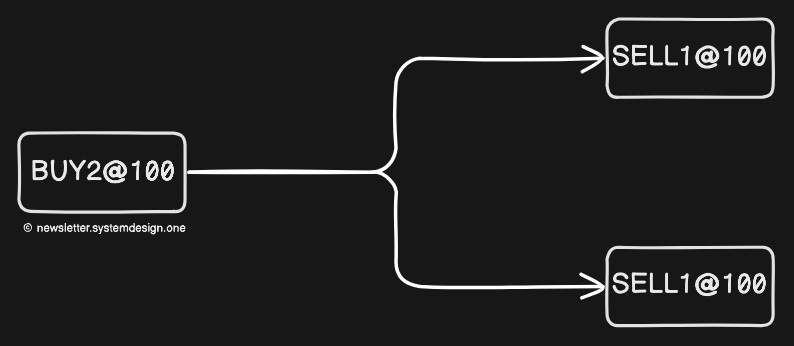
The same order sequence (input) must always produce the same execution sequence (output). So the matching function must be fast and accurate, and deterministic.
Ready for the best part?
Reminder: this is a teaser of the subscriber-only newsletter series, exclusive to my golden members.

When you upgrade, you’ll get:
High-level architecture of real-world systems.
Deep dive into how popular real-world systems actually work.
How real-world systems handle scale, reliability, and performance.