


Share this post & I'll send you some rewards for the referrals.
Block diagrams created using Eraser.
Some of these are foundational, and some are quite advanced. ALL of them are super useful to software engineers building scalable systems.
Curious to know how many were new to you:
Scalability,
Availability,
Reliability,
Latency vs Throughput vs Bandwidth,
Client-Server Architecture,
Databases,
SQL vs NoSQL,
Load Balancing,
Load Balancing Algorithms,
Caching,
Cache Invalidation,
CDN,
DNS,
API Design,
REST APIs,
Authentication vs Authorization,
Session-based vs Token-based Authentication,
OAuth/OAuth2/OpenID Connect,
JWT,
Rate Limiting,
Single Point of Failure,
High Availability vs Fault Tolerance,
CAP Theorem,
Consistency Models,
Data Replication,
Read Replicas,
Sharding,
Data Partitioning,
Consistent Hashing,
Denormalization,
Indexing,
Microservices Architecture,
Monolithic Architecture,
Serverless Architecture,
Event-Driven Architecture,
Message Queues,
Pub/Sub,
Synchronous vs Asynchronous Communication.
(…and many more in parts 2 & 3!)
For each, I’ll share:
What it is & how it works--in simple words
A real-world analogy (if I found one)
Tradeoffs
Why it matters
Let’s go.
AI code review with comments you'll actually implement (Partner).

Unblocked is the only AI code review tool that reflects your team’s standards and judgment, delivering thoughtful feedback that feels like it came from your best engineer.
1. Scalability
Scalability is the system’s ability to handle increased load without breaking.
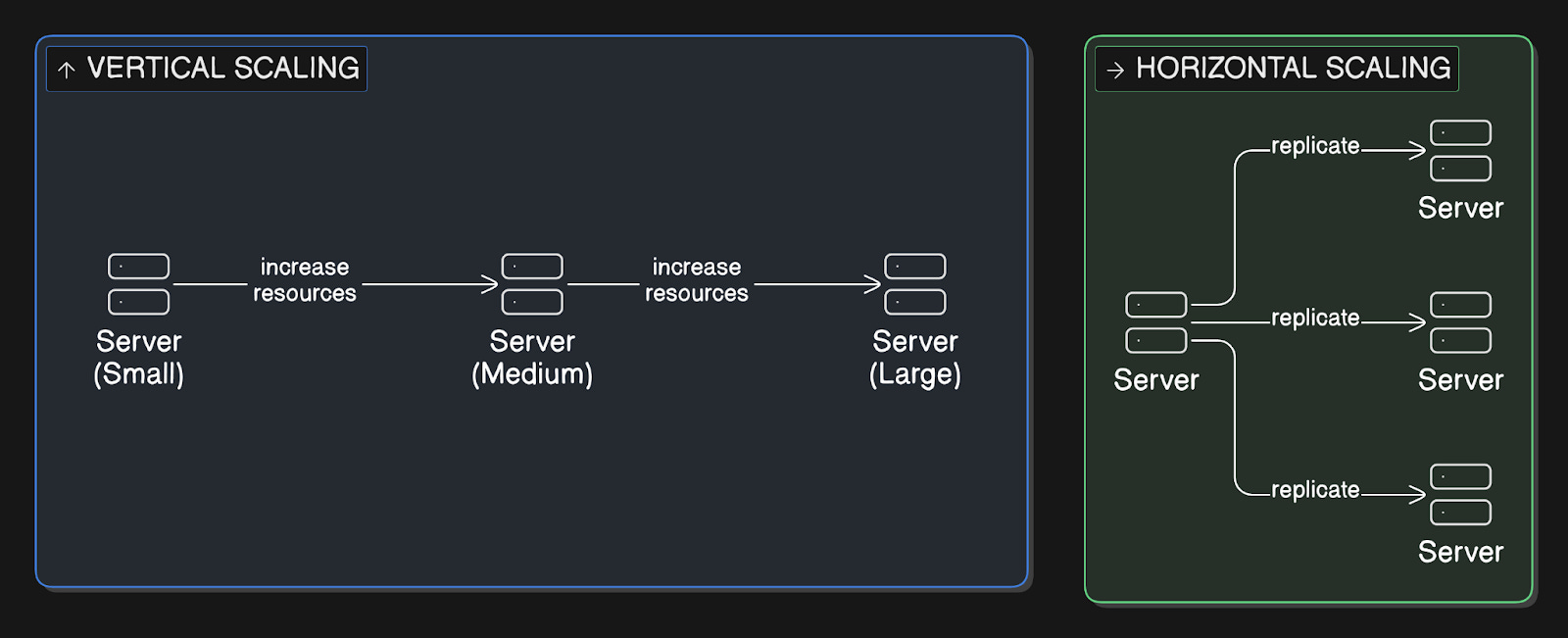
Vertical scaling means adding more power to your existing machine, such as a larger CPU, more RAM, or a faster disk. Horizontal scaling means adding more machines to distribute the work across multiple servers.
When traffic grows, vertical scaling upgrades a single machine, while horizontal scaling adds more machines to work together.
Analogy
Vertical scaling is like upgrading from a small restaurant kitchen to a bigger one with industrial-grade equipment.
Horizontal scaling is like opening multiple restaurant locations instead of expanding one location.
Tradeoff
Vertical scaling is simpler but hits a ceiling. You can only make one machine so powerful, and it becomes a single point of failure.
Horizontal scaling can grow infinitely, but it introduces complexity in coordinating multiple machines and keeping data consistent across them.
Why it matters
Use vertical scaling when you’re starting out or when your application isn’t designed for distribution. Switch to horizontal scaling when you need to handle millions of users, want high availability, or when vertical scaling becomes very expensive.
2. Availability
Availability measures the percentage of time your system is operational & accessible to users.
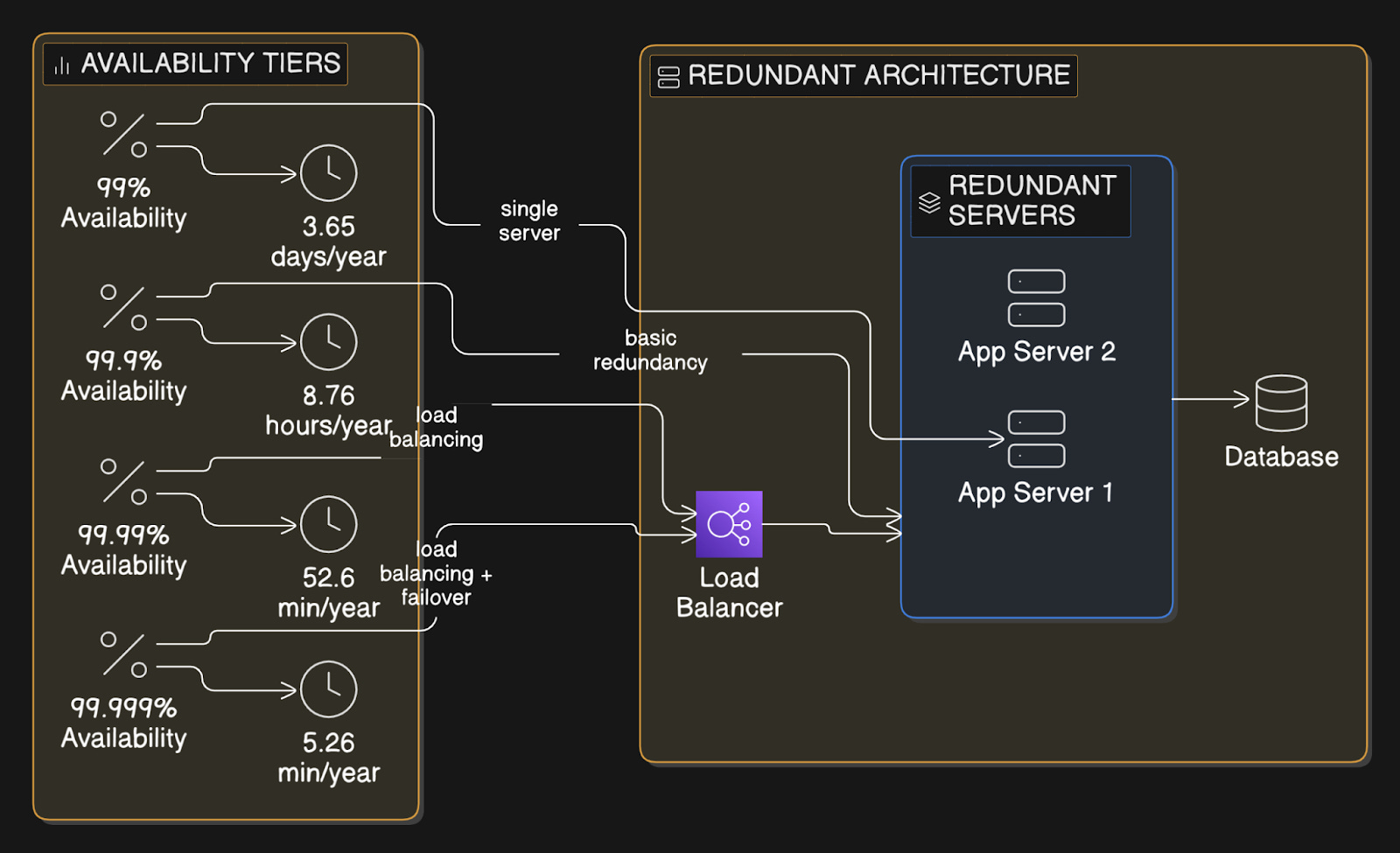
It’s typically expressed as “nines,” where 99.9% corresponds to about 8.76 hours of downtime per year, while 99.99% corresponds to only 52.6 minutes. Availability is achieved through redundancy, failover mechanisms, and the elimination of single points of failure.
Analogy
Availability is like a 24/7 convenience store.
A store with 99% availability would be closed for 3.65 days per year. A store with 99.999% availability would only be closed for 5 minutes per year.
Tradeoff
Higher availability requires more resources, such as redundant servers, load balancers, complex failover systems, and multi-region deployments. Each additional “nine” gets exponentially more expensive.
You might also sacrifice consistency for availability (CAP theorem).
Why it matters
Customer-facing systems, e-commerce platforms, payment processing, or any service where downtime directly costs money or erodes user trust.
Yet internal tools or batch processing jobs can tolerate lower availability.
3. Reliability
Reliability is your system’s ability to perform its intended function correctly over time, even when things go wrong.
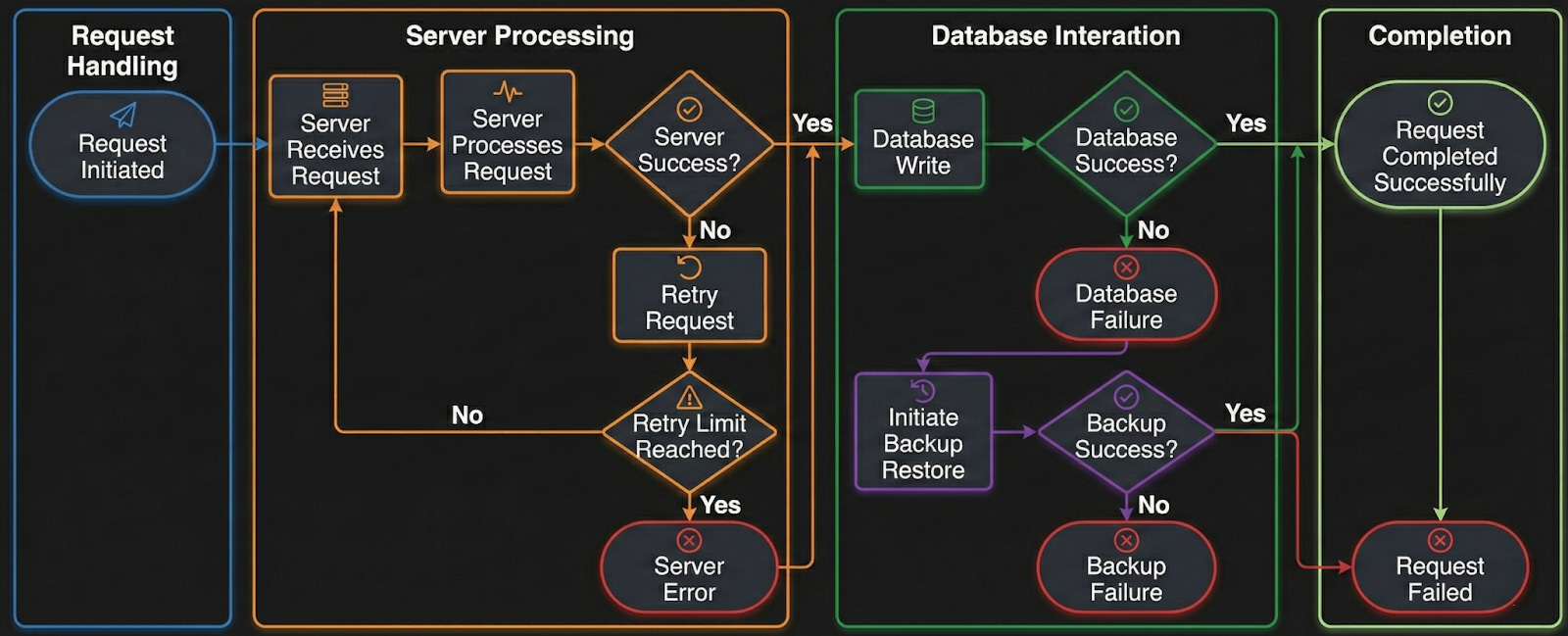
A reliable system handles failures gracefully. If a server crashes, requests get rerouted. If data gets corrupted, backups restore it. Reliability includes fault tolerance, data durability, and consistent behavior under various conditions.
Analogy
Reliability is like a car that starts every morning, even in winter…
It doesn’t just work 99% of the time--it safely takes you to the right destination. A highly available but unreliable system is like a taxi that always shows up but sometimes takes you to the wrong address.
Tradeoff
Building reliable systems requires extensive testing, monitoring, error handling, retry logic, and redundancy. This increases development time & operational complexity.
Why it matters
Prioritize reliability for financial transactions, healthcare systems, data pipelines where data loss is unacceptable, or any system where incorrect behavior is worse than being temporarily unavailable.
Remember, a personal blog doesn’t need the same reliability as a hospital patient monitoring system.
4. Latency vs Throughput vs Bandwidth
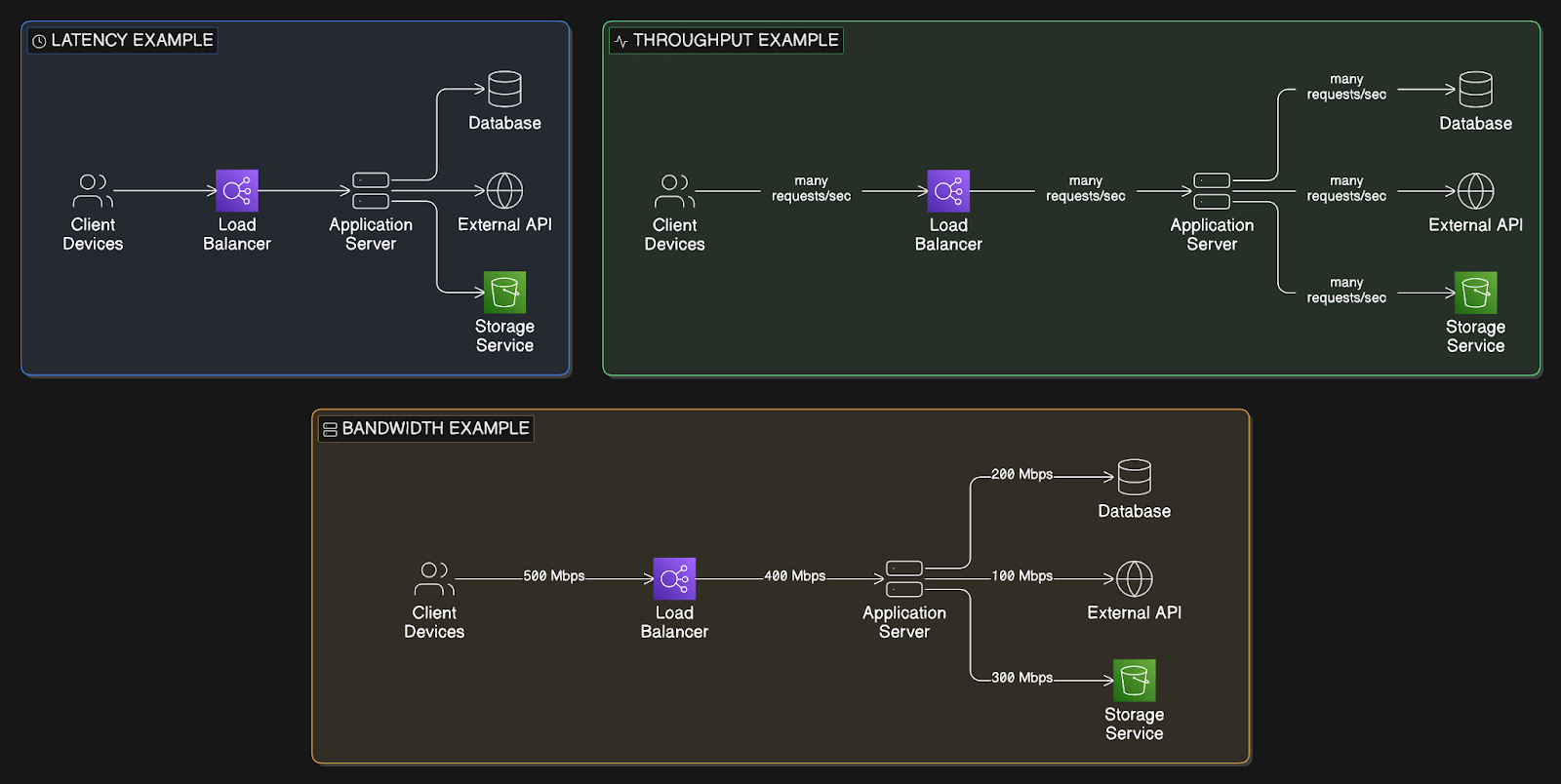
Latency is the time it takes for a single request to travel from client to server and back, measured in milliseconds.
Throughput is how many requests your system can handle per unit of time, like requests per second.
Bandwidth is the maximum amount of data that can be transferred over a network connection in a given time, measured in Mbps or Gbps.
These three metrics are related,,, but measure different aspects of performance.
Analogy
Think of a highway:
Latency is how long it takes one car to drive from point A to B.
Throughput is the number of cars that can complete the journey per hour.
Bandwidth is how many lanes a highway has.
You can have an 8-lane highway with high latency over long distances, or a 2-lane road with low latency over short distances.
Tradeoff
Optimizing for one doesn’t automatically improve the others…
You can increase throughput by adding more servers, but it won’t reduce latency. You can reduce latency by caching or using a CDN, but it doesn’t increase throughput.
Increasing bandwidth helps with large data transfers but doesn’t reduce latency.
Why it matters
Focus on low latency for real-time applications such as gaming, video calls, and trading platforms. While optimize throughput for high-traffic APIs and web services. And prioritize bandwidth for video streaming, file transfers, and data-intensive applications.
Most production systems need to balance all three…
5. Client-Server Architecture
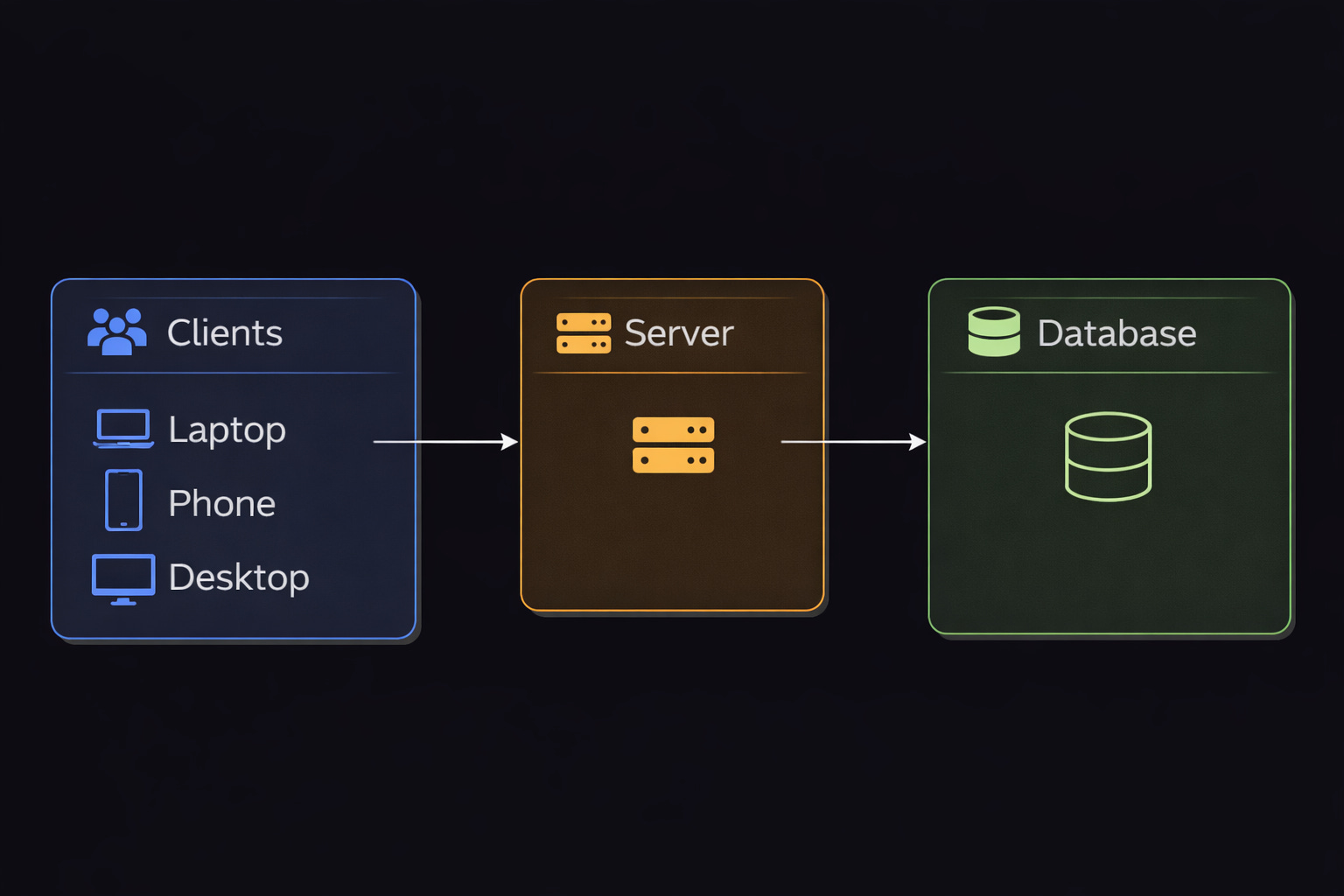
A model where clients, such as users’ devices, browsers, or mobile apps, send requests to servers, which process those requests and send back responses.
The server hosts the business logic, databases, and resources, while clients provide the user interface. This separation allows multiple clients to access the same server resources simultaneously.
Analogy
Client-server is like a restaurant: you sit at a table, place your order with a waiter, and the waiter takes it to the kitchen.
The kitchen prepares your food and sends it back through the waiter. You don’t go into the kitchen yourself…there’s a clear separation of responsibilities.
Tradeoff
This architecture centralizes control and data management, making it easier to maintain and secure. Yet the server could become a bottleneck and a single point of failure. If the server goes down, all clients lose access.
The server also needs to scale to handle increasing numbers of clients.
Why it matters
Web applications, mobile apps, email systems, and most modern software.
It’s the foundation of how the internet works…Consider alternatives such as peer-to-peer file sharing or edge computing when you need to reduce dependence on central servers.
6. Databases
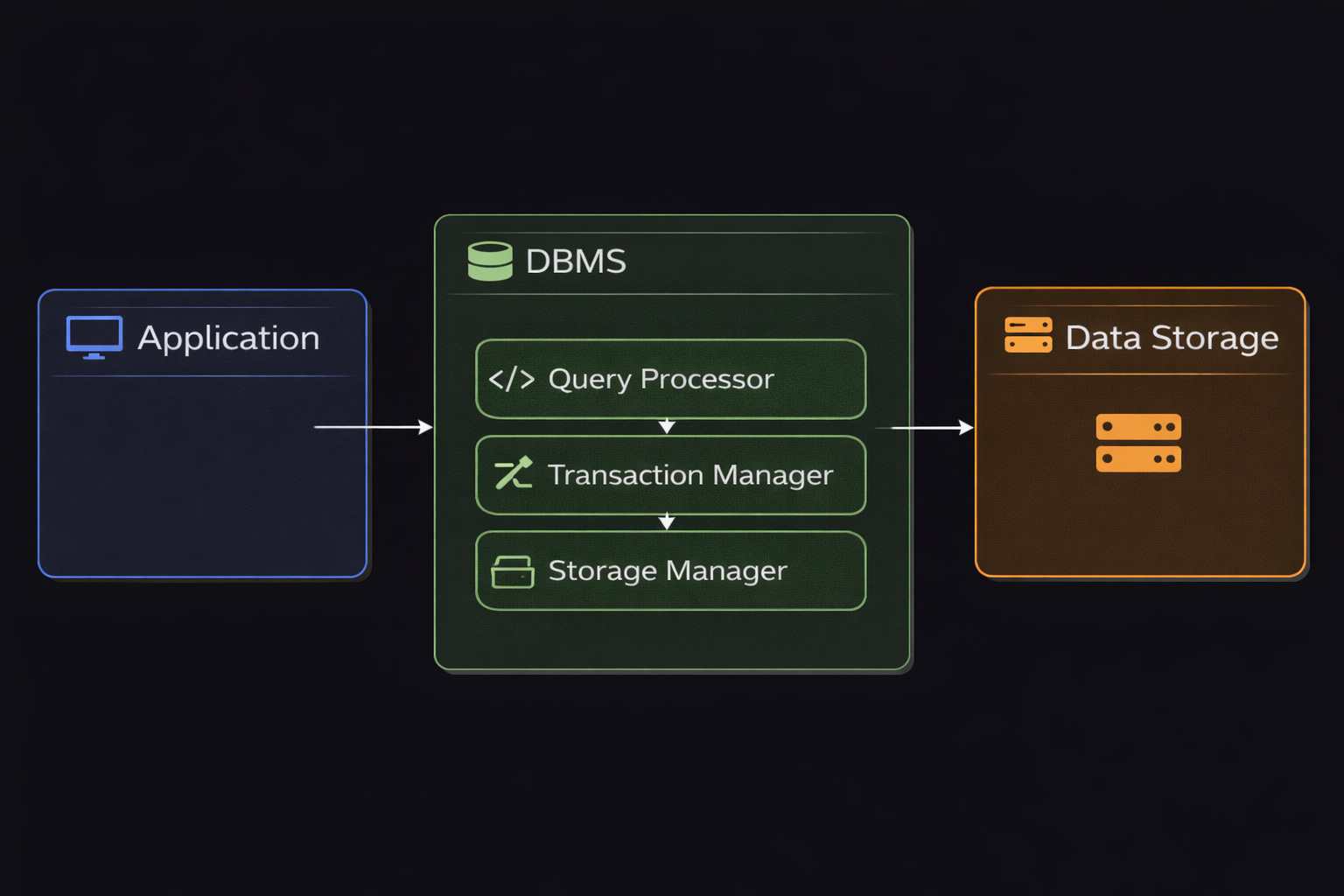
A database is an organized collection of structured data stored electronically and managed by a Database Management System (DBMS).
Databases allow you to create, read, update, and delete data efficiently.
They handle concurrent access, ensure data integrity through transactions with ACID properties, and provide query languages to retrieve data. Databases can be relational, with tables organized as rows and columns, or non-relational, such as documents, key-value pairs, or graphs.
Analogy
A database is like a highly organized library with a sophisticated cataloging system.
Instead of wandering through aisles hoping to find a book, you use the catalog to locate what you need instantly. The librarian ensures books don’t get lost, handles multiple people checking out books simultaneously, and maintains the organization system.
Tradeoff
Databases provide powerful data management but introduce complexity:
They require careful schema design, indexing strategies, backup procedures, and monitoring. Poorly designed databases become bottlenecks. Plus, slow queries can bring down your entire application.
Different database types optimize for different use cases…so choosing the wrong one can ‘hurt’ performance.
Why it matters
Use databases whenever you need to persist data beyond application restarts, handle concurrent users accessing shared data, maintain data relationships, or query data in flexible ways.
Almost every production application needs a database…the question is which type fits your use case.
7. SQL vs NoSQL
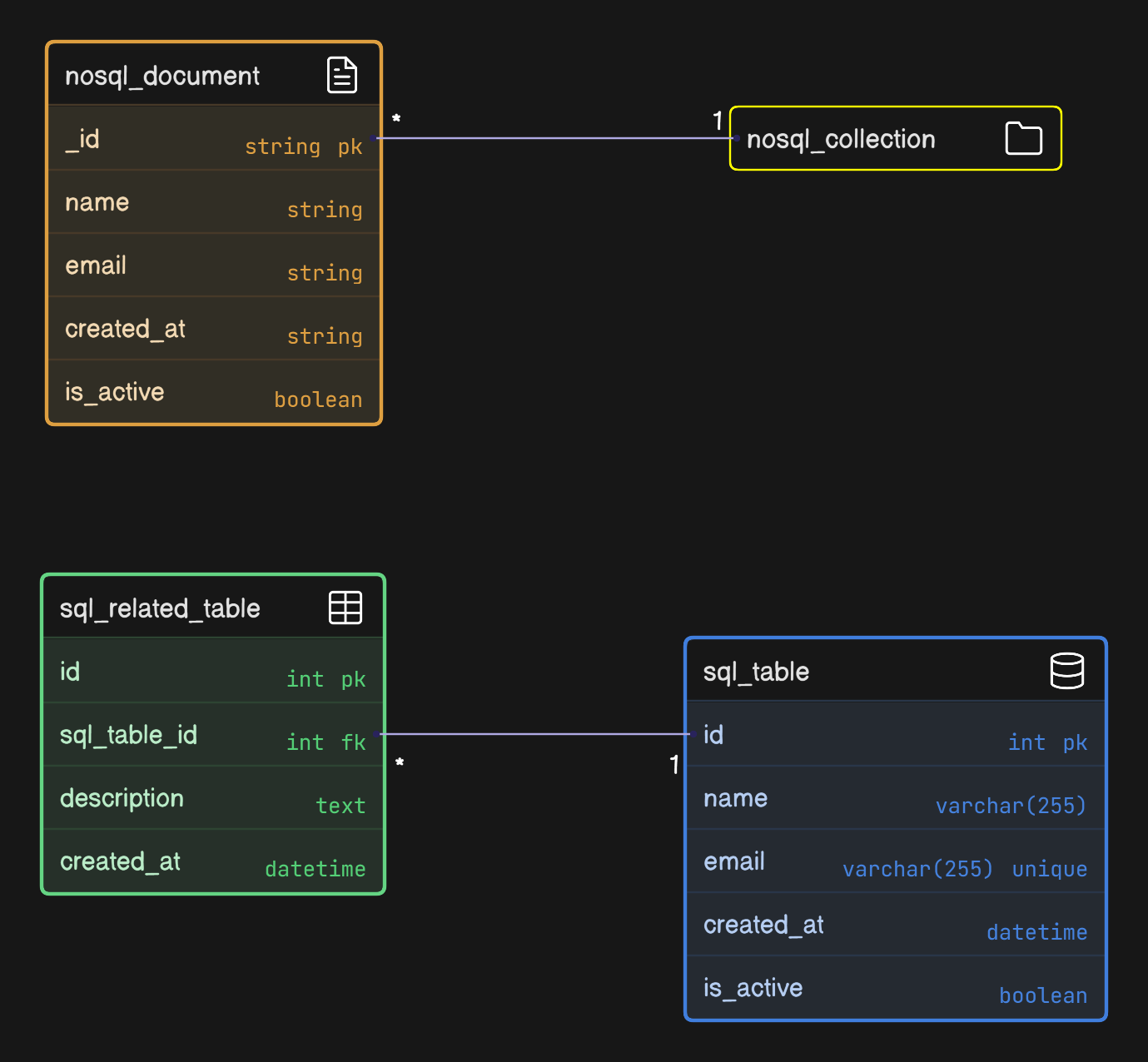
SQL databases organize data in tables with predefined schemas, using rows and columns.
They support complex queries, joins across tables, and ACID transactions. Examples: PostgreSQL & MySQL.
NoSQL databases use flexible schemas and store data as documents, key-value pairs, wide columns, or graphs.
They prioritize scalability and flexibility over strict consistency. Examples: MongoDB, Redis, Cassandra, and Neo4j.
Analogy
SQL is like a spreadsheet with strict columns…
Everyone must follow the same structure, but you can easily combine data from different sheets using formulas.
NoSQL is like a filing cabinet where each folder can contain different types of documents in different formats…more flexible, but harder to analyze across folders.
Tradeoff
SQL databases offer strong consistency, complex querying, and enforced data integrity. They can scale vertically and horizontally, but distributing data across many machines is often complex because of joins and transactional guarantees.
While NoSQL databases are built to scale horizontally and handle flexible data models. They often trade strong consistency or full relational features for scale and high availability.
Most companies use both SQL for transactional data and NoSQL for flexibility and scalability.
Why it matters
Use SQL for financial systems, e-commerce orders, user authentication, or anywhere you need ACID guarantees and complex queries across related data.
Use NoSQL for user profiles, product catalogs, real-time analytics, session storage, or when your schema changes frequently.
Reminder: this is a teaser of the subscriber-only post, exclusive to my golden members.
When you upgrade, you’ll get:
Full access to system design case studies
FREE access to (coming) Design, Build, Scale newsletter series
FREE access to (coming) popular interview question breakdowns
And more!
Get 10x the results you currently get with 1/10th the time, energy & effort.