


Share this post & I'll send you some rewards for the referrals.
Block diagrams created using Eraser.
Onwards 'n downwards:
Following is the second of a premium 3-part newsletter series… If you’re just getting started with system design or want a super strong foundation, then this newsletter is for you.
On with part 2 of the newsletter:
===
Some of these are foundational, and some are quite advanced. ALL of them are super useful to software engineers building distributed systems…
Curious to know how many were new to you:
WebSockets
API Gateways
Distributed Cache
Cache Eviction Policies
Proxy vs Reverse Proxy
HTTP vs HTTPS
TCP vs UDP
OSI Model
TLS/SSL
DNS Load Balancing
Anycast Routing
Object Storage
Distributed File Systems
Block vs File vs Object Storage
Data Compression
ACID vs BASE
Network Partitions
Split-Brain Problem
Heartbeats
Leader Election
Consensus Algorithms
Quorum
Paxos Algorithm
Raft Algorithm
Gossip Protocol
Clock Synchronization Problem
Logical Clocks
Lamport Timestamps
Vector Clocks
Distributed Transactions
Two-Phase Commit
SAGA Pattern
Outbox Pattern
Three-Phase Commit
Delivery Semantics
Change Data Capture
Long Polling
Server-Sent Events
(…and much more in part 3!)
For each, I’ll share:
What it is & how it works--in simple words
A real-world analogy
Tradeoffs
Why it matters
Let’s go.
AI code review with your team’s knowledge (Partner)

Unblocked is the only AI code review tool that has a deep understanding of your codebase, docs, and past decisions, giving you thoughtful feedback that feels like it came from your best engineer.
39. WebSockets
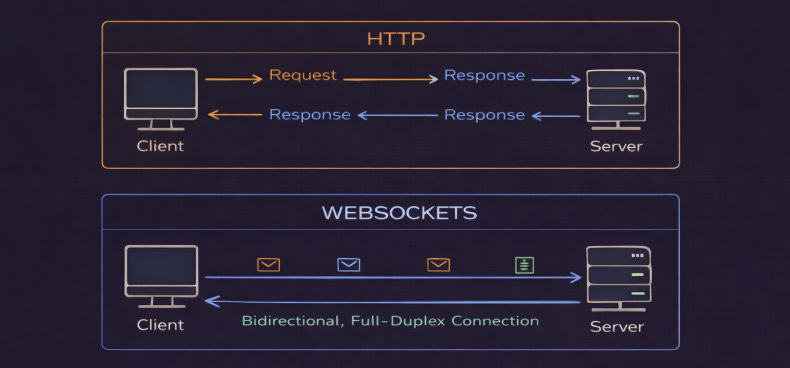
WebSockets provide full-duplex, bidirectional communication between client & server over a single, long-lived TCP connection.
Unlike HTTP, where the client always initiates requests, WebSockets allow the server to push data to clients in real-time.
After an initial HTTP handshake, the connection upgrades to the WebSocket protocol. Both the client and the server can then send messages at any time.
Analogy
WebSockets is like a phone call where both people can talk and listen simultaneously…
Compare this to HTTP, which is like sending letters back and forth,,, where you wait for a reply before sending the next message.
Tradeoff
They’re more complex to implement and scale since each connection consumes server resources. Also, load balancing becomes tricky because connections are long-lived and stateful.
Plus, some proxies/firewalls “block” WebSocket upgrades or long-lived connections, so compatibility can vary.
Why it matters
Use for real-time apps like chat systems, live sports scores, collaborative editing, online gaming, or stock trading platforms. But avoid for simple request-response patterns where HTTP is enough.
40. API Gateways
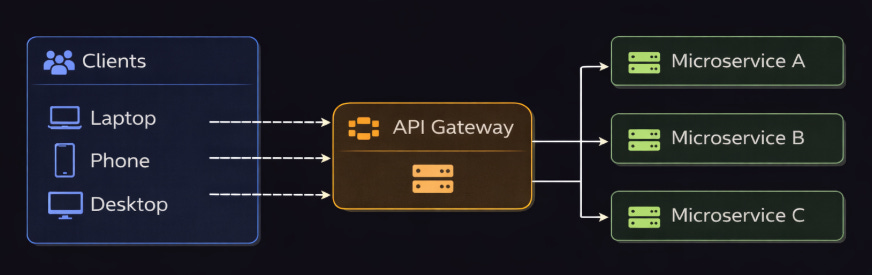
An API gateway is a server that acts as a SINGLE entry point for all client requests to your microservices.
It handles request routing, composition, and protocol translation1. Instead of clients calling different microservices directly, they make ‘one call’ to the gateway.
Analogy
An API gateway is like a hotel concierge:
Instead of guests figuring out which department to call, they call the concierge desk. The concierge knows which department to contact and gets back to the guest with answers.
Tradeoff
They can become a bottleneck or a single point of failure if not deployed redundantly. Besides, they increase latency because of the extra network hop. So the gateway itself needs to scale & be highly available.
Why it matters
Useful in microservices because it provides clients with a single entry point.
Also, it handles common tasks like authentication, authorization, and rate limiting in one place, and can return different responses for different clients, such as web or mobile apps.
41. Distributed Cache
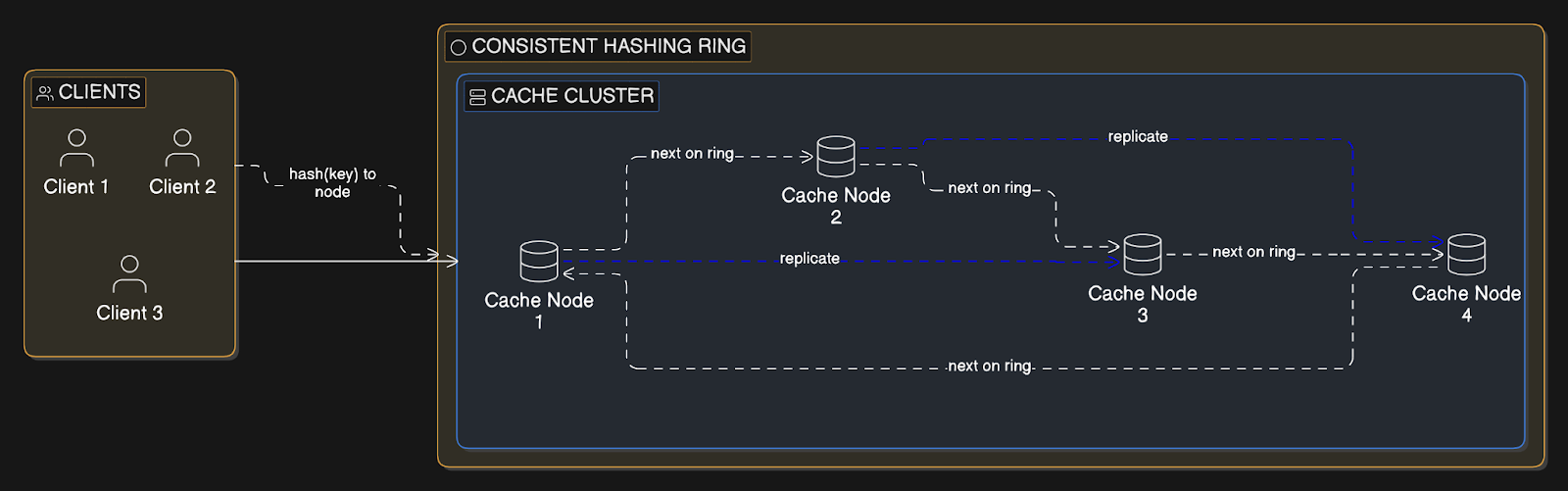
Distributed cache spreads cached data across many cache servers instead of a single cache instance.
Each cache node stores a portion of the data, typically determined by consistent hashing2. Popular implementations include Redis Cluster and Memcached.
Analogy
Multiple fast-food locations across a city instead of one central kitchen.
Each location stores popular items for quick service. Total capacity increases by opening more locations, and no single location becomes overwhelmed during rush hour.
Tradeoff
They add operational complexity (partitioning, rebalancing, replication) and can incur overhead during rebalancing/failover. Also, there’s a risk of cache misses when keys get redistributed.
Plus, debugging becomes harder with many nodes.
Why it matters
Use a distributed cache in high-traffic sites when one cache server can’t handle the traffic, when the data no longer fits in one machine’s memory, or when you need high availability.
Start with a single cache server…Move to a distributed cache setup only when you reach scaling or reliability limits.
42. Cache Eviction Policies
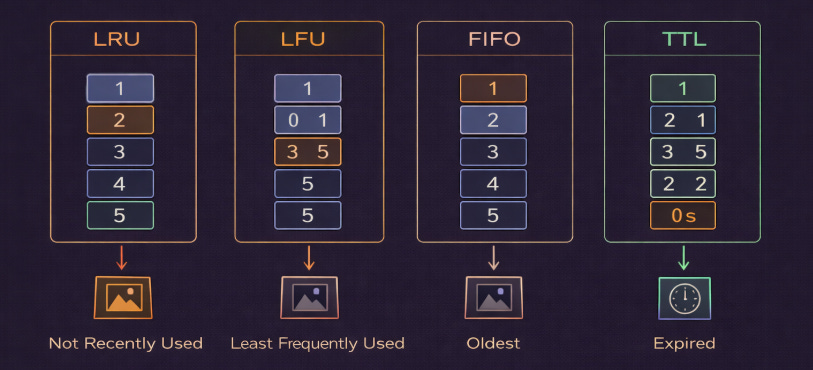
Cache eviction policies decide which data to remove when the cache is full and new data needs space.
Least Recently Used (LRU) removes the data that has NOT been accessed for the longest time.
Least Frequently Used (LFU) removes the data that is accessed the least often.
First In, First Out (FIFO) removes the oldest data first, based on when it was added.
Time To Live (TTL) automatically removes data after a fixed time period.
Analogy
Think of your phone storage:
LRU deletes photos you haven’t opened in a long time.
LFU deletes photos you rarely look at.
FIFO deletes the oldest photos first.
TTL is like a message that automatically disappears after 24 hours.
Tradeoff
Different policies work well for different access patterns…
LRU works well when recently accessed data is likely to be used again. Yet it can perform poorly if large amounts of data are accessed only once.
LFU works well when frequently accessed data stays popular over time, but it reacts slowly if usage patterns change.
FIFO is simple but does not consider how often or recently data is used.
TTL ensures data does not stay in the cache forever, but it may remove useful data too early or keep stale data too long.
Each policy has overhead in tracking metadata for eviction decisions.
Why it matters
Use:
LRU for general-purpose caching where recent data is likely to be reused.
LFU when certain data remains popular for long periods.
TTL when data naturally becomes stale after some time, such as API responses or session data.
Most systems combine TTL with LRU or LFU.
43. Proxy vs Reverse Proxy
A forward proxy sits between clients and the Internet. It sends requests to external servers on behalf of the client.
A reverse proxy sits in front of your servers. It receives requests from clients and forwards them to the correct backend server.
With a forward proxy, client is configured to use it. With a reverse proxy, the client usually doesn’t know it exists.
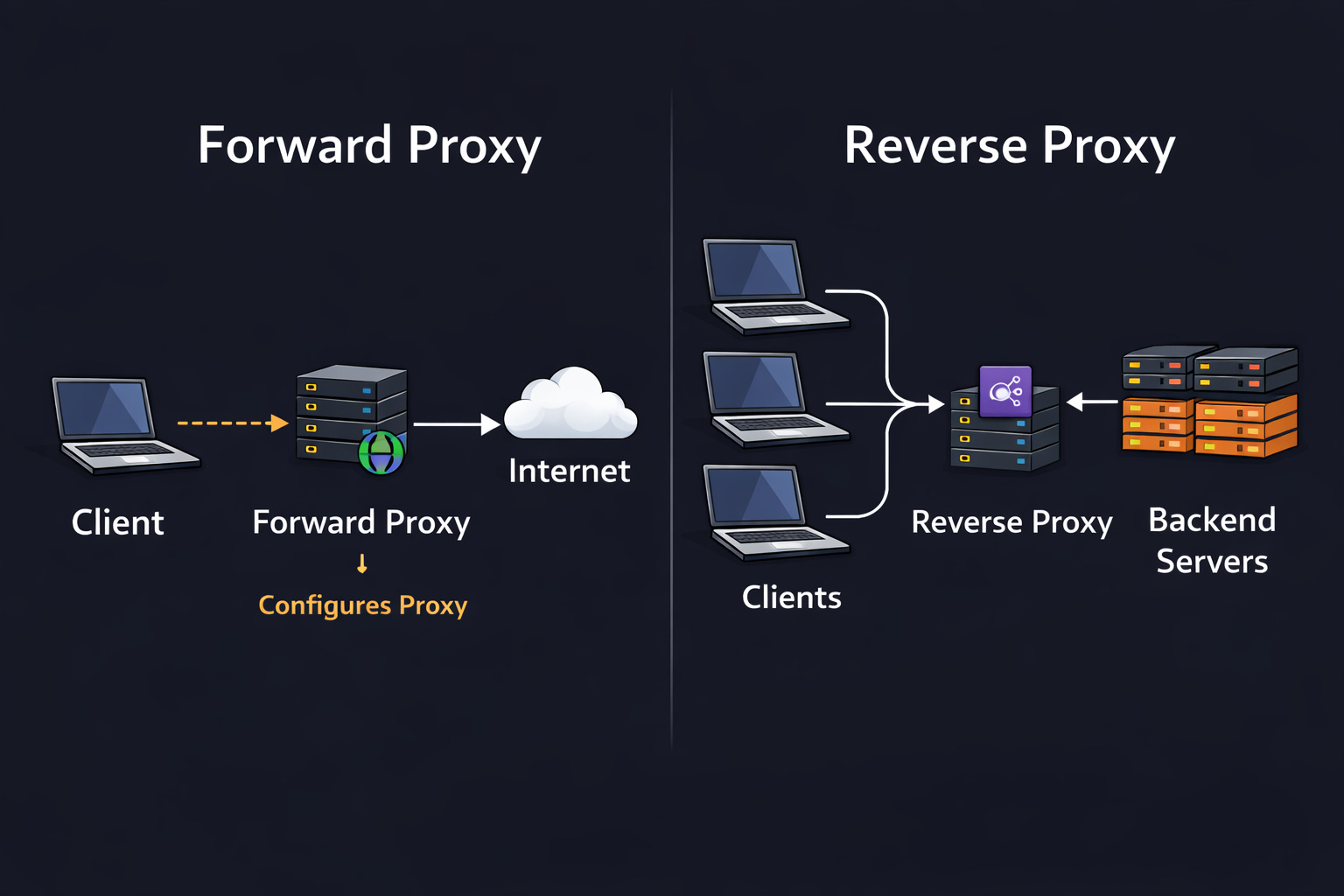
Analogy
A forward proxy is like an assistant who makes calls for you, so the person on the other end doesn’t talk with you directly.
A reverse proxy is like a company receptionist. Callers think they are contacting the company directly,,, but the receptionist routes the call internally.
Tradeoff
Forward proxies can improve privacy, enforce security policies, and filter traffic. Yet they add extra network hops and can increase latency.
Reverse proxies provide load balancing, SSL termination, caching, and protection from direct exposure of backend servers. But they must be deployed redundantly to avoid becoming a single point of failure.
Both require proper configuration to prevent security risks…
Why it matters
Use forward proxies in corporate networks for content filtering, monitoring & privacy control.
Use reverse proxies in production systems for load balancing, SSL termination, traffic routing, and protection against attacks3.
Most apps use reverse proxies such as Nginx, HAProxy, or cloud load balancers.
44. HTTP vs HTTPS
Hypertext Transfer Protocol (HTTP) sends data in ‘plain text’.
Hypertext Transfer Protocol Secure (HTTPS) is HTTP encrypted using Transport Layer Security (TLS).
HTTPS encrypts communication between the client and server, protecting data from eavesdropping and tampering. The server provides a certificate to prove its identity. Modern browsers mark HTTP sites as “Not Secure.”
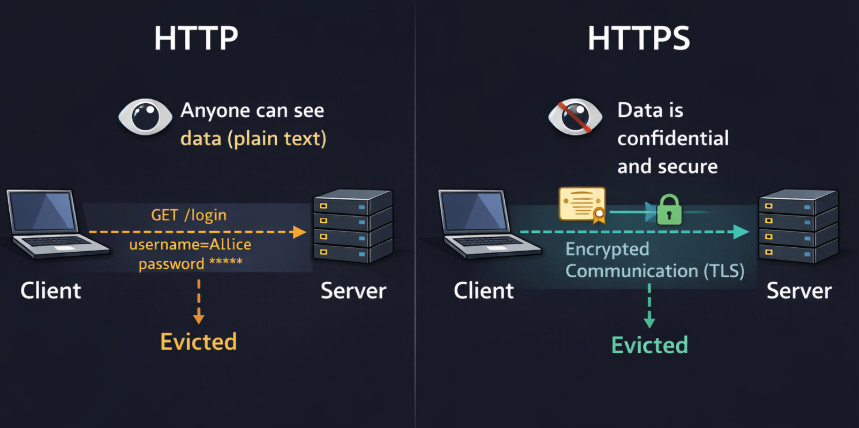
Analogy
HTTP is like sending a postcard. Anyone who intercepts it can read the message.
HTTPS is like sending a sealed, locked box. Even if someone intercepts it, they cannot read or change what’s inside.
Tradeoff
HTTPS requires managing digital certificates and adds a small performance cost because of the TLS handshake. Yet these costs are minimal compared to the security benefits.
Why it matters
HTTPS protects against eavesdropping and man-in-the-middle attacks, where attackers intercept or modify traffic.
HTTPS is also a positive ranking factor for search engines and is required for many modern web features, such as HTTP/2, service workers, and secure cookies.
45. TCP vs UDP
Transmission Control Protocol (TCP) is a connection-oriented protocol that provides reliable, ordered delivery of data.
User Datagram Protocol (UDP) is connectionless and sends packets without guaranteeing delivery, order, or protection against duplication.
TCP establishes a connection using a handshake, retransmits lost packets, and performs congestion control.
UDP sends packets independently with minimal overhead & no built-in reliability. i.e., UDP is faster but less reliable.
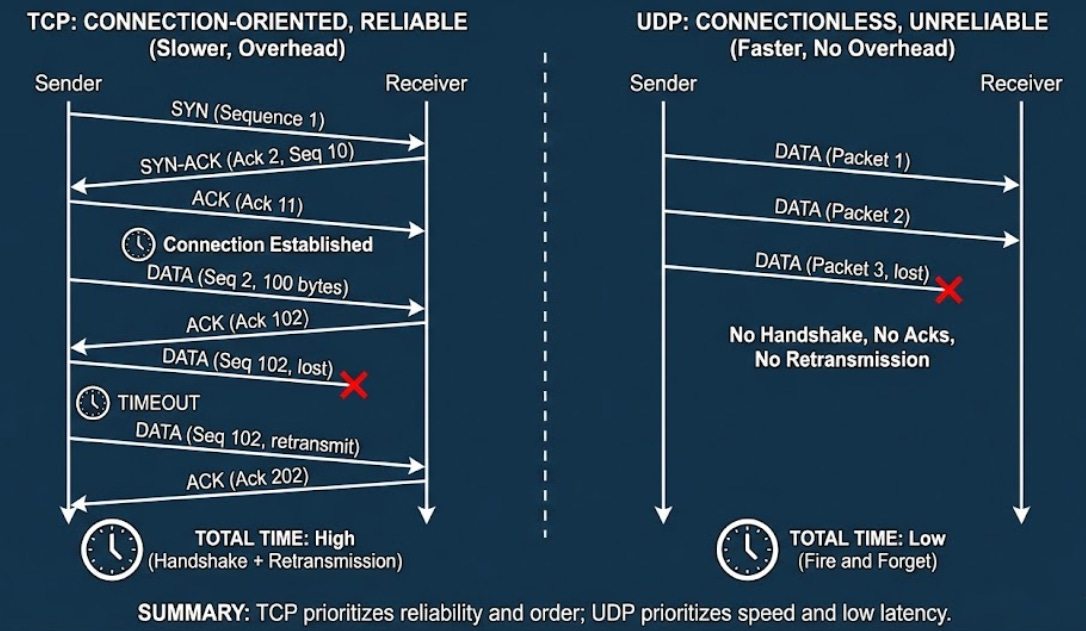
Analogy
TCP is like certified mail with tracking and delivery confirmation.
UDP is like sending postcards. They usually arrive, but they might be lost or arrive out of order…
Tradeoff
TCP adds latency due to the handshake, acknowledgments, retransmissions, and head-of-line blocking (where a lost packet delays subsequent packets).
UDP doesn’t guarantee delivery or order. If reliability is needed,,, the application code must handle it.
Why it matters
Use TCP for web browsing, email, file transfers, database connections, and APIs where accuracy matters more than speed.
Use UDP for real-time applications such as video calls, live streaming, and online gaming, where low latency is more important than reliability.
NOTE: DNS typically uses UDP for speed, but it can fall back to TCP for large responses or specific operations.
Reminder: this is a teaser of the subscriber-only post, exclusive to my golden members.
When you upgrade, you’ll get:
Full access to system design case studies
FREE access to (coming) Design, Build, Scale newsletter series
FREE access to (coming) popular interview question breakdowns
And more!
Get 10x the results you currently get with 1/10th the time, energy & effort.