

Share this post & I'll send you some rewards for the referrals.
Block diagrams created using Eraser.
Building a video-sharing platform like YouTube is a ‘classic’ system design interview question.
YouTube processes over 500 hours of content that is uploaded every minute and serves billions of video streams daily.
Unlike static file-sharing services, YouTube transforms every upload into dozens of optimized formats, enabling smooth playback across devices from smartphones to 4K TVs, even on slow networks.

Here are some core challenges that make YouTube interesting from a system design perspective:
Scale: Exabyte-level storage with millions of concurrent viewers
Global reach: Low latency for users worldwide
Adaptive delivery: Automatic quality adjustment for varying network conditions
Processing complexity: Each upload becomes 6+ resolutions × hundreds of segments1
Read-heavy traffic: This demands aggressive caching
Similar architectural patterns appear in platforms such as Netflix, Twitch, and TikTok, as well as in any platform that serves video at scale.
Let’s learn how to design YouTube during a system design interview:
Master of Science in AI Engineering (Partner)

AI Engineer is the #1 Fastest-Growing Job on LinkedIn, with salaries typically ranging from $180,000 to $350,000.
Co-designed with AI leaders from Microsoft (Eduardo Kassner, Chief Data & AI Officer) and Google (Tomas Pfister, Head of AI Research @ Google Cloud)
12 months | 100% online | No exams
Built for working software engineers ready to land AI Engineer positions:
Build a GitHub portfolio of 8 AI projects
Bring Your Own Projects or Ideas (BYOP)
Live weekly AI masterclasses
Developers from Microsoft, Apple, AWS, and TJ Maxx have already joined the program.
By graduation, you’ll have the skills, confidence, and credentials to lead AI initiatives. To command top-tier salaries. To shape what comes next.
Cohort starts February 2.
Questions to Ask the Interviewer
Candidate: What scale are we designing for?
Interviewer: 1 million uploads per day, 100 million DAU2
Why it matters: Scale drives sharding, partitioning, and caching3
Interview insight: You show you understand capacity planning
===
Candidate: What’s the read-to-write ratio?
Interviewer: About 100 views for every 1 upload
Why this matters: It’s a read-heavy system, so the design favors streaming
Interview insight: You show awareness of workload patterns
===
Candidate: What’s the maximum video file size?
Interviewer: 256 GB
Why this matters: Forces you to use multipart uploads and chunking4
Interview insight: You consider edge cases
===
Candidate: What video formats and resolutions do we support?
Interviewer: MP4, AVI, MOV, and from 240p to 4K5
Why this matters: Needs a strong transcoding pipeline with many output renditions6
Interview insight: Shows attention to real-world constraints
===
Candidate: What’s the target latency for streaming?
Interviewer: First frame in under 500ms
Interview insight: You focus on user experience
===
Candidate: What’s acceptable for upload processing time?
Interviewer: Around 10 to 30 minutes
Why this matters: Processing can be asynchronous
Interview insight: You understand eventual consistency
===
Candidate: Is eventual consistency fine for new uploads?
Interviewer: Yes, a short delay is acceptable
Why this matters: Availability over strict immediacy
Interview insight: You show CAP theorem9 reasoning
===
Candidate: What’s our uptime target?
Interviewer: 99.9%
Why this matters: Need redundancy and failover10
Interview insight: You think about reliability
===
Candidate: Do we support livestreaming?
Interviewer: For this interview, focus on uploads
Why this matters: Keeps scope controlled
Interview insight: You avoid feature creep
Onward.
System Requirements
The design must address a massive scale and specific constraints:
Functional Requirements
Upload Videos
Users upload from web and mobile clients
System accepts files up to 256 GB
Resume interrupted uploads without data loss
Store raw media for the transcoding pipeline11
Stream Videos
Smooth playback across regions and devices
Quality adjusts automatically to network speed (adaptive bitrate)
First frame appears in under 500ms
Stability in different connection types
Search Videos
Discover content by querying titles and descriptions
Return results in manageable chunks (pagination)
Support high-cardinality searches (millions of videos)
Non-Functional Requirements
Availability
Service must remain available during failures
New uploads don’t need instant visibility (eventual consistency is okay)
Scalability
Support 1 million uploads/day
Handle 100 million daily active users
Large File Support
Multipart upload with chunk-level retries
Resume capability for interrupted uploads
Efficient storage and processing of massive files
No progress loss on network failures
Low Latency Streaming
First frame must appear in under 500ms
Video playback must adapt to varying network speeds
Buffering should be minimal during normal network conditions
Low Bandwidth Usage
Automatic quality adjustment for slow networks
Smaller segment sizes for stable playback
Bandwidth optimization for developing regions
Let’s keep going!
API Design
API Type: REST (Representational State Transfer).
Why: REST12 is the industry standard for public-facing web services, offering scalability and ease of integration for web and mobile clients.
API Optimizations
Pre-Signed URLs13 (Bypass the App Server)
Instead of uploading videos through your API servers, clients receive a temporary, signed S3 URL. This prevents your application servers from becoming the bottleneck. And users upload directly to blob storage.
Pagination
The search and comments endpoints return results in chunks via cursor-based pagination14. This prevents massive queries from locking down the database.
The client interacts with the system via a RESTful API.
The design follows a strict philosophy: application servers handle lightweight metadata, while heavy video data is offloaded directly to cloud storage and CDNs.15
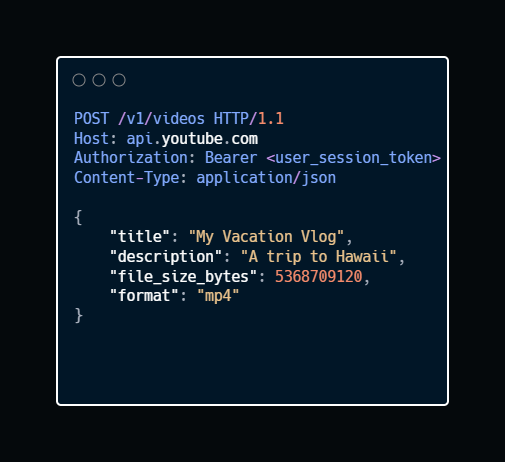
1. Upload Initiation
Endpoint: POST /v1/videos
Description: The server reserves a video ID and returns a pre-signed URL, a temporary link that allows the client to upload directly to S3 without touching the app server.
Sample Request:
Sample Response:
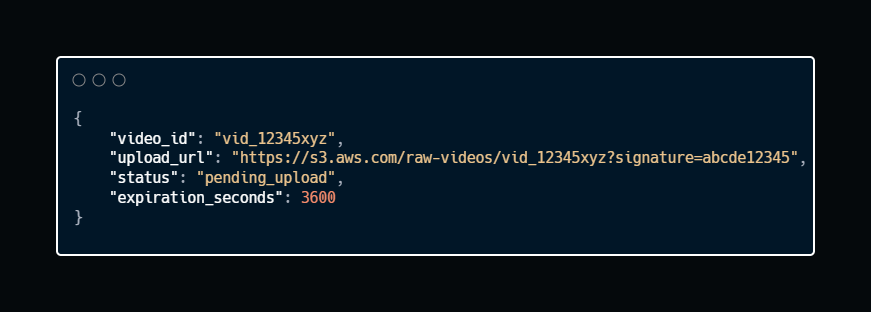
The application server is almost untouched… Bandwidth goes directly to blob storage.
2. Stream Video
Endpoint: GET /v1/videos/{video_id}
Description: When a user requests to watch a video, this endpoint returns the video’s metadata and the manifest file URL16. The client uses this to begin adaptive bitrate streaming (ABR) from the CDN.
Sample Request:

Sample Response:
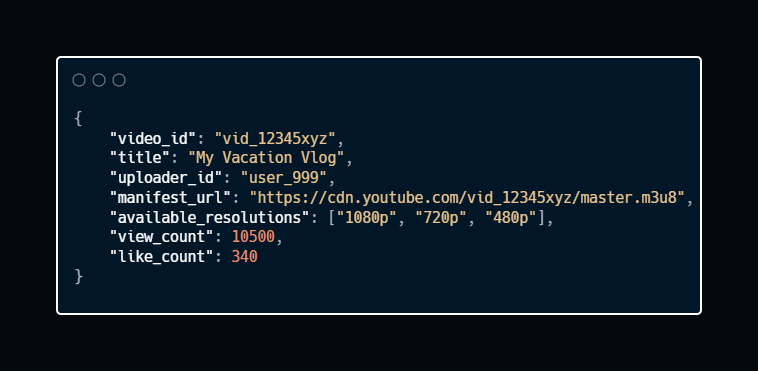
Manifest file tells the client which video segments and resolutions are available. The CDN handles the actual streaming.
3. Update Watch Progress
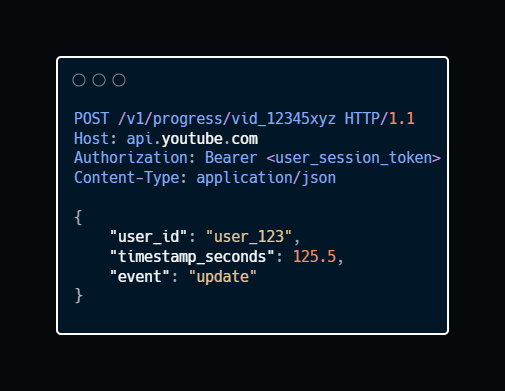
Endpoint: POST /v1/progress/{video_id}
Description: This endpoint tracks the user’s playback position. It’s designed for massive scale (handling millions of writes/second) and prioritizes speed over immediate consistency.
Sample Request:
Sample Response:

This endpoint alone handles millions of writes/second. It can’t afford latency. So fire the request; don’t wait for confirmation. Then store in a high-throughput database like DynamoDB17.
4. Search
Endpoint: GET /v1/search
Description: Queries the search index18 to find videos matching a user’s query. This endpoint relies heavily on pagination to return results in manageable chunks.
Sample Request:
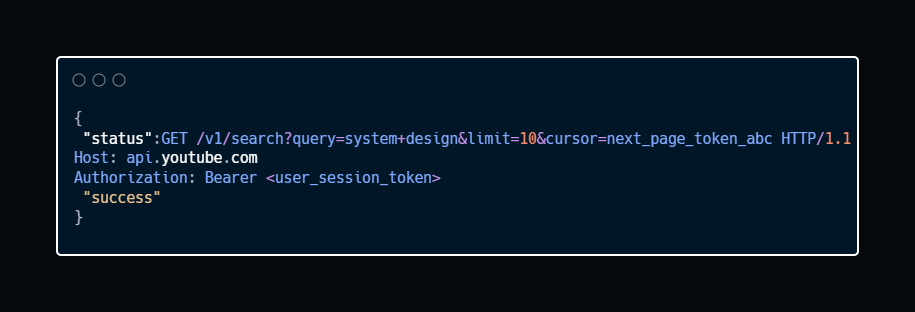
Cursor-based pagination prevents massive queries. Each page contains a next_cursor token, allowing the client to fetch the next batch without re-querying the entire dataset.
Sample Response:
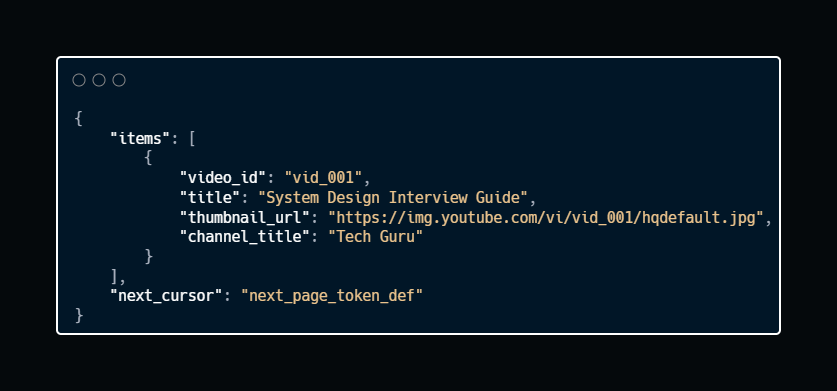
Cursor-based pagination is more scalable than offset-based pagination. It prevents the “skip 10 million rows” problem19.
Ready for the best part?