


Share this post & I'll send you some rewards for the referrals.
Every AI tool you use is starving for “context1”.
Your AI needs your codebase. Your custom agents2 need database access. But getting that context to them? That is where things get messy.
When large language models3 (LLMs) emerged, each link between AI and data sources required a custom integration built from scratch.
Onward.
Cut Code Review Time & Bugs in Half (Sponsor)

Code reviews are critical but time-consuming.
CodeRabbit acts as your AI co-pilot, providing instant code review comments and potential impacts of every pull request.
Beyond just flagging issues, CodeRabbit provides one-click fix suggestions and lets you define custom code quality rules using AST Grep patterns, catching subtle issues that traditional static analysis tools might miss.
CodeRabbit has so far reviewed more than 10 million PRs, installed on 2 million repositories, and used by 100 thousand open-source projects.
CodeRabbit is free for all open-source repos.
I want to introduce Eric Roby as a guest author.

He’s a senior backend and AI engineer focused on building real-world systems and teaching developers how to do the same. He runs the YouTube channel codingwithroby, where he focuses on scalable backend architecture and integrating AI into production applications.
Through his content and courses, he helps engineers go beyond tutorials, think in systems, and develop the skills that actually matter for senior-level roles.
Find him on:
In November 2024, Anthropic launched the Model Context Protocol (MCP) to fix this problem. This wasn’t just another developer tool. It aimed to tackle a key infrastructure issue in AI engineering.
The challenge?
Every AI application needs to connect to data sources. Until now, they had to build custom integrations from scratch. This approach creates a fragmented ecosystem that does not scale.
For example, the world isn’t frozen in time, but LLMs are…
If you want an AI to “monitor server logs,” you can’t feed it a file. You would have to build a data pipeline that polls an API every few seconds. Filter out noise, then push only the relevant anomalies into the AI’s context window4. If the API changes its rate limits or response format, your entire agent breaks.
A better way to think of MCP is like a USB-C port.
The Old Way (Before USB):
If you bought a mouse, it had a PS/2 plug. A printer had a massive parallel port. A camera had a proprietary cable. If you wanted to connect these to a computer, the computer needed a specific physical port for each one.

This is the “N×M” problem:
Each device maker had to figure out how to connect to each computer. So, computer makers had to create ports for every device.
The MCP Way (With USB-C):
Now, everything uses a standard port.
Computer (AI Model5) needs one USB-C port. It doesn’t need to know if you are plugging in a hard drive or a microphone; it just speaks “USB.”
Device (Data Source) requires a USB-C port. It doesn’t need to know if it’s plugged into a Mac, a PC, or an iPad.

The result: you can plug anything into anything instantly.
The analogy makes sense in theory. But to understand why MCP matters, you need to see how painful the current reality actually is…
The Integration Complexity Problem
Every AI assistant needs context to be useful:
Claude6 needs access to your codebase. ChatGPT may require your Google Drive files. Custom agents need database connections. But how do these AI systems actually get that context?
Traditionally, each connection requires a custom integration.
If you’re building an AI coding assistant, you need to:
Write code to connect to the GitHub API.
Add authentication and security.
Create a way to change GitHub’s data format into a version that your AI can understand.
Handle rate limiting, errors, and edge cases.
Repeat this entire process for GitLab, Bitbucket, and every other source control system.
This creates the N×M problem:
‘N’ AI assistants multiplied by ‘M’ data sources equals N×M unique integrations that need to be built and maintained.
When Cursor wants to add Notion support, they build it from scratch. When GitHub Copilot wants the same thing, they build it again. The engineering effort gets duplicated across every AI platform.
The traditional approaches have fundamental limitations:
Static, build-time integration:
Integrations are hard-coded into applications. You can’t add a new data source without updating the application itself. This makes rapid experimentation impossible and forces users to wait for official support.
Application-specific security implementations:
Every integration reinvents authentication, authorization, and data protection. This leads to inconsistent security models and increases the attack surface.
No standard way to discover:
AI systems can’t find out what capabilities a data source has. Everything needs clear programming. This makes it hard to create agents that adapt. They can’t use the new tools on their own.
The result is a ‘broken’ ecosystem!
Innovation is stuck because of integration work. Users can access only the connections that application developers create. So that’s a mess.
Now let’s look at how MCP cleans it up…
How MCP Solves It
MCP’s solution is straightforward: define a single protocol that functions across all systems.
Instead of building N×M integrations, you build N clients (one per AI application) and M servers (one per data source). The total integration work drops from N×M to N+M.
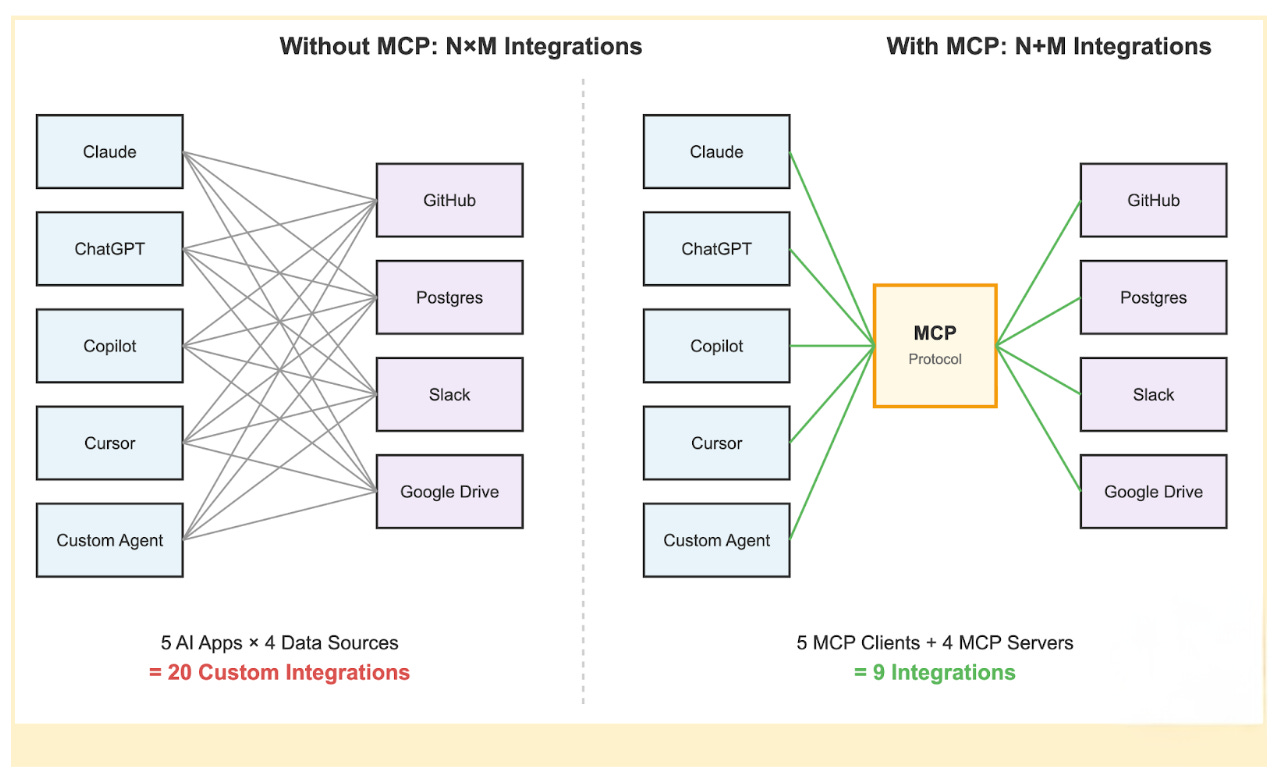
When a new AI assistant7 wants to support all existing data sources, it just needs to implement the MCP client protocol once.
When a new data source wants to be available to all AI assistants, it just needs to implement the MCP server protocol once.
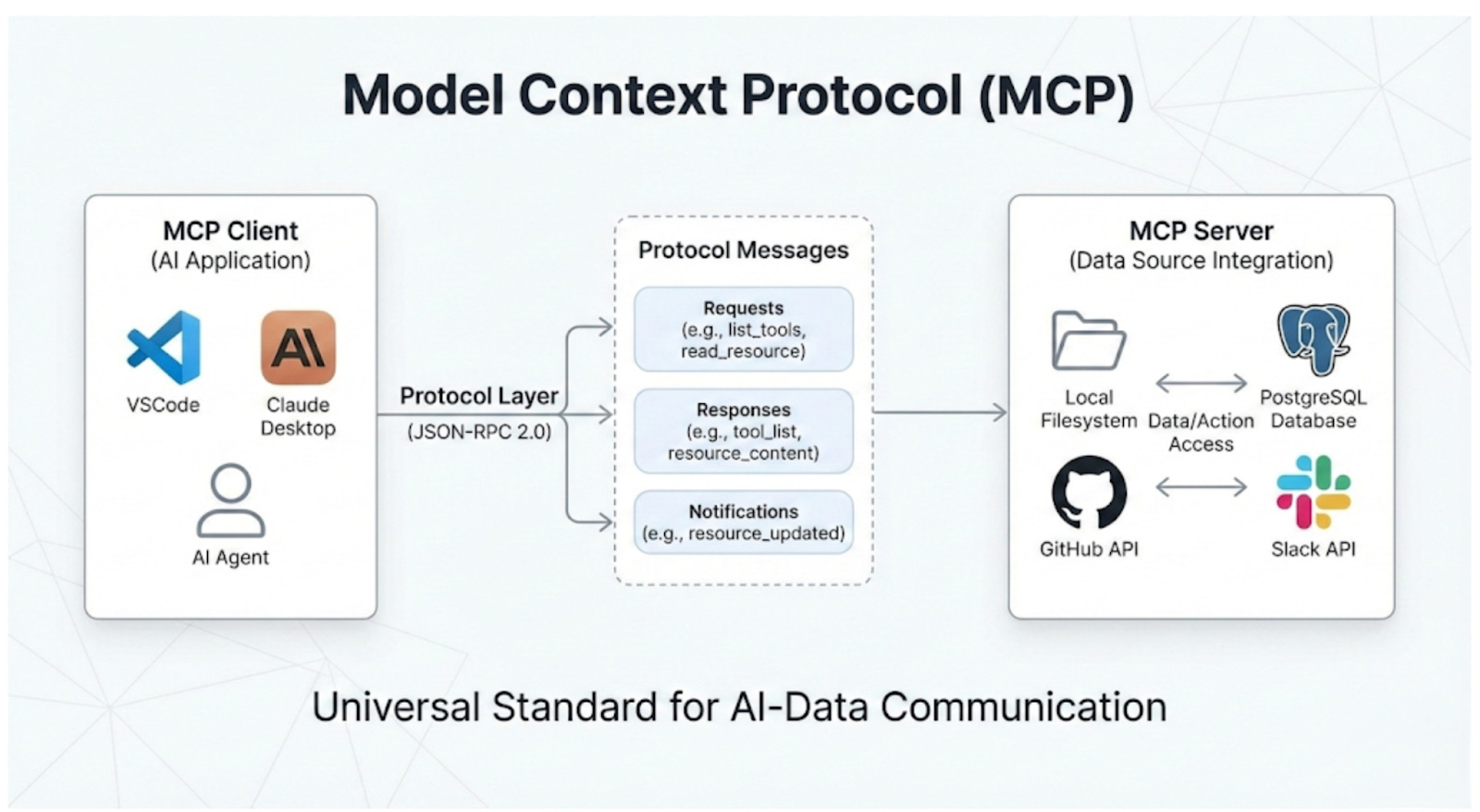
Two critical architectural features power this efficiency:
1. Dynamic Capability Discovery
In traditional integrations, the AI application8 must know the data source details in advance.
If the API changes, the application breaks…
MCP flips this. It uses a “handshake” model. When an AI connects to an MCP server, it asks, “What can you do?”.
The server returns a list of available resources and tools in real time.
RESULT:
You can add a new tool to your database server, like a “Refund User” function. The AI agent finds it right away the next time it connects. You won’t need to change any code in the AI application.
2. Decoupling Intelligence from Data
MCP separates the thinking system (AI model) from the knowing system (the data source).
For Data Teams: They can build robust, secure MCP servers for their internal APIs without worrying about which AI model will use them.
For AI Teams: They can swap models without having to rebuild their data integrations.
This decoupling means your infrastructure doesn’t become obsolete whenever a new AI model gets released.
You build your data layer once, and it works with whatever intelligence layer you choose to plug into it.
An AI agent using MCP doesn’t need to know in advance what tools are available. It simply connects, negotiates capabilities, and uses them as needed. This enables a level of flexibility and scale that is impossible with traditional static integrations.
The high-level concept is straightforward.
But the real elegance is in how the architecture actually works under the hood…
MCP Architecture Deep Dive
MCP’s architecture has three main layers.
These layers separate concerns and allow for easy scalability:
The Three-Layer Model
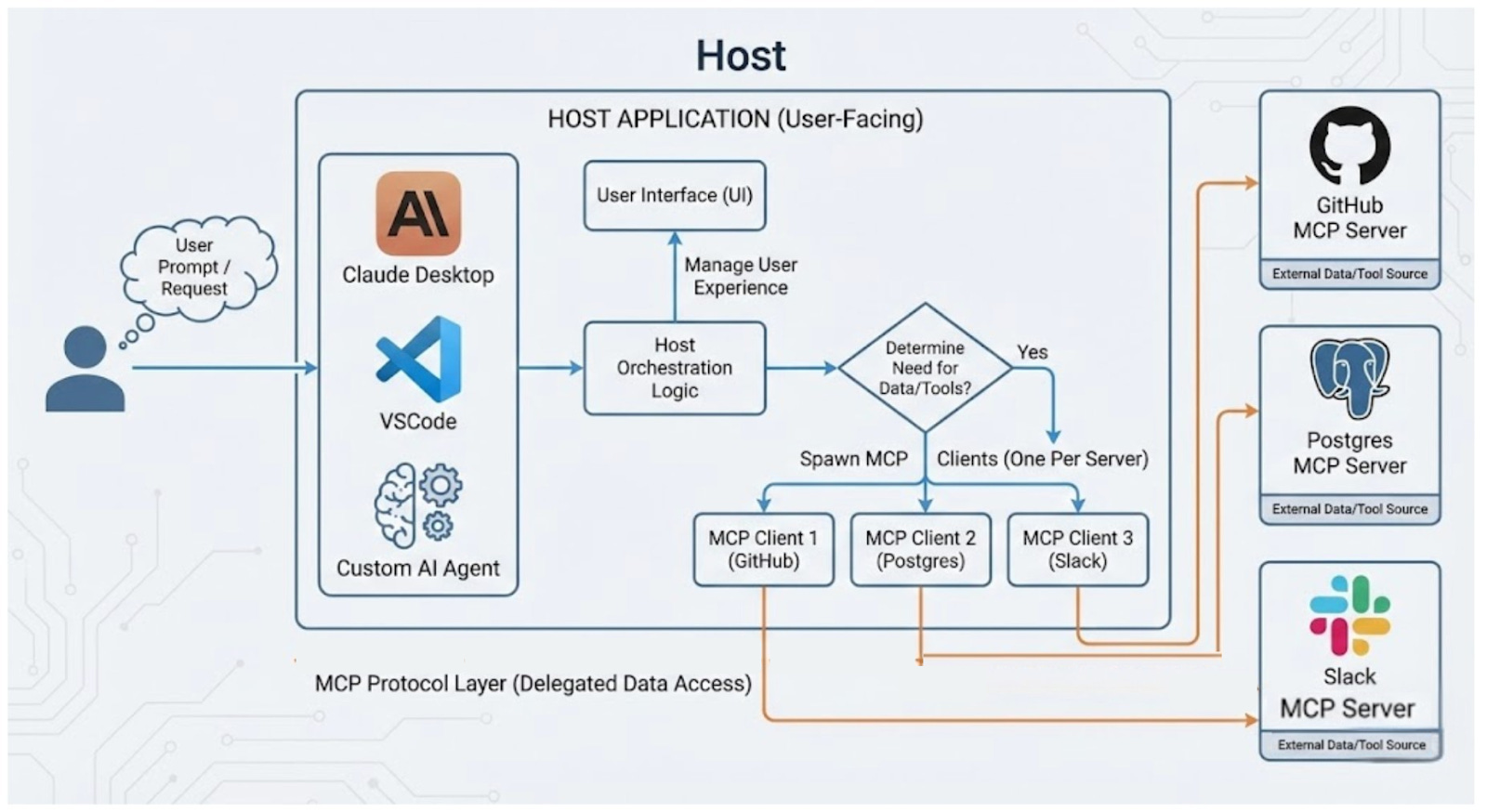
Hosts are user-facing apps.
This includes the Claude Desktop app, IDEs like VSCode, or custom AI agents you create. Hosts are where users connect with the AI. They are also where requests begin. They do more than display the UI; they orchestrate the entire user experience.
The host application interprets the user’s prompt.
It decides whether external data or tools are needed to fulfill the request. If access is necessary, the host creates and manages several internal clients. It keeps one client for each MCP server it connects to.
The protocol layer handles the mechanics of data access.
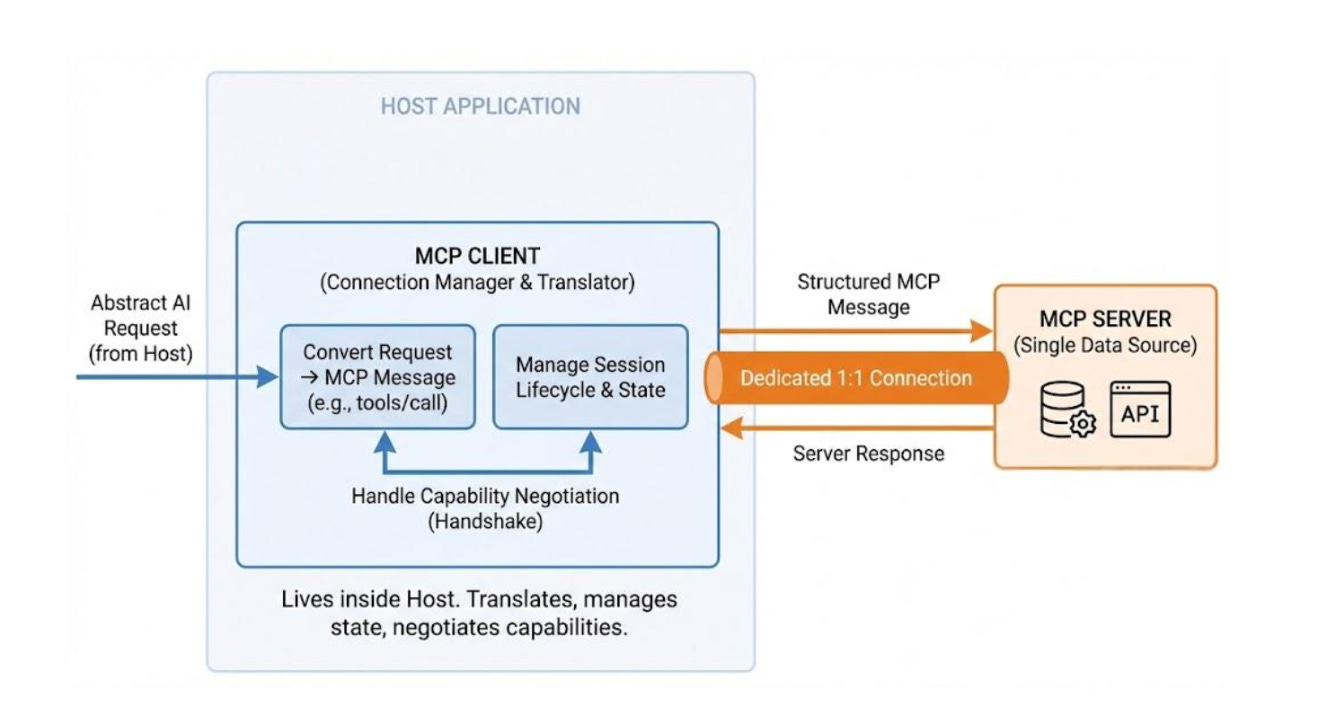
Clients are protocol-speaking connection managers that run on hosts.
Each client maintains a dedicated 1:1 connection with a single MCP server. They serve as the translation layer.
They convert abstract AI requests from the host into clear MCP messages. These messages, like tools/call or resources/read, can be understood by the server. Clients do more than send messages. They manage the entire session lifecycle. This includes handling connection drops, reconnections, and state.
When a connection starts, the client takes charge of capability negotiation. It asks the server which tools, resources, and prompts it supports.
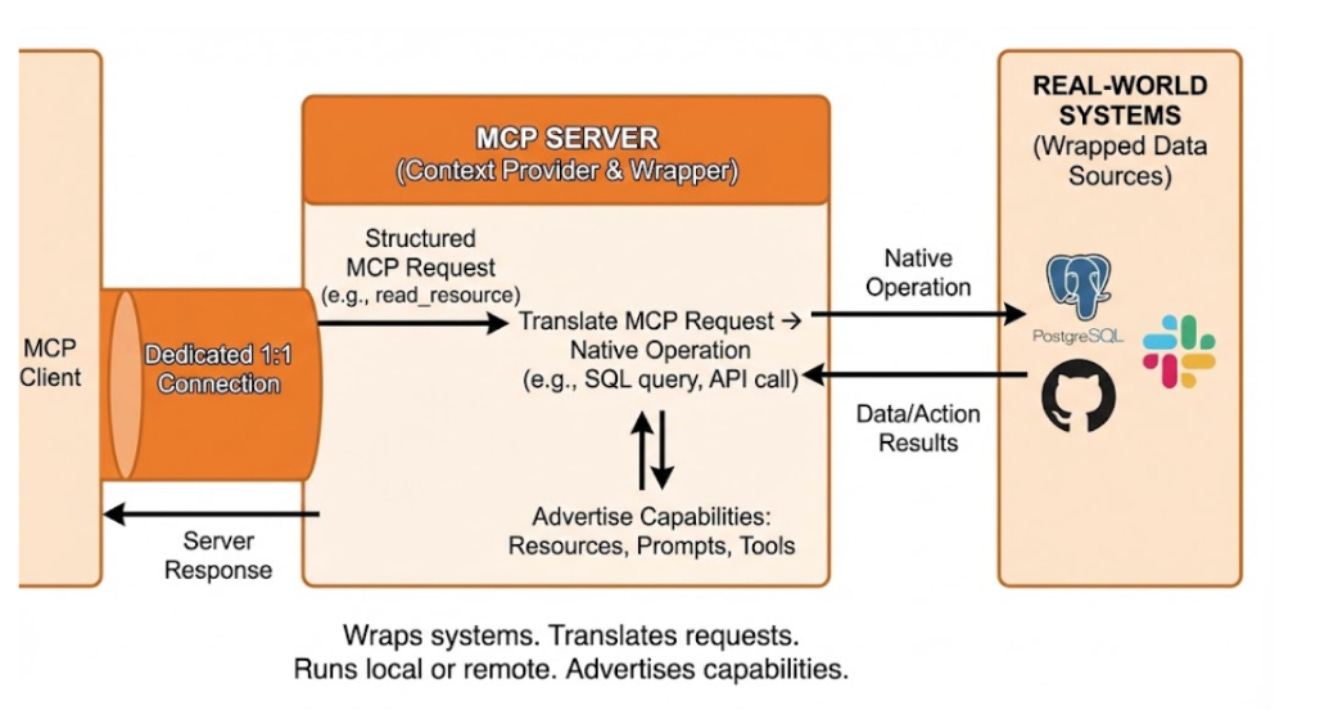
Servers provide context.
They act as the layer that connects real-world systems, such as PostgreSQL databases, GitHub repositories, or Slack workspaces.
A server connects the MCP protocol to the data source. It translates MCP requests into the system’s native operations. For example, it turns an MCP read request into a SQL SELECT query. They are very flexible. They can run on a user’s machine for private access or remotely as a cloud service.
Servers share their available capabilities when connected. They inform the client about the Resources, Prompts, and Tools they offer.
Core Primitives
MCP defines three fundamental primitives that servers can expose:
1 Resources
They’re context-controlled by applications. They provide data that the AI can read but not change.
Resources might be:
Database query results.
Files from a file system.
API responses from a web service.
Documentation or knowledge base articles.
2 Prompts
They’re reusable instruction templates with variables. Think of them as parametrised prompts that can be shared across applications.
Users and applications can invoke prompts with different values for code and focus areas. Prompts help standardize common AI workflows.
Plus, they make it easy to share effective prompting techniques.
3 Tools