MCP - A Deep Dive
#110: Understanding Model Context Protocol
Share this post & I'll send you some rewards for the referrals.
Every AI tool you use is starving for “context1”.
Your AI needs your codebase. Your custom agents2 need database access. But getting that context to them? That is where things get messy.
When large language models3 (LLMs) emerged, each link between AI and data sources required a custom integration built from scratch.
Onward.
Cut Code Review Time & Bugs in Half (Sponsor)
Code reviews are critical but time-consuming.
CodeRabbit acts as your AI co-pilot, providing instant code review comments and potential impacts of every pull request.
Beyond just flagging issues, CodeRabbit provides one-click fix suggestions and lets you define custom code quality rules using AST Grep patterns, catching subtle issues that traditional static analysis tools might miss.
CodeRabbit has so far reviewed more than 10 million PRs, installed on 2 million repositories, and used by 100 thousand open-source projects.
CodeRabbit is free for all open-source repos.
I want to introduce Eric Roby as a guest author.
He’s a senior backend and AI engineer focused on building real-world systems and teaching developers how to do the same. He runs the YouTube channel codingwithroby, where he focuses on scalable backend architecture and integrating AI into production applications.
Through his content and courses, he helps engineers go beyond tutorials, think in systems, and develop the skills that actually matter for senior-level roles.
Find him on:
In November 2024, Anthropic launched the Model Context Protocol (MCP) to fix this problem. This wasn’t just another developer tool. It aimed to tackle a key infrastructure issue in AI engineering.
The challenge?
Every AI application needs to connect to data sources. Until now, they had to build custom integrations from scratch. This approach creates a fragmented ecosystem that does not scale.
For example, the world isn’t frozen in time, but LLMs are…
If you want an AI to “monitor server logs,” you can’t feed it a file. You would have to build a data pipeline that polls an API every few seconds. Filter out noise, then push only the relevant anomalies into the AI’s context window4. If the API changes its rate limits or response format, your entire agent breaks.
A better way to think of MCP is like a USB-C port.
The Old Way (Before USB):
If you bought a mouse, it had a PS/2 plug. A printer had a massive parallel port. A camera had a proprietary cable. If you wanted to connect these to a computer, the computer needed a specific physical port for each one.
This is the “N×M” problem:
Each device maker had to figure out how to connect to each computer. So, computer makers had to create ports for every device.
The MCP Way (With USB-C):
Now, everything uses a standard port.
Computer (AI Model5) needs one USB-C port. It doesn’t need to know if you are plugging in a hard drive or a microphone; it just speaks “USB.”
Device (Data Source) requires a USB-C port. It doesn’t need to know if it’s plugged into a Mac, a PC, or an iPad.
The result: you can plug anything into anything instantly.
The analogy makes sense in theory. But to understand why MCP matters, you need to see how painful the current reality actually is…
The Integration Complexity Problem
Every AI assistant needs context to be useful:
Claude6 needs access to your codebase. ChatGPT may require your Google Drive files. Custom agents need database connections. But how do these AI systems actually get that context?
Traditionally, each connection requires a custom integration.
If you’re building an AI coding assistant, you need to:
Write code to connect to the GitHub API.
Add authentication and security.
Create a way to change GitHub’s data format into a version that your AI can understand.
Handle rate limiting, errors, and edge cases.
Repeat this entire process for GitLab, Bitbucket, and every other source control system.
This creates the N×M problem:
‘N’ AI assistants multiplied by ‘M’ data sources equals N×M unique integrations that need to be built and maintained.
When Cursor wants to add Notion support, they build it from scratch. When GitHub Copilot wants the same thing, they build it again. The engineering effort gets duplicated across every AI platform.
The traditional approaches have fundamental limitations:
Static, build-time integration:
Integrations are hard-coded into applications. You can’t add a new data source without updating the application itself. This makes rapid experimentation impossible and forces users to wait for official support.
Application-specific security implementations:
Every integration reinvents authentication, authorization, and data protection. This leads to inconsistent security models and increases the attack surface.
No standard way to discover:
AI systems can’t find out what capabilities a data source has. Everything needs clear programming. This makes it hard to create agents that adapt. They can’t use the new tools on their own.
The result is a ‘broken’ ecosystem!
Innovation is stuck because of integration work. Users can access only the connections that application developers create. So that’s a mess.
Now let’s look at how MCP cleans it up…
How MCP Solves It
MCP’s solution is straightforward: define a single protocol that functions across all systems.
Instead of building N×M integrations, you build N clients (one per AI application) and M servers (one per data source). The total integration work drops from N×M to N+M.
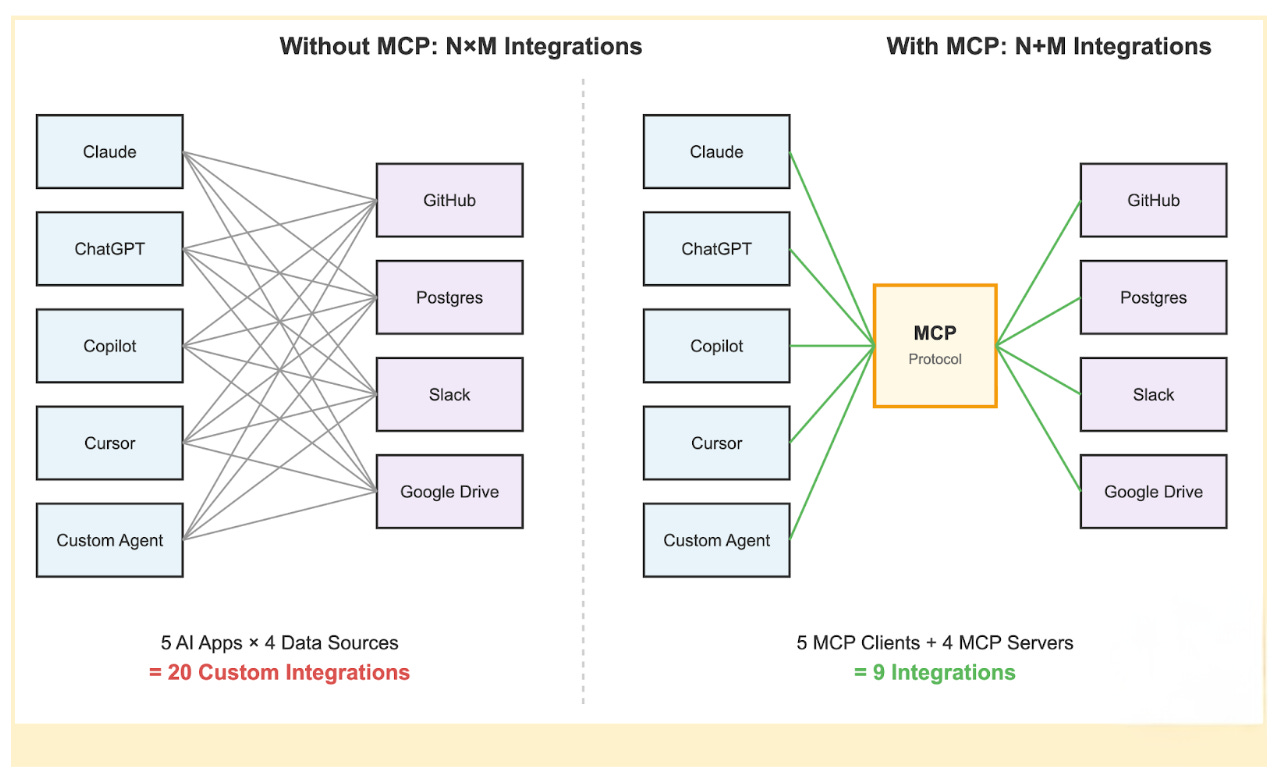
When a new AI assistant7 wants to support all existing data sources, it just needs to implement the MCP client protocol once.
When a new data source wants to be available to all AI assistants, it just needs to implement the MCP server protocol once.
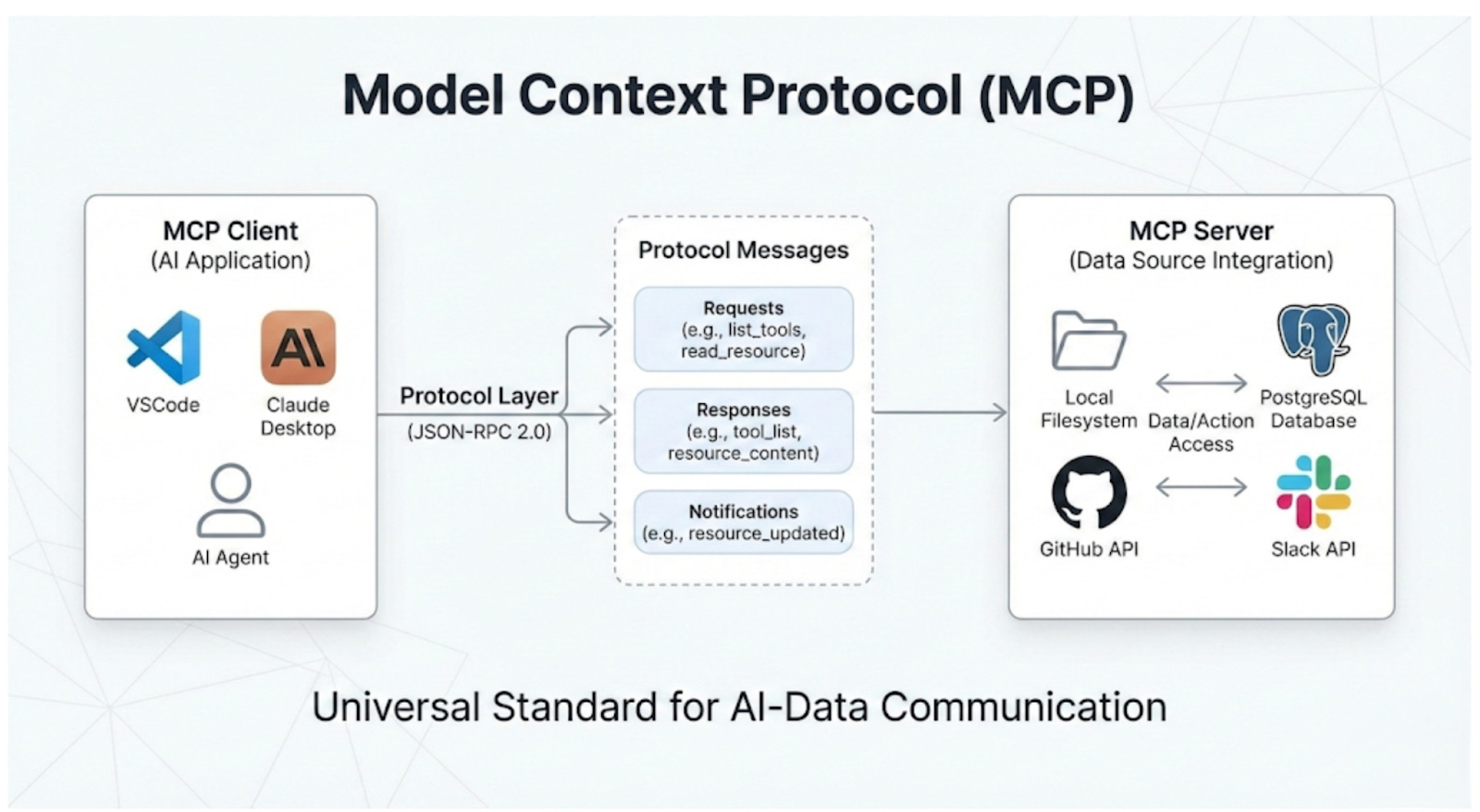
Two critical architectural features power this efficiency:
1. Dynamic Capability Discovery
In traditional integrations, the AI application8 must know the data source details in advance.
If the API changes, the application breaks…
MCP flips this. It uses a “handshake” model. When an AI connects to an MCP server, it asks, “What can you do?”.
The server returns a list of available resources and tools in real time.
RESULT:
You can add a new tool to your database server, like a “Refund User” function. The AI agent finds it right away the next time it connects. You won’t need to change any code in the AI application.
2. Decoupling Intelligence from Data
MCP separates the thinking system (AI model) from the knowing system (the data source).
For Data Teams: They can build robust, secure MCP servers for their internal APIs without worrying about which AI model will use them.
For AI Teams: They can swap models without having to rebuild their data integrations.
This decoupling means your infrastructure doesn’t become obsolete whenever a new AI model gets released.
You build your data layer once, and it works with whatever intelligence layer you choose to plug into it.
An AI agent using MCP doesn’t need to know in advance what tools are available. It simply connects, negotiates capabilities, and uses them as needed. This enables a level of flexibility and scale that is impossible with traditional static integrations.
The high-level concept is straightforward.
But the real elegance is in how the architecture actually works under the hood…
MCP Architecture Deep Dive
MCP’s architecture has three main layers.
These layers separate concerns and allow for easy scalability:
The Three-Layer Model
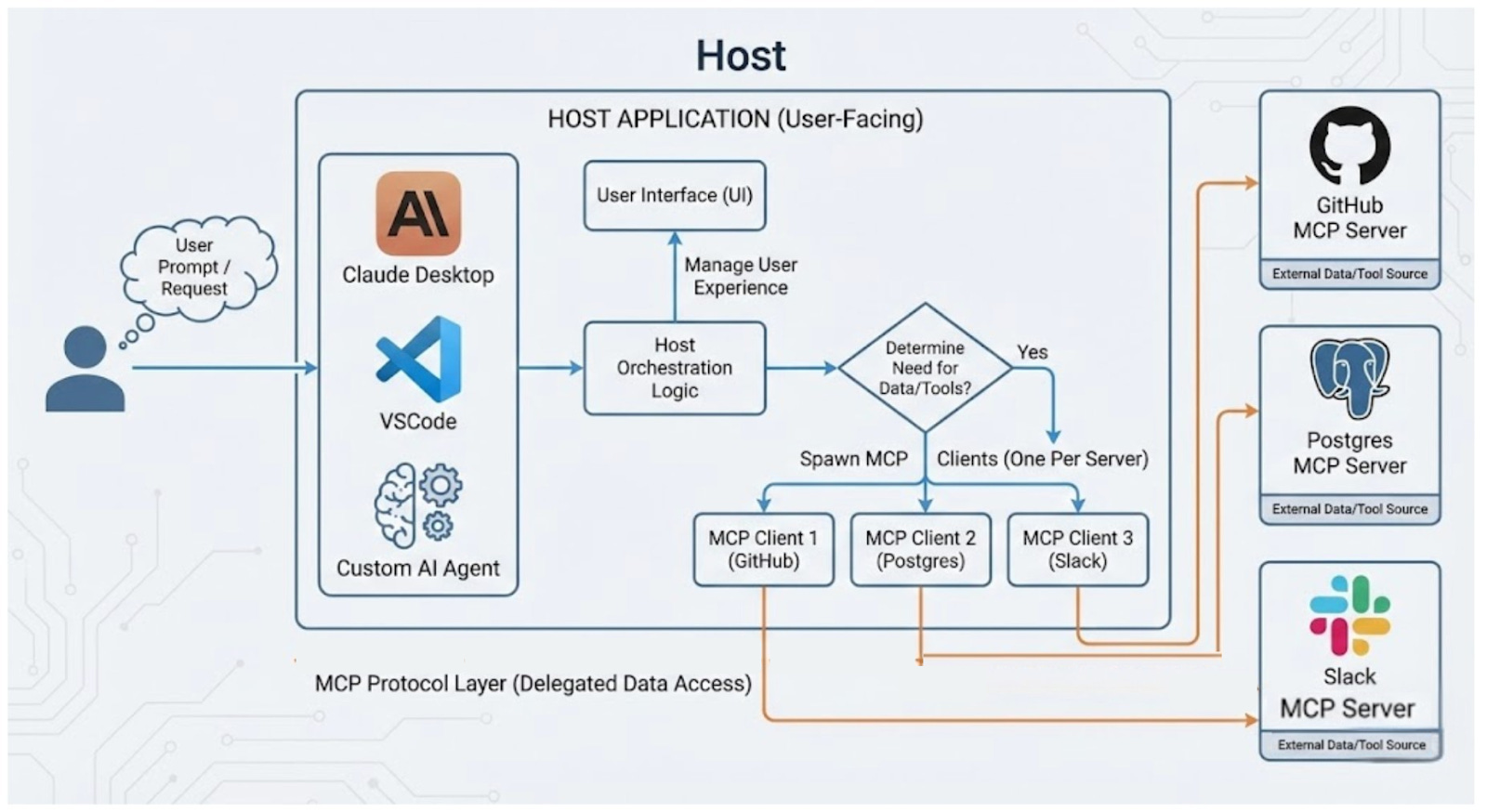
Hosts are user-facing apps.
This includes the Claude Desktop app, IDEs like VSCode, or custom AI agents you create. Hosts are where users connect with the AI. They are also where requests begin. They do more than display the UI; they orchestrate the entire user experience.
The host application interprets the user’s prompt.
It decides whether external data or tools are needed to fulfill the request. If access is necessary, the host creates and manages several internal clients. It keeps one client for each MCP server it connects to.
The protocol layer handles the mechanics of data access.
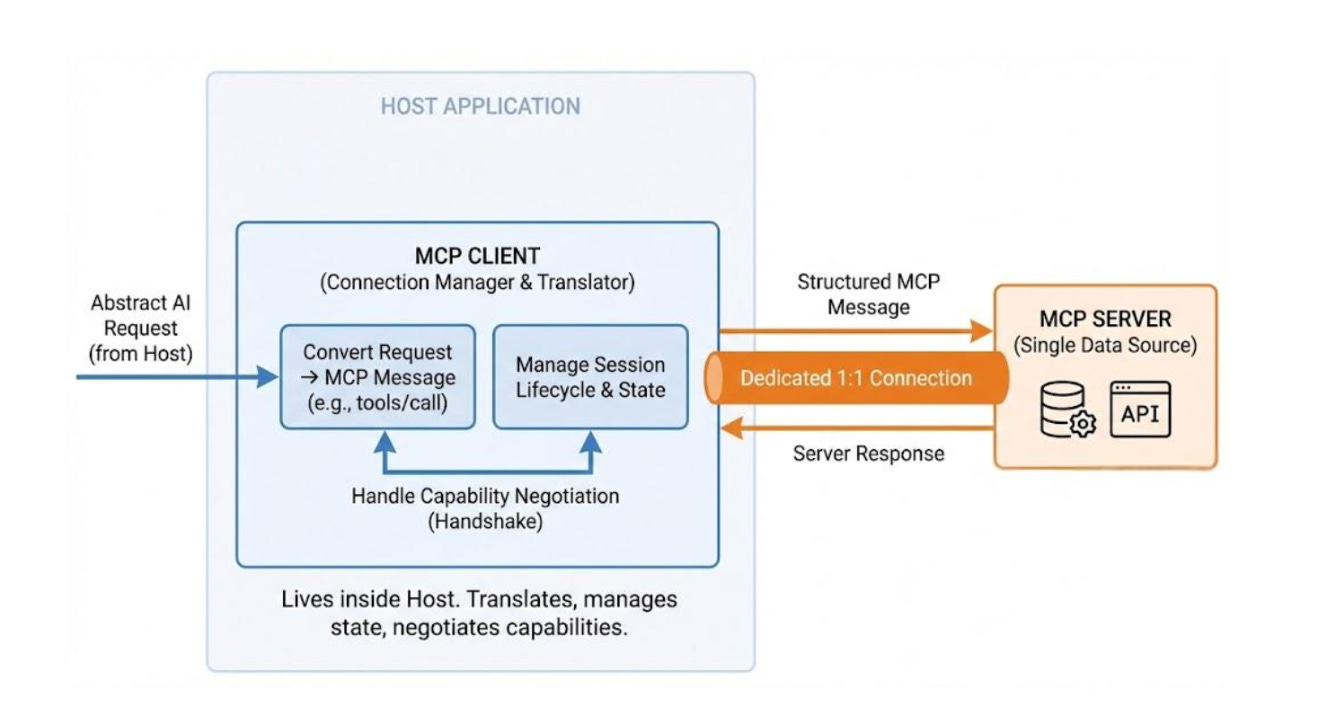
Clients are protocol-speaking connection managers that run on hosts.
Each client maintains a dedicated 1:1 connection with a single MCP server. They serve as the translation layer.
They convert abstract AI requests from the host into clear MCP messages. These messages, like tools/call or resources/read, can be understood by the server. Clients do more than send messages. They manage the entire session lifecycle. This includes handling connection drops, reconnections, and state.
When a connection starts, the client takes charge of capability negotiation. It asks the server which tools, resources, and prompts it supports.
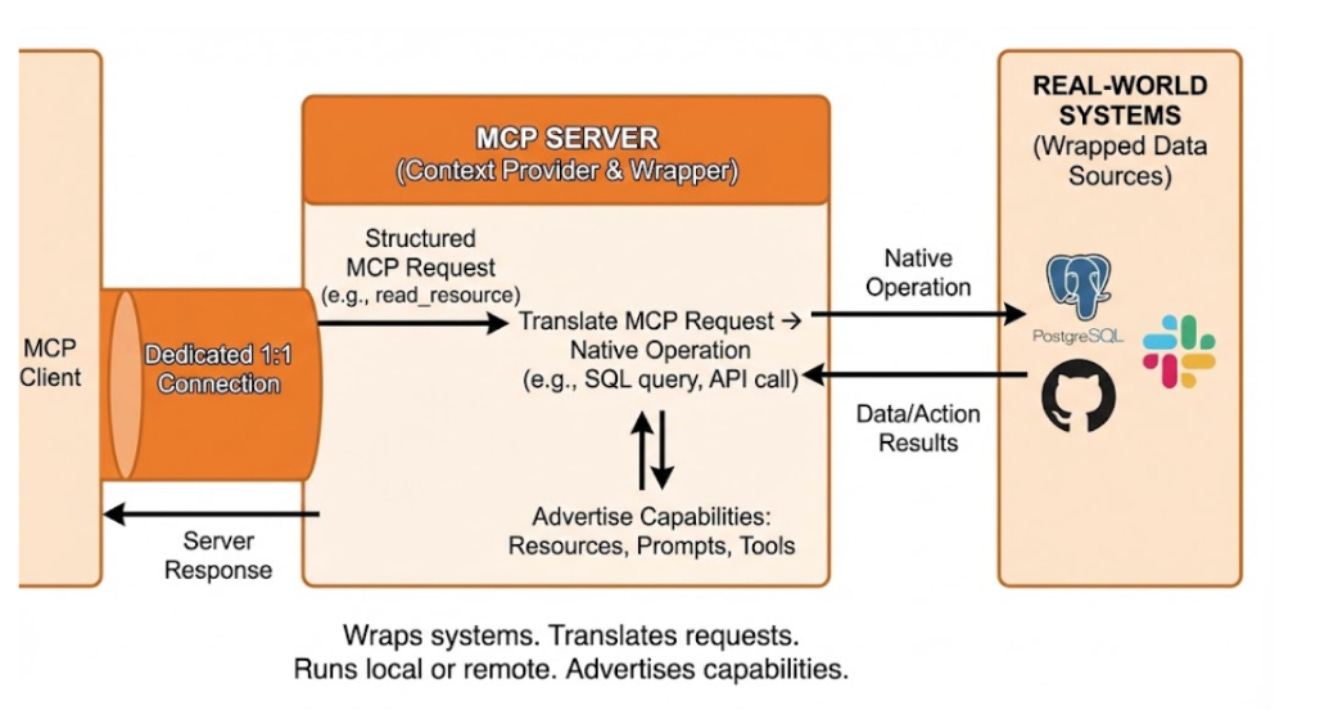
Servers provide context.
They act as the layer that connects real-world systems, such as PostgreSQL databases, GitHub repositories, or Slack workspaces.
A server connects the MCP protocol to the data source. It translates MCP requests into the system’s native operations. For example, it turns an MCP read request into a SQL SELECT query. They are very flexible. They can run on a user’s machine for private access or remotely as a cloud service.
Servers share their available capabilities when connected. They inform the client about the Resources, Prompts, and Tools they offer.
Core Primitives
MCP defines three fundamental primitives that servers can expose:
1 Resources
They’re context-controlled by applications. They provide data that the AI can read but not change.
Resources might be:
Database query results.
Files from a file system.
API responses from a web service.
Documentation or knowledge base articles.
2 Prompts
They’re reusable instruction templates with variables. Think of them as parametrised prompts that can be shared across applications.
Users and applications can invoke prompts with different values for code and focus areas. Prompts help standardize common AI workflows.
Plus, they make it easy to share effective prompting techniques.
3 Tools
Actions controlled by models. They let the AI perform tasks in the world. Tools implement function calling, where the AI decides when to use a tool and what parameters to pass.
Examples include:
execute_sql(query)to run database queriessend_email(to, subject, body)to send messages.create_ticket(title, description)to file issues.
The key difference from resources is control.
With tools, the AI model chooses when to act. This enables agentic behavior, where AI can autonomously accomplish multi-step tasks.
These primitives cover the complete spectrum of AI-data interaction: reading context (resources), reusing patterns (prompts), and taking actions (tools).
Protocol Layer: JSON-RPC 2.0
The communication protocol uses JSON-RPC 2.09
It’s a simple remote procedure call protocol that encodes messages in JSON.
Why JSON-RPC? Three reasons:
Bidirectional communication: Unlike REST, JSON-RPC supports requests flowing in both directions. Servers can notify clients of changes, and clients can notify servers of capability updates.
Message semantics: JSON-RPC clearly separates requests (which expect responses), responses (that reply to requests), and notifications (which are fire-and-forget). This makes the protocol’s behavior predictable.
Simplicity: JSON-RPC is much simpler than alternatives like gRPC while providing all the features MCP needs. Less complexity means easier implementation and better debugging.
MCP messages include:
Requests
Ask the other party to perform an action and wait for a response.
{
“jsonrpc”: “2.0”,
“id”: 1,
“method”: “resources/list”,
“params”: {}
}Responses
Replies to requests with results or errors.
{
“jsonrpc”: “2.0”,
“id”: 1,
“result”: { “resources”: [...] }
}Notifications
Sends information without expecting a reply.
{
“jsonrpc”: “2.0”,
“method”: “notifications/resources/updated”,
“params”: { “uri”: “file:///changed.txt” }
}MCP sessions are stateful with lifecycle management.
When a client connects to a server, it negotiates capabilities. The server shares its available resources, tools, and prompts. Then, the session stays open for ongoing communication.
This statefulness enables features such as subscriptions and change notifications. These features wouldn’t work with stateless protocols.
Transport Layer
MCP supports two transport mechanisms, each with different trade-offs:
1. Stdio (standard input/output)
Runs the MCP server locally. It communicates through stdin and stdout.
Advantages:
Lowest latency - communication happens via OS pipes.
OS level security - standard process isolation protects data.
Simple deployment - just launch a process.
Works offline - no network connectivity required.
The trade-off is that stdio only works for local processes. You cannot use stdio to connect to a remote database or cloud service.
2. HTTP with Server-Sent Events
Runs the MCP server as a web service that clients connect to over HTTP.
Server uses SSE to push notifications to clients. This is the standard approach for integrating cloud services. It’s important to remember that MCP wraps existing APIs; it doesn’t replace them. For example, a GitHub MCP server uses HTTP and the standard GitHub REST API to function.
Advantages:
Remote access - servers can run anywhere on the network.
TLS encryption - transport level security for data in transit.
Standard authentication - use OAuth, API keys, or other HTTP authentication mechanisms.
Scalable - servers can handle multiple clients and scale horizontally.
The trade-off is added complexity. You must manage network security, handle connection failures, and deal with latency.
MCP handles most security issues at the transport layer. It also allows for extra capability negotiation at the protocol level. stdio relies on OS security, while HTTP relies on TLS and authentication headers. This keeps the protocol layer simple and allows transport-specific security mechanisms.
Most local integrations (file systems, local databases, desktop apps) use stdio. Remote integrations (cloud APIs, SaaS products, shared databases) use HTTP with SSE.
Now that you understand how MCP works, the obvious question is: should you actually use it?
MCP vs Custom Integrations
MCP doesn’t replace all custom integrations.
It’s made for specific cases where standardization adds value.
When to use MCP:
AI-first applications: If your main interface is an AI assistant that needs data from multiple sources, MCP is the fastest way to integrate. You don’t need to build custom connectors. Just implement MCP once, and you get access to the entire ecosystem.
Multi-tool agents: For AI agents that need to use many tools autonomously, MCP’s dynamic discovery and function calling primitives are exactly what you need. The agent can find tools while running and use them as needed. There’s no hard-coded logic involved.
Rapid Prototyping: When trying out new AI apps, MCP lets you connect to existing data sources right away. You can test ideas without building integration infrastructure.
Standardized workflows: If you’re creating a platform for users to connect their data sources, MCP offers a standard interface. It works on any compliant server.
When custom integrations make sense:
Performance-critical paths: If you need maximum performance and minimal overhead, a custom integration optimized for your specific use case will be faster than a general protocol.
Complex business logic: When the integration involves complex transformations, validations, or business rules that go beyond simple data access, a custom integration gives you more control.
Existing infrastructure: If you have functional integrations and aren’t adding AI features, you don’t need MCP.
The important insight is that MCP complements existing APIs rather than replacing them.
MCP servers often wrap existing APIs and add an AI-native interface layer. A GitHub MCP server uses GitHub’s REST API. It shows repositories, issues, and pull requests as MCP resources and tools.
This layered approach allows you to add MCP as a standard on top of APIs. So, you don’t have to choose between MCP and APIs. Instead, you’re enhancing APIs for AI use cases.
The technical merits matter. But what’s driving real adoption is something bigger…
The Ecosystem Effect
The true strength of MCP lies not in the protocol… It’s in the network effects that happen when a standard reaches critical mass.
Months after the launch, the MCP ecosystem saw explosive growth.
Major platform adoption from large AI companies: Replit, Sourcegraph, Block
Community-built servers for:
Databases: PostgreSQL, MySQL, MongoDB.
Cloud services: AWS, GCP, Azure.
Developer tools: GitHub, GitLab, Linear.
Productivity apps: Notion, Google Drive, and Slack.
This creates a strong flywheel:
More servers boost MCP’s value for clients. This attracts more clients to use MCP. As more clients join, server developers find MCP more appealing. This support brings even more servers.
We’ve seen this pattern before.
As Docker became popular, every cloud platform added container support. This was because developers were using it for their deployments.
MCP appears to be following the same trajectory.
When a protocol becomes the standard, adoption speeds up. This happens because the cost of not adopting becomes higher than the cost of adopting.
The SDK availability is essential for ecosystem growth.
Anthropic made it easier to build MCP servers by offering high-quality SDKs in various languages. A developer can build a working MCP server in less than 100 lines of Python or TypeScript. This makes it easy to wrap almost any data source.
So where does this leave us?
Conclusion
Model Context Protocol changes how we build AI systems. Instead of using custom, fragmented setups, it promotes standardized, composable infrastructure.
We are witnessing an adoption trajectory similar to Docker's. Just as containers changed software by providing a standardized way to package and ship applications, MCP is quickly becoming the go-to method for providing context to any AI model.
The architecture features simple elegance. It uses a three-layer model to separate concerns. Three primitives handle all AI data interactions. JSON-RPC ensures predictable communication. Pluggable transports allow for different deployment scenarios. This simplicity is intentional. Protocols work best when they are easy to implement and understand.
MCP won’t replace every custom integration, nor should it. For AI-native apps that need to connect to various data sources, MCP provides the standard tools that enable innovation. Teams can use their engineering resources to create better AI experiences rather than rebuild the same integrations.
NOTE:
MCP just got a massive signal that it’s here to stay.
MCP was recently donated to the new Agentic AI Foundation, part of the Linux Foundation. It means MCP is no longer tied to any single AI company. It’s now a neutral, open standard, like Linux itself.
The message is clear: the industry favors an open ecosystem for AI agents. They are moving away from closed proprietary systems.
👋 I’d like to thank Eric for writing this newsletter!
Also, don’t forget to join his YouTube channel.
He focuses on scalable backend architectures and integrating AI into production applications.
I launched Design, Build, Scale (newsletter series exclusive to PAID subscribers).
When you upgrade, you’ll get:
High-level architecture of real-world systems.
Deep dive into how popular real-world systems actually work.
How real-world systems handle scale, reliability, and performance.
10x the results you currently get with 1/10th of your time, energy, and effort.
👉 CLICK HERE TO ACCESS DESIGN, BUILD, SCALE!
If you find this newsletter valuable, share it with a friend, and subscribe if you haven’t already. There are group discounts, gift options, and referral rewards available.
Eliminate role explosion, endless support tickets, and stalled enterprise deals in multitenant SaaS.
Download free ebook by Cerbos on implementing dynamic authorization that actually scales (drawn from real implementations across hundreds of SaaS companies).
Want to reach 200K+ tech professionals at scale? 📰
If your company wants to reach 200K+ tech professionals, advertise with me.
Thank you for supporting this newsletter.
You are now 200,001+ readers strong, very close to 201k. Let’s try to get 201k readers by 1 January. Consider sharing this post with your friends and get rewards.
Y’all are the best.
References
[1] Anthropic. (2024). “Introducing the Model Context Protocol.” Anthropic Blog. https://www.anthropic.com/news/model-context-protocol
[2] Model Context Protocol Documentation. “Why MCP?” https://modelcontextprotocol.io/introduction
[3] Model Context Protocol Documentation. “Architecture Overview.” https://modelcontextprotocol.io/docs/concepts/architecture
[4] Model Context Protocol Documentation. “Components: Hosts and Clients.” https://modelcontextprotocol.io/docs/concepts/architecture
[5] Model Context Protocol Documentation. “Resources.” https://modelcontextprotocol.io/docs/concepts/resources
[6] Model Context Protocol Documentation. “Prompts.” https://modelcontextprotocol.io/docs/concepts/prompts
[7] Model Context Protocol Documentation. “Tools.” https://modelcontextprotocol.io/docs/concepts/tools
[8] Model Context Protocol Specification. “Protocol Layer.” https://spec.modelcontextprotocol.io/specification/architecture/
[9] Model Context Protocol Specification. “Lifecycle Management.” https://spec.modelcontextprotocol.io/specification/basic/lifecycle/
[10] Model Context Protocol Documentation. “Transports: stdio.” https://modelcontextprotocol.io/docs/concepts/transports
[11] Model Context Protocol Documentation. “Transports: HTTP with SSE.” https://modelcontextprotocol.io/docs/concepts/transports
[12] Model Context Protocol Documentation. “Building Servers.” https://modelcontextprotocol.io/docs/tools/building-servers
[13] Model Context Protocol Documentation. “Quickstart.” https://modelcontextprotocol.io/quickstart
[14] Industry analysis based on adoption patterns of similar protocols (LSP, Docker) and current MCP trajectory as reported in developer surveys and platform announcements.


